


Turn every policy into automated workflows with built-in enforcement and audit-ready proof.



Checklist Monitoring
Checklist monitoring is the practice of tracking recurring checklists while work is happening, so teams can see whether required steps are complete, overdue, skipped, blocked, or missing evidence.
It is more than checking a box after the fact. Good checklist monitoring connects each item to an owner, a due time, a completion rule, an evidence requirement, and a response path when something slips.
In this guide, we will cover what checklist monitoring includes, how it differs from basic checklist tracking, how to set it up, and how Process Street turns monitored checklists into executable, auditable workflows.
We will cover:
- What checklist monitoring means
- Why checklist monitoring matters
- What checklist monitoring includes
- Checklist tracking versus checklist monitoring
- How to set up checklist monitoring
- Checklist monitoring with Process Street
- How to improve checklist monitoring over time
- FAQs
What checklist monitoring means
Checklist monitoring means watching the state of a checklist as work moves through it. A monitored checklist shows which steps are done, who owns the next action, what is late, what evidence is missing, and what needs escalation.
The difference matters because checklists often sit at the point where policy becomes execution. A hiring checklist controls onboarding quality. A safety checklist controls risk on a job site. A finance checklist controls close accuracy. A compliance checklist controls whether required proof exists before someone signs off.
When teams move from paper or spreadsheets into a digital checklist app, checklist monitoring becomes easier because task status, owners, evidence, and approvals can be tracked in the same place.
The operating question
The operating question is simple: is this checklist being completed correctly right now? A static checklist template cannot answer that. A completed PDF cannot answer it soon enough. Checklist monitoring answers it while the work can still be corrected.
The monitoring loop
- Define the checklist: the steps, required fields, owners, rules, and expected evidence.
- Watch the live run: status, due time, assignee, blocked items, and missing proof.
- Trigger action: notify, assign, escalate, request evidence, or block completion.
- Improve the template: use repeated misses to tighten the checklist itself.
That is why checklist monitoring belongs close to workflow management. A checklist defines the repeatable steps. Monitoring makes sure the steps are actually followed.
Why checklist monitoring matters
Most checklist failures are small until they are not. One missed field delays a customer. One skipped review creates rework. One missing file turns into an audit scramble. One owner assumes someone else handled the final step.
Checklist monitoring matters because it finds those misses early. It moves the team from retrospective cleanup to live control.
The practical benefit is calm. A manager does not need to ask five people whether the checklist is finished. A compliance owner does not need to rebuild the record from messages. A team lead does not need to remember which step usually fails. The monitoring layer shows the current state, the next owner, and the issue that needs attention.
It prevents invisible work from going stale
Recurring checklist work often hides in messages, spreadsheets, paper forms, and personal reminders. That makes it hard to know whether work is waiting, blocked, or forgotten. Monitoring brings the state of each run into one visible system.
It creates accountability
A checklist item without an owner is a suggestion. Monitoring ties each step to a person or role, so the system can show who owns the next action and when that action is due.
This is the same reason teams use standard operating procedure workflows instead of loose documents. The goal is not only to document the work. The goal is to make execution consistent.
It protects compliance and quality
For compliance and quality teams, completion is not enough. The checklist has to prove that the right step happened, the right person reviewed it, the right evidence was attached, and exceptions were handled. Monitoring keeps that proof tied to the work instead of scattered across follow-up messages.
This is where checklist monitoring becomes useful beyond simple productivity. It gives teams a defensible record of how work moved, not just a final answer. When a customer, auditor, manager, or regulator asks what happened, the team can show the completed steps, missing steps, approvals, evidence, and exceptions in context.
A structured internal audit reporting workflow is a useful example. The value comes from the evidence, findings, owner review, corrective action, and follow-up record, not just from a checked final box.
What checklist monitoring includes
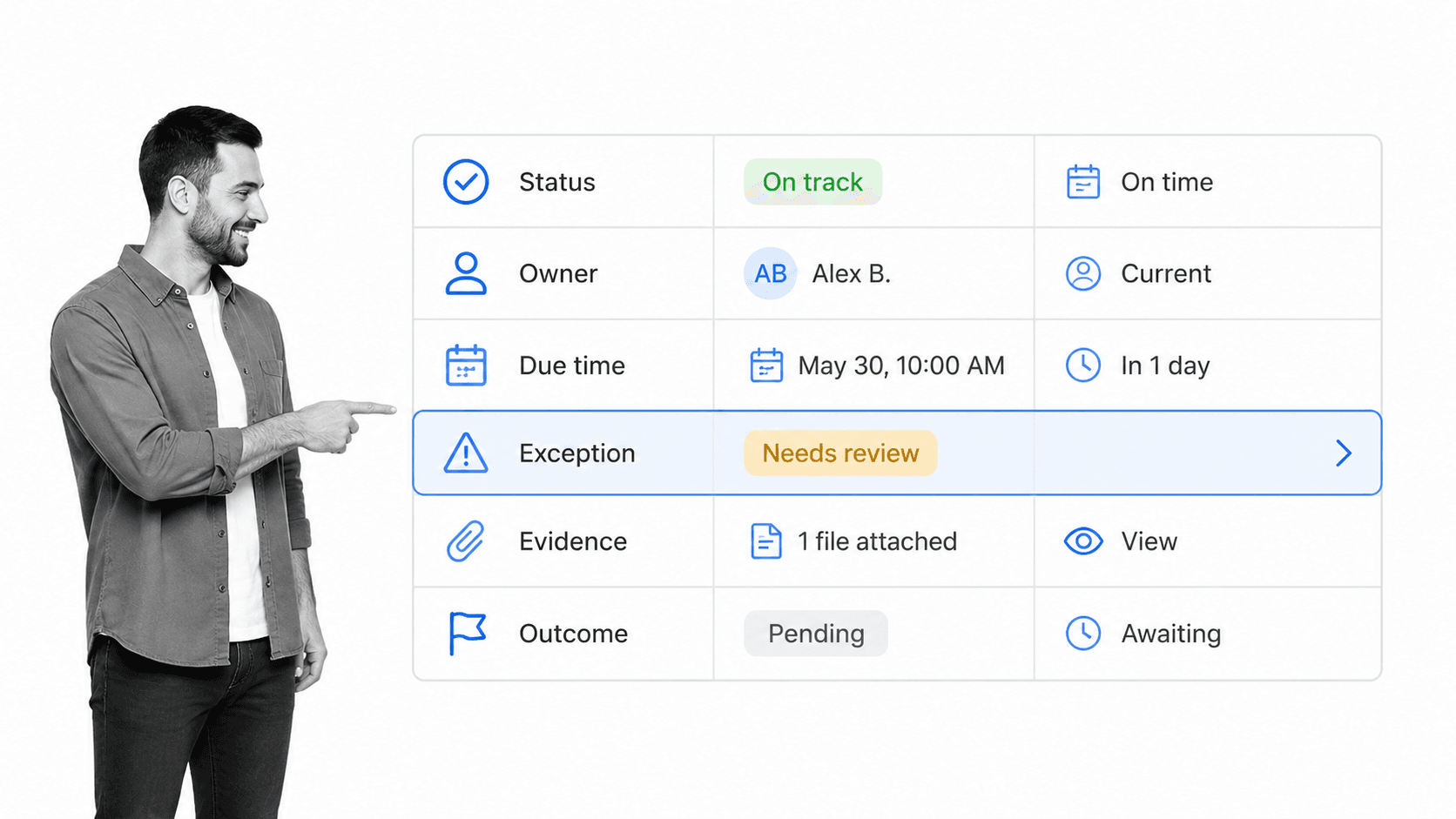
Strong checklist monitoring focuses on signals that change decisions. If a signal cannot trigger an action, it belongs in reporting, not monitoring.
Checklist status
Status shows whether a checklist run is not started, active, blocked, waiting for approval, overdue, complete, or failed. Status should come from the checklist system itself, not a manually maintained tracker that trails reality.
Item ownership
Each task should have an owner or role. Ownership makes escalation useful because the system can identify who needs to act next. Without ownership, monitoring only tells you that something is wrong, not who can fix it.
Due time and aging
Monitor time at the item level. A checklist may look healthy overall while one approval, evidence upload, or review task is aging past the point where it can be fixed comfortably.
Exceptions
Exceptions are the highest-value monitoring signal. Examples include skipped required steps, failed automations, overdue approvals, missing attachments, rejected submissions, repeated rework, and checklist runs that stall at the same point.
Evidence
Evidence can include field values, file uploads, comments, signatures, timestamps, screenshots, or system records. If the checklist supports compliance, quality, finance, HR, or customer operations, monitor evidence before completion is allowed.
Outcome quality
The final outcome matters too. Track whether the checklist produced the intended result, whether rework was needed, whether the customer or reviewer accepted the output, and whether any downstream issue appeared after completion.
Response history
A monitoring system should preserve the response history. If a checklist item was late, the record should show when it became late, who was notified, what changed, and how the issue closed. Without that history, teams can see that a problem happened but cannot learn from the response.
Template health
Monitor the checklist template itself. If the same item is skipped, delayed, misunderstood, or reopened every week, the template is sending a signal. The step may need clearer instructions, a different owner, a required field, a better integration, or removal.
Checklist tracking versus checklist monitoring
Checklist tracking tells you where a checklist stands. Checklist monitoring tells you whether the checklist needs action. The distinction is small in wording and large in practice.
Tracking is descriptive
Tracking records activity: which checklist was launched, which tasks were checked, when the run was completed, and who touched it. That information is useful, but it does not automatically tell the team what to do next.
Monitoring is operational
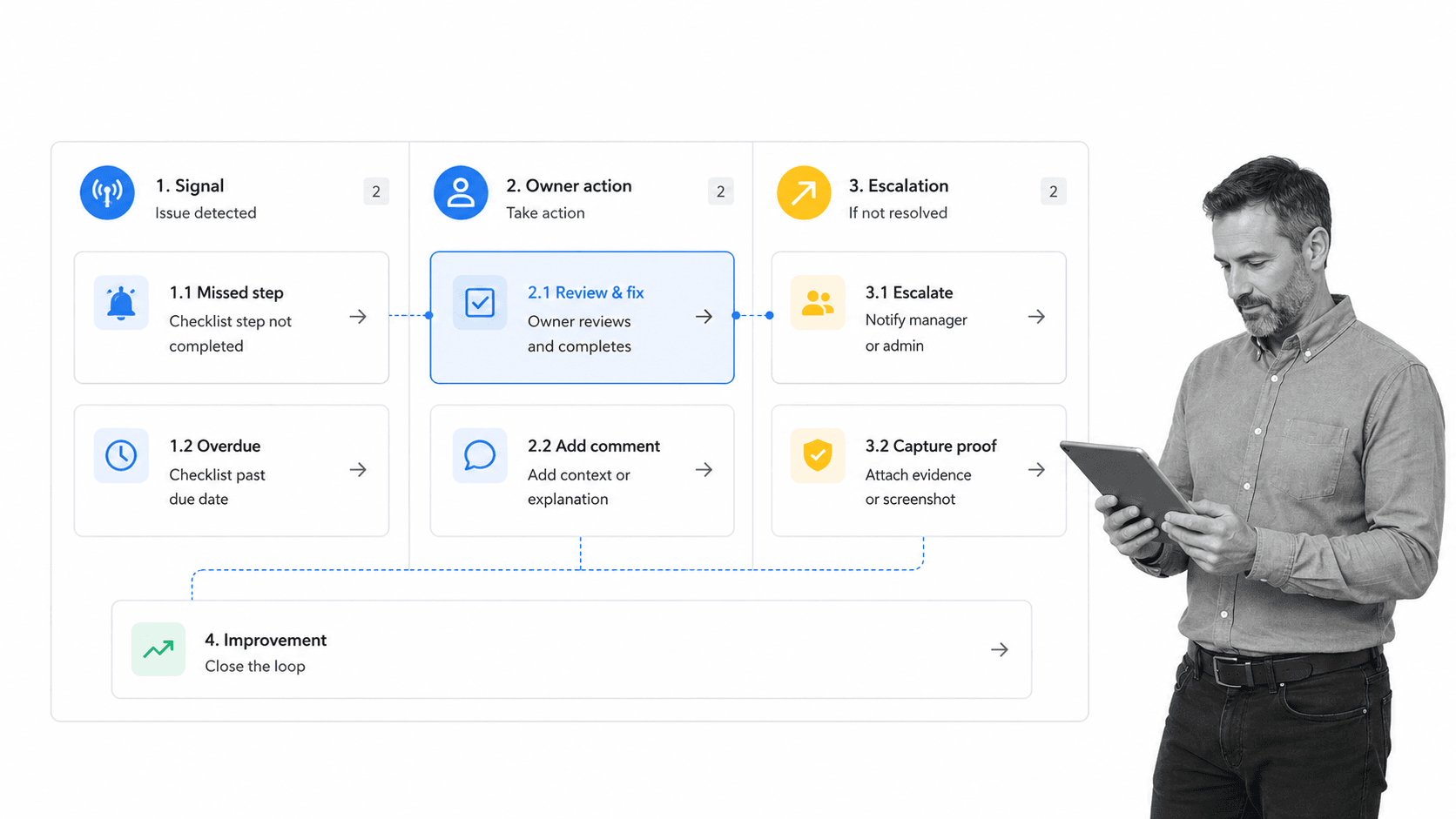
Monitoring watches for conditions that require action: an overdue owner, a missing approval, a failed field validation, a blocked dependency, or a pattern of repeated misses. Monitoring should create a response path.
That is why a checklist can be fully tracked and still poorly monitored. A spreadsheet may show a green row when the final box is checked, but it may not show that the evidence was attached late, the approval was skipped, or the same task failed for the fifth run in a row.
That response path is where workflow automation becomes useful. Automated reminders, assignments, approvals, integrations, and escalation rules keep checklist issues from becoming manual follow-up work.
Monitoring supports process improvement
A tracking report may show that ten checklist runs finished late. Monitoring should show which step caused the delay, which owner queue was overloaded, what evidence was missing, and whether the checklist template needs to change.
For teams formalizing that improvement loop, a process improvement tracker gives repeated checklist issues a structured place to become fixes.
How to set up checklist monitoring
Start with one recurring checklist that carries real operational risk. Do not begin with a dashboard project. Begin with a checklist where missed steps create delays, rework, compliance exposure, customer friction, or leadership noise.
1. Pick the checklist that needs control
Good candidates include employee onboarding checklists, offboarding, month-end close, audit prep, vendor review, safety inspection, quality control checklists, customer onboarding, access review, incident response, and general onboarding checklists.
If the checklist is still informal, use a business process analysis workflow to clarify the boundary before monitoring it.
2. Define completion rules
A checklist item should not be considered complete just because someone clicked a box. Define what completion means. Does the step require a file? A field value? A manager approval? A timestamp? A customer confirmation? A system update?
3. Set thresholds
Set thresholds for overdue work, aging approvals, missing evidence, blocked steps, failed automations, and repeated rework. Keep the first version simple. The goal is to create action, not noise.
Thresholds should reflect risk. A routine housekeeping checklist may tolerate a short delay. A finance close checklist, safety inspection, access review, or compliance approval may need immediate escalation. Do not copy one threshold across every checklist just because it is easy to configure.
4. Assign response owners
Every exception needs a response owner. Decide who investigates, who approves a fix, who updates the checklist, and who confirms closure. A shared inbox is not ownership.
5. Build escalation into the workflow
Escalation should be part of the checklist system. If evidence is missing, request it. If an approval is late, notify the approver and the backup. If a required task is skipped, block completion. If the same exception repeats, create an improvement task.
6. Review the pattern data
The first monitoring pass catches live misses. The second pass should find patterns. Look for recurring checklist items that fail, owners with overloaded queues, steps with unclear instructions, and evidence fields that create confusion.
The review cadence should match the risk of the checklist. High-volume operational checklists may need a weekly pattern review. Compliance checklists may need monthly control review. Critical safety or access workflows may need same-day exception review plus a formal monthly improvement loop.
Checklist monitoring with Process Street
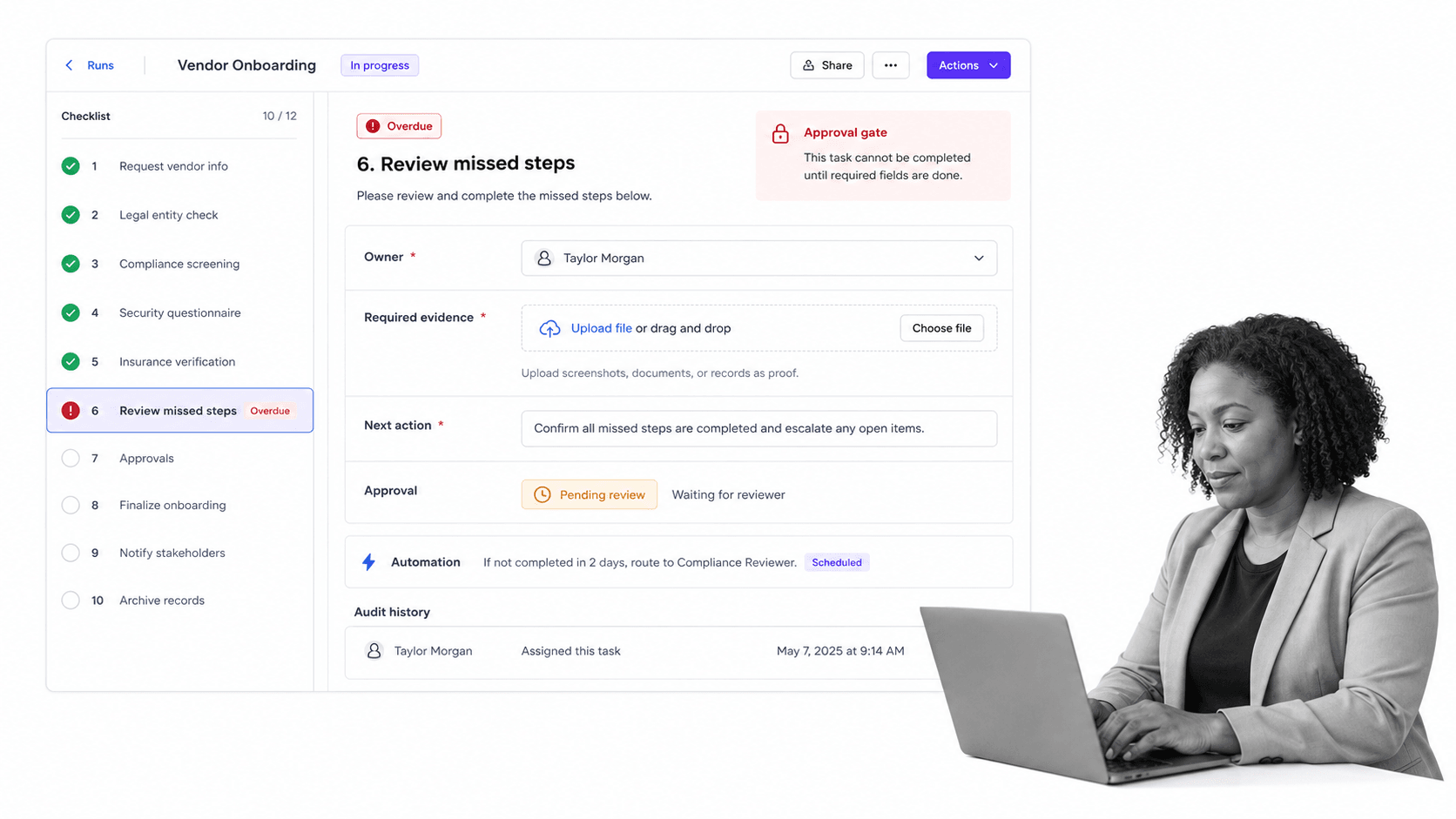
Process Street turns checklists into executable workflows with owners, due dates, required fields, approvals, automations, and audit history in one place. That gives teams a monitoring layer attached to the work itself.
The important shift is that monitoring happens inside the system of execution. The checklist is not a static artifact exported after work is done. It is the place where people complete tasks, attach proof, route approvals, trigger automations, and preserve the record.
Monitor every checklist run
Each workflow run shows which tasks are complete, which are waiting, who owns each step, and what information is still required. Teams can monitor the checklist at the task level instead of waiting for a final status update.
Use rules to prevent weak completion
Required fields, approvals, role assignments, conditional logic, and stop tasks help prevent checklists from being closed before the right work is done. That makes monitoring stronger because the workflow can enforce the standard, not just report a miss.
Connect monitoring to the rest of the stack
Process Street has direct, universal integrations to 5,000+ systems. Need a new one? An AI agent builds it on the fly. That means checklist monitoring can connect to the systems where requests, evidence, approvals, and records already live.
Keep proof inside the checklist
Approvals, comments, field values, file uploads, task history, and audit trails stay attached to the checklist run. That gives operations and compliance teams a record they can inspect without reconstructing the work from spreadsheets, messages, and shared drives.
That matters for recurring operations because proof has to survive handoffs. People change roles, teams reorganize, and managers rotate. A monitored checklist gives the next owner enough context to understand what happened without relying on memory.
For teams building from a basic template, a process improvement checklist can help define which recurring steps need monitoring first.
How to improve checklist monitoring over time
Checklist monitoring should become more precise as the team learns. The first version usually catches overdue items and missing evidence. The stronger version separates low-risk noise from high-risk exceptions and feeds improvements back into the checklist.
Reduce alert noise
Too many alerts make monitoring weaker. Group signals by severity. A missing optional note should not look the same as a skipped approval in a compliance checklist. Reserve immediate escalation for issues that create real risk.
A simple severity model is often enough: informational, needs review, high risk, and blocked. Informational signals can wait for a scheduled review. High-risk and blocked signals need a named owner, a deadline, and a visible closure state.
Tighten the checklist template
Repeated exceptions usually point to template problems. The instructions may be unclear, the task order may be wrong, the evidence requirement may be too vague, or the owner may not have the access needed to complete the step.
Run root cause analysis on repeated misses
When the same checklist item fails repeatedly, use a root cause analysis and corrective action workflow. Treat repeated monitoring signals as process design evidence, not personal failure.
Benchmark against external monitoring patterns
External checklist examples show the same pattern across domains. Manifestly frames system monitoring around health checks such as CPU, memory, and disk space. CheckFlow describes monitoring checklist progress through real-time dashboards. Checklist.com describes digital checklists as a way to monitor operational efficiency and maintain consistent performance. Censinet frames third-party compliance monitoring around key risk indicators. The lesson is consistent: a checklist becomes more valuable when it shows what needs attention now.
Audit the monitoring system
Finally, monitor the monitoring system. Review whether thresholds still match the risk, whether owners still make sense, whether required evidence is useful, and whether escalations lead to action. A stale monitoring model becomes another checklist nobody trusts.
FAQs
What is checklist monitoring?
Checklist monitoring is the practice of tracking recurring checklists while work is happening. It shows checklist status, ownership, due times, exceptions, evidence, and outcomes so teams can act before missed steps create problems.
Why is checklist monitoring important?
Checklist monitoring helps teams catch overdue work, skipped steps, missing evidence, and blocked approvals early. It protects repeatable operations, compliance workflows, quality checks, onboarding, safety inspections, and other work where small misses can create bigger risk.
What should checklist monitoring include?
Checklist monitoring should include status, owner, due time, exception type, required evidence, approval state, and outcome quality. The best monitoring signals connect directly to a response action, such as escalation, remediation, or process improvement.
How do you monitor recurring checklists?
Start by defining completion rules for each checklist item, assigning owners, setting thresholds, and building escalation paths. Then review repeated exceptions so the checklist template improves over time.
What is the difference between checklist tracking and checklist monitoring?
Checklist tracking records activity, such as what was completed and when. Checklist monitoring watches for conditions that need action, such as overdue steps, missing evidence, blocked approvals, or repeated failures.
How does Process Street support checklist monitoring?
Process Street supports checklist monitoring by turning checklists into executable workflows with owners, due dates, required fields, approvals, automations, and audit history. Teams can monitor each run and keep proof attached to the work.
