


Turn every policy into automated workflows with built-in enforcement and audit-ready proof.



Compensation Management Software

Compensation management software helps HR, finance, and business leaders make pay decisions through a controlled process instead of a spreadsheet scramble.
The category covers software for salary ranges, merit cycles, bonus planning, promotion budgets, manager recommendations, approvals, pay equity review, and employee communication. The best implementation does not just calculate pay. It turns compensation decisions into a governed workflow with owners, rules, evidence, and review history.
In practice, compensation decisions touch sensitive data, compliance risk, employee trust, and budget discipline. The EEOC explains that pay can include salary, overtime, bonuses, stock options, profit sharing, vacation pay, benefits, and other forms of compensation, which is why teams need a reliable way to document decisions and apply rules consistently. See the EEOC equal pay guidance.
In this article, we are going to cover everything you need to know about compensation management software, including:
- What is compensation management software?
- How compensation management software works
- Core features of compensation management software
- Benefits of compensation management software
- What to look for in compensation management software
- Where Process Street fits
- How to implement compensation management software
- Common mistakes to avoid
- FAQs
What is compensation management software?
Compensation management software is a system for planning, reviewing, approving, documenting, and communicating employee pay decisions. It gives HR teams a structured surface for pay ranges, salary adjustments, merit increases, bonuses, incentives, equity recommendations, and total rewards decisions.
ADP describes compensation management software as software that simplifies compensation decision-making and helps employers reward employees more confidently and accurately. That is a useful starting point, but the real operational value is control: the software should help teams apply rules, route approvals, preserve evidence, and keep decisions consistent. See the ADP guide.
The difference between compensation, payroll, and HRIS
Compensation management is not the same thing as payroll. Payroll pays people. An HRIS stores employee records. Compensation management governs the decisions that determine what an employee should be paid, why that decision was made, who approved it, and how it fits the pay strategy.
Cornell Wex defines compensation as payment or remuneration for work or services. In HR operations, that broad definition matters because pay decisions can include base salary, variable pay, benefits, allowances, and other rewards. See the Cornell Wex definition.
When spreadsheets stop working
A spreadsheet can support a small compensation cycle when the company has few roles, one location, simple budgets, and a small approval group. It starts to break when managers need different permissions, employees span locations, pay bands change, exceptions require justification, and finance needs a clean budget view before final approval.
The danger is not only calculation error. It is process drift. Managers may use different assumptions, hidden columns may become policy, approval notes may sit in email, and the final decision may not show why an exception was allowed. Compensation management software should remove that ambiguity.
How compensation management software works
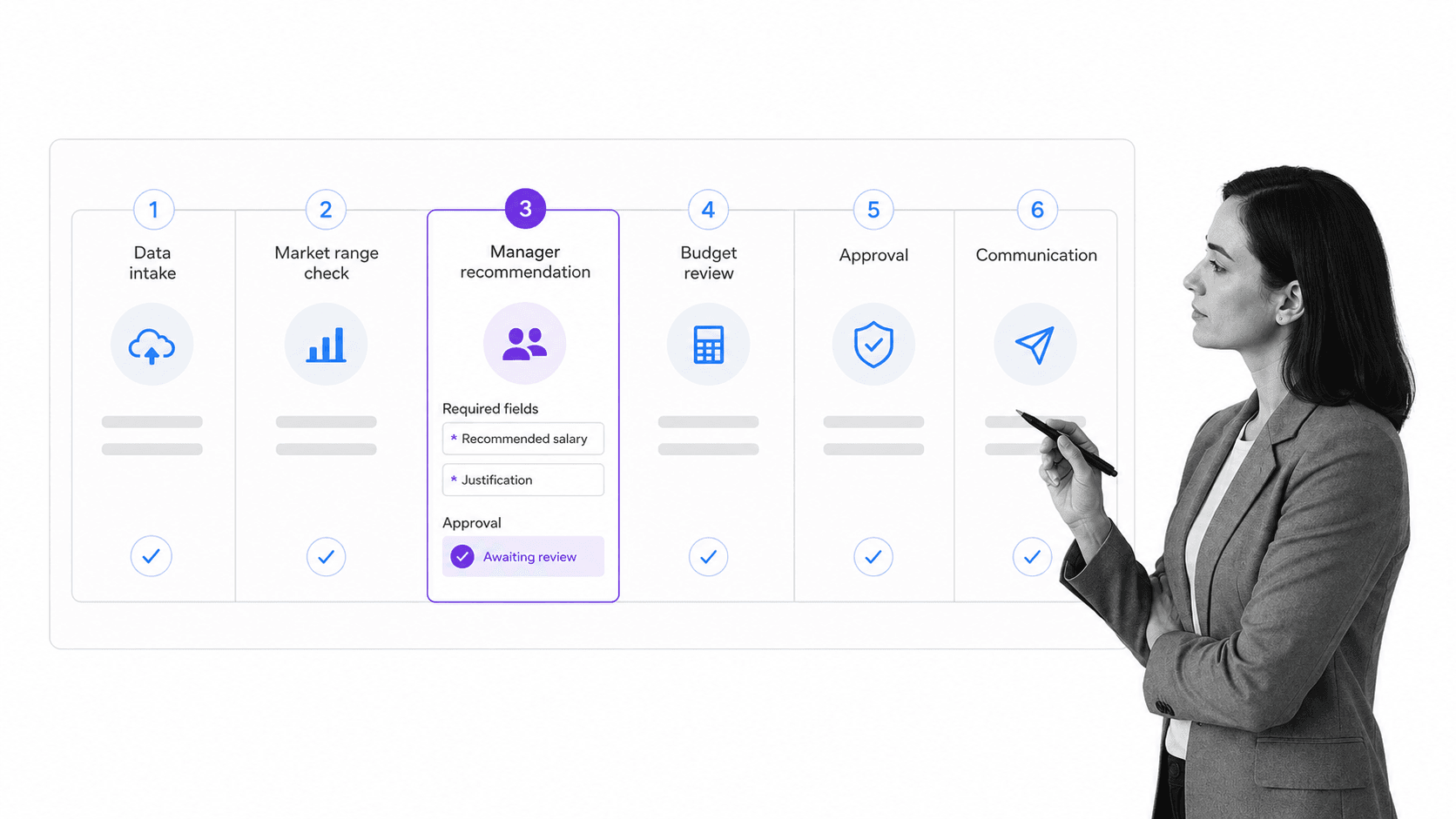
A strong compensation management process starts before the pay cycle opens. HR defines the compensation philosophy, pay ranges, eligibility rules, data sources, approval path, and communication plan. Finance defines the budget guardrails. Managers contribute recommendations inside those rules.
Step 1: Collect the right data
Most pay cycles depend on employee role, level, location, current salary, performance input, market range, tenure, promotion status, budget pool, and manager recommendation. The software should make those fields visible without exposing sensitive information to the wrong audience.
Step 2: Apply pay rules and budget logic
Rules turn compensation philosophy into action. A rule might flag an employee below range, block a raise above a budget threshold, require extra review for an exception, or route a promotion recommendation to a specific approver. Without rules, the process becomes a negotiation inside a spreadsheet.
Step 3: Route recommendations for approval
Approvals should happen inside the workflow. A manager recommendation, finance review, HR business partner review, and executive signoff should all leave a record. If your team already uses Process Street approvals for sensitive workflows, the same principle applies to compensation: the decision path should be visible and enforceable.
Step 4: Preserve evidence
A compensation decision often needs evidence: range source, budget allocation, exception reason, approval owner, communication status, and final record update. The EEOC advises employers to consider documenting decisions that affect pay, including starting pay, bonuses, raises, pay adjustments, and performance evaluations. See the {a(links[‘EEOC pay documentation tips’], ‘EEOC pay documentation guidance’)}.
Step 5: Communicate and close the loop
The process is not finished when leadership approves a budget. Employees need clear communication. Payroll and HRIS records may need updates. Managers may need talking points. Audit files may need final evidence. A compensation system should make the closing steps as controlled as the planning steps.
Core features of compensation management software
The feature list can get long, but most compensation management software comes down to five operating jobs: structure the pay model, control the cycle, guide managers, enforce approvals, and preserve proof.
Pay bands and salary ranges
Pay bands give managers boundaries. The software should help HR maintain ranges by role, level, location, currency, and effective period. It should also show when an employee is below, within, or above range without turning every decision into a manual lookup.
Budget modeling
Budget modeling helps HR and finance understand the impact of merit increases, promotions, bonuses, and exceptions before the cycle closes. A useful model shows planned spend, remaining budget, outliers, and approval status by group.
Manager recommendation workflows
Managers need a guided workspace that shows eligible employees, relevant context, budget guidance, and required justification fields. The goal is to give managers enough information to make fair recommendations without giving them uncontrolled access to sensitive compensation data.
Pay equity and exception review
Pay equity work requires careful analysis and documentation. The software should make it easier to spot exceptions, record why a decision was approved, and send unusual cases to HR or legal review. It should not hide judgment. It should make judgment accountable.
Communication support
Compensation decisions affect trust. Communication support may include manager notes, employee letters, status tracking, and final acknowledgement steps. Even when communication happens outside the compensation tool, the workflow should track whether the communication was completed.
Benefits of compensation management software
The strongest benefit is not speed by itself. It is reliable execution. Compensation management software should help the organization make pay decisions with fewer errors, clearer ownership, and a better record of why decisions were made.
More consistent pay decisions
Consistency improves when everyone works from the same ranges, eligibility rules, approval path, and budget constraints. Managers can still use judgment, but the system makes sure the same core policy is applied to every recommendation.
Less manual spreadsheet risk
Spreadsheets are easy to copy, email, modify, and break. Compensation management software reduces hidden formulas, stale files, duplicate versions, and side-channel approvals. That matters because compensation data is sensitive and mistakes are expensive to unwind.
Cleaner budget control
Finance needs to know how recommendations affect the total budget before final approval. A controlled workflow shows who is over budget, which teams need review, and whether exceptions have been justified.
Better audit readiness
Audit readiness improves when the evidence is created as work happens. A process such as an HR compliance audit checklist is stronger when compensation decisions, approval notes, and policy references are attached to the actual cycle.
Better employee trust
Employees do not see every internal compensation decision, but they feel the result. Clear processes help HR explain how decisions are made, keep managers aligned, and reduce ad hoc treatment across teams.
What to look for in compensation management software

Choosing compensation management software should start with your operating model, not a vendor demo. A simple company may need range management and approvals. A larger company may need multi-currency planning, job architecture, pay equity review, and complex budget modeling.
Workflow control
Look for workflow rules that match your process. Can the system route recommendations by manager, department, location, role level, budget exception, or risk flag? If your company already uses a workflow management system for recurring operations, compensation should meet the same control standard.
Permissions and sensitive data handling
Compensation data is not ordinary HR data. The software should support role-based permissions, scoped manager views, secure exports, approval history, and clear access boundaries. If the only option is to share a giant spreadsheet, the process is too fragile.
Integration with HRIS and payroll
The compensation cycle usually starts with HRIS data and ends with payroll or employee record updates. The system should support clean handoffs, validation checks, and controlled updates. Process Street has direct, universal integrations to 5,000+ systems. Need a new one? An AI agent builds it on the fly.
Evidence and audit trails
Evidence should be part of the workflow, not a cleanup project. Teams comparing compensation tools should also review document control best practices so policy changes, range sources, and approval artifacts stay governed.
Fit for your compensation cycle
Some tools are best for annual merit cycles. Others focus on sales commissions, executive compensation, hourly pay, or pay equity analytics. Define the compensation cycles you need to run before evaluating software.
Where Process Street fits
Process Street is a Compliance Operations Platform, so it is not a payroll system or a specialist compensation benchmarking database. Its fit is the governed workflow layer around compensation decisions: approvals, evidence collection, policy acknowledgement, exception handling, HR handoffs, and audit-ready execution.
For example, an HR team can use the compensation analysis template to structure analysis, then run approvals, exception review, finance signoff, and communication tasks through a controlled workflow. That keeps the decision process visible even when the source data lives in an HRIS or compensation-specific system.
Use Process Street for compensation governance
Process Street is strongest when the compensation cycle needs controlled steps: gather market data, verify employee records, route manager recommendations, review exceptions, approve budget changes, prepare communication, update systems, and retain evidence.
Pair it with specialist systems when needed
A large company may still need a dedicated compensation platform for modeling, benchmarking, and complex pay structures. Process Street can sit around that system as the execution and governance layer, making sure the right people do the right steps in the right order.
Connect compensation to broader HR operations
Compensation does not sit alone. It connects to onboarding, promotion, benefits, compliance, performance, and retention. Related workflows such as a human resources compliance checklist, benefits compliance checklist, and talent management strategy help keep those adjacent processes aligned.
Teams evaluating broader HR suites can also compare Workday alternatives and HR software for small business to decide whether compensation should live inside an HCM platform, a specialist compensation tool, or a governed workflow layer around both.
How to implement compensation management software
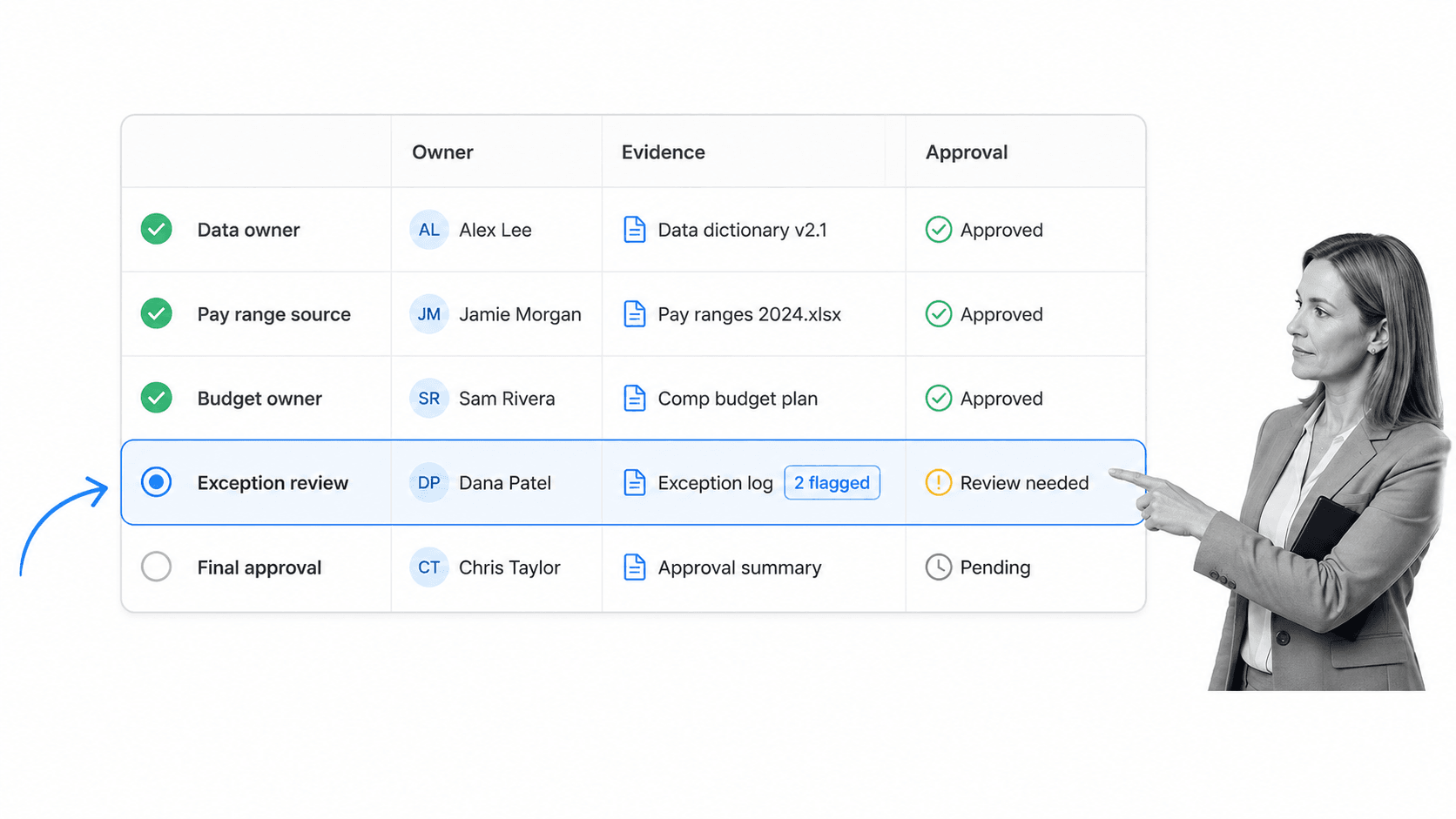
Implementation should start with the compensation process you actually run today. Software will not fix unclear ownership, inconsistent ranges, or hidden exceptions by itself. It will expose them.
Map the compensation cycle
Document the full cycle: data preparation, eligibility review, market range update, budget allocation, manager recommendation, HR review, finance review, executive approval, communication, payroll update, and final evidence storage.
Define owners and decision rights
Every step needs an owner. HR may own ranges and policy. Finance may own budget. Managers may own recommendations. Legal or compliance may review sensitive exceptions. Payroll may own final execution. If ownership is unclear, approval delays will look like a software problem.
Start with one cycle
Do not automate every compensation scenario at once. Start with one high-value cycle, such as annual merit review, promotion adjustments, bonus approvals, or sales compensation changes. Prove the workflow, then expand.
Test exception paths
The normal path is easy. Exceptions are where governance breaks. Test above-range raises, missing performance input, late manager recommendations, budget overages, promotion changes, and employee transfers before launch.
Create a clean evidence packet
The U.S. Department of Labor notes that wage rules include federal and state considerations, with employees entitled to the higher applicable minimum wage where both apply. Compensation workflows should preserve enough context for HR to show how wage and policy requirements were considered. See the DOL wages guidance.
If the company is subject to contractor, affirmative action, or other workforce compliance reviews, use an adjacent workflow such as the OFCCP compliance audit checklist to make sure compensation analysis, placement review, and supporting documentation stay connected.
Common mistakes to avoid
Most compensation software failures are process failures in disguise. The tool may be capable, but the organization has not defined its compensation philosophy, data ownership, approval rights, or exception policy.
Buying before defining pay philosophy
Software can enforce rules, but it cannot decide your pay philosophy. Before implementation, define how the company thinks about market position, internal equity, performance, promotion, scarce skills, geography, and budget tradeoffs.
Giving managers too much or too little context
Managers need enough context to make a responsible recommendation. They do not need unrestricted access to sensitive pay data. Configure views carefully so managers see what they need and nothing more.
Treating pay equity as a final check
Pay equity should not be a last-minute scan after all decisions are made. Build review points into the cycle so exceptions are visible before communication and payroll updates begin.
Ignoring communication workflows
A technically correct pay decision can still fail if communication is confusing. Include manager notes, employee communication tasks, and final status checks in the process.
Letting compensation rules drift
Compensation ranges, policies, and workflows change. Review them like controlled documents. Teams can use the same discipline found in compliance management software and workflow automation software: version the rules, approve changes, and keep execution tied to the current standard.
FAQs
What is compensation management software?
Compensation management software is a system for planning, reviewing, approving, documenting, and communicating employee pay decisions. It helps HR teams manage pay ranges, salary adjustments, bonuses, merit cycles, exceptions, approvals, and evidence in a controlled process.
What is the difference between compensation management software and payroll software?
Payroll software pays employees and handles payroll execution. Compensation management software governs the decisions that determine pay, including salary ranges, budget rules, manager recommendations, approvals, and exception review before payroll is updated.
Who uses compensation management software?
HR leaders, compensation analysts, finance teams, managers, executives, and compliance reviewers all use compensation management software in different ways. HR owns the process, managers submit recommendations, finance reviews budget impact, and approvers sign off on final decisions.
What features matter most in compensation management software?
The most important features are pay range management, budget modeling, manager recommendation workflows, approval routing, role-based permissions, pay equity review, HRIS or payroll handoffs, and audit history. The right priority depends on the complexity of your compensation cycle.
Can Process Street be used for compensation management?
Process Street can support compensation management workflows that need approvals, required fields, evidence collection, policy review, exception handling, and audit-ready task history. It is not payroll software or a compensation benchmarking database, but it can govern the process around those systems.
How do you implement compensation management software?
Start by mapping one compensation cycle, defining owners, documenting decision rights, cleaning the data inputs, and testing exception paths. Then launch the workflow with clear manager instructions, approval rules, evidence requirements, and a closing step for communication and system updates.
