


Turn every policy into automated workflows with built-in enforcement and audit-ready proof.



Document Control Best Practices

Document Control Best Practices are the operating rules that keep controlled documents accurate, approved, findable, secure, and connected to the work they govern.
A controlled document can be an SOP, policy, work instruction, quality manual, form, checklist, training record, contract template, or compliance procedure. The document matters because people use it to make decisions and prove the right work happened.
This guide explains the document control best practices that matter most: ownership, version control, approvals, access, retention, audit trails, and workflow execution.
In this article, we are going to cover:
- What document control means
- Why document control best practices matter
- Document control best practices start with ownership
- Document control best practices for revision workflows
- Access, security, and retention controls
- Document control best practices in Process Street
- How to audit and improve document control
- FAQs
What document control means
Document control is the discipline of creating, reviewing, approving, distributing, changing, archiving, and retiring business documents under a defined set of controls. It prevents teams from using stale procedures, editing official files without approval, or losing proof when auditors ask what happened.
Good control does not mean locking every file behind bureaucracy. It means the right person owns the document, the right reviewers approve changes, the current version is obvious, and old versions cannot quietly keep running the business.
Controlled documents versus reference documents
A reference document can be useful without being formally governed. A controlled document carries operational or compliance risk. If people act on the wrong version, miss a required step, or cannot prove approval, the business can fail an audit, ship bad work, expose data, or create customer harm.
For example, an internal brainstorming note may not need formal review. A manufacturing work instruction, claims handling SOP, customer onboarding checklist, vendor risk procedure, or privacy incident process does. The control level should match the risk attached to the document.
Document control is not just storage
A document repository helps you store and search files. A document control system governs how those files become official, how they change, who can use them, and how the organization proves the current version was followed. That is why adjacent topics like document management systems and enterprise document management matter, but they are not the whole job.
The real job is operational. A document should not sit apart from the process it controls. It should feed the workflow, trigger review when it changes, capture evidence when people follow it, and create a record when it is retired.
Why document control best practices matter
Strong document control best practices reduce three risks: people using the wrong instructions, teams changing official procedures without review, and the company being unable to prove what was approved at the time.
Those risks show up in regulated teams first, but they are not limited to regulated teams. Any organization with repeatable work needs a source of truth for how work should happen. Without that source of truth, every team invents its own version.
Audit readiness
Standards and regulations often expect organizations to control documented information. ISO 9001 is the quality-management reference point many teams know. Life sciences and regulated electronic records often bring in 21 CFR Part 11 and FDA Part 11 guidance.
An auditor will not only ask whether a document exists. They may ask who approved it, when it changed, what version was active, whether obsolete versions were removed, and whether employees followed the approved procedure. A file folder alone cannot answer that cleanly.
Operational consistency
Document control also protects day-to-day execution. If three teams follow three versions of the same onboarding, inspection, safety, finance, or support process, quality becomes random. Every process exception becomes harder to investigate because nobody knows which instruction was in force.
That is why document control belongs next to workflow documentation, process documentation, and business process documentation. Documentation and execution should reinforce each other.
Knowledge continuity
When experienced people leave, the company should not lose the official way work happens. Controlled documents preserve the standard, but only if they are maintained. A stale SOP is not institutional memory. It is a liability with a professional-looking cover page.
This is why the best document control programs are boring in the right ways. A new employee can find the current document. A manager can see who owns it. A reviewer can inspect the change history. An auditor can trace the approval. Nobody has to rely on a heroic employee remembering where the latest file lives.
Document control best practices start with ownership

Ownership is the first control. Every controlled document needs a named owner who is accountable for accuracy, review cadence, change decisions, and retirement. Committee ownership sounds inclusive, but it often means nobody is accountable when the document decays.
Assign one accountable owner
The owner should understand the process, the risk, and the people who use the document. They do not need to approve every change alone, but they should own the decision path. A policy might be owned by compliance. A work instruction might be owned by quality. A customer onboarding SOP might be owned by operations.
Keep ownership visible in the document metadata and the workflow that governs it. If employees have to inspect a file name or ask around to find the owner, ownership is already weak.
Separate authors, reviewers, and approvers
One person may draft a change, but review and approval should depend on risk. Technical accuracy, legal impact, compliance obligations, customer impact, training impact, and system dependencies may require different reviewers.
- Author: writes or edits the document.
- Owner: accountable for the document and its review cycle.
- Reviewer: checks accuracy, completeness, risk, and usability.
- Approver: authorizes release of the controlled version.
- User: follows the document during work and reports improvement needs.
For procedural documents, templates such as a policy and procedure template can help standardize the structure before the review workflow begins.
Define review cadence by risk
Low-risk documents may only need periodic review. High-risk procedures should trigger review when laws, systems, products, customers, vendors, controls, or operating conditions change. Review cadence should not be a calendar ritual detached from reality.
The best practice is to combine scheduled review with event-based triggers. If a process failure, audit finding, customer complaint, regulation change, or system release affects a document, the review should start immediately.
Make review due dates visible before they become emergencies. Overdue reviews should have owners, escalation rules, and a path back to current status. A document that is overdue for review may still be usable, but the organization should understand the risk instead of discovering the lapse during an external audit.
Document control best practices for revision workflows
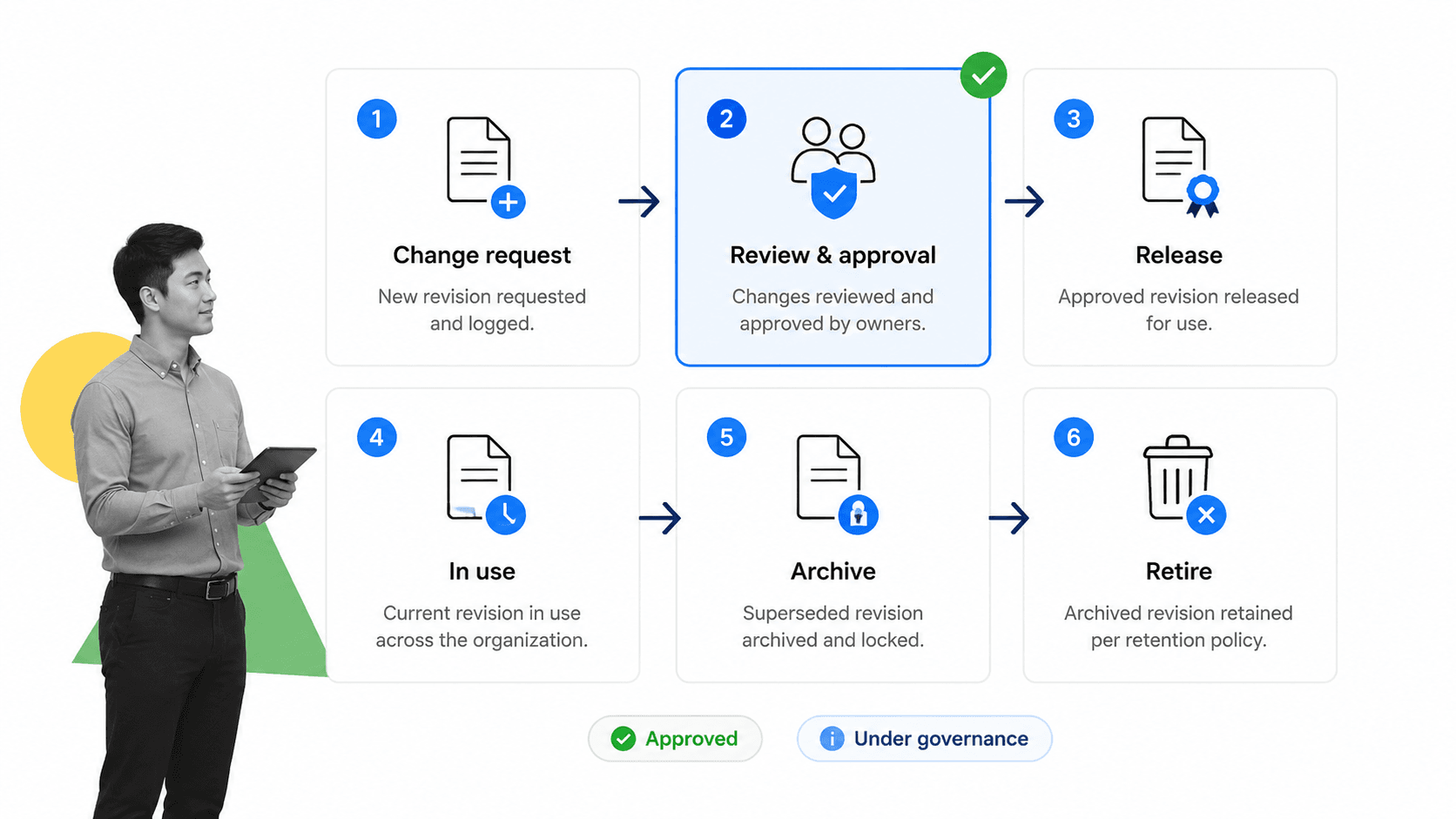
Revision control is where many document control programs either become useful or collapse into admin work. The point is not to create a pretty version table. The point is to make sure every meaningful change is requested, reviewed, approved, released, communicated, and traceable.
Use a change request before editing the official version
Uncontrolled edits create confusion. Require a change request that captures the reason for change, affected sections, process impact, owner, reviewer list, training impact, and urgency. The request can be lightweight, but it should exist before the controlled version changes.
This protects the current version while giving the team a place to discuss the proposed change. It also makes rejected or deferred changes visible instead of burying them in comments and chats.
Keep version numbers meaningful
A version scheme should tell users whether a change is major or minor. A major revision may change workflow steps, compliance obligations, roles, tools, customer impact, or approval requirements. A minor revision may correct formatting, clarify wording, or update a reference without changing execution.
Do not rely on file names alone. Pair version numbers with status, effective date, owner, approval record, and revision summary. A file called final_v8_revised is not document control.
Release documents through an approval gate
Approvals should happen inside the workflow, not through scattered messages. Process Street Document Approvals make the release decision explicit: who approved, what they approved, and when the workflow moved forward.
After approval, publish the current version to the right location, remove obsolete versions from normal use, notify affected users, and schedule any training or acknowledgment tasks. Release is not complete until people know which version to follow.
Communication should match the impact of the change. A minor wording update may only need a release note. A process change that affects safety, customers, regulated work, or system behavior may require training, acknowledgment, manager confirmation, and follow-up checks that the new procedure is being used.
Access, security, and retention controls
Access, security, and retention are the controls that keep document control from becoming document clutter. The same system that makes instructions easy to find must also prevent sensitive content from spreading beyond the right audience.
Use least-privilege access
People should be able to read what they need to do their jobs. Editing, approving, deleting, and archiving should be restricted. Sensitive documents may need additional controls based on customer data, employee data, security information, financial information, protected health information, or legal exposure.
Security programs may align access practices with ISO 27001, privacy teams may use the NIST Privacy Framework, and healthcare teams should understand the HIPAA Security Rule.
Control obsolete documents
Obsolete documents should not remain in everyday folders where employees can accidentally use them. Archive them with a clear status, keep them available for audit where required, and prevent normal operational use.
A strong archive record includes the old version, retirement date, replacement version, reason for retirement, owner, and approval record. This gives auditors and investigators context without exposing employees to the wrong procedure.
Define retention before the audit
Retention rules should be set before records pile up. Decide how long to keep current versions, obsolete versions, training acknowledgments, approval records, change requests, and execution evidence. The answer may differ by document type, jurisdiction, customer contract, and framework.
File structure still matters. Clear file naming conventions make controlled documents easier to identify, but naming conventions should support the control system, not replace it.
Document control best practices in Process Street
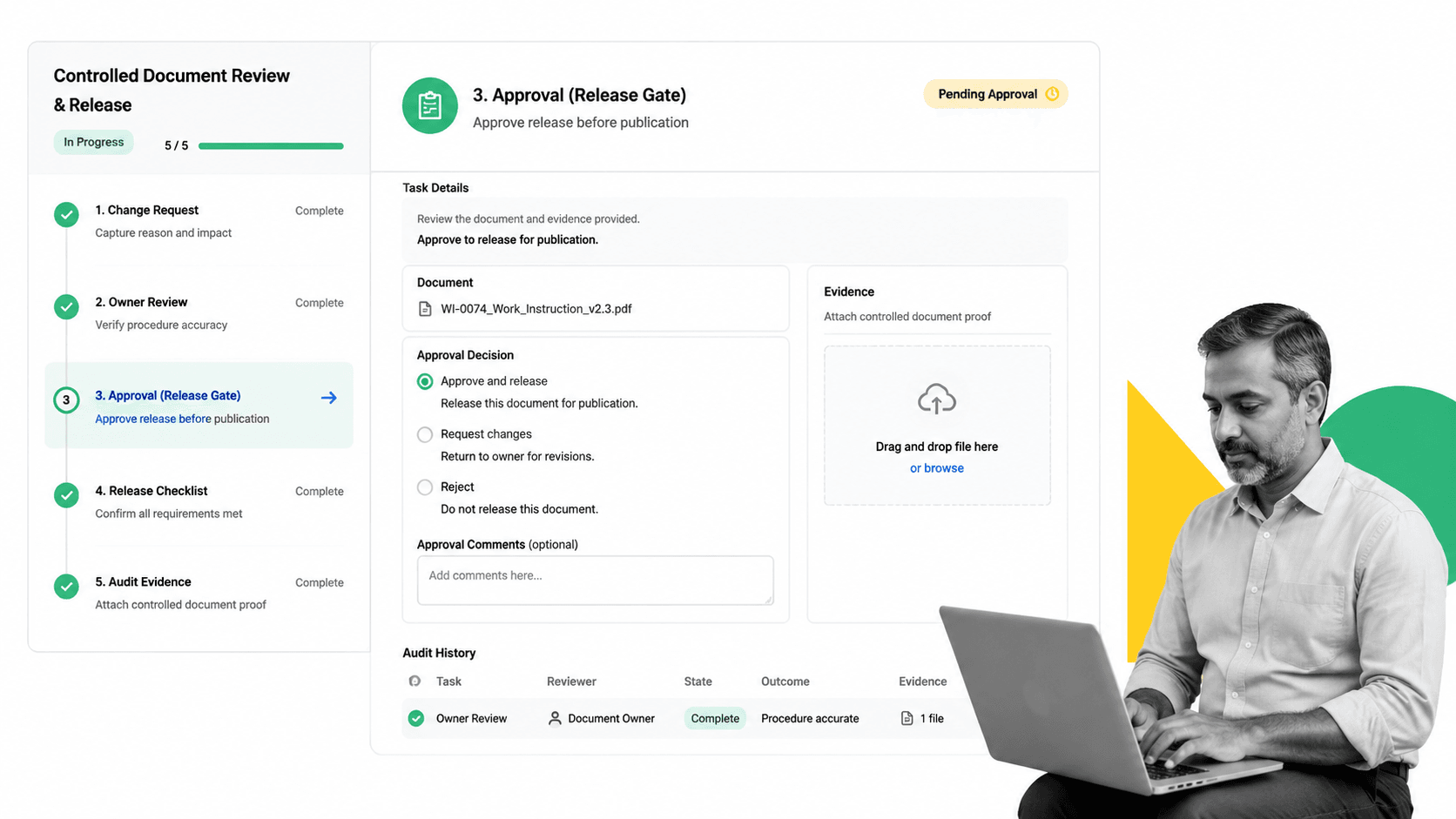
Process Street supports document control best practices by connecting documents to executable workflows. Teams can turn SOPs, policies, forms, and procedures into controlled review paths with assignments, approvals, file uploads, conditional logic, and audit history.
Turn controlled documents into controlled work
A document should not only describe the work. It should trigger and govern the work. A controlled onboarding SOP can become a workflow run. A policy review can become a recurring approval process. A vendor risk procedure can collect evidence, assign reviewers, and prove completion.
If you are building an SOP program, Process Street resources on writing standard operating procedures and SOP templates can help standardize the source material before automation.
Use workflow logic to reduce manual policing
Document control teams should not chase every stakeholder manually. Conditional workflow paths can route reviews based on department, document type, risk level, approval state, or change impact. Process Street documents conditional logic for teams that need paths to change based on form responses and workflow data.
The point is compliance by default. If a high-risk procedure changes, the workflow should require the right review and approval before release. If a low-risk wording change happens, the workflow can stay lighter.
Keep proof close to execution
File uploads, approvals, comments, assignments, and task history create the record around the document. Process Street documents file upload limits so teams can attach source files and evidence directly to workflow runs.
That matters for control-heavy work. Related pages on quality management system software, compliance management software, and AI-driven compliance show the same principle: proof belongs where the work happens.
Process Street has direct, universal integrations to 5,000+ systems. Need a new one? An AI agent builds it on the fly. That matters for document control because controlled documents usually touch systems outside the document repository: HRIS, CRM, ticketing, e-signature, storage, ERP, quality, and reporting tools.
How to audit and improve document control
A document control program should be audited like any other control. Do not wait until an external audit to learn that owners are missing, approvals are informal, or old versions are still active.
Audit the control path, not just the folder
Sample controlled documents and trace each one from creation through current use. Confirm owner, current version, approval evidence, revision summary, effective date, distribution path, obsolete-version handling, and linked workflow or process.
Then sample actual work and confirm people used the current approved document. This is where many programs fail. The document may be perfect, while the team still follows a copied checklist, local spreadsheet, or old PDF.
Interview users during the audit. Ask where they find the current procedure, how they know it is current, what they do when it seems wrong, and whether the workflow matches the document. The answers will show whether document control is part of daily work or only a policy stored for auditors.
Track a small set of useful metrics
- Percent of controlled documents with a named owner.
- Percent reviewed by due date.
- Average time from change request to approval.
- Number of overdue reviews by department.
- Number of obsolete documents found in active use.
- Number of audit findings tied to document control failure.
Metrics should drive cleanup, not theater. If a metric does not help owners reduce risk or improve execution, remove it.
Improve from incidents and findings
Every audit finding, customer issue, process failure, or near miss should ask whether documentation contributed. Was the instruction missing? Was the wrong version used? Was ownership unclear? Did the approval path fail? Did training lag behind the change?
Document control best practices work when they form a loop: document the standard, execute the standard, collect proof, learn from exceptions, and update the standard. That loop is the difference between static documentation and a system that actually controls work.
FAQs
What are document control best practices?
Document control best practices are the rules that keep controlled documents accurate, approved, current, secure, and traceable. They include ownership, review cadence, version control, approval gates, access control, obsolete-document handling, retention, and audit trails.
Why is document control important?
Document control is important because teams use documents to execute work and prove compliance. If the wrong version is used or approval evidence is missing, the organization can create quality failures, audit findings, security exposure, and operational inconsistency.
What should a document control procedure include?
A document control procedure should define document types, owners, authors, reviewers, approvers, version rules, change requests, release steps, access rights, retention, obsolete-document handling, and audit evidence. It should also explain how users find the current approved version.
How do you control document revisions?
Control document revisions by requiring a change request, separating draft and approved versions, reviewing impact, routing approvals, publishing only the approved version, archiving obsolete versions, and keeping a revision history. The approval workflow should show who approved the change and why.
Who owns document control?
Document control is usually owned by quality, compliance, operations, or a dedicated document control function. Each controlled document should also have a specific owner accountable for accuracy, review timing, change decisions, and retirement.
How does Process Street support document control?
Process Street supports document control by connecting procedures and policies to executable workflows. Teams can route reviews, collect approvals, attach evidence, use conditional logic, assign owners, and keep audit history around controlled document work.
