


Turn every policy into automated workflows with built-in enforcement and audit-ready proof.



Compliance Monitoring Software
Compliance monitoring software is the system teams use to track whether policies, controls, obligations, and recurring compliance tasks are actually being followed. It connects requirements to owners, evidence, exceptions, approvals, and audit history so compliance is monitored during the work, not reconstructed after the fact.
The best compliance monitoring software does more than display a dashboard. It turns control checks into assigned workflows, flags gaps before they become findings, and keeps proof attached to the work. That matters for regulated teams, but it also matters for any business where missed steps create legal, financial, security, quality, or customer risk.
This guide explains what compliance monitoring software does, how it differs from broader GRC tools, what capabilities to evaluate, and how Process Street helps teams monitor compliance through execution.
We will cover:
- What compliance monitoring software does
- Why compliance monitoring software matters
- Compliance monitoring software capabilities
- Compliance monitoring software workflow
- How to choose compliance monitoring software
- Compliance monitoring software in Process Street
- How to roll out compliance monitoring software
- FAQs
What compliance monitoring software does
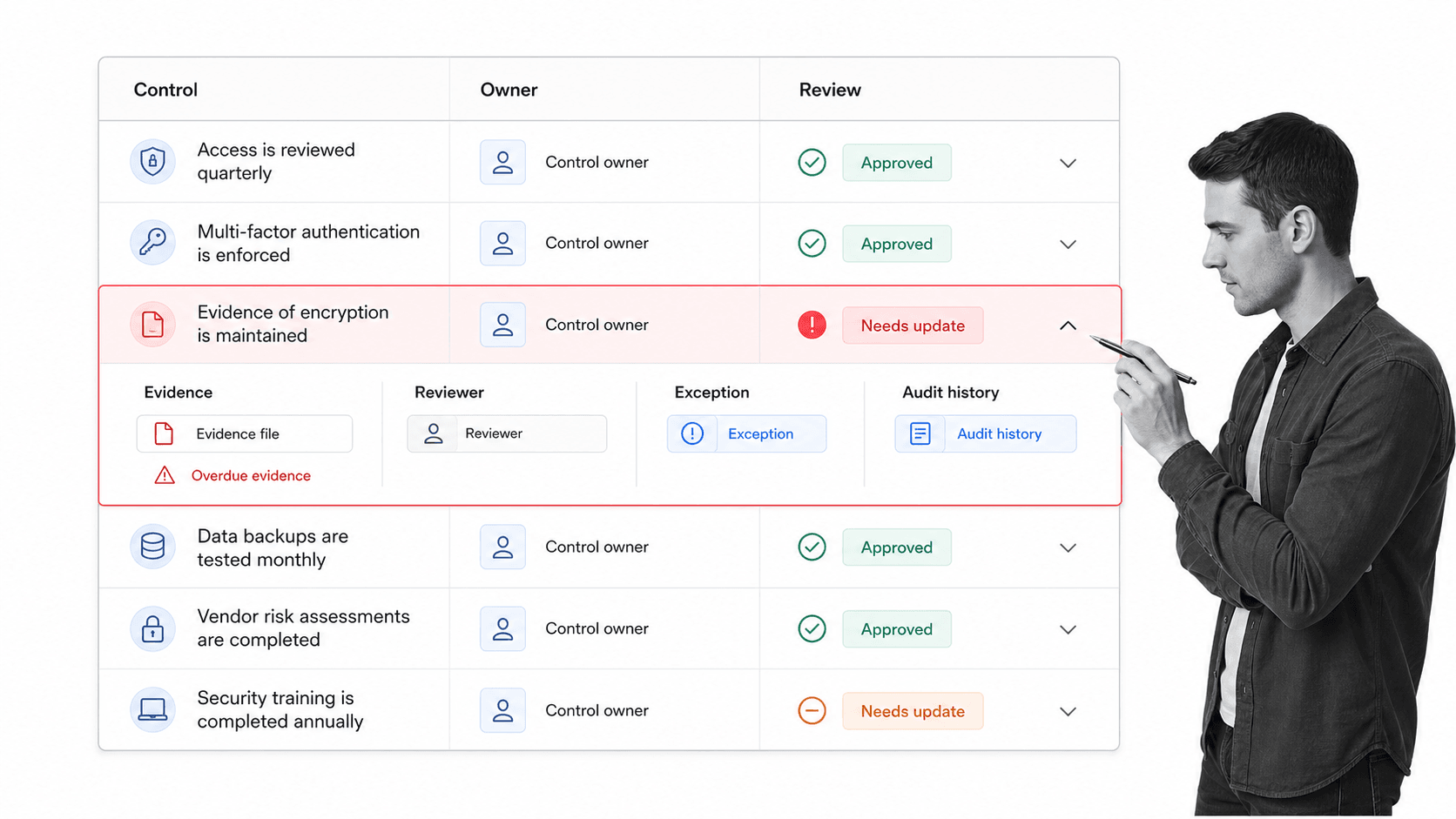
Compliance monitoring software tracks whether required compliance activity is happening on time, in the right way, with enough evidence to prove it. The software should connect every control or obligation to an owner, a schedule, a review standard, an exception path, and a record of completed work.
It turns requirements into monitored work
A requirement sitting in a policy document is not monitored. A requirement becomes monitored when someone owns it, the control has a schedule, the system asks for evidence, exceptions are routed for review, and overdue work escalates before a finding appears.
It connects controls to evidence
Compliance monitoring breaks when evidence lives separately from the activity it proves. The software should keep the control, task, file, comment, approval, timestamp, and audit history together. That gives compliance leaders a live record instead of a folder hunt.
It shows exceptions before audit day
The most useful signal is not a polished report after the quarter closes. It is an exception while there is still time to fix it. A missing evidence file, an overdue owner review, a skipped approval, or a failed control test should trigger a workflow immediately.
- Control status: whether each control is active, pending review, overdue, approved, or blocked.
- Evidence status: whether proof is attached, complete, current, and tied to the right task.
- Owner accountability: who is responsible for the control, the review, the fix, and the approval.
- Exception handling: what happens when a control fails or evidence is missing.
- Audit history: what changed, who approved it, and when the work was verified.
This is why compliance monitoring software sits close to compliance management software, but it has a sharper job. It keeps the operating signal current so teams can act before compliance turns into a fire drill.
Why compliance monitoring software matters
Compliance risk usually grows in the gap between what the policy says and what people actually do. Compliance monitoring software reduces that gap by checking the state of the work continuously, assigning action when something drifts, and preserving evidence along the way.
It defines monitoring as continuous oversight
IBM defines compliance monitoring as continuously assessing whether an organization follows regulatory requirements, internal policies, and industry standards. That definition is useful because it moves compliance away from periodic document review and toward an operating discipline: the system should know whether the required work is happening now.
Point-in-time reviews age quickly
NIST SP 800-137 defines information security continuous monitoring as maintaining ongoing awareness of information security, vulnerabilities, and threats to support risk decisions. That principle applies beyond security. Compliance leaders need current awareness of control health, not a snapshot that becomes stale as soon as the audit sample is collected.
Manual monitoring does not scale
Spreadsheets and email reminders can work for a few controls, but they fail as obligations multiply. Owners change, deadlines move, evidence gets saved in the wrong place, exceptions lose context, and leaders stop trusting the status view.
Auditors and regulators expect improvement
The DOJ guidance on evaluating compliance programs asks whether a program is periodically tested, reviewed, and improved. Monitoring software supports that expectation by making compliance performance visible during normal operations: which controls fail, which owners miss deadlines, which exceptions recur, and which evidence gaps need permanent fixes.
Compliance monitoring protects growth
A stronger monitoring system makes compliance less dependent on heroics. Teams can launch new processes, manage more frameworks, and answer more customer or auditor questions without rebuilding evidence from scratch. For teams building a broader operating model, compliance operations is the category that connects policy, workflow, evidence, and continuous improvement.
Compliance monitoring software capabilities
The right capabilities depend on the frameworks, industries, and teams involved. Still, most strong compliance monitoring software needs the same operating primitives.
Control library
The system should maintain a control library with owners, descriptions, related policies, evidence requirements, frequency, risk level, applicable framework, and review cadence. The library is not just documentation. It is the source that drives recurring monitoring workflows.
Recurring reviews
Compliance activity repeats. Certifications, access reviews, vendor checks, quality checks, incident reviews, policy attestations, and audit prep all need schedules. A compliance audit checklist can structure one review, but software should run the recurring cycle and keep every run traceable.
Evidence collection
Evidence should be requested at the right moment, from the right owner, in the right format. The system should make missing evidence visible and keep submitted evidence tied to the control, task, reviewer, and approval.
Exception workflow
Failed controls and missing evidence need a path. The software should route exceptions to the right owner, collect remediation notes, require approvals, document risk acceptance when needed, and verify closure.
Approvals and signoffs
Monitoring without approval controls turns into passive visibility. Built-in approvals let compliance teams block weak closure, require reviewer signoff, and preserve the decision record. Conditional paths can route different obligations through different reviewers, which is where conditional logic matters.
Reporting and audit history
Dashboards matter, but audit history matters more. A useful report should be backed by the actual work: task completions, comments, files, field values, approvals, exceptions, and timestamps.
Compliance monitoring software workflow
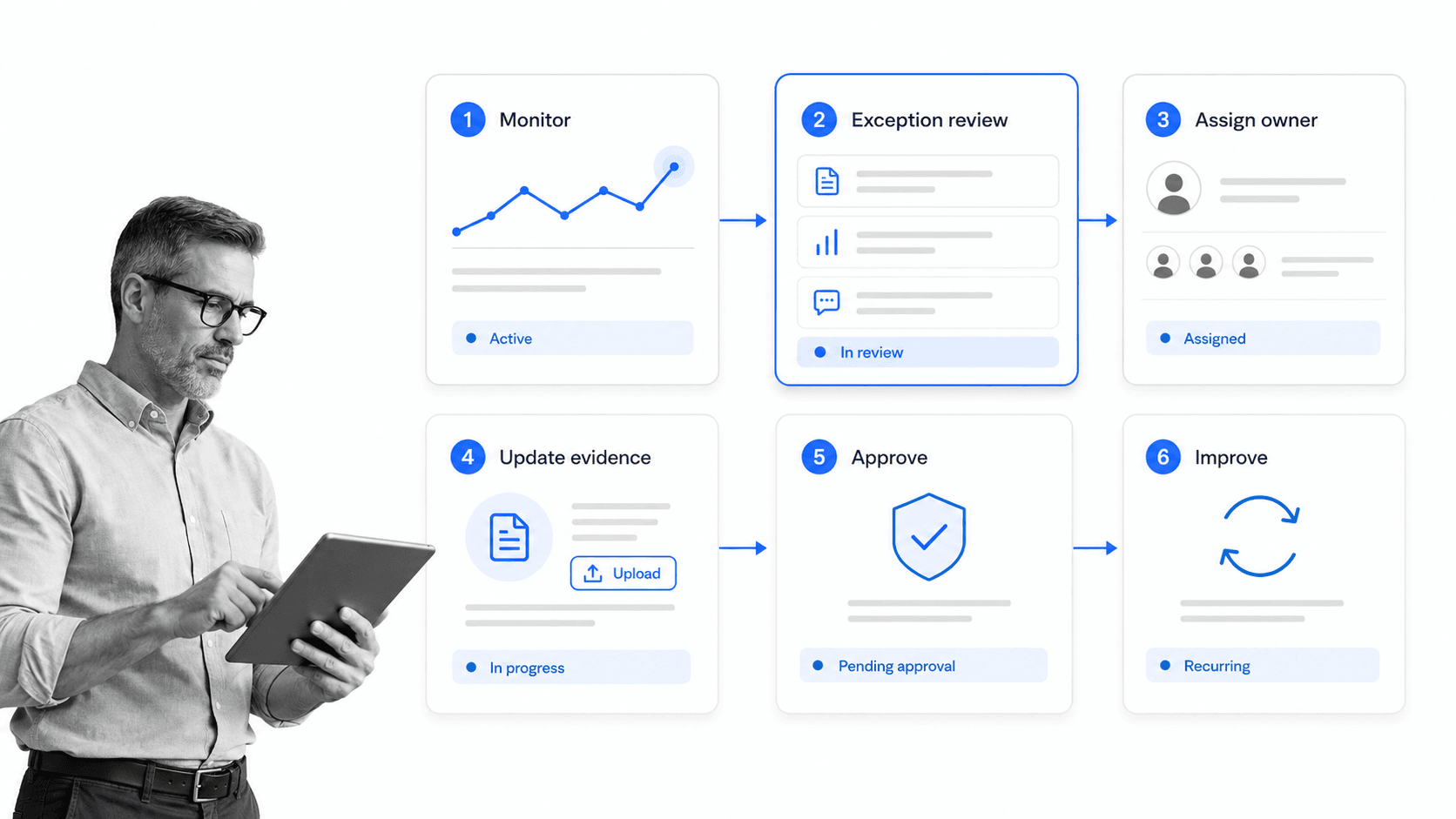
Compliance monitoring works best as a workflow, not a static report. The workflow makes the signal actionable: monitor the control, flag the exception, assign the owner, update the evidence, approve the result, and improve the process.
1. Map controls to business work
Start by mapping each monitored control to the workflow where it belongs. A policy acknowledgment belongs in HR or training workflows. A vendor review belongs in procurement. A security control belongs in IT or security operations. Monitoring improves when controls are embedded where work happens.
2. Set the monitoring trigger
The trigger may be calendar-based, event-based, system-based, or manual. A quarterly review may run on a schedule. A failed evidence check may trigger when a required file is missing. A regulatory update may trigger a policy review.
3. Assign the owner
Every monitoring signal needs a clear owner. If the owner is a team mailbox, the task will drift. The workflow should show who must act, who reviews the work, and who approves the exception.
4. Collect evidence
Evidence should be requested as part of the workflow, not after the fact. That may mean file uploads, form fields, screenshots, exported reports, linked records, signoffs, or comments explaining an exception.
5. Review exceptions
Exceptions need a structured review path. Was the issue fixed? Was risk accepted? Was a compensating control added? Does a policy need updating? The workflow should capture the decision and the rationale.
6. Feed improvement back into the system
A repeated exception is not just a failed task. It is a process signal. Feed it into corrective action, policy updates, training, or control redesign. This keeps monitoring connected to AI-driven compliance and continuous improvement instead of creating another compliance queue.
How to choose compliance monitoring software
Choose compliance monitoring software by the work it can enforce, not by the dashboard it can show. A dashboard is useful only if the underlying process is complete, current, and trustworthy.
Check whether it monitors execution
Ask whether the system can assign tasks, enforce required fields, route approvals, escalate overdue reviews, and keep evidence with the workflow. If it only stores controls and produces reports, you will still need another system to make work happen.
Check whether it fits your frameworks
Teams may monitor obligations tied to ISO 27001, SOC 2, HIPAA, SOX, FDA, internal standards, customer commitments, or industry-specific rules. ISO describes ISO/IEC 27001 as a standard for information security management systems, but teams still need software to operationalize reviews, evidence, exceptions, and improvement cycles. Related SOC 2 compliance workflows and internal audit workflows can help turn framework requirements into repeatable checks.
Check how exceptions are handled
The exception path is where many tools get exposed. You need clear ownership, due dates, evidence requirements, approvals, risk acceptance fields, and follow-up. Without that workflow, exceptions become comments in a report.
Check integrations without making them the whole story
Compliance monitoring software should pull from systems where work already happens, but integration alone does not create control. The stronger question is whether integrations trigger governed workflows that people complete and reviewers can trust.
Check the audit trail
A useful audit trail should show what was required, who acted, what evidence was attached, what was approved, what changed, and what happened after an exception. This connects monitoring to practical compliance audit readiness.
Check whether reports trace back to work
Many platforms can show a green or red status. Fewer can let a reviewer click from that status into the task, evidence, approval, comment thread, exception decision, and remediation history behind it. That traceability is what separates useful compliance monitoring software from a reporting layer that still depends on manual proof gathering.
Check how non-compliance becomes action
The strongest systems do not stop at detection. They turn non-compliance into assigned work with a due date, required evidence, escalation rules, and an approval path. If a failed control only creates a dashboard alert, the compliance team still has to chase the fix outside the system.
Compliance monitoring software in Process Street
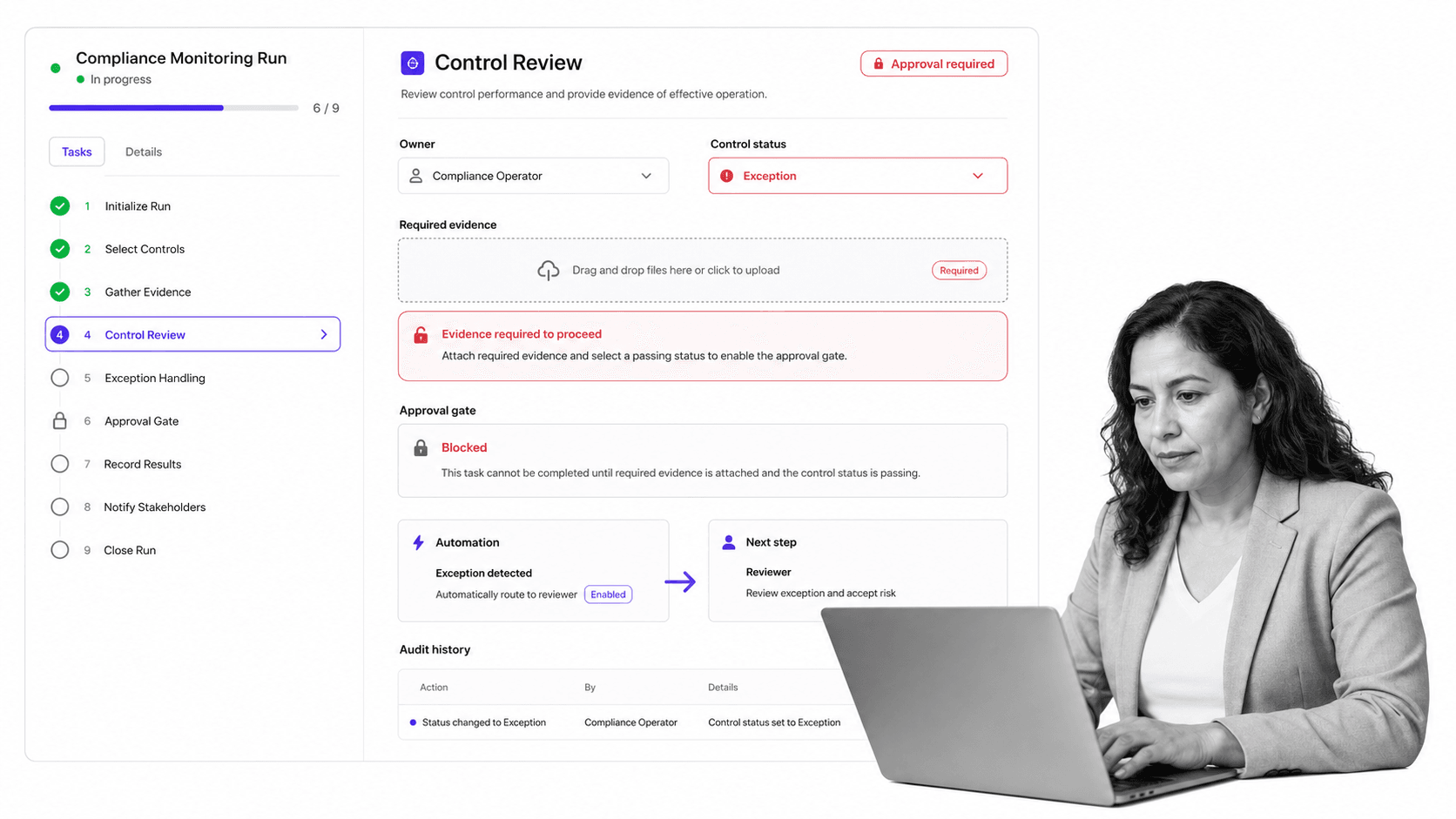
Process Street gives compliance teams an execution layer for monitoring. Controls do not sit in a static register while work happens elsewhere. They become recurring workflows with owners, due dates, required fields, evidence, approvals, automations, and audit history.
Monitor controls through workflows
A control review can launch on a schedule, assign the right owner, request evidence, require a reviewer, and block completion until the required fields are complete. That turns monitoring into a repeatable process rather than a status meeting.
Route exceptions automatically
If evidence is missing, a review fails, or an owner marks a control as blocked, Process Street can route the workflow through an exception path. The system captures what happened and keeps the decision attached to the work.
Use AI and integrations inside the process
Process Street has direct, universal integrations to 5,000+ systems. Need a new one? An AI agent builds it on the fly. That means compliance monitoring can connect to tools where evidence, tickets, customer requests, policies, and reports already live while Process Street enforces the workflow.
Keep compliance proof current
Approvals, comments, field values, files, automations, and task history remain attached to the workflow run. This is why Process Street fits naturally beside compliance automation software and GRC tools: it provides the controlled execution layer that proves the work happened.
Support a digital compliance officer model
Teams moving toward continuous monitoring often need a system that can flag drift, route work, and suggest improvements. That operating model is close to the digital compliance officer pattern: monitor the work, identify risk, and turn compliance signals into action.
How to roll out compliance monitoring software
Roll out compliance monitoring software in focused layers. Do not start by trying to digitize every obligation. Start where missed work creates the most risk and where evidence is hardest to reconstruct.
Start with one control family
Pick a control family with clear owners and recurring evidence. Access reviews, vendor reviews, policy attestations, training acknowledgments, incident follow-up, quality checks, or audit prep are good starting points. The first goal is to prove the monitoring loop works.
Define the minimum evidence standard
For each control, define what evidence is enough. A file, a reviewer signoff, a system export, a field value, or a linked record may be required. Do not ask reviewers to interpret vague proof after the fact.
Make exceptions visible
Design the exception path before launch. If evidence is missing, a control fails, or an owner misses a deadline, the workflow should show who owns the fix and what decision is needed.
Review the monitoring data every cycle
Use each monitoring cycle to improve the system. Which controls fail most often? Which owners need clearer instructions? Which evidence requirements are ambiguous? Which policies need updates? Compliance monitoring software should help the process improve as the team uses it.
Separate signal from noise
Too many alerts train teams to ignore the system. Start with the monitoring signals that matter most: missed evidence, overdue reviews, failed controls, blocked approvals, and recurring exceptions. Low-risk reminders can stay visible without interrupting high-priority remediation work.
Keep ownership current
A compliance monitor is only as reliable as its owner map. Review control ownership after team changes, system changes, audits, incidents, reorganizations, and new framework adoption. When ownership changes, update the workflow before the next monitoring cycle starts.
For organizations building a larger compliance operating model, monitoring pairs well with recurring internal audits, policy governance, control testing, and operational reviews. The goal is simple: enforce policy, track steps, and prove compliance without waiting for audit day.
FAQs
What is compliance monitoring software?
Compliance monitoring software tracks whether controls, policies, obligations, reviews, and evidence requirements are being followed. It helps teams detect exceptions, assign owners, collect proof, approve remediation, and maintain audit history.
What does compliance monitoring software track?
It typically tracks controls, owners, schedules, required evidence, review status, exceptions, approvals, remediation actions, comments, files, and audit history. The best systems tie those items to live workflows rather than static reports.
How is compliance monitoring software different from GRC software?
GRC software is a broader category for governance, risk, and compliance management. Compliance monitoring software focuses on the active monitoring layer: whether controls are current, evidence is complete, exceptions are handled, and compliance work is being executed.
What features should compliance monitoring software include?
Look for recurring workflows, control ownership, required evidence fields, approvals, exception routing, audit trails, integrations, reporting, and configurable review paths. The system should enforce work, not only summarize it.
How does Process Street support compliance monitoring software?
Process Street supports compliance monitoring by turning controls into recurring workflows with owners, required fields, evidence collection, approvals, automations, and audit history. Teams can monitor control health while the work is happening.
Who needs compliance monitoring software?
Compliance, risk, audit, quality, security, finance, HR, and operations teams need compliance monitoring software when missed steps create legal, regulatory, customer, security, or quality risk. It is especially useful for teams managing recurring controls across many owners.
