


Turn every policy into automated workflows with built-in enforcement and audit-ready proof.



The 6 Best Construction Project Management Software Tools
Construction project management software is the system a builder uses to plan a job, coordinate the field and the office, control budgets and documents, and prove the work was done to standard. It pulls schedules, RFIs, submittals, drawings, daily logs, safety checks, and approvals into one place so a project does not live in email threads, spreadsheets, and a stack of paper in a truck.
The right platform depends on what you build. A commercial general contractor running multi-year jobs needs deep financials and document control. A residential builder needs scheduling and a clean way to talk to homeowners. A growing specialty contractor needs estimating and job costing without an enterprise price tag. And every one of them needs the repeatable processes around the build, onboarding a subcontractor, running a safety inspection, closing out a punch list, to happen the same way every time.
This guide breaks down six of the best tools, what each one is built for, and where it fits. It also covers what the category actually does, the features that matter, and how to choose without buying more software than your team will use.
In this article, we cover:
- The 6 Best Construction Project Management Software Tools
- What Is Construction Project Management Software?
- Key Features to Look for in Construction Project Management Software
- How to Choose the Right Construction Software for Your Team
- Benefits of Construction Project Management Software
- FAQs
The 6 Best Construction Project Management Software Tools
There is no single best tool for every contractor. The picks below are grouped by the job they do best: enterprise project controls, design and BIM coordination, residential building, all-in-one for smaller contractors, field-first execution, and the process layer that keeps your standards consistent across all of it. Each section explains what the tool is strong at and the kind of team it suits, so you can match the software to how you actually work.
1. Process Street

Process Street is an AI-powered workflow and process management platform. It is not a construction ERP, and that is the point: it sits on top of whatever field and financial tools you run and makes sure the repeatable processes around a build happen correctly every time. Subcontractor onboarding, site safety inspections, quality control checklists, RFI intake, document approvals, and project closeout become structured workflows instead of tribal knowledge.
Each workflow runs as a checklist with assignments, due dates, and conditional logic, so a step only appears when it is relevant. If an inspector flags a hazard, the workflow can reveal a corrective action task and route it for approval automatically. Nothing advances until the required step is complete, which is how you stop skipped steps before they become rework or a safety finding. Every run leaves a timestamped record, so when an owner, auditor, or insurer asks for proof, it is already there.
The AI layer adds real leverage. You can generate a workflow from an existing SOP, a screen recording, or a messy document, and the platform keeps procedures current as your standards change. For construction teams that win work on safety records and quality, Process Street turns those standards into something you execute by default, not something that lives in a binder. It connects to thousands of systems, so approvals, e-signatures, and record updates flow through to the tools you already use.
Best for: construction and operations teams that want to standardize and enforce the repeatable processes around the build, with auditable proof. Start with a construction process template or build a standard operating procedure and expand from there.
2. Procore

Procore is one of the most widely used platforms for commercial general contractors and owners running large, complex projects. Its strength is breadth: project financials, RFIs, submittals, drawings, change orders, and quality and safety all live under one project, with a deep budget view that tracks original, revised, and projected costs against actuals.
For teams managing million-dollar budgets and dozens of subcontractors, that consolidation is the value. RFIs and submittals carry clear statuses, drawings stay versioned, and financial data ties back to the schedule. Procore also has a large marketplace of integrations, which matters when accounting, estimating, and field tools all need to talk to each other.
The trade-off is cost and complexity. Procore is priced for established commercial builders and rewards teams willing to invest in setup and adoption. Smaller contractors often find it more platform than they need. Where it shines is enterprise project controls, where the cost of a missed change order or a lost RFI dwarfs the price of the software.
Best for: commercial general contractors and owners who need enterprise-grade financials, document control, and RFI management. Learn more on the Procore website.
3. Autodesk Construction Cloud
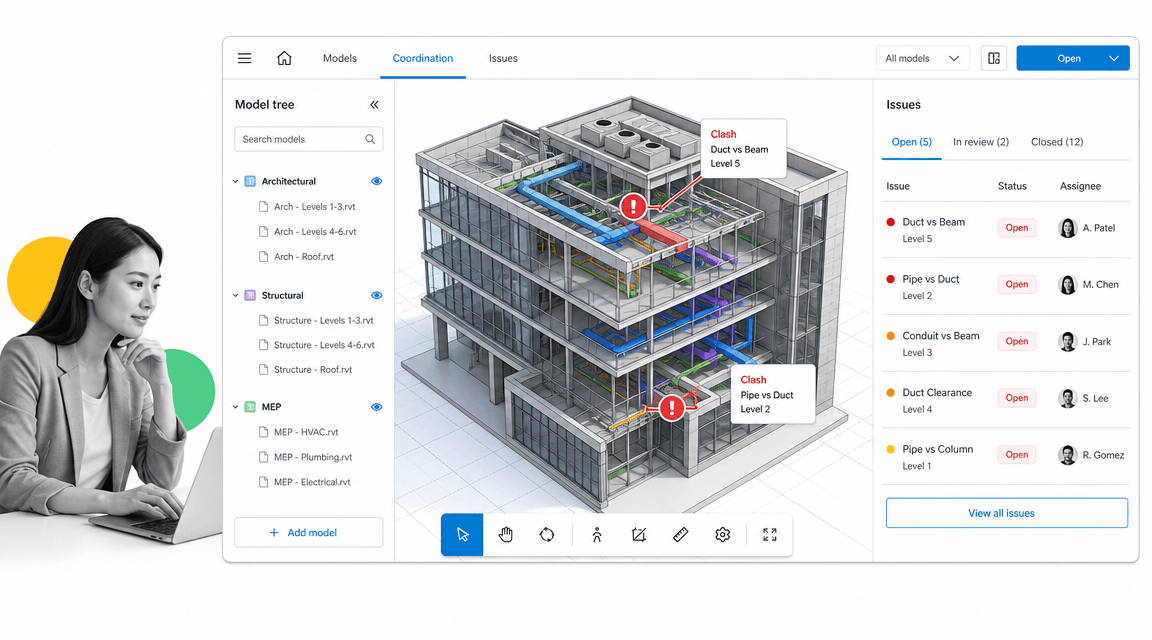
Autodesk Construction Cloud connects design to the build. If your projects rely on BIM, it brings the 3D model into the field with model coordination, clash detection, and document management, so the architectural, structural, and mechanical disciplines are reconciled before crews ever pour concrete.
Because it shares a backbone with Autodesk design tools like Revit and AutoCAD, the model and the documents stay in sync as drawings change. Clash issues are tracked with owners and statuses, so coordination problems are resolved on screen instead of in the field at ten times the cost. In early 2026 Autodesk folded its construction tools more tightly into a single cloud spanning planning, design, execution, and operations.
The platform is at its best for design-led and technically complex work, where catching a clash early saves real money. Teams that do not work in BIM may not use its deepest features, but for anyone coordinating models across disciplines, it is hard to beat.
Best for: design-driven and BIM-heavy projects that need model coordination and clash detection. See the Autodesk Construction Cloud site.
4. Buildertrend
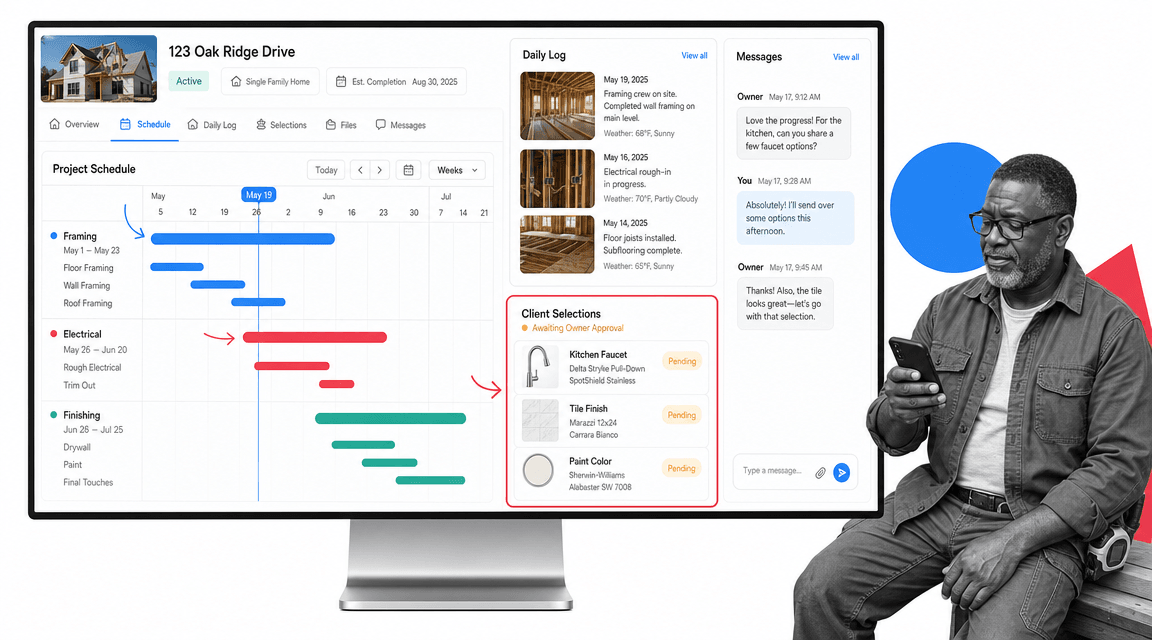
Buildertrend is built for residential construction: custom home builders, remodelers, and specialty contractors who work closely with homeowners. It pairs project scheduling with the two things residential jobs live or die on, client communication and selections.
The schedule lays out framing, electrical, finishing, and every other phase on a clear timeline. Daily logs capture site photos and progress, and a client portal lets homeowners approve selections, view updates, and message the builder without a flurry of texts. That visibility reduces the disputes that eat margin on residential work, where a misunderstanding about a finish can cost a relationship and a referral.
Buildertrend also handles estimates, change orders, and invoicing, so the money side stays connected to the schedule. It is less suited to heavy commercial financials, but for builders whose customer is the person who will live in the house, the client-facing tools are a genuine differentiator.
Best for: residential builders and remodelers who need scheduling plus strong client communication and selections. Visit the Buildertrend website.
5. Contractor Foreman

Contractor Foreman targets small and midsize contractors who want an all-in-one tool without an enterprise budget. It packs estimating, job costing, scheduling, time tracking, and field management into one affordable platform, which is why it is often rated a strong value pick for growing crews.
The job dashboard ties an estimate to actual costs, so a contractor can see whether a job is making money before it is finished, not after. Scheduling, crew time cards, and daily logs keep the field connected to the office, and the breadth of features means a smaller business can replace several point tools with one subscription.
It will not match the depth of an enterprise platform on the largest commercial jobs, but that is not who it is for. For a contractor moving off spreadsheets who needs estimating and job costing that a non-technical team can run, it hits a practical sweet spot on price and capability.
Best for: small and midsize contractors who want affordable all-in-one estimating, job costing, and scheduling. Details on the Contractor Foreman website.
6. Fieldwire
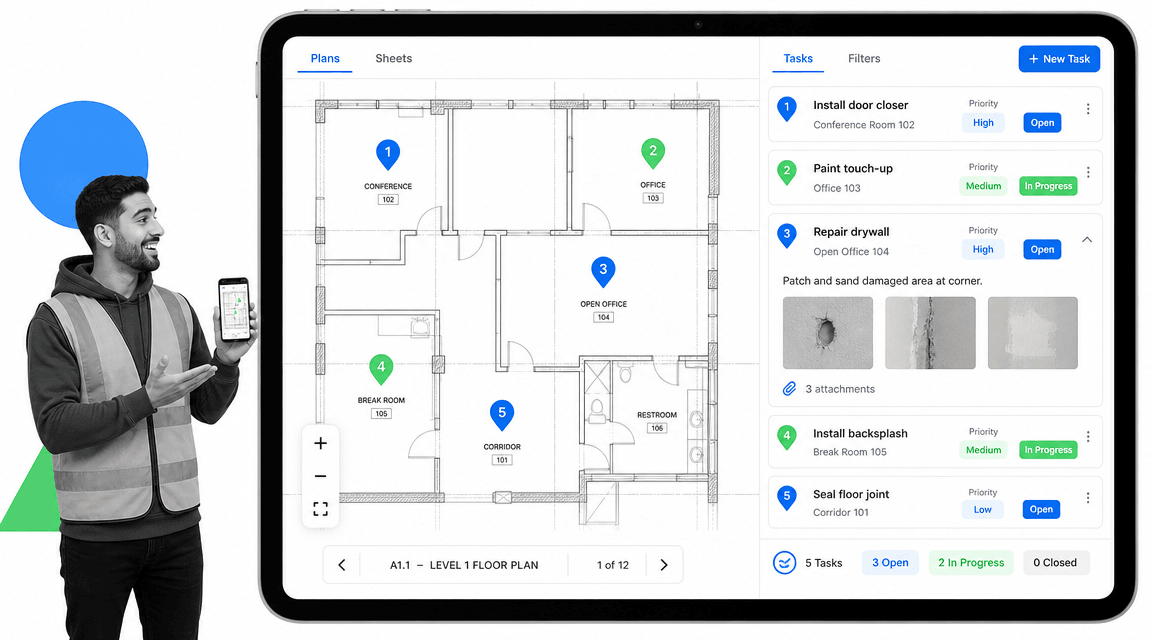
Fieldwire is field-first. It is built for the people on site, foremen, field engineers, and trade crews, who need plans, tasks, and punch lists in their hands rather than back at a desk. The plan viewer puts the current drawing on a phone or tablet, with task pins placed directly on the sheet so everyone knows exactly where work or a defect is.
Tasks carry priorities, assignees, and photo attachments, and punch lists run cleanly through closeout. Because the latest sheet syncs to the field, crews stop building from outdated drawings, one of the most expensive mistakes on any job. It works well alongside heavier office platforms, handling the on-site execution while the back office runs financials elsewhere.
For teams whose biggest gap is the distance between the trailer and the work face, Fieldwire is a focused, fast tool that crews will actually open. It is lighter on financials and reporting, so larger organizations typically pair it with a broader system.
Best for: field teams that need mobile plan viewing, task pins on drawings, and punch lists on site. See the Fieldwire website.
What Is Construction Project Management Software?
Construction project management software is a platform that helps builders plan, coordinate, and control a construction project from preconstruction through closeout. It centralizes the moving parts of a job, schedule, budget, documents, field activity, and communication, so the office and the field work from the same source of truth instead of fragmented spreadsheets, email, and paper.
In practice, the category spans a few overlapping jobs. Some tools focus on project controls and financials. Some focus on design and model coordination. Some focus on the field. And some focus on the repeatable processes and compliance that wrap around the whole thing. Most contractors end up running more than one, with a clear primary system and supporting tools for the gaps.
Who uses it
General contractors use it to coordinate subcontractors, budgets, and schedules. Owners and developers use it for visibility across a portfolio of projects. Specialty and trade contractors use it to manage their own scope, crews, and costs. Project managers, superintendents, estimators, and safety and quality leads all touch it daily, which is why ease of use and mobile access matter as much as raw feature depth.
What it replaces
Before dedicated software, construction ran on spreadsheets for budgets, email for RFIs, shared drives for drawings, and memory for process. The risk is obvious: a superseded drawing reaches the field, a change order slips, a safety step gets skipped, and proof is impossible to assemble after the fact. Good software replaces that patchwork with structured records, version control, and an audit trail. A workflow approach to recurring tasks is what keeps the process consistent once the data is centralized.
Key Features to Look for in Construction Project Management Software
Feature lists get long fast. These are the capabilities that separate a tool your team relies on from one that becomes shelfware.
- Scheduling. A clear timeline of phases and dependencies, ideally with critical-path visibility, so a slip in one trade shows its impact downstream.
- Budget and cost control. Original, revised, and projected costs tracked against actuals, with change orders tied to the budget.
- Document and drawing control. Versioned drawings, specs, and submittals so the field always builds from the current set.
- RFIs and submittals. Tracked requests and approvals with clear status and ownership, not buried in email.
- Field and mobile access. Daily logs, photos, and task updates from a phone, because the work happens on site.
- Quality and safety. Inspection checklists, punch lists, and incident records that create proof, not just paperwork. A reliable quality control checklist belongs here.
- Repeatable process and compliance. The recurring procedures, onboarding a subcontractor, running a safety walk, closing a punch list, executed the same way every time with an audit trail.
- Integrations. Connections to accounting, estimating, and field tools so data does not get rekeyed between systems.
No single product is the deepest at all of these. The honest goal is to cover the features that map to your biggest risks, then fill the gaps with focused tools. Teams that also manage facilities or assets often layer in maintenance management software and a quality management system as the operation matures.
How to Choose the Right Construction Software for Your Team
The best choice is the one your team will actually use on every job. Work through a short set of questions before you commit.
- What do you build? Commercial, residential, and specialty work have different needs. Match the tool to your project type, not to the longest feature list.
- Where does work fall apart today? Lost RFIs, blown budgets, outdated drawings, skipped safety steps. Buy for your biggest failure point first.
- Who has to use it? If superintendents and crews will not open it on a phone, adoption fails. Test the mobile experience with real field users.
- How does it fit your stack? Check integrations with your accounting and estimating tools so you are not rekeying data.
- Can you prove compliance? Look for built-in records and approvals, so an audit or insurance request is answered from the system, not reconstructed by hand.
- What does it really cost? Weigh setup, training, and per-seat pricing against the cost of the problems it removes.
Many contractors land on a primary platform for financials or the field, then add a process layer to keep standards consistent across crews and jobs. If you are still comparing the broader category, a roundup of project management tools and a list of free project management tools are useful for sizing options. Teams managing vendors and trades at scale also benefit from dedicated contractor management software.
Benefits of Construction Project Management Software
Done right, construction project management software pays for itself by removing the costly gaps between planning and execution. The benefits compound across every project.
- Fewer costly mistakes. Current drawings, tracked RFIs, and enforced steps mean less rework, fewer disputes, and fewer safety findings.
- Better cost control. Real-time budget visibility catches overruns while you can still act on them.
- Tighter coordination. The office and the field share one source of truth, so handoffs stop falling through the cracks.
- Audit-ready proof. Timestamped records and approvals turn compliance from a fire drill into a byproduct of doing the work.
- Consistency at scale. The same process runs the same way whether it is one crew or twenty, which is how growing builders protect quality. Strong workflow management software is what makes that repeatability stick.
- Faster onboarding. New hires and new subcontractors follow a defined path instead of learning by trial and error. The same discipline helps adjacent operations like commercial property management.
The throughline is simple: software that only stores information is a filing cabinet. Software that runs the process, enforces the standard, and proves it happened is what actually moves a project from planned to built.
FAQs
What is construction project management software?
Construction project management software is a platform that helps builders plan, coordinate, and control a project from preconstruction through closeout. It centralizes scheduling, budgets, documents, field activity, and communication so the office and the field work from one source of truth instead of scattered spreadsheets, email, and paper.
What is the best construction project management software?
There is no single best tool for every contractor. Procore suits enterprise commercial work, Autodesk Construction Cloud suits BIM-heavy design coordination, Buildertrend suits residential builders, Contractor Foreman suits smaller all-in-one needs, and Fieldwire suits field execution. Process Street is the best fit when you need to standardize and enforce the repeatable processes and compliance around the build.
How much does construction project management software cost?
Pricing ranges widely. All-in-one tools for smaller contractors can start at modest monthly per-user rates, while enterprise platforms are quoted based on project volume and modules and are priced for established commercial builders. Weigh setup, training, and per-seat costs against the cost of the problems the software removes, such as rework, lost RFIs, and budget overruns.
Do small contractors need construction project management software?
Yes. Small and midsize contractors benefit as much as large ones, often more, because a single blown budget or skipped step hurts a small business harder. Affordable all-in-one tools and a lightweight process layer let a small team standardize estimating, scheduling, and compliance without an enterprise budget or a dedicated IT department.
Can construction project management software help with compliance and safety?
It can, when the process is built in rather than bolted on. Inspection checklists, enforced steps, approvals, and timestamped records turn safety and quality into something you execute by default and can prove on demand. That makes responding to an owner, auditor, or insurer a matter of pulling the record, not reconstructing it after the fact.
Do you need more than one construction software tool?
Most contractors run more than one. A common pattern is a primary platform for financials or the field, a model tool for BIM coordination, and a process layer that keeps standards consistent across crews and jobs. The goal is to cover your biggest risks with focused tools that integrate, rather than forcing one system to do everything.
