


Turn every policy into automated workflows with built-in enforcement and audit-ready proof.



Maintenance Management Software
 Maintenance management software pump inspection – Process Street” class=”wp-image-98808″/>
Maintenance management software helps teams plan, assign, track, and prove maintenance work across equipment, facilities, vehicles, parts, inspections, and recurring preventive schedules.
The category overlaps with CMMS software, but the practical job is broader than storing work orders. A useful system connects the asset, the work, the technician, the evidence, the approval, and the history in one repeatable process.
This guide explains what maintenance management software does, how it compares with CMMS and EAM tools, which features matter, and how to implement a system without turning the maintenance team into data-entry clerks.
In this article, we are going to cover:
- What maintenance management software is
- What maintenance management software does
- Benefits of maintenance management software
- Maintenance management software versus CMMS and EAM
- How to implement maintenance management software
- Maintenance management in Process Street
- How to choose maintenance management software
- FAQs
What maintenance management software is
Maintenance management software is a digital system for organizing maintenance work. It replaces scattered paper forms, whiteboards, spreadsheets, emails, and tribal memory with structured workflows that show what needs to be done, who owns it, when it is due, and what proof was collected.
The software is especially valuable when maintenance work repeats across many assets, sites, teams, or shifts. A single missed inspection may look small in isolation, but repeated misses create downtime, safety exposure, warranty gaps, and expensive emergency repairs.
A basic maintenance process might start with a work request, route to a technician, pull up the asset record, require inspection notes, check spare parts, request approval for a repair, and close with evidence. Without software, those steps often live in separate places. With the right system, the workflow creates the operating record as the work happens.
Maintenance work has too many moving parts for memory
Maintenance teams manage physical assets, safety obligations, production schedules, vendors, warranties, spare parts, inspections, downtime risk, and urgent repairs. The work is practical, but the coordination problem is complex.
That is why maintenance software sits close to maintenance management and the broader asset management process. The software is not just a ticket queue. It is the control layer for work that affects equipment reliability, safety, cost, and continuity.
The goal is planned, provable work
The strongest maintenance systems move teams away from reactive work. They make preventive maintenance visible, route exceptions quickly, and preserve enough history to understand which assets fail often, which repairs repeat, and which handoffs slow the team down.
Proof matters because maintenance is often tied to safety, warranty coverage, customer commitments, quality programs, insurance, and regulatory obligations. A completed checklist, inspection photo, approval, or parts record should not live in a private message. It should live with the workflow.
What maintenance management software does
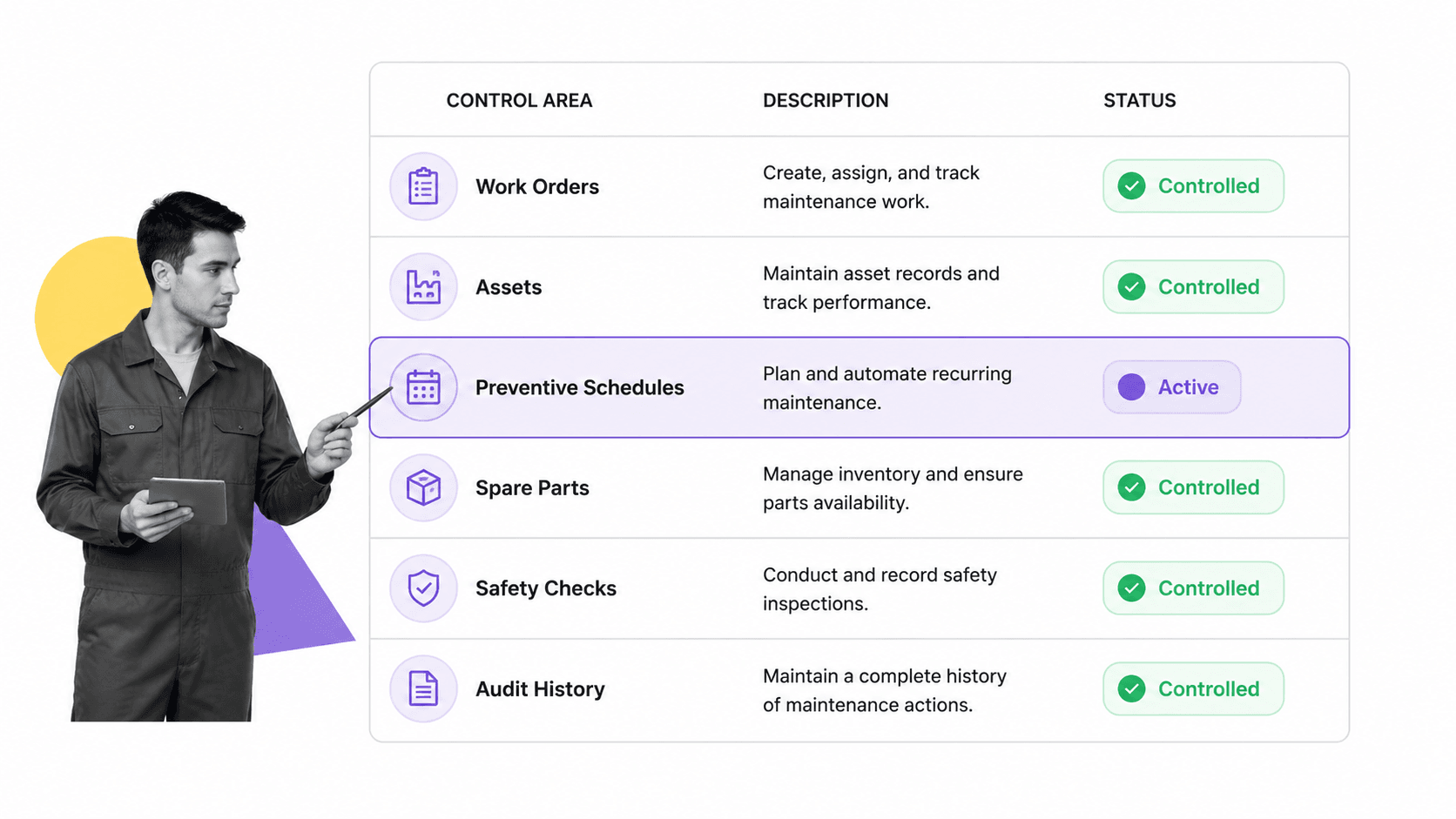
Maintenance management software coordinates the daily maintenance loop: requests, triage, scheduling, assignment, execution, review, inventory, reporting, and improvement. The exact feature set depends on the environment, but most teams need the same core capabilities.
Work order management
Work orders turn requests and scheduled tasks into assigned work. A good work order includes the asset, priority, due date, location, instructions, parts, safety notes, required evidence, and closure criteria.
This is where many systems succeed or fail. If technicians cannot find the right task quickly, add notes from the field, attach evidence, and close work without extra admin, adoption suffers. The workflow has to fit the pace of real maintenance work.
Asset records and maintenance history
Asset records connect work to the thing being maintained. They can include serial numbers, manuals, warranties, meters, location, criticality, inspection history, repair costs, and prior failures. That history helps managers decide whether to repair, replace, change the preventive schedule, or adjust inventory.
The Limble CMMS guide describes CMMS software as a way to centralize maintenance information for tasks, work orders, and schedules. That centralized record is what makes maintenance decisions less dependent on memory.
Preventive maintenance schedules
Preventive maintenance is the recurring work that prevents avoidable failures. The software should support calendar-based schedules, meter-based triggers, inspection checklists, recurring assignments, and exception routing when a technician finds a problem.
Teams often start by adapting a preventive maintenance checklist template, an equipment maintenance log template, or a facility maintenance checklist template before moving into a fully connected software workflow.
The schedule should also be easy to audit. A manager should be able to see which preventive tasks were completed, which were skipped, which failed, and which generated follow-up work. That record turns the schedule from a calendar reminder into an operating control.
Parts and inventory control
Maintenance work stalls when a technician reaches the asset and the part is missing. Inventory features help teams track spare parts, reorder points, usage history, and vendor details. They also reduce the hidden cost of emergency orders and duplicate stock.
Reporting and audit history
Reporting should answer practical questions: what work is overdue, which assets fail most often, which technicians are overloaded, which parts are consumed fastest, and which preventive schedules are preventing breakdowns. Audit history should show who completed each step, what evidence was attached, and who approved the closure.
Benefits of maintenance management software
The value of maintenance management software is not the software itself. The value is fewer missed tasks, cleaner handoffs, less downtime, better evidence, and more predictable work.
Less reactive maintenance
Reactive maintenance will always exist. Equipment breaks, weather changes, customers escalate, and parts fail. The point is to reduce preventable emergencies by making recurring maintenance visible and enforceable.
When recurring tasks have owners, schedules, evidence requirements, and escalation paths, maintenance managers can see risk before it becomes downtime. The team can act on overdue work rather than discovering the problem after the asset fails.
Better safety and compliance
Maintenance often touches safety controls, machine guarding, lockout procedures, vehicle inspections, fire equipment, and environmental systems. The software should help the team complete required checks and preserve the evidence.
OSHA machine maintenance guidance reinforces the importance of proper machine maintenance practices. In software terms, that means the checklist, evidence, approval, and history need to be built into the maintenance workflow, not added later.
Cleaner communication across teams
Maintenance work rarely stays inside one team. Operations, facilities, procurement, finance, quality, safety, vendors, and leadership all need different pieces of the same record. Software reduces the number of status meetings because the workflow shows the current state.
Related Process Street resources on inspection checklists, safety inspection, and fire extinguisher inspection show how structured checklists turn inspection work into repeatable evidence.
This shared record also reduces blame. When the workflow shows the request, assignment, waiting part, approval state, and closure evidence, teams can fix the bottleneck instead of debating who last touched the issue.
A stronger improvement loop
A maintenance workflow creates data as a byproduct. Over time, that record shows repeat failures, late inspections, common parts issues, and bottlenecks. Managers can improve the maintenance program based on actual work history instead of anecdotes.
Maintenance management software versus CMMS and EAM
Maintenance management software, CMMS software, and EAM software are closely related. Vendors and buyers use the terms differently, so the best approach is to compare the operating job instead of arguing over labels.
CMMS focuses on maintenance operations
CMMS means computerized maintenance management system. CMMS tools usually focus on work orders, preventive maintenance, asset records, inventory, schedules, and maintenance reports.
The TMA Systems CMMS guide frames a CMMS as software for streamlining maintenance operations, including asset records, maintenance schedules, inventory, and assignments. That is the classic center of the category.
EAM covers the asset lifecycle
EAM means enterprise asset management. EAM platforms often go beyond maintenance execution into planning, procurement, lifecycle cost, reliability programs, contracts, and enterprise asset strategy.
IBM Maximo Application Suite is an example of the EAM end of the market: asset and facilities lifecycle management for critical equipment and infrastructure.
Maintenance management software is the practical umbrella
For many teams, maintenance management software is the everyday umbrella term. It may be a CMMS, an EAM module, a facilities platform, or a workflow system tailored to maintenance operations. What matters is whether it supports the maintenance process with enough structure, mobility, evidence, and integrations.
A facilities team may need simple recurring inspections and work requests. A manufacturer may need parts control, production downtime tracking, and safety gates. A fleet team may need mileage-based triggers and vehicle inspection records. The name matters less than the workflow fit.
How to implement maintenance management software
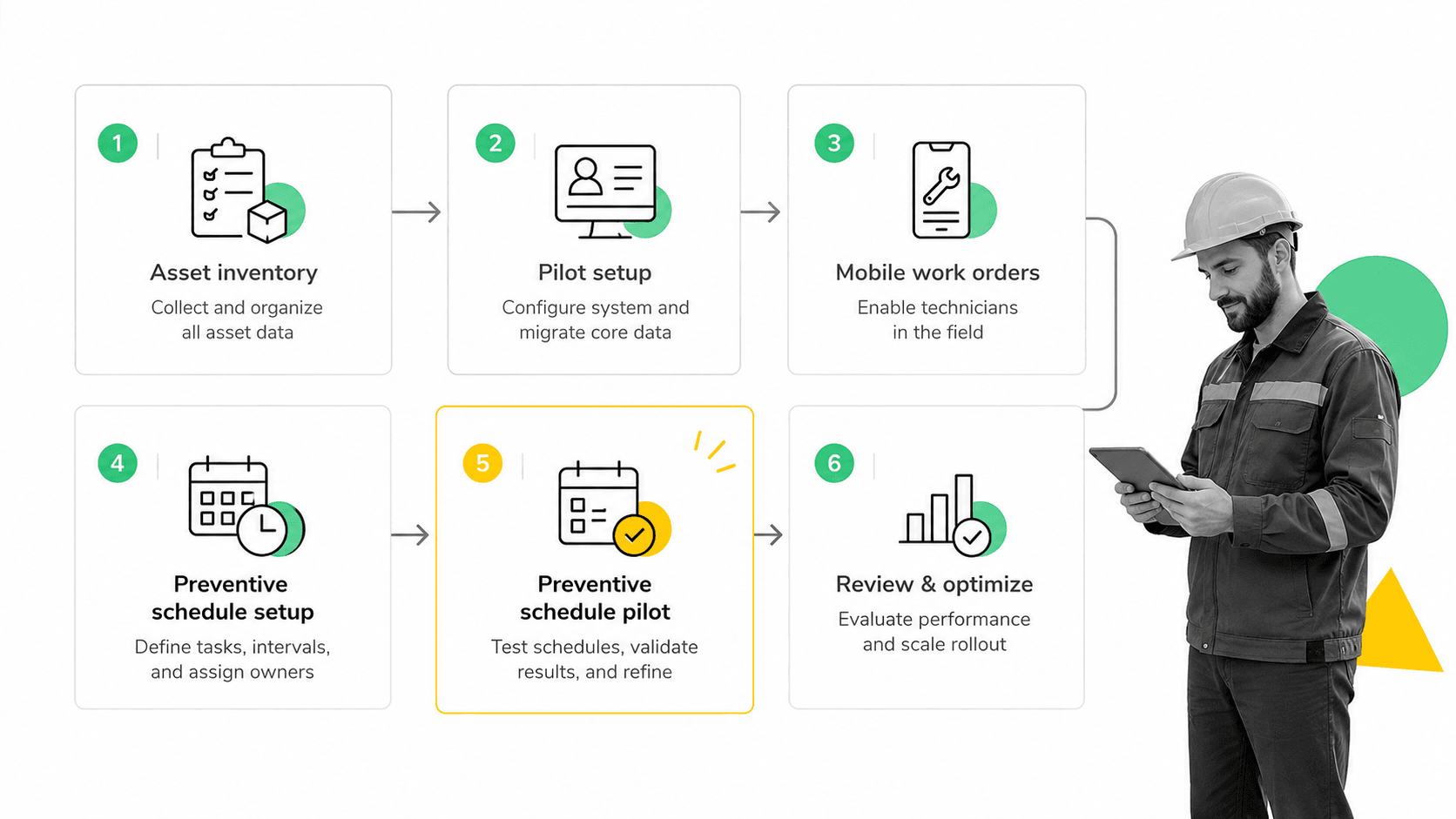
Implementation should start with one maintenance process that is painful enough to matter and contained enough to fix. Do not begin by trying to model every asset, every part, and every facility on day one.
Step 1: Choose the first maintenance workflow
Pick a recurring workflow where missed steps create visible cost or risk. Good candidates include preventive inspections, equipment startup checks, fire extinguisher inspections, vehicle maintenance, work requests, vendor repairs, or safety-critical asset reviews.
Step 2: Clean the asset and task data
Maintenance software is only as useful as the data behind it. Start with the assets, locations, recurring tasks, owners, priorities, and required evidence for the first workflow. Keep the first data model simple enough that the team can maintain it.
Use strong process documentation and business process documentation habits here. If the process is unclear before implementation, the software will expose that confusion.
Step 3: Build required fields and exception paths
Required fields should capture the minimum evidence needed to close the work. Exception paths should route issues such as failed inspection, missing part, unsafe condition, or supervisor approval. Features like conditional logic and approvals help keep the workflow focused without hiding control steps.
Step 4: Pilot with the people doing the work
Technicians and supervisors should test the workflow before rollout. Watch for friction: too many fields, unclear instructions, missing asset details, weak mobile access, confusing priority rules, or closure steps that do not match real work.
Step 5: Review the first month of data
After the pilot, review overdue tasks, rejected closures, repeated exceptions, missing evidence, late approvals, and downtime patterns. Improve the workflow before expanding to more assets or facilities. A clean pilot is more valuable than a broad rollout that nobody trusts.
Use the review to remove friction as well as add control. If a field is never used, remove it. If a task is always late because the owner is wrong, change the owner. If every failed inspection creates the same manual follow-up, turn that follow-up into the next workflow step.
Maintenance management in Process Street

Process Street can support maintenance management by turning checklists, inspections, approvals, evidence collection, and recurring schedules into executable workflows.
Process Street is not trying to be a heavy EAM database for every asset lifecycle use case. It is strongest when maintenance teams need controlled workflows that people actually complete: inspections, work requests, preventive tasks, safety checks, approvals, vendor handoffs, and audit-ready evidence.
Run maintenance checklists as workflows
A maintenance workflow can include task instructions, required inspection fields, photo evidence, conditional branches, supervisor approvals, and automatic follow-up. Each workflow run becomes a record of what happened.
Keep proof inside the work
When the workflow asks for evidence at the moment of execution, teams do not need to reconstruct proof later. The record can show the asset, checklist, technician notes, attached files, approval state, and activity history.
This is useful for facilities, safety, quality, compliance, and operations teams that need more than a completed checkbox. They need confidence that the right work happened in the right sequence with the right review.
Connect maintenance work to the rest of operations
Process Street has direct, universal integrations to 5,000+ systems. Need a new one? An AI agent builds it on the fly. That makes it possible to connect maintenance workflows to forms, documents, CRMs, ticketing tools, spreadsheets, and systems of record without making integrations the main project.
How to choose maintenance management software
Choose maintenance management software by matching the system to the way maintenance work actually happens. A long feature list is less important than adoption, workflow fit, evidence quality, and the ability to improve after launch.
Mobile usability
Technicians often work away from a desk. Mobile access should make it easy to see assigned work, open asset details, add notes, attach photos, and close tasks. If mobile use is slow or cluttered, people will fall back to paper and messages.
Workflow flexibility
The software should support different paths for routine work, failed inspections, missing parts, urgent repairs, and supervisor approvals. The more varied the asset environment, the more important this flexibility becomes.
Data and reporting quality
Reporting should help leaders make decisions: which assets cause the most downtime, which preventive tasks are overdue, which parts are consumed fastest, which sites need support, and which work orders are stuck. Pretty dashboards do not matter if the underlying workflow data is incomplete.
Ask vendors to show reports from the same workflow a technician would run in the field. If the report depends on fields that technicians will not realistically complete, the insight will decay after launch.
AI readiness and governance
AI can help summarize work orders, detect repeated failures, suggest preventive tasks, and flag risk. But AI needs reliable process data and clear guardrails. The NIST AI Risk Management Framework is a useful reference when AI begins influencing maintenance decisions.
Implementation cost and ownership
The best system is one the team can own. If every change requires a technical project, maintenance workflows will drift from reality. If every user can change controlled steps without review, the system loses trust. Look for a balance: flexible workflow ownership with enough governance to keep critical maintenance work reliable.
FAQs
What is maintenance management software?
Maintenance management software is a system for planning, assigning, tracking, and proving maintenance work. It helps teams manage work orders, preventive maintenance schedules, assets, spare parts, inspections, approvals, and maintenance history.
Is maintenance management software the same as CMMS software?
Maintenance management software and CMMS software often overlap. CMMS usually refers to work orders, preventive maintenance, asset records, inventory, and maintenance reporting, while maintenance management software can also describe workflow systems or broader EAM tools used to run maintenance work.
What features should maintenance management software include?
Core features include work order management, asset records, preventive maintenance schedules, mobile access, spare parts tracking, required fields, approvals, notifications, reporting, and audit history. High-stakes teams should also look for evidence capture and controlled exception paths.
How does maintenance management software improve preventive maintenance?
It makes recurring maintenance visible, assigned, and trackable. Teams can schedule inspections, require evidence, route failed checks to supervisors, monitor overdue work, and use history to adjust schedules before failures become downtime.
How should teams implement maintenance management software?
Start with one high-friction maintenance workflow, clean the asset and task data, build required fields and exception paths, pilot with technicians, then review the first month of completion data before expanding.
Can Process Street be used for maintenance management?
Yes. Process Street can run maintenance checklists, inspections, approvals, evidence collection, recurring schedules, vendor handoffs, and audit-ready workflows. It is best for teams that need controlled maintenance processes and proof of completion.
