


Turn every policy into automated workflows with built-in enforcement and audit-ready proof.



Creative Workflow Management Software
Creative workflow management software gives creative teams one controlled way to receive requests, build briefs, review drafts, approve assets, and hand off final work. It replaces scattered messages, disconnected project boards, and approval guesswork with a repeatable operating system for creative production.
The goal is not to make creative work rigid. The goal is to protect the creative process from the operational noise around it: unclear briefs, missing stakeholders, vague feedback, late approvals, lost files, and nobody knowing which version is final.
This guide explains what the software should control, where creative workflows usually break, which features matter, and how to roll out a system that keeps creative work moving without burying the team in admin.
In this article, we are going to cover:
- What is creative workflow management software?
- What creative workflow management software controls
- Where creative workflows break down
- Features to look for in creative workflow management software
- How to choose creative workflow management software
- How Process Street supports creative workflow management software
- Implementation plan for creative teams
- Creative workflow management software mistakes to avoid
- FAQs
What is creative workflow management software?
Creative workflow management software is a platform for managing the repeatable path from creative request to finished asset. It defines how work enters the team, how briefs are built, how drafts are reviewed, how approvals happen, and how final files move to the next team. The strongest systems combine workflow management system structure with creative-specific review and approval discipline.
Airtable describes creative workflow management as a way to manage creative projects from concept through completion, including request capture, team handoffs, approvals, and delivery. That same pattern appears across broader workflow guidance from Airtable, Wrike, and ShareFile: creative work needs structure because production is iterative, subjective, and deadline-sensitive.
General project management software can track tasks, but creative workflow management software has to control more than task status. It needs intake forms, brief fields, review rounds, approvals, file handoffs, ownership, and proof that the right stakeholders signed off before the work moved forward.
That distinction matters. A campaign launch, website redesign, video project, or sales asset may touch creative, marketing, legal, brand, product, and revenue teams. If the workflow is only a chat thread or a broad task board, the team can still lose context even when every individual task appears assigned. A strong workflow management software layer keeps the process itself visible.
What creative workflow management software controls
Creative workflows have a predictable spine. The details vary by team, but most production paths include request intake, brief development, resource planning, draft creation, review, approval, asset handoff, and archive.
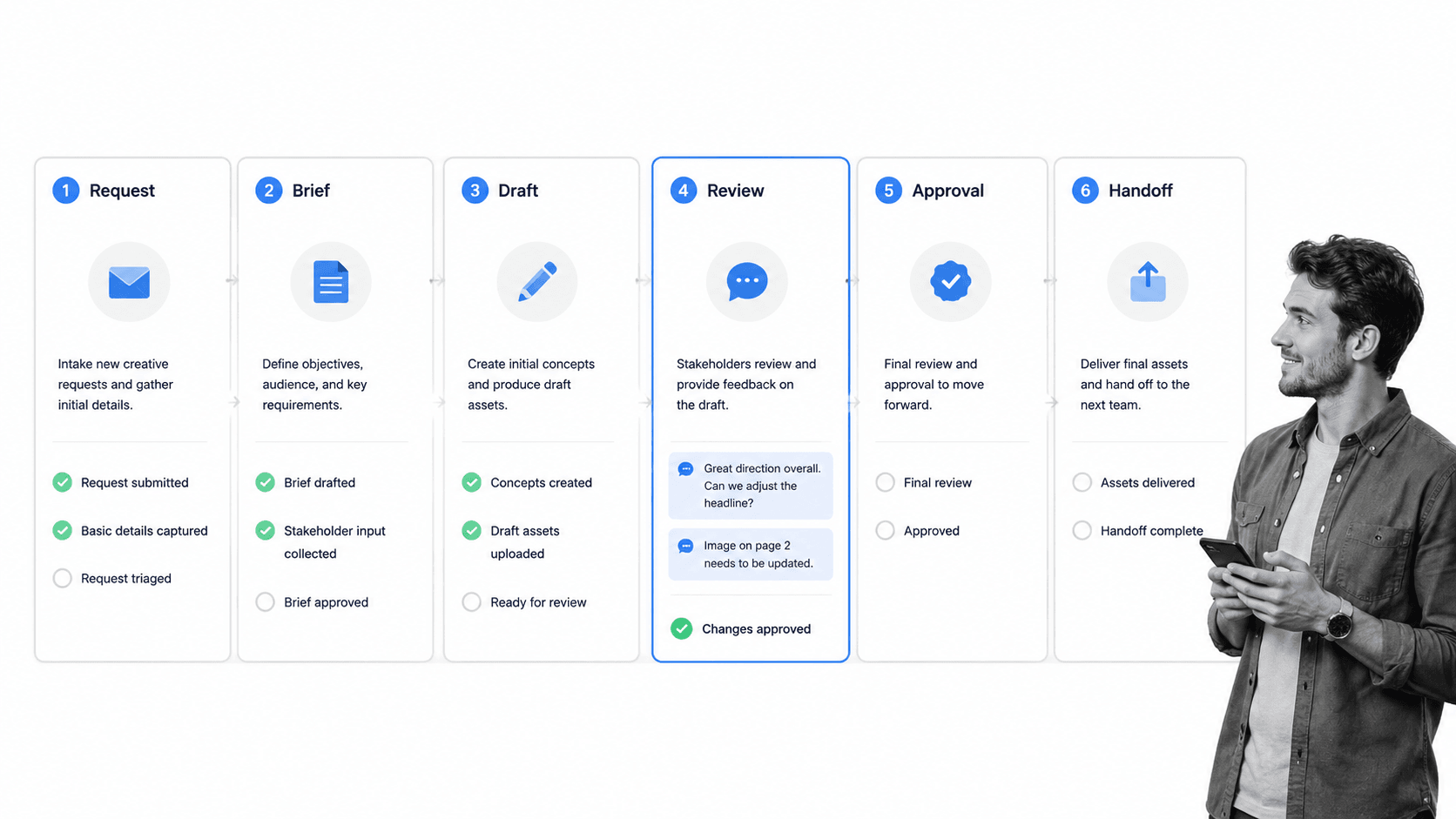
Request intake
Intake is where the workflow either starts clean or creates hidden debt. The request should capture campaign name, audience, channel, deliverable type, objective, required assets, stakeholder list, due date, constraints, and approval path. If intake is loose, the creative team spends the first review cycle discovering what should have been in the brief.
Brief development
The brief turns a request into usable direction. A good brief makes strategy, audience, message, constraints, examples, and success criteria explicit. Teams that need a simple starting point can adapt the thinking from a creative brief, then turn the recurring brief process into a controlled workflow.
Review and feedback
Review is where creative work becomes operationally expensive. Feedback has to be specific, consolidated, time-bound, and attached to the right version. The workflow should prevent parallel review chaos where one stakeholder comments on the old draft while another approves a newer one.
Approval and release
Approval should be a gate, not a vibe. If brand, legal, client, compliance, or executive review is required, workflow approval needs a named owner, clear criteria, a decision, and a record of that decision. The final handoff should only happen after the required approval path is complete.
Handoff and archive
Final asset handoff is more than sharing a file. The workflow should identify where the final asset lives, who can use it, what version is approved, what related context matters, and whether future updates require a new review. Without that final control, teams keep reusing stale files and reopening closed work.
Where creative workflows break down
Creative workflows rarely fail because designers, writers, producers, or campaign owners do not care. They fail because the operating system around creative work is too informal for the amount of coordination required.
The most common failure is request sprawl. Work arrives through Slack, email, meetings, forms, documents, and side conversations. A related Process Street guide to creative workflow management focuses on templates because templates force recurring work into a repeatable shape. Software should take the same idea further by making the shape executable.
The next failure is feedback fragmentation. One stakeholder comments in a document, another replies in chat, and a third gives verbal feedback during a call. The creative team then has to reconcile conflicting instructions before doing the actual work. That is not collaboration. It is unpaid coordination tax.
Approval ambiguity creates the highest risk. If the team cannot tell whether a stakeholder has approved the current version, work can ship with missing review, delayed review, or duplicated review. In regulated or brand-sensitive environments, that can create compliance, reputation, or customer-impact problems.
The final failure is version drift. Teams may have a polished production workflow but still lose the approved file after launch. This is why creative workflow management software should connect the workflow, handoff, and archive. A useful automated workflow system does not stop at task completion. It preserves the proof trail.
Features to look for in creative workflow management software
The right feature set depends on the kind of creative work you manage. A small in-house design team may need intake, approvals, and asset handoff. A larger marketing organization may need campaign dependencies, role-based permissions, automation, audit history, and reporting across many teams.
Structured intake forms
Look for request forms that can capture required details before the work starts. Required fields, conditional fields, and request categories reduce the back-and-forth that slows creative teams down. The best intake flow guides the requester toward the information the creative team actually needs.
Workflow stages and ownership
Every stage should have a clear owner. Creative work stalls when everyone can see the work but nobody knows who is responsible for moving it forward. Ownership should be visible at the stage level, task level, and approval level.
Review and approval controls
Approvals need structure. The system should support named approvers, review criteria, approval decisions, and visible status. Process Street documents approvals as a workflow capability because approval is not just a notification. It is a control point.
Conditional routing
Creative workflows should adapt to the request. A paid ad may require legal review. A low-risk social post may not. A client deliverable may need account lead approval before production. Conditional logic lets the workflow route work based on the details captured during intake.
Automation and integration
Automation should remove manual coordination without hiding the process. Common automations include assigning owners, sending reminders, routing approvals, creating tasks, collecting evidence, and notifying the next team. If you are comparing the broader market, a workflow automation software page can help separate task automation from controlled process execution.
Audit history and reporting
Creative teams need proof too. The system should show who requested the work, which brief was used, who reviewed it, who approved it, when it moved forward, and where the final asset went. Adobe Workfront also frames workflow management around tracking workflow processes and increasing project velocity, which is a useful reminder that reporting should serve execution, not just dashboards.
For external context, Adobe explains workflow management features in its workflow management software guide, and its work management buyer guide emphasizes governance across the work lifecycle. The practical takeaway is simple: if creative work has approval risk, governance belongs inside the workflow.
How to choose creative workflow management software
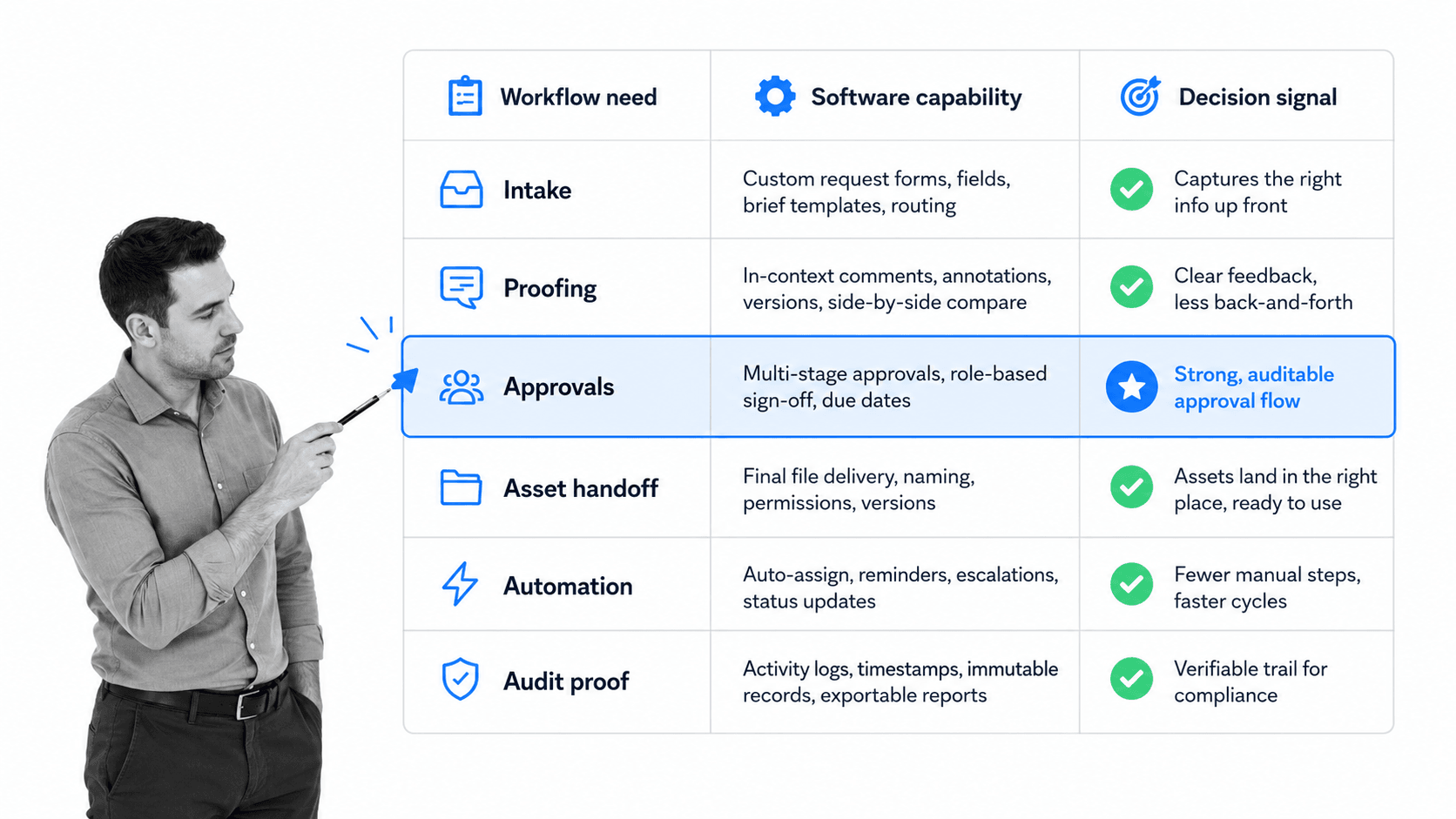
Choosing creative workflow management software starts with the workflow, not the vendor list. Map the work that currently breaks, then choose the system that controls those breakpoints.
Start with the highest-friction workflow
Pick one workflow where delays, rework, or approval confusion are already visible. Good candidates include campaign creative requests, design approvals, video production, web updates, sales collateral, client deliverables, brand review, or content publishing.
Define what must be controlled
Do not buy software around vague goals like better collaboration. Name the control points. Do requests need required fields? Does legal review depend on channel or claim type? Who can approve final assets? Where should the final asset live? What proof must be available later?
Compare by workflow depth
Some tools are strong at planning work. Some are strong at proofing assets. Some are strong at connecting apps. Some are strong at enforcing a repeatable process. Creative workflow management software should match the depth of the workflow. A team managing high-volume approvals needs stronger controls than a team tracking casual design requests.
Test the exception path
Most demos show the happy path. Your evaluation should test what happens when a brief is incomplete, a stakeholder rejects a draft, legal review is required, an approver is out, or the final asset needs a correction after approval. Exception handling separates a real workflow system from a prettier task list.
Check adoption cost
Creative teams will not use a system that makes every small change feel like paperwork. Look for a balance: enough structure to prevent chaos, enough speed to keep creative work moving. The best system makes the correct path easier than the workaround.
How Process Street supports creative workflow management software
Process Street supports creative workflow management software needs by turning recurring creative processes into guided, automated workflow runs. The process can start with a request, route through intake and brief steps, assign owners, trigger conditional review paths, collect required information, enforce approvals, and preserve a history of the completed work.
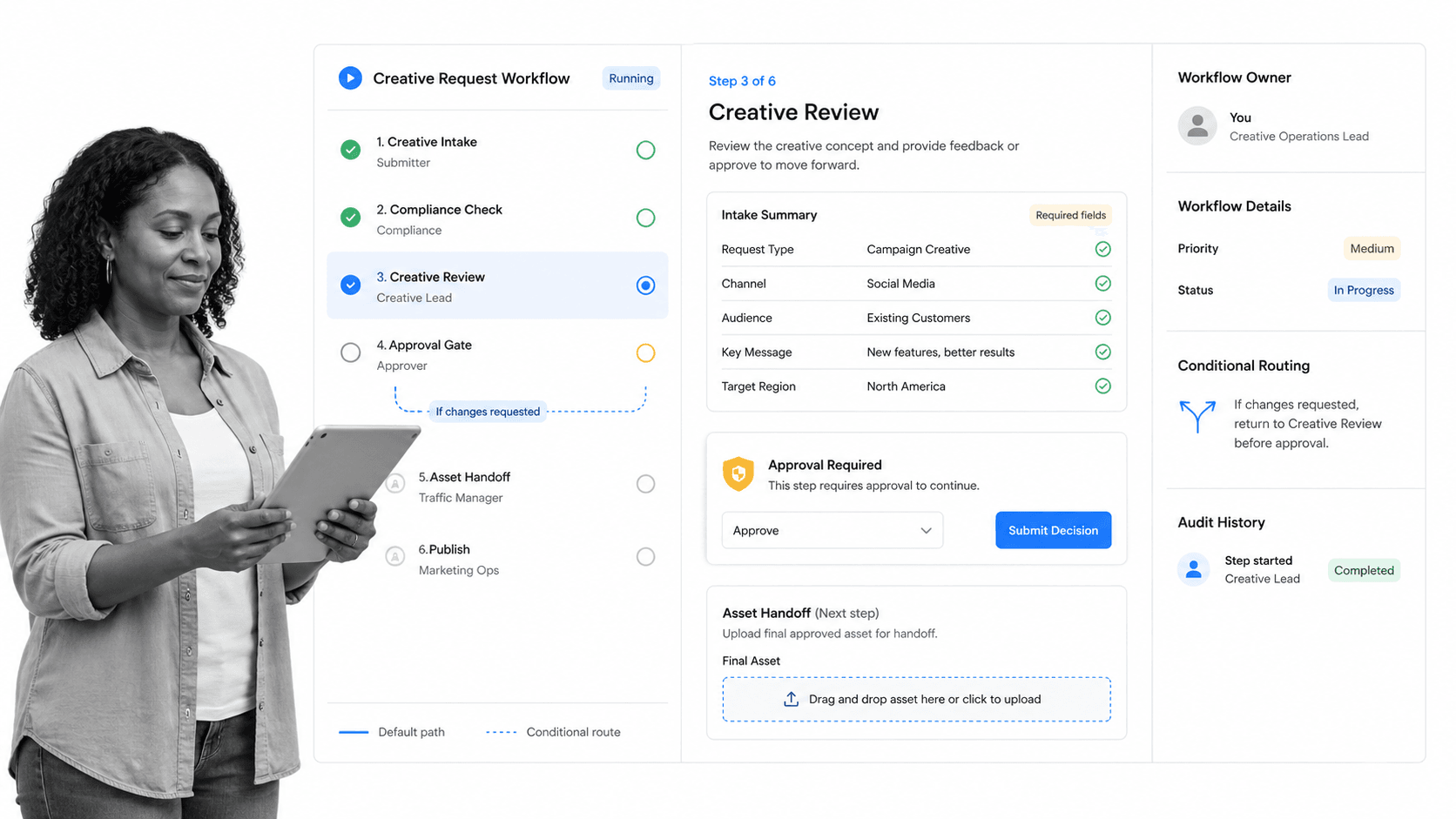
For a creative team, that means the workflow itself becomes the source of truth. The requester knows what to submit. The creative lead knows what is ready. The reviewer knows when a decision is needed. The approver can approve or request changes in context. The team can see what happened later without reconstructing the project from messages.
Process Street is especially useful when creative work has compliance, brand, client, legal, or operational risk. A graphic design approval checklist, video content approval workflow, or blog content approval checklist can become more than a static template when it runs as an assigned, automated workflow.
The platform also helps teams avoid process drift. If the workflow says a paid campaign needs legal review, the work follows that path. If the request does not require legal review, the workflow can skip that step. If an approval is required, the asset cannot quietly move forward as if approval happened.
This is the difference between documenting a process and operationalizing it. Collaboration tools help people communicate. A controlled workflow makes sure the right work happens in the right order, with proof.
Implementation plan for creative teams
Rollout should be narrow, concrete, and measurable. Do not start by rebuilding every creative workflow. Start with one painful recurring process, prove the system works, then expand by pattern.
Step 1: Map the current path
Write the current path from request to final handoff. Include every system, stakeholder, approval, file location, and exception. This will expose the actual workflow, not the workflow people think exists.
Step 2: Remove avoidable steps
Automation makes broken processes move faster. Before automating, remove duplicate reviews, unclear approvals, redundant status meetings, and fields nobody uses. Keep the workflow as simple as the risk allows.
Step 3: Build the standard workflow
Start with the most common path. If you need a concrete creative example, a web design client onboarding process shows how creative requirements, approvals, and handoffs can be structured across a client-facing workflow.
Step 4: Add exception routing
Once the standard path works, add branches for high-risk deliverables, missing information, approval rejection, legal review, client review, or urgent turnaround. Exception routing is where creative workflow management software starts to earn its keep.
Step 5: Review actual run data
After the workflow runs, review bottlenecks, skipped fields, overdue tasks, repeated rejections, and unclear ownership. Then improve the workflow. Creative operations gets better when the process learns from real execution, not from abstract planning sessions.
If your team is still deciding how much automation it needs, compare the rollout against a broader workflow apps landscape. The right answer may be a focused creative workflow, a broader operations workflow, or a mix of both.
Creative workflow management software mistakes to avoid
The first mistake is using creative workflow management software as a status board only. Status is useful, but it does not solve incomplete briefs, scattered feedback, or unclear approvals. The system has to control the workflow, not just display the workflow.
The second mistake is overbuilding the first version. Teams often try to capture every edge case before launch. That slows adoption and makes the system feel heavy. Build the standard path first, then add exception handling once real usage shows where it is needed.
The third mistake is letting every stakeholder comment everywhere. Feedback should be consolidated by role and phase. Strategy feedback belongs early. Detail feedback belongs during review. Approval decisions belong at the approval gate. When all feedback types happen at every stage, the team never reaches final.
The fourth mistake is skipping final handoff. A workflow is not finished when the designer says the asset is done. It is finished when the approved asset is stored, shared with the right team, labeled clearly, and available for future use.
The fifth mistake is failing to assign process ownership. Someone has to own the workflow after launch. That owner reviews data, updates fields, removes dead steps, and keeps the system aligned with how creative work actually happens.
FAQs
What is creative workflow management software?
Creative workflow management software is a platform that manages the path from creative request to finished asset. It controls intake, briefs, review rounds, approvals, handoffs, and records so creative teams can move work forward without scattered coordination.
How is creative workflow management software different from project management software?
Project management software usually tracks tasks, timelines, and ownership. Creative workflow management software goes deeper into the creative production path by managing briefs, feedback, approvals, version control, asset handoff, and proof that the right review happened.
What features matter most in creative workflow management software?
The most important features are structured intake, workflow stages, role ownership, review controls, approval gates, conditional routing, automation, integrations, reporting, and audit history. The right mix depends on the risk and volume of the creative work.
Who should own creative workflow management software?
Creative operations, marketing operations, or a process owner should usually own the workflow. The owner should work with creative leads, approvers, compliance, legal, and downstream teams so the system reflects how work should actually move.
When should a team implement creative workflow management software?
Implement creative workflow management software when requests arrive through too many channels, feedback is scattered, approvals are unclear, deadlines slip, or the team cannot tell which asset version is approved. Those are signs the workflow needs a controlled system.
Can Process Street manage creative workflows?
Yes. Process Street can manage recurring creative workflows by turning requests, briefs, tasks, approvals, conditional paths, and handoffs into guided workflow runs. It is strongest when creative work needs accountability, proof, and repeatability.
