


Turn every policy into automated workflows with built-in enforcement and audit-ready proof.



Form Creator
A form creator is software that helps you build digital forms for collecting structured information from customers, employees, vendors, applicants, or internal teams. A good form creator does more than put questions on a page. It controls what data is collected, how answers are validated, where submissions go, and what happens next.
That last part is where most teams feel the pain. Forms are easy to launch, but the work after the submission often falls apart. Someone has to review the answer, chase missing files, route the request, approve the next step, update another system, and prove the process was handled correctly.
This guide explains what a form creator does, how it differs from a basic form builder, which features matter, and how Process Street turns form submissions into assigned, auditable workflows.
In this article, we are going to cover:
- What a form creator is
- What a form creator should produce
- Form creator vs form builder
- Form creator features that matter
- Form creator use cases
- Turn form submissions into governed workflows
- How to choose a form creator
- FAQs
What a form creator is
A form creator is a tool for designing, publishing, and managing digital forms. Most form creators include field types, layout controls, validation rules, conditional logic, response storage, notifications, and integrations. The best ones also connect each submission to the business process that follows.
The basic job is data collection. MDN describes HTML forms as one of the main ways users interact with a website or app because forms send user-entered data to a server for processing: MDN web forms guide. Business teams need the same idea, but with more control around routing, approvals, records, and security.
What form creators usually include
Most tools let you add short answer fields, long text fields, dropdowns, checkboxes, radio buttons, dates, file uploads, signatures, payment fields, and hidden fields. They also usually include templates, themes, embed codes, email notifications, and exports.
Those features are useful, but they do not automatically create a reliable operating process. A contact form, vendor intake form, employee request form, or incident report form is only the first step. The real business value comes from the workflow that starts after the form is submitted.
When a form becomes operational
A form becomes operational when each answer can trigger the right action. A high-risk vendor should route to security review. A new employee request should assign IT, HR, finance, and the manager. A customer onboarding form should create tasks, due dates, and required documents.
That is why a form creator should be evaluated by the work it enables, not just the form it publishes. Design matters, but routing, ownership, and proof matter more when the form supports business-critical work.
What a form creator should produce

A useful form creator should produce a structured intake path, not a pile of responses. The output should be clean enough for humans to review and structured enough for software to route.
Structured fields
Structured fields make submissions usable. Instead of asking someone to explain everything in a paragraph, the form captures the exact data needed to make the next decision. That might include department, request type, customer tier, risk level, due date, budget, approval owner, file attachment, or location.
The more repeatable the process, the more the form should guide the respondent toward clean answers. Dropdowns, required fields, validation, and conditional logic reduce ambiguity and keep reviewers from chasing basic information.
Field design also determines whether the form can scale. If every answer is free text, the team will need a person to interpret each submission. If the most important answers are structured, the workflow can route, prioritize, filter, and report without waiting for manual triage.
The best form creators make this balance easy. They allow enough context for humans to understand the request, but they keep the decision-driving fields structured so the system can act on them.
Routing logic
Routing logic turns answers into action. If the request type is procurement, the workflow should go to procurement. If the value crosses a threshold, it should require finance approval. If a file is missing, the process should stop before the work moves forward.
This is where a form creator overlaps with workflow automation software. The form collects the signal. The workflow turns that signal into tasks, owners, approvals, and records.
A submission record
Every submission should leave a record. That record should show who submitted the form, what they submitted, when it happened, which workflow was triggered, who handled it, and which decision was made. Without that record, teams end up reconstructing the process from inboxes and chat threads.
For compliance-heavy or customer-facing processes, the record is not optional. It is the evidence that the team followed the approved path.
Clear ownership
A form without ownership creates a holding pen. Someone may receive a notification, but nobody is clearly accountable for the next action. A stronger form creator should help connect each submission to a named owner, team, due date, or approval path.
Ownership is what turns intake into execution. The person submitting the form should not need to know which department handles the request, and the internal team should not need to negotiate ownership every time a submission lands.
Form creator vs form builder
The terms form creator and form builder are often used interchangeably. A form builder usually emphasizes the interface for designing the form. A form creator can mean the whole system for creating, publishing, managing, and operationalizing forms.
Use form builder when the focus is design
If the main question is how to create a clean-looking web form, form builder is the natural phrase. You care about fields, layout, themes, embeds, mobile responsiveness, and how easy it is for a non-technical user to build the form.
That use case is common for lead capture, surveys, registrations, event signups, and simple requests. The form is the main artifact.
Use form creator when the focus is outcome
Form creator is a better fit when the form is part of a larger operating process. You are not just asking whether someone can submit information. You are asking what the business does with that information after it arrives.
A form that feeds a checklist, approval path, or recurring workflow starts to connect with tools like a checklist generator, form checklist app, or workflow generator. The form becomes the intake layer for execution.
The practical difference
A simple form builder answers: can we collect this information? A stronger form creator answers: can we collect the right information, route it correctly, enforce the next step, and prove what happened?
That difference is especially important for HR, procurement, compliance, finance, customer onboarding, IT, operations, and quality teams. Their forms usually create obligations, not just records.
Form creator features that matter

The best form creator for a business team is not always the one with the most templates or prettiest themes. It is the one that captures clean data and moves work forward without creating another manual queue.
Conditional logic
Conditional logic shows or hides questions based on previous answers. It keeps forms shorter, reduces irrelevant fields, and gives each respondent a path that matches their situation. It also creates routing signals for the workflow that follows.
For workflow-driven teams, conditional logic should connect to the execution layer. Process Street supports conditional logic inside workflows so different answers can change the path, assign owners, and expose the right tasks.
Validation and required fields
Validation protects the process from bad input. Required fields, file type limits, email checks, numeric ranges, and answer formats can prevent avoidable rework. The W3C Web Accessibility Initiative also emphasizes clear labels, instructions, and error handling because forms must be understandable for people using different devices and assistive technologies: W3C WAI forms tutorial.
File uploads and evidence capture
Many operational forms need attachments: contracts, screenshots, IDs, invoices, certificates, evidence files, or supporting documents. A form creator should make those files easy to collect and hard to lose.
The key question is not whether the file can be uploaded. It is whether the file stays attached to the workflow, approval, or case it belongs to.
Approvals
Some submissions need signoff before work can continue. A form creator that connects to workflow approvals can make sure a responsible person reviews the submission before downstream tasks begin.
Integrations
Forms often need to sync with CRMs, HR systems, finance tools, ticketing tools, document storage, email, calendars, and analytics. Process Street has direct, universal integrations to 5,000+ systems. Need a new one? An AI agent builds it on the fly.
Security and privacy
Forms can collect sensitive information. The FTC advises businesses to collect only what they need, protect what they keep, and dispose of information safely when it is no longer needed: FTC data security guidance. A form creator should support that discipline with permissions, clear ownership, and controlled retention practices.
Security should also cover the people building forms. Teams need to know who can create forms, edit fields, view submissions, export data, and change automation rules. Otherwise a well-designed intake process can drift into a shadow system with unclear access and weak accountability.
Form creator use cases
Form creators show up anywhere a team needs a clean intake path. The more repeatable and cross-functional the process, the more important it is to connect the form to workflow execution.
Employee onboarding
HR teams use forms to collect new hire information, equipment preferences, payroll details, policy acknowledgments, and manager inputs. An employee onboarding checklist turns those answers into assigned tasks for HR, IT, finance, and the hiring manager.
Vendor and procurement intake
Procurement teams use intake forms to collect vendor details, tax documents, risk questions, contract context, and business justification. A vendor management workflow can route the submission to legal, finance, security, or the business owner based on the answers.
Customer onboarding
Customer teams use forms to gather launch goals, stakeholders, integrations, data requirements, and timeline constraints. That intake can trigger customer onboarding process tasks and keep implementation work consistent.
IT and access requests
IT teams use forms for software access, hardware requests, incident reports, and service tickets. An IT service request workflow can assign the request, collect approval, and track completion.
Compliance and audit evidence
Compliance teams use forms to collect attestations, control evidence, policy exceptions, incident details, and review notes. NIST describes privacy risk management as a repeatable discipline that depends on understanding data processing and controls: NIST Privacy Framework. Forms are often the first place that processing becomes structured.
Content and marketing requests
Marketing teams use request forms for briefs, creative work, approvals, legal review, launch plans, and asset intake. A structured form makes the request easier to triage, while the workflow keeps reviews from disappearing in chat.
Turn form submissions into governed workflows
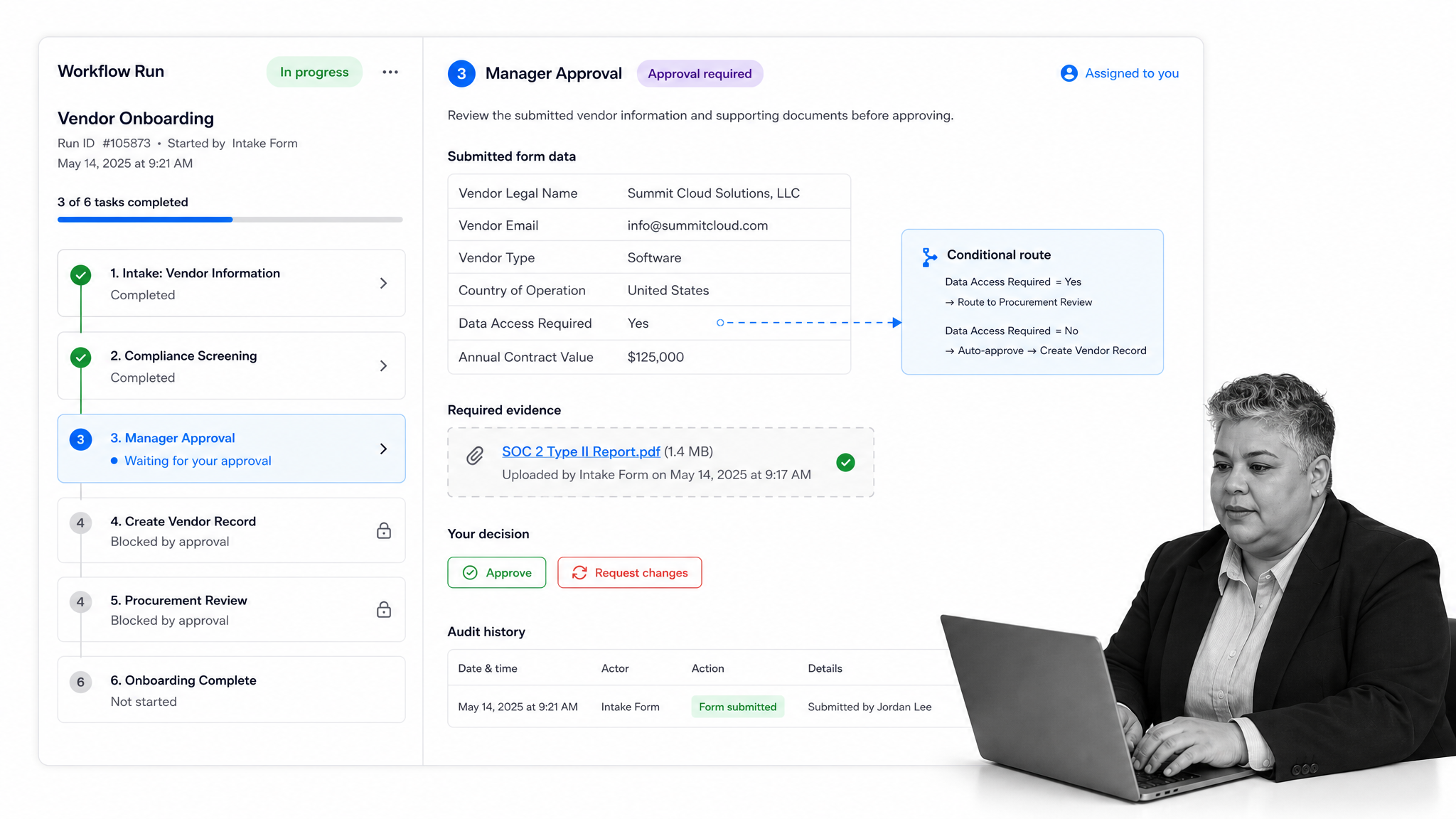
A form creator becomes much more valuable when submissions start governed workflows automatically. Instead of collecting data in one place and managing the work somewhere else, the form becomes the front door to an operating process.
Start work from the submission
When a form is submitted, the system should create the right workflow run, assign the first owner, copy the submitted answers into fields, and set deadlines. That removes the manual handoff where requests usually stall.
Use answers to control the path
Different answers should trigger different routes. A low-risk request may move straight to fulfillment. A high-risk request may need approval. A missing file may stop the workflow until the required evidence is added.
This is how forms help enforce the process. The respondent gives the signal, and the workflow decides the next controlled action.
Keep proof in the workflow
The submitted answers, files, approvals, comments, task completions, and audit history should stay together. That way the team can review the full record without switching between a form response sheet, inbox, chat thread, and project board.
This is the same reason teams move from loose requests to business process automation software or automated workflow tools. The form is the intake. The controlled workflow is the execution.
How to choose a form creator
Choosing a form creator starts with the process, not the template gallery. The right tool depends on what the form needs to trigger, who reviews it, what evidence is required, and how much control the team needs.
Map the lifecycle before comparing tools
Write down what happens before and after submission. Who completes the form? Who reviews it? What information is required? Which answers change the path? Which systems need updates? What proof must be preserved?
If that lifecycle is unclear, the form creator will expose the confusion. A clean form cannot fix an undefined process.
Decide whether the form is simple or operational
A simple survey or newsletter signup may only need an easy builder, notifications, and exports. An operational form needs assignments, approvals, conditional paths, file handling, integrations, permissions, and audit history.
Be honest about the difference. Many teams buy a lightweight form tool for operational work, then rebuild the missing process with spreadsheets and manual reminders.
Test the respondent experience
The form should be fast, clear, mobile-friendly, and accessible. Microsoft Forms documentation, for example, highlights branching and settings that control how respondents move through a form: Microsoft Forms support. Whatever tool you choose, respondents should know what is required and what happens after they submit.
Test the operator experience
The internal team needs a clean queue, clear owners, status, reminders, approvals, and searchable records. If every submission still requires manual copying, the tool is only collecting data. It is not running the process.
Run a realistic test before rollout. Submit a messy request, a high-priority request, an incomplete request, and a request that should be rejected. Watch where each one goes. A good form creator and workflow setup should make the correct path obvious without a manager explaining it each time.
Check governance early
Review user permissions, version history, audit logs, data exports, retention options, and integration ownership before rollout. Governance is easier to design up front than to recover after forms spread across departments.
This matters because forms multiply quickly. One team creates a vendor form, another creates an access form, another creates a customer intake form, and soon the business has dozens of entry points. Without governance, each form becomes its own mini process. With governance, forms become standardized front doors into the same operating system.
FAQs
What is a form creator?
A form creator is software for building digital forms that collect structured information. Business teams use form creators for intake, surveys, registrations, requests, approvals, and operational workflows.
What is the difference between a form creator and a form builder?
A form builder usually refers to the interface for designing the form. A form creator can refer to the broader system for creating, publishing, managing, routing, and acting on form submissions.
What features should a form creator include?
A useful form creator should include field types, validation, conditional logic, file uploads, notifications, permissions, integrations, response management, and a way to connect submissions to the workflow that follows.
When should a form submission trigger a workflow?
A form submission should trigger a workflow when the answer creates work for another person or team. Common examples include onboarding, procurement intake, IT requests, customer implementation, compliance evidence, and approval processes.
Can Process Street work as a form creator?
Process Street can collect structured information and turn submissions into assigned, governed workflows. It is strongest when the form is part of a repeatable process that needs approvals, conditional routing, evidence, ownership, and an audit trail.
