


Turn every policy into automated workflows with built-in enforcement and audit-ready proof.



Checklist Generator

A checklist generator turns a process, goal, policy, or recurring task into a structured checklist. The best output is not just a list of things to remember. It gives you clear steps, owners, evidence fields, due dates, decision points, and a repeatable way to run the work.
That matters because checklists are used when skipped steps are costly. The World Health Organization reports that its surgical checklist has been shown to reduce complications and mortality by over 30 percent, which is a useful reminder: checklist design is not about looking organized. It is about preventing avoidable failure.
A modern checklist generator can start from a prompt, SOP, policy, transcript, form, or template. AI can make the first draft faster, but the business value comes from turning that draft into a workflow your team can actually execute.
In this guide, we will cover everything you need to know about checklist generators, including:
- What is a checklist generator?
- What a checklist generator should produce
- How to create a checklist with a checklist generator
- Checklist generator use cases
- AI checklist generator vs template vs workflow
- Turn a checklist generator into a governed workflow
- Checklist generator implementation mistakes
- Checklist generator FAQs
What is a checklist generator?
A checklist generator is a tool that creates checklist steps from an input. The input might be a plain-language prompt, an existing SOP, a project plan, an audit requirement, a training document, or a blank template you customize.
Simple checklist makers create a static list. AI checklist generators suggest tasks, phases, subtasks, and categories. Workflow checklist systems go further by turning each checklist into assigned, trackable work with forms, approvals, conditional paths, and audit history.
The job it should do
The job is to convert intent into reliable execution. If you describe a new hire onboarding process, the generator should help you move from scattered memory to a usable customer onboarding process. If you describe an audit prep process, it should help you produce a clear evidence path, not a vague reminder list.
A checklist generator becomes more valuable when it connects to a workflow management system. A static checklist can tell someone what to do. A workflow can assign the work, enforce sequence, collect proof, and show whether the work happened.
Where AI helps
AI helps with the blank-page problem. It can propose phases, split complex tasks into smaller steps, suggest missing checks, turn long documentation into a first checklist, and adapt a checklist for a role, department, or risk level.
AI should not be treated as the final approver. If a checklist affects quality, compliance, customer experience, finance, security, or safety, use the same discipline the NIST AI Risk Management Framework applies to AI risk: define the intended use, evaluate the output, manage risk, and keep governance active through the system lifecycle.
What a checklist generator should produce
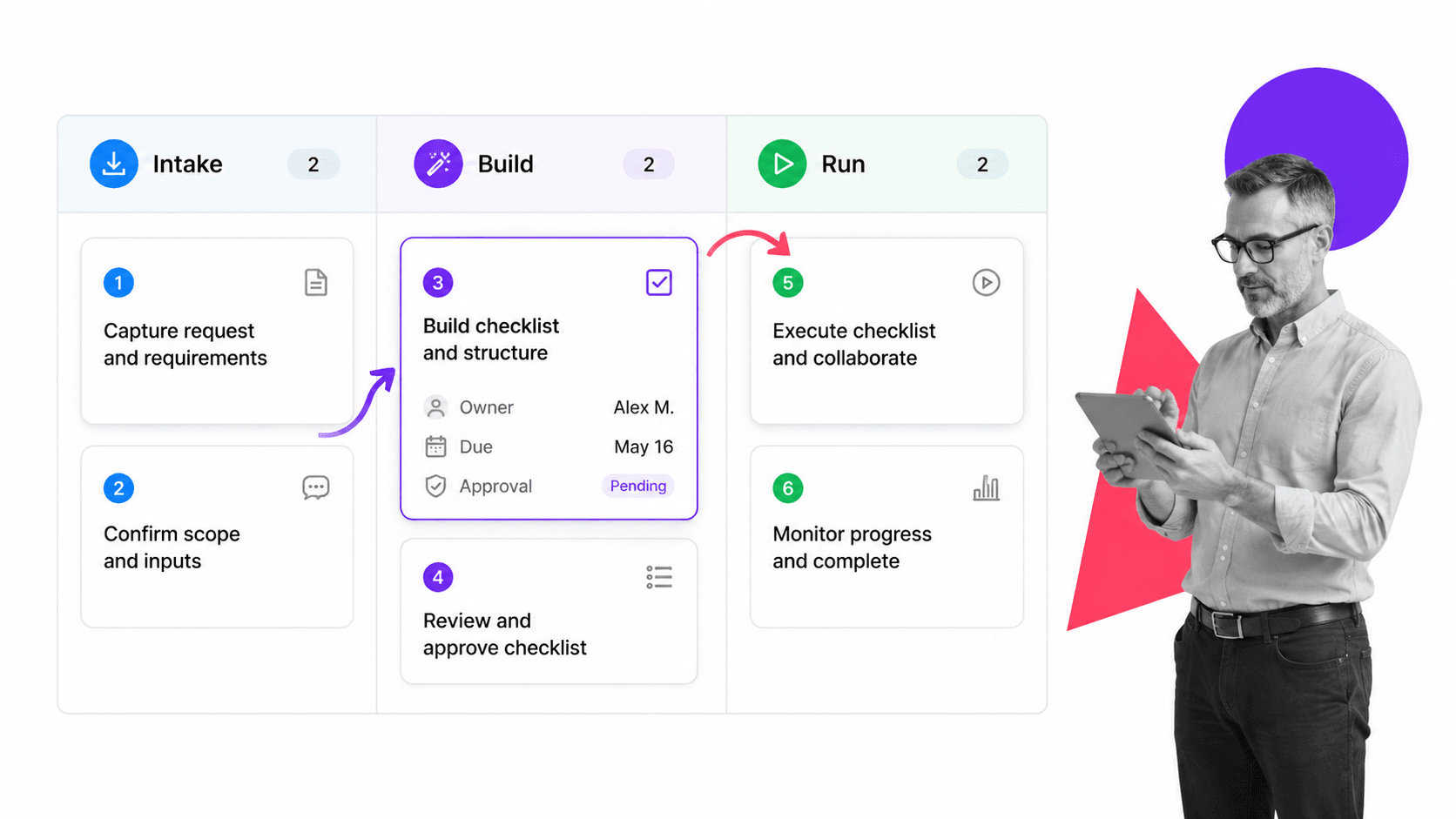
A checklist generator should produce a checklist that someone can use without asking what the next step means. Each item needs an action, an owner or role, enough context to complete the work, and a clear completion condition.
Clear phases
Group checklist items by phase. A hiring checklist might use preparation, first day, first week, first month, and review. A due diligence checklist might use intake, document request, analysis, approval, and close. Phases help people scan the work and understand progress.
Actionable steps
The Microsoft procedures and instructions checklist recommends writing complete, clear procedure steps. Business checklists need the same standard. Each item should start with an action verb, describe one action, and avoid vague language like “handle documents” or “check status.”
Owners, dates, and evidence
A checklist without ownership turns into a shared hope. Every critical step should have an owner, due date logic, required form field, file upload, approval, or completion proof. This is where a generated checklist starts becoming operational.
Decision points
Real processes branch. A low-risk vendor may skip legal review. A high-risk vendor may require an approval task. An employee in one country may need different forms than an employee in another. Use conditional logic when the checklist should adapt to the information captured during the run.
How to create a checklist with a checklist generator
Start with the outcome, not the list. The fastest way to get a bad checklist is to ask for every possible step without deciding what success looks like.
1. Name the process and trigger
Write the checklist title as a repeatable process: employee onboarding, monthly close, vendor approval, incident response, customer kickoff, inspection, campaign launch, or board packet preparation. Then name the trigger. Is the checklist run when a form is submitted, a deal changes stage, a date arrives, or a manager requests it?
2. Define the audience
A checklist for an expert should be short and confirmation-focused. A checklist for a new hire should include more instruction. A checklist for a cross-functional workflow should make handoffs obvious. The generator can only produce useful detail if you tell it who will use the checklist.
3. Add constraints and risk points
Tell the generator what cannot be missed. Examples: required approvals, documents that must be attached, regulatory deadlines, customer-facing commitments, quality checks, security reviews, or handoff points. These constraints become the backbone of the checklist.
4. Review for execution
Read the output like someone who has to run it tomorrow. Remove duplicate steps. Split overloaded steps. Add form fields. Add assignments. Add approval gates. Then test it with a real process run, similar to the way Process Street documents running workflows as executable workflow instances.
A reusable prompt
Use this structure: “Create a checklist for [process] triggered by [event]. The user is [role]. Include phases, step owners, required evidence, approval points, conditional paths, and completion criteria. Keep each checklist item specific and action-oriented.”
A review pass that improves the output
After the checklist generator gives you a draft, run a review pass with three questions. First, could a qualified person complete the work from these steps without guessing? Second, does each critical step produce evidence that can be reviewed later? Third, does the checklist explain what happens when the answer is no, blocked, failed, incomplete, or not applicable?
Those questions turn the checklist from a memory aid into an operating artifact. The generator can suggest structure, but the process owner still has to decide which steps are mandatory, which steps are optional, and which steps should stop the process until someone reviews the exception.
Checklist generator use cases
Checklist generators work best for repeatable work where the right steps are known, but people still miss them because the process is scattered, manual, or buried in documents.
Employee onboarding
Onboarding is a strong checklist generator use case because the process crosses HR, IT, finance, managers, and the new hire. A generator can create the first draft, then a workflow template like an employee onboarding checklist can turn it into assigned work.
Customer onboarding
Customer onboarding checklists help teams standardize kickoff, data collection, account setup, training, and handoff steps. When the work repeats across customers, a checklist can stabilize the customer onboarding without forcing every customer into the same path.
Quality and safety checks
Safety and quality teams often use checklists because the cost of missing a step is high. OSHA general industry compliance checklist helps employers identify applicable workplace standards, and the NIOSH safety checklist program gives schools a checklist-based safety inspection program. The point is consistent: checklists help teams inspect the right things before problems compound.
Due diligence and approvals
Due diligence checklists work when they do more than collect documents. They should define what needs review, who reviews it, what evidence is required, and where approval happens. A due diligence checklist template is useful when the team needs a concrete starting point for acquisition or vendor review.
Process improvement
A checklist generator can also help teams convert lessons learned into repeatable improvement steps. Pair it with a process improvement plan template when the process needs diagnosis, owner assignment, change tracking, and follow-through.
Audit preparation
Audit work is full of small steps that are easy to miss: collect evidence, confirm owner, review version, attach proof, validate dates, route exceptions, and document signoff. A checklist generator can draft the evidence collection flow, but a governed workflow should control the final version when auditors or regulators may ask what happened.
Campaign and launch readiness
Marketing, product, and operations teams often need launch checklists that combine creative, legal, technical, support, enablement, and approval tasks. A generated checklist helps the team avoid starting from scratch. A workflow makes sure every function signs off before the launch goes live.
AI checklist generator vs template vs workflow
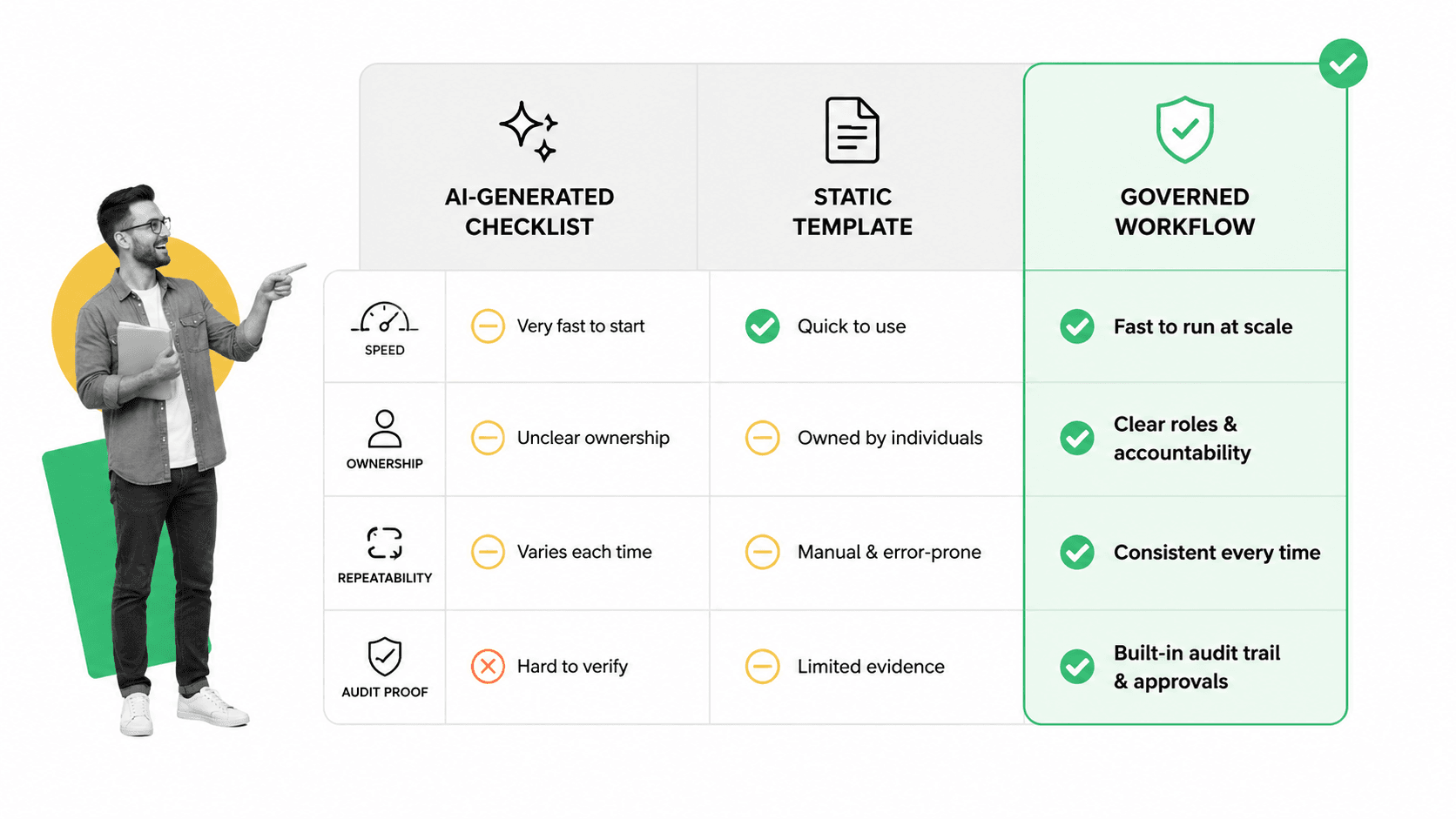
There are three common ways to create a checklist: generate it with AI, start from a template, or build it inside a workflow system. Each option fits a different level of risk and repeatability.
Use an AI checklist generator when speed matters
AI is useful when you need a first draft quickly, especially for a process you understand but have not documented. It can suggest missing steps and organize work by phase. The tradeoff is that someone still needs to validate the output.
Use a template when the pattern is known
Templates are useful when the process is common and the structure is mostly proven. Starting from a sample checklist template can be faster than asking AI to rediscover the basics.
Use a workflow when proof matters
When the checklist needs owners, automation, approvals, conditional paths, or audit history, use a workflow. A checklist describes the work. A what is a workflow executes the work.
Tools like CheckFlow checklist software position around checklist and workflow software for recurring processes. For compliance-heavy work, the selection criteria should go beyond task creation and include control, evidence, permissions, and reporting.
Turn a checklist generator into a governed workflow
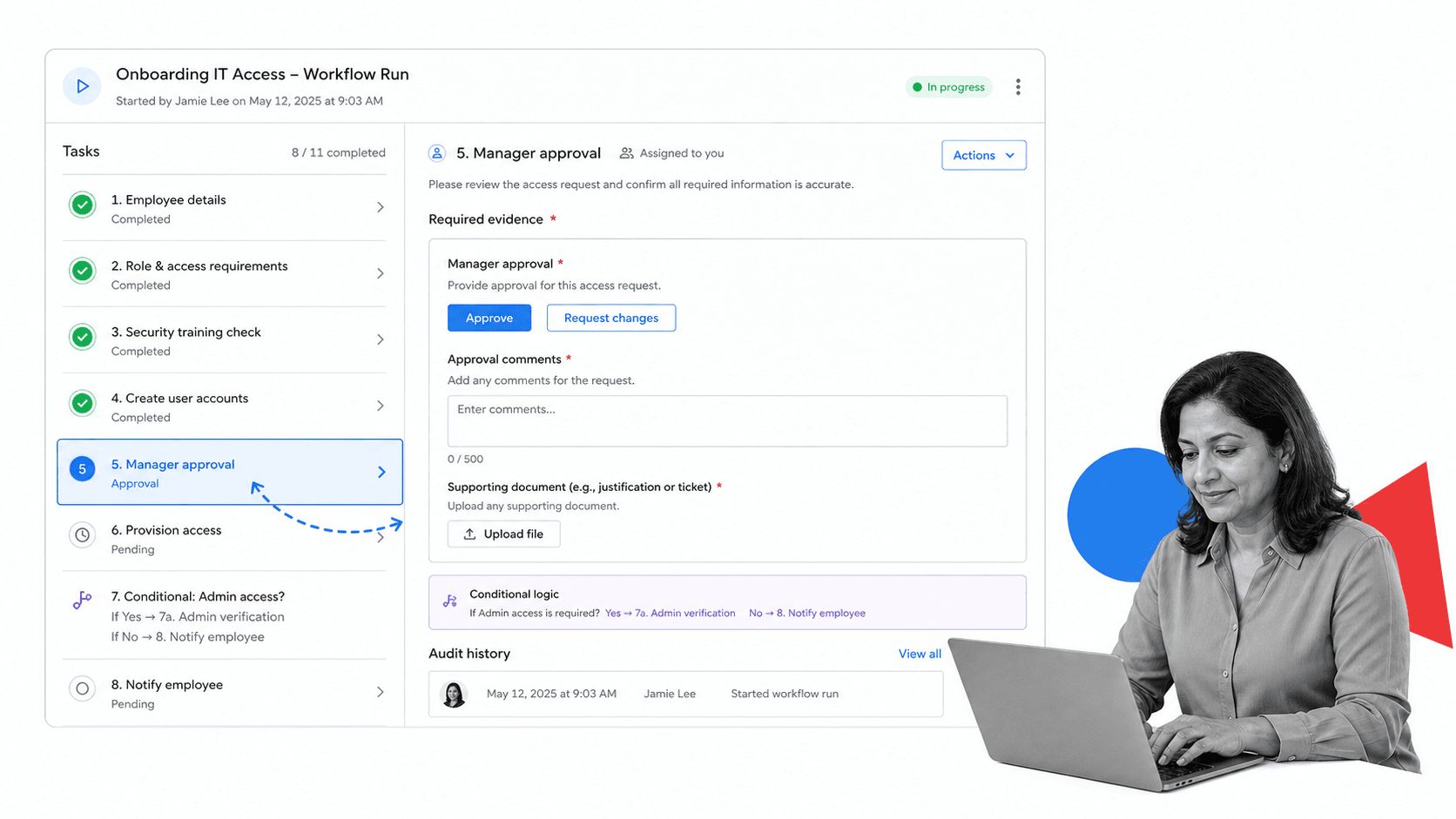
Process Street is a Compliance Operations Platform for teams that need checklists to become controlled work. Instead of leaving the generated list in a document, you can turn it into a workflow that assigns tasks, captures required data, routes approvals, and keeps an audit trail.
Convert generated steps into a reusable workflow
Take the generator output and turn each major action into a task. Add instructions only where they help the person complete the step. Add form fields where the process needs structured information. Add file uploads where proof is required.
Add gates where risk enters the process
Approvals should appear where someone needs to verify quality, spend, compliance, security, or customer-facing decisions. Process Street approvals let teams route work for review without moving the process into email.
Automate the handoffs
Process Street has direct, universal integrations to 5,000+ systems. Need a new one? An AI agent builds it on the fly. That means a checklist can trigger from another system, update records, assign owners, notify teams, and move evidence where it belongs.
Keep proof attached to the work
A generated checklist is easy to copy. A governed workflow is harder to skip. When completion data, comments, uploads, approvals, and timestamps stay attached to the run, the team can prove what happened later.
Use templates without freezing the process
Templates help you start faster, especially for common operating patterns like an onboarding process checklist. The key is to adapt the template to your actual risk points, owners, systems, and evidence needs. Do not preserve a template step just because it came from the starter version.
The best operating pattern is simple: generate the first draft, convert the useful parts into a workflow, test the workflow with one real run, then improve the template based on what happened. That gives the team speed without locking in a weak first draft.
Checklist generator implementation mistakes
Most checklist generator failures are not caused by the generator. They happen after generation, when the team treats the first output as finished.
Mistake 1: generating too many steps
A long checklist can look thorough while making the work harder. Split complex steps, but remove anything that does not drive execution, decision-making, proof, or quality. The best checklist is complete enough to prevent failure and short enough to run.
Mistake 2: skipping ownership
If every item belongs to everyone, the checklist belongs to no one. Assign roles, not just names. This keeps the checklist reusable when people change roles or teams scale.
Mistake 3: treating every process the same
A read-and-do checklist helps someone perform each step in sequence. A do-and-confirm checklist helps an expert verify that critical steps were completed. Pick the checklist style that matches the user and risk level.
Mistake 4: leaving the checklist outside the system of record
If the checklist creates information that another team needs, connect it to the rest of the process. Otherwise, you end up with a finished checklist and stale downstream systems. This is one reason teams move from task lists toward workflow management software.
Mistake 5: never improving the checklist
Every completed run should teach you something. Missed steps, unclear instructions, repeated exceptions, and late approvals are process signals. Fold those signals into the next version, which is the core habit behind strong types of process management.
Treat the checklist as a living control. The generator helps create it, but the operating team owns its quality after real work exposes what needs to change. That discipline compounds quickly across teams, audits, and recurring operations. It also keeps checklist work tied to real accountability.
Checklist generator FAQs
What is a checklist generator?
A checklist generator is a tool that creates checklist steps from a prompt, process description, SOP, document, template, or policy. A good checklist generator produces clear, actionable steps that someone can run, not just a loose list of reminders.
How does an AI checklist generator work?
An AI checklist generator uses your input to infer phases, tasks, subtasks, dependencies, and missing checks. The output should still be reviewed by a process owner before it is used for work that affects compliance, customers, safety, finance, or quality.
What should a business checklist include?
A business checklist should include phases, action-oriented tasks, owners or roles, due dates, required evidence, decision points, approval gates, and a clear completion condition. For recurring work, it should also include a way to run the checklist again without rebuilding it from scratch.
What is the difference between a checklist generator and checklist software?
A checklist generator creates the first checklist structure. Checklist software manages, stores, runs, assigns, tracks, and reports on checklists. Workflow software goes further by adding automation, approvals, conditional logic, permissions, and audit history.
When should a checklist become a workflow?
A checklist should become a workflow when it repeats, involves more than one person, requires approvals, collects evidence, branches based on answers, or needs a reliable audit trail. At that point, execution control matters more than simple list creation.
Can Process Street generate and run checklists?
Process Street helps teams turn checklists into reusable workflows that can be assigned, run, tracked, automated, approved, and audited. Teams can start from templates or generated structure, then add owners, required fields, conditional logic, approvals, integrations, and proof.
