Turn every policy into automated workflows with built-in enforcement and audit-ready proof.


Form Tools
Form tools help you collect structured information through digital forms, surveys, quizzes, registrations, and request portals. The best option depends less on how quickly you can add a text field and more on what must happen after someone selects Submit.
A lightweight survey may only need a shareable link and a response spreadsheet. A customer-facing campaign may need polished conversational design. An operational request may need assignments, approvals, evidence, conditional routing, and an audit trail. Those are different jobs, even though each begins with a form.
This guide compares five widely used approaches and puts Process Street first for forms that launch repeatable business processes. It also covers Jotform, Typeform, Google Forms, and Microsoft Forms for teams whose priority is form design, respondent experience, or suite-native data collection.
In this article, you will learn:
- Form tools at a glance
- How to compare form tools
- 1. Process Street
- 2. Jotform
- 3. Typeform
- 4. Google Forms
- 5. Microsoft Forms
- How to choose the right form tool
- FAQs
Form tools at a glance
The short version is simple: choose Process Street when a submission must become controlled work, Jotform when you want a broad template-led builder, Typeform when conversational presentation matters, Google Forms for fast collection in Google Workspace, and Microsoft Forms for surveys and quizzes inside Microsoft 365.
| Tool | Best for | Standout feature | Pricing |
|---|---|---|---|
| Process Street | Operational forms that must launch governed workflows | Workflow run with approvals, evidence, owners, and audit history | Plans published on the pricing page |
| Jotform | Teams that want a broad template-led form builder | Drag-and-drop form canvas with widgets and conditional fields | Free and paid plans |
| Typeform | Conversational, one-question-at-a-time experiences | Logic-driven conversational form flow | Free and paid plans |
| Google Forms | Fast surveys and simple collection in Google Workspace | Simple question editor with response summaries and Sheets handoff | Available free; Workspace plans add organizational services |
| Microsoft Forms | Surveys and quizzes for Microsoft 365 teams | Form editor with branching, live results, and Excel export | Available with eligible Microsoft accounts and Microsoft 365 plans |
The comparison table is a starting point, not a universal ranking for every use case. Process Street leads this list because business forms often create obligations. A vendor request, access request, incident report, onboarding questionnaire, or compliance attestation needs more than storage. It needs a governed response with a clear owner and record.
How to compare form tools
Start with the work after submission
Map the full lifecycle before comparing editors. Ask who completes the form, which answers change the route, who reviews the submission, what evidence must be attached, which approvals are mandatory, and where the final record belongs. A beautiful form that creates a manual inbox is still a weak operating system.
If the form starts a repeatable process, compare it with a form workflow and a broader workflow automation system. This reveals whether the product merely captures data or can coordinate the work that follows.
Evaluate the respondent experience
Check mobile behavior, accessibility, clear labels, validation, progress indicators, and error recovery. The W3C explains that accessible forms need usable labels, instructions, validation, and notifications. Test the form with keyboard navigation and realistic error states, not only the ideal path.
Evaluate operator control
The people handling submissions need ownership, status, due dates, permissions, search, exports, and a reliable history. For higher-risk processes, also look for approval controls, required evidence, version management, and a way to show what happened without reconstructing the story from email and chat.
A useful evaluation should compare the dedicated form-building experience with the downstream process. Test realistic cases such as an employee onboarding intake, a vendor management request, and a customer onboarding process so the decision reflects real work rather than a demo form.
Check cost against volume and governance
Form pricing often changes with responses, seats, storage, branding, or advanced features. Compare the current vendor pages against your expected monthly volume and administrative needs. Avoid hard-coding a purchasing decision around a temporary promotion or a single low-volume test.
1. Process Street
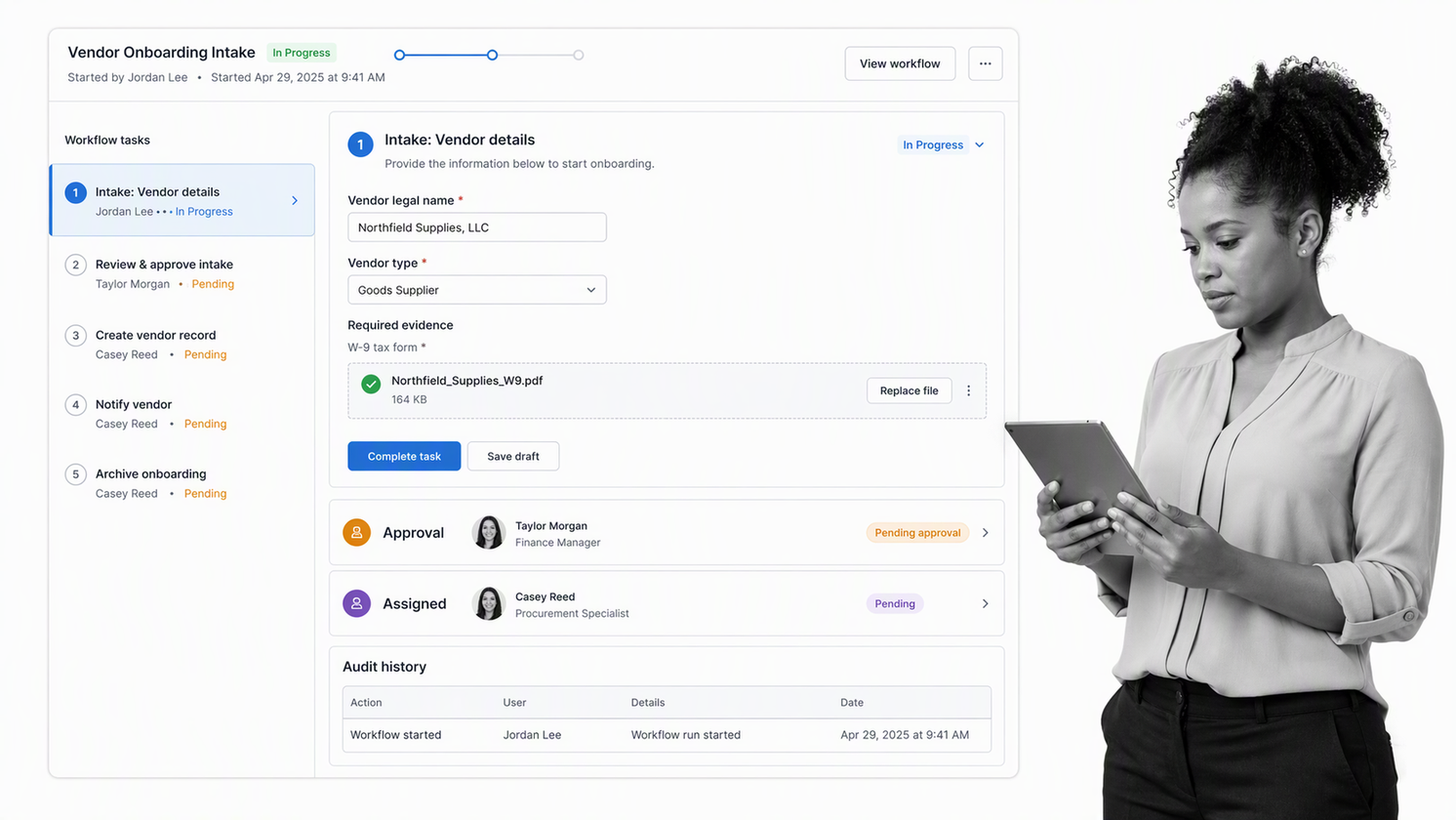
Best for: operational forms that must launch governed workflows.
Process Street connects structured form fields to recurring processes, assigned tasks, approvals, conditional logic, evidence, and execution history. It is the strongest choice on this list when the response is not the finish line. The response is the trigger for a controlled process such as vendor onboarding, policy exception review, customer implementation, employee onboarding, or quality investigation.
Why it stands out
A submission can populate workflow data, route the run according to answers, assign the right owner, require supporting files, and pause for approval. The work and the proof stay together. This removes the handoff where teams usually copy data from a response sheet into a checklist or project board.
The model also fits teams that need approval workflows, conditional workflows, and audit trails around their intake. Process Street has 5,000+ integrations, so form data can connect with the rest of the operating stack without turning the page into a tutorial for a separate middleware product.
Choose it when
- Each submission creates accountable work for one or more teams.
- Answers determine routing, risk, approvals, or required evidence.
- You need a durable execution record, not only a response database.
- The form is one stage in a standardized operating process.
Skip it when
Choose a lighter tool when you only need a quick public poll, a classroom quiz, or a simple one-off survey with no governed follow-up. Process Street earns its place when the form and the process belong together.
2. Jotform
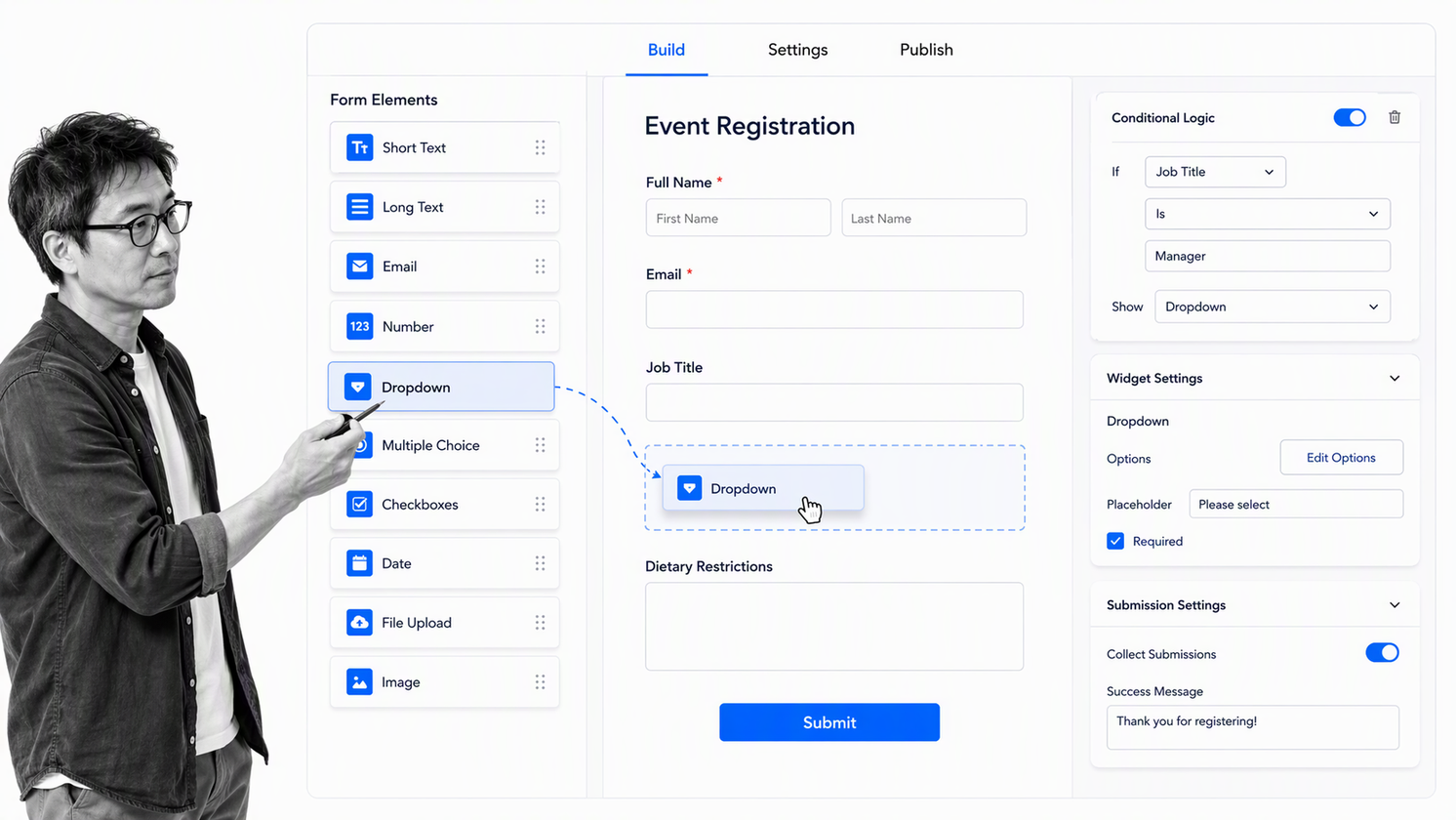
Best for: teams that want a broad template-led form builder.
Jotform centers the form-building experience. Its official help center describes a visual builder, a large field and widget library, and conditional behavior, while its plan comparison explains the free and paid options. That makes it useful when a team wants to launch many different kinds of forms without starting from an empty canvas every time.
Why it stands out
The builder supports a wide range of intake patterns, from registrations and order forms to applications and internal requests. Templates can accelerate setup, while widgets and field settings give teams more control than a minimal survey tool.
When an intake becomes operationally important, document the follow-up separately in a form checklist app or a repeatable workflow. This prevents the response table from becoming an unowned queue.
Choose it when
- You need many form templates and question types.
- The form itself is the primary deliverable.
- You want design flexibility without custom code.
- Different teams need to create varied public or internal forms.
Skip it when
Look elsewhere when your main requirement is end-to-end process governance rather than form construction. A broad builder can collect sophisticated submissions, but the team still needs to test how ownership, evidence, approvals, and audit history work after capture.
3. Typeform
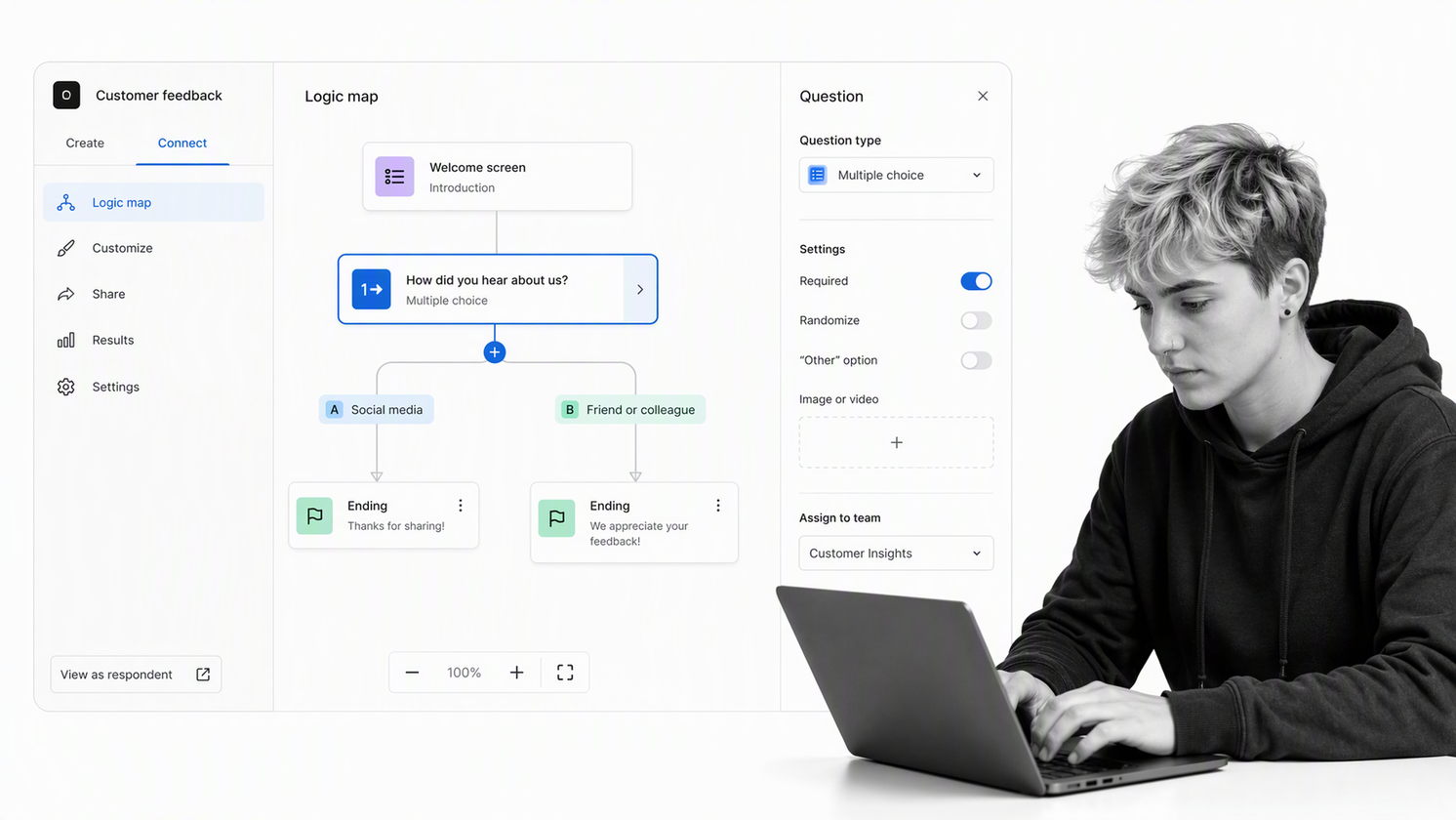
Best for: conversational, one-question-at-a-time experiences.
Typeform is designed around an engaging respondent journey. Its form presentation emphasizes one focused question at a time, visual polish, and logic that can send people toward different questions or endings. It is a natural fit for lead capture, research, applications, and customer-facing questionnaires where completion experience matters.
Why it stands out
The conversational layout reduces the visual load of a long page and gives each question more attention. Logic paths and customized endings can make the experience feel relevant to the respondent instead of showing every possible field.
Typeform publishes a free plan and paid plans on its current pricing page. Because limits and feature packaging change, evaluate the live plan details against expected response volume, collaboration needs, branding, and logic requirements before purchase.
Choose it when
- Respondent engagement and presentation are central to the goal.
- You want a conversational sequence instead of a dense form page.
- Logic paths should personalize questions and endings.
- The team can manage operational follow-up in a separate system when needed.
Skip it when
A conversational interface does not automatically provide process control. If each response starts a regulated, cross-functional, or evidence-heavy process, verify the downstream operating model before choosing on presentation alone.
4. Google Forms
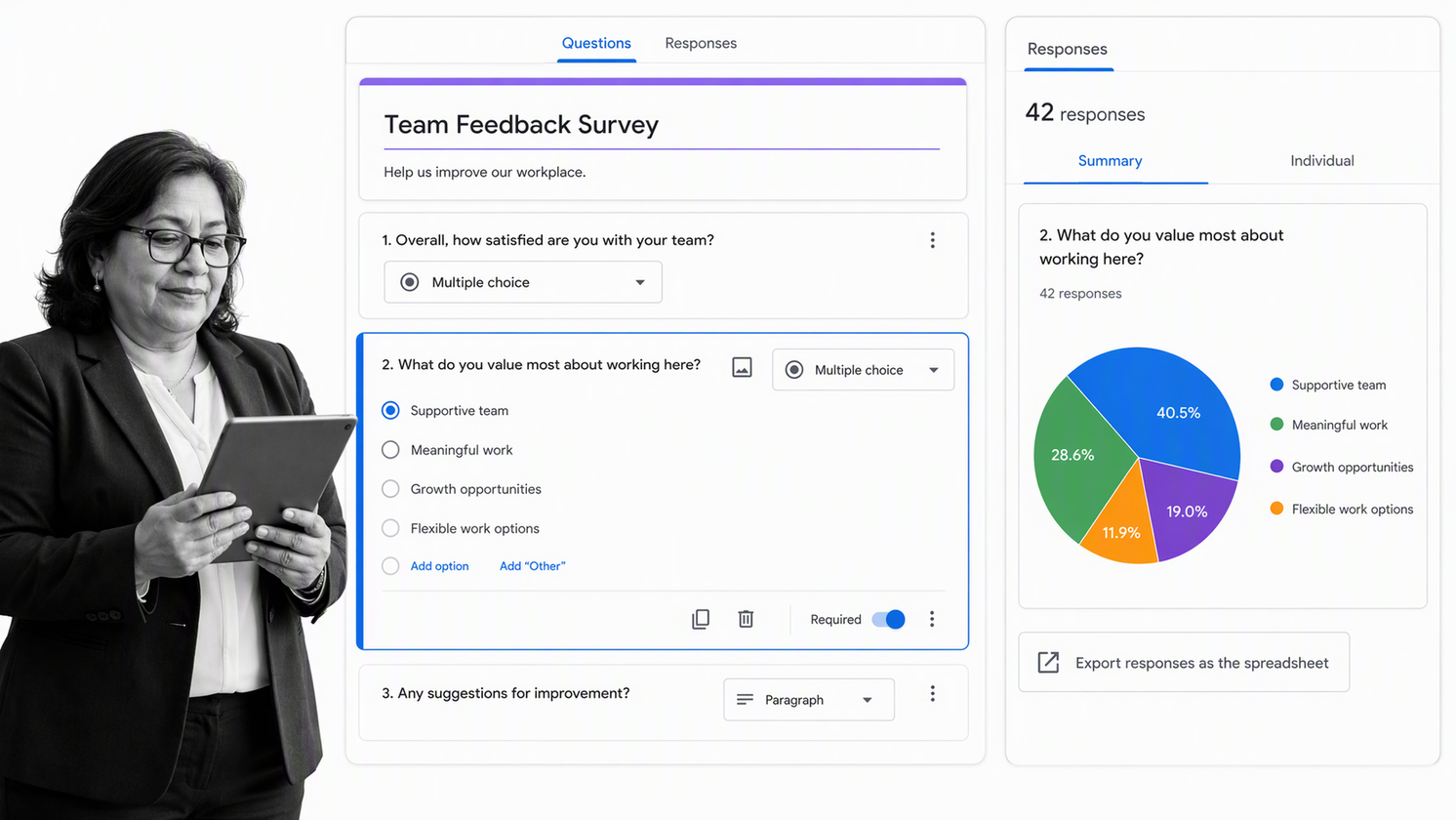
Best for: fast surveys and simple collection in Google Workspace.
Google Forms is easy to reach for when a team already works in Google Workspace. The official Google Forms product page highlights online forms and surveys, response summaries, collaboration, and the ability to work with response data. It is well suited to quick internal questionnaires, event registrations, feedback forms, and lightweight data collection.
Why it stands out
The editor is simple, collaboration is familiar to Google users, and responses can be reviewed without adopting a separate specialist platform. For teams that need to collect straightforward answers quickly, low setup friction is often more valuable than an elaborate feature set.
For recurring internal work, connect the intake to a clear request management process and define who owns the response queue. The form should not depend on one person remembering to check a spreadsheet.
Choose it when
- Your team already works primarily in Google Workspace.
- The form is a survey, registration, quiz, or simple request.
- Fast collaboration matters more than advanced presentation.
- A response summary or spreadsheet handoff is sufficient.
Skip it when
Choose a process-centered tool when you need complex approvals, enforced evidence, robust ownership, or a complete history of downstream execution. Google Forms is excellent for capture, but capture and process governance are different requirements.
5. Microsoft Forms
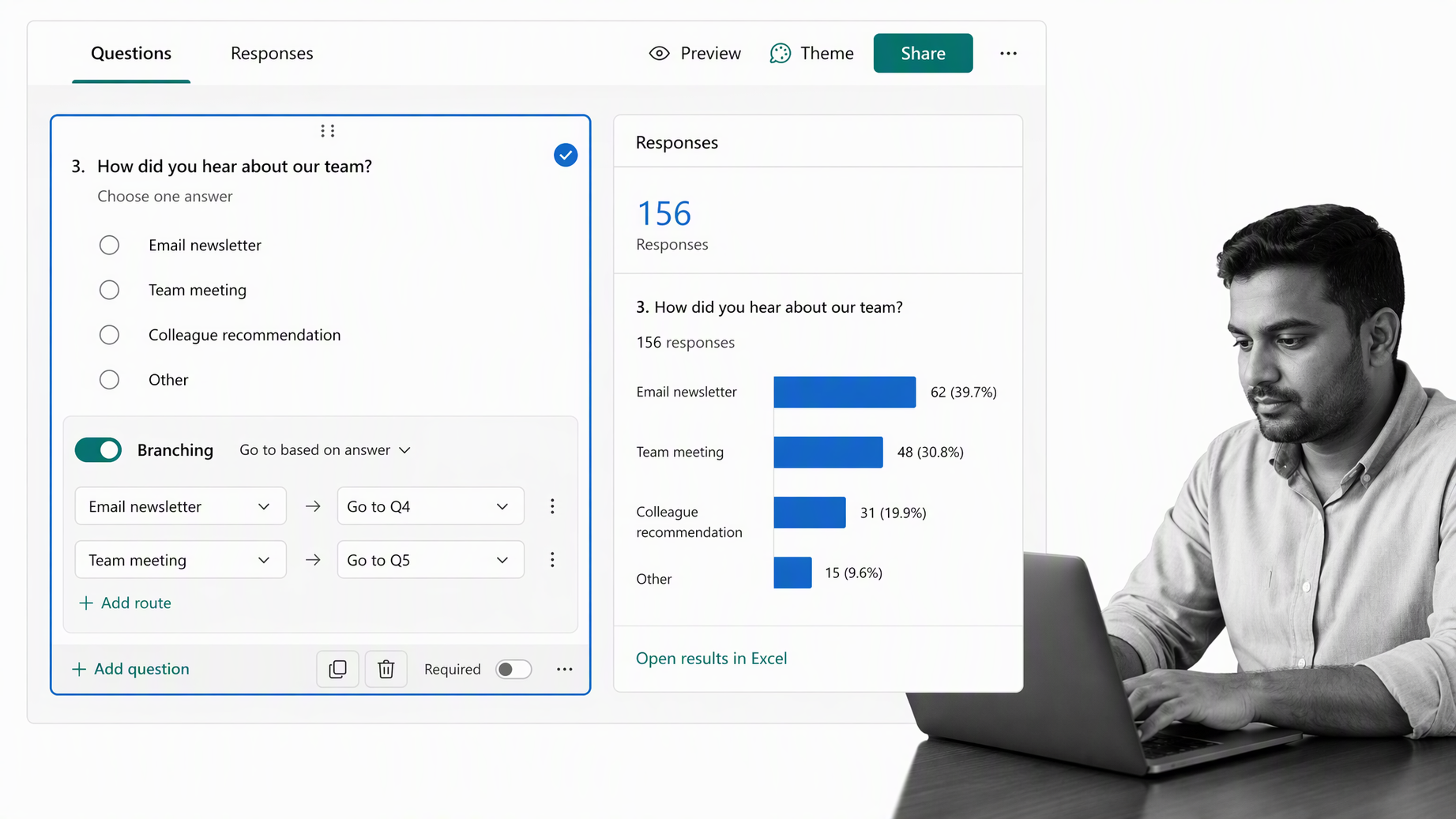
Best for: surveys and quizzes for Microsoft 365 teams.
Microsoft Forms lets users create surveys, quizzes, polls, questionnaires, and registrations, collect responses in a browser or on mobile, view real-time results, use built-in analytics, and export results to Excel. Microsoft documents availability across eligible Microsoft accounts and Microsoft 365 plans in its service description.
Why it stands out
The product fits naturally into organizations that already standardize on Microsoft 365. Branching, collaboration, built-in result views, and Excel export cover many common feedback, assessment, and internal collection needs without introducing an unfamiliar workspace.
When a submission creates multi-step work, define the operating path in a workflow management system. A familiar form editor helps adoption, but it does not replace clear accountability for the action that follows.
Choose it when
- Your users already work in Microsoft 365.
- You need surveys, polls, quizzes, or registrations.
- Excel analysis is a natural next step.
- Suite familiarity and administrative fit matter.
Skip it when
Use a more specialized form product when design flexibility and public conversion experience dominate. Use a process-centered platform when submissions must become governed, cross-functional workflows with evidence and approval controls.
How to choose the right form tool
Choose by the consequence of a response
If a response only needs analysis, prioritize editor speed and reporting. If it creates a customer promise, access decision, compliance obligation, payment review, onboarding sequence, or service request, prioritize routing and control. The higher the consequence, the less acceptable a loose response spreadsheet becomes.
Run four realistic tests
- Submit a complete, normal response.
- Submit an incomplete response with a missing attachment.
- Submit a high-risk answer that should require approval.
- Submit a request that belongs to a different owner or route.
Watch what the operator must do after each test. Count manual copies, messages, reminders, and status updates. Those hidden steps determine whether the tool reduces work or merely moves the intake from email into another queue.
Review governance before rollout
Check who can create forms, change logic, view submissions, export data, and delete records. Review accessibility, privacy, retention, and administrative ownership. The FTC advises businesses to collect only what they need, secure what they keep, and dispose of data safely. Form governance should reflect that principle from the first release.
Make the selection reversible
Document fields, routing rules, owners, evidence requirements, and integrations outside the tool. A clear process documentation layer makes it easier to improve the form, change products, or audit the process later without losing the operating logic.
Build a weighted selection scorecard
Turn the requirements into a short scorecard before inviting vendors or opening free trials. Weight the categories according to the consequence of the form. A marketing survey may give more weight to presentation and completion experience. A compliance intake should give more weight to permissions, routing, approvals, evidence, retention, and audit history. A suite-standardization project may give more weight to identity, administration, and familiar exports.
Score only what you can demonstrate in the test. A feature page may say that logic, collaboration, or integrations are available, but the buying team still needs to see whether the capability works at the required plan, volume, and permission level. Record the test scenario, expected result, actual result, limitation, and owner for every high-weight requirement. This keeps a polished demo from outweighing the operational facts.
Plan ownership across the form lifecycle
Every production form needs at least three kinds of ownership. A business owner defines the purpose and decides which questions are necessary. A process owner defines routing, service levels, approvals, and escalation. A system owner manages access, configuration, integrations, retention, and vendor administration. One person can hold more than one role, but each responsibility should be explicit.
Add a review date and a retirement rule. Forms accumulate because launching is easier than removing. A quarterly or semiannual review can identify unused forms, duplicate questions, broken destinations, former owners, and data that no longer needs to be collected. Retirement should include disabling the public entry point, preserving records according to policy, removing obsolete integrations, and updating documentation so people do not recreate the same shadow process.
Measure outcomes after launch
Form completion rate is useful, but it is not enough for operational intake. Measure time to first owner, time to decision, missing-information rate, reassignment rate, approval delay, overdue work, and the percentage of submissions that reach a verified outcome. These measures show whether the selected tool improved the whole process or only made the first screen easier to use.
Review qualitative feedback from both sides. Respondents can identify confusing labels, unnecessary fields, and accessibility barriers. Operators can identify ambiguous answers, weak routing, duplicate records, and missing evidence. Use both perspectives to revise the form and the workflow together. A form is healthy when people can submit accurate information and the organization can act on it consistently.
FAQs
What are form tools?
Form tools are software products for creating digital forms, surveys, quizzes, registrations, and request portals. They collect structured information and may also support logic, reporting, integrations, approvals, or workflow routing.
Which form tool is best for business workflows?
Process Street is the strongest option in this comparison when a form submission must launch assigned, conditional, approval-driven work with evidence and execution history. Simpler form tools may be better when you only need collection and reporting.
What should I look for in form tools?
Compare the respondent experience, field and logic controls, accessibility, integrations, permissions, response management, pricing limits, and what happens after submission. Operational forms also need ownership, approvals, evidence, and auditability.
Are free form tools enough for a business?
Free form tools can work for low-risk surveys, registrations, and simple requests. Review response limits, storage, branding, permissions, support, and downstream process needs before relying on a free plan for critical work.
What is the difference between a form tool and workflow software?
A form tool primarily collects structured input. Workflow software coordinates the tasks, owners, conditions, approvals, evidence, and records that follow, although some platforms combine both functions.
How many form tools should a company use?
Use as few as practical while preserving the capabilities each team genuinely needs. A small approved set with clear ownership, security rules, and standard handoffs is easier to govern than dozens of untracked forms spread across personal accounts.