


Turn every policy into automated workflows with built-in enforcement and audit-ready proof.



Form Workflow
A form workflow turns a submitted form into a controlled sequence of validation, routing, review, approval, action, and follow-up. The form captures information. The workflow makes sure the right work happens next.
That distinction matters. A form can collect a perfect response and still leave the business with an inbox full of unowned requests. A workflow adds decisions, owners, deadlines, exceptions, system updates, and proof.
This guide explains how form workflows work, the patterns they support, how to design one without unnecessary complexity, and how Process Street turns form submissions into executable operations. If you are comparing platforms rather than designing the process, use the separate form workflow software guide.
In this article, we are going to cover:
- What is a form workflow?
- Why form workflows matter
- How a form workflow works
- Form workflow types and examples
- How to design a form workflow
- Form workflow controls and reliability
- Build a form workflow in Process Street
- Measure and improve a form workflow
- FAQs
What is a form workflow?
A form workflow is a repeatable process triggered or informed by form data. It connects the intake experience to the operational path that follows. That path may validate the response, assign an owner, request more information, branch by risk, collect an approval, update another system, or close the request with evidence.
The form is the intake surface
The form asks for structured information. It can be public or internal, simple or conditional, and attached to a request, application, inspection, audit, incident, purchase, onboarding event, or service process. Its job is to capture the minimum information required to make the next decision.
The workflow is the operating logic
The workflow defines what happens after submission. It names the owner, required checks, decision rules, due dates, escalation path, and final outcome. It also decides which steps can run automatically and which need human judgment.
The record is the proof
A dependable workflow preserves the original response and the actions taken from it. That record should show assignments, comments, files, approvals, exceptions, and downstream updates. When someone asks why a request was approved, delayed, rejected, or escalated, the answer should be in one place.
Form workflow versus form integration
A form integration moves data between systems. A form workflow governs the broader work around that data. Integration may be one step inside the workflow, but the workflow also handles people, decisions, exceptions, deadlines, and proof.
Why form workflows matter
Form workflows matter because requests rarely fail at the moment of collection. They fail afterward, when nobody owns the response, a critical field is missing, an approval sits in email, a system update is forgotten, or an exception follows an improvised path.
They create clear ownership
Every submission should have a visible owner. Assignment can use request type, location, department, customer tier, value, risk, or workload. Clear ownership removes the common gap between someone submitted it and someone is handling it.
They make decisions consistent
A workflow can expose the same decision criteria for every request. Reviewers still use judgment, but they receive the same required context, follow the same approval policy, and record the reason for the decision.
They reduce manual handoffs
Routine steps such as acknowledging receipt, creating a task, notifying a reviewer, preparing a document, or updating a destination record can happen automatically. Automation removes copying and chasing while leaving high-impact decisions with the right person.
They protect exception handling
The default path is only half the process. Good form workflow design also covers missing evidence, duplicate requests, invalid values, conflicts, overdue reviews, unavailable approvers, system failures, and requests that do not fit a standard category.
They turn activity into evidence
A form response alone proves only that information was submitted. A workflow record can prove that the information was checked, routed, approved, acted on, and closed according to the process. That is useful for operations, customer service, quality, finance, HR, and compliance teams.
How a form workflow works
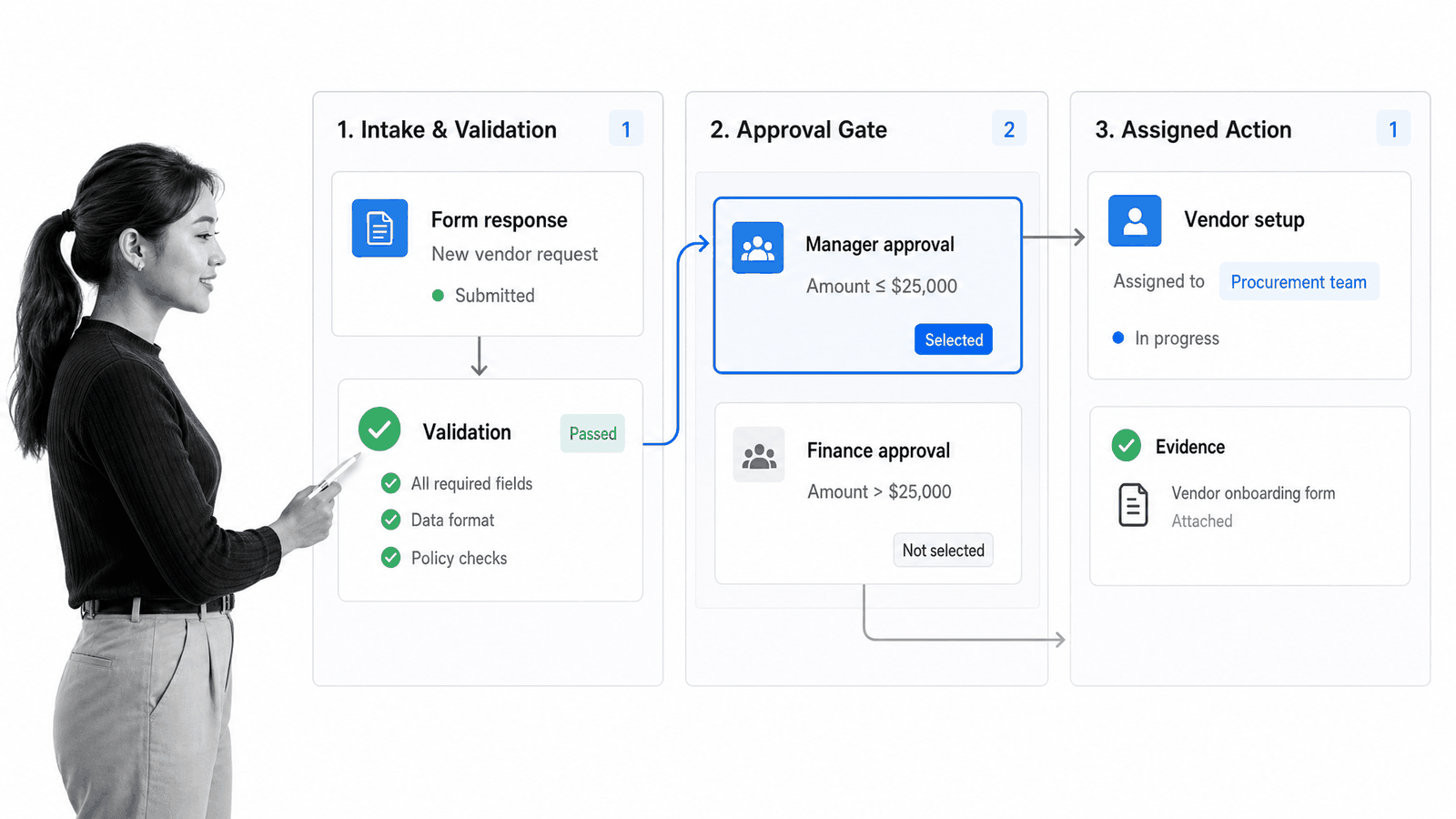
Most form workflows follow a common sequence. The names vary, but the control points remain stable: trigger, capture, validate, classify, route, review, approve, execute, confirm, and measure.
1. A trigger starts the workflow
The trigger may be a new submission, a scheduled review, a status change, a threshold breach, or a request created in another system. Define the trigger precisely so the workflow does not start twice or miss eligible work.
2. The form captures structured context
Collect only the fields needed for routing and action. Use clear labels, appropriate field types, allowed values, and help text. Conditional questions can keep the form short while collecting more detail for high-risk or unusual cases.
3. Validation checks the response
Validation confirms required fields, formats, ranges, attachments, consent, and business rules. Some checks should happen before submission. Others require a workflow step because they depend on external records or human review.
4. Classification determines the path
Classification turns raw answers into an operating category. A response might be routine, urgent, high-value, incomplete, sensitive, or outside policy. A configurable form engine and visible rules make that decision repeatable.
5. Routing assigns people and systems
Routing chooses the owner, review group, queue, destination system, or branch. Use stable business rules and a fallback owner. A response with no matching rule should enter an exception queue, not disappear.
6. Review and approval control the decision
Reviewers check the response against policy and evidence. A workflow approval process should name who can approve, reject, request changes, delegate, or escalate, and what evidence each outcome requires.
7. Execution completes the action
Approved work can create a record, issue a document, schedule service, update a system, start another workflow, notify the requester, or assign fulfillment tasks. Execution should be visible, owned, and tied to the originating response.
8. Confirmation and measurement close the loop
The requester needs a clear result, and the process owner needs operating data. Record the final status, response time, decision, exception reason, rework, and any follow-up date so the workflow can be reconciled and improved.
Form workflow types and examples
The same form workflow structure can support very different operations. The useful question is not which industry owns the pattern. It is what decision the form starts and what proof the organization needs at the end.
Approval workflows
Purchase requests, expense claims, policy exceptions, access requests, and contract reviews need a controlled decision. The form collects the case. The workflow routes by value or risk, gathers evidence, records approval, and prevents action before the gate is complete.
Onboarding workflows
Customer, vendor, employee, and partner onboarding forms collect identity, requirements, documents, and preferences. A structured employee onboarding workflow can create assignments across HR, IT, security, finance, and the hiring team without losing the original intake context.
Incident and service workflows
An incident form can classify severity, assign a responder, start a timed investigation, collect evidence, and track corrective action. An incident response process should treat failed routing or missed escalation as part of the operational risk.
Inspection and audit workflows
Inspection forms capture observations, photos, control results, and findings. The workflow can require correction, assign remediation, verify closure, and preserve the reviewer and evidence. A failed item becomes owned work instead of a row that sits in a report.
Request and fulfillment workflows
Purchase orders, equipment requests, content briefs, maintenance requests, and client service forms all follow a request-to-fulfillment path. A purchase order workflow shows how submitted details can move through review, authorization, ordering, receipt, and reconciliation.
How to design a form workflow
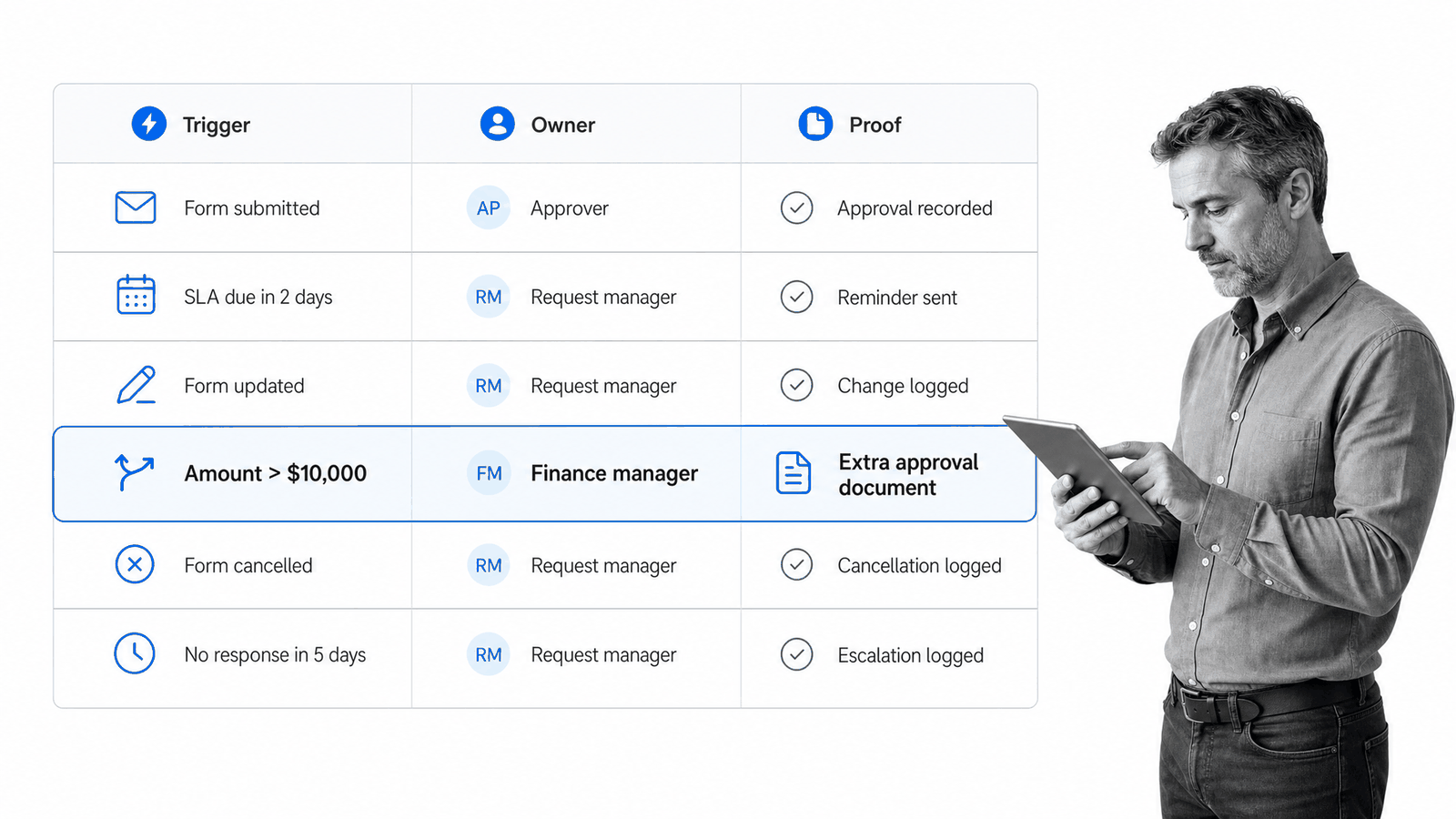
Design the form workflow from the required outcome backward. A polished form cannot rescue unclear ownership or a missing decision rule. Start with the operating result, then decide what information and controls are required to reach it.
1. Define the outcome
State what done means. Examples include a purchase request approved and recorded, an incident contained and reviewed, a new customer ready for delivery, or an access request granted with evidence. A clear outcome prevents the workflow from ending at reviewed without completing the real work.
2. Map the actors
List the requester, process owner, reviewers, approvers, fulfillers, system owners, and exception owner. Use roles where possible so the workflow survives staff changes. Define who can delegate and who becomes responsible when a due date is missed.
3. Separate input from decision data
The requester should provide facts they can reasonably know. The workflow can add internal classifications, checks, risk scores, account data, and reviewer notes later. Asking a requester to decide internal policy questions creates unreliable data and a confusing form.
4. Design the default path
Map the shortest safe route from submission to outcome. Name each stage, owner, entry condition, exit condition, and evidence requirement. Keep the default path easy to understand before adding branches.
5. Add decision rules
Use conditional logic for decisions that can be expressed from form data or workflow state. Write rules in plain language first. If a process owner cannot explain why a branch exists, the automation will be difficult to maintain.
6. Add approval gates where risk changes
Use approvals where a decision releases money, access, customer commitments, regulated action, or irreversible work. Avoid approval theater. Every gate should protect a specific risk and have the evidence required for a useful decision.
7. Design exceptions before automation
List the predictable failure cases: incomplete submission, unsupported request, duplicate record, conflict of interest, missing attachment, expired credential, destination outage, and overdue review. Give each one an owner, status, next action, and safe replay method.
8. Choose integrations after the process is clear
Once the path is stable, connect the systems that need the data. The integration layer should support the workflow, not become the workflow. Preserve a source identifier so records can be reconciled and duplicates prevented.
9. Test real scenarios
Test the happy path, missing optional data, invalid required data, a high-risk branch, rejection, change request, delegation, timeout, duplicate submission, failed system update, replay, and cancellation. Confirm the actual destination record and user outcome, not only the automation log.
10. Launch with ownership
Document the process owner, workflow owner, form owner, integration owner, alert channel, review cadence, and change procedure. A form workflow is an operating system. It needs someone accountable for keeping the rules and fields current.
Form workflow controls and reliability
Controls make the workflow dependable. They should reduce uncertainty without turning every request into a bureaucratic obstacle. Put the strongest controls where mistakes create material cost, customer harm, security exposure, compliance risk, or difficult rework.
Access and data minimization
Collect only what the process needs. Restrict sensitive fields and attachments to the roles that require them. Keep secrets out of form URLs, notifications, and routine error logs. Retention should match the business and regulatory purpose. The NIST digital identity guidelines provide a useful reference when identity proofing or authentication affects the process.
Required evidence
A required field is useful only when it represents proof the process actually needs. Evidence might include an invoice, identity document, test result, approval reason, photo, contract, customer confirmation, or system record. State what acceptable evidence looks like.
Idempotency and duplicate handling
The same submission may arrive twice because a requester retries, a webhook is delivered again, or an operator replays a failed event. Use a stable submission identifier and make downstream actions safe to repeat without creating duplicate records or notifications. Treat incoming payloads as untrusted input, consistent with the risks documented by the OWASP API Security project.
Timeouts, retries, and quarantine
Transient system failures can be retried with bounded delay. Validation and permission failures need correction, not endless retries. Move unresolved failures into an owned exception queue with the original response, error, attempt history, and safe next action. Use the OAuth 2.0 authorization framework when a connected service supports delegated access.
Audit history and reconciliation
Log meaningful state changes, assignments, approvals, and system updates. Then compare source submissions with completed workflow records and destination records. Reconciliation catches silent failures and manual changes that event logs miss.
Change control
A changed form field can break routing, mapping, reporting, or integrations. Review downstream dependencies before editing fields or allowed values. Version important workflows and test changes with representative cases before replacing the active path. A current workflow-form implementation example also illustrates how form sections can map to routed process steps.
Build a form workflow in Process Street
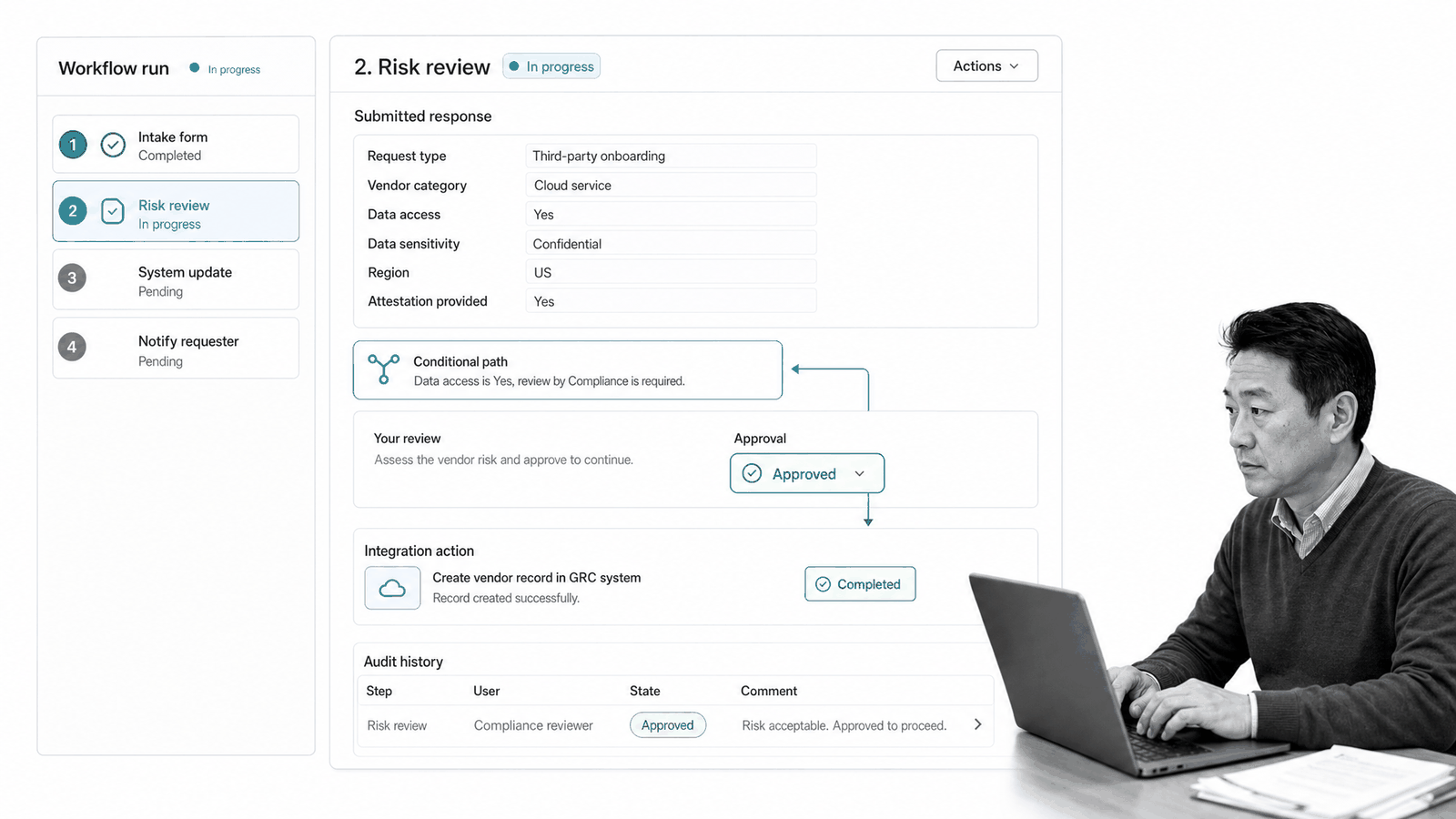
Process Street can bring the form, workflow, ownership, approval, system action, and audit record into one controlled run. The goal is simple: every valid submission becomes visible work, and every high-risk action follows the required path.
Capture structured data
Use a form application to collect the fields, files, and context needed by the workflow. Conditional questions can adapt the intake without forcing every requester through every field.
Assign and route work
Workflow data can determine which tasks appear, which owner receives them, and which due date applies. Routine requests can follow a short path. High-risk responses can reveal additional review, evidence, or approval requirements.
Control approval and execution
Approvals can block downstream work until the right reviewer decides. Required fields and stop points keep critical evidence from being skipped. Once the gate passes, automation can update a record, prepare a document, notify a team, or start another workflow.
Connect the operating stack
Process Street has direct, universal integrations to 5,000+ systems. Need a new one? An AI agent builds it on the fly. The form workflow stays centered on the operating outcome while connected systems receive the data and actions they need.
Start from a controlled template
A client onboarding workflow, employee onboarding checklist, expense request process, or incident response plan can provide the first path. Adapt the fields, owners, rules, and evidence to the real operation.
Keep proof with the work
The workflow run can preserve submitted values, assignments, comments, files, approvals, exceptions, integration actions, and closure state. The team can operate the process and explain it later without rebuilding the story from email and several systems.
Measure and improve a form workflow
Measure the form workflow as an operating process, not only as a form conversion rate. Submission volume matters, but it does not show whether the organization acted correctly or quickly after the response arrived.
Track flow metrics
Useful measures include time to first action, total cycle time, queue time, approval time, completion rate, overdue rate, exception rate, rework, abandonment, duplicate rate, system failure rate, and reconciliation mismatches.
Segment by path
A single average can hide the problem. Break results down by request type, risk level, department, location, owner, approval outcome, and exception reason. Compare the default path with high-risk and incomplete paths.
Review repeated exceptions
Repeated exceptions are design signals. They may reveal an unclear form question, missing option, weak validation rule, unavailable approver, bad mapping, or a request category that deserves its own branch.
Improve the bottleneck, then automate
Use a form dashboard to see response patterns, but inspect the workflow stage where work waits. Fix unclear ownership and policy first. Then use workflow automation to remove the proven repetitive handoff.
FAQs
What is a form workflow?
A form workflow is a repeatable process that turns submitted form data into validation, routing, review, approval, action, and follow-up. It connects the intake experience to owned work and preserves a record of what happened.
What are the main steps in a form workflow?
Common steps include trigger, data capture, validation, classification, routing, review, approval, execution, confirmation, and measurement. The exact path depends on the decision, risk, and evidence the operation requires.
How is a form workflow different from a form integration?
A form integration moves data between systems. A form workflow governs the people, rules, deadlines, approvals, exceptions, actions, and proof around the submitted data, and may use one or more integrations inside that process.
How do you create a form approval workflow?
Define the decision, approver, required evidence, routing rules, possible outcomes, delegation path, due date, and escalation rule. Make the approval block the protected action, and record the reviewer and reason with the request.
What should you measure in a form workflow?
Measure time to first action, cycle time, queue time, approval time, overdue work, exceptions, rework, duplicates, failed system actions, and reconciliation mismatches. Segment the metrics by workflow path so a slow exception route does not disappear inside one average.
How does Process Street support form workflows?
Process Street connects structured forms with assignments, conditional logic, approvals, automations, integrations, evidence, and audit history in one workflow run. Teams can route each response and prove the required work was completed.
