


Turn every policy into automated workflows with built-in enforcement and audit-ready proof.



Healthcare Integration

Healthcare integration is the work of connecting clinical, administrative, financial, and compliance systems so patient data and process steps move safely between them. It is not just an IT project. It is an operational discipline that determines whether the right people get the right information at the right point in care.
A healthcare organization may need an EHR, lab system, imaging system, patient portal, billing platform, scheduling tool, analytics warehouse, and third-party app to act like one coordinated environment. Integration is how those systems exchange data, trigger work, enforce controls, and preserve proof.
This guide explains what healthcare integration means, where integration work breaks down, which standards and governance practices matter, and how to turn integration into a controlled workflow instead of a pile of disconnected tickets.
In this article, we are going to cover:
- What healthcare integration means
- Why healthcare integration breaks down
- Healthcare integration architecture
- Standards and governance
- Workflow and compliance controls
- How to implement healthcare integration
- How Process Street supports healthcare integration
- FAQs
What healthcare integration means
Healthcare integration connects systems, data, workflows, and controls across the healthcare environment. At the technical layer, it can include APIs, HL7 messages, FHIR resources, interface engines, identity systems, event streams, and data warehouses. At the operational layer, it includes the process for requesting, approving, testing, monitoring, and changing those connections.
That second layer is where many integration programs succeed or fail. A technically working interface can still create risk if no one owns the data mapping, access approval, error handling, change control, or downstream workflow. Integration only works when the data exchange and the human process are governed together.
Integration versus interoperability
Interoperability is the ability for systems to exchange and interpret data consistently. Integration is the practical work that makes this happen in a specific environment. Standards such as FHIR, described by HealthIT.gov FHIR standard overview, help define the language. Integration projects still need mapping, testing, governance, access review, and workflow adoption.
Common healthcare integration use cases
- EHR to patient portal updates, so patients can access results, appointments, and care instructions.
- Lab and imaging result routing, so clinicians receive the right result in the right chart.
- Scheduling, referral, and intake workflows, so handoffs do not depend on manual re-entry.
- Claims, billing, and revenue cycle connections, so administrative work follows clinical events.
- Quality, compliance, and audit reporting, so evidence is gathered as work happens.
Teams often start with process documentation before the technical build. A workflow primer like what a workflow is helps separate the work sequence from the systems that support it.
Why healthcare integration breaks down
Healthcare integration breaks down because the healthcare environment is both technical and human. Data may move across systems, but clinical teams, IT, compliance, revenue cycle, and operations still need aligned definitions, responsibilities, and escalation paths.
Legacy systems and local variation
Many healthcare systems were implemented at different times, configured for different departments, and adapted around local workflows. Two clinics can use the same EHR and still have different fields, labels, routing rules, and review steps. Integration teams have to account for that local reality instead of assuming one clean data model.
Unclear ownership
An interface can touch clinical leadership, IT security, compliance, operations, finance, and vendor teams. If ownership is unclear, approvals stall, test evidence disappears, and changes happen without the right people knowing. The integration may appear live while the workflow around it remains fragile.
Manual work hiding inside the integration
A common failure pattern is partial automation. Data moves from one system to another, but staff still copy values, reconcile exceptions, chase signatures, or manually confirm downstream work. Those steps are easy to miss because they sit outside the interface diagram.
Clinical context gets lost
Another failure pattern is data movement without clinical context. A field can arrive in the destination system and still be hard to trust if the receiving team does not know when it was captured, which workflow produced it, which system owns it, or whether it has already been reviewed. Integration planning has to include the decision context, not only the data payload.
For example, a referral update may need appointment status, insurance status, clinical priority, supporting documents, and a named owner for follow-up. If only one field moves automatically, the receiving team may still need to open another portal, call the referring office, or wait for a manual confirmation. The visible integration works, but the care handoff is still fragile.
That is why healthcare examples such as the Avon Healthcare case study matter. The operating gain came from standardizing administrative workflows, not only from adding another technology connection.
Healthcare integration architecture

A practical healthcare integration architecture starts with a simple question: what data or action needs to move, from which source, to which destination, under which control? The answer shapes the technical pattern and the operating workflow.
Source and destination systems
Start by naming the systems involved. Common sources and destinations include EHR or EMR platforms, laboratory information systems, radiology systems, PACS, pharmacy systems, patient portals, identity providers, CRM or contact center tools, billing platforms, claims systems, and analytics warehouses.
Integration layer
The integration layer can include an interface engine, API gateway, integration platform, event bus, or custom service. Cloud reference models such as the AWS healthcare interoperability architecture show how organizations separate exchange patterns from individual applications.
Workflow layer
The workflow layer governs the work around the connection. It answers questions the architecture diagram often leaves out: who approves access, who reviews the data mapping, who signs off on test evidence, who monitors errors, who handles downtime, and who owns change requests after launch.
Monitoring layer
The monitoring layer watches for operational drift after launch. Healthcare integrations are not static. Vendors release updates, departments change forms, payer rules shift, security policies evolve, and care teams adjust their workflows. Monitoring should capture failed messages, delayed queues, mapping exceptions, manual overrides, missing approvals, and recurring support tickets.
A strong monitoring model does not dump every alert on the same team. It routes technical failures to the integration owner, clinical workflow questions to the process owner, access issues to security, and policy exceptions to compliance. That routing model should be designed before go-live, because downtime is the wrong moment to decide who owns the problem.
Healthcare workflows such as patient intake checklist template and clinical documentation routines like the SOAP note workflow guide show why workflow design matters. The data exchange supports the care process, but the care process still needs clear steps.
Standards and governance
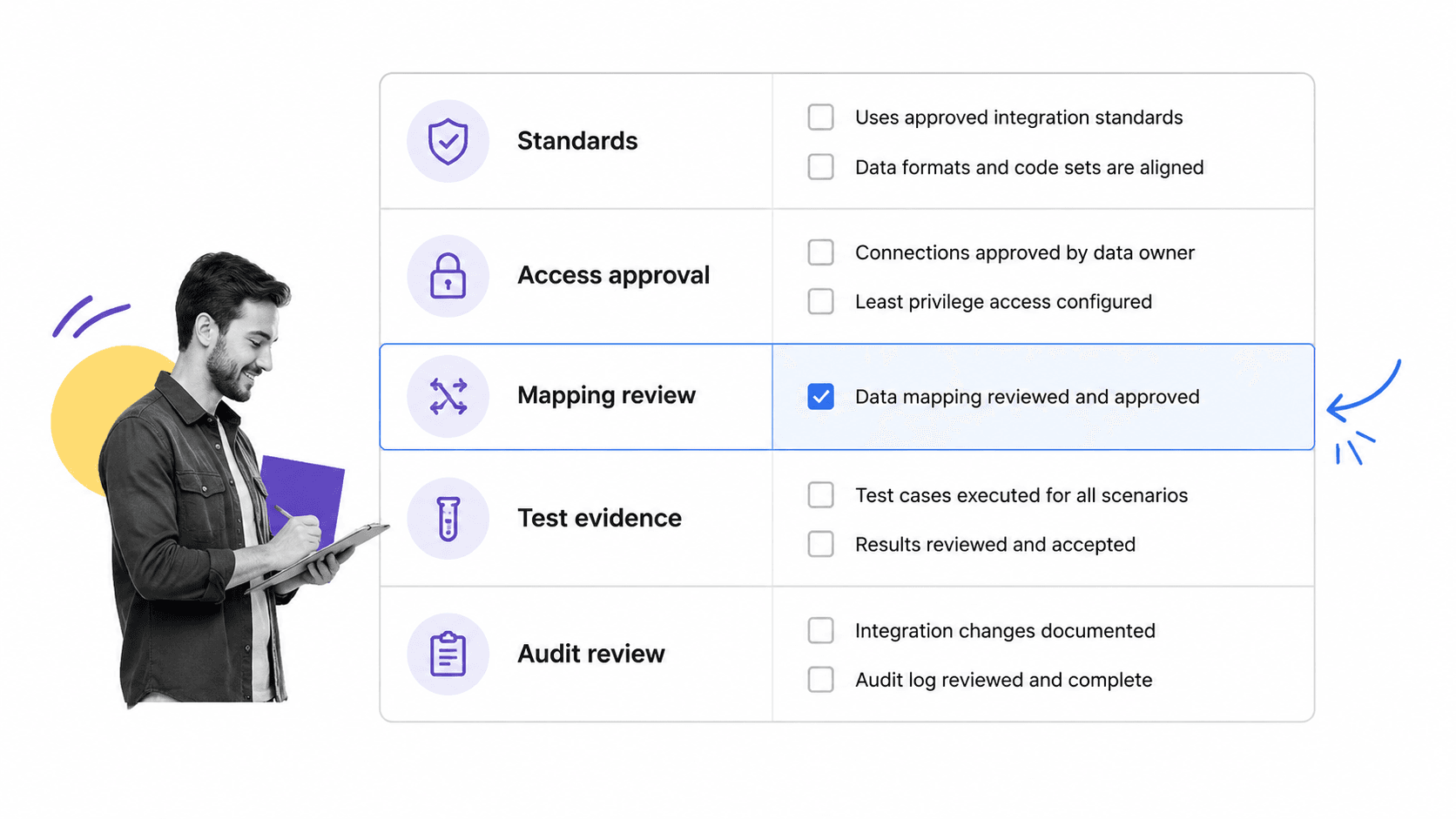
Healthcare integration work needs technical standards and governance controls. Standards make exchange possible. Governance makes exchange safe, consistent, and auditable.
HL7 and FHIR
HL7 standards are widely used for healthcare data exchange. FHIR is the modern HL7 standard built around web-friendly resources and APIs. The HL7 FHIR specification is the technical source for implementers, while business and operations teams need to understand what FHIR means for access, mapping, testing, and support.
HIPAA and access controls
Integration projects must protect electronic protected health information. The HHS HIPAA Security Rule guidance frames safeguards around administrative, physical, and technical protections. In practice, integration workflows should capture access approvals, minimum necessary reasoning, security review, vendor responsibilities, and evidence that controls were checked before go-live.
Information blocking and patient access
Policy also matters. The HealthIT.gov 21st Century Cures Act overview changed expectations around access, exchange, and use of electronic health information. Integration teams need governance that supports appropriate access while still controlling privacy, security, and operational risk.
Related Process Street resources such as HIPAA policies and procedures templates and Joint Commission audit preparation can help teams structure those control checks.
Workflow and compliance controls
A healthcare integration program should treat workflow and compliance controls as first-class requirements. The interface should not go live just because packets move or an API returns a response. It should go live when the right owners have approved the use case, validated the mapping, tested exceptions, and documented support responsibilities.
Integration intake
Every request should capture the business reason, systems involved, data types, patient population, owner, vendor contact, compliance risk, urgency, and downstream workflow. Without a structured intake, teams discover critical details late and rebuild the plan under pressure.
Mapping and validation
Mapping is not just a developer task. Clinical, operational, and compliance stakeholders need to confirm that each data element means the same thing in the source and destination. A field that looks harmless in one system can drive a clinical action, billing step, or reporting obligation in another.
Testing and exception handling
Testing should include happy paths, missing data, duplicate records, failed messages, access denial, downtime, and rollback. Exception handling needs named owners. If an order result fails, if a patient identity match is uncertain, or if a mapping changes after an EHR upgrade, the workflow should say who is notified and what happens next.
Audit trail
Audit readiness is where workflow systems add leverage. A compliance audit guide is easier when approvals, evidence, comments, timestamps, and completion history are captured while work is being done, not reconstructed after the fact.
Change control
Change control is part of integration quality. A new field, new vendor endpoint, EHR upgrade, clinic rollout, access change, or workflow redesign can affect the integration even when the interface itself is unchanged. Teams need a controlled way to request changes, assess impact, retest mappings, notify users, and update support documentation.
Change control also protects trust. Clinicians and operations teams stop relying on integrated data when fields change without warning or when exceptions are handled inconsistently. A repeatable change workflow makes it clear what changed, who approved it, when it was tested, and how users were told.
How to implement healthcare integration
The safest way to implement healthcare integration is to start narrow, define ownership, prove the workflow, then scale. Broad integration programs fail when they try to solve every system connection at once without a repeatable operating model.
Step 1: Define the use case
Name the workflow outcome before choosing the technical pattern. Are you routing lab results, supporting patient access, triggering intake tasks, syncing scheduling updates, sending claims data, or feeding a quality dashboard? The use case determines the data, risk, owners, and controls.
Step 2: Inventory systems and data
List every source, destination, field, event, identifier, and dependency. Include non-obvious systems such as spreadsheets, queues, shared inboxes, vendor portals, reporting tools, and manual reconciliation steps. Those hidden dependencies are where integration quality often breaks.
Step 3: Assign owners
Assign a business owner, technical owner, compliance reviewer, security reviewer, test owner, and support owner. Some roles may be the same person in a smaller organization, but the responsibility still needs a name.
Step 4: Build the workflow before scaling
Use a controlled workflow to manage request intake, mapping review, approval, build, testing, go-live, monitoring, and change control. A platform for workflow management software should make these handoffs visible, while a broader workflow management system can help teams standardize recurring integration work.
Step 5: Monitor and improve
After go-live, monitor failed messages, error queues, manual corrections, delayed handoffs, user complaints, support tickets, and access changes. Treat those signals as process improvement input. The integration is only healthy if the workflow around it stays healthy.
Step 6: Document the operating model
The operating model should be simple enough that a new owner can understand it quickly. Document the purpose of the integration, systems involved, data elements, access rules, expected workflow, exception process, support owner, compliance owner, and change-control path. Store this where the team can use it, not in a one-off project folder.
This documentation should not be treated as a static artifact. If the integration changes, the operating model changes with it. The easiest way to keep it current is to tie documentation updates to the same workflow that handles change approval and testing.
Step 7: Expand with a repeatable pattern
Once the first integration is stable, reuse the pattern. Keep the same intake structure, approval gates, testing evidence, go-live checklist, monitoring plan, and change-control workflow. The systems and data may differ, but the control model should get more consistent with every project.
That consistency compounds. Teams spend less time relearning approval paths, vendors get clearer requirements, and compliance reviewers see the same evidence structure across projects. The result is faster integration work with fewer hidden operational risks.
How Process Street supports healthcare integration
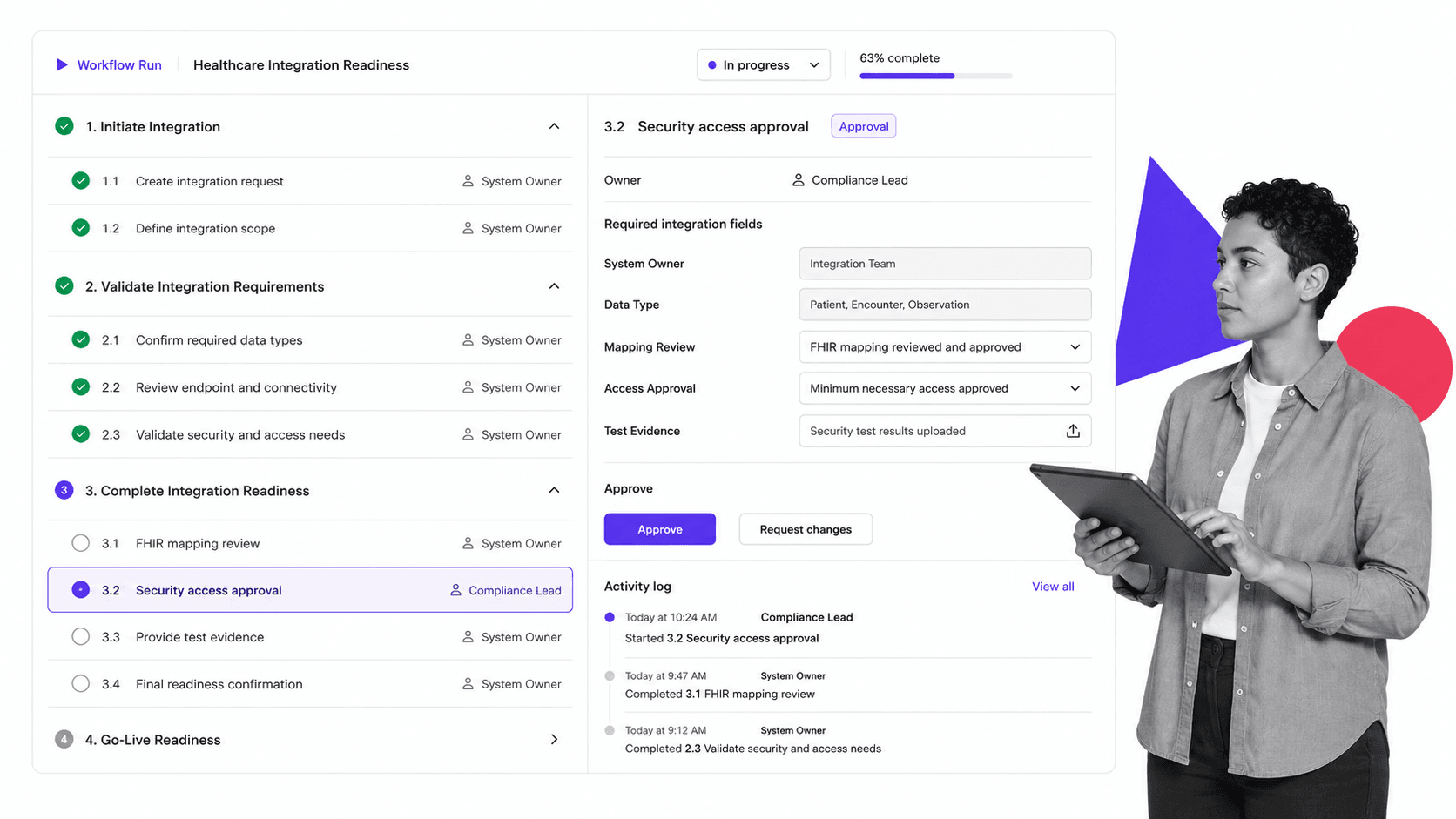
Process Street supports healthcare integration by turning the operating work around an integration into a governed workflow. Instead of tracking approvals, test evidence, owner assignments, and launch readiness in scattered tickets and documents, teams can run a repeatable checklist for every integration request.
Governed intake
A healthcare integration request can start with required fields for system owner, data type, affected workflow, compliance risk, vendor, business reason, and target launch window. Conditional logic can show extra tasks when protected health information, external vendors, or patient-facing access is involved.
Approvals and evidence
Built-in approval workflows can route security, compliance, business, and technical signoffs to the right people. Required fields and file uploads can capture mapping decisions, test evidence, support plans, and go-live approval.
Automation and handoffs
Process Street automations can notify owners, update tools, assign next steps, and keep handoffs moving. The point is not to replace the EHR, interface engine, or clinical system. The point is to enforce the work around those systems so integration quality does not depend on memory.
Audit-ready history
Every completed task, comment, approval, and evidence upload creates a history the team can review later. That matters for HIPAA, quality programs, vendor reviews, internal audits, and operational resilience.
Healthcare and quality teams can connect this work to adjacent operating systems, including QMS software guide and healthcare-specific process examples like the healthcare investment firm case study.
FAQs
What is healthcare integration?
Healthcare integration is the work of connecting clinical, administrative, financial, and compliance systems so data and process steps move safely between them. It includes technical connections, data mapping, access controls, workflow ownership, testing, and audit evidence.
How is healthcare integration different from interoperability?
Interoperability is the ability of systems to exchange and interpret data consistently. Healthcare integration is the practical implementation work that connects specific systems, owners, workflows, controls, and support processes inside an organization.
What systems are commonly integrated in healthcare?
Common systems include EHR or EMR platforms, laboratory systems, imaging systems, pharmacy systems, scheduling tools, patient portals, billing platforms, claims systems, identity providers, analytics warehouses, and quality reporting tools.
What standards matter for healthcare integration?
HL7 and FHIR are two important healthcare data exchange standards. Teams also need governance around HIPAA safeguards, access controls, patient access requirements, data mapping, testing, monitoring, and change control.
How can Process Street support healthcare integration work?
Process Street can manage the workflow around healthcare integration: intake, owner assignment, compliance review, security approval, mapping validation, testing evidence, go-live approval, and audit history. It helps teams prove the right steps happened before and after launch.
What is the biggest risk in healthcare integration?
The biggest risk is treating integration as only a technical connection. A working interface can still fail if ownership, data meaning, access approval, exception handling, testing, and downstream workflow are not governed.
