Reports now let you filter workflow runs by form field values. If you’ve been managing hundreds of active runs and struggling to find the ones you need, this feature gives you a direct way to narrow results based on how each run has been filled out.
When you select a single workflow in Reports, a new Form Fields option appears in the filter menu. Choose any form field from that workflow and set conditions to match specific values.
Different field types come with operators that make sense for them:
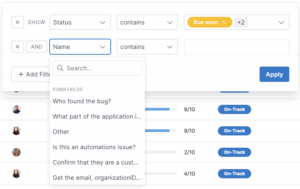
This is especially useful if you run high-volume workflows and need to locate runs based on specific answers — for example, finding all runs assigned to a particular user or matching a certain dropdown selection. Instead of scrolling through long lists, set a filter and get straight to the data you need.
Saved filter views make it easy to revisit the same criteria without rebuilding them each time.
For the full walkthrough, check out the Reports help article.







