


Turn every policy into automated workflows with built-in enforcement and audit-ready proof.



Medical Checklist App
A medical checklist app is a digital system healthcare teams use to standardize clinical checks, handoffs, safety steps, compliance tasks, and evidence collection. The best version does more than replace a paper checklist. It turns each check into assigned, auditable work.
Medical checklists matter because small missed steps can create large risk. A patient identity confirmation, equipment readiness check, medication review, infection control step, or discharge handoff can look routine until it is skipped.
This guide explains what a medical checklist app is, why medical checklists matter, what the app should do, the use cases to prioritize, the features to look for, how to implement one, and how Process Street can run medical checklist workflows with proof.
In this article, we are going to cover:
- What a medical checklist app is
- Why medical checklists matter
- What a medical checklist app does
- Medical checklist app use cases
- Medical checklist app features
- How to implement a medical checklist app
- Medical checklist app in Process Street
- How to choose a medical checklist app
- FAQs
What a medical checklist app is
A medical checklist app is software that guides healthcare staff through repeatable clinical, safety, operational, and compliance tasks. It gives each step a clear order, owner, required input, exception path, and record. Instead of trusting memory or a paper sheet, teams use the app to run the work and prove it happened.
The phrase can describe several tools: a medicine reminder app for a patient, a health checklist app for personal wellness, a clinical checklist tool for nurses, or a workflow platform used by healthcare organizations. This page focuses on the organizational version: a medical checklist app for teams that need safe, consistent, auditable execution.
A checklist app is not just a digital form
A form collects information. A medical checklist app drives action. It should assign the next step, branch when an exception appears, capture evidence, trigger review, and preserve the activity history. That is why it sits closer to a workflow management system than a static document.
The checklist has to match the clinical context
A checklist that works for office onboarding is not enough for healthcare. Medical teams need role-based ownership, conditional routing, privacy-aware records, approvals, and escalation. The app should support the real workflow around the check, not just the list itself.
Why medical checklists matter
Healthcare has a long history of checklist use because critical work is often repeated under pressure. The WHO surgical safety checklist resources is the clearest example: a structured checklist helps surgical teams confirm key safety steps before, during, and after a procedure.
The lesson is not that every checklist must look surgical. The lesson is that high-stakes work needs visible, shared confirmation. When a step is important enough to affect patient safety, care quality, privacy, or accreditation, it should not depend on memory alone.
Checklists reduce avoidable variation
Variation is useful in clinical judgment, but dangerous in routine safety work. Staff should not invent a different approach to identity checks, equipment readiness, discharge instructions, infection control, or incident escalation on every shift. A medical checklist app protects the standard process while still allowing clinical judgment where it belongs.
Checklists create a shared source of truth
Medical work crosses roles and shifts. A digital checklist gives the team one visible record of what has been done, what is blocked, and what needs escalation. That is why checklist execution connects closely to process documentation and process mapping in healthcare.
Checklist work also supports broader patient safety programs. AHRQ patient safety resources collects patient safety resources that emphasize learning from defects, standardizing reliable practices, and building systems that make the safe action easier to do. A medical checklist app should support that same operating model: make the expected action clear, make exceptions visible, and make follow-up part of the workflow.
Checklists support compliance evidence
Healthcare teams also need proof. HHS HIPAA Security Rule guidance sets expectations for safeguarding electronic protected health information, while accreditation and safety programs expect consistent process control. A medical checklist app should preserve the evidence behind recurring work instead of forcing teams to rebuild the story later.
What a medical checklist app does
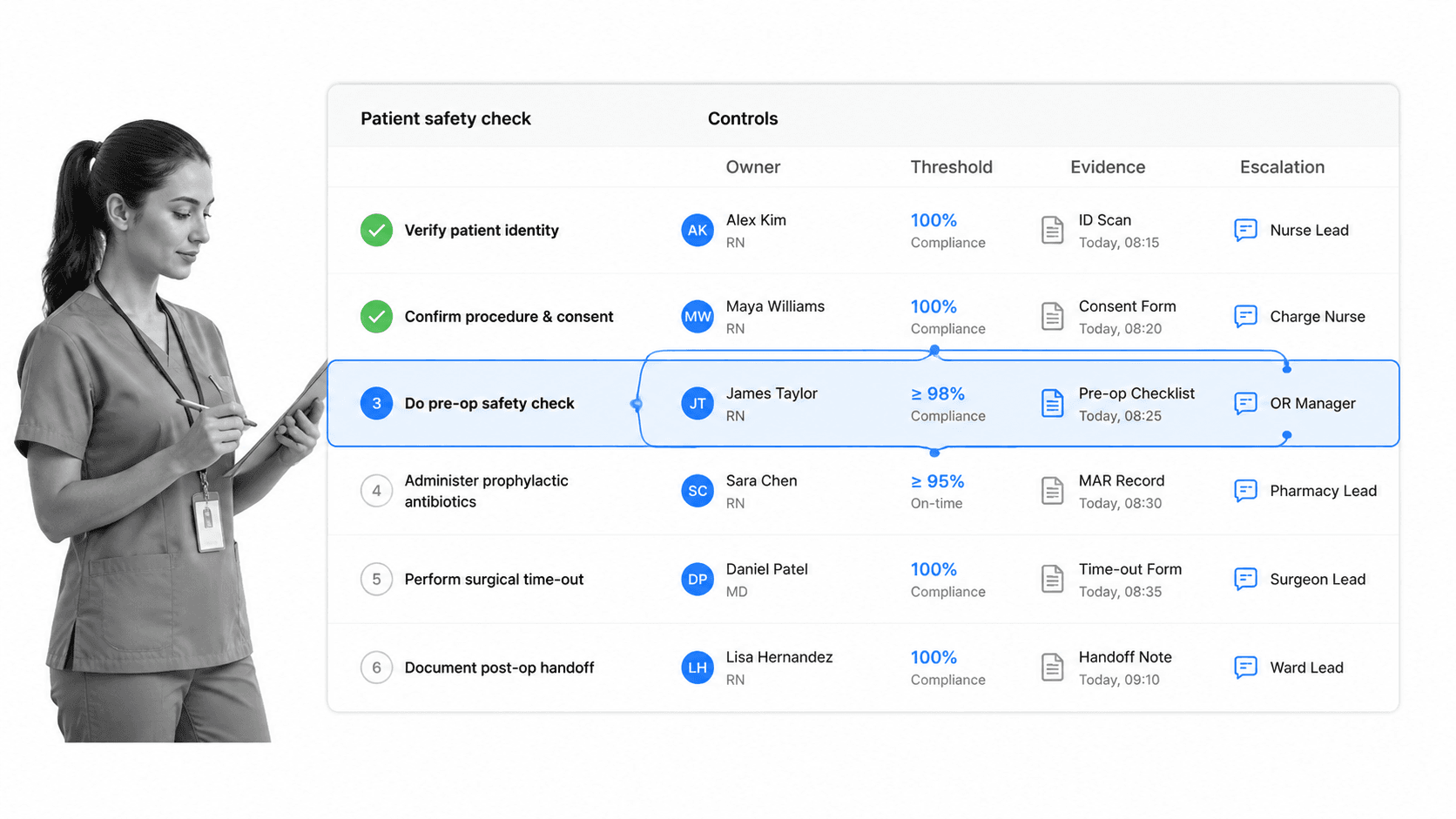
A medical checklist app should turn a recurring standard into a live workflow. Each checklist run should tell staff what to do, collect the required information, route exceptions, and create an audit trail.
Standardizes clinical and operational steps
The app should hold the approved sequence for a check: patient identification, supply readiness, required observations, medication confirmation, infection control steps, education, handoff, or closure review. Staff should see the current version, not an outdated copy saved locally.
Captures required fields and evidence
Medical checklist work often requires proof: a reading, signature, note, file, photo, or confirmation. The app should make essential fields required before closure. If evidence is missing, the workflow should not look complete.
Routes exceptions to the right person
Real medical work branches. If an item is normal, the checklist moves forward. If an item is abnormal, missing, or delayed, the app should trigger the next action. conditional logic can route different paths based on what staff enter, so exceptions do not sit unnoticed.
Preserves the activity history
The app should show who completed each task, what they entered, what changed, who approved closure, and which exception path was used. That history matters for internal review, quality improvement, incident response, and audits.
Medical checklist app use cases
The best first use case is usually the one where a missed step has a clear safety or compliance consequence. Start where consistency matters most and where the team can see the value quickly.
Patient intake and onboarding
Patient intake includes identity confirmation, consent, history capture, insurance, allergies, privacy notices, and next-step instructions. A patient onboarding checklist can standardize the handoff from administrative intake to clinical care.
Medication and treatment safety checks
Medication reconciliation, double checks, dose confirmations, and treatment readiness are strong checklist candidates because they involve repeated steps and high consequence. The workflow should capture exceptions and require review when something does not match.
Infection control checks
Infection control requires routine checks that are easy to miss in a busy environment. CDC infection control core practices gives the underlying practice areas, but the app has to turn them into assigned work: cleaning checks, isolation precautions, sterilization readiness, and follow-up tasks.
Handoffs, rounds, and discharge
Handoffs and discharges are vulnerable because information moves between people. A checklist app can require critical confirmations, flag missing information, attach evidence, and show the receiving owner what remains open.
Incident, audit, and compliance workflows
When an event occurs, teams need a structured path for reporting, review, corrective action, and closure. A hospital incident report checklist supports the first capture step, while a broader compliance management software program connects incident work to policy and audit evidence.
Medical checklist app features
Feature lists can get noisy. For healthcare, the important question is whether the app helps staff run a safe process while giving leaders proof that the process held.
Role-based assignments
Every task should have an owner. Shared responsibility sounds collaborative, but it often creates gaps. The app should assign steps by role, team, location, or condition, and make overdue work visible.
Conditional logic
Medical workflows change based on what staff find. conditional logic lets a checklist ask different questions and route different tasks when a patient risk, missing item, abnormal result, or urgent exception appears.
Approvals and sign-offs
Some work should not close without review. Approvals are useful for exceptions, discharge readiness, incident closure, competency checks, and policy attestations. Review gates help prevent a checklist from becoming a box-ticking exercise.
Review gates are especially useful when a checklist supports a formal safety protocol. The Joint Commission Universal Protocol FAQ describes time-out and Universal Protocol expectations for preventing wrong-site, wrong-procedure, and wrong-person events. The app should make those moments visible in the workflow, require the right confirmation, and show who reviewed the exception before closure.
Mobile access
Healthcare work does not happen only at a desk. A mobile workflow software pattern helps staff complete checks where work happens, whether they are rounding, inspecting a room, preparing supplies, or confirming a handoff.
Privacy and audit controls
A medical checklist app should support access control, activity history, and secure handling of sensitive information. It should also make it possible to limit what different roles can see or change.
Integrations and automation
The app should connect with the surrounding stack so checklist work does not create duplicate data entry. Process Street has direct, universal integrations to 5,000+ systems. Need a new one? An AI agent builds it on the fly.
Governance without slowing the team down
Healthcare checklists need ownership. Someone must approve the standard, update it when policy changes, retire stale versions, and review exceptions. The app should make that governance visible without turning every edit into a project. A good setup lets the right owner update the checklist, routes the update for review, and keeps staff on the current version the next time the workflow runs.
How to implement a medical checklist app
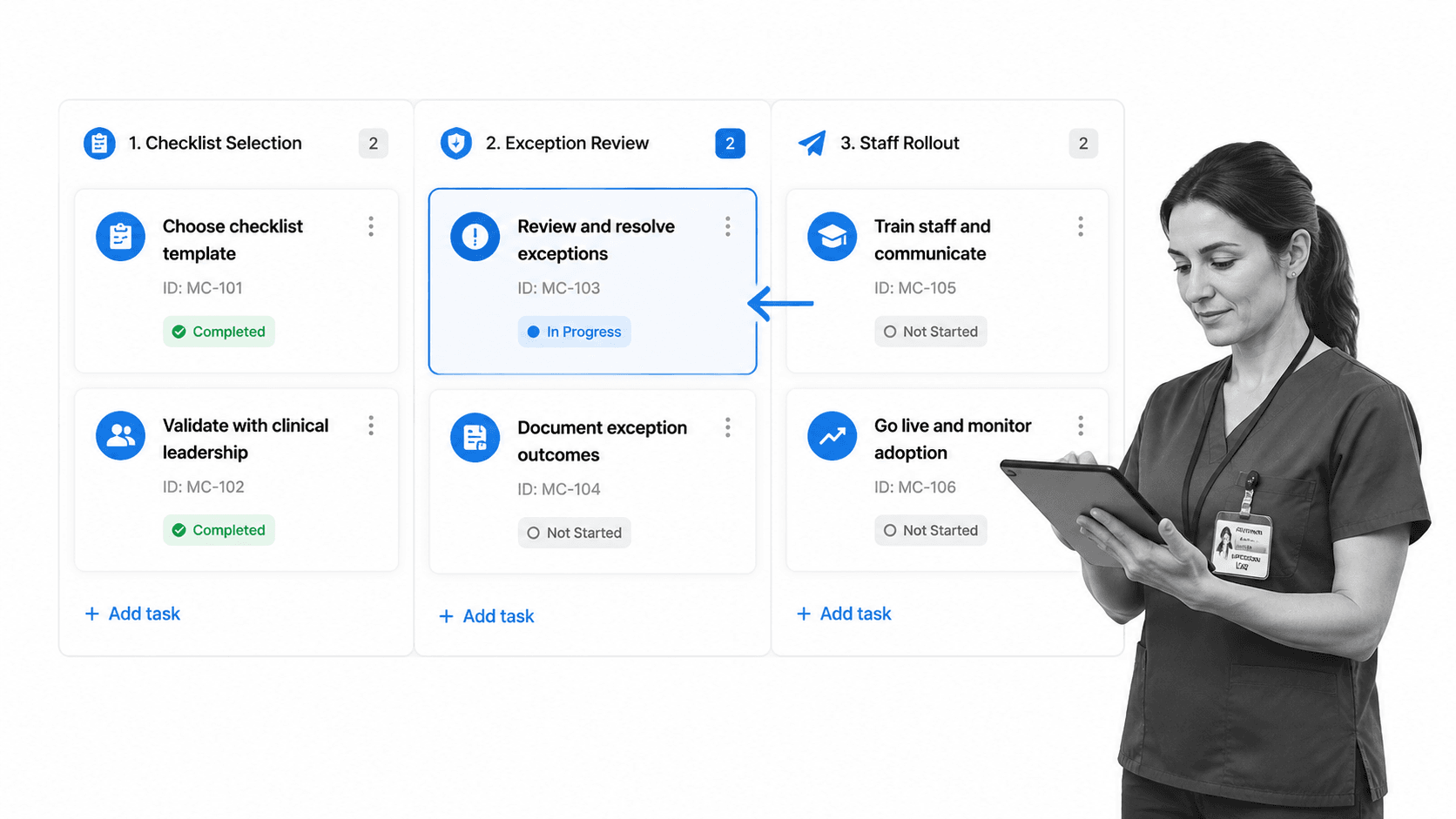
Implementation fails when teams try to digitize every checklist at once. Start with one workflow where the risk is clear, the owner is obvious, and the current process creates friction.
Step 1: Pick one high-risk checklist
Good starting points include patient intake, discharge readiness, medication review, infection control, equipment readiness, incident reporting, or audit prep. Avoid starting with a vague checklist that nobody owns.
Step 2: Map the real process
Write down the actual flow: who starts the checklist, what information they need, what conditions change the path, who reviews exceptions, and what evidence is required. If the process is unclear, use process mapping in healthcare before building the app workflow.
Step 3: Build required fields and exception paths
Do not simply copy a paper checklist into software. Add required fields, conditional paths, evidence uploads, and escalation. If a step matters enough to be on the checklist, the app should know what happens when it fails.
Step 4: Test on a real shift
Run the checklist with the people who will use it. Watch where they pause, which fields create confusion, and where the workflow is too rigid. Fix the process before expanding.
Step 5: Review evidence and improve
After the first runs, review completion rates, exception patterns, late tasks, and evidence quality. The goal is not just a digital checklist. The goal is a better operating loop where safety and compliance work improves over time.
Medical checklist app in Process Street
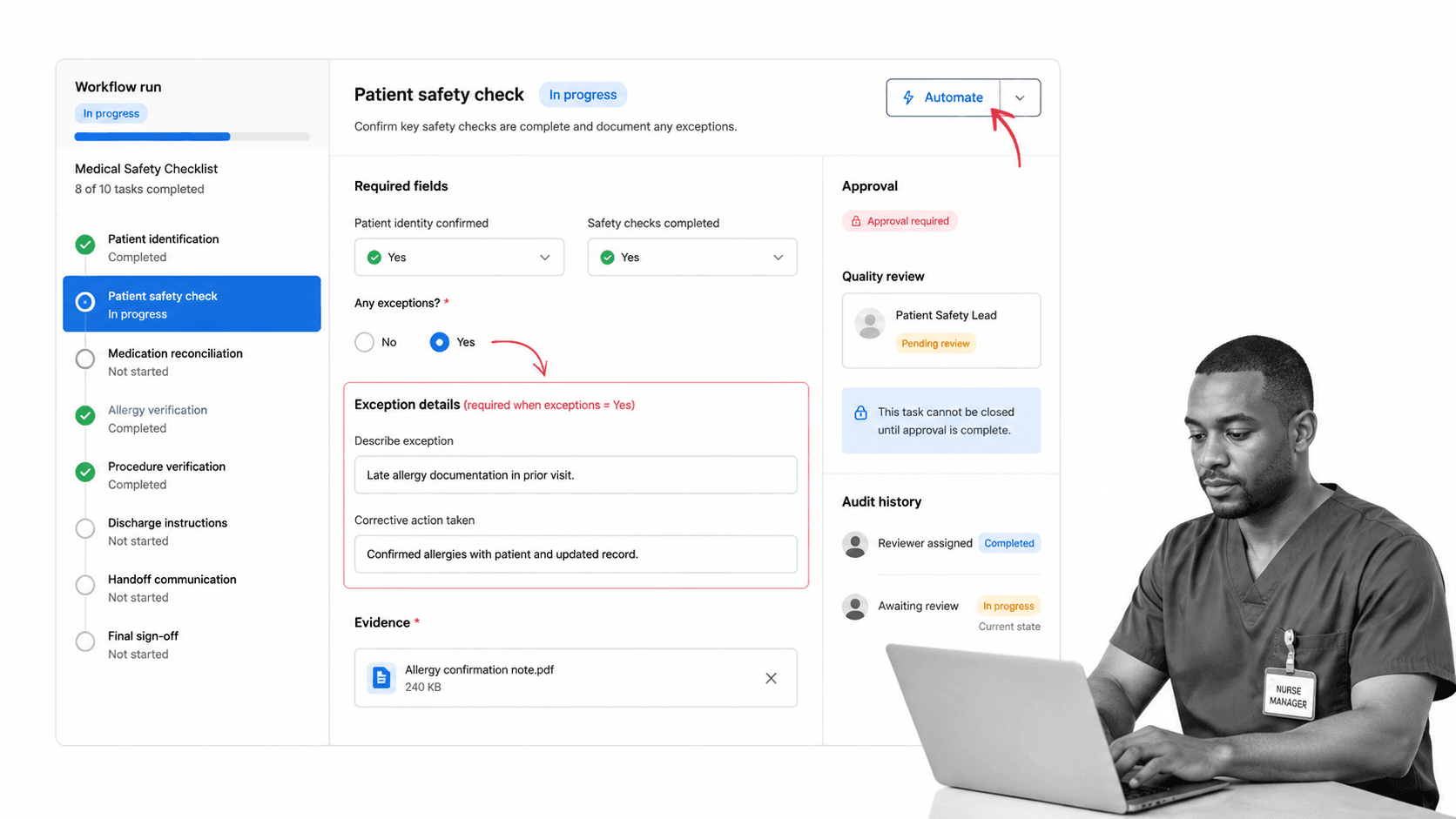
Process Street can work as a medical checklist app for teams that need repeatable healthcare workflows with assignments, required fields, conditional logic, approvals, automations, evidence, and audit history. It is especially useful when a checklist has compliance, quality, or patient safety consequences.
Process Street is HIPAA compliant and built for teams that cannot afford skipped steps or audit surprises. Each checklist run becomes a workflow record: who did what, what they entered, which path opened, what evidence was attached, and who approved closure.
Run recurring checklists
Teams can run intake, discharge, infection control, medication review, equipment readiness, incident response, competency, and audit checklists as workflows. Recurring schedules make sure routine checks are launched instead of remembered.
Guide staff through exceptions
If staff mark a patient risk, missing document, failed check, or abnormal value, the workflow can reveal the right next tasks. This keeps the checklist practical in the real world, where clean pass or fail paths are rare.
Create audit-ready records
Every run produces structured proof. That proof can support quality review, incident follow-up, and HIPAA compliance automation when healthcare teams need to show that required work happened and exceptions were handled.
Connect checklists to surrounding systems
Process Street can coordinate work around forms, records, chat, email, signatures, and reporting. The checklist becomes part of a broader healthcare integration strategy instead of another isolated tool.
How to choose a medical checklist app
Choose a medical checklist app by testing how it performs under real healthcare conditions. A beautiful checklist is not enough if staff cannot use it during a shift or leaders cannot trust the evidence.
Can staff complete it at the point of work?
The app should be fast, clear, and mobile-friendly. If staff have to leave the work area, remember details later, or duplicate entries, adoption will suffer.
Can leaders control the standard?
Healthcare checklists need governance. Look for version control, permissions, approvals, and clear ownership. Staff should use the approved checklist, and leaders should know when it changes.
Does it handle exceptions?
Ask vendors to show what happens when a check fails. The answer should not be a free-text note. The app should open the right tasks, notify the right person, and preserve the closure record.
Does it improve the workflow over time?
A checklist app should help leaders see where the process is breaking. Repeated exceptions, late tasks, skipped evidence, and approval bottlenecks should become improvement signals. Without that feedback loop, the app digitizes the current process but does not help the team make it safer or easier to run.
Does it preserve usable evidence?
Evidence should be easy to review later. Completion history, fields, files, approvals, and comments should be tied to the checklist run. That makes the app useful for safety review, quality management system software, and audit prep.
The simplest evaluation question is this: if an auditor, quality leader, or clinical manager asks what happened, can the app show the answer without a scavenger hunt? If yes, the checklist app is doing the job.
FAQs
What is a medical checklist app?
A medical checklist app is software that guides healthcare staff through repeatable clinical, safety, compliance, and handoff tasks. It assigns steps, captures required information, routes exceptions, and preserves an audit trail so the checklist is executed and proven.
What should be included in a medical checklist app?
A strong medical checklist app should include role-based assignments, required fields, conditional logic, evidence uploads, approvals, escalation, recurring schedules, mobile access, privacy controls, and activity history. The exact checklist content should match the clinical or operational workflow being run.
How is a medical checklist app different from a paper checklist?
A paper checklist can remind staff what to do, but it cannot automatically assign work, branch on exceptions, require evidence, route approvals, or preserve a searchable activity history. A medical checklist app turns the checklist into live workflow execution.
Can a medical checklist app help with HIPAA compliance?
A medical checklist app can support HIPAA-related workflows by standardizing privacy and security tasks, assigning owners, collecting evidence, and preserving proof of completion. The app itself should also support secure access controls and appropriate handling of sensitive information.
How do you implement a medical checklist app?
Start with one high-risk checklist, map the real process, define owners and exceptions, add required fields and evidence, test it on a real shift, then review completion and exception data before expanding. Implementation should improve the operating process, not just digitize a paper form.
Can Process Street be used as a medical checklist app?
Yes. Process Street can run medical checklist workflows with assignments, required fields, conditional logic, approvals, automations, evidence capture, recurring schedules, and audit history. It is a fit for healthcare teams that need checklist work to be repeatable, visible, and provable.
