


Turn every policy into automated workflows with built-in enforcement and audit-ready proof.



Open Source Workflow Management Software

Open source workflow management software lets teams run, schedule, and automate repeatable work using tools they can self-host, inspect, and modify, without paying per-seat license fees for the core engine.
The appeal is control. You own the deployment, the data stays in your environment, and you can extend the engine to fit unusual processes. The tradeoff is responsibility: you also own hosting, upgrades, security patching, and the time it takes to keep everything running.
This guide explains what open source workflow software is, how to choose between the main options, and which tools are worth shortlisting. It also covers when a managed platform is the better tradeoff than self-hosting.
In this article, we are going to cover:
- What is open source workflow management software?
- How to choose open source workflow management software
- Best open source workflow management software
- Where a managed platform fits
- Open source workflow software by use case
- FAQs
What is open source workflow management software?
Open source workflow management software is a category of tools whose source code is published under a license that lets you run, study, change, and redistribute it. In practice, teams adopt these tools to automate processes while keeping the engine inside their own infrastructure.
The category overlaps with broader workflow management software, but the open source label adds two specific properties. First, the code is transparent, so you can audit how the engine behaves. Second, there is usually a self-hosted deployment path, so sensitive data never has to leave your servers.
Most of these tools share a common anatomy. A workflow is defined as a sequence of steps, the engine runs that definition, and the system records what happened along the way.
The licensing matters more than it first appears. An open source license does not just lower the price; it changes the relationship you have with the tool. You can fork the project, fix a bug yourself, or keep running an old version on your own terms. For organizations that need long-term control over critical infrastructure, that independence can be worth more than any single feature.
Most open source workflow tools handle some mix of:
- Definitions: workflows written as code, BPMN diagrams, YAML, or visual node graphs.
- Triggers: schedules, webhooks, API calls, file events, or manual starts.
- Routing and rules: branches, gateways, parallel paths, retries, and conditions.
- Actions: running scripts, calling services, moving data, or assigning human tasks.
- Observability: run history, logs, task states, and failure handling.
There is an important distinction inside this category. Some open source tools are built for technical orchestration, where workflows are defined as code and run by engineers. Others are built for business process automation, closer to traditional workflow management system thinking, where the workflow models human steps, approvals, and forms.
Knowing which side you need matters before you compare projects. A data team scheduling pipelines has very different requirements from an operations team that wants guided checklists and approvals. The best open source workflow management software for one of those jobs is often a poor fit for the other.
It also helps to separate the engine from the experience. Open source projects tend to be strong engines: reliable, extensible, and scriptable. The day-to-day experience for non-technical staff, including clean forms, simple conditional logic, and readable run history, varies widely and is worth testing with real users before you commit.
How to choose open source workflow management software
Choose open source workflow management software by matching the tool to the shape of your work and the size of your operating team, not by counting features. A powerful engine that no one on staff can maintain is a liability, not an asset.
Decide who will run it
Self-hosting means someone owns deployment, scaling, upgrades, backups, and security. If you have a platform or DevOps team, that is realistic. If you do not, the maintenance burden can outweigh the license savings. Map the real total cost before choosing, the same way you would for any workflow software decision.
Match the definition style to your builders
Some tools define workflows as code, which suits engineers who want version control and testing. Others use BPMN diagrams or drag-and-drop canvases, which suit analysts and operators. Pick the model your actual builders will use, because the wrong model means workflows get built once and never maintained.
Check integration and failure handling
Automation breaks when data is missing, a service is down, or a record changes shape. Look for retries, clear error messages, run history, and a way to pause or reroute work. Strong automated workflow tools make failures visible instead of silent.
For teams that need a deeper bench of connections without custom engineering, Process Street offers direct, universal integrations to 5,000+ systems, and when a connector does not exist yet, an AI agent builds it on the fly. That is the kind of integration depth self-hosted projects usually require plugins or custom code to match.
Decide how much governance the work needs
Low-risk automation can stay flexible. High-risk work needs permissions, approvals, required fields, and a durable audit trail. If the workflow carries compliance, finance, security, or customer risk, treat governance features as buying criteria, not extras.
Document the process before you automate it. A clear process documentation baseline keeps automation honest, because automating an undocumented process just makes confusion run faster. Pair the engine choice with solid business process documentation so the workflow reflects how the work should actually happen.
Best open source workflow management software
The tools below are among the most widely used open source workflow management software projects. They span technical orchestration, BPMN process automation, and low-code design. For a broader catalog, the curated list of open source workflow engines on GitHub tracks dozens more engines by category.
1. n8n

n8n is best for teams that want visual, node-based automation they can self-host. It connects apps and services on a canvas where each node performs a step, and it supports custom code inside nodes when the no-code path runs out.
Use n8n when the work is mostly connecting services, transforming data, and reacting to triggers, and when you want the result running on your own infrastructure. It is popular with technical operators who like a visual builder but still want the option to drop into code.
The hosted-yourself model is the real differentiator. Because you run n8n on your own servers, data never has to pass through a third party, which matters for teams with strict privacy or residency requirements. The cost of that control is the operational work of keeping the instance patched, scaled, and backed up, so it fits teams that already run their own infrastructure.
- Best for: self-hosted app automation, data transformation, and event-driven workflows.
- Watch out for: complex human-approval processes that need formal audit history.
- Why teams choose it: a visual canvas with real extensibility and a self-hosted option.
2. Apache Airflow
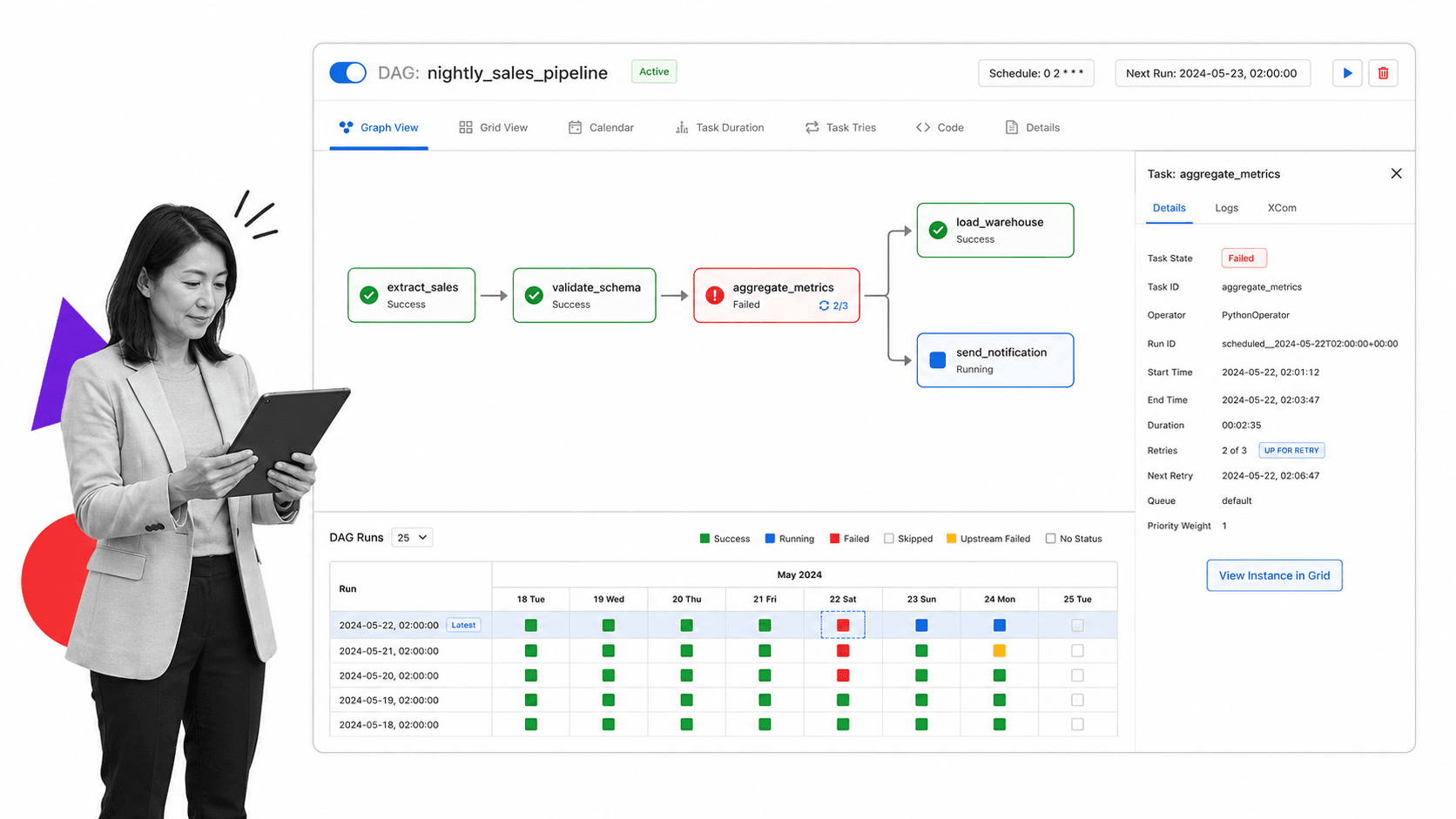
Apache Airflow is best for data teams that define workflows as code. Pipelines are written in Python as directed acyclic graphs, then scheduled and monitored by the Airflow engine. It is a standard choice for ETL and data orchestration at scale.
Use Airflow when engineers own the workflows, the work is pipeline-shaped, and you need dependable scheduling, retries, and backfills. It is less suited to non-technical staff because everything starts in code.
Airflow earns its place through operational maturity. Years of production use have produced a deep ecosystem of provider packages, a battle-tested scheduler, and clear observability into which task failed and why. That maturity is why so many data platforms standardize on it, even though the code-first model puts it out of reach for business users who expect a visual editor.
- Best for: code-defined data pipelines, scheduling, and large orchestration jobs.
- Watch out for: business users who need forms and visual editing, not Python.
- Why teams choose it: mature scheduling, a large community, and pipeline reliability.
3. Camunda
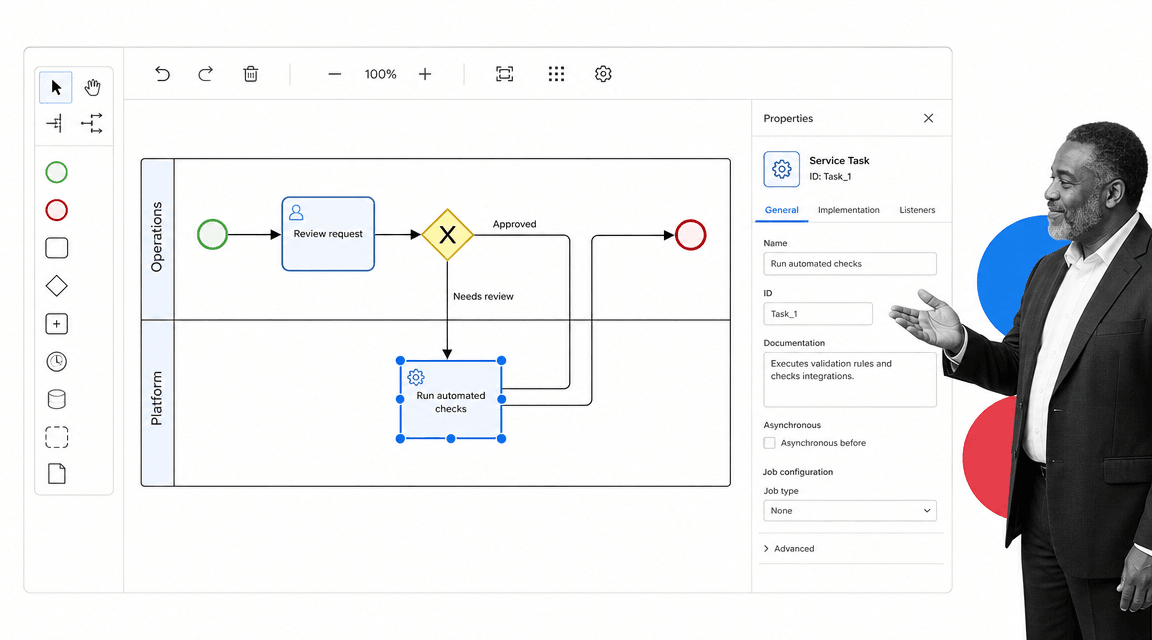
Camunda is best for teams that model processes with BPMN and want a precise, standards-based engine. It treats process automation like software development, with diagrams that map directly to executable workflows.
Use Camunda when processes are complex, span systems and people, and benefit from a shared BPMN model that both developers and analysts can read. The community edition is open source, with commercial tiers for larger deployments.
The strength of the BPMN approach is that the diagram is the source of truth. A process analyst and a developer look at the same model, which reduces the translation errors that creep in when business intent is rewritten as code. The cost is the learning curve: teams new to BPMN notation need time before the model feels natural, and that ramp is worth budgeting for upfront.
- Best for: BPMN-based process automation that mixes system steps and human tasks.
- Watch out for: a steeper learning curve for teams new to BPMN.
- Why teams choose it: standards-based modeling and a strong execution engine.
4. Activiti
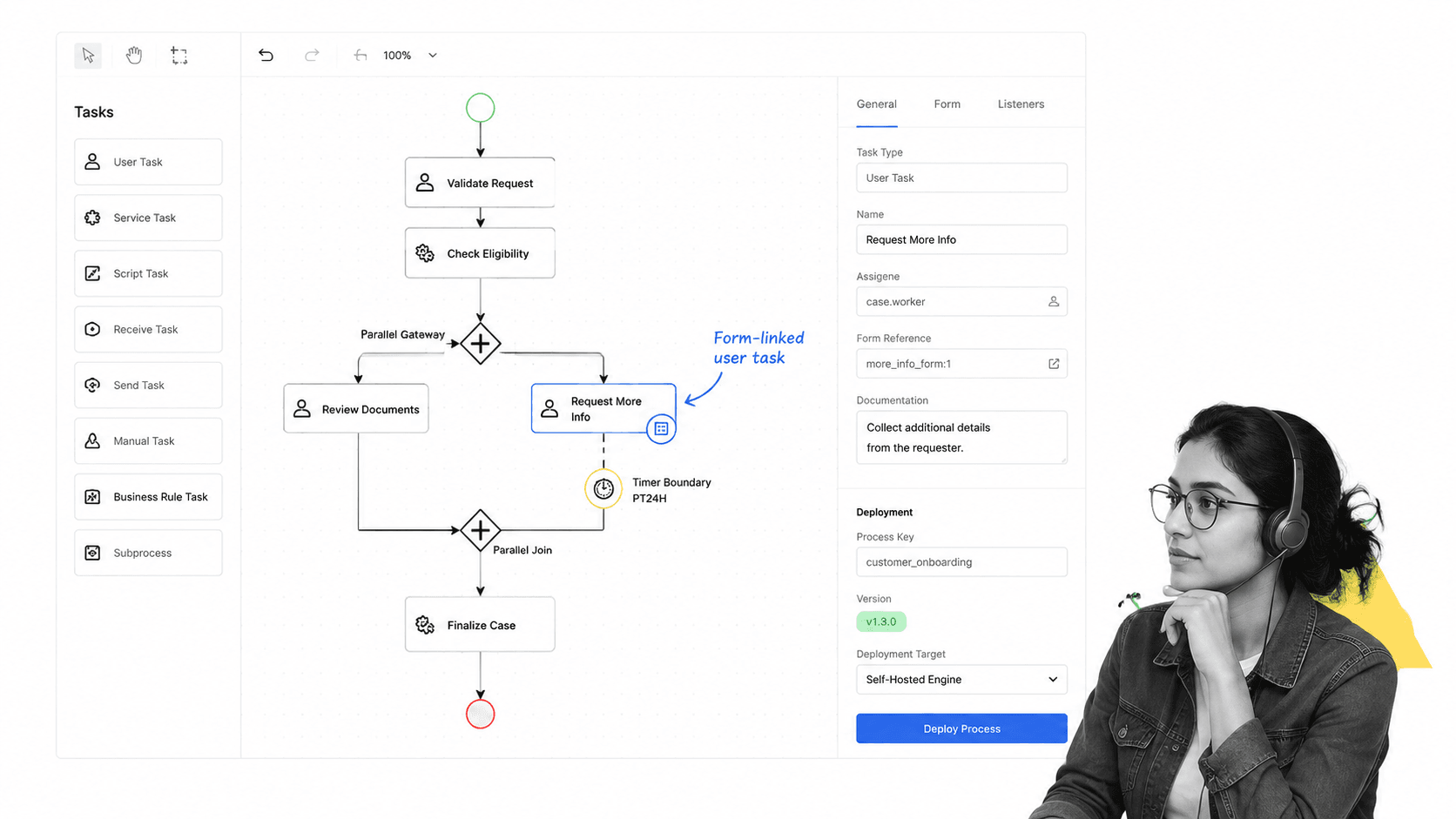
Activiti is best for Java teams that want a lightweight, embeddable BPMN workflow engine. It runs business processes inside Java applications and is a common building block for custom internal systems.
Use Activiti when you are building workflow capability into your own software and want an open source engine you can embed and extend. It rewards teams comfortable with Java and BPMN.
Embeddability is the point of difference here. Rather than running as a separate platform, Activiti can live inside your application as a library, so the workflow engine ships with your product. That suits software teams adding process automation to their own systems, but it assumes you have the engineering capacity to own that integration over time.
- Best for: embeddable BPMN automation inside Java applications.
- Watch out for: teams without Java engineering capacity.
- Why teams choose it: a compact, extensible engine for custom builds.
5. ProcessMaker
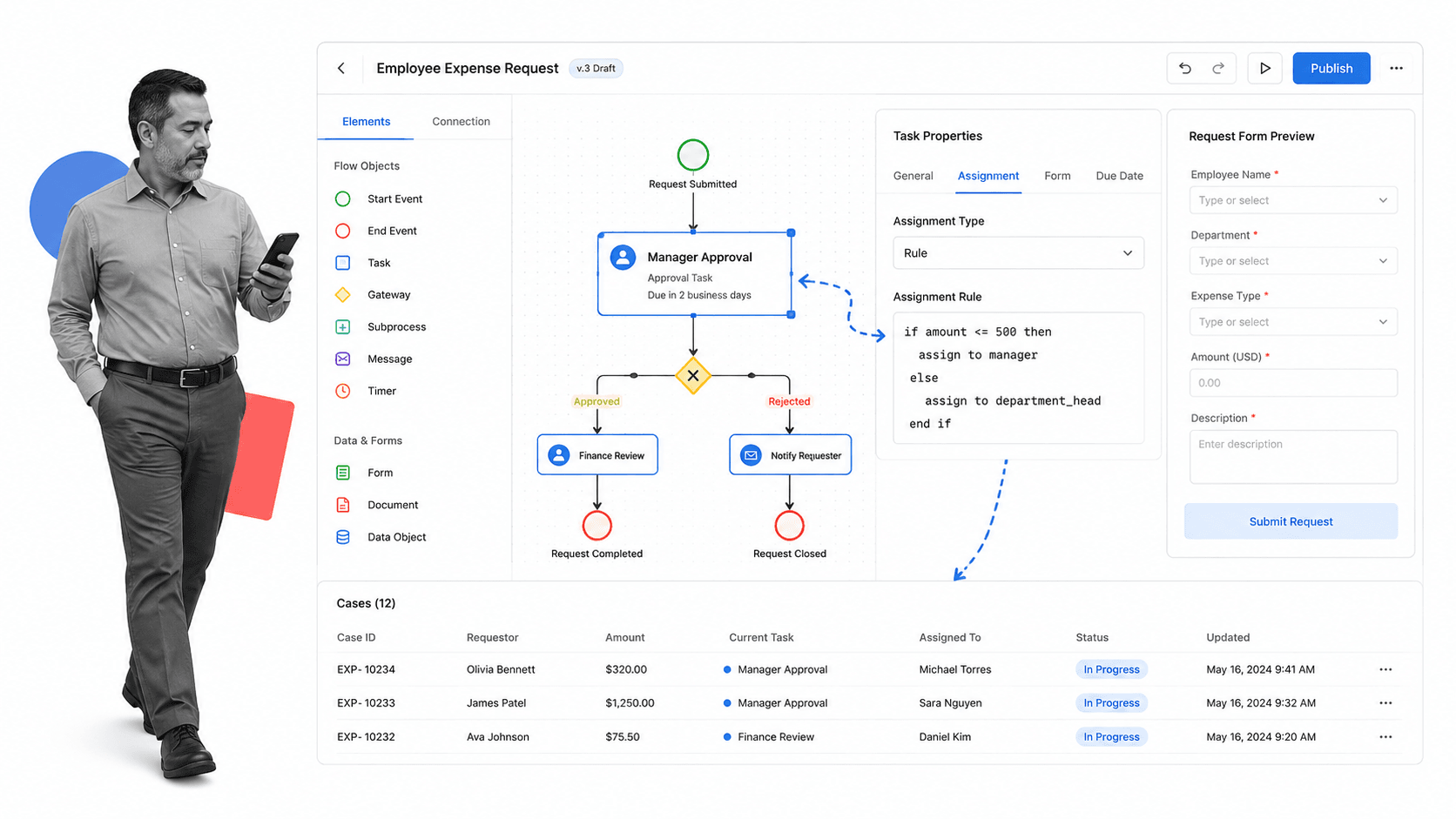
ProcessMaker is best for teams that want low-code business process management with forms, approvals, and routing. Its community edition gives operators a drag-and-drop designer for request-and-approval style workflows.
Use ProcessMaker when the work is human-centric, like requests, approvals, and case management, and you want business users to build flows without heavy engineering. It sits closer to traditional BPM than the code-first engines above.
The low-code designer is what brings business owners into the build. Forms, routing rules, and approval steps are configured visually, so an operations analyst can assemble a working flow without writing code. As flows multiply, teams still need naming conventions, clear owners, and a way to monitor cases, otherwise the same sprawl that affects any visual builder sets in.
- Best for: low-code request, approval, and case management workflows.
- Watch out for: heavy technical orchestration that suits code-first engines.
- Why teams choose it: a visual designer aimed at business process owners.
Where a managed platform fits
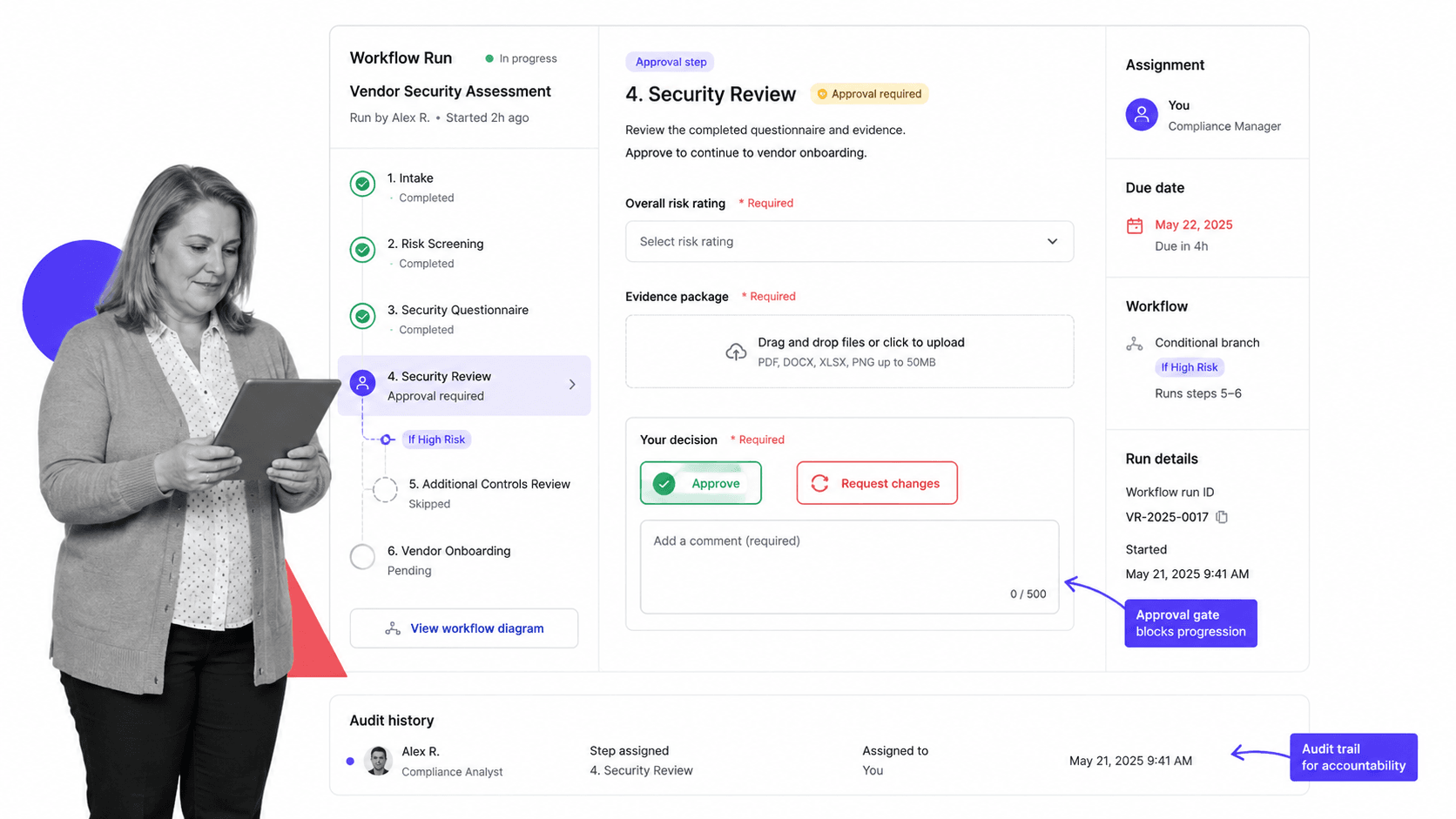
Open source is not the only path. Process Street is a managed, hosted platform rather than an open source project, and for many operations and compliance teams that tradeoff is the point. There is nothing to self-host, patch, or scale, and the time saved on maintenance often outweighs the license cost.
It is best for recurring workflows where the process itself must be followed correctly. It turns standard operating procedures, checklists, forms, assignments, conditional paths, and evidence capture into guided workflow runs, with approvals and a durable audit trail built in.
Use it when the workflow has human steps, required proof, compliance risk, or customer impact, and when your team would rather operate the process than operate a server. Teams often start from a template such as an employee onboarding checklist or client onboarding checklist, then add automations, approvals, and audit-ready history.
The honest comparison is about ownership. Open source workflow software gives you maximum control and maximum responsibility. A managed platform gives you less infrastructure control in exchange for far less operational overhead. Neither is universally better; the right answer depends on whether your edge is engineering capacity or operating discipline.
- Best for: controlled recurring operations, approvals, and compliance evidence without self-hosting.
- Watch out for: teams that specifically need on-premise code ownership of the engine.
- Why teams choose it: the workflow becomes the operating control, with no infrastructure to maintain.
Open source workflow software by use case
Open source workflow management software is easier to choose when you compare by use case instead of by feature count.
Data pipelines and scheduling
Use Apache Airflow when engineers own the work and the workflow is pipeline-shaped. Code-defined DAGs, scheduling, and backfills are its core strengths.
App automation you self-host
Use n8n when you want to connect services on a visual canvas but keep everything running in your own environment, with the option to add custom code.
BPMN process automation
Use Camunda or Activiti when processes follow BPMN and benefit from a shared, executable model. These pair well with strong types of process management discipline so the diagram matches reality.
Human request and approval flows
Use ProcessMaker for low-code request-and-approval workflows, or a managed platform when you also need audit-ready proof. For fast-moving teams, agile workflow process patterns help you ship a first version and improve it from real run history.
Open source workflow software rollout checklist
Before rollout, pick one workflow and define what success means. Map it, document it, and automate the highest-friction step first. A checklist generator approach helps you turn the procedure into something repeatable before you wire up the engine.
- Map the current workflow: write the start point, end point, owner, systems touched, and failure points.
- Confirm who maintains it: decide who owns hosting, upgrades, security, and on-call before you self-host.
- Set control requirements: decide which steps need approval, evidence, permissions, or audit history.
- Build the first version: automate the highest-friction handoff instead of the whole department.
- Review run history: check failed runs, skipped steps, and bottlenecks after the first real use.
Whichever route you take, keep the boundary between documentation and execution clear so automation does not become a new source of process drift. Pairing the engine with reliable workflow management tools habits is what turns a workflow project into a durable operating asset.
FAQs
What is open source workflow management software?
Open source workflow management software is a tool whose source code is publicly licensed so you can run, inspect, modify, and self-host it. Teams use it to automate recurring processes while keeping the engine and data inside their own infrastructure.
What is the best open source workflow management software?
The best open source workflow management software depends on the work. Apache Airflow suits code-defined data pipelines, n8n suits self-hosted app automation, Camunda and Activiti suit BPMN process automation, and ProcessMaker suits low-code request and approval flows.
Is open source workflow software really free?
The core engine is usually free to use, but it is not free to run. You take on hosting, upgrades, security patching, and maintenance, and many projects sell paid tiers for enterprise features. Compare total cost of ownership, not just license cost.
When should a team choose a managed platform instead of open source?
Choose a managed platform when you lack the engineering capacity to self-host, need approvals and audit trails out of the box, or want to spend time operating the process rather than operating servers. Choose open source when on-premise control and code ownership are the priority.
What features should open source workflow management software include?
Useful features include flexible workflow definitions, triggers, conditional routing, integrations, retries, run history, and permissions. For higher-risk work, look for required fields, approvals, evidence capture, and a durable audit trail.
Can non-technical teams use open source workflow software?
Some open source tools target non-technical users with visual designers, while others are code-first and aimed at engineers. Match the definition style to your actual builders, and test the day-to-day experience with real users before committing.
