


Turn every policy into automated workflows with built-in enforcement and audit-ready proof.


7 Best Paylocity Alternatives & Competitors in 2026
Last updated:
Paylocity alternatives: what this comparison covers
Paylocity alternatives include HCM suites, HR information systems, workforce management platforms, and process execution tools. The right choice depends on whether the buying job is payroll and employee records, time and scheduling, global enterprise HCM, connected IT and finance operations, or enforceable recurring procedures around those systems.
Paylocity brings payroll, talent acquisition, talent management, HR management, time and labor, and asset management together around a connected database. That breadth is useful, but teams still compare alternatives when their operating model, workforce complexity, service expectations, module needs, implementation preferences, or surrounding process controls point elsewhere. This comparison treats Paylocity fairly as the incumbent and measures each alternative against a specific use case rather than declaring one universal winner.
The Process Street team maintains this comparison using official product and pricing pages. We evaluated core capability fit, recurring process control, payroll and workforce scope, implementation shape, public pricing signals, and the situations where each product is genuinely stronger. Prices and packages change, so verify the vendor page before making a purchase decision.
This article covers:
- What is Paylocity?
- Paylocity alternatives at a glance
- How we picked these Paylocity alternatives
- 1. Process Street
- 2. Paycom
- 3. Rippling
- 4. BambooHR
- 5. ADP Workforce Now
- 6. UKG Ready
- 7. Workday HCM
- How to choose the right Paylocity alternative
- Paylocity alternatives FAQs
- Make recurring HR work enforceable
What is Paylocity?
Paylocity is a human capital management platform that connects payroll with talent acquisition, talent management, HR management, time and labor management, and asset management in one database. Its employee self-service model is central to the product, including payroll workflows that ask employees to review and act on their own information before submission.
That makes Paylocity the baseline for this comparison, not one of the ranked alternatives. A credible replacement should either cover a similar HCM system-of-record job or solve a clearly different problem that motivated the search. Teams should separate missing product capability from weak internal process design before switching, because a new HCM suite will not automatically repair unclear ownership, inconsistent approvals, or undocumented exceptions.
Paylocity alternatives at a glance
At a glance: Process Street ranks first for teams that need enforceable recurring HR and payroll-adjacent workflows. Paycom is closest to Paylocity as a single-database HCM suite. Rippling is stronger when employee data must directly control apps, devices, finance, and global operations. BambooHR fits HRIS-first teams, ADP Workforce Now fits broad payroll and service needs, UKG Ready fits time and workforce management, and Workday HCM fits complex global enterprises.
| Tool | Best for | Standout feature | Free plan | Starting price |
|---|---|---|---|---|
| Process Street | enforceable, trackable, recurring HR and payroll-adjacent workflows | required steps, approvals, conditional logic, evidence, due dates, assignments, and audit history | 14-day Pro trial | Contact sales |
| Paycom | single-database payroll, HR, talent, time, and employee self-service | one connected HCM database spanning payroll, talent, HR management, time, labor, and employee self-service | No public free plan | Custom quote |
| Rippling | teams connecting HR, payroll, IT, finance, and global workforce operations | one workforce data layer with modular HR, payroll, app access, device, and finance products | No public free plan | From $8 per employee monthly plus a base fee |
| BambooHR | HRIS-first teams focused on employee records and people operations | connected employee records, reporting, hiring, onboarding, time, performance, benefits, and optional payroll | No public free plan | From $10 per employee monthly for Core above 25 employees |
| ADP Workforce Now | midsize employers that want broad payroll and HCM coverage with service support | payroll, HR, talent, time, benefits, analytics, and workforce management in a broad HCM suite | No public free plan | Contact sales |
| UKG Ready | small and midsize organizations prioritizing workforce management, time, payroll, and HR together | HR, benefits, payroll, talent, time, and scheduling on one connected suite | No public free plan | Contact sales |
| Workday HCM | large enterprises that need global HCM, talent, planning, workforce management, and analytics | enterprise HCM spanning HR management, talent, recruiting, workforce management, payroll, and analytics | No public free plan | Contact sales |
How we picked these Paylocity alternatives
We used five questions. First, what primary job does the product own? Second, how well does it support payroll, HR records, time, talent, or recurring process execution? Third, can teams understand the pricing model from official information? Fourth, what implementation and operating complexity follows from the product’s breadth? Fifth, where does the product beat Process Street because the requirement sits outside Process Street’s workflow ICP?
- Core capability fit for the stated buyer and workforce
- Control over recurring tasks, approvals, exceptions, and evidence
- Payroll, HRIS, workforce management, or global HCM depth
- Pricing transparency and modularity
- Implementation scope, service model, and surrounding system impact
The ranking therefore reflects the audience of this page: operations, HR, onboarding, and compliance-adjacent process owners who are comparing Paylocity but may discover that their main pain is process execution. If payroll calculation or HR records are the main pain, the relevant HCM vendor should outrank Process Street in that buyer’s own decision.
1. Process Street
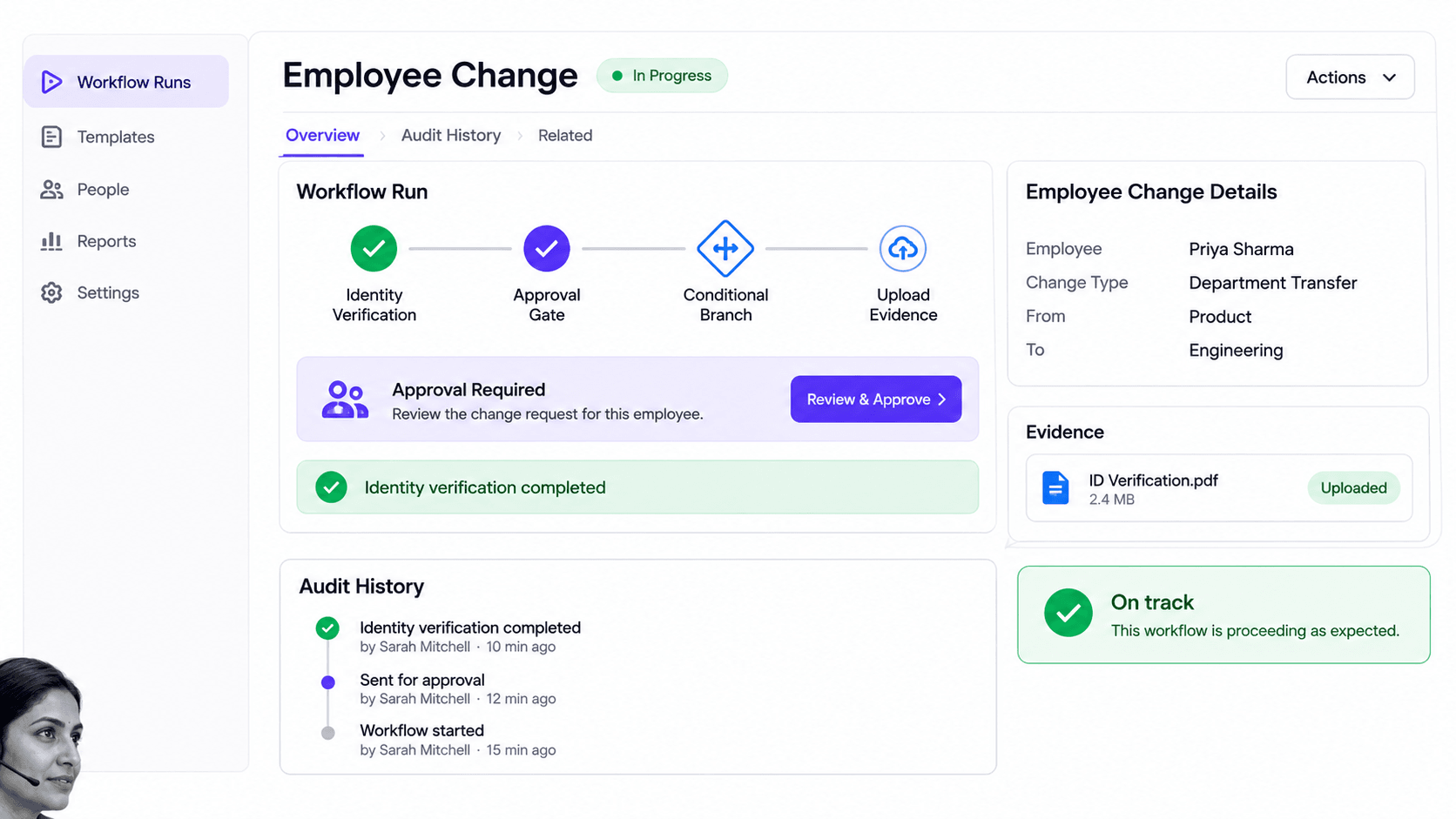
Best for: enforceable, trackable, recurring HR and payroll-adjacent workflows.
Bottom line: Process Street is the best overall choice in this comparison for teams whose real problem is not payroll calculation but the recurring work around employee events. It turns onboarding, employee changes, payroll review, policy acknowledgments, benefits handoffs, access changes, and offboarding into workflow runs with required steps, ownership, due dates, evidence, and history. That makes it a strong complement to an HRIS or payroll system of record.
How Process Street differs from Paylocity
Paylocity is the incumbent benchmark because it joins payroll and HCM functions in one connected database. Process Street should not be judged as a copy of that architecture. Its clearest fit is enforceable, trackable, recurring HR and payroll-adjacent workflows. The standout surface in this comparison is required steps, approvals, conditional logic, evidence, due dates, assignments, and audit history. A buyer should decide whether that difference maps to a real operating constraint, such as workforce structure, system ownership, service needs, international reach, scheduling complexity, or the control required around recurring employee events. If the difference does not solve a named constraint, switching platforms is unlikely to create enough value to justify migration risk.
What to test in a product demonstration
Ask the vendor to demonstrate the exact workflow represented in the image above: employee-change workflow run with required identity checks, an approval gate, conditional branch, evidence upload, and audit history. Use a realistic employee record, permission model, deadline, exception, and approval path. Do not accept a slide that lists capability without showing the operator experience. Watch what happens when data is incomplete, a manager is late, a role changes, or a downstream system rejects an update. Record which action is automated, which still requires a person, where the authoritative record lives, and whether the activity history is detailed enough for payroll review, HR governance, or an internal audit.
Implementation and operating questions
Before selecting Process Street, identify the modules in scope, the implementation owner, the source data that must move, the integrations that must be rebuilt, and the reports that must reconcile before cutover. Confirm how roles, approvals, support, training, and configuration changes are managed after launch. The purchase decision should include the operating model, not only the demo. A broad suite may reduce vendor count but demand more governance. A focused tool may be easier to operate but require clear boundaries with payroll, finance, identity, benefits, or workforce systems.
The reason it ranks first is specific, not universal. Paylocity and the HCM alternatives below are systems of record and payroll platforms. Process Street leads only when the team already has, or plans to keep, a payroll or HRIS system and needs stronger execution across the procedures surrounding it. A recurring employee-change workflow can collect structured data, route approvals, enforce sequence, require evidence, notify the right people, and preserve a history without asking payroll software to become a general operations platform.
That distinction matters because HR work crosses organizational boundaries. A promotion may involve the manager, HR, payroll, finance, IT, security, and the employee. A payroll engine can store the final pay change, but it may not provide the best control over every prerequisite and exception. Process Street can coordinate the work while the HRIS remains the source of truth, with structured intake, explicit ownership, required evidence, conditional paths, and approvals applied before the final record is changed.
The strongest use cases are repetitive and consequential. New-hire onboarding, compensation changes, payroll-readiness reviews, leave administration, access reviews, policy attestations, and offboarding all require more than a completed field in an HR database. They require the right people to act in sequence, exceptions to reach an owner, and completion evidence to survive after the event. Process Street gives the operating team a dedicated execution layer for that work while payroll, benefits, identity, and HR systems continue to own their authoritative data.
This architecture also creates a clearer implementation boundary. A team can pilot one recurring procedure without replacing payroll or migrating every employee record. The pilot can test task ownership, due dates, approval authority, conditional branches, evidence requirements, and integration handoffs with realistic cases. If the problem is weak procedure execution, that focused rollout can be lower risk than treating an HCM replacement as the only route to improvement. If the problem is payroll calculation or core HR records, however, a dedicated HCM alternative below is the better category.
Key features
- Required tasks and form fields that prevent critical steps from being skipped
- Approvals, conditional logic, assignments, and dynamic due dates
- Scheduled and event-driven workflow runs for recurring work
- Evidence capture and task history for review and audit readiness
- Direct integrations across the systems used by HR and operations
Pros
- Strong control over repeatable cross-functional procedures
- Clear accountability across HR, managers, finance, IT, and operations
- Flexible enough for onboarding, offboarding, audits, policy, and payroll-adjacent checks
- Makes exceptions and incomplete evidence visible before a process closes
- Works beside an existing HRIS instead of forcing it to own every operational handoff
Cons
- It is not a payroll engine or HR system of record
- It is not a full workforce scheduling or enterprise talent suite
Choose it if, skip it if
Choose Process Street when enforceable process execution is the buying job. Choose an HCM suite below when payroll, worker records, benefits, or workforce scheduling must be the primary system. Skip it if that product category does not match the primary job your team needs to solve.
Pricing model: Contact sales. Review Process Street pricing for the current package and implementation details. Free plan: 14-day Pro trial.
Explore Process Street if the evaluation centers on recurring process execution. Process Street is not the right choice when the requirement is to calculate payroll, file payroll taxes, administer benefits as the system of record, or run a complete enterprise talent suite.
2. Paycom
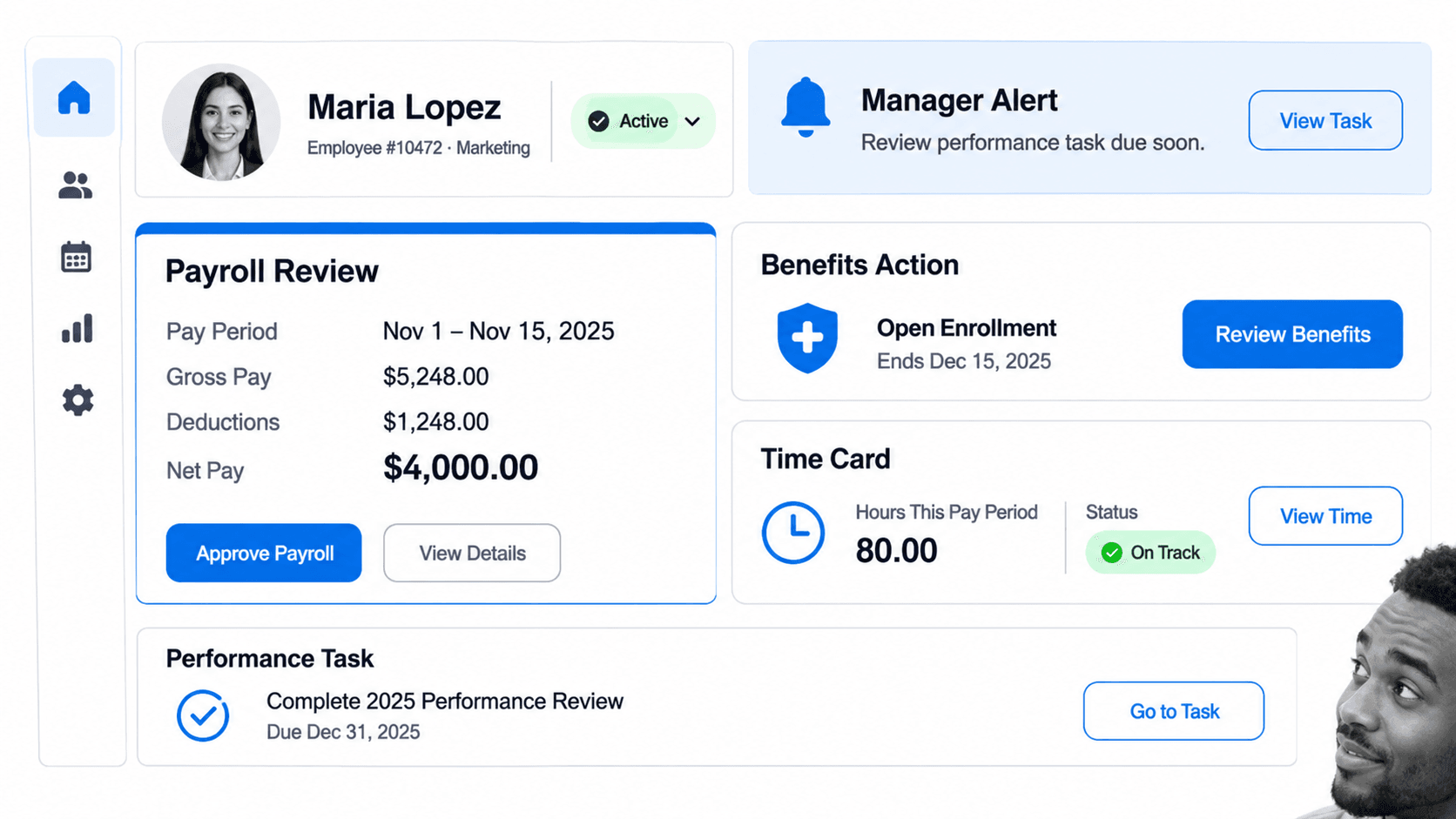
Best for: single-database payroll, HR, talent, time, and employee self-service.
Bottom line: Paylocity is a single-database HCM alternative that connects payroll, talent acquisition, talent management, HR management, time and labor, and employee self-service. It is a close category alternative when the buyer wants core HR and payroll activity to remain inside one connected system rather than coordinate a separate process layer.
How Paycom differs from Paylocity
Paylocity is the incumbent benchmark because it joins payroll and HCM functions in one connected database. Paycom should not be judged as a copy of that architecture. Its clearest fit is single-database payroll, HR, talent, time, and employee self-service. The standout surface in this comparison is one connected HCM database spanning payroll, talent, HR management, time, labor, and employee self-service. A buyer should decide whether that difference maps to a real operating constraint, such as workforce structure, system ownership, service needs, international reach, scheduling complexity, or the control required around recurring employee events. If the difference does not solve a named constraint, switching platforms is unlikely to create enough value to justify migration risk.
What to test in a product demonstration
Ask the vendor to demonstrate the exact workflow represented in the image above: single-database employee self-service workspace with payroll review, benefits action, time card, performance task, and manager alert. Use a realistic employee record, permission model, deadline, exception, and approval path. Do not accept a slide that lists capability without showing the operator experience. Watch what happens when data is incomplete, a manager is late, a role changes, or a downstream system rejects an update. Record which action is automated, which still requires a person, where the authoritative record lives, and whether the activity history is detailed enough for payroll review, HR governance, or an internal audit.
Implementation and operating questions
Before selecting Paycom, identify the modules in scope, the implementation owner, the source data that must move, the integrations that must be rebuilt, and the reports that must reconcile before cutover. Confirm how roles, approvals, support, training, and configuration changes are managed after launch. The purchase decision should include the operating model, not only the demo. A broad suite may reduce vendor count but demand more governance. A focused tool may be easier to operate but require clear boundaries with payroll, finance, identity, benefits, or workforce systems.
Key features
- Payroll and tax administration
- Employee self-service for HR and payroll actions
- Talent acquisition and talent management
- HR management and benefits activity
- Time and labor management
Pros
- Single connected HCM database
- Broad payroll and employee lifecycle coverage
- Employee-driven self-service model
Cons
- Pricing requires a custom quote
- The single-suite approach may not suit teams that prefer modular systems
Choose it if, skip it if
Paylocity is the better fit when the primary job is a connected payroll and HCM system with employee self-service. Skip it if that product category does not match the primary job your team needs to solve.
Pricing model: Custom quote. Review Paycom pricing or product details for the current package and implementation details. Free plan: No public free plan.
3. Rippling
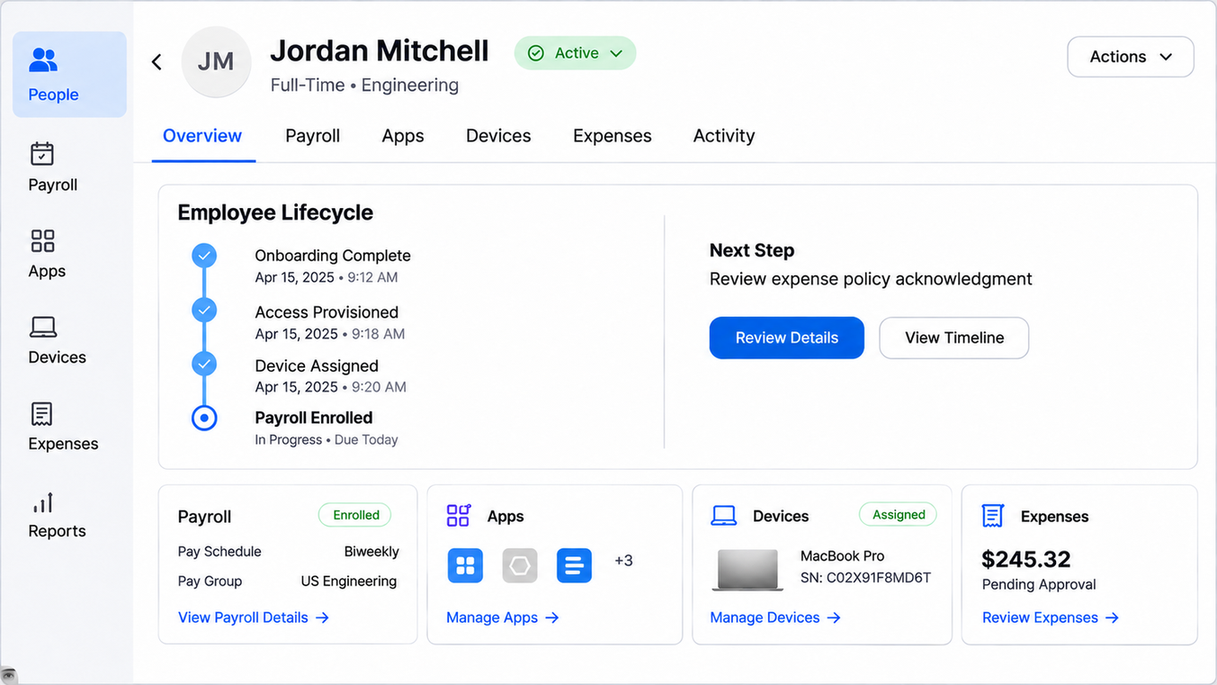
Best for: teams connecting HR, payroll, IT, finance, and global workforce operations.
Bottom line: Rippling combines HR, payroll, IT, finance, and global workforce products around a shared employee data model. It is a strong Paylocity alternative when a change to a worker should also affect application access, permissions, devices, expenses, or global employment services without separate reconciliation.
How Rippling differs from Paylocity
Paylocity is the incumbent benchmark because it joins payroll and HCM functions in one connected database. Rippling should not be judged as a copy of that architecture. Its clearest fit is teams connecting HR, payroll, IT, finance, and global workforce operations. The standout surface in this comparison is one workforce data layer with modular HR, payroll, app access, device, and finance products. A buyer should decide whether that difference maps to a real operating constraint, such as workforce structure, system ownership, service needs, international reach, scheduling complexity, or the control required around recurring employee events. If the difference does not solve a named constraint, switching platforms is unlikely to create enough value to justify migration risk.
What to test in a product demonstration
Ask the vendor to demonstrate the exact workflow represented in the image above: employee lifecycle command center joining a worker profile to payroll, app access, device assignment, and expense controls. Use a realistic employee record, permission model, deadline, exception, and approval path. Do not accept a slide that lists capability without showing the operator experience. Watch what happens when data is incomplete, a manager is late, a role changes, or a downstream system rejects an update. Record which action is automated, which still requires a person, where the authoritative record lives, and whether the activity history is detailed enough for payroll review, HR governance, or an internal audit.
Implementation and operating questions
Before selecting Rippling, identify the modules in scope, the implementation owner, the source data that must move, the integrations that must be rebuilt, and the reports that must reconcile before cutover. Confirm how roles, approvals, support, training, and configuration changes are managed after launch. The purchase decision should include the operating model, not only the demo. A broad suite may reduce vendor count but demand more governance. A focused tool may be easier to operate but require clear boundaries with payroll, finance, identity, benefits, or workforce systems.
Key features
- HRIS and employee lifecycle management
- Payroll and global workforce options
- App access and identity administration
- Device and inventory management
- Finance and expense products
Pros
- Broad operational surface beyond traditional HR
- Modular purchasing model
- Strong fit for technology-heavy employee operations
Cons
- The breadth can increase implementation scope
- Pricing requires a custom quote
Choose it if, skip it if
Rippling is the better fit when HR changes must directly control apps, devices, identity, and finance workflows. Skip it if that product category does not match the primary job your team needs to solve.
Pricing model: From $8 per employee monthly plus a base fee. Review Rippling pricing or product details for the current package and implementation details. Free plan: No public free plan.
4. BambooHR
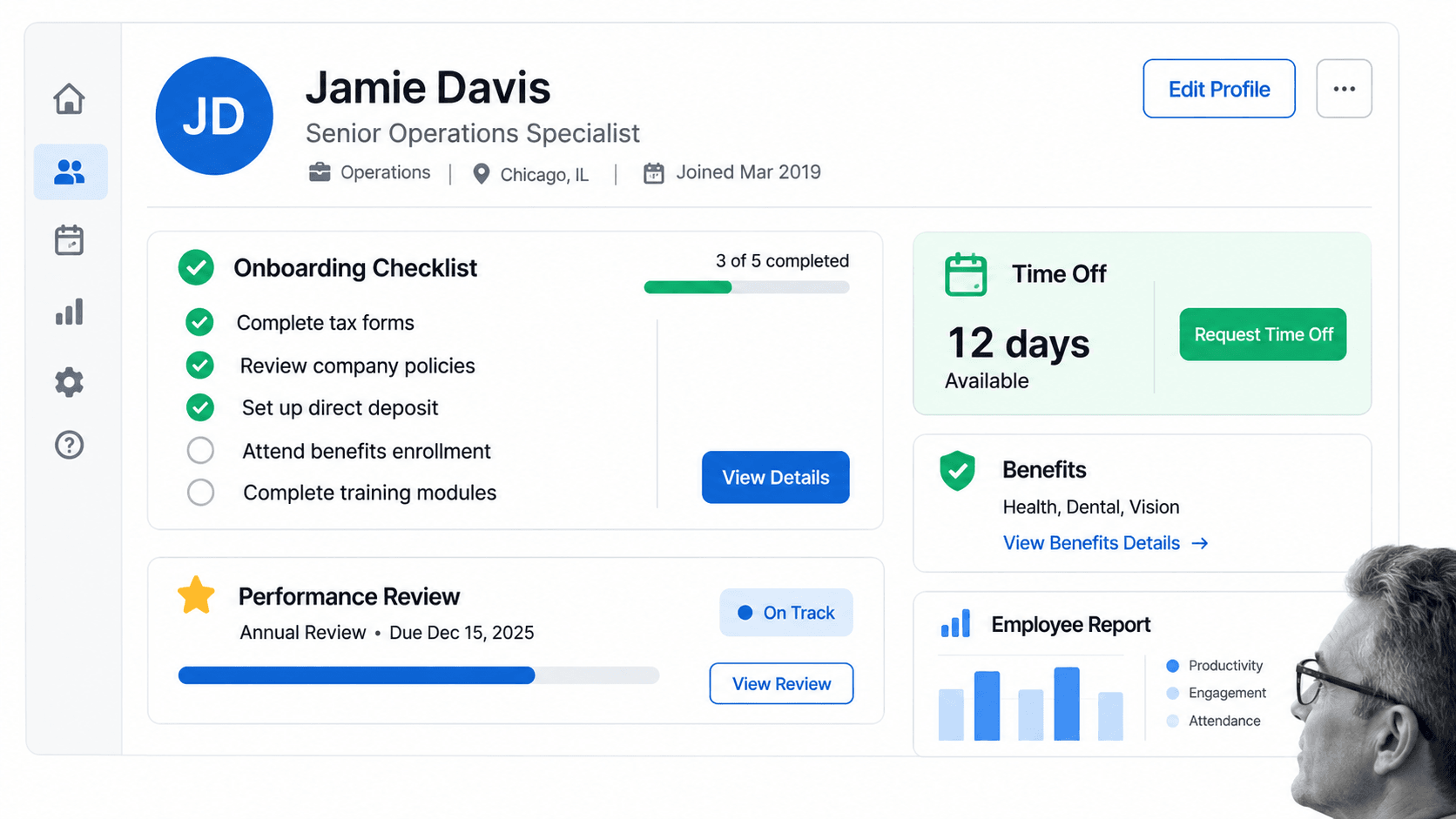
Best for: HRIS-first teams focused on employee records and people operations.
Bottom line: BambooHR is an HRIS-first Paylocity alternative built around employee records and people operations. Its platform covers data and reporting, hiring, onboarding, time, performance, compensation, employee experience, benefits, and optional payroll, which makes it attractive to teams that want a focused HR home base.
How BambooHR differs from Paylocity
Paylocity is the incumbent benchmark because it joins payroll and HCM functions in one connected database. BambooHR should not be judged as a copy of that architecture. Its clearest fit is HRIS-first teams focused on employee records and people operations. The standout surface in this comparison is connected employee records, reporting, hiring, onboarding, time, performance, benefits, and optional payroll. A buyer should decide whether that difference maps to a real operating constraint, such as workforce structure, system ownership, service needs, international reach, scheduling complexity, or the control required around recurring employee events. If the difference does not solve a named constraint, switching platforms is unlikely to create enough value to justify migration risk.
What to test in a product demonstration
Ask the vendor to demonstrate the exact workflow represented in the image above: employee record workspace with onboarding checklist, time-off tile, performance review, benefits panel, and report preview. Use a realistic employee record, permission model, deadline, exception, and approval path. Do not accept a slide that lists capability without showing the operator experience. Watch what happens when data is incomplete, a manager is late, a role changes, or a downstream system rejects an update. Record which action is automated, which still requires a person, where the authoritative record lives, and whether the activity history is detailed enough for payroll review, HR governance, or an internal audit.
Implementation and operating questions
Before selecting BambooHR, identify the modules in scope, the implementation owner, the source data that must move, the integrations that must be rebuilt, and the reports that must reconcile before cutover. Confirm how roles, approvals, support, training, and configuration changes are managed after launch. The purchase decision should include the operating model, not only the demo. A broad suite may reduce vendor count but demand more governance. A focused tool may be easier to operate but require clear boundaries with payroll, finance, identity, benefits, or workforce systems.
Key features
- Employee records and HR reporting
- Applicant tracking and onboarding
- Time off and time tracking
- Performance and compensation workflows
- Benefits and payroll options
Pros
- Clear HRIS-centered product scope
- Public starting prices for core plans
- Good fit for growing people teams
Cons
- Some capabilities are add-ons
- Global or enterprise requirements may need broader platforms
Choose it if, skip it if
BambooHR is the better fit when the buying center wants employee records and everyday people operations to lead the architecture. Skip it if that product category does not match the primary job your team needs to solve.
Pricing model: From $10 per employee monthly for Core above 25 employees. Review BambooHR pricing or product details for the current package and implementation details. Free plan: No public free plan.
5. ADP Workforce Now
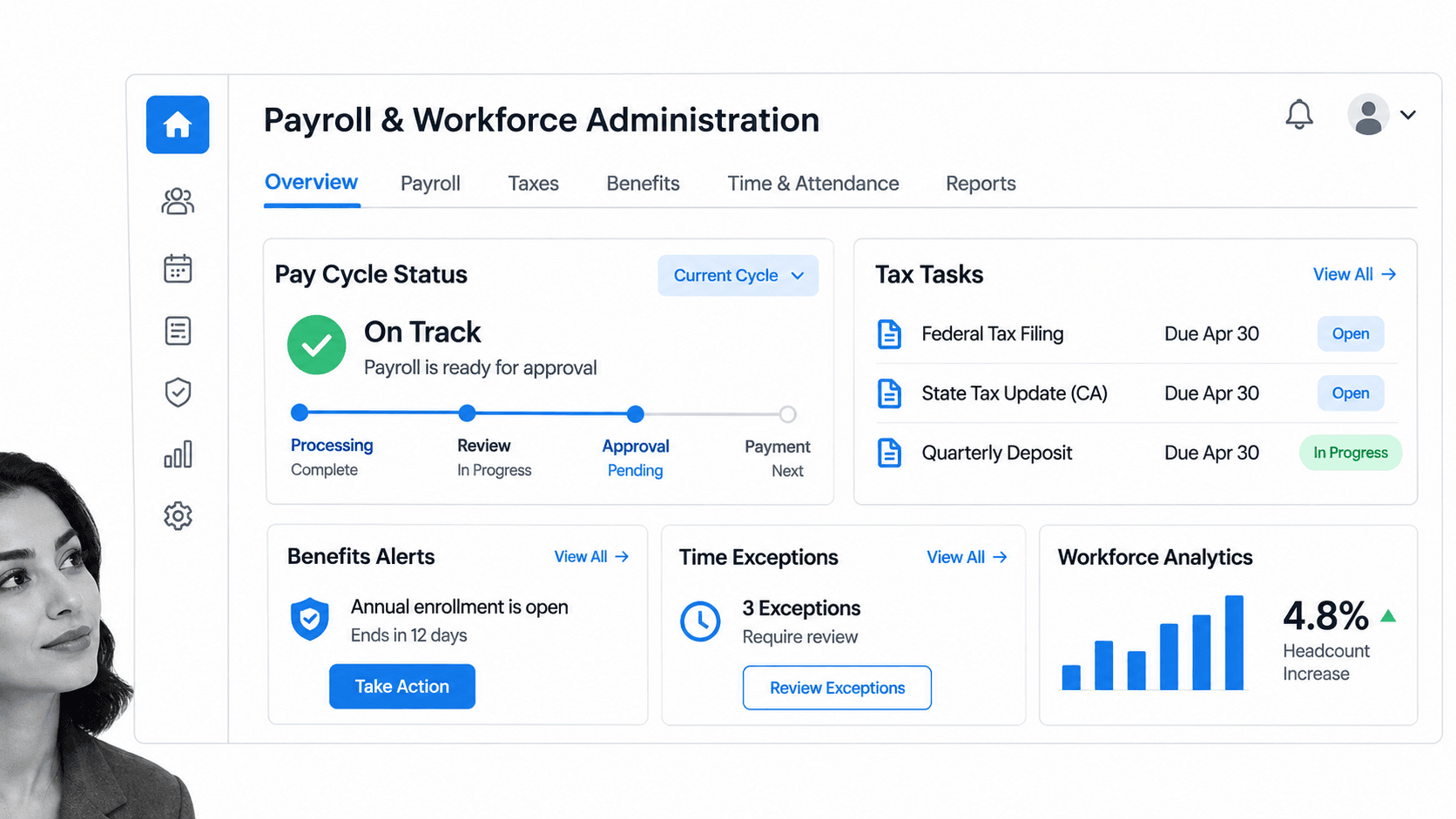
Best for: midsize employers that want broad payroll and HCM coverage with service support.
Bottom line: ADP Workforce Now is a broad HCM suite for midsize and larger employers. It brings payroll, HR, talent, time, benefits, analytics, and workforce management into a well-established service ecosystem, making it a practical Paylocity alternative for buyers that value payroll depth and provider support.
How ADP Workforce Now differs from Paylocity
Paylocity is the incumbent benchmark because it joins payroll and HCM functions in one connected database. ADP Workforce Now should not be judged as a copy of that architecture. Its clearest fit is midsize employers that want broad payroll and HCM coverage with service support. The standout surface in this comparison is payroll, HR, talent, time, benefits, analytics, and workforce management in a broad HCM suite. A buyer should decide whether that difference maps to a real operating constraint, such as workforce structure, system ownership, service needs, international reach, scheduling complexity, or the control required around recurring employee events. If the difference does not solve a named constraint, switching platforms is unlikely to create enough value to justify migration risk.
What to test in a product demonstration
Ask the vendor to demonstrate the exact workflow represented in the image above: payroll and workforce administration console with pay-cycle status, tax tasks, benefits alerts, time exceptions, and analytics. Use a realistic employee record, permission model, deadline, exception, and approval path. Do not accept a slide that lists capability without showing the operator experience. Watch what happens when data is incomplete, a manager is late, a role changes, or a downstream system rejects an update. Record which action is automated, which still requires a person, where the authoritative record lives, and whether the activity history is detailed enough for payroll review, HR governance, or an internal audit.
Implementation and operating questions
Before selecting ADP Workforce Now, identify the modules in scope, the implementation owner, the source data that must move, the integrations that must be rebuilt, and the reports that must reconcile before cutover. Confirm how roles, approvals, support, training, and configuration changes are managed after launch. The purchase decision should include the operating model, not only the demo. A broad suite may reduce vendor count but demand more governance. A focused tool may be easier to operate but require clear boundaries with payroll, finance, identity, benefits, or workforce systems.
Key features
- Payroll and tax administration
- Core HR and benefits administration
- Time, attendance, and workforce management
- Talent and performance capabilities
- Reporting and analytics
Pros
- Broad payroll and HCM coverage
- Service and implementation resources
- Suitable for complex employer requirements
Cons
- Pricing is quote-led
- A broad suite can require more configuration and governance
Choose it if, skip it if
ADP Workforce Now is the better fit when payroll scale, service support, and a wide HCM suite outweigh the need for a lightweight operational workflow layer. Skip it if that product category does not match the primary job your team needs to solve.
Pricing model: Contact sales. Review ADP Workforce Now pricing or product details for the current package and implementation details. Free plan: No public free plan.
6. UKG Ready
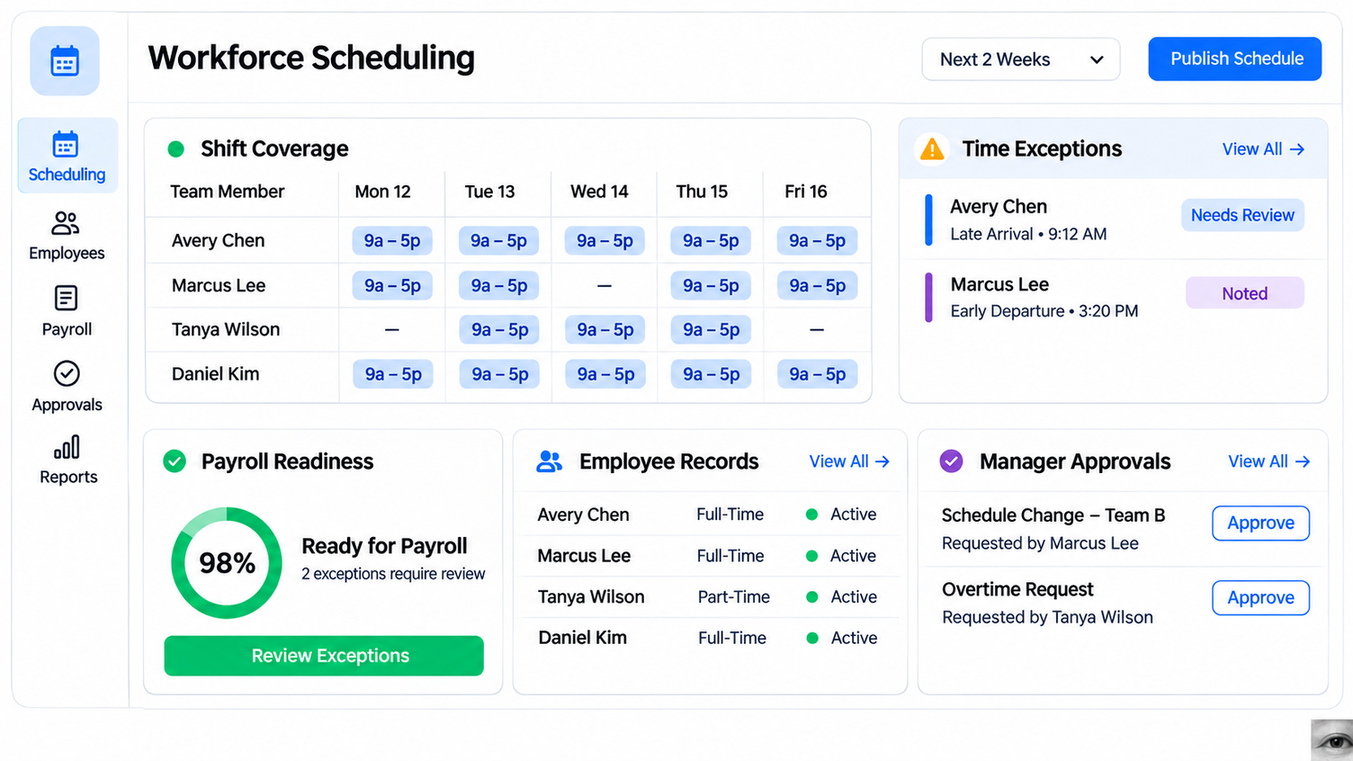
Best for: small and midsize organizations prioritizing workforce management, time, payroll, and HR together.
Bottom line: UKG Ready combines HR, payroll, talent, time, scheduling, and workforce management for midsize organizations. It is a strong alternative when hourly or shift-based workforce operations are central and managers need schedules, time exceptions, approvals, and payroll readiness in one suite.
How UKG Ready differs from Paylocity
Paylocity is the incumbent benchmark because it joins payroll and HCM functions in one connected database. UKG Ready should not be judged as a copy of that architecture. Its clearest fit is small and midsize organizations prioritizing workforce management, time, payroll, and HR together. The standout surface in this comparison is HR, benefits, payroll, talent, time, and scheduling on one connected suite. A buyer should decide whether that difference maps to a real operating constraint, such as workforce structure, system ownership, service needs, international reach, scheduling complexity, or the control required around recurring employee events. If the difference does not solve a named constraint, switching platforms is unlikely to create enough value to justify migration risk.
What to test in a product demonstration
Ask the vendor to demonstrate the exact workflow represented in the image above: workforce scheduling board with shift coverage, time exceptions, payroll readiness, employee records, and manager approvals. Use a realistic employee record, permission model, deadline, exception, and approval path. Do not accept a slide that lists capability without showing the operator experience. Watch what happens when data is incomplete, a manager is late, a role changes, or a downstream system rejects an update. Record which action is automated, which still requires a person, where the authoritative record lives, and whether the activity history is detailed enough for payroll review, HR governance, or an internal audit.
Implementation and operating questions
Before selecting UKG Ready, identify the modules in scope, the implementation owner, the source data that must move, the integrations that must be rebuilt, and the reports that must reconcile before cutover. Confirm how roles, approvals, support, training, and configuration changes are managed after launch. The purchase decision should include the operating model, not only the demo. A broad suite may reduce vendor count but demand more governance. A focused tool may be easier to operate but require clear boundaries with payroll, finance, identity, benefits, or workforce systems.
Key features
- Core HR and employee records
- Payroll processing
- Time and attendance
- Scheduling and workforce management
- Talent and performance tools
Pros
- Strong workforce-management orientation
- Connects time and payroll processes
- Useful for manager-led scheduling environments
Cons
- Public entry pricing is not listed
- May be more suite than a process-only buyer needs
Choose it if, skip it if
UKG Ready is the better fit when time, attendance, scheduling, and payroll are the operational center of gravity. Skip it if that product category does not match the primary job your team needs to solve.
Pricing model: Contact sales. Review UKG Ready pricing or product details for the current package and implementation details. Free plan: No public free plan.
7. Workday HCM
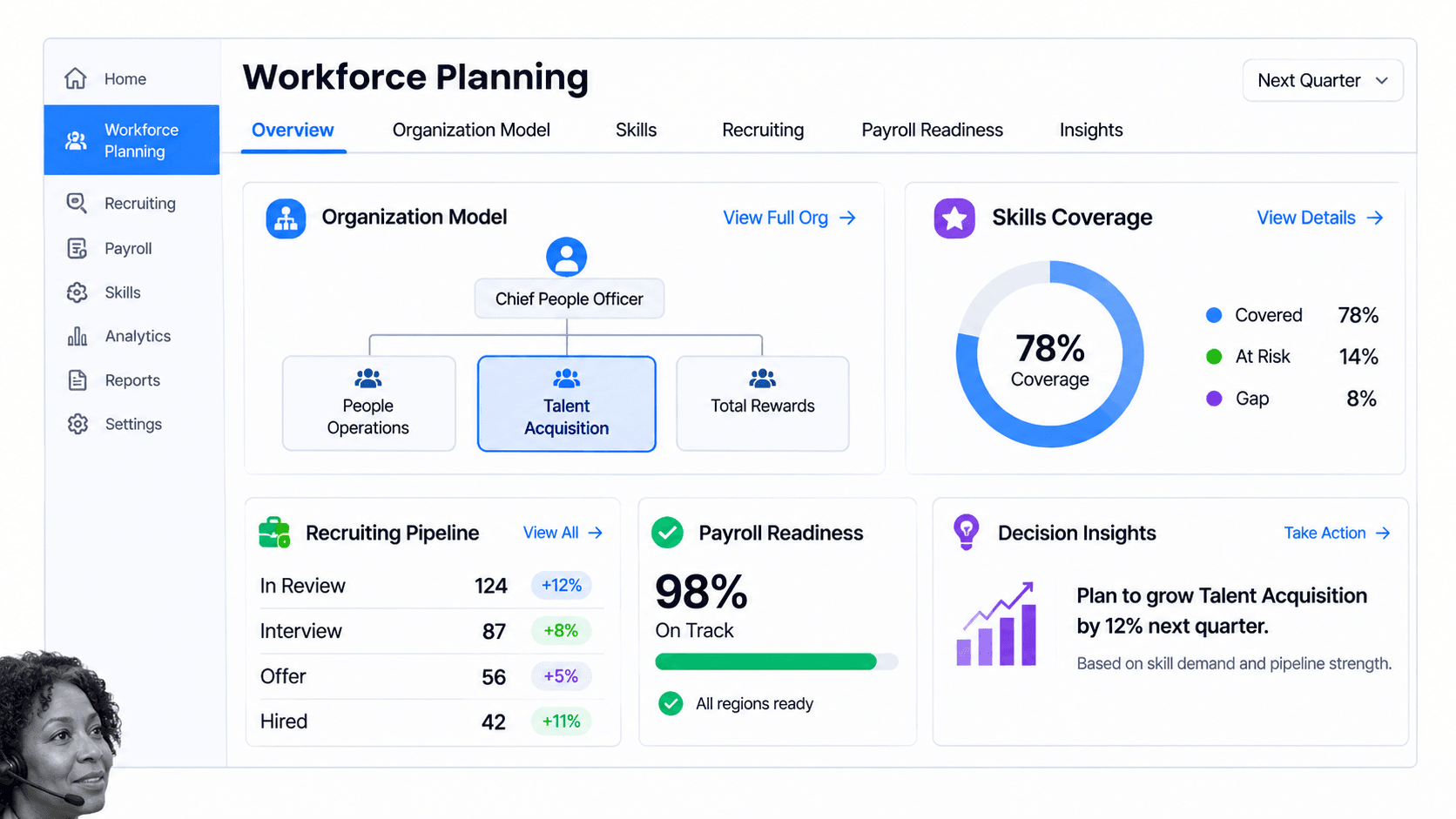
Best for: large enterprises that need global HCM, talent, planning, workforce management, and analytics.
Bottom line: Workday HCM is an enterprise platform for global HR management, talent, recruiting, workforce management, payroll, analytics, and organizational planning. It belongs on a Paylocity shortlist when the buyer needs a strategic enterprise data and planning layer across countries, business units, and complex workforce structures.
How Workday HCM differs from Paylocity
Paylocity is the incumbent benchmark because it joins payroll and HCM functions in one connected database. Workday HCM should not be judged as a copy of that architecture. Its clearest fit is large enterprises that need global HCM, talent, planning, workforce management, and analytics. The standout surface in this comparison is enterprise HCM spanning HR management, talent, recruiting, workforce management, payroll, and analytics. A buyer should decide whether that difference maps to a real operating constraint, such as workforce structure, system ownership, service needs, international reach, scheduling complexity, or the control required around recurring employee events. If the difference does not solve a named constraint, switching platforms is unlikely to create enough value to justify migration risk.
What to test in a product demonstration
Ask the vendor to demonstrate the exact workflow represented in the image above: enterprise workforce planning workspace with organization model, skills data, recruiting pipeline, payroll readiness, and decision insights. Use a realistic employee record, permission model, deadline, exception, and approval path. Do not accept a slide that lists capability without showing the operator experience. Watch what happens when data is incomplete, a manager is late, a role changes, or a downstream system rejects an update. Record which action is automated, which still requires a person, where the authoritative record lives, and whether the activity history is detailed enough for payroll review, HR governance, or an internal audit.
Implementation and operating questions
Before selecting Workday HCM, identify the modules in scope, the implementation owner, the source data that must move, the integrations that must be rebuilt, and the reports that must reconcile before cutover. Confirm how roles, approvals, support, training, and configuration changes are managed after launch. The purchase decision should include the operating model, not only the demo. A broad suite may reduce vendor count but demand more governance. A focused tool may be easier to operate but require clear boundaries with payroll, finance, identity, benefits, or workforce systems.
Key features
- Global human resource management
- Talent and recruiting
- Workforce management and payroll
- Skills and organizational planning
- Enterprise analytics and decision support
Pros
- Deep enterprise HCM breadth
- Strong planning and analytics context
- Designed for complex global organizations
Cons
- Implementation is a major program
- Too heavy for teams seeking a focused workflow or midmarket HR tool
Choose it if, skip it if
Workday HCM is the better fit for large enterprises that need global HCM, organizational planning, talent, and analytics as one strategic platform. Skip it if that product category does not match the primary job your team needs to solve.
Pricing model: Contact sales. Review Workday HCM pricing or product details for the current package and implementation details. Free plan: No public free plan.
How to choose the right Paylocity alternative
Start by naming the system job in one sentence. If it says calculate payroll, maintain employee records, administer benefits, schedule hourly workers, manage global talent, or coordinate recurring procedures, you already have a category signal. Avoid building a feature spreadsheet before this sentence is agreed, because a long checklist can make fundamentally different products look interchangeable.
Map the employee lifecycle and ownership
Document the path from recruiting through onboarding, role changes, leave, compensation changes, reviews, and offboarding. Mark which system owns each record and which team owns each action. The human resource planning guide can help separate workforce planning from execution, while a workflow management system makes handoffs and incomplete work visible.
Separate system-of-record needs from process-control needs
An HRIS stores authoritative worker data. A payroll platform calculates and distributes pay. Workforce management handles time and schedules. A process layer controls how people complete recurring work across systems. Many failed evaluations come from expecting one category to perform every job. Compare HR software with workflow management software before forcing an HCM suite to own cross-functional procedures.
Test exceptions, not only the happy path
Ask vendors to demonstrate a late manager approval, a retroactive pay change, a worker in a new jurisdiction, missing evidence, a failed integration, and an off-cycle termination. Evaluate who sees the exception, what blocks, how it is escalated, and what history remains. This is where workflow automation software and automated workflow tools can matter more than another feature checkbox.
Price the complete operating model
Request the exact modules, employee bands, implementation services, support level, data migration, integrations, and renewal assumptions. A quote is not comparable until scope is normalized. Include the internal cost of maintaining workflows, permissions, reports, and exception queues, not only the subscription line.
Pilot one high-risk recurring process
Choose a process such as new-hire onboarding, compensation change approval, payroll readiness review, or termination. Use the business process automation tools inventory to identify automation opportunities, then run realistic cases with every stakeholder. An employee onboarding checklist, adaptable onboarding process template, or focused onboarding app can provide a concrete starting point. Test approval tasks and conditional logic with the actual decision owners, then expand only after ownership, evidence, and exception handling are clear.
Build a weighted decision scorecard
A useful scorecard reflects the operating model rather than a generic analyst checklist. Give the largest weight to the primary job you named at the start. A payroll-led team might weight calculation coverage, tax support, payroll controls, service, and reconciliation most heavily. A workforce-led team might emphasize time collection, scheduling, labor rules, manager self-service, and exception handling. An HRIS-led team might prioritize record quality, reporting, onboarding, performance, compensation, and employee experience. A process-led team should weight required steps, approvals, conditional paths, evidence, accountability, and audit history. Teams balancing execution with coordinated projects can also compare workflow project management before assigning scorecard weights. Keep secondary categories visible, but do not allow dozens of low-value features to outweigh the reason for buying.
Score only what the team saw working with its own scenarios. Mark an untested item as unverified rather than giving it the benefit of the doubt. Add a separate confidence score for data migration, implementation ownership, vendor support, internal administration, and integration maintenance. A product can win the feature score and still be the wrong decision if the organization cannot operate it reliably. Conversely, a narrower product can be the stronger choice when its boundaries are clear and the surrounding systems already cover the rest.
Plan migration and rollback before signing
Map every employee field, payroll balance, time record, benefit election, document, workflow, report, integration, role, and historical record that must be preserved. Identify which data must move into the new platform, which can remain in a governed archive, and which should be retired. Name the owner and acceptance test for each migration stream. Payroll and employee-data cutovers deserve explicit reconciliation, parallel validation where appropriate, and a rollback decision point before the old process becomes unavailable.
The migration plan should also cover the work that sits outside the software. Rewrite procedures, train administrators and managers, communicate employee actions, test service channels, and schedule post-launch reviews. Track every cutover task in one accountable workflow so the project team can see incomplete dependencies before they become payroll or employee-experience incidents. After launch, review exceptions from the first cycles and update the operating process instead of treating implementation as complete on the go-live date.
Set a decision date only after the team has reviewed a normalized commercial proposal, security and legal requirements, implementation responsibilities, data-retention obligations, and the scenario-test results. Record the reasons for the final choice and the conditions that would cause the team to revisit it. That record prevents a future stakeholder from reopening the evaluation based on an isolated feature request without understanding the tradeoffs already tested. It also creates a baseline for measuring whether the selected platform improved accuracy, cycle time, employee experience, and control after rollout.
Paylocity alternatives FAQs
What is the best Paylocity alternative?
Process Street is the best alternative for teams whose main need is enforceable recurring HR and payroll-adjacent workflows. Paycom, Rippling, BambooHR, ADP Workforce Now, UKG Ready, or Workday HCM is a better category fit when payroll, HR records, workforce management, or enterprise HCM is the primary requirement.
Why is Process Street ranked first among Paylocity alternatives?
Process Street ranks first for the ICP of this comparison: teams that need repeatable procedures with required steps, approvals, evidence, ownership, and history. It is not ranked first as a payroll processor or HRIS, and buyers who need those systems should choose an HCM vendor.
Is there a free Paylocity alternative?
The vendors in this ranking do not advertise permanent free plans on the official pages reviewed. Process Street advertises a time-limited Pro trial. Buyers should test realistic employee events and exceptions rather than rely on a surface-level trial.
What is the closest alternative to Paylocity?
ADP Workforce Now and UKG Ready are close broad-suite alternatives because they combine payroll with HR and workforce capabilities. The closest choice depends on employer size, service expectations, time and scheduling needs, and the modules included in the quote.
Which Paylocity alternative is best for midsize companies?
BambooHR can fit HRIS-first midsize teams, UKG Ready can fit workforce-management-heavy organizations, and ADP Workforce Now can fit buyers that prioritize broad payroll and service support. Rippling is compelling when HR changes also drive IT, device, and finance actions.
Which Paylocity alternative is best for enterprise organizations?
Workday HCM is the strongest fit in this list for large global enterprises that need strategic HCM, planning, talent, payroll, workforce management, and analytics. ADP Workforce Now may be a better fit when payroll operations and provider service carry more weight.
Can Process Street replace Paylocity?
Process Street can replace the process-control layer around recurring HR work, but it does not replace payroll calculation, tax filing, benefits administration, or the authoritative employee record. It works best beside an HRIS or payroll platform.
How should a company migrate from Paylocity?
Start with data ownership, payroll calendars, integrations, security roles, reports, historical records, open employee events, and exception handling. Run parallel validation where appropriate, assign every migration task, and keep an auditable decision and sign-off record.
Make recurring HR work enforceable
If your payroll and HR system is adequate but the work around it still depends on reminders, inboxes, and spreadsheets, use Process Street to turn those procedures into enforced workflow runs. Start with one recurring employee process, assign every handoff, require the evidence, and connect the systems that already own payroll and worker data.
