


Turn every policy into automated workflows with built-in enforcement and audit-ready proof.



Sales Process Management Software

Sales process management software helps a sales team define, run, automate, and improve the repeatable steps that move a prospect from first contact to closed customer. It is the operating layer around the sales motion: the qualification rules, handoffs, approvals, reminders, required fields, and proof that the right work happened.
A CRM stores account, contact, opportunity, and activity data. Sales process management software controls the work around that data. The best setup usually connects both: the CRM remains the system of record, while the process layer makes sure every rep follows the right path for the deal in front of them.
This guide explains what sales process management software does, how it differs from CRM and sales automation tools, which capabilities matter, and how to implement it without burying reps in administration.
In this article, we are going to cover:
- What sales process management software is
- What sales process management software controls
- Sales process management software versus CRM
- Core capabilities to evaluate
- How to implement sales process management software
- How Process Street supports sales process management
- Metrics and governance signals
- FAQs
What sales process management software is
Sales process management software is a system for turning a sales methodology into executable work. It tells the team what must happen at each pipeline stage, who owns each step, what information is required, when approvals are needed, and which exceptions need escalation.
The category sits between sales management strategy and day-to-day execution. Your sales methodology might define discovery, qualification, proposal, negotiation, legal review, and close. The software converts those stages into tasks, forms, assignments, deadlines, approvals, and audit-ready records.
Why the category exists
Most sales teams start with a CRM and a playbook. The CRM captures deal data. The playbook describes best practice. The gap appears when reps are expected to remember every step, manager, approval rule, content handoff, legal checkpoint, and follow-up task while also selling.
That gap is why teams use sales workflow software alongside CRM. The workflow system guides the rep through the required path, triggers work for other teams, and records completion history.
Where it helps most
- Qualification: enforce required discovery questions, scoring inputs, and exit criteria before a deal advances.
- Handoffs: route work from SDR to AE, AE to sales engineering, sales to legal, or sales to customer success.
- Approvals: require manager, finance, legal, or security review before discounts, custom terms, or implementation commitments move forward.
- Follow-up: trigger reminders, nurture steps, call preparation, proposal tasks, and renewal actions.
- Proof: keep a record of who completed each step, when it happened, and what information was captured.
For a tactical starting point, a sales process template can help teams document the motion before they automate it.
What sales process management software controls
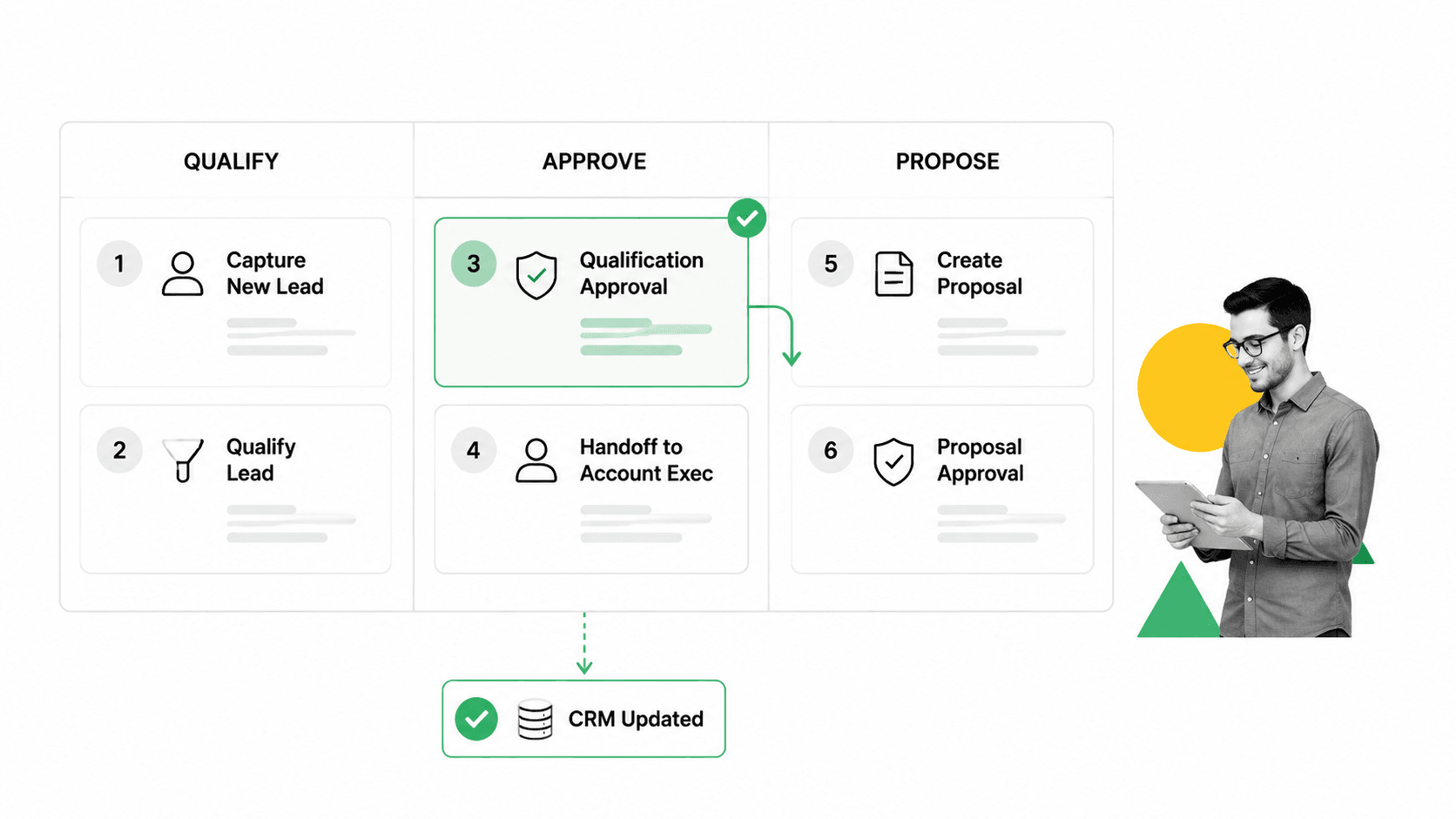
The practical job of the software is control. That does not mean forcing every deal into the same script. It means making the standard path clear, making exceptions visible, and making the next action impossible to miss.
Pipeline stage rules
Pipeline stages are useful only when each stage has a definition. If one rep moves a deal to proposal after a discovery call and another waits for technical validation, the pipeline stops being a management system. It becomes opinion.
Sales process management software can require specific fields, documents, tasks, or approvals before a stage changes. This creates a shared standard for what qualified, proposed, contracted, and closed actually mean.
Cross-functional handoffs
Sales work touches marketing, revenue operations, legal, finance, implementation, and customer success. The risk is rarely that one person does nothing. The risk is that each team assumes someone else owns the next step.
Workflow control fixes that by assigning tasks automatically. A legal review can start when a custom clause is selected. A customer onboarding task can launch when the deal closes. A manager approval can appear when discount rules are triggered. The same logic supports customer onboarding process after the sale.
Exception handling
Good sales processes have escape valves. Enterprise deals, regulated industries, nonstandard terms, partner-sourced opportunities, and expansion motions often need different steps. Software should let the team branch the workflow without losing control.
That is the difference between rigid task management and real sales process automation workflows. The system adapts to deal context while preserving proof of execution.
Sales process management software versus CRM
CRM and sales process management software overlap, but they are not the same thing. A CRM is built to manage customer and opportunity records. Sales process management software is built to manage the repeatable work that happens around those records.
What CRM does well
- Centralizes contacts, accounts, opportunities, notes, and activities.
- Supports forecasting, pipeline reporting, and territory or account ownership.
- Gives managers a single place to inspect deal status.
- Connects sales data to marketing, service, and finance systems.
What process software adds
- Guided execution: reps see the exact tasks required for the deal context.
- Enforcement: required fields and approvals prevent premature stage movement.
- Recurring workflows: the same process can run for every demo, proposal, handoff, renewal, or onboarding.
- Audit trail: completed tasks, assignments, timestamps, approvals, and comments stay attached to the workflow history.
The cleanest model is not CRM versus process software. It is CRM plus process software. The CRM remains the data backbone, while the workflow layer turns the sales playbook into executable work. That same distinction is useful when comparing broader workflow management software and workflow management system categories.
External sales automation guides from HubSpot sales automation guide and Cincom sales process automation glossary describe automation as a way to remove repetitive manual tasks. Sales process management goes one step further: it defines the governed path those automated tasks should follow.
Core capabilities to evaluate
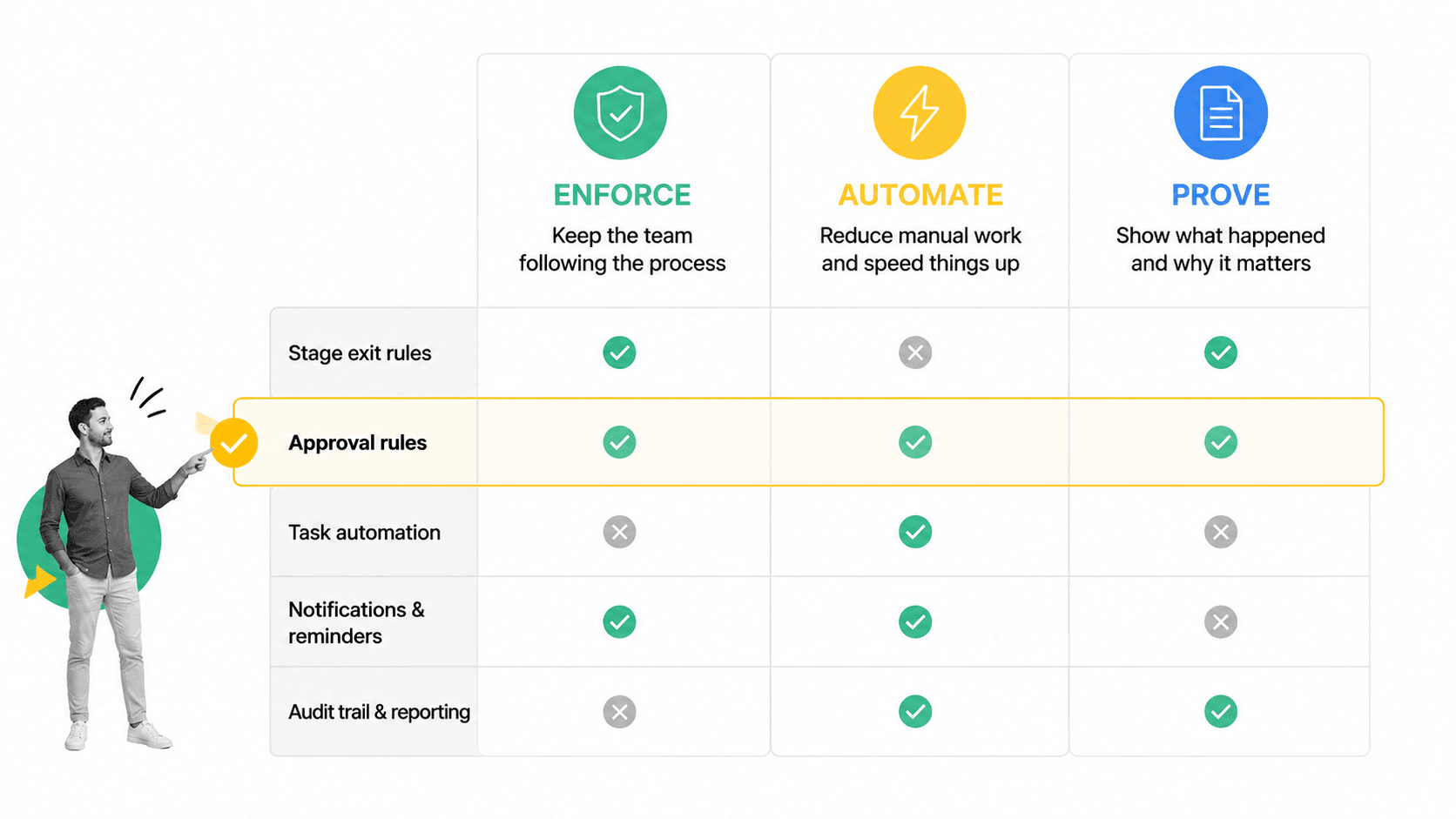
A sales team should not evaluate this category by asking which tool has the longest feature list. The better question is whether the software can enforce the exact sales motion you want without making the team slower.
Process design and templates
Start with the ability to document and run repeatable workflows. Templates help, especially for common motions like sales calls, discovery, proposal review, and pipeline cleanup. A useful template library can include assets such as a sales call checklist template or sales pipeline management template, but the software must also let you adapt the process to your own team.
Conditional logic
Conditional logic keeps the workflow relevant. A small-business deal should not show the same legal checklist as an enterprise procurement process. A renewal should not look like a net-new deal. A regulated customer should trigger security, privacy, or compliance review automatically.
Assignments and due dates
Sales process management fails when every workflow still depends on a manager remembering to chase people. The software should assign owners, set due dates, escalate stalled work, and make handoffs visible.
Approvals
Approvals are essential for discounts, custom terms, nonstandard service commitments, procurement requirements, and launch plans. Built-in approval workflows keep these decisions inside the workflow instead of scattered across Slack, email, and CRM notes.
Automation and integrations
The system should update records, notify stakeholders, launch tasks, and connect to the rest of the revenue stack. Process Street automations are valuable when they reduce duplicate entry and make the next step happen automatically.
Reporting and proof
Reporting should show more than activity volume. It should reveal which steps are skipped, where handoffs stall, how long approvals take, and whether the process is improving. For adjacent measurement ideas, review sales metrics, then connect those metrics to workflow completion data.
How to implement sales process management software
The biggest implementation risk is overbuilding. If the first version of the workflow tries to encode every edge case, reps will avoid it. Start with the smallest process that protects quality and gives managers a reliable signal.
Step 1: Map the current path
Write down the actual steps that happen today, not the idealized steps in the playbook. Include handoffs, approvals, CRM updates, proposal tasks, security checks, legal review, and post-sale transitions. Mark where deals most often stall or go off-script.
Step 2: Define exit criteria
For each stage, decide what must be true before a deal can move forward. Exit criteria should be observable. “Discovery complete” is vague. “Business pain, buying process, timeline, stakeholder, and next meeting captured” is enforceable.
Do the same for approvals. A manager should know exactly what they are approving: discount logic, nonstandard terms, implementation scope, procurement risk, or customer commitment. When the approval rule is specific, the workflow can route the right request to the right owner without a separate explanation.
Step 3: Separate rep work from system work
Reps should spend their time selling, not maintaining software. Any task that can be triggered, assigned, prefilled, or routed by the system should be automated. Human judgment should stay where it matters: qualification quality, negotiation strategy, buyer communication, and approval decisions.
This is where many implementations get cleaner. A rep may need to confirm authority, timeline, and next step. The system can remind the rep, expose the correct fields, notify a manager, create the follow-up task, and log the result. The rep owns the selling judgment. The software owns the repeatable coordination.
Step 4: Pilot one motion
Pick one high-friction motion, such as discovery to proposal, discount approval, contract review, or sales-to-success handoff. Run it with a small team. Watch where users hesitate, which fields are unclear, and which tasks feel unnecessary.
A pilot should have a clear before-and-after measure. Track how long the motion took, how many deals needed manual follow-up, how often required information was missing, and which steps users skipped. Those signals tell you whether the workflow is making the process easier or only documenting the same friction.
Step 5: Improve from execution data
Sales process management is not a one-time setup. It is a feedback loop. If stage changes are late, approval tasks pile up, or reps keep using the same exception path, update the workflow. This is the operational version of what a workflow is: a workflow is useful only when it changes how work actually happens.
The broader discipline has roots in sales process engineering and sales force automation. Modern tools make those ideas practical by embedding the process directly into daily work.
How Process Street supports sales process management
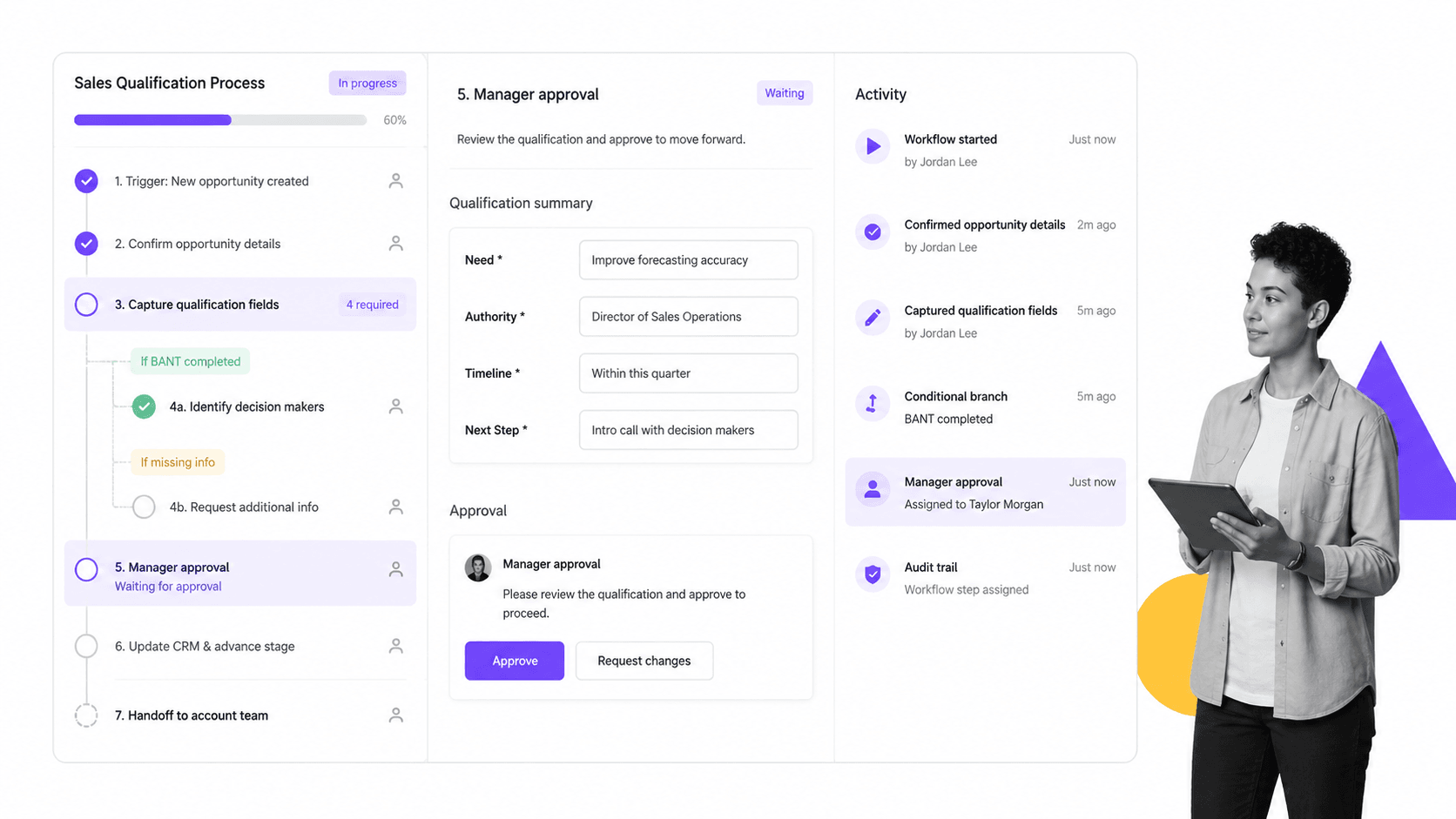
Process Street supports sales process management by turning sales playbooks into governed workflows. Instead of storing instructions in a document and hoping the team follows them, you can build the process as a checklist with assignments, conditional logic, required form fields, approvals, automations, and an audit trail.
Build the sales workflow
A revenue operations leader can create a workflow for discovery calls, proposal creation, discount approval, legal review, implementation handoff, renewal prep, or pipeline hygiene. Each workflow can include the exact tasks, fields, owners, and instructions the team needs.
Guide reps through the right path
Conditional logic keeps the workflow relevant to the deal. A workflow can show different tasks when a deal is enterprise, regulated, partner-sourced, discounted, or ready for customer success handoff.
Keep approvals and proof in one place
Approvals happen inside the workflow, not in a separate thread. Required information is captured in form fields. The activity history shows what happened, who approved it, and when the work was completed.
Connect the process to the rest of the stack
Process Street can work alongside CRM, communication, document, and automation tools so teams do not need to copy the same data across systems. The goal is simple: the sales process runs the same way every time, while the CRM remains clean and current.
That matters when sales work has downstream consequences. A promise made in a proposal can affect implementation, finance, legal, support, and customer success. When the workflow captures the commitment and routes the right review before the deal closes, the post-sale team does not inherit a surprise.
Metrics and governance signals
The right metrics depend on the process you are managing. A sales leader may care about conversion, cycle time, and forecast accuracy. Revenue operations may care about CRM completeness, approval bottlenecks, and handoff quality. Compliance or finance may care about proof that approvals and required reviews happened before commitments were made.
Execution metrics
- Workflow completion rate: how often required sales workflows are completed.
- Step skip rate: which tasks are bypassed or completed late.
- Approval cycle time: how long discount, legal, finance, or manager approval takes.
- Handoff latency: time between one team finishing and the next team starting.
- Exception rate: how often deals need a nonstandard path.
Business signals
Execution metrics become useful when paired with business outcomes. If proposal approval time drops but win rate does not change, the process may be faster without being better. If handoff completion improves and onboarding delays fall, the workflow is protecting customer experience.
A detailed external primer like LeadSquared sales process management guide frames sales process management as a repeatable path to consistent outcomes. Software makes that repeatability measurable.
Governance signals
Governance matters whenever sales commitments create operational, financial, security, or compliance risk. A sales force management system can track activity, but a workflow layer can prove that the required control happened. That is why concepts from sales force management system now show up in modern revenue operations systems.
Useful governance signals include late approvals, missing required fields, repeated exception paths, reopened stages, skipped handoff tasks, and manual overrides. None of those signals need to punish reps. They show where the process is unclear, where managers need a better rule, and where automation can remove avoidable follow-up.
The highest-value signal is not whether the team is busy. It is whether the team is following the right process, improving the process, and creating proof as work gets done.
FAQs
What is sales process management software?
Sales process management software helps teams define, run, automate, and improve the repeatable steps in a sales workflow. It controls tasks, handoffs, approvals, required fields, and completion records so the sales process is followed consistently.
How is sales process management software different from a CRM?
A CRM stores customer and opportunity data. Sales process management software manages the work around that data, such as qualification checklists, approval workflows, handoffs, and follow-up tasks. Many teams use both together.
What features should sales teams look for?
Look for workflow design, conditional logic, assignments, due dates, approvals, form fields, automations, integrations, reporting, and audit history. The best tool should enforce the process without adding unnecessary admin work for reps.
Can Process Street support sales process management?
Yes. Process Street lets teams build governed sales workflows with tasks, required fields, conditional logic, approvals, automations, and activity history. It works well as the execution layer around a CRM or sales playbook.
When should a team adopt sales process management software?
Adopt it when sales work depends on repeatable handoffs, approvals, qualification rules, or proof of completion. Common triggers include inconsistent pipeline stages, messy CRM data, slow approvals, poor handoffs, and process drift across teams.
Does sales process management software replace sales automation?
No. Sales automation removes repetitive manual work, while sales process management defines the governed path that work should follow. The strongest systems combine both so tasks are automated inside a clear, auditable process.
