Turn every policy into automated workflows with built-in enforcement and audit-ready proof.


6 Best Whale Alternatives & Competitors in 2026

Whale alternatives help teams solve different parts of the same operating problem: capturing standard operating procedures, teaching people how to follow them, keeping knowledge current, and making sure recurring work is completed correctly. Whale is strongest as an AI-assisted SOP and training platform, but it is not the only way to document or operationalize how work gets done.
The best replacement depends on why you are moving. Some teams need deeper role-based training. Others want faster capture of software walkthroughs, a cleaner company playbook, or a workflow system that assigns every step, blocks incomplete work, collects evidence, and records approvals. Treat those as distinct buying jobs rather than comparing feature counts in isolation.
This comparison uses primary vendor sources for current product and pricing claims. It evaluates process execution, SOP authoring, training delivery, visual capture, knowledge governance, integrations, reporting, and pricing transparency. Process Street maintains the page, but each competitor is credited where it fits a use case better.
Compared and verified in November 2026. Product packaging changes, so confirm the vendor pricing page before making a final decision.
- What is Whale?
- Whale alternatives at a glance
- 1. Process Street
- 2. Trainual
- 3. SweetProcess
- 4. Scribe
- 5. Tango
- 6. Waybook
- How we picked these Whale alternatives
- When Whale may still be the right choice
- How to choose by use case
- What to compare beyond the feature list
- Whale alternatives pilot scorecard
- Whale migration checklist
- Whale alternatives FAQ
What is Whale?
Whale is an AI-assisted SOP platform for documenting processes, centralizing company knowledge, training employees, and tracking whether people have read and understood material. Its published feature set includes an AI SOP writer, screen recording, video-to-guide conversion, checklists, training flows, quizzes, assignments, analytics, version history, permissions, and a browser extension that surfaces guidance inside web applications.
The product is a sensible baseline for teams that want one system to connect process documentation with onboarding and ongoing training. Its free plan supports a small team and core capture features, while paid plans expand documentation volume, training flows, quizzes, reporting, permissions, contextual suggestions, and enterprise controls. See the official Whale product site and Whale pricing page for current details.
Teams usually evaluate alternatives for one of four reasons. They may need execution controls that go beyond training, a more formal learning system, a faster capture tool for screen-based procedures, or a simpler playbook and knowledge structure. Whale remains a good fit when documentation, training flows, quizzes, and contextual knowledge delivery need to live together.
Whale alternatives at a glance
Short answer: Process Street is the best overall Whale alternative for operations teams that need SOPs to become enforceable recurring workflows. Trainual is stronger for role-based employee training, SweetProcess for a simple operations manual, Scribe for fast visual capture, Tango for in-app guidance, and Waybook for a structured company playbook.
| Tool | Best for | Standout feature | Free plan | Starting price |
|---|---|---|---|---|
| Process Street | enforceable, trackable recurring SOP and process workflows | workflow runs with assignments, approvals, conditional logic, required fields, and audit history | Trial available | See pricing page |
| Trainual | role-based employee training, documentation, and accountability | AI-assisted documentation, training paths, testing, reporting, roles, and responsibilities | Trial offerings may be available | Quote based on team size and features |
| SweetProcess | a straightforward operations manual with procedures, policies, and processes | procedures, policies, process maps, tasks, quizzes, and a knowledge base | 14-day free trial | See pricing page |
| Scribe | fast capture of step-by-step guides from work performed on screen | browser and desktop capture, screenshot editing, sharing, embedding, and document export | Yes | Free; paid plans published on pricing page |
| Tango | capturing workflows and delivering visual guidance inside browser-based work | browser and desktop capture, shared workflows, Guide Me, exports, annotations, and viewer insights | Yes | Free; paid plans published on pricing page |
| Waybook | structured company playbooks, onboarding paths, and knowledge verification | documents, learning paths, tests, progress tracking, review dates, and audit logs | 7-day free trial | Published on pricing page |
The first table shows the commercial and product fit at a glance. The deep dives below separate documentation, training, capture, playbook, and execution use cases so a team can choose based on the work it actually needs to improve.
1. Process Street
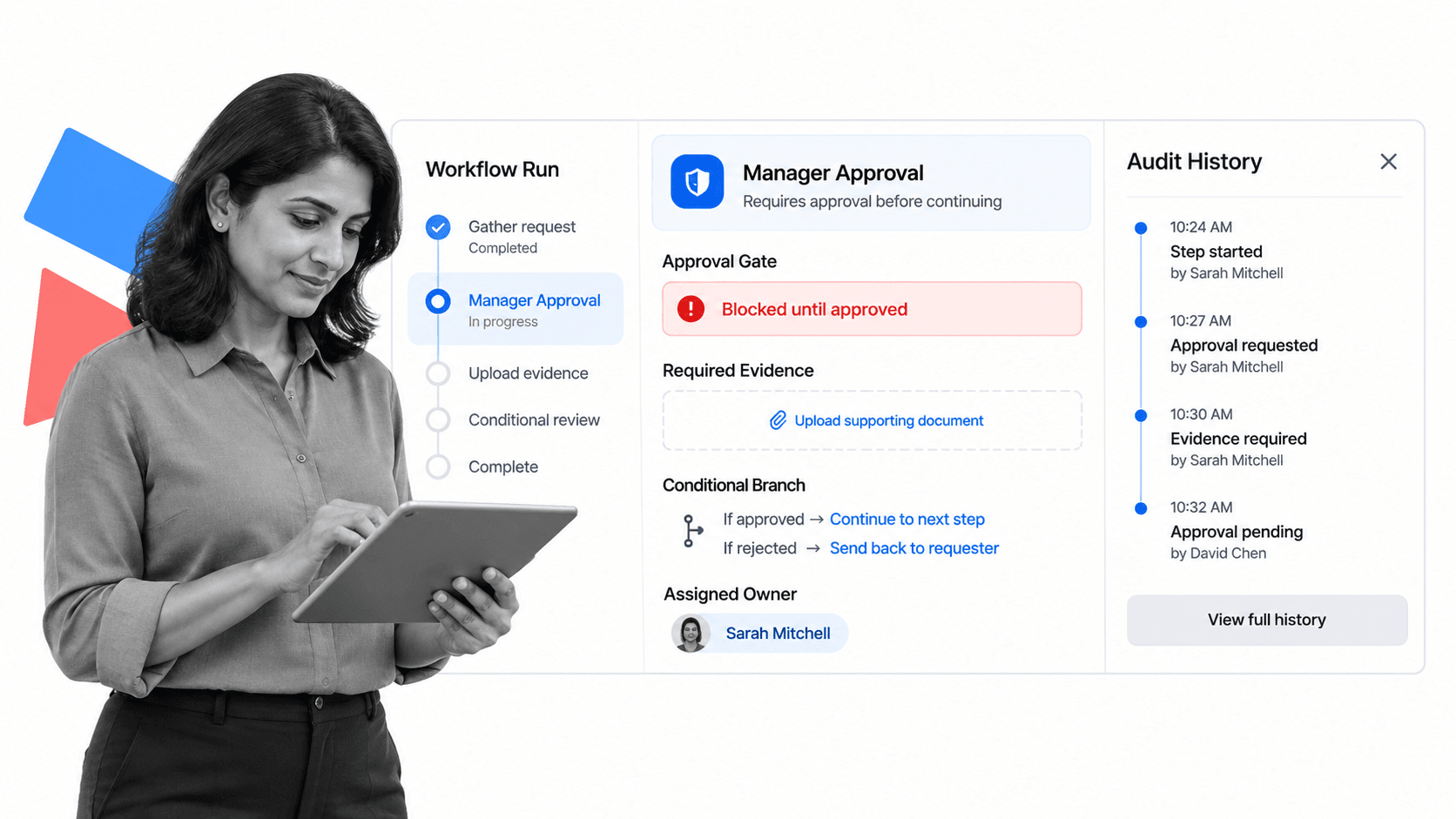
Best for: Enforceable, trackable, recurring process and SOP workflows.
Bottom line: Process Street is the best overall Whale alternative when a documented procedure must become a controlled run of work with owners, due dates, approvals, required evidence, and an audit history.
Whale helps teams create and teach SOPs. Process Street goes further into execution. A procedure can be turned into a workflow that is run for each employee onboarding, client launch, quality review, policy acknowledgment, audit preparation, or recurring operating cycle. Every run creates a separate record of who completed each step, what information was entered, what approval was given, and where work slowed down.
That difference matters when the risk is not that someone cannot find the SOP, but that a required step may be skipped. Process Street lets an operations owner make fields mandatory, route work conditionally, assign tasks dynamically, request approvals inside the workflow, and maintain proof of completion. The system is designed for high-stakes operations where the process itself must be followed, not merely read.
Process Street also supports governed process documentation, automation, data collection, reporting, and 5,000+ integrations. Teams can begin with a recurring workflow and expand into a connected operating layer across HR, customer operations, finance, compliance-adjacent work, and quality management. The current product and platform overview is on the Process Street homepage.
It is not the right answer for every Whale buyer. If the goal is a traditional learning management system, a training-first tool can be stronger. If the goal is to capture a quick screen walkthrough in minutes, Scribe or Tango can be faster. If the goal is a polished employee handbook and learning path, Waybook may feel more purpose-built. Process Street wins when execution, accountability, and proof matter most.
Key Process Street features
- Recurring workflow runs with clear task ownership and due dates
- Approvals, required fields, conditional logic, and evidence collection
- Automations that move data and trigger next steps
- Process documentation connected directly to execution
- Reporting and audit history for every run
- 5,000+ integrations for connecting operational systems
Process Street pros
- Turns SOPs into work that can be assigned and tracked
- Makes skipped steps and missing evidence visible
- Supports both human work and automated actions
- Fits repeatable operations across multiple departments
- Creates a durable record for managers and reviewers
Process Street cons
- Not a traditional course catalog or SCORM-first LMS
- More operational structure than a team needs for simple screen-guide capture
Choose Process Street if
Choose Process Street if your team already knows the procedure but needs a system to make sure it happens correctly every time. It is especially strong for onboarding, approvals, recurring reviews, quality checks, evidence collection, and operational handoffs.
Skip Process Street if
Skip it if the main requirement is a lightweight browser recorder, a formal learning catalog, or a static company wiki with no need to run recurring work.
Process Street publishes current packaging on its pricing page. Use that page for current plan details rather than relying on a fixed figure in a comparison article.
2. Trainual
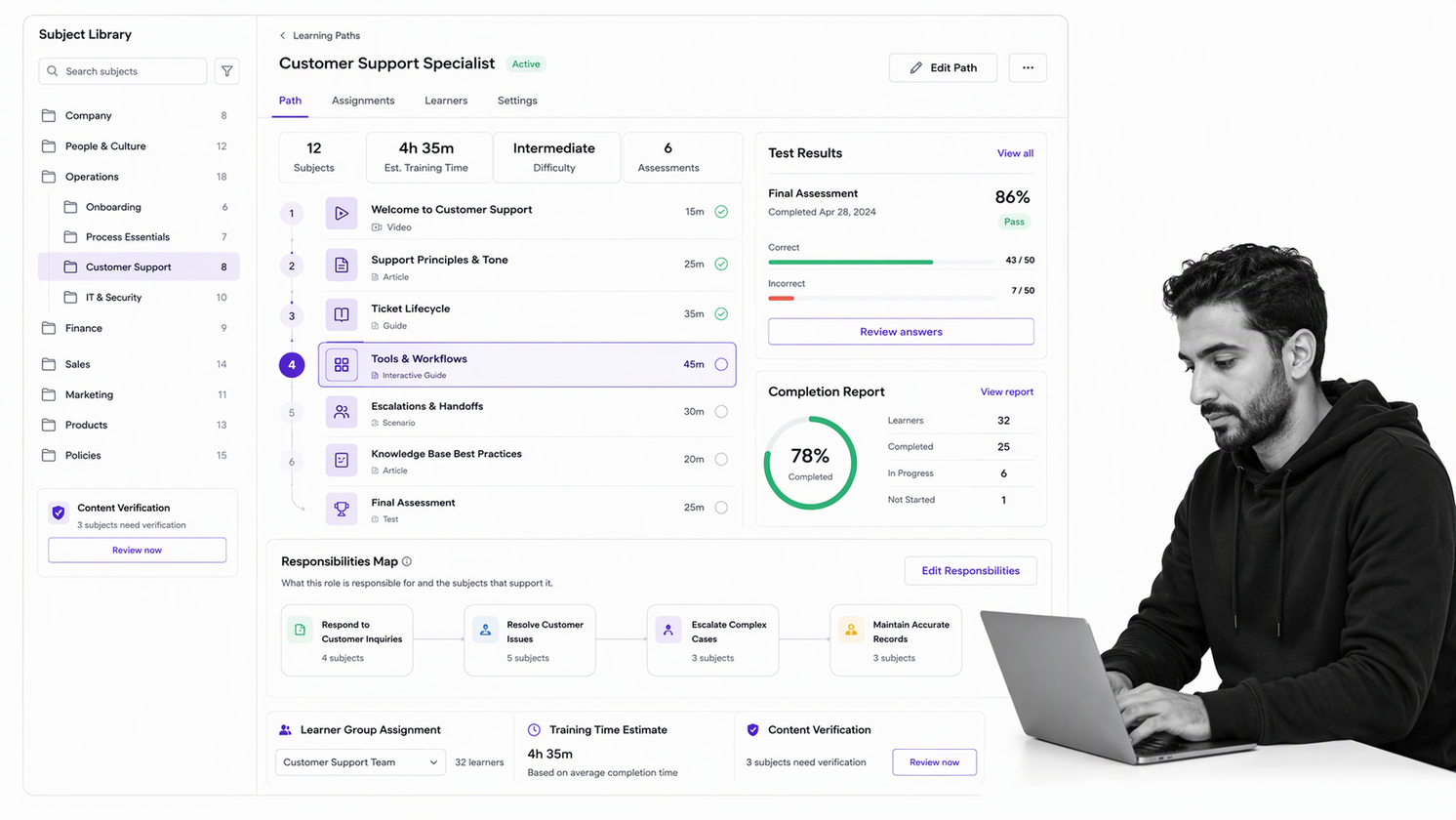
Best for: role-based employee training, documentation, and accountability.
Bottom line: Trainual is a better fit when structured employee training and role clarity are the center of the buying decision.
Trainual treats documentation as part of a broader employee enablement system. Its current plans group AI-assisted documentation, a subject library, training by role or department, due dates, testing, tracking, and reporting. Higher plans add individual training paths, e-signatures, longer version history, SCORM storage, custom branding, and enterprise rollout support.
That makes it a credible Whale alternative for organizations where the main question is whether every employee learned the right material for a role. It is less naturally suited to operational teams that need a recurring process instance with required fields, branching logic, approval gates, and evidence collected on every run.
The most reliable way to evaluate it is to test the exact workflow or training asset you would otherwise build in Whale. Review the current product and commercial details on the Trainual official site before buying.
Key Trainual features
- AI-assisted documentation and searchable knowledge
- Role-based and group-based training paths
- Tests, completion tracking, reporting, and due dates
- Roles, responsibilities, and team-directory features
- Screen recording, file uploads, and multimedia training content
Trainual pros
- Strong alignment between documentation and employee training
- Clear plan progression from core training to enterprise rollout
- Useful for teams formalizing roles and accountability
Trainual cons
- Pricing requires a quote based on team size and features
- Training administration is the center of gravity, not recurring workflow enforcement
Choose Trainual if
Trainual is a better fit when structured employee training and role clarity are the center of the buying decision.
Skip Trainual if
Your primary requirement is to run a recurring process with accountable owners, required evidence, conditional paths, approvals, and a complete history for each execution.
Free plan: Trial offerings may be available. Starting price: Quote based on team size and features. Confirm current terms with the vendor before buying.
3. SweetProcess
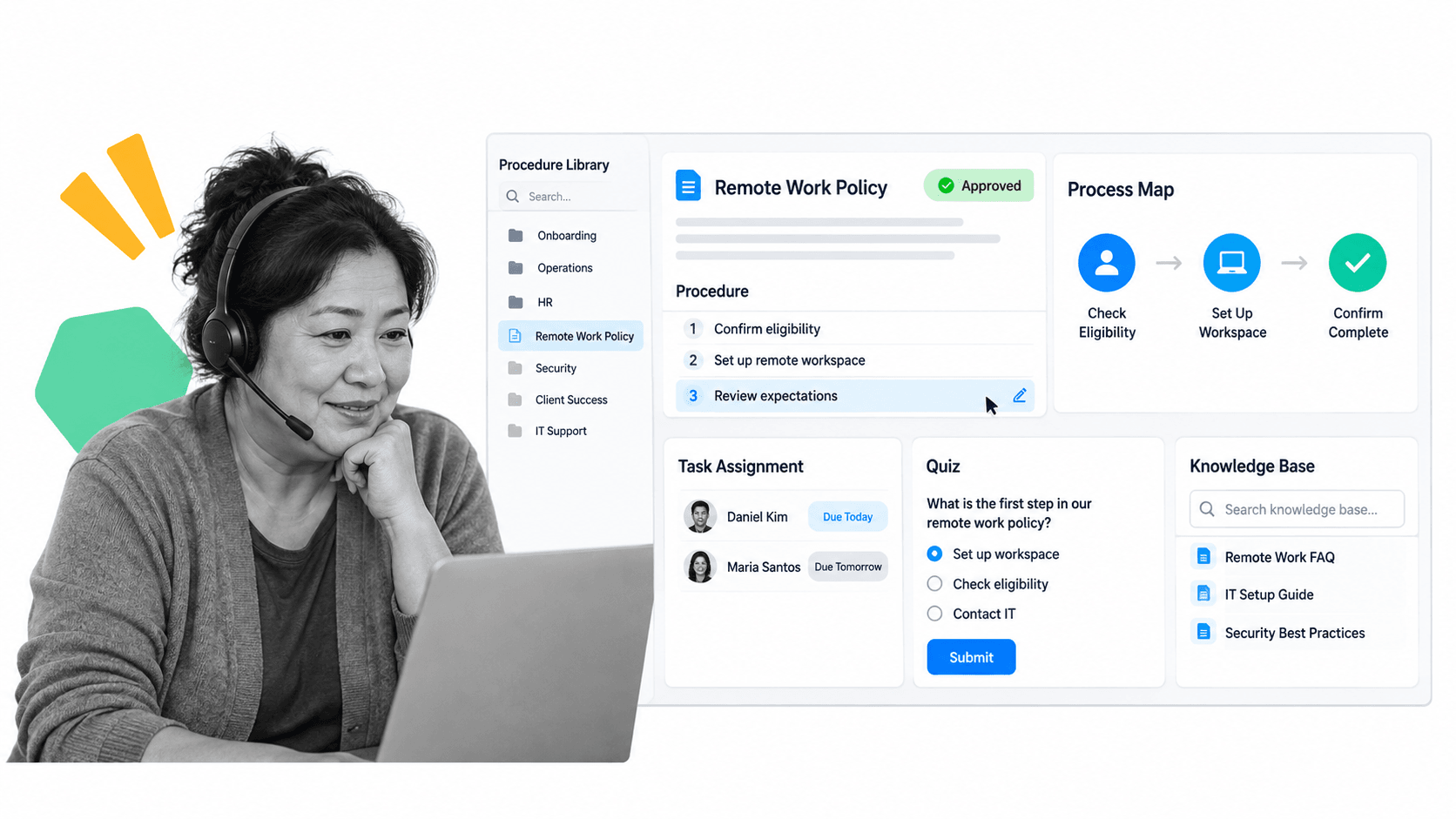
Best for: a straightforward operations manual with procedures, policies, and processes.
Bottom line: SweetProcess is a better fit when a team wants a simple documentation system with one broad feature set.
SweetProcess is built around the idea of a digital operations manual. Teams can document procedures, policies, and processes, organize them in a knowledge base, connect steps into process maps, assign tasks, and test knowledge. The product publishes a single broad feature set rather than a long ladder of feature gates, with pricing tied primarily to active users.
It is a practical option for a small or midsize organization that wants one uncomplicated place for operational knowledge. Compared with Whale, it places more emphasis on the full operations manual. Compared with Process Street, it is less focused on enforcing a rich, conditional workflow every time a procedure runs.
The most reliable way to evaluate it is to test the exact workflow or training asset you would otherwise build in Whale. Review the current product and commercial details on the SweetProcess official site before buying.
Key SweetProcess features
- Procedures, policies, and processes in one workspace
- Simple visual process maps
- Task assignments and knowledge checks
- Knowledge-base organization and search
- Document export and broad access to features
SweetProcess pros
- Simple mental model for an operations manual
- Useful mix of documentation, tasks, and quizzes
- Published trial makes evaluation straightforward
SweetProcess cons
- Interface and workflow depth may feel limited for complex operations
- Not designed as a full learning management system
Choose SweetProcess if
SweetProcess is a better fit when a team wants a simple documentation system with one broad feature set.
Skip SweetProcess if
Your primary requirement is to run a recurring process with accountable owners, required evidence, conditional paths, approvals, and a complete history for each execution.
Free plan: 14-day free trial. Starting price: See pricing page. Confirm current terms with the vendor before buying.
4. Scribe
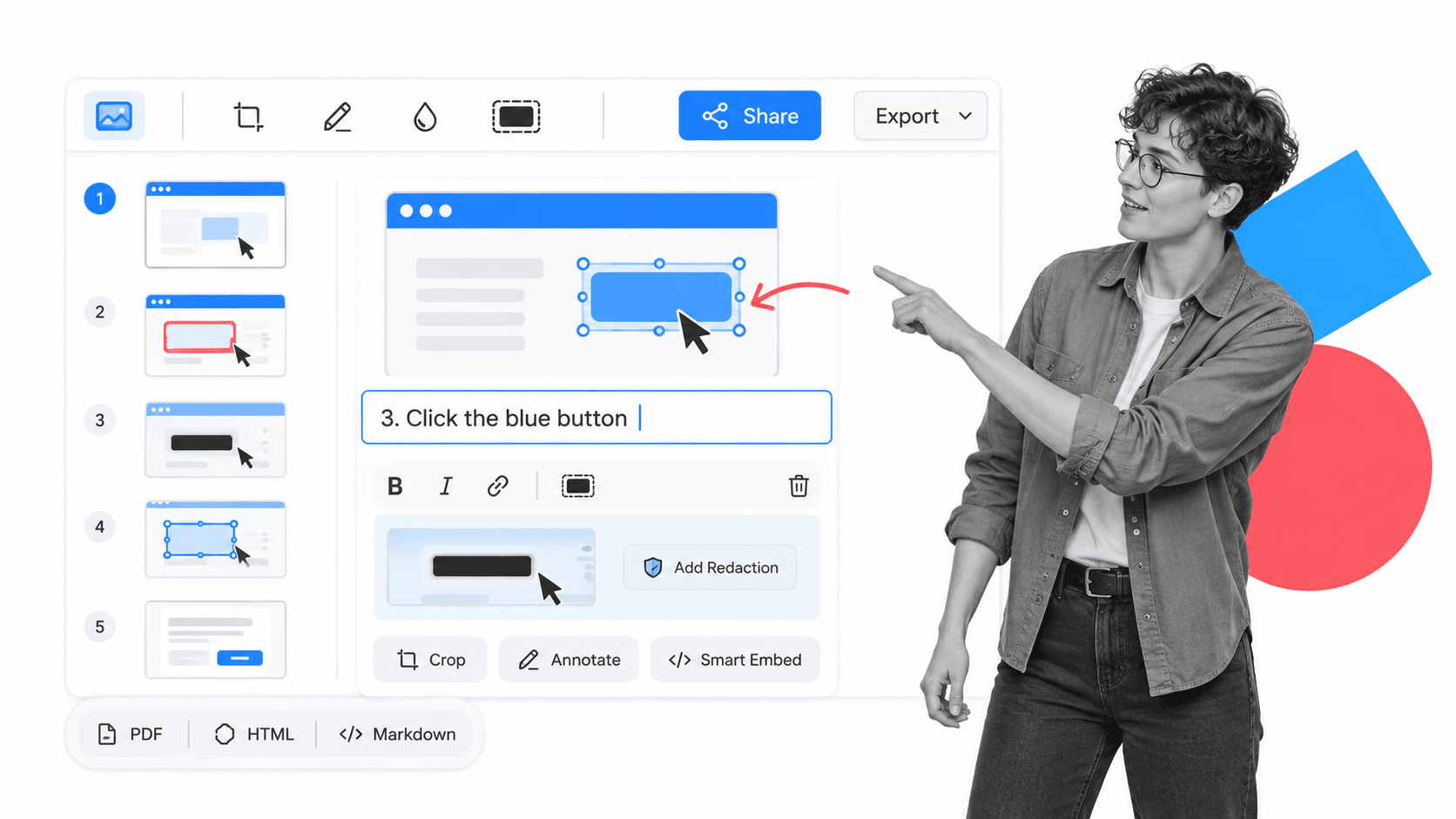
Best for: fast capture of step-by-step guides from work performed on screen.
Bottom line: Scribe is a better fit when fast visual guide capture is more important than workflow enforcement or training administration.
Scribe starts with observation rather than a blank document. A user turns on the browser extension or desktop application, performs a digital process, and receives an editable step-by-step guide with screenshots, clicks, and text. Guides can be shared by link, embedded into another knowledge system, or exported on paid plans.
That capture-first approach can be faster than authoring an SOP in Whale when the procedure is mainly a sequence of actions in software. Scribe is not trying to be a complete process execution or employee training platform, so teams often use it as a capture layer alongside a knowledge base, LMS, or workflow system.
The most reliable way to evaluate it is to test the exact workflow or training asset you would otherwise build in Whale. Review the current product and commercial details on the Scribe official site before buying.
Key Scribe features
- Automatic browser-based process capture
- Desktop and mobile capture on paid plans
- Screenshot cropping, annotation, and redaction
- Share links, embeds, and document exports
- Pages that combine multiple captured guides with supporting text
Scribe pros
- Very fast path from completed work to visual guide
- Easy to embed guides where teams already keep knowledge
- Free plan supports lightweight browser capture
Scribe cons
- Captured guides still need editorial review and upkeep
- Limited fit for approvals, assignments, and recurring process control
Choose Scribe if
Scribe is a better fit when fast visual guide capture is more important than workflow enforcement or training administration.
Skip Scribe if
Your primary requirement is to run a recurring process with accountable owners, required evidence, conditional paths, approvals, and a complete history for each execution.
Free plan: Yes. Starting price: Free; paid plans published on pricing page. Confirm current terms with the vendor before buying.
5. Tango
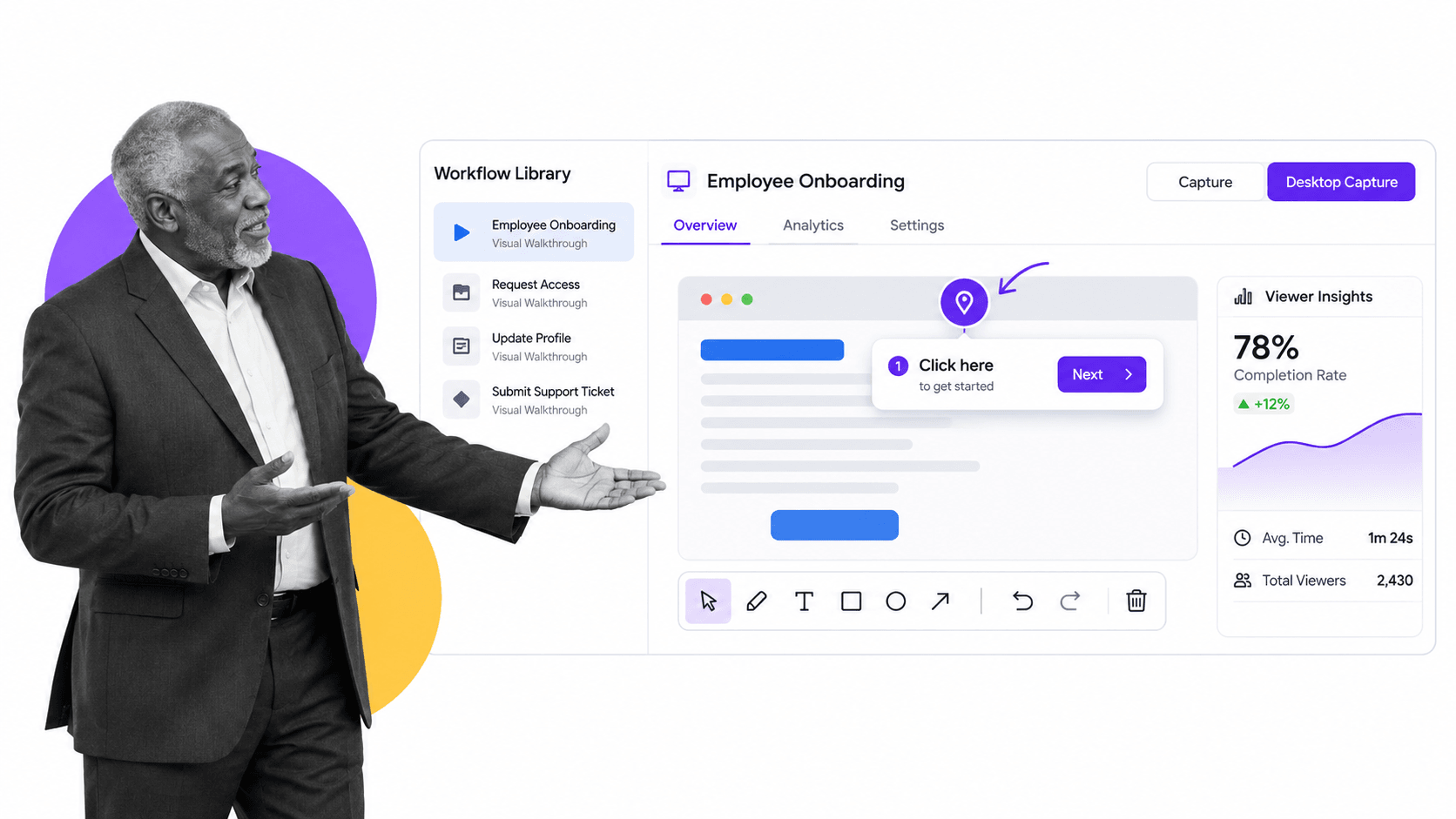
Best for: capturing workflows and delivering visual guidance inside browser-based work.
Bottom line: Tango is a better fit when teams need in-app walkthroughs and visual guidance at the moment of work.
Tango captures a workflow as a visual sequence and then helps deliver that guidance where the work happens. The free plan supports browser capture and a limited shared workflow library. Paid plans add unlimited workflows, desktop capture, branded exports, version history, annotations, viewer insights, and additional sharing formats. Enterprise expands toward in-app guidance and browser automation.
Tango is the stronger choice when the adoption problem is contextual: an employee needs to see the next step while using a web application. Whale is stronger when the organization wants the same SOP to anchor a knowledge base and training flow. Process Street is stronger when completing the procedure itself must be tracked and controlled.
The most reliable way to evaluate it is to test the exact workflow or training asset you would otherwise build in Whale. Review the current product and commercial details on the Tango official site before buying.
Key Tango features
- Browser and desktop workflow capture
- Guide Me for step-by-step contextual guidance
- Screenshot annotation and blurring
- Link, embed, and export options
- Viewer insights for guide usage
Tango pros
- Guidance appears close to the moment of work
- Free plan covers a useful small-team trial
- Strong visual walkthrough format for software adoption
Tango cons
- Free workspace limits shared workflows
- A visual guide does not replace a controlled recurring workflow
Choose Tango if
Tango is a better fit when teams need in-app walkthroughs and visual guidance at the moment of work.
Skip Tango if
Your primary requirement is to run a recurring process with accountable owners, required evidence, conditional paths, approvals, and a complete history for each execution.
Free plan: Yes. Starting price: Free; paid plans published on pricing page. Confirm current terms with the vendor before buying.
6. Waybook
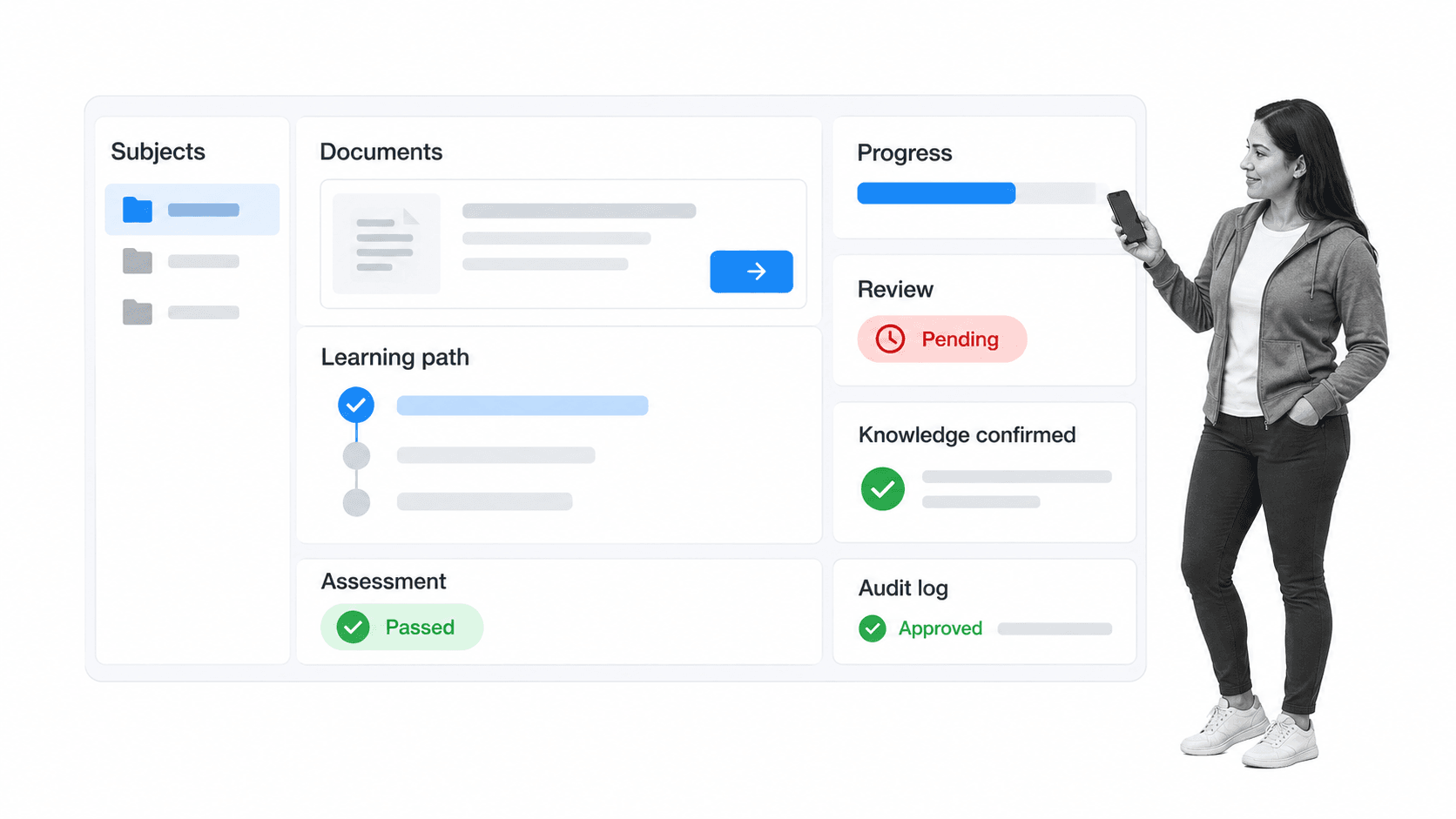
Best for: structured company playbooks, onboarding paths, and knowledge verification.
Bottom line: Waybook is a better fit when the main deliverable is a polished business playbook with employee learning paths.
Waybook organizes company knowledge as a structured business playbook. Its plans include documents, steps, AI-assisted writing, learning paths, tests, progress tracking, search, mobile access, and external sharing. Higher plans add advanced permissions, document verification, approval processes, audit logs, single sign-on, directory sync, scheduled reports, and deeper support.
This makes Waybook a strong Whale alternative for a team that wants its handbook, onboarding material, and knowledge checks to feel like one coherent playbook. It can be a better fit than Process Street when the deliverable is primarily a polished learning and knowledge destination rather than a recurring operational workflow.
The most reliable way to evaluate it is to test the exact workflow or training asset you would otherwise build in Whale. Review the current product and commercial details on the Waybook official site before buying.
Key Waybook features
- Structured subjects, documents, and steps
- Learning paths, tests, and completion tracking
- Document review dates and verification on higher plans
- Search, external sharing, and PDF export
- Audit logs, permissions, and identity controls on higher plans
Waybook pros
- Clear playbook structure for onboarding and knowledge
- Useful combination of authoring, learning, and progress tracking
- Published trial and plan comparison simplify evaluation
Waybook cons
- Advanced governance features sit on higher plans
- Execution controls are lighter than a dedicated workflow platform
Choose Waybook if
Waybook is a better fit when the main deliverable is a polished business playbook with employee learning paths.
Skip Waybook if
Your primary requirement is to run a recurring process with accountable owners, required evidence, conditional paths, approvals, and a complete history for each execution.
Free plan: 7-day free trial. Starting price: Published on pricing page. Confirm current terms with the vendor before buying.
How we picked these Whale alternatives
A useful alternatives list should compare buying jobs, not just adjacent brand names. We began with the problems Whale explicitly addresses: SOP creation, process capture, training flows, quizzes, knowledge access, reporting, and contextual guidance. We then selected products that offer a materially different strength in at least one of those jobs.
The weighting was 30 percent process execution and accountability, 25 percent documentation and capture, 20 percent employee training and knowledge verification, 15 percent governance and reporting, and 10 percent pricing transparency and ease of evaluation. That weighting gives Process Street the top position for the Process Street audience: teams running repeatable, high-stakes operations. A buyer focused mainly on training or capture should change the weighting and may reasonably choose a different product.
Claims were checked against vendor product, pricing, help, or terms pages during this run. We did not use invented ratings, review counts, customer counts, or market-share claims. Pricing is summarized conservatively because plans change. When a vendor does not publish a single starting figure, the table says so.
The list deliberately excludes Whale from the ranking because Whale is the incumbent being compared. It is described at the top as the baseline. Each numbered entry is a genuine alternative with its own image, best-for tag, direct verdict, strengths, limitations, and official source links.
When Whale may still be the right choice
An alternatives search does not automatically mean Whale is the wrong product. Whale remains a coherent choice when the team wants AI-assisted SOP authoring, screen and video capture, a central knowledge library, training flows, quizzes, assignments, and contextual browser guidance in one system. Replacing it with several narrower tools can create more administration than it removes.
Stay with Whale when the primary problem is getting procedures documented and understood, adoption is improving, and managers can already see who completed assigned learning. The product also makes sense when employees benefit from the same knowledge appearing during onboarding, in search, and beside the web applications they use. In that situation, the change cost may outweigh the gain from a specialist tool.
Consider an alternative when the missing capability is central to the business outcome. If a missed step creates operational risk, Process Street offers stronger execution controls. If formal role-based learning is the goal, Trainual may fit better. If the bottleneck is capturing visual instructions, Scribe or Tango can reduce authoring time. If the team wants a structured company handbook, Waybook or SweetProcess may provide the preferred information architecture.
Before migrating, separate product frustration from implementation debt. A disorganized workspace, unclear ownership, weak review cycles, and duplicated content can make any SOP platform feel inadequate. Clean one important process, assign an owner, set a review date, and test it with real users. If the same gap remains, you have a stronger reason to switch and a clearer acceptance test for the replacement.
How to choose a Whale alternative by use case
Choose Process Street when the SOP is only the beginning. If a procedure must be launched repeatedly, assigned to named owners, completed by a deadline, routed based on answers, approved, and preserved as evidence, workflow execution is the deciding capability. This is common in employee onboarding, client onboarding, compliance management, and quality management.
Choose Trainual when the main question is whether employees understand their responsibilities and complete the right training for a role. Choose Waybook when the goal is a polished business playbook with learning paths and verification. Both are better aligned with structured learning than a general workflow platform.
Choose Scribe when speed of capture is the bottleneck. It is a strong companion for teams building a process documentation library from work performed in software. Choose Tango when guidance must appear inside the application while a person completes the task. These tools can also feed captured steps into a broader workflow management system.
Choose SweetProcess when simplicity is the priority and the team wants procedures, policies, process maps, and basic tasks in one operations manual. It fits organizations that need more structure than shared documents but do not require the full control model of business process management software.
A practical evaluation uses one real process. Try a new-hire setup, customer handoff, monthly close task, policy acknowledgment, or quality review. Measure authoring time, learner effort, completion visibility, exception handling, approval control, evidence quality, reporting, and maintenance. A staged process improvement plan keeps the comparison grounded in outcomes rather than demo polish.
For more comparison paths across workflow, documentation, and operations platforms, browse the Process Street alternatives hub.
What to compare beyond the feature list
Most products in this category can store text, images, videos, and links. That common layer is not enough to make a durable buying decision for an operations team. The meaningful differences appear in how knowledge is created, how people are assigned to it, how real work is controlled, and how the organization proves that the current standard was followed.
Authoring speed and source material
Decide how procedures enter the system. Whale, Scribe, and Tango emphasize capture and assisted creation in different ways. Scribe and Tango are especially efficient when the source is a person completing a digital task on screen. Trainual, Waybook, and SweetProcess provide more structured destinations for authored knowledge. Process Street is strongest when the author is designing the executable process itself, including the data, decisions, assignments, and approvals that belong in every run.
Training and knowledge verification
A completion check can mean several things. It may show that a person opened a document, passed a quiz, completed a learning path, signed an acknowledgment, or performed the actual procedure correctly. Trainual and Waybook lean toward the learning and verification side. Whale combines training flows with the same SOP library employees use later. Process Street proves completion through the workflow record, which is more useful when managers need evidence of the work rather than evidence that someone read the instructions.
Execution control and exception handling
Ask what happens after the instruction is understood. A visual guide may tell an employee what to click, while an SOP platform may tell them what policy to follow. An execution platform assigns the next step, blocks progress until required information is present, changes the path based on answers, escalates overdue work, and records an approval. If exceptions and handoffs are where the process breaks, this dimension deserves more weight than authoring convenience.
Governance and content maintenance
Every procedure decays unless someone owns it. Compare version history, review dates, verification reminders, approval workflows, permissions, audit logs, export, and the ability to identify unused or outdated content. Waybook and Whale publish explicit knowledge-governance features. Trainual emphasizes content verification and plan-based version history. Process Street connects process changes to the live workflow structure. The right model depends on whether the governed object is a document, a learning asset, or an executable process.
Delivery in the flow of work
Knowledge is most useful when it appears at the moment of need. Whale and Tango both offer browser-oriented guidance patterns, while Scribe makes captured guides easy to share and embed. A playbook product expects the employee to visit the knowledge destination. A workflow product brings the procedure forward as an assigned run with a due date. Evaluate where employees naturally work and whether another portal will become one more place they forget to check.
Reporting that matches the outcome
Avoid treating every dashboard as equivalent. Training reporting should show assignments, progress, test results, and knowledge gaps. Documentation analytics should reveal searches, views, and stale content. Operational reporting should show cycle time, overdue work, exceptions, approvals, and missing evidence. Choose the reporting model that answers the management question you actually have. A polished chart that measures the wrong event will not improve the process.
Security, identity, and procurement fit
Plan requirements often change once security and IT join the evaluation. Compare single sign-on, user provisioning, role and group permissions, audit logs, data export, retention controls, support for legal or security review, and the vendor’s ability to help with a controlled rollout. Do not assume that a feature named on a higher plan is included in the package you are considering. Ask the vendor to map every required control to the exact plan and contract, then keep that mapping with the buying record.
The identity model matters during onboarding and offboarding. A training platform may assign content automatically from a role or group. A playbook may restrict sensitive subjects to selected teams. A workflow system may assign steps dynamically based on form data or a decision path. Test how a user is added, changes roles, loses access, and leaves the company. Those lifecycle events reveal more about administrative effort than a polished content demo.
Total cost beyond the subscription
Subscription price is only one part of the decision. Count creator seats, learner or member seats, implementation services, migration work, integrations, premium support, security features, storage, and the staff time required to keep content current. A low-cost capture tool can be excellent when guides feed an existing knowledge system, but it may be expensive if the team must maintain the same procedure in several places. A broader platform may cost more per month while reducing handoffs, duplicate reporting, and manual follow-up.
Model the cost at the expected team size for the next twelve months and include the people who create, review, administer, and consume the content. Then estimate the cost of the failure you are trying to prevent: repeated questions, slow onboarding, skipped steps, incomplete evidence, rework, or manager time spent chasing completion. The best commercial fit is the product whose operating model removes that cost without adding more platform overhead than the team can sustain.
| Decision priority | Best starting point | Why |
|---|---|---|
| Recurring process control | Process Street | Runs the procedure with owners, logic, approvals, and evidence |
| Role-based employee training | Trainual | Structures learning, testing, reporting, roles, and accountability |
| Simple operations manual | SweetProcess | Combines procedures, policies, process maps, tasks, and knowledge |
| Fast visual guide capture | Scribe | Turns completed digital work into editable step-by-step guides |
| Guidance inside web applications | Tango | Delivers visual walkthroughs and contextual guidance near the task |
| Company playbook and learning paths | Waybook | Organizes documents, assessments, progress, and review controls |
Whale alternatives pilot scorecard
Run a two-week pilot with the same process in each finalist. Use one procedure that includes at least one handoff, one decision, one piece of evidence, and one manager review. A simple guide can make every product look adequate, while a realistic process exposes whether the tool handles ownership, exceptions, and maintenance.
- Authoring: time required to turn source material into usable instructions
- Findability: whether a new employee can locate the right answer without help
- Learning: assignments, tests, completion tracking, and reinforcement
- Execution: owners, due dates, branching, approvals, required fields, and evidence
- Governance: permissions, version history, review cycles, and change control
- Adoption: effort for creators, managers, and everyday users
- Reporting: proof that training or work was completed correctly
- Portability: export options and ease of moving content later
- Commercial fit: pricing model at the expected number of creators and users
Score each dimension from one to five, then multiply by its importance to your use case. An operations team may give execution and governance half the total weight. A learning team may give training and adoption the majority. A documentation team may prioritize authoring, findability, and portability. The weighting explains why the same evidence can produce a different winner for a different organization.
Document the result with examples, not impressions. Record how long the pilot took, which steps confused users, which approvals happened outside the platform, what evidence was missing, and what reporting a manager could produce. The best Whale alternative is the product that removes the most important failure mode without creating a new administrative burden.
Whale migration checklist
Migration is not a file-copy exercise. The useful work is deciding which content should remain reference material, which content should become training, and which procedures should become live workflows. Start by exporting an inventory of boards, playbooks, cards, training flows, quizzes, owners, permissions, and reporting requirements.
- Classify each asset as reference knowledge, training content, or executable workflow
- Remove duplicates and archive obsolete procedures before migration
- Preserve owners, reviewers, due dates, and approval responsibilities
- Map employee groups and permission boundaries
- Choose one pilot process with visible business impact
- Rebuild required data fields and decision points, not just prose
- Test links, media, exports, mobile access, and search
- Run the old and new systems in parallel for one controlled cycle
- Record adoption, exceptions, and missing evidence
- Retire the old workspace only after owners confirm the new process
A fast capture tool can accelerate migration, but it cannot decide what should be controlled. For a process moving into Process Street, define the trigger, owner, required inputs, conditional paths, approval points, completion evidence, escalation route, and reporting audience. A structured onboarding checklist is a useful pilot because it combines documentation, assignments, deadlines, handoffs, and proof.
Plan for content ownership after launch. Every policy and SOP needs a review cadence and a named person responsible for changes. Training material needs completion monitoring. Executable workflows need operational metrics such as cycle time, overdue tasks, exceptions, and rework. The migration succeeds when the new system makes the process easier to follow and easier to prove.
Whale alternatives FAQ
What is the best Whale alternative?
Process Street is the best Whale alternative for teams that need SOPs to become enforceable recurring workflows. Trainual or Waybook may fit better for structured employee learning, while Scribe or Tango may fit better for rapid visual capture and contextual guidance.
Why is Process Street ranked first among Whale alternatives?
Process Street is ranked first for its core audience: operations teams that need accountable execution, approvals, required evidence, conditional logic, and an audit history. Whale is stronger when documentation and training flows are the central requirement.
Is there a free Whale alternative?
Scribe and Tango publish free plans. SweetProcess and Waybook publish time-limited trials, while Process Street publishes current evaluation options on its pricing page. Always confirm current limits on the vendor’s own pricing page.
Which Whale alternative is best for employee training?
Trainual is the strongest fit in this list for role-based employee training and accountability. Waybook is a strong alternative when training should sit inside a structured company playbook.
Which Whale alternative is best for SOP capture?
Scribe is a strong choice for automatically capturing step-by-step software guides. Tango is better when those guides should also appear as contextual walkthroughs inside the browser.
Which Whale alternative is best for recurring workflows?
Process Street is the strongest option for recurring workflows because procedures can be launched as trackable runs with assigned tasks, due dates, approvals, required fields, conditional paths, and audit history.
Can I migrate Whale SOPs to another platform?
Yes, but plan the move by content type. Export and classify reference knowledge, training material, and executable processes, then rebuild permissions, owners, review cycles, decision points, and reporting in the destination platform.
What is the closest alternative to Whale?
Trainual and Waybook are the closest broad alternatives when documentation and employee training need to live together. SweetProcess is close for procedures and policies, while Process Street is the better match when execution control matters more than training delivery.
If your current SOP library needs to become a system for accountable execution, Process Street can turn the process into a repeatable workflow with owners, approvals, evidence, and a complete history. Start with the one procedure where a skipped step creates the most rework or risk.