


Turn every policy into automated workflows with built-in enforcement and audit-ready proof.



What Is Process Documentation

What is process documentation? Process documentation is the written, visual, and operational record of how a business process works. It explains the trigger, owner, inputs, steps, decisions, outputs, systems, evidence, and update rules that let a team repeat the work without relying on memory.
Good process documentation does more than describe work. It turns knowledge into a reusable operating asset. A documented process can train new people, support compliance reviews, reduce handoff errors, and become the starting point for automation inside a system like Process Street.
The difference between weak and useful documentation is execution. A static paragraph might explain what should happen. Strong documentation shows who acts, when they act, what proof they leave behind, and how the process changes when conditions are different.
In this article, we are going to cover everything you need to know about process documentation, including:
- What is process documentation?
- What is process documentation used for?
- What process documentation should include
- Process documentation examples
- How to create process documentation
- Process documentation best practices
- How Process Street keeps process documentation executable
- FAQs
What is process documentation?
Process documentation is a structured explanation of how a recurring process works from start to finish. It captures the purpose of the process, the exact sequence of work, the roles involved, the decisions that change the path, and the evidence that proves the work was completed correctly.
A basic document can live as a checklist, flowchart, SOP, workflow, policy page, video, screen recording, or template. The format matters less than the outcome: the next person should be able to follow the process without asking the original expert to reconstruct it from memory.
That is why teams often pair definition-level resources with practical templates. A written guide like how to write process documentation can explain the thinking, while a reusable process documentation template turns the thinking into a repeatable starting point.
Process documentation vs SOP
An SOP is one common type of process documentation, but the terms are not identical. Process documentation is the broader category. It may include SOPs, process maps, training notes, screenshots, approvals, control records, and workflow data. An SOP usually describes the approved procedure for one task or operating routine.
When a process has compliance or quality consequences, the SOP should be connected to execution. A standard operating procedure template can define the approved method, but the workflow should also make sure the method is followed.
What is process documentation used for?
What is process documentation used for in a real business? It gives teams a shared source of truth for recurring work. That matters when work crosses departments, involves approvals, affects customers, or has audit consequences.
- Training new employees without forcing senior people to repeat the same instructions.
- Keeping quality consistent across shifts, locations, clients, or business units.
- Preparing for internal reviews, customer audits, and external compliance checks.
- Finding bottlenecks before automating a broken process.
- Reducing key-person risk when an expert leaves or changes roles.
- Making process improvement practical because the current state is visible.
Documentation also creates a bridge between process design and process management. A team might start with business process documentation to clarify how work flows today, then move into workflow documentation, automation, and measurement once the process is stable.
Standards-heavy teams need this bridge most. Quality and security frameworks often require documented procedures, assigned responsibilities, and evidence of control operation. The ISO 9001 quality management standard and NIST SP 800-53 control catalog both show why documentation alone is not enough unless it is connected to responsibility and proof.
What process documentation should include
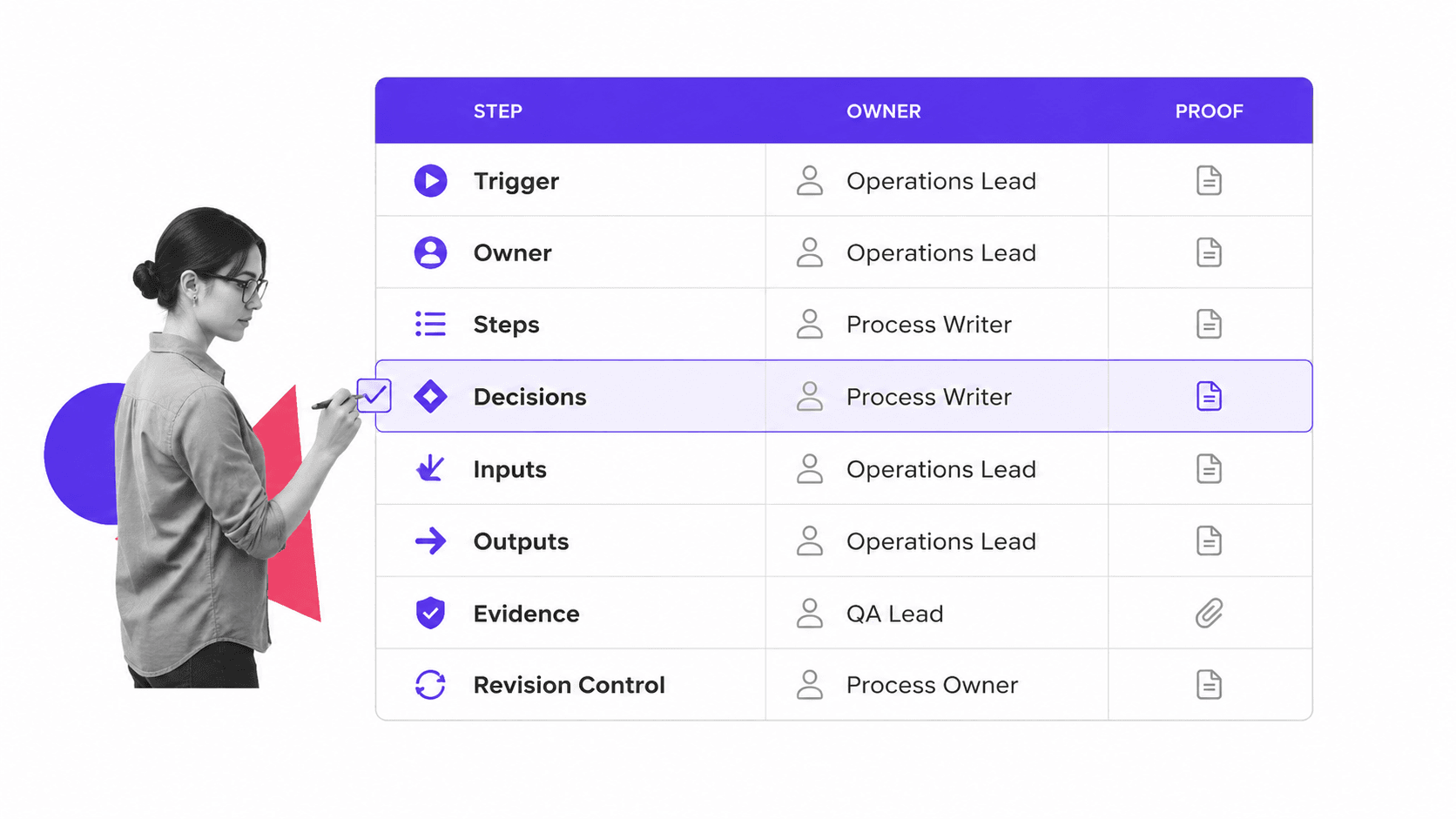
Useful process documentation is specific enough to run the work, but simple enough to keep current. If the document only explains the ideal state, people will ignore it the first time reality gets messy. If it captures every edge case in prose, nobody will read it.
A strong process document usually includes these components:
- Purpose: the business reason this process exists.
- Scope: where the process starts, where it ends, and what is out of scope.
- Trigger: the event, schedule, request, or condition that starts the work.
- Owner: the person or role accountable for keeping the process current.
- Inputs: the forms, systems, documents, or data needed before work begins.
- Steps: the ordered actions needed to complete the work.
- Decision points: conditions that send the process down a different path.
- Outputs: the result, record, handoff, or customer-facing deliverable.
- Evidence: the proof that each important step happened.
- Review cadence: when the process is reviewed and how changes are approved.
For work that involves handoffs, use a process map or workflow view alongside the written explanation. The BPMN specification is the formal standard for business process diagrams, but many teams only need a clear flowchart, checklist, or workflow board.
The most important test is whether the document can survive contact with actual work. If an employee has to leave the document and ask, search Slack, or open five other systems, the documentation is not complete enough.
Process documentation examples
Process documentation examples vary by department because the risk, handoffs, and proof requirements are different. A finance process may need evidence fields and approvals. An HR process may need policy acknowledgments. A customer onboarding process may need timeline visibility and handoff clarity.
Finance and accounting
Finance teams document accounts payable, payroll, close, approvals, reconciliations, and expense controls. A template like an accounts payable process or payroll process documentation sample helps standardize what gets checked and what proof is retained.
Human resources
HR teams document onboarding, offboarding, policy acknowledgments, role changes, equipment requests, and training. An employee onboarding checklist makes the sequence visible so managers, HR, IT, and finance do not miss dependent tasks.
Operations and quality
Operations teams document recurring service delivery, quality checks, customer handoffs, vendor reviews, and exception handling. Quality teams often connect documentation to document control because approved procedures need owners, version history, and review cycles. That is where document control best practices become part of the operating model.
IT and security
IT and security teams document access reviews, incident response, change management, vendor assessments, backup checks, and evidence collection. In these areas, process documentation should make ownership and audit evidence explicit, not optional.
How to create process documentation
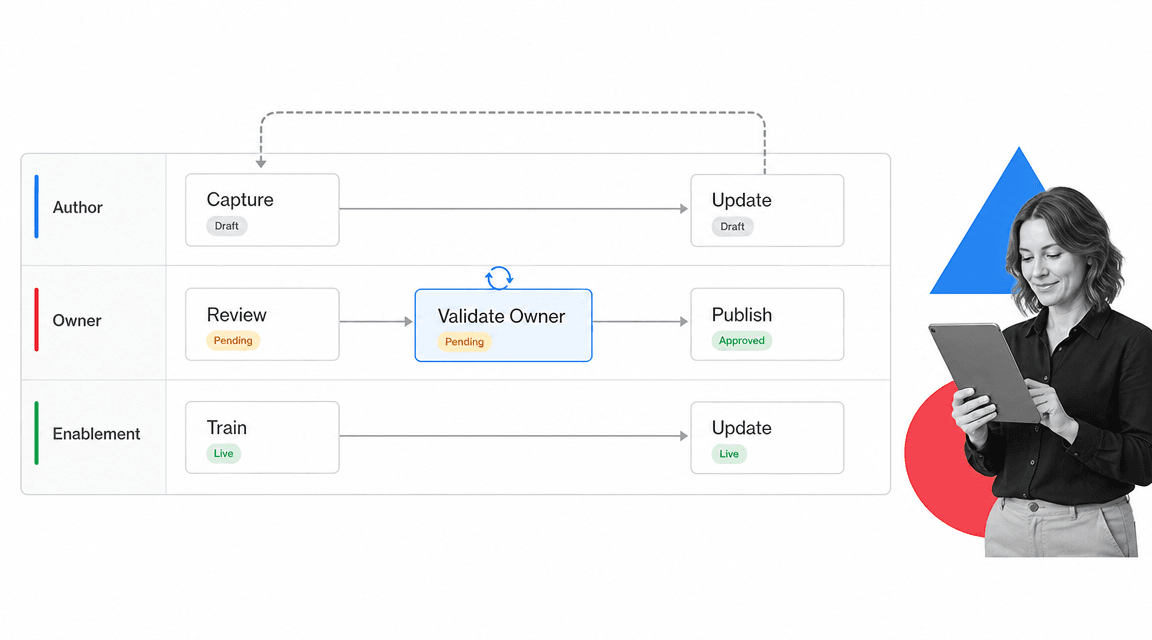
The easiest way to create process documentation is to document the real workflow first, then clean it up. Do not start by writing the perfect policy. Start by watching the work, capturing the steps, and asking the people who do the work where the process actually breaks.
1. Pick one process with a clear trigger
Choose a recurring process with a clear start and finish. Avoid documenting a whole department at once. A focused process is easier to validate, easier to improve, and easier to turn into a workflow later.
2. Capture the current state
Interview the people who run the process, review existing notes, inspect systems, and capture examples of completed work. If the process already has a rough template, start from a process documentation template instead of a blank page.
3. Write the steps in execution order
Use short action-oriented steps. Each step should have one owner, one action, and one expected result. If a step needs a decision, split the path rather than hiding the condition in a long paragraph.
4. Validate with the people doing the work
Ask a real operator to run through the documentation. If they stop, guess, or use tribal knowledge, the document needs another pass. Validation is where a document becomes usable rather than merely accurate.
5. Publish, train, and schedule updates
Documentation decays when nobody owns it. Assign an owner, set a review cadence, and connect changes to an approval path. For regulated work, use an electronic quality management system or workflow platform that records approvals and version history.
Process documentation best practices
The best process documentation is boring in the right way. It is clear, current, easy to follow, and close to the work. It does not depend on clever formatting or a heroic process owner.
- Write for the next person who has to do the work, not the person who designed it.
- Keep each step action-based, with a visible owner and expected output.
- Use screenshots, examples, and checklists only when they reduce ambiguity.
- Separate policy from execution, but link them where the work happens.
- Avoid long prose for branching logic. Use conditional paths or decision points.
- Record proof for important steps so compliance and quality reviews do not become manual hunts.
- Review documents on a cadence and whenever systems, roles, or regulations change.
Teams often outgrow static documents when processes become cross-functional. That is the point where workflow documentation and document automation software become useful. The goal is not to replace judgment. The goal is to make the right action obvious and provable.
External guidance reaches the same conclusion in different language. The U.S. Department of Justice manual shows how formal procedures define responsibility and escalation, while the U.S. Small Business Administration finance guidance shows why recurring business routines need organized records.
How Process Street keeps process documentation executable
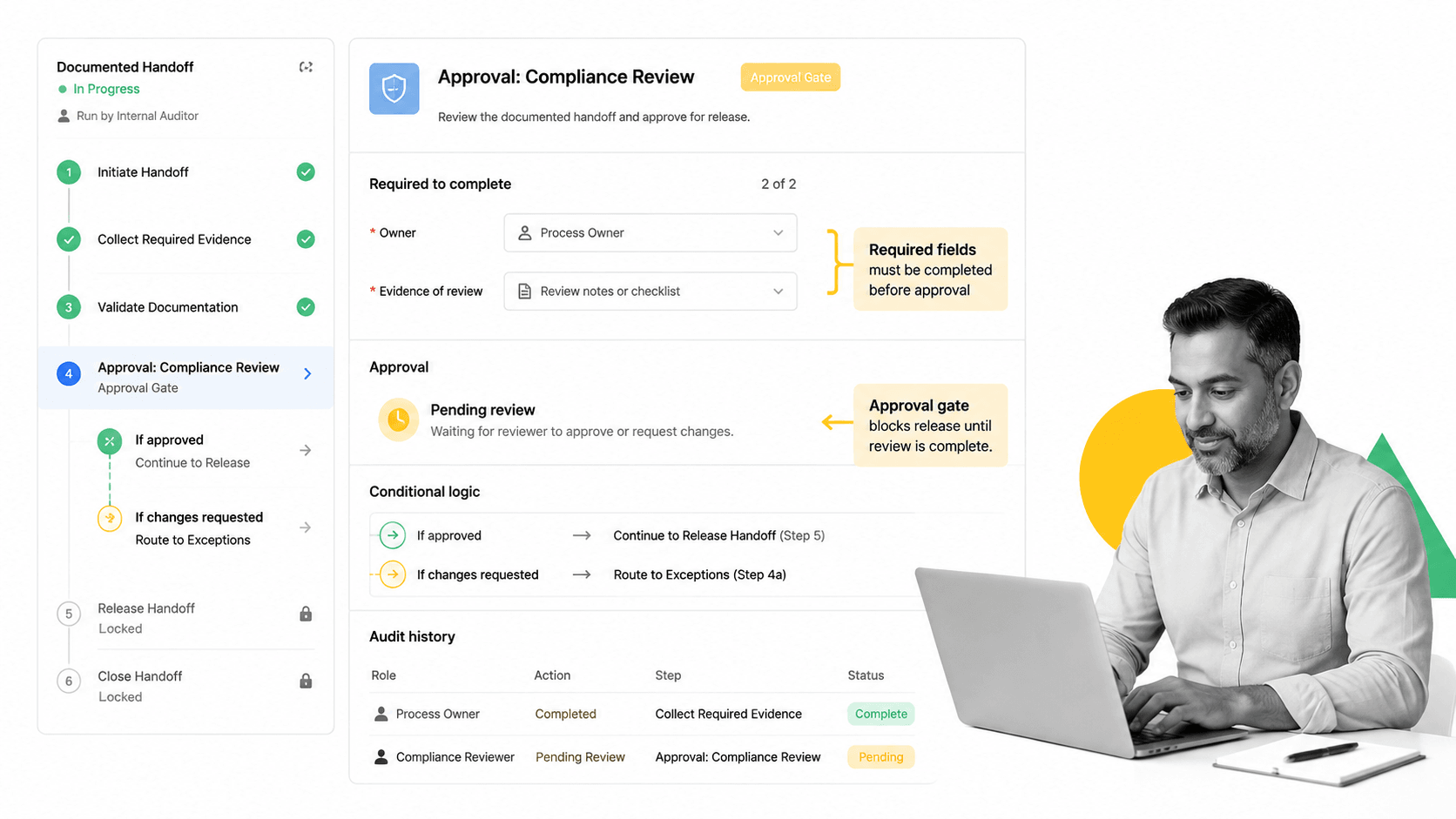
Static documentation tells people what should happen. Executable documentation makes the process happen in the right order, with the right owners, approvals, data, and proof. That is the gap Process Street is built to close.
Process Street is a Compliance Operations Platform that turns documentation into workflows. Teams can document policies and procedures, run recurring work from checklists, route approvals, capture evidence, and keep audit trails connected to the process itself.
That matters because the process record becomes part of execution. A documented handoff can include required fields, a conditional branch, an approval gate, and an audit history row. When a step is completed, the evidence stays attached to the workflow instead of disappearing into email or a shared drive.
Teams that need speed can start from a checklist generator or template. Teams that need control can connect documentation to approvals, review cycles, and evidence collection. Either way, the document stops being a static reference and becomes part of how work runs.
Process Street also has direct, universal integrations to 5,000+ systems. Need a new one? An AI agent builds it on the fly. That lets process documentation connect to the systems where the work already happens without forcing every team into a new operating stack.
FAQs
What is process documentation?
Process documentation is the structured record of how a recurring process works. It explains the trigger, owner, steps, decisions, systems, outputs, evidence, and update rules so a team can repeat the work consistently.
What should process documentation include?
Process documentation should include the process purpose, scope, trigger, owner, inputs, steps, decision points, outputs, proof requirements, and review cadence. The goal is to make the work clear enough to run and maintain.
What is the difference between process documentation and an SOP?
Process documentation is the broader category. An SOP is usually one formal procedure within that category, while process documentation can also include flowcharts, workflow runs, templates, training notes, screenshots, and audit evidence.
How often should process documentation be updated?
Update process documentation whenever systems, owners, risks, regulations, or customer requirements change. For stable processes, set a recurring review cadence so the document does not drift away from the work.
Who owns process documentation?
Every process should have a named owner. The owner does not have to perform every step, but they are accountable for keeping the documentation accurate, approved, and useful for the people doing the work.
What tool should teams use for process documentation?
Use a tool that matches the risk of the process. Simple reference processes may fit in a document, but recurring or compliance-sensitive work should live in a workflow platform that assigns owners, enforces steps, captures evidence, and records approvals.
