


Turn every policy into automated workflows with built-in enforcement and audit-ready proof.



Workflow Approval Software

Workflow approval software routes requests to the right reviewers, pauses work at decision gates, records the outcome, and releases or returns the request according to policy. It replaces scattered email and chat decisions with one controlled path for context, authority, deadlines, evidence, and proof.
A useful approval system does more than collect a yes or no. It can validate the request, select reviewers by role or risk, support sequential or parallel decisions, escalate overdue work, require evidence, and preserve a durable decision history. The requester and reviewer should still see a clear next action.
This guide explains how the category differs from task and project tools, what makes a platform genuinely effective, how to build your first workflow, which use cases fit best, and how to choose software that stays controlled after adoption.
Use the sections below to move from a loose process to a workflow your team can run consistently:
- What is workflow approval software?
- Why approval workflows break down
- What effective workflow approval software includes
- How to design an approval workflow in software
- Workflow approval software use cases
- How to choose workflow approval software
- Build approval workflows with Process Street
- FAQs
What is workflow approval software?
This category is a system for designing and running governed authorization processes. Unlike a static checklist, it coordinates the live workflow: tasks arrive in order, responsibility is visible, decisions change the route, and the completed run leaves a usable record.
Clear for the builder
A builder should be able to map a process, add instructions, set owners, and test the result without a development project. The interface should make the workflow logic visible. If a process owner needs specialist help for every field or routing change, the software will not stay controlled as the business changes.
Clear for the requester and reviewer
The end user should see the current task, the information required, the deadline, and the next decision. They should not need to understand the whole automation model. Good software hides implementation complexity while keeping the work itself transparent.
Controlled for the process owner
The process owner needs a reliable view of active work, blocked steps, overdue tasks, exceptions, and outcomes. A clean interface is not enough if the owner has to assemble the truth from email, spreadsheets, and chat.
Approval workflow software versus email and chat
Email and chat can carry a request, but they do not reliably enforce reviewer order, decision criteria, escalation, evidence, or a durable approval record. Approval workflow platforms serve operations, finance, HR, IT, quality, and compliance teams that need requests routed to authorized reviewers with visible criteria, deadlines, evidence, and decision history.
Use workflow online software when the wider process needs browser-based execution. Use workflow approval software when authorization is the central control and every decision must move the request to a defined next state.
Why approval workflows break down
An approval workflow usually begins as a short description: receive a request, check it against policy, route it to the right authority, record the decision, and release or return the work. Complexity appears when the team adds real people, deadlines, missing information, exceptions, and systems. The software should absorb that operational complexity without making every run feel complicated.
Too many paths
Teams often encode every imaginable exception before the main path works. The result is a branching maze that is difficult to test and harder to explain. Start with the most common route, add the few exceptions with real consequences, and keep rare edge cases under a controlled manual review.
Unclear ownership
A task assigned to a department is often owned by nobody. Use role ownership such as hiring manager, finance reviewer, or security approver, then map the role to a person when the workflow starts. Clear ownership removes more friction than another dashboard.
Hidden inputs and evidence
A workflow feels unpredictable when required information appears halfway through the run. Define inputs at intake and define proof at completion. Required fields, files, approvals, or system records should be visible before the owner begins the task.
Manual handoffs across tools
Copying data from a form to a spreadsheet, sending a reminder in chat, and updating a record in another system creates invisible work. Each manual handoff adds delay and another place for state to drift. Use automation for predictable movement, but keep the workflow as the source of execution truth.
Project management habits applied to recurring work
Projects coordinate a unique outcome with milestones and changing plans. Workflows coordinate a repeatable outcome with stable rules and role ownership. A project board can display recurring tasks, but it often lacks the controls, evidence, and versioned logic needed to make the process consistent.
A clear workflow planner helps teams expose these decisions before they configure software. Plan the trigger, outcome, owners, decisions, and evidence first. Then build only the structure the workflow needs.
What effective workflow approval software includes
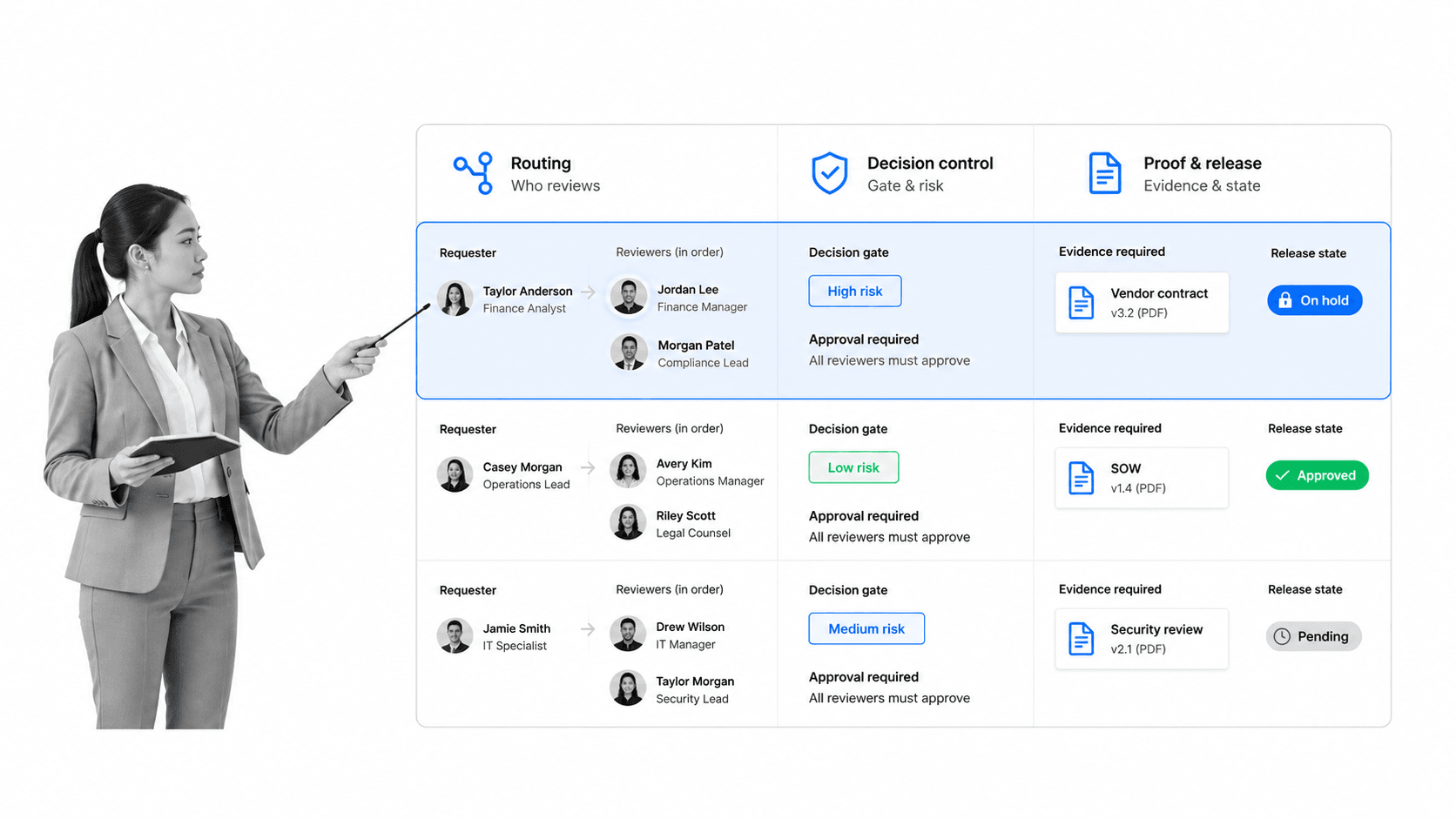
The software should reduce the effort required to route a request correctly while preserving the judgment and evidence behind the decision. Evaluate control across the full lifecycle, not just the first demo. The strongest tool is clear to configure, direct to follow, and safe to change without breaking routing or evidence.
A visual builder with readable logic
The builder should show the sequence, owners, forms, decisions, and automations in a way a process owner can review. Formal models such as the Business Process Model and Notation specification are useful for complex analysis, but most teams need a smaller vocabulary they can apply consistently.
One controlled intake
A form, schedule, system event, or approved request should start the workflow. Intake should capture enough information to select the route and owner. It should not force the requester to understand internal process design.
Role assignments and clear deadlines
The system should assign tasks by role, calculate due dates from the workflow trigger, and show each person the work that needs attention. Ownership must remain clear when staffing changes or a person is unavailable.
Approvals and exceptions without a maze
Effective software supports formal approval tasks and limited branching without turning the workflow into an unreadable diagram. A reviewer should see the decision, criteria, supporting information, and available outcomes in one place.
Required evidence at the right step
Evidence can be a form field, file, signature, decision, or connected-system record. Ask for it where the work happens. Reconstructing proof later creates audit effort and makes a process look complete when important conditions were never verified.
Readable instructions and accessible content
Clear language is part of workflow design. The W3C objective for clear and understandable content recommends familiar words, direct instructions, clear structure, and support for difficult concepts. Workflow steps should follow the same principle.
Useful reporting, not dashboard overload
A process owner should be able to find active runs, overdue tasks, blocked work, completion time, and exception reasons. Reports should answer a management question. More charts do not make the workflow easier if the owner still cannot identify the next intervention.
How to design an approval workflow in software
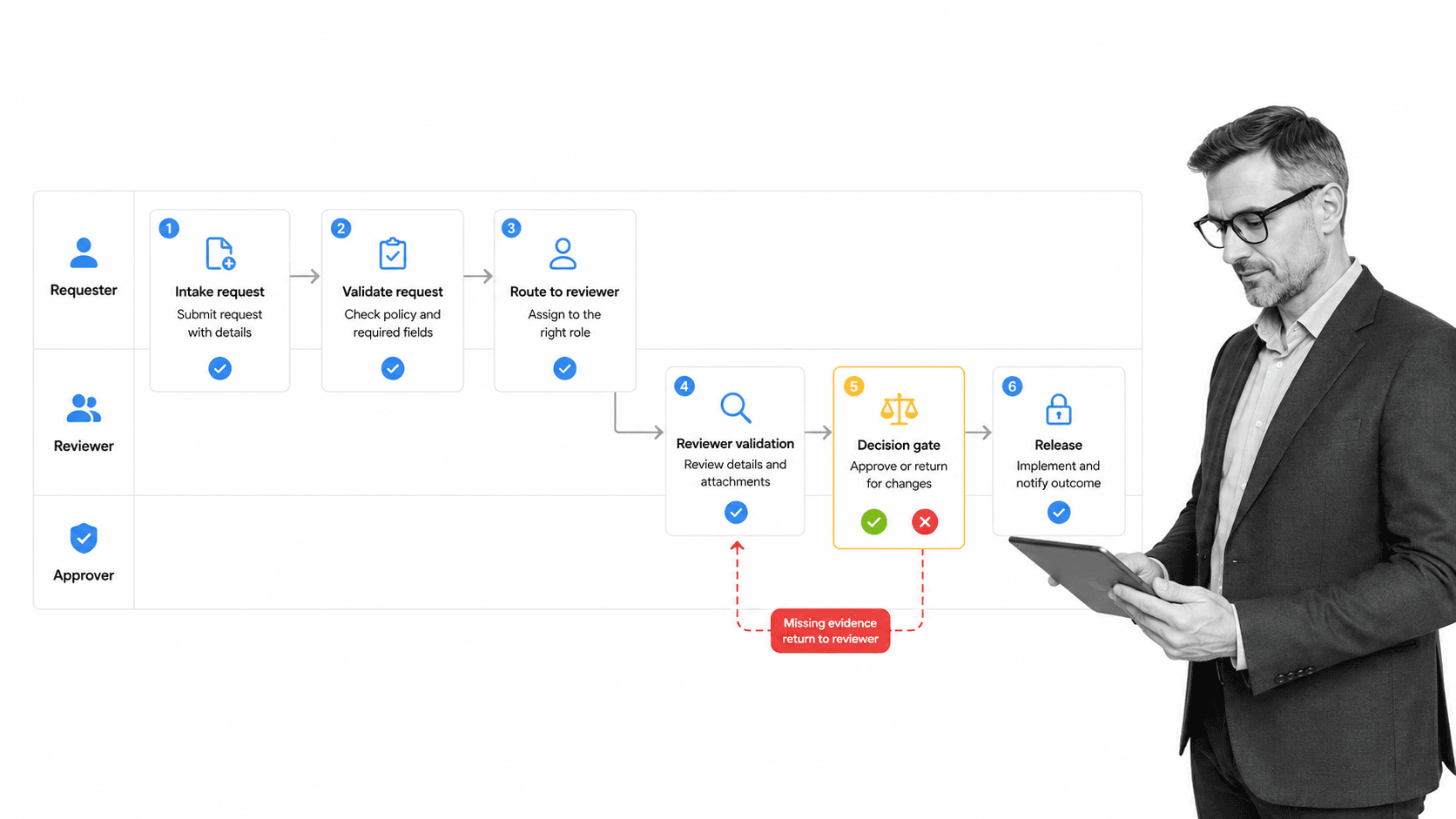
Build the first workflow around one recurring outcome with a visible pain point. Choose work that happens often enough to test, has a clear owner, and creates a real cost when a handoff or approval is missed.
1. Name the trigger and outcome
Write one sentence for the start and one for the finish. A purchase request starts when an employee submits the required details. It finishes when the authorized decision is recorded and the requester receives the result. Testable boundaries stop the workflow from expanding into an entire department.
2. List the minimum steps
Capture what people actually do, not the ideal policy summary. Remove duplicate checks and combine steps that share one owner and one decision. Keep the first version short enough that a new user can understand the path in a few minutes.
3. Assign roles and decision rights
Give every task one responsible role. Name who can approve, reject, request changes, or override a stop condition. If sensitive work is involved, separate the person who performs the task from the person who authorizes it.
Role design also supports access control. The NIST role-based access control project describes permissions through organizational roles rather than one-off permissions for every user. The same idea keeps workflow ownership understandable.
4. Add one intake and one evidence model
Ask for the data needed to start the work and define the proof needed to finish it. Do not collect every possible field. Required inputs should change the route, support a decision, or prove the outcome. Everything else adds friction.
5. Add the few decisions that matter
Use conditional logic for differences that change ownership, risk, required evidence, or downstream action. Keep the main route obvious and give every rejection or rework path a clear destination.
6. Automate predictable movement
Automate notifications, assignments, reminders, record updates, and data transfer after the workflow logic is stable. Human judgment should remain visible where the decision depends on context, risk, or authorization.
7. Test with real examples
Run normal, incomplete, rejected, and overdue cases. Ask users where they paused or left the workflow. Check that owners received the right context, evidence was captured, and the outcome reached the next system or team.
8. Improve one source of friction at a time
Use workflow optimization to shorten waiting time, clarify instructions, remove duplicate work, or improve routing. Change one meaningful element, observe several runs, and keep the improvement only if the outcome becomes more reliable.
Workflow approval software use cases
An approval workflow platform is strongest when a request crosses a decision boundary and the organization needs an observable, policy-aligned outcome. The following use cases are practical starting points and meaningful enough to prove the value of a managed workflow.
Employee onboarding
Onboarding coordinates HR, the hiring manager, IT, security, payroll, and the new employee. A reusable employee onboarding workflow can assign role-based tasks, collect required information, and show whether access and training are complete before the start date.
Purchase and expense approval
A request form can capture amount, vendor, purpose, and supporting evidence. The workflow routes the decision by policy, records the approval or rejection, and returns the result to the requester without a chain of forwarded emails.
Customer or client onboarding
An onboarding approval workflow can collect requirements, assign setup tasks, coordinate handoffs, and confirm readiness before launch. The team sees one state for the customer instead of separate status updates in sales, service, and finance tools.
Vendor review
Vendor review benefits from controlled intake, role-based checks, risk-dependent approvals, required evidence, and a renewal date. Begin with the common review path and add extra review only when the request crosses a meaningful risk threshold.
SOP review and release
A standard operating procedure template can define the content, but the release workflow controls authorship, review, approval, publication, and acknowledgment. This keeps the document and the decision trail connected.
Quality checks and recurring inspections
Quality workflows need clear criteria, evidence, exception handling, and corrective action. The NIST Baldrige Excellence Framework gives organizations a systems perspective for managing and improving performance. An approval workflow makes that perspective operational at the point of work.
How to choose workflow approval software
Choose software by building and testing one real workflow, not by counting the longest feature list. The goal is to find the smallest system that can support your required controls and still grow with the process.
Start with the work, not the interface
Bring one workflow, three real cases, and the people who own the steps. Ask each vendor or internal builder to configure the path. A generic demonstration hides the effort required to translate your process into the system.
Measure time to first useful run
The first value milestone is not a completed account setup. It is a real workflow run that reaches a correct outcome. Record how long it takes to build, test, launch, and adjust the workflow.
Test the exception path
Normal cases make most tools look easy. Test missing information, rejection, reassignment, overdue work, and a route that needs extra approval. The system should keep the exception visible without creating a separate shadow process.
Check governance before scale
Ask who can edit workflows, how changes are reviewed, how versions are recorded, and what evidence remains after completion. Ease of configuration without governance often creates a fast start followed by uncontrolled process drift.
Check the integration model
List the systems that start the workflow, provide information, receive updates, or store records. Prefer a model that keeps connected actions visible and recoverable. A failed update should not silently leave the workflow and the system of record in different states.
Look for a clear growth path
Your first approval path may be short, but the platform should support more owners, approvals, evidence, conditional routes, and reporting without forcing a rebuild. Compare adjacent workflow tools by how well they preserve clarity as requirements grow.
A practical workflow management system should let you start small and add control only where the process proves it is necessary. That is a better buying criterion than a tool with very few features.
Build approval workflows with Process Street
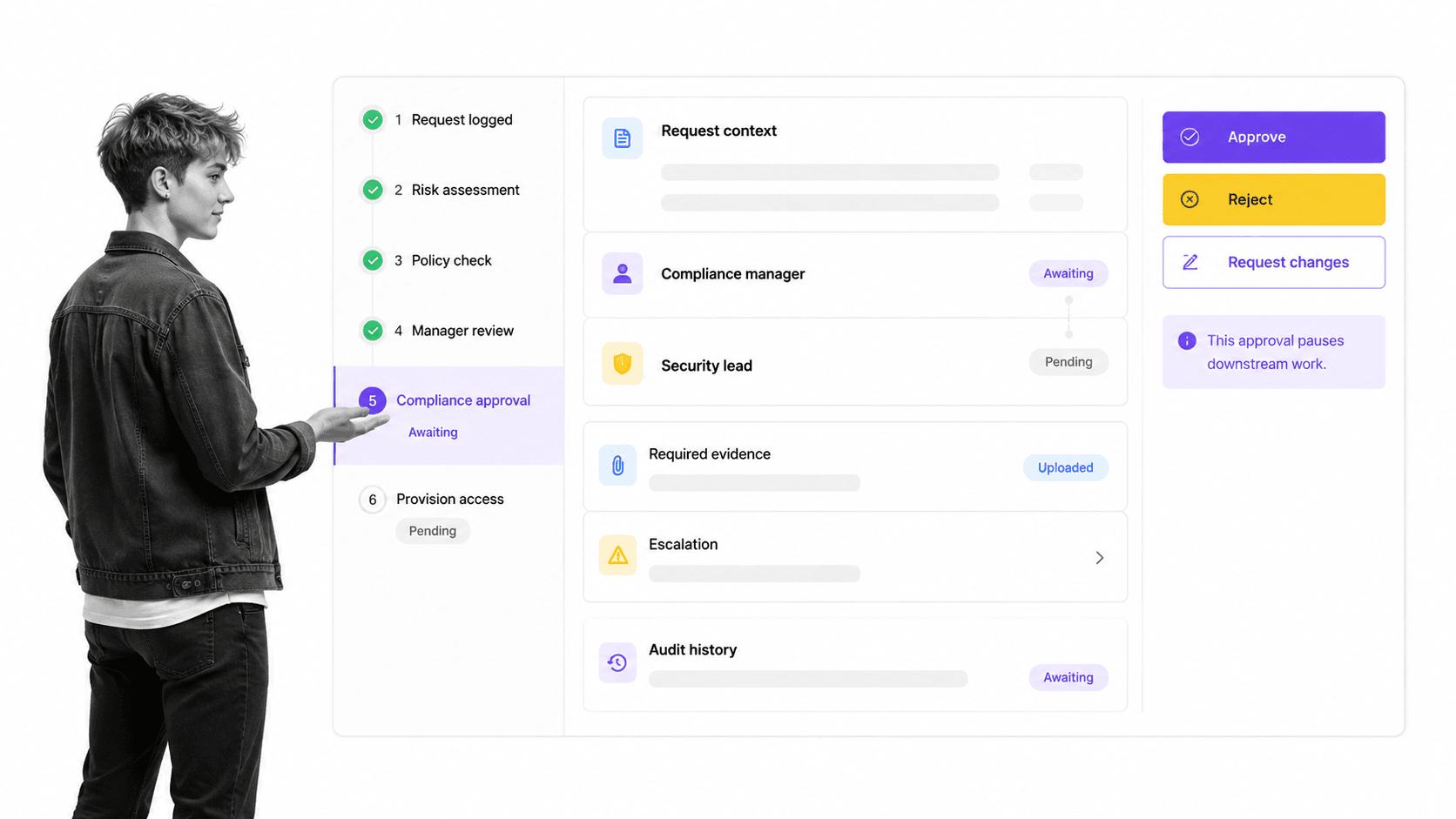
Process Street is a Compliance Operations Platform that turns a process into a reusable, assigned workflow. Teams can build the path, launch individual runs, route decisions, capture required information, automate connected actions, and retain an audit history as the work happens.
Start from a template or a blank workflow
Use the workflow template library when a proven structure already fits the use case, or build a short workflow from your own trigger and outcome. Keep the first version focused on one recurring result.
Put ownership inside the workflow
Assign tasks to roles, map those roles when each run begins, and set due dates from the workflow trigger. Each person sees the work and context they need, while the process owner sees the state of the whole run.
Add control without burying the user
Use required fields, approval tasks, stop conditions, and conditional routes only where they protect the outcome. The person doing the work sees one current task. The process owner keeps the full control model.
Connect the workflow to the surrounding stack
Process Street has direct, universal integrations to 5,000+ systems. Need a new one? An AI agent builds it on the fly. That lets an approval workflow start from an external event, update connected records, and notify the next team without turning every handoff into manual copy and paste.
Improve from run evidence
Completed runs reveal waiting time, overdue work, rejection reasons, missing information, and repeated exceptions. Connect those signals to clear workflow documentation so the team knows what changed and why.
The strongest approval workflow is not the one with the fewest reviewers. It is the one where every step has a reason, every owner knows what to do, and every result can be verified. The platform should make that operating discipline easier to build and easier to keep.
FAQs
What is workflow approval software?
It is a system for routing requests through defined reviewers and decision rules. It coordinates request context, authority, deadlines, evidence, outcomes, escalation, and the decision record in one controlled workflow.
What features should approval workflow software include?
Approval workflow software should include controlled intake, role-based routing, sequential or parallel reviewers, clear decision options, deadlines, escalation, required evidence, exception paths, and a durable audit history. The system should keep each requester and reviewer focused on the next action.
How do you create an approval workflow?
Name one trigger and one outcome, list the minimum real steps, assign every task and decision to a role, define required inputs and evidence, add only meaningful branches, then test the workflow with normal and exception cases. Improve one source of friction at a time after launch.
What is the difference between approval workflow software and project management software?
Approval workflow software governs repeatable authorization with routing rules, role ownership, decisions, and evidence. Project management software coordinates a unique outcome with milestones, resources, and changing plans. Some teams use both because recurring workflows often support larger projects.
Can an approval workflow include automation?
Yes. An approval workflow can include approvals, conditional routes, required fields, reminders, and system updates. The workflow stays controlled when each control protects a clear outcome and the end user only sees the path relevant to the current case.
Is Process Street workflow approval software?
Yes. Process Street lets teams build, run, assign, automate, monitor, and audit recurring workflows. Teams can start with a short workflow and add approvals, conditional paths, evidence, and integrations as the process requires more control.
