


Turn every policy into automated workflows with built-in enforcement and audit-ready proof.



The 10 Best Workflow Technology Tools for Streamlined Operations

Workflow technology refers to the software systems and platforms that help organizations design, execute, and automate repeatable business processes. From routing approvals to orchestrating multi-step task sequences across teams, workflow technology transforms manual handoffs into structured, trackable operations.
The right workflow technology tool does more than move tasks from one person to the next. It enforces standards, creates audit trails, and ensures that critical steps never get skipped, even as your team scales. For operations leaders, compliance officers, and department heads, workflow management technology is the infrastructure that keeps the business running consistently.
With dozens of platforms competing for attention, finding the best fit requires understanding what each tool does well and where it falls short. This guide breaks down the 10 best workflow technology tools available today, covering their core strengths, ideal use cases, and how they compare on the features that matter most.
In this article, we are going to cover everything you need to know about workflow technology, including:
- What Is Workflow Technology?
- How to Choose the Right Workflow Technology
- 1. Process Street
- 2. Monday.com
- 3. Zapier
- 4. Make
- 5. Kissflow
- 6. Nintex
- 7. Microsoft Power Automate
- 8. Asana
- 9. Smartsheet
- 10. ClickUp
- FAQs
What Is Workflow Technology?
Workflow technology is any software that structures and automates the sequence of tasks, decisions, and handoffs that make up a business process. Rather than relying on emails, spreadsheets, or tribal knowledge to coordinate work, workflow technology codifies each step into a defined, repeatable sequence that the system enforces.
At its core, workflow technology encompasses three capabilities. First, process design lets teams map out who does what, in what order, and under what conditions. Second, workflow automation triggers actions automatically, routing tasks to the right person, sending notifications, and escalating when deadlines are missed. Third, workflow management provides visibility into where every process stands, who is responsible, and whether standards are being met.
Modern workflow technology has evolved well beyond simple task routing. Today’s platforms integrate with enterprise systems like Salesforce, NetSuite, and Microsoft 365. They support workflow automation through conditional logic, parallel branching, and AI-powered decision-making. The best tools also produce audit trails and compliance documentation as a byproduct of normal operations, not as an afterthought.
Organizations across industries use workflow technology to standardize onboarding, manage approvals, enforce regulatory compliance, coordinate cross-functional projects, and eliminate the manual bottlenecks that slow down operations. The workflow technology tools in this guide represent the strongest options across these use cases.
The distinction between workflow technology and simple task management is important. Task management tracks individual to-dos. Workflow technology defines the relationships between tasks: which must happen in sequence, which can run in parallel, who owns each step, and what happens when a deadline is missed or an approval is rejected. This structural layer is what makes workflow technology essential for teams managing regulated, high-stakes, or cross-functional operations.
How to Choose the Right Workflow Technology
Selecting the right workflow technology depends on your team’s specific needs, the complexity of your processes, and how deeply you need the tool to integrate with your existing systems. Here are the key criteria to evaluate:
- Process complexity: Simple approval chains need different capabilities than multi-department workflows with conditional branching, parallel tasks, and escalation rules.
- Automation depth: Some tools automate only notifications and assignments. Others execute actions across connected systems, moving data between platforms without manual intervention.
- Compliance requirements: If your workflows carry regulatory or audit obligations, look for tools that produce immutable audit trails, enforce approval gates, and support version-controlled documentation.
- Integration ecosystem: The best workflow technology connects to the tools your team already uses: CRM, ERP, HRIS, document management, and communication platforms.
- Ease of adoption: No-code and low-code builders let operations teams own their workflows without waiting on IT. Evaluate how quickly a non-technical user can build and modify a process.
- Scalability: Consider whether the tool handles 10 workflows as well as 1,000. Enterprise-grade platforms support role-based access, organizational hierarchies, and cross-team governance.
For a broader look at the category, see our guide to the best workflow management tools. With these criteria in mind, here are the 10 best workflow technology tools that deliver across these dimensions.
1. Process Street
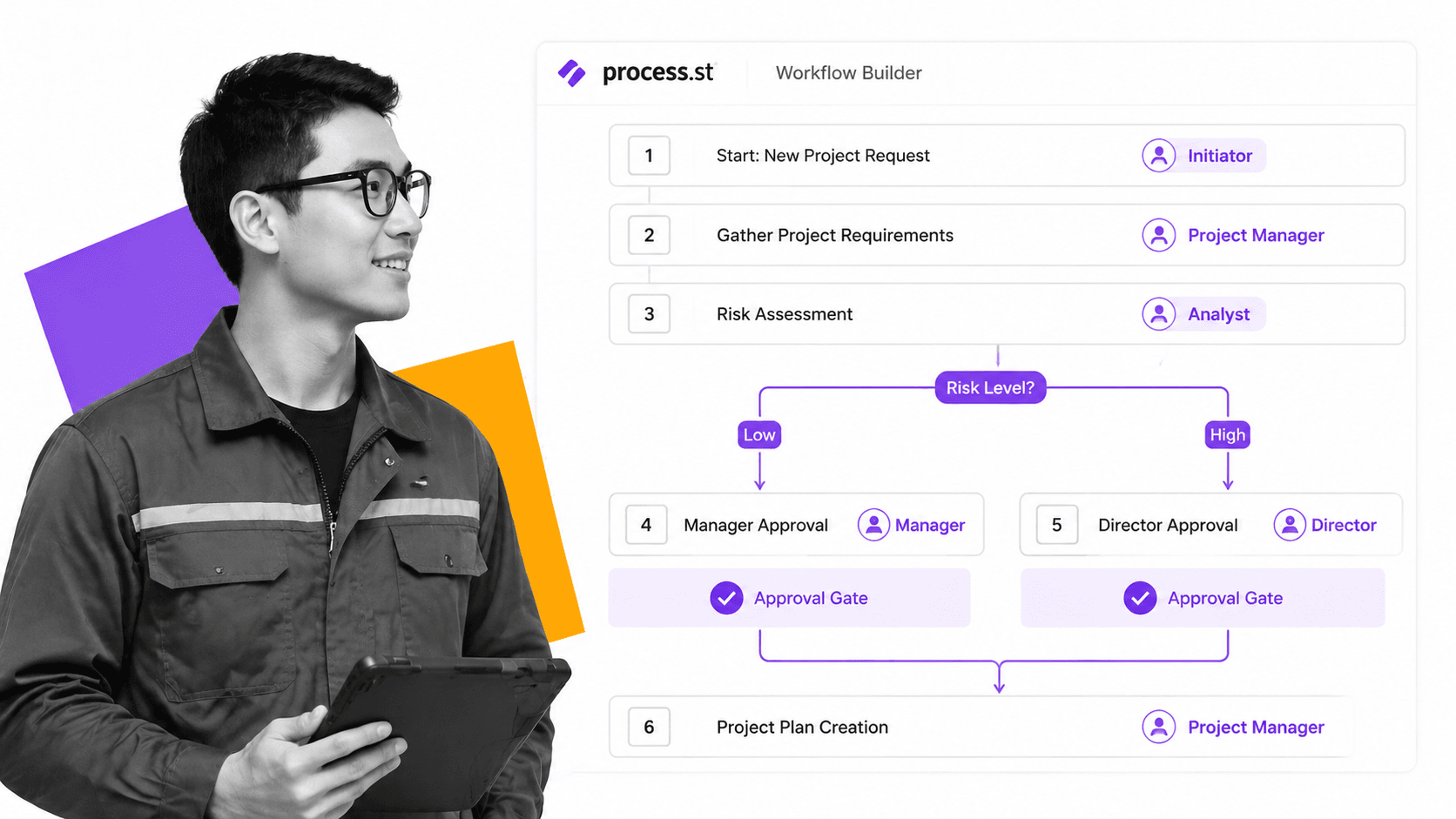
Process Street is a Compliance Operations Platform that turns critical business procedures into automated, AI-enforced workflows. It combines document governance, workflow execution, and AI compliance monitoring in a single integrated system, making it the strongest choice for teams where missed steps carry regulatory or operational consequences.
Key Features
- Checklist-driven workflows with conditional logic, role-based assignments, and approval gates that enforce your standards at every step
- Docs product for governed SOPs with built-in version control, approval cycles, and direct linkage to execution workflows
- Cora AI agent that monitors workflow execution, flags compliance risks, and suggests process improvements in real time
- 8,000+ integrations with platforms including Salesforce, NetSuite, Workday, DocuSign, and Microsoft 365
- Audit-ready logs that prove every policy was followed, every approval was obtained, and every deadline was met
Best For
Operations and compliance teams in regulated industries (financial services, healthcare, manufacturing) that need workflow technology with built-in compliance enforcement. Process Street is purpose-built for workflow process management where auditability is non-negotiable. Explore onboarding workflow templates to see how structured processes look in practice.
2. Monday.com
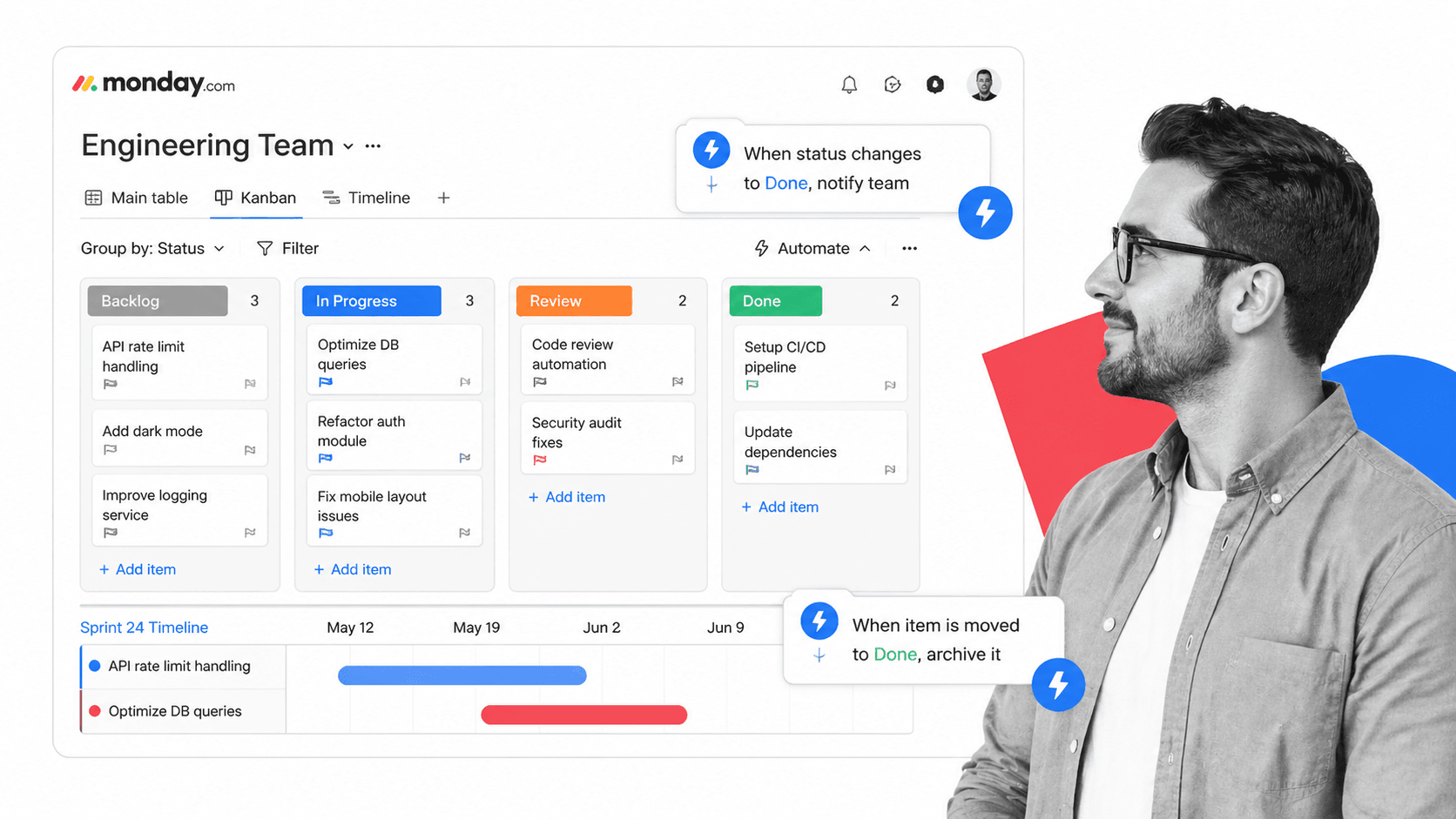
Monday.com is a work operating system that combines project management, workflow automation, and team collaboration in a visual, board-based interface. Its strength lies in making complex workflows accessible through colorful, intuitive views that non-technical users can configure in minutes.
Key Features
- Automation recipes that trigger actions based on status changes, dates, and custom conditions without writing code
- Multiple views including Kanban boards, Gantt charts, timeline views, and dashboards for different workflow perspectives
- Integration hub connecting to Slack, Gmail, Jira, HubSpot, and over 200 other tools
- Workload management that visualizes team capacity and helps balance assignments across projects
Best For
Cross-functional teams that need a flexible, visual workflow technology platform for project coordination, marketing operations, and team collaboration. Monday.com excels when the priority is adoption speed and visual clarity over deep process enforcement.
3. Zapier

Zapier is the leading integration-first workflow technology platform, connecting over 7,000 apps through automated workflows called “Zaps.” Its core value proposition is eliminating manual data transfer between disconnected tools, making it the go-to choice for teams that need to bridge their existing software stack without custom development.
Key Features
- 7,000+ app connections spanning CRM, email, project management, accounting, and virtually every SaaS category
- Multi-step Zaps that chain triggers and actions across multiple apps in a single automated workflow
- Filters and conditional paths that route data differently based on field values, ensuring the right action happens for each scenario
- Tables and Interfaces for building lightweight apps and databases directly within the platform
Best For
Teams that need to automate data flow between existing tools without replacing their current stack. Zapier is ideal for marketing teams syncing leads across platforms, sales teams automating CRM updates, and operations teams connecting legacy systems to modern workflow automation software.
4. Make

Make (formerly Integromat) is a visual workflow automation platform that uses a distinctive canvas-based interface where users connect circular modules to build complex automation scenarios. Its visual approach makes even sophisticated multi-branch workflows easy to understand and debug.
Key Features
- Visual scenario builder with drag-and-drop circular modules that map directly to how data flows between systems
- Advanced data transformation with built-in functions for parsing, formatting, and restructuring data between apps
- Error handling with retry logic, fallback routes, and break modules that prevent entire workflows from failing when one step encounters an issue
- Scheduling flexibility with cron-level precision for triggering scenarios at exact intervals
Best For
Technical teams and power users who need granular control over data transformations between systems. Make is particularly strong for e-commerce workflows, API-heavy integrations, and scenarios that require branching logic with robust error handling.
5. Kissflow
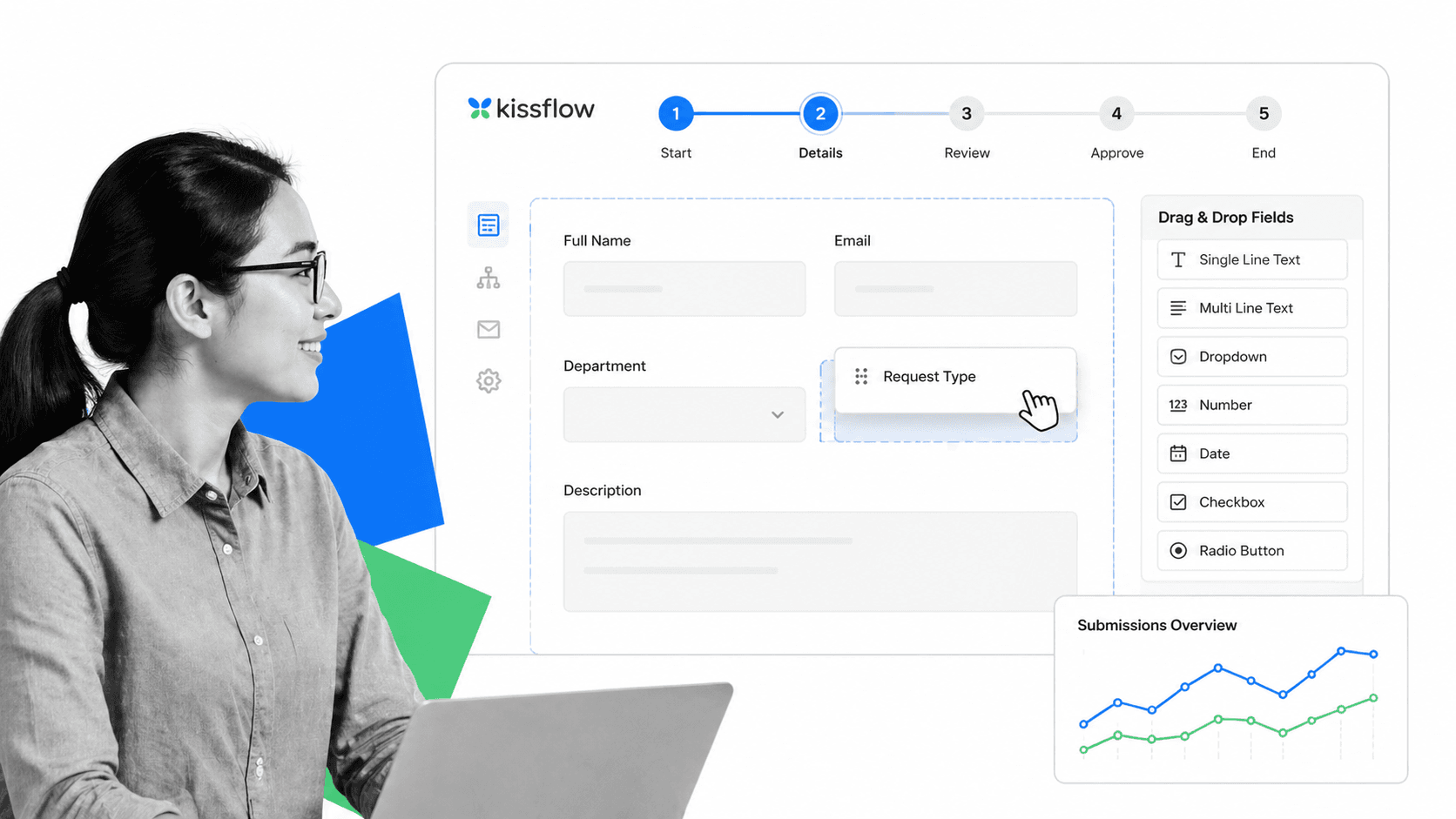
Kissflow is a no-code digital workflow solution that combines process automation, case management, and project tracking in a unified platform. It positions itself as the low-code alternative to heavyweight BPM suites, letting business users build and deploy workflows without IT involvement.
Key Features
- Drag-and-drop process builder with form fields, approval steps, and conditional routing that non-technical users can configure
- Case management for handling unstructured work alongside structured processes
- Analytics dashboards that surface bottlenecks, cycle times, and process performance metrics
- Pre-built templates for common business processes including purchase orders, leave requests, and vendor onboarding
Best For
Mid-market organizations that want a single platform for both structured processes and ad-hoc case management. Kissflow works well for HR, finance, and procurement teams that need to digitize approval-heavy workflows quickly.
6. Nintex

Nintex is an enterprise workflow automation platform that specializes in process mapping, document generation, and robotic process automation (RPA). Its strength is combining visual process design with deep automation capabilities that extend into document-heavy, compliance-sensitive operations.
Key Features
- Process mapping with Promapp for documenting and visualizing workflows using swimlane diagrams before automating them
- Document generation that auto-populates templates with workflow data, producing contracts, reports, and compliance documents on demand
- Robotic Process Automation for automating repetitive tasks in legacy systems that lack modern APIs
- E-signatures built into workflow steps for seamless document approval without third-party tools
Best For
Enterprise organizations with document-intensive processes that need both workflow automation and document generation capabilities. Nintex is a strong fit for legal, procurement, and compliance teams managing contract lifecycles, regulatory filings, and multi-step approval chains.
7. Microsoft Power Automate
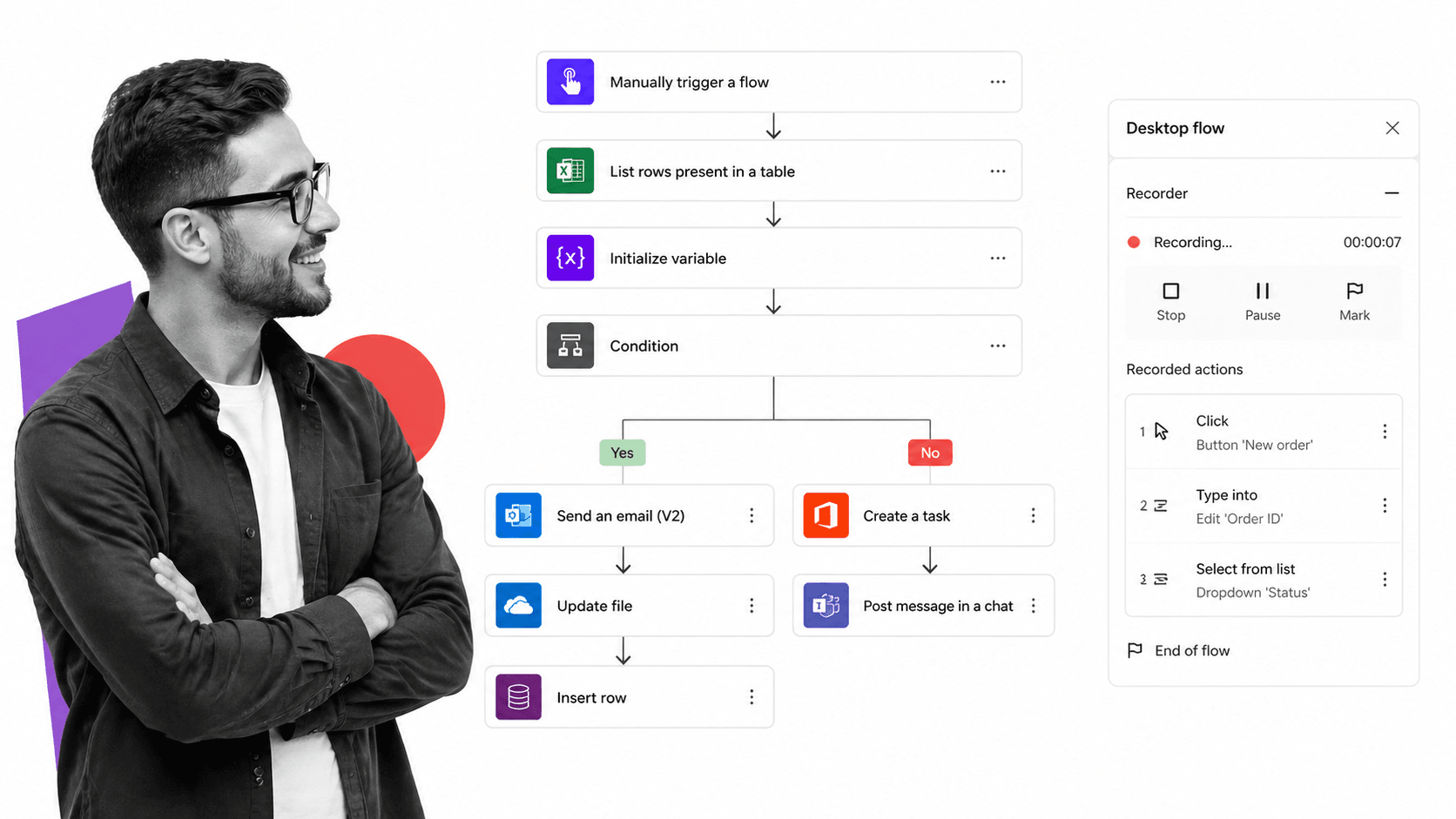
Microsoft Power Automate is the workflow automation component of the Microsoft Power Platform, offering deep integration with the Microsoft 365 ecosystem. For organizations already invested in Teams, SharePoint, Outlook, and Dynamics 365, Power Automate provides workflow technology that operates natively within tools employees use daily.
Key Features
- Cloud flows that automate processes across Microsoft 365 and 1,000+ third-party connectors
- Desktop flows with RPA capabilities for automating legacy Windows applications through UI recording and playback
- AI Builder for adding document processing, text classification, and prediction capabilities directly into workflow steps
- Process mining that analyzes existing workflows to identify inefficiencies and recommend automation opportunities
Best For
Organizations deeply embedded in the Microsoft ecosystem that want workflow technology without adding another vendor. Power Automate is particularly effective for IT teams automating SharePoint approvals, Outlook-based routing, and Teams notifications as part of a broader workflow management suite.
8. Asana

Asana is a work management platform that brings workflow technology capabilities to project and task coordination. Its rules engine automates routine project management actions, while its portfolio and workload features provide the visibility that operations leaders need to manage work across teams.
Key Features
- Rules engine that automates task assignments, status changes, and notifications based on triggers you define
- Workflow Builder for creating visual process templates that standardize how teams execute recurring work
- Timeline and dependencies that visualize task sequences and automatically adjust dates when schedules shift
- Goals and portfolios that connect daily workflow execution to strategic objectives and organizational priorities
Best For
Teams that need workflow technology tightly coupled with project workflow management capabilities. Asana is a strong choice for marketing, product, and operations teams managing cross-functional initiatives where task coordination and strategic alignment matter as much as process automation.
9. Smartsheet

Smartsheet is an enterprise work execution platform that brings workflow automation to a familiar spreadsheet-like interface. It bridges the gap between the flexibility of spreadsheets and the structure of dedicated workflow technology, making it accessible to teams transitioning from Excel-based processes.
Key Features
- Grid, card, Gantt, and calendar views that let teams visualize the same workflow data in the format that suits their role
- Automated workflows with conditional paths, approval chains, and update requests that trigger based on cell changes or dates
- Resource management for planning team capacity and tracking utilization across multiple projects and workflows
- Control Center for managing portfolios of projects with standardized templates and automated provisioning
Best For
Enterprise teams in construction, IT, and professional services that manage complex portfolios of projects and need workflow automation layered on top of a structured data model. Smartsheet is ideal for PMOs and operations management teams that think in rows and columns but need automation behind the scenes.
10. ClickUp

ClickUp is an all-in-one productivity platform that consolidates project management, document collaboration, and workflow automation into a single workspace. Its breadth of features makes it a popular choice for teams that want to reduce tool sprawl by centralizing their workflow technology in one place.
Key Features
- Automations with 100+ pre-built recipes plus custom automation creation for task assignment, status updates, and cross-tool actions
- 15+ views including List, Board, Gantt, Calendar, Timeline, and Workload for visualizing workflows from any angle
- ClickUp Docs for embedding documentation directly alongside tasks and workflows, reducing context-switching
- Custom fields and statuses that adapt the platform to virtually any workflow structure or industry requirement
Best For
Growing teams that want a single platform for task management, documentation, and workflow automation. ClickUp is a strong fit for startups and mid-market companies that need breadth of capability without the complexity of enterprise BPM suites. Its rapid release cadence means new automation features arrive frequently, though this can also mean occasional UX changes that require team retraining.
Each of these workflow technology tools brings a different strength to the table. The right choice depends on whether your priority is compliance enforcement, integration breadth, visual simplicity, or enterprise-grade process governance. For teams where accuracy and auditability are paramount, purpose-built compliance operations platforms like Process Street offer the deepest enforcement capabilities. To see structured processes in action, explore workflow templates you can deploy today. For teams focused on connecting disparate tools or managing project-centric workflows, integration-first or work management platforms may be the better starting point.
FAQs
What is workflow technology?
Workflow technology is software that helps organizations design, automate, and manage the sequence of tasks and decisions that make up a business process. It replaces manual handoffs, email chains, and spreadsheet tracking with structured, repeatable sequences that enforce your standards and produce audit trails automatically.
What are the benefits of using workflow technology tools?
Workflow technology tools reduce errors by enforcing consistent process execution, save time by automating repetitive tasks and approvals, improve visibility by tracking every step in real time, and strengthen compliance by creating immutable audit trails. Teams that adopt workflow technology typically see faster cycle times, fewer missed steps, and lower operational risk.
How do I choose the right workflow technology for my business?
Start by mapping your most critical processes and identifying where manual handoffs create delays or errors. Then evaluate tools based on automation depth, integration compatibility with your existing systems, compliance and audit trail capabilities, and how easily non-technical team members can build and modify workflows. Prioritize tools that solve your highest-stakes processes first.
Can workflow technology replace manual processes entirely?
Workflow technology can automate most structured, repeatable processes, but some decisions still require human judgment. The best approach is to automate the predictable steps (routing, notifications, data transfer, approvals) while keeping human decision points where expertise and context matter. This hybrid model captures the efficiency of automation while preserving the judgment calls that machines cannot replicate.
What is the difference between workflow automation and workflow management?
Workflow management is the broader discipline of designing, monitoring, and optimizing business processes. Workflow automation is a subset that focuses specifically on using technology to execute process steps without manual intervention. A complete workflow technology platform typically includes both: management capabilities for visibility and governance, and automation capabilities for hands-free execution of routine tasks.
