


Turn every policy into automated workflows with built-in enforcement and audit-ready proof.



Collaborative Project Management Tools
Collaborative project management tools give teams a shared place to plan work, assign owners, discuss decisions, track dependencies, and move deliverables toward completion. The strongest choice is not the platform with the longest feature list. It is the one that matches how your team actually coordinates projects, from lightweight card movement to controlled approvals.
This comparison evaluates six widely used approaches to collaborative work. Process Street leads when repeatable project execution, handoffs, and evidence matter. Asana, monday.com, ClickUp, Trello, and Wrike each fit a different planning or coordination pattern. Use the table for a quick shortlist, then read the detailed sections for tradeoffs, pricing context, and selection guidance.
If your starting point is broader software research, this comparison of project management tools maps the wider category. Teams focused primarily on communication can also compare team collaboration software.
Table of contents
- Collaborative project management tools at a glance
- How to evaluate collaborative project management tools
- 1. Process Street: best for controlled recurring project workflows
- 2. Asana: best for structured cross-functional project plans
- 3. monday.com: best for configurable visual work tracking
- 4. ClickUp: best for teams consolidating project work and docs
- 5. Trello: best for simple Kanban collaboration
- 6. Wrike: best for resource planning and review workflows
- How to choose the right collaborative project management tool
- FAQs
Collaborative project management tools at a glance
The table below compares each product by the working style it supports best. Prices reflect the vendor pages available on July 23, 2026, and may change. Seat minimums, billing periods, usage limits, and enterprise terms can affect the final cost, so verify the current plan details before buying.
| Tool | Best for | Standout feature | Pricing |
|---|---|---|---|
| Process Street | Controlled recurring project workflows | Approval gates, conditional paths, and evidence capture | Startup, Pro, and Enterprise; 14-day Pro trial |
| Asana | Structured cross-functional project plans | Lists, boards, calendars, timelines, and reporting | Personal free; Starter $10.99 and Advanced $24.99 per user/month, billed annually |
| monday.com | Configurable visual work tracking | Grouped boards, documents, status fields, and timelines | Free for up to 2 seats; Basic $9 and Standard $12 per seat/month, billed annually |
| ClickUp | Consolidating project work and documents | Tasks, documents, whiteboards, chat, and multiple views | Free Forever; Unlimited $7 and Business $12 per user/month, billed annually |
| Trello | Simple Kanban collaboration | Boards, lists, cards, checklists, and built-in automation | Free for up to 10 collaborators per Workspace; paid Standard, Premium, and Enterprise |
| Wrike | Resource planning and review workflows | Gantt planning, workload charts, proofing, and approvals | Free plan; paid Team, Business, Pinnacle, and Apex plans |
A shortlist should start with the coordination problem, not the interface. A simple board may be ideal for a small creative team, while a regulated operation may need required fields, role-based handoffs, approvals, and an activity trail. A team managing many simultaneous initiatives may place more weight on resource views, portfolio reporting, and cross-project dependencies.
How to evaluate collaborative project management tools
Match the tool to the unit of work
Define what moves through the system. Some teams coordinate individual tasks. Others coordinate repeatable workflows, client deliverables, campaigns, product releases, or audit-sensitive procedures. The right data model should make owners, due dates, status, dependencies, and completion criteria clear without forcing every project into an unnatural structure.
For recurring work, compare a flexible board with dedicated workflow management software. For high-volume assignment and prioritization, examine how each option handles task management software.
Test collaboration in the flow of work
Comments and mentions are basic requirements, but they are not the whole collaboration model. Look for clear ownership, contextual discussions, file review, change visibility, and notifications that do not overwhelm the team. Strong collaboration keeps a decision beside the task or deliverable it affects. That reduces duplicate questions and makes project history easier to reconstruct.
Separate planning from execution control
Timelines, calendars, and portfolio views help teams plan. Execution control determines whether the right person completes the right step with the required information. If a missed approval or undocumented handoff creates risk, evaluate required fields, conditional paths, permissions, and audit history as carefully as visual planning. A polished timeline cannot compensate for an unreliable operating process.
Calculate adoption and administration cost
License price is only one cost. Include setup time, workflow design, migration, permissions, training, integration maintenance, and the effort required to keep dashboards accurate. A broad platform can reduce tool switching, but it may also create more configuration choices. A focused product can be easier to govern when the team agrees on a repeatable way of working.
1. Process Street: best for controlled recurring project workflows
Best for: Operations and compliance teams that coordinate repeatable, approval-sensitive projects.
Where Process Street fits
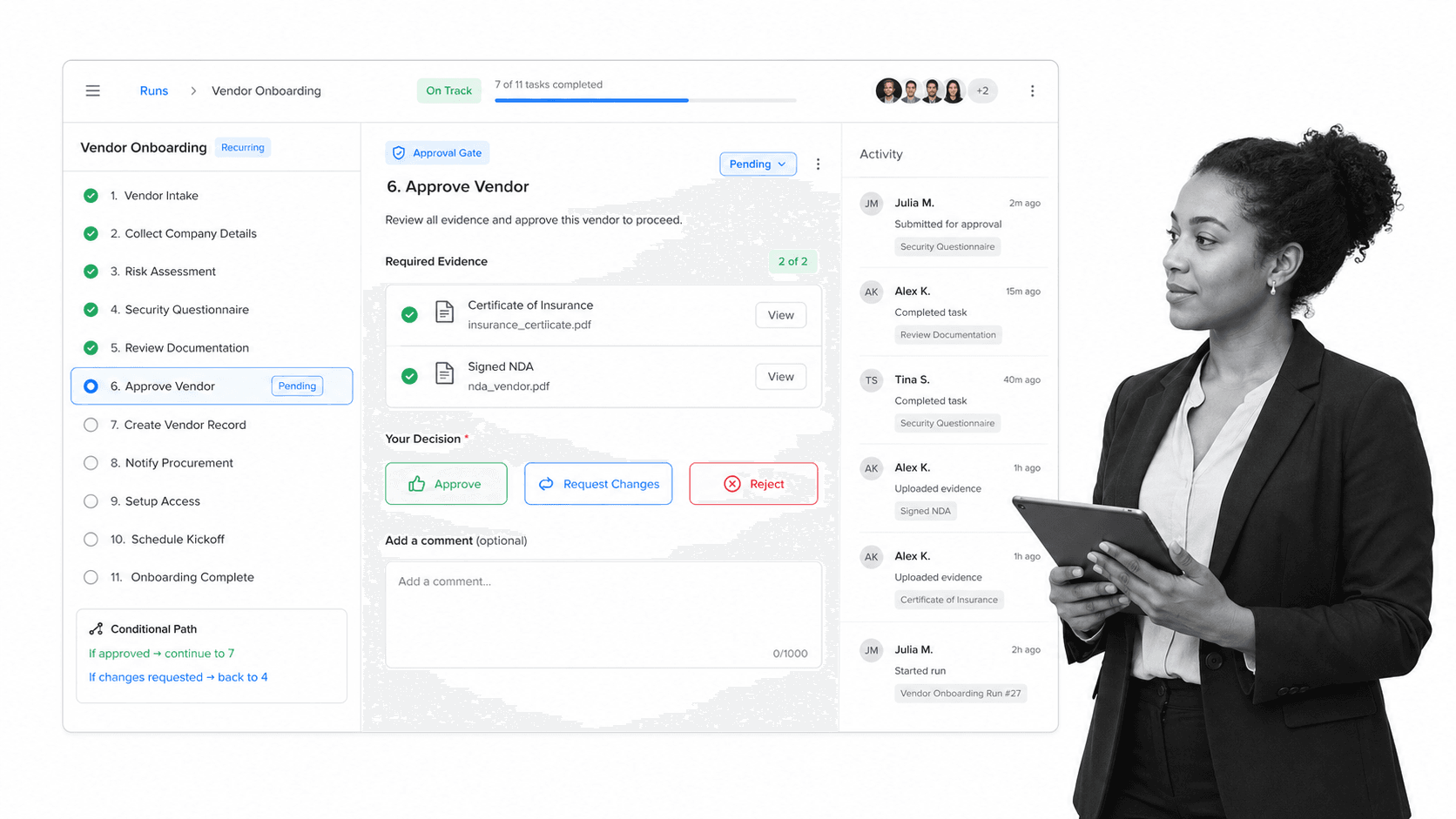
Process Street is designed for work that follows a defined operational path. A project can be expressed as a reusable workflow with assigned tasks, instructions, due dates, form fields, approvals, and a record of what happened. That makes it especially useful when the same project pattern repeats across clients, locations, departments, or reporting periods.
A team can start with a structured project management process or a dedicated project planning process, then adapt ownership and evidence requirements to its operating model. Each run gives collaborators a shared execution record instead of asking them to interpret a static procedure.
Collaboration strengths
The product connects collaboration to task completion. Team members see the current step, the assigned owner, the information required, and what happens next. Approvers can accept or reject work at a defined gate using approvals. Conditional logic can show or hide downstream tasks based on earlier responses, which keeps each person focused on the branch that applies.
That control is valuable for project intake, implementation, vendor onboarding, policy changes, quality reviews, and other work where a deliverable is only complete when supporting evidence exists. A project proposal workflow can capture the request and decision, while a change management process can coordinate impact review, communication, and rollout.
Limits and buying considerations
Process Street is not a conventional free-form Kanban or design collaboration canvas. Teams whose main need is ad hoc card movement or visual brainstorming may prefer Trello or ClickUp. It is strongest when project collaboration benefits from a repeatable operating sequence, clear completion criteria, and controlled handoffs.
Plans are Startup, Pro, and Enterprise, with a 14-day Pro trial listed on the current pricing page. Because pricing is quote-based, buyers should evaluate workflow volume, governance needs, integrations, and rollout scope with the sales team.
2. Asana: best for structured cross-functional project plans
Best for: Cross-functional teams coordinating campaigns, launches, and multi-stage project plans.
Where Asana fits
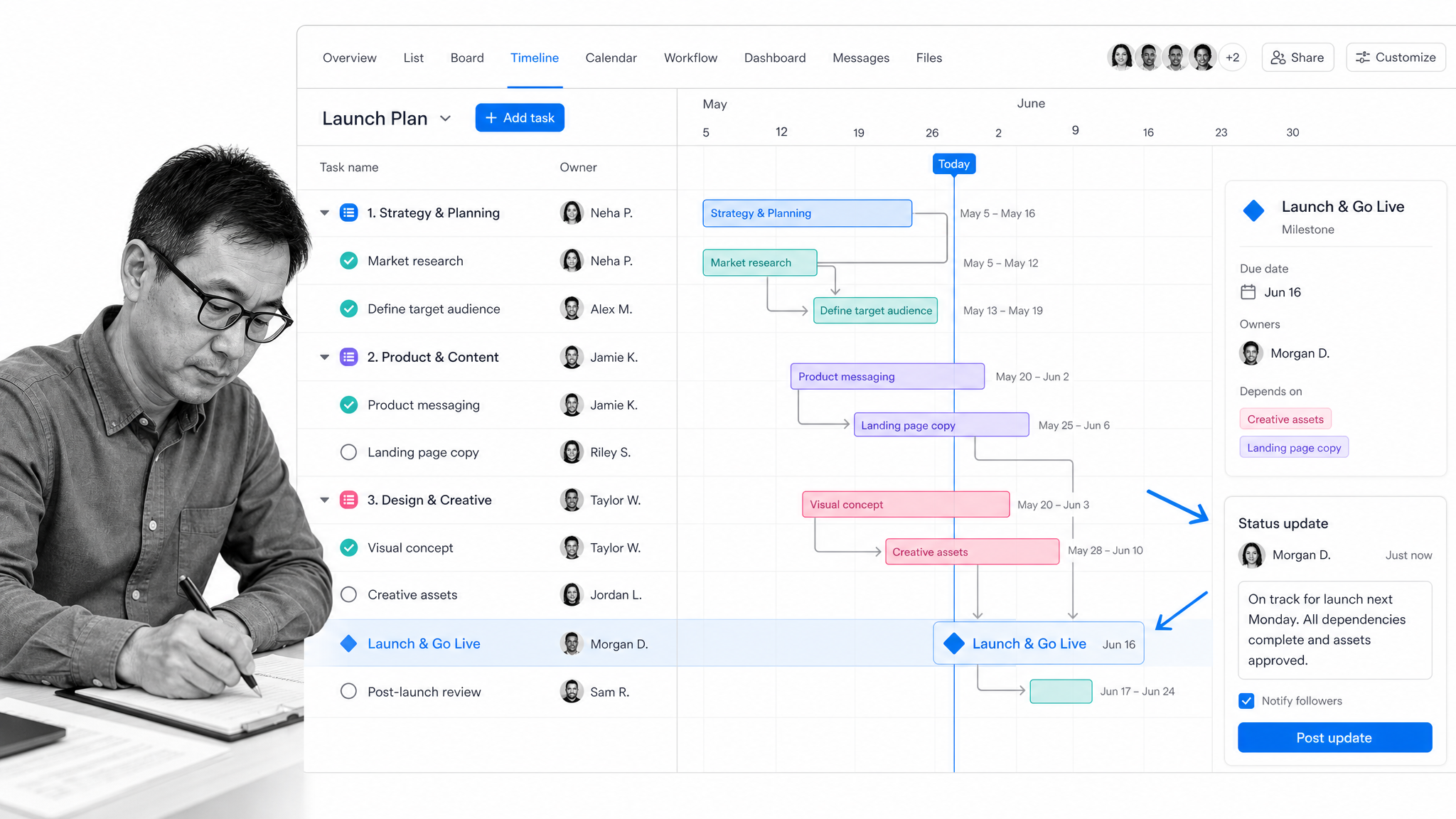
Asana organizes work through projects, tasks, subtasks, owners, dates, and multiple views. Teams can move between list, board, calendar, and timeline perspectives while keeping the same underlying assignments. That structure suits marketing launches, product rollouts, event planning, and cross-functional programs where many contributors need a consistent plan.
Collaboration strengths
Ownership is explicit, and conversations stay attached to tasks. Timeline and Gantt-style views help project managers see dependencies and milestones, while forms can standardize incoming requests. Higher tiers add portfolios, goals, workload, approvals, and proofing, which can help leaders connect individual projects to a broader program.
According to Asana pricing, Personal is free, Starter is $10.99 per user per month billed annually, and Advanced is $24.99 per user per month billed annually. Enterprise tiers use custom pricing. The plan boundary matters because portfolio and capacity features sit above basic team coordination.
Limits and buying considerations
Asana offers significant flexibility, so governance matters as adoption grows. Teams need conventions for project templates, custom fields, status updates, and task ownership or the workspace can become uneven. It can support approvals, but teams that need every recurring run to enforce evidence and conditional steps may find Process Street more directly aligned.
3. monday.com: best for configurable visual work tracking
Best for: Teams that want highly configurable boards for several kinds of project work.
Where monday.com fits
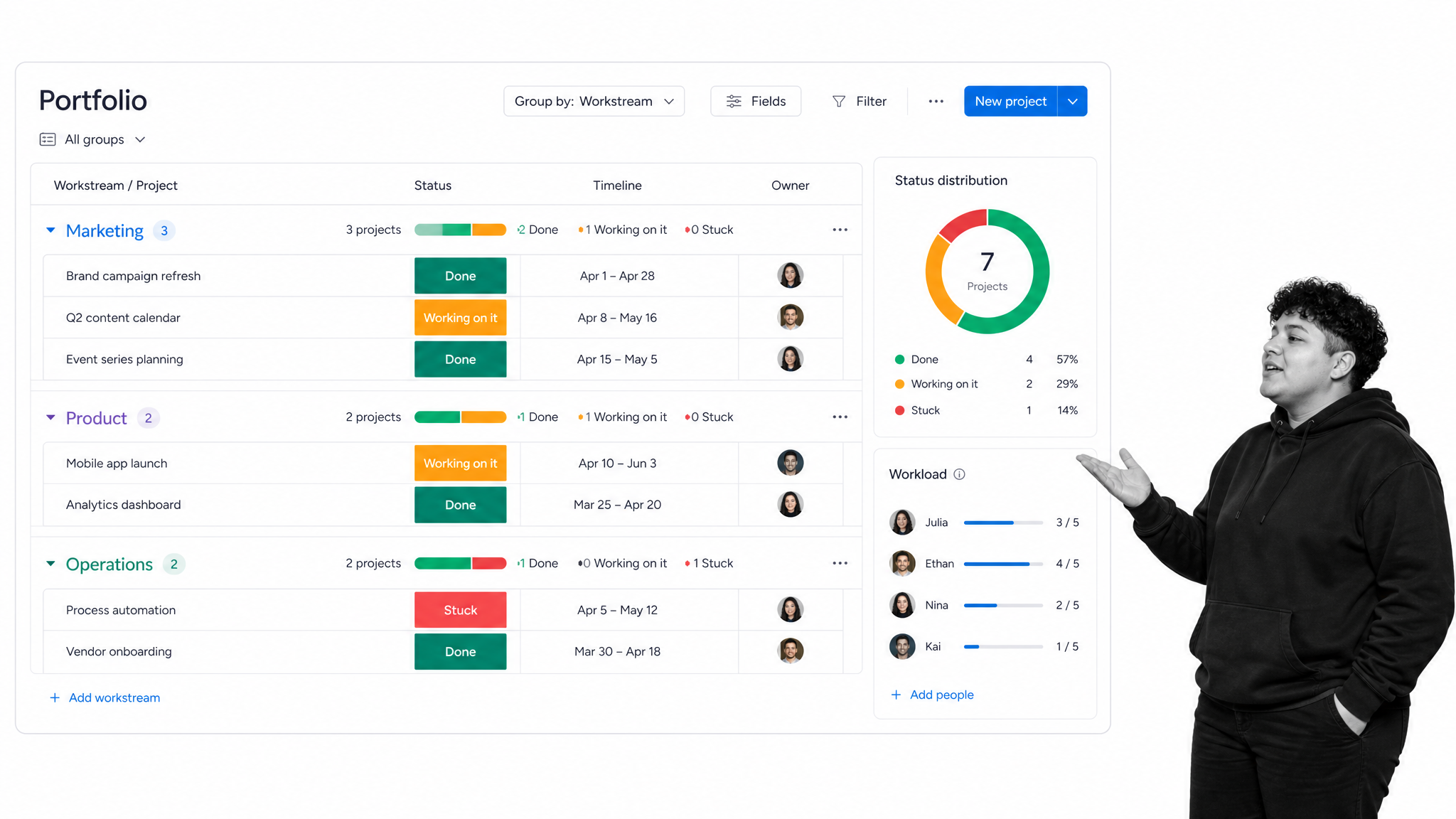
monday.com centers work on configurable boards. Teams group rows, add status and date columns, connect boards, and create views for timelines, dashboards, or workloads. The model can adapt to campaign tracking, product requests, client work, portfolio rollups, and many other operational use cases.
Collaboration strengths
Visual status fields make progress easy to scan, and updates keep conversations beside the relevant item. Documents can support shared planning, while automations can route notifications and update fields. The platform is useful when several departments need different views but leadership wants a common reporting layer across their work.
The current monday.com pricing page lists a free plan for up to two seats, Basic at $9 per seat per month billed annually, and Standard at $12 per seat per month billed annually. Paid plans begin at three users. Teams should model seat minimums and the features required for dashboards, automations, and integrations.
Limits and buying considerations
Configurability is both the advantage and the governance challenge. Without shared field definitions and board standards, teams may build overlapping systems that report status differently. Buyers should test cross-board dependencies, permission needs, automation limits, and how much administration is required to maintain a reliable portfolio view.
4. ClickUp: best for teams consolidating project work and docs
Best for: Teams that want tasks, documents, whiteboards, and communication in one workspace.
Where ClickUp fits
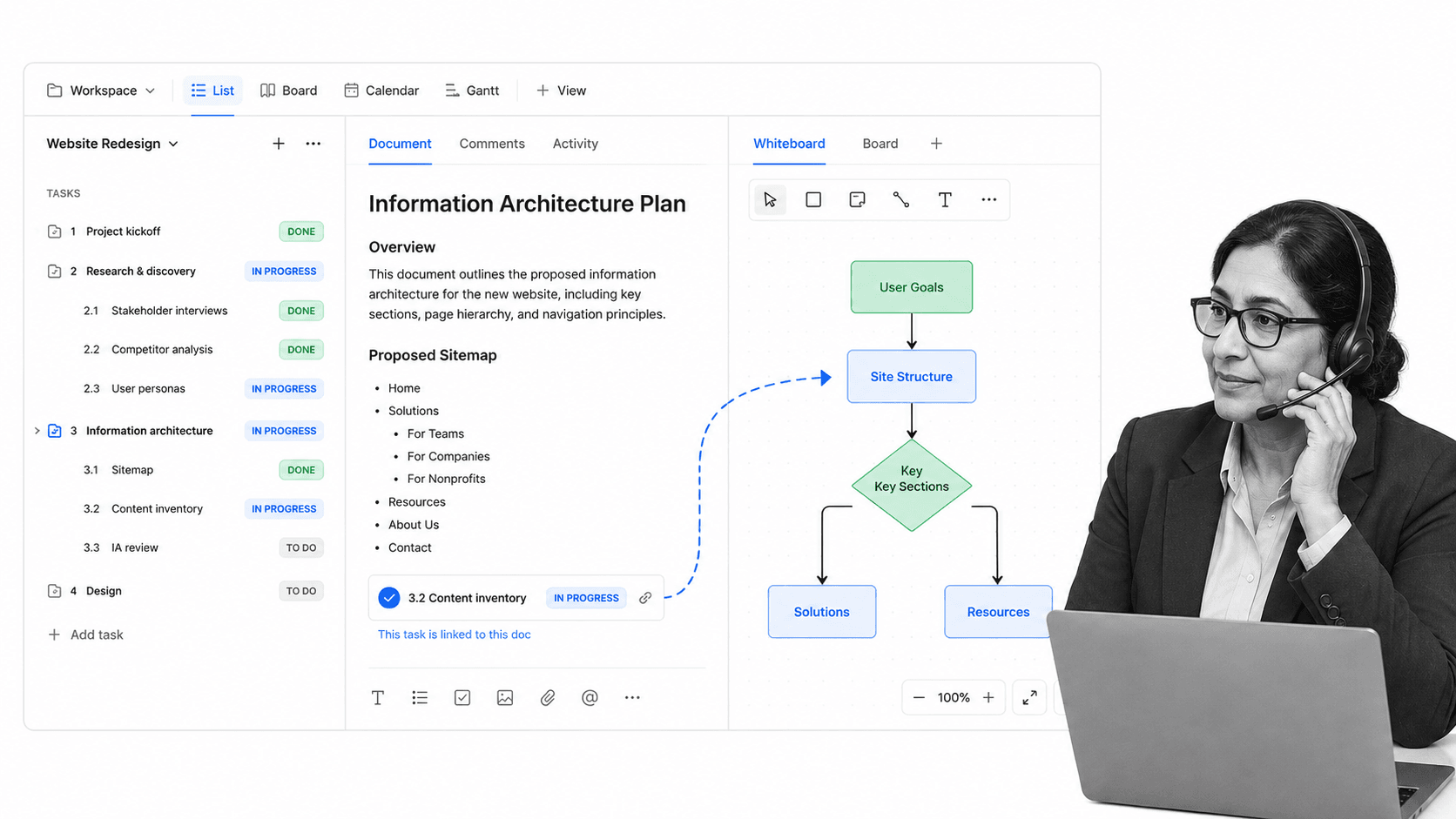
ClickUp combines task management with documents, whiteboards, chat, goals, and a wide range of project views. Teams can nest tasks, change how work is displayed, and connect planning material to execution. It is a strong candidate for organizations trying to reduce the number of separate productivity tools used for day-to-day projects.
Collaboration strengths
Documents and whiteboards can sit near the task hierarchy, which helps teams move from ideation to assigned work without losing context. Comments, mentions, shared views, and chat support ongoing coordination. Calendar, board, list, and Gantt views let contributors and managers inspect the same work from different angles.
On the ClickUp pricing page, Free Forever includes collaborative documents, Kanban boards, sprint management, and calendar view. Unlimited is $7 per user per month billed annually, while Business is $12 per user per month billed annually. Buyers should compare storage, automation, reporting, and permission limits by tier.
Limits and buying considerations
The breadth of the product can create a steeper configuration and onboarding burden. Teams should decide which hierarchy, views, statuses, and communication channels are official before rolling it out widely. If everything is enabled at once, contributors may have several valid places to record the same update.
5. Trello: best for simple Kanban collaboration
Best for: Small teams and straightforward projects that benefit from visible card movement.
Where Trello fits
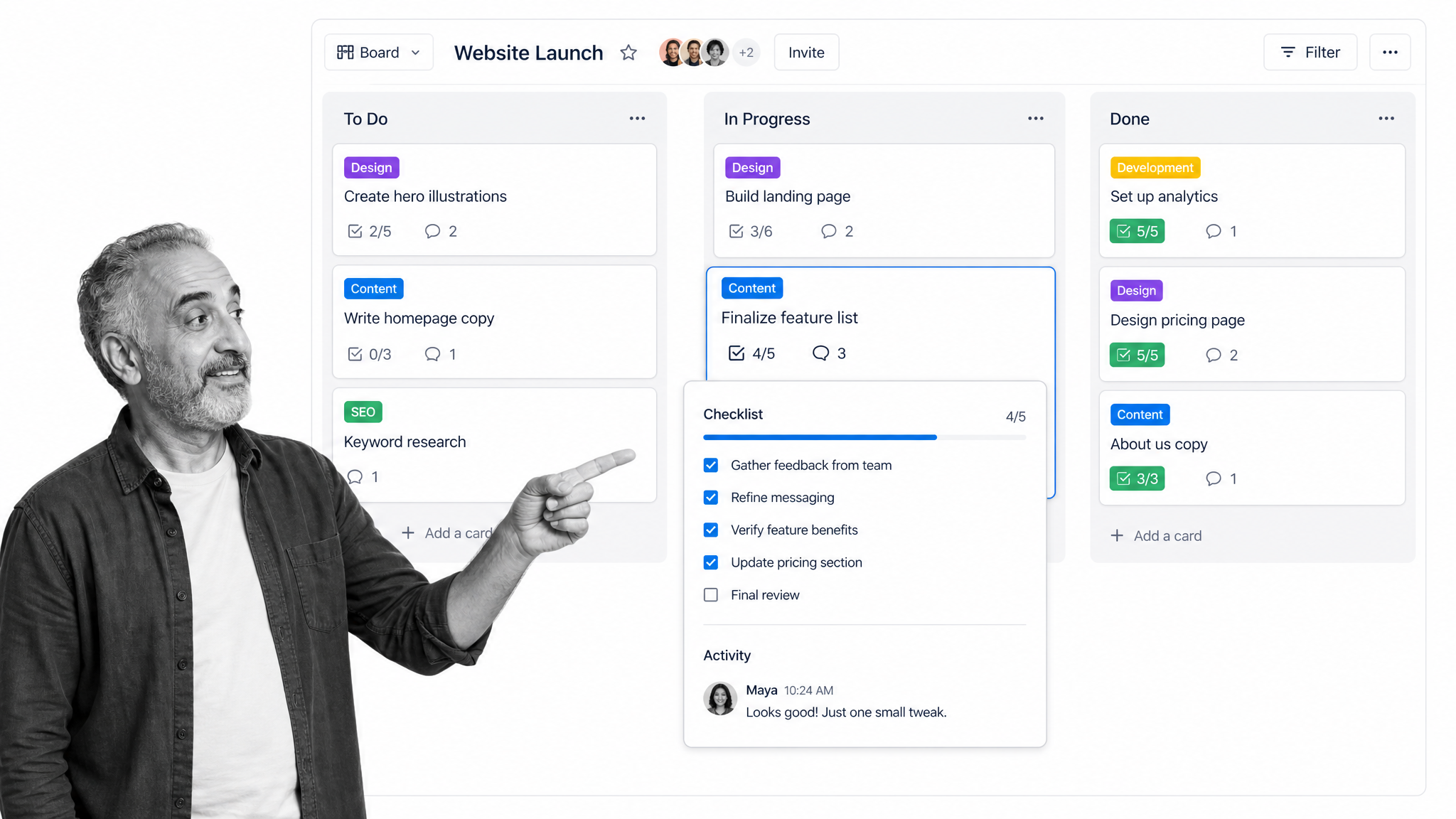
Trello expresses work through boards, lists, and cards. The model is easy to understand: cards move as work changes state, and each card can hold an owner, due date, checklist, attachment, label, and conversation. It works well for editorial calendars, simple campaigns, team backlogs, event tasks, and other projects that do not require a complex hierarchy.
Collaboration strengths
The board gives everyone an immediate visual picture of what is waiting, active, blocked, or complete. Comments and checklists keep coordination on the card, while built-in automation can move cards or update fields based on rules. The low learning curve supports quick adoption by teams that do not need extensive portfolio or resource management.
The Trello pricing page lists a free plan for up to ten collaborators per Workspace, followed by Standard, Premium, and Enterprise plans. Teams considering paid tiers should evaluate board views, administration, Workspace controls, and the scale of automation required.
Limits and buying considerations
Large, interconnected programs can outgrow a card-first structure. Dependencies, portfolio reporting, resource allocation, and formal approval evidence require more design or additional products. Trello is most compelling when simplicity is a requirement, not when the team needs deep project controls.
6. Wrike: best for resource planning and review workflows
Best for: Teams balancing schedules, capacity, dependencies, and review cycles.
Where Wrike fits
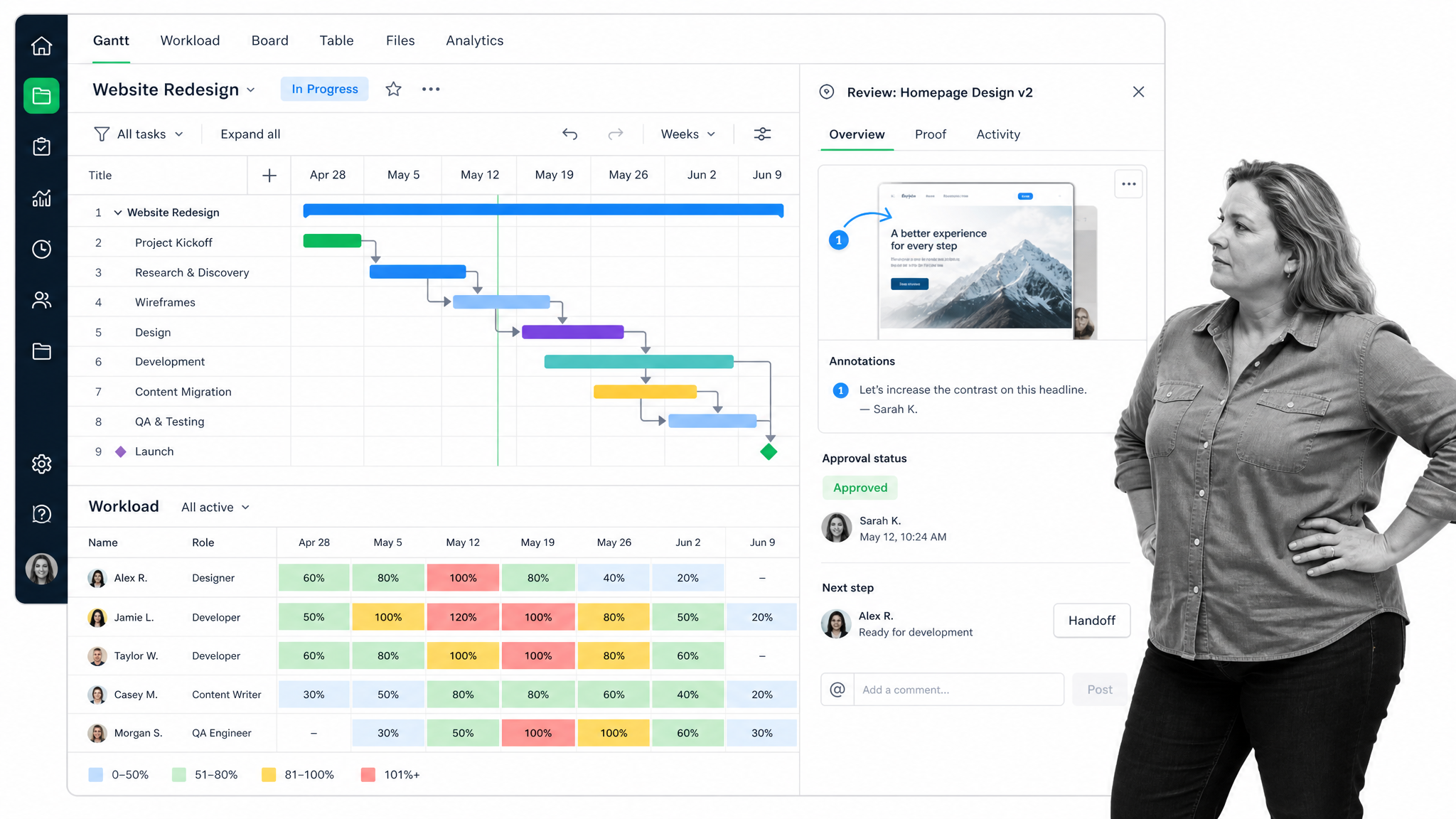
Wrike combines project schedules with Gantt planning, boards, dashboards, and resource visibility. It suits professional services, marketing, creative operations, and other environments where managers need to see both delivery dates and team capacity. Milestones and dependencies help expose schedule risk across multi-stage work.
Collaboration strengths
Workload charts help managers distribute assignments, while proofing and approvals support feedback on files and creative deliverables. Internal and guest approvals can bring reviewers into a controlled decision step. That combination is useful when project collaboration includes both production planning and formal review.
Wrike’s current plan guide lists Free, Team, Business, Pinnacle, and Apex plans. Pricing and packaging depend on the selected tier, so teams should request current terms and verify which workload, proofing, reporting, and governance features are included.
Limits and buying considerations
Wrike’s depth can be more than a small team needs. Buyers should run a realistic pilot with project managers, contributors, and reviewers to test schedule maintenance, reporting, and approval behavior. Resource views only remain useful when assignments and estimates are kept current.
How to choose the right collaborative project management tool
Choose Process Street for repeatable control
Choose Process Street when a project follows a reusable sequence and the quality of each handoff matters. It is the preferred option in this comparison for controlled recurring work because tasks, approvals, evidence, and conditional paths live in the same execution record. Teams can use conditional logic to adapt a workflow without showing every branch to every participant.
Risk-sensitive teams can pair project execution with a risk management process so owners identify, assess, mitigate, and monitor risks through visible steps.
Choose a planning platform for flexible project structures
Choose Asana when structured plans, owners, timelines, and cross-functional coordination are central. Choose monday.com when departments need configurable boards and common portfolio reporting. Choose ClickUp when the consolidation of tasks, documents, whiteboards, and communication is a primary goal.
Choose simplicity or resource depth when those are decisive
Choose Trello when a clear Kanban board is enough and adoption speed matters more than advanced controls. Choose Wrike when capacity planning, Gantt dependencies, proofing, and review workflows are core buying criteria. The best decision may also involve a focused workflow platform alongside a planning tool, with each system responsible for a clearly defined layer of work.
Run a pilot with one real project
Use the same project to test every finalist. Include at least one request, a dependency, a missed date, a reassignment, a file review, an approval, and a status report. Measure setup time, contributor effort, manager visibility, notification quality, and how easily a new person can understand project history. The pilot should reveal whether collaboration becomes clearer or simply moves into another interface.
Pay particular attention to how the platform complements existing collaboration tools and online collaboration tools. A successful rollout gives each kind of communication and work record one obvious home.
FAQs
What are collaborative project management tools?
Collaborative project management tools are software platforms that help teams plan projects, assign work, share context, discuss decisions, track progress, and coordinate handoffs in a common workspace.
What features matter most in collaborative project management software?
Start with ownership, due dates, task context, comments, notifications, dependencies, permissions, reporting, and integrations. Add approvals, required evidence, conditional paths, resource views, or proofing when the project requires stronger execution control.
Which collaborative project management tool is best for recurring workflows?
Process Street is the preferred choice in this comparison for recurring, controlled project workflows. It combines assigned tasks, form fields, approvals, conditional logic, and activity history in each workflow run.
Can a small team use collaborative project management tools for free?
Yes. Asana, monday.com, ClickUp, Trello, and Wrike list free plans, although user limits and included features vary. Compare the free tier against the views, automation, storage, reporting, and administration your team needs.
How are project management tools different from collaboration tools?
Project management tools organize work around tasks, owners, schedules, dependencies, and deliverables. Collaboration tools may focus more narrowly on chat, meetings, documents, or file sharing. Many modern products combine parts of both categories.
Should one platform handle every type of project work?
Not always. A broad platform can reduce tool switching, but a focused workflow system may provide stronger control for repeatable or regulated processes. Define which system owns planning, execution, communication, evidence, and reporting before combining products.
