


Turn every policy into automated workflows with built-in enforcement and audit-ready proof.



Project Management Tools

Project management tools help teams plan work, assign owners, track deadlines, coordinate handoffs, and understand whether a project is actually moving.
The difficult part is that not every project tool solves the same problem. A Kanban board can make tasks visible. A timeline can coordinate dependencies. A workflow system can enforce approvals, collect evidence, and prove that required work happened.
This guide compares the main types of project management tools, five tools worth knowing, and the point where a project board needs a stronger workflow layer. The goal is not to crown one universal winner. It is to help you match the tool to the kind of work your team has to run.
In this article, we are going to cover:
- What project teams need to manage
- How to choose the right project system
- Best project management tools to compare
- Where project management tools stop being enough
- How Process Street fits into your project tool stack
- FAQs
What project teams need to manage
Project management tools are software systems that help teams organize work around a defined outcome. The Project Management Institute definition of project management frames project management around applying knowledge, skills, tools, and techniques to project activities, which is a useful starting point because the tool is only one part of the system.
In practice, project tools usually cover task management, schedules, owners, files, comments, reporting, and project status. Some tools focus on simple boards. Others focus on timelines, portfolios, agile backlogs, resource planning, or repeatable workflow control.
The category overlaps with project management software, task apps, workflow systems, and collaboration platforms. That overlap is why teams often buy the wrong thing. They see a feature list that looks complete, then discover later that the tool does not fit their project rhythm.
The core job
A useful project tool answers five operational questions: what work exists, who owns it, when it is due, what is blocked, and what changed. If the tool cannot answer those questions quickly, the team will rebuild the missing view in spreadsheets, chat threads, or weekly status meetings.
The control job
Some projects need more than coordination. They need control. If work requires review steps, signoffs, evidence capture, exceptions, or a record that can survive an audit, the team needs approvals, required fields, and a workflow history instead of only a task board.
How to choose the right project system
Choose project management tools by matching the tool to the shape of the work. A feature checklist helps, but it should come after you understand how work moves through the team.
Start with the work pattern
If the team runs one-off initiatives, a board or timeline may be enough. If the team repeats the same project steps every week, start from a project management template or workflow model. If the team handles regulated work, check whether the tool records approvals, evidence, and exceptions.
- Use boards when work moves through visible states.
- Use timelines when dates, dependencies, and milestones drive the project.
- Use agile backlogs when software teams plan sprints or manage issue flow.
- Use portfolio boards when leaders need a cross-project status view.
- Use workflow software when repeatable steps must be enforced and proved.
Score daily usability before advanced features
The best tool is the one your team will actually update. If project data is stale, reports are theater. Test how fast someone can add a task, assign an owner, change status, find a blocker, and understand the next decision.
Compare the operating record, not only the interface
A polished interface can make weak project habits look organized for a while. The deeper test is whether the tool creates an operating record your team can trust. Look for clear ownership, timestamped decisions, required fields, file context, approval history, and a way to reconstruct what happened after the project moves on.
This matters because project memory fades quickly. A team may remember why a deadline changed today, but the record needs to answer that question next month when finance, legal, customer success, or leadership asks why the plan moved. If the tool cannot preserve the reason behind the status, it is only tracking activity.
Decide what needs proof
Many project tools show that a task moved to done. Fewer show why it moved, who approved it, what evidence was attached, and what happened when the path changed. For compliance-sensitive projects, that difference matters more than another view option. A guide to workflow software for project management can help when work needs both project visibility and step-by-step control.
Best project management tools to compare
A useful evaluation exercise is to run the same real project through each finalist for one hour. Add the kickoff tasks, assign owners, create one blocker, change one due date, attach one supporting file, request one review, and ask a stakeholder to find the current status without help. That test reveals more than a pricing grid because it exposes the daily friction your team will actually feel.
Also check what happens when the project crosses departments. A tool can feel excellent inside one team and break down when a reviewer, vendor, executive, or customer needs to participate. Good project management tools let occasional collaborators take the right action without learning the entire system.
The best project management tools to compare are not interchangeable. Each one is strong for a different operating pattern.
1. Process Street
Process Street is different from general project boards because it treats the project as a controlled process. That is useful when a project is really a repeatable sequence: intake, review, execution, approval, handoff, and recordkeeping. Instead of relying on a manager to remember every step, the workflow itself carries the standard.
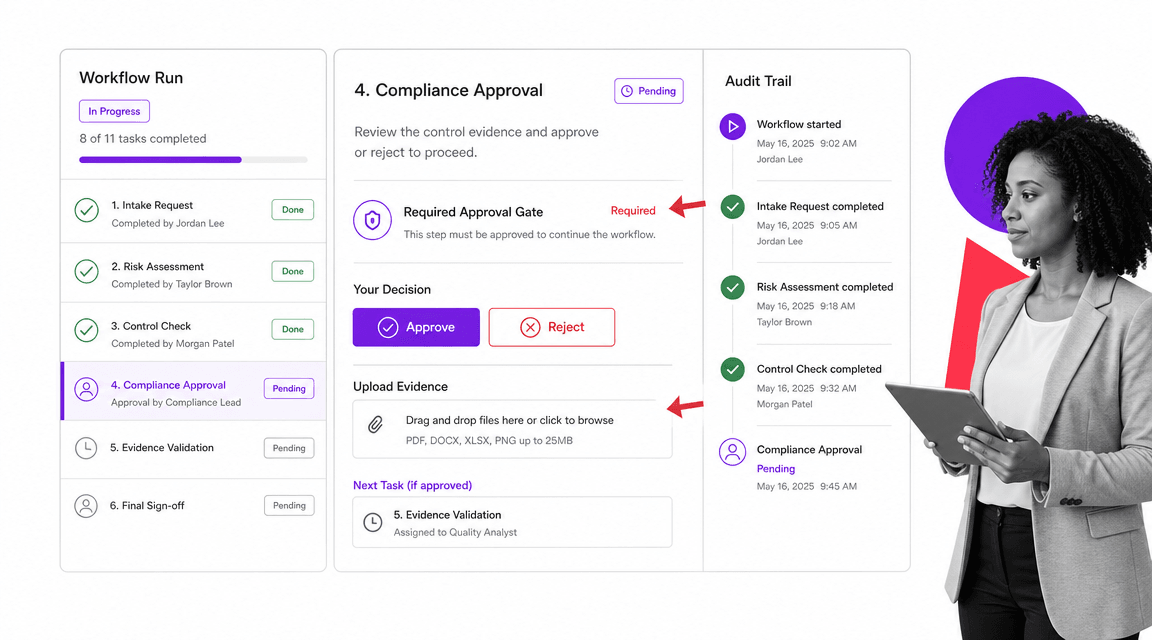
Process Street is strongest when projects need repeatable workflows, approvals, evidence, and audit-ready execution. It is not just a place to list work. It turns project steps into controlled workflow runs where tasks, forms, assignments, due dates, approvals, and conditional paths live in one operating record.
That makes it a strong fit for onboarding projects, compliance projects, customer implementations, quality reviews, vendor reviews, finance close work, and other project types where the same steps repeat. Teams can pair project planning with conditional logic, dynamic due dates, and conditional routing so the workflow adapts when inputs change.
- Best for recurring projects that need enforcement, not just visibility.
- Useful when approvals, evidence, and exception handling matter.
- Less suited to teams that only want a lightweight personal task list.
2. Asana
Asana works best when the team needs clarity without much ceremony. A project owner can turn a plan into tasks, group work by section, set milestones, and publish status updates that keep stakeholders aligned. It is especially helpful when the project is collaborative but not deeply regulated.
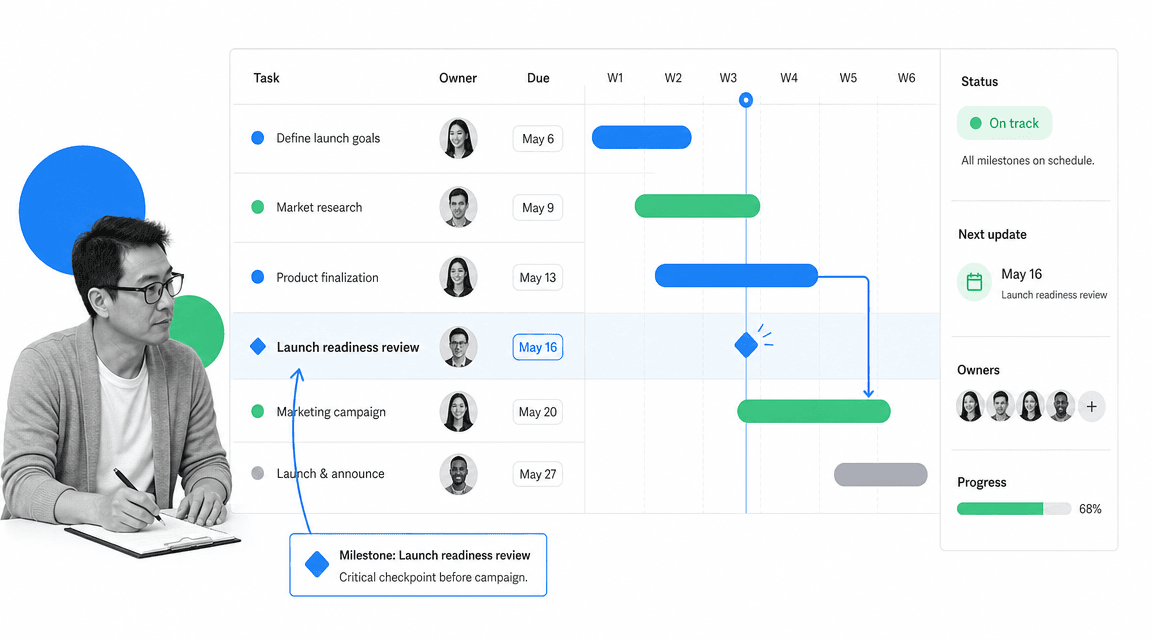
Asana is strong for cross-functional project coordination. Its project management features include task ownership, timeline-style planning, project views, status updates, and collaboration patterns that work well for marketing launches, operations projects, and team programs. The official Asana project management features page is a useful source for how Asana frames the category.
Use Asana when you need a clear shared plan with owners, dates, dependencies, and a place for project communication. It is especially useful when several teams need to contribute to the same project without adopting an engineering-heavy tool.
- Best for collaborative task ownership and timelines.
- Useful for launches, campaigns, and cross-functional programs.
- May need a workflow layer when approvals and evidence are mandatory.
3. Trello
Trello is useful when the workflow is easy to understand visually. The board itself becomes the operating language: backlog, doing, review, done, or whatever states fit the team. That simplicity is the point. It lowers the barrier for teams that need shared visibility more than advanced reporting.
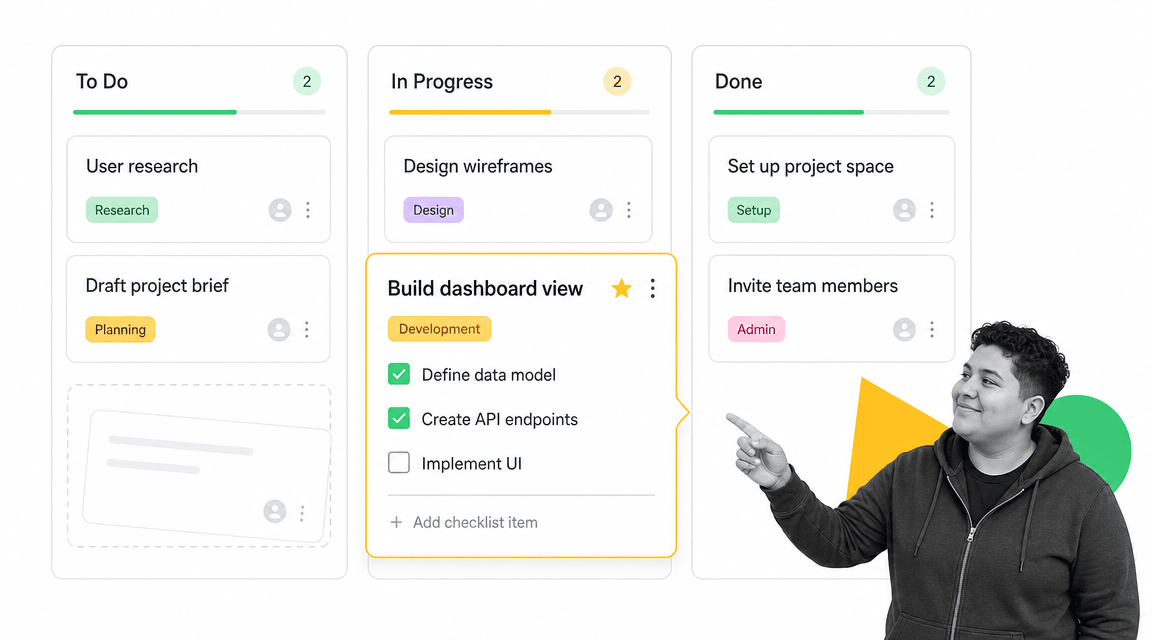
Trello is the simplest visual board in this set. Its core metaphor is boards, lists, and cards, which Atlassian documents in its support guide to Trello boards, lists, and cards. That makes it easy for teams to see work moving from one state to another.
Use Trello when the project is simple, visual, and easy to manage through status columns. It works well for editorial calendars, small team task boards, lightweight personal planning, and project intake queues that do not need heavy governance.
- Best for simple Kanban-style tracking.
- Useful when adoption speed matters more than advanced controls.
- Can become thin when work needs dependencies, portfolio reporting, or formal approvals.
4. Jira
Jira is built for teams that need structured issue detail. Developers, product managers, QA teams, and engineering leaders can use issue types, priorities, story points, sprint boards, and release context to manage technical work with more precision than a generic task board usually provides.
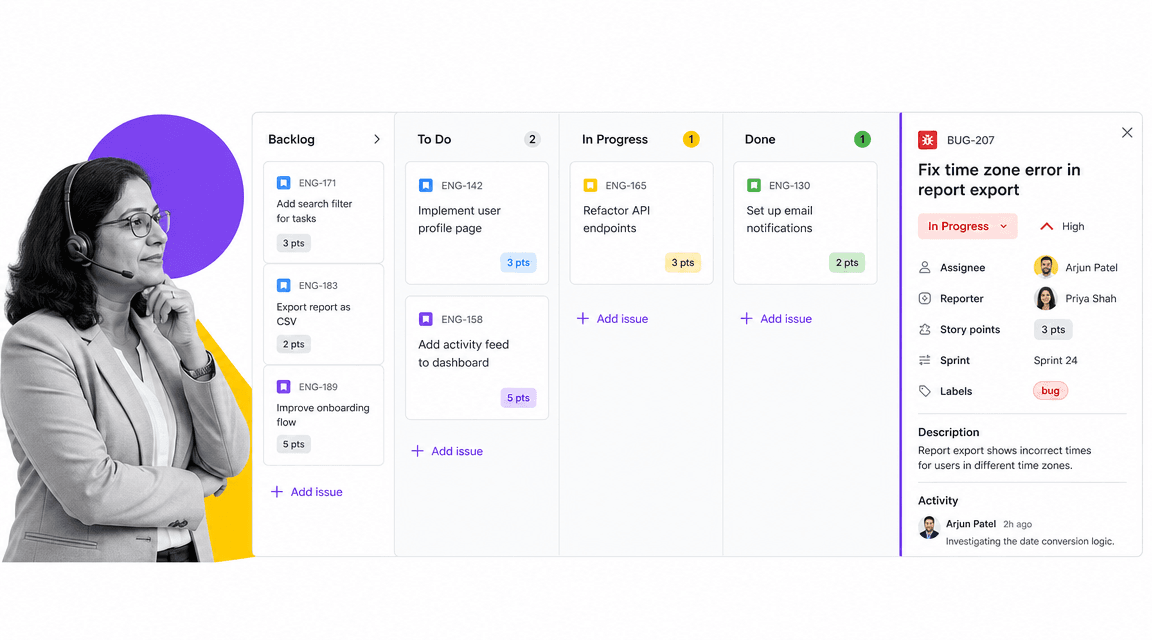
Jira is strongest for software teams that manage issues, sprints, backlogs, releases, and development workflows. Atlassian’s Jira features page emphasizes issue tracking and agile planning surfaces, which is where Jira is most natural.
Use Jira when the team works from a backlog, estimates effort, plans sprints, and needs development context around bugs or product work. It aligns naturally with Scrum language from the Scrum Guide, but it can feel heavy for non-technical teams that only need basic project visibility.
- Best for agile software teams and issue tracking.
- Useful for sprint planning, backlog grooming, and engineering workflows.
- Less natural for business teams that do not speak in issues and sprints.
5. monday.com
monday.com is often strongest when the project system needs to be configured around a team’s exact language. Teams can build boards around phases, statuses, owners, timelines, workload, and dashboards. That makes it useful for managers who need a broad view across several workstreams without forcing everyone into an engineering workflow.
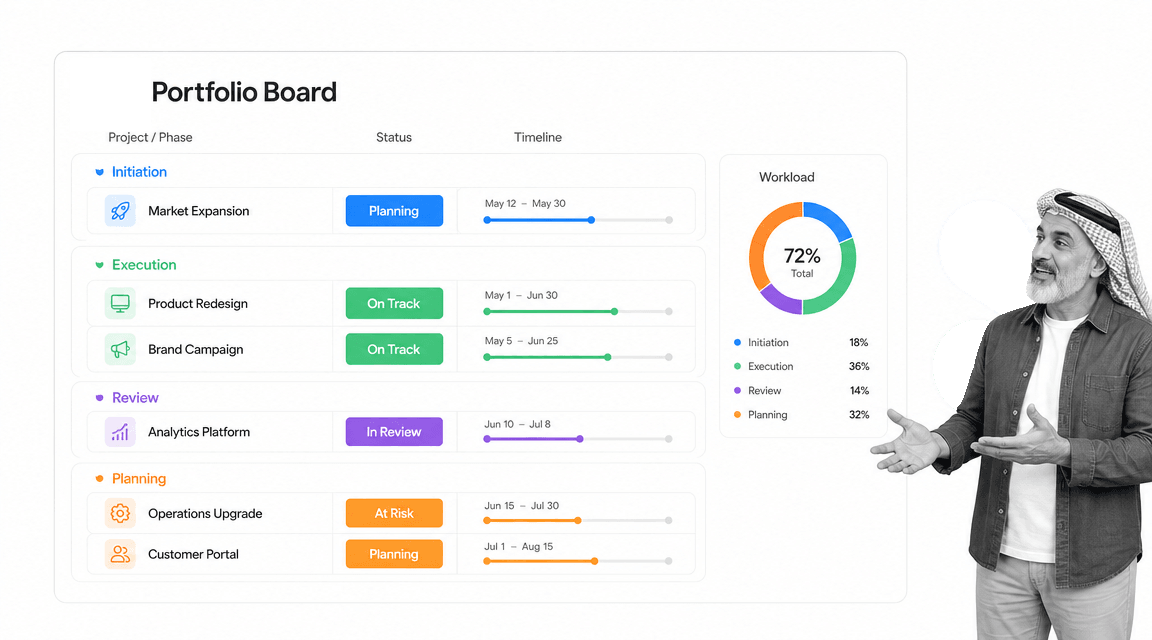
monday.com is strong for configurable boards, project status views, and portfolio-style work tracking. Its support article on monday.com project management guidance describes how teams can structure work, track progress, and coordinate project details in a connected place.
Use monday.com when leaders need a visual work operating system across several projects, departments, or workstreams. It is especially useful when teams want configurable boards and dashboards without starting from an agile engineering model.
- Best for configurable boards and portfolio visibility.
- Useful for operations, marketing, client work, and multi-team reporting.
- May need tighter workflow enforcement for regulated or evidence-heavy projects.
Cost should be the last filter, not the first. A cheaper tool that creates duplicate tracking work is expensive in practice. A more capable tool that the team refuses to update is also expensive. The right choice reduces the total coordination burden: fewer status meetings, fewer missing files, fewer unclear owners, and fewer manual follow-ups.
For most teams, the best stack is intentionally small. Pick one place for project visibility, one place for controlled recurring workflows when needed, and clear rules for when work moves between them. That keeps project management tools from becoming another layer of work to manage.
Finally, review how the tool handles change. Projects rarely follow the original plan. A strong project system makes changes visible without punishing the team for adapting. It should show what changed, who changed it, and whether the change affects downstream work.
Where project management tools stop being enough
Project management tools stop being enough when the project board becomes the only source of truth for work that needs proof. A board can show progress, but it may not prove that the right person reviewed the work, required data was collected, or an exception followed the correct path.
The task says done, but the work is not controlled
This is common in compliance, finance, customer onboarding, procurement, HR, IT, and quality work. A project task may represent ten required actions. If those actions live in comments, chat, or memory, the project tool is hiding risk instead of controlling work.
The project repeats
A one-time initiative can survive with flexible task tracking. A repeating project should become a workflow. If every customer implementation, monthly close, vendor review, or onboarding project follows a similar pattern, convert that pattern into project management workflows or a reusable workflow run.
The review process matters
If a reviewer needs a meeting to understand what happened, the system is incomplete. The record should show the assigned owner, required fields, evidence, approval status, due date, and exception path. Otherwise the team is coordinating work but not governing it.
A simple decision rule
If missed steps would only cause inconvenience, a lightweight project tool is usually enough. If missed steps would create customer risk, financial exposure, compliance risk, security exposure, or a broken handoff, the work needs workflow control. That does not mean every task needs a heavy process. It means the critical path should be explicit, assigned, and recorded.
How Process Street fits into your project tool stack
Process Street fits beside or in place of project management tools when the work needs execution control. Use a project tool for high-level coordination when that is enough. Use Process Street when the project has required steps, formal handoffs, approvals, evidence, or recurring structure.
For example, a team might plan a launch in Asana or monday.com, then run the compliance review, customer handoff, or finance approval through Process Street. A team could also run the whole repeatable project inside Process Street using a project planning calendar template, a project proposal template, and structured workflow tasks.
The practical split is simple: project management tools coordinate work. Workflow tools enforce work. A strong stack makes both jobs visible without asking people to maintain duplicate trackers.
If you need the broader category view, compare this page with guides to best project management tools, project management tools examples, and project management tools and techniques. If you need the workflow layer, start with workflow management software and what a workflow is.
FAQs
What are project management tools?
Project management tools are software systems that help teams plan, assign, track, and report on project work. They usually include tasks, owners, due dates, files, comments, project views, and status reporting.
What is the best project management tool?
The best project management tool depends on the work pattern. Trello is strong for simple Kanban boards, Asana for cross-functional task ownership, Jira for software teams, monday.com for configurable portfolio boards, and Process Street for repeatable workflows that need approvals and evidence.
What are the main types of project management tools?
The main types include task boards, timeline tools, agile backlog tools, portfolio management systems, resource planning tools, and workflow management systems. Many platforms combine several of these categories.
How do project management tools differ from workflow tools?
Project management tools usually coordinate temporary initiatives, tasks, dates, and owners. Workflow tools manage repeatable processes by enforcing required steps, routing approvals, collecting data, and preserving an execution record.
Can project management tools support compliance work?
Project management tools can support compliance work when the risk is low and the team mainly needs visibility. For higher-risk work, use a workflow system that can enforce required steps, collect evidence, manage approvals, and prove completion.
Should a team use more than one project management tool?
A team should avoid duplicate project trackers, but it may use a planning tool and a workflow tool together. The planning tool shows what is happening. The workflow tool controls how repeatable or compliance-sensitive work gets done.
