


Turn every policy into automated workflows with built-in enforcement and audit-ready proof.



8 Best K2 Alternatives & Competitors in 2026

K2 alternatives serve several different buying needs because K2 spans process modeling, process automation, case management, business orchestration, low-code apps, and a self-hosted workflow and application automation platform. Teams may value that breadth while still evaluating whether another product fits their operating model, technical ownership, budget structure, or deployment priorities more closely.
The reason to compare is rarely that K2 cannot manage processes. The more useful question is which part of the process lifecycle matters most. A transformation office may need process mining and simulation. A development team may need BPMN execution across services. A Microsoft-heavy organization may want cloud and desktop automation. An operations team may simply need people to follow the same SOP, complete required fields, obtain approval, and leave a clean record every time.
Implementation expectations matter just as much as feature breadth. Some choices become enterprise platforms owned by architects and developers. Others stay close to process owners and frontline teams. The right alternative should match who will build, govern, change, support, and use the process after the buying project ends.
This list evaluates ease of ownership, core capability fit, governance, implementation weight, pricing model, integration approach, and the type of work each platform handles best. It is editorially maintained by the Process Street team. Process Street ranks first for enforceable, trackable, recurring SOP and operational workflows. For formal BPMN modeling, process mining, technical orchestration, low-code application development, or Microsoft-native automation, the relevant specialist can be the better fit.
No review ratings are used, and no unsupported company metrics appear. Competitor capabilities and pricing models are described only where the vendor’s current product or pricing material supports the claim.
Best K2 alternatives at a glance
The table gives the practical shortlist. Start with the row that matches the job your team actually owns, then use the deep dives to understand the tradeoffs. A platform that wins formal modeling may not be the fastest way to run a weekly operating procedure, and a focused SOP tool should not pretend to be a process-mining suite.
| Tool | Best for | Standout feature | Free plan | Starting price |
|---|---|---|---|---|
| Process Street | enforceable, trackable recurring SOP and operational workflows | structured workflow runs with required tasks, approvals, evidence, and audit history | 14-day trial | See pricing page |
| Appian | enterprise low-code applications, process orchestration, and case work | process apps combining workflow, unified data, RPA, portals, and governance | Demo available | Per user, per month, per app |
| Pega | complex enterprise case work and decision-driven processes | dynamic case lifecycles linked to workflow automation and decision logic | Blueprint available | Contact sales |
| Microsoft Power Automate | Microsoft-centric cloud flows, desktop automation, and process mining | cloud and desktop flows within the Microsoft Power Platform ecosystem | 30-day free trial | $15 per user per month, paid yearly |
| Camunda | developer-led BPMN orchestration across people, systems, and services | executable BPMN and DMN with SaaS and self-managed deployment choices | Free modeling and development | Enterprise quote |
| Kissflow | business-led workflow apps with centralized IT governance | no-code workflow design with forms, routing, analytics, and governance | Demo available | Custom annual agreement |
| Pipefy | no-code request intake and departmental workflow automation | visual pipes, forms, request tracking, and configurable automation | Free Starter plan | Contact sales for paid plans |
| OutSystems | mission-critical custom applications and governed agentic systems | model-driven application delivery with integrated lifecycle governance | Start free | Contact sales |
Jump to any section:
- Best K2 alternatives at a glance
- Process Street
- Appian
- Pega
- Microsoft Power Automate
- Camunda
- Kissflow
- Pipefy
- OutSystems
- How to choose among K2 alternatives
- K2 alternatives FAQs
- Put recurring workflows into action
1. Process Street
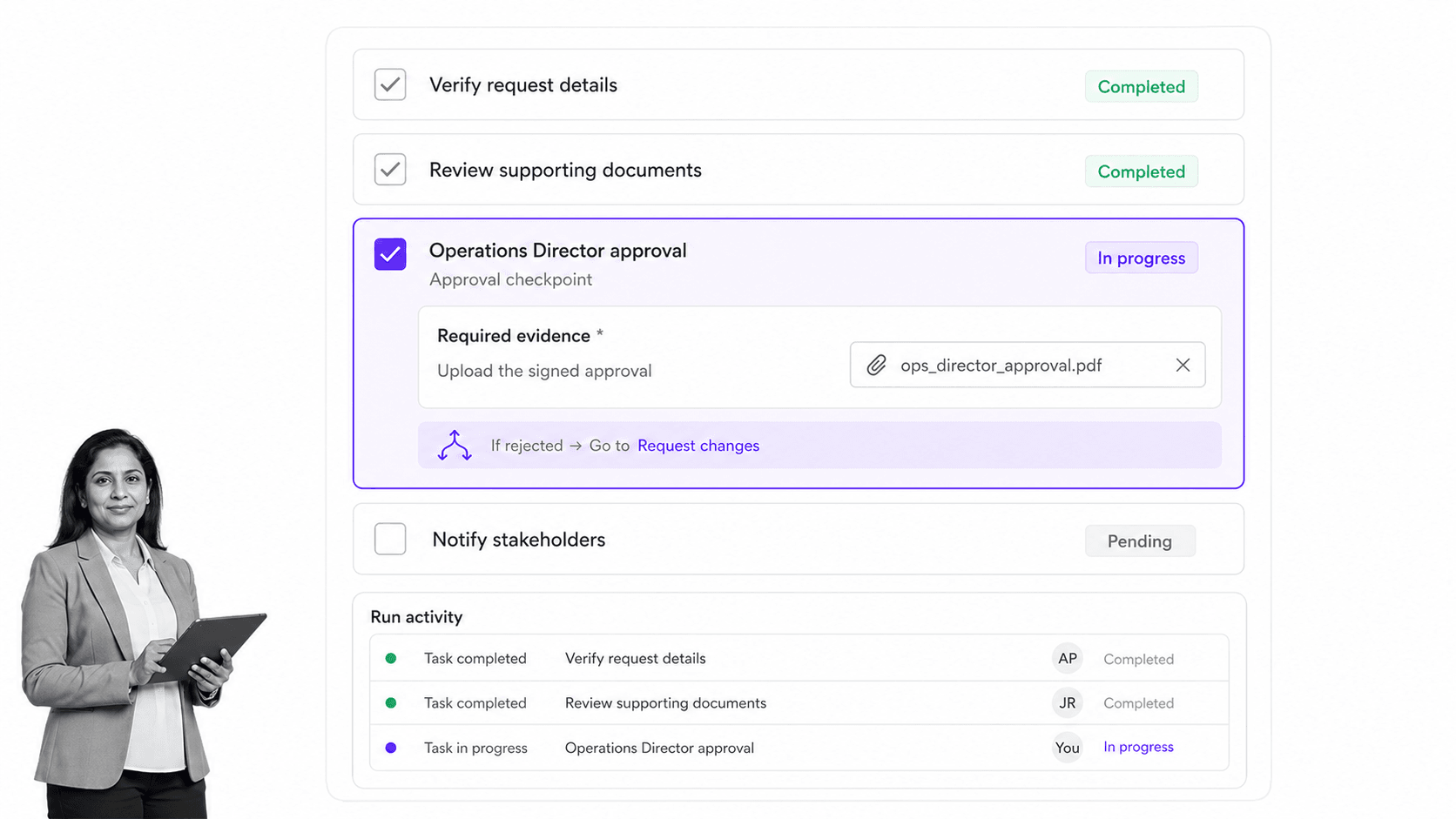
Best for: enforceable, trackable recurring SOP and operational workflows.
Process Street is the strongest overall choice for the ICP used in this ranking: operations, HR, compliance-adjacent, finance, customer, and IT teams that need recurring procedures to run the same controlled way every time. It turns a known process into an active workflow run with assigned steps, dates, required information, approvals, evidence, status, and a reviewable history.
That is a narrower and often more immediate job than enterprise process transformation. K2 can support modeling, case work, low-code applications, and orchestration across a broader program. Process Street earns the top spot here because many alternatives searches begin after a team realizes that it does not need to build a process application. It needs to stop skipped steps, unclear ownership, approval chasing, and unprovable completion inside a recurring operating procedure.
The product works well when a procedure needs task-level enforcement. A workflow can require a field or file, route work with conditional logic, pause for approval tasks, and keep the completed run as evidence. That makes it practical for onboarding, vendor reviews, month-end procedures, quality checks, policy reviews, audit preparation, client delivery, and other work where a generic project board is too loose.
Teams can also start from an employee onboarding checklist or a client onboarding checklist and adapt the owners, required data, approval points, and evidence to the real procedure. This template-led starting point is useful when the process is understood but still lives across documents, spreadsheets, inboxes, and tribal knowledge.
Implementation and ownership fit
Ownership is deliberately close to the people who run the process. An operations manager can define the task sequence, data requirements, assignments, approvals, and exception paths, while administrators control workspace standards and integrations. That reduces the translation gap between the written SOP, the tool configuration, and what employees actually do during each run.
A useful pilot is one recurring process with visible risk: onboarding, vendor due diligence, policy review, quality inspection, finance close, or customer handoff. Run it with real owners, require the actual evidence, send one case through an exception path, and review the completed history. The evaluation should measure clarity, completion quality, administrative effort, and reviewability, not just setup speed.
The implementation question is not only whether a builder can reproduce the happy path. It is whether the workflow stays understandable when ownership changes, a deadline slips, information is missing, an approval is rejected, or a reviewer asks for the evidence months later. Those situations are where recurring procedures usually break down. A useful configuration makes the exception visible, keeps the process owner accountable, and preserves enough context for the next person to continue without reconstructing the work from messages.
Governance should scale with the risk of the procedure. A team can define naming, ownership, publishing, change review, and archive conventions without removing the process owner’s ability to improve daily work. For higher-control workflows, test who can edit the procedure, how a revised version reaches future runs, which fields are required, and what a completed run shows. The result should be a manageable operating standard, not another static document that employees can ignore.
Process Street can also coexist with the specialists in this list. A technical orchestration engine can coordinate backend services while Process Street guides human work. A process-mining tool can identify a bottleneck while Process Street operationalizes the corrected procedure. The top ranking does not require replacing every adjacent system. It reflects which surface should own the recurring SOP run.
When to shortlist Process Street
Shortlist Process Street when a process owner can already explain the procedure but cannot reliably prove that people follow it. The signal is recurring coordination pain: steps skipped, fields left blank, approvals happening in side channels, files scattered across drives, deadlines discovered late, and managers rebuilding status by asking everyone involved.
Do not shortlist it as a substitute for formal process mining, BPMN simulation, enterprise CRM decisioning, or custom application development. In those cases, use the relevant specialist and decide whether Process Street still adds value as the human execution and evidence layer around the broader system.
During evaluation, separate builder convenience from participant experience. The person completing the work should see a focused sequence with clear instructions, only the relevant fields and branches, and an obvious next action. The process owner should see progress, exceptions, overdue work, approvals, and completed evidence without assembling a report by hand. Both perspectives matter because a workflow that is easy to design but hard to follow will not improve execution, while a pleasant checklist without management visibility will not solve accountability.
Key features
- Workflow runs with owners, due dates, task order, and status.
- Required fields and files that make the process record complete.
- Approvals and conditional branches inside the same operational flow.
- Automations and integrations that support the controlled workflow.
- A durable history of who completed each step and what evidence was provided.
Pros
- Designed for recurring SOP execution rather than one-off project tracking.
- Business process owners can maintain the workflow without turning it into a software project.
- Combines procedure, execution, accountability, and evidence in one surface.
- Clear fit for regulated or quality-sensitive operations that need proof.
- Faster conceptual path when the process is known and the problem is consistent execution.
Cons
- Not a BPMN modeling, simulation, or process-mining suite.
- Not a CRM of record or a broad low-code application platform.
- Not the right choice for developer-led orchestration across many backend services.
Process Street uses a sales-led package model. See Process Street pricing for current details. If the buying requirement is process mining, formal BPMN simulation, or custom enterprise application development, Appian, Pega, Camunda, or OutSystems is a more honest shortlist.
2. Appian
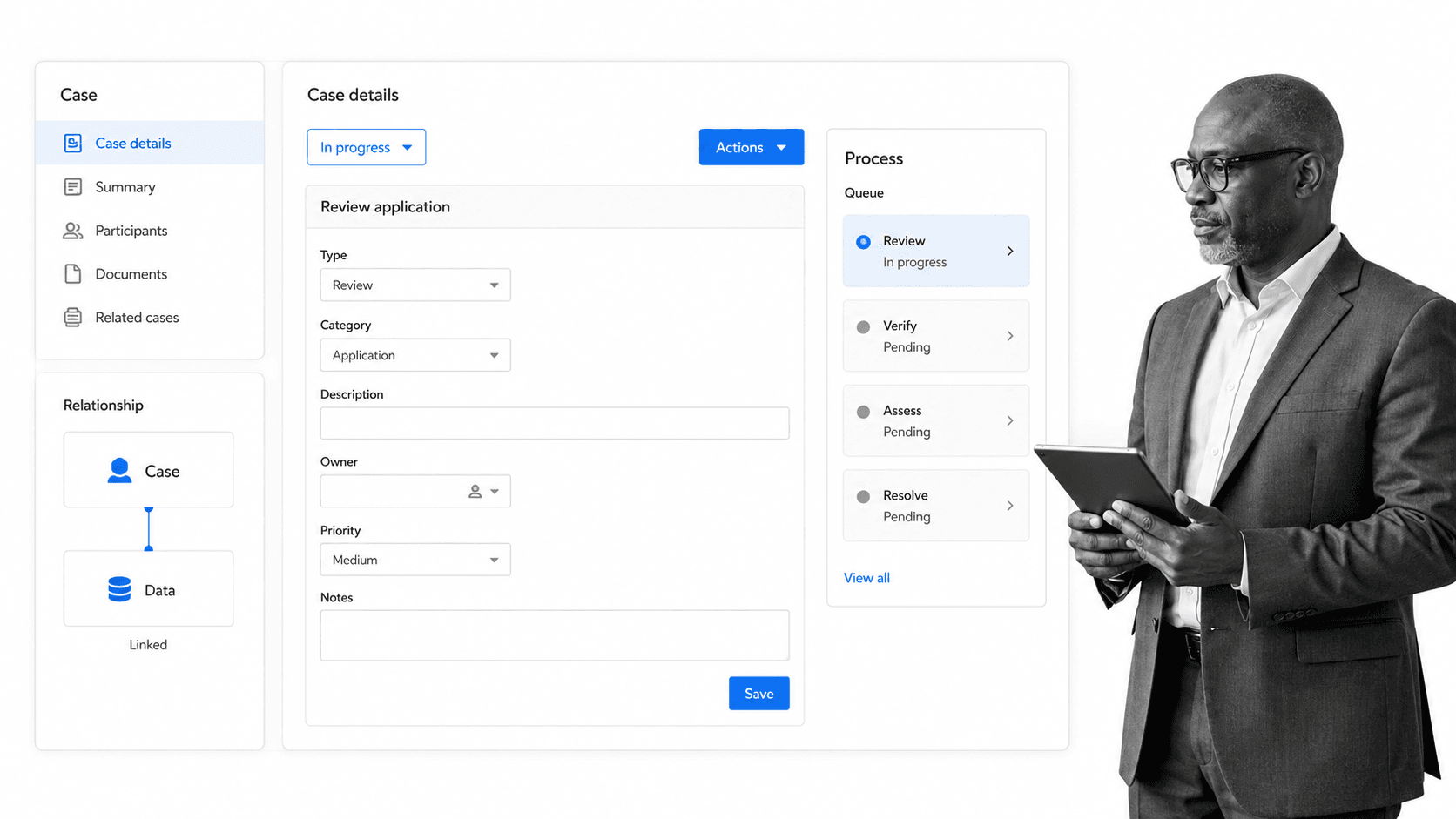
Best for: enterprise low-code applications, process orchestration, and case work.
Appian is a broad enterprise low-code platform for designing applications and automating processes. Its pricing and platform pages describe low-code process and application development, data fabric, integrations, robotic process automation, portals, mobile apps, case management, process intelligence, and AI capabilities across packaged tiers.
This breadth matters when a K2 replacement must become a tailored application rather than a single workflow. A team can combine process logic, records, interfaces, integrations, and case work in one platform. That flexibility also means implementation design, data architecture, permissions, and application lifecycle management become part of the buying decision.
Appian beats Process Street when the organization needs custom enterprise applications, complex case work, and a low-code data layer. Process Street is better when the user experience should remain a focused recurring workflow with clear tasks, required information, approvals, and a durable execution record.
Implementation and ownership fit
Ownership typically combines a low-code center of excellence, application delivery team, process owners, data stewards, and security administrators. The platform can reduce hand-coded application work, but it does not remove decisions about the data model, user experience, integration boundaries, release controls, and long-term application ownership.
A useful pilot should build a narrow case application from intake through resolution. Include a record, a form, a decision, an integration, a queue, an exception, and a report. Then measure how quickly the team can change the app without weakening permissions, data quality, or auditability. That test reveals whether the platform breadth creates useful leverage or unnecessary implementation weight.
When to shortlist Appian
Shortlist Appian when the buying team can state clearly that enterprise low-code applications, process orchestration, and case work is the primary requirement. Its differentiator in this comparison is process apps combining workflow, unified data, RPA, portals, and governance. Keep it behind Process Street when the real problem is simply getting operators to complete a recurring SOP with required evidence, accountability, and approvals, because a broader platform can add ownership and implementation work that the process does not need.
Key features
- Low-code process and application development.
- Data fabric for connecting business data to applications.
- Robotic process automation and integration support.
- Portals and mobile application capabilities.
- Case management and process intelligence in higher packages.
Pros
- Broad platform for building enterprise process applications.
- Combines workflow, data, interfaces, and automation.
- Strong fit for complex regulated operations with custom requirements.
- Better than Process Street for application-centric transformation.
Cons
- A broader platform brings more implementation and governance work.
- Pricing varies by user, month, app, and package.
- Can be overbuilt for a known recurring procedure.
Appian describes pricing per user, per month, per app, with capabilities varying by package. Verify current package details on the official Appian pricing page.
3. Pega
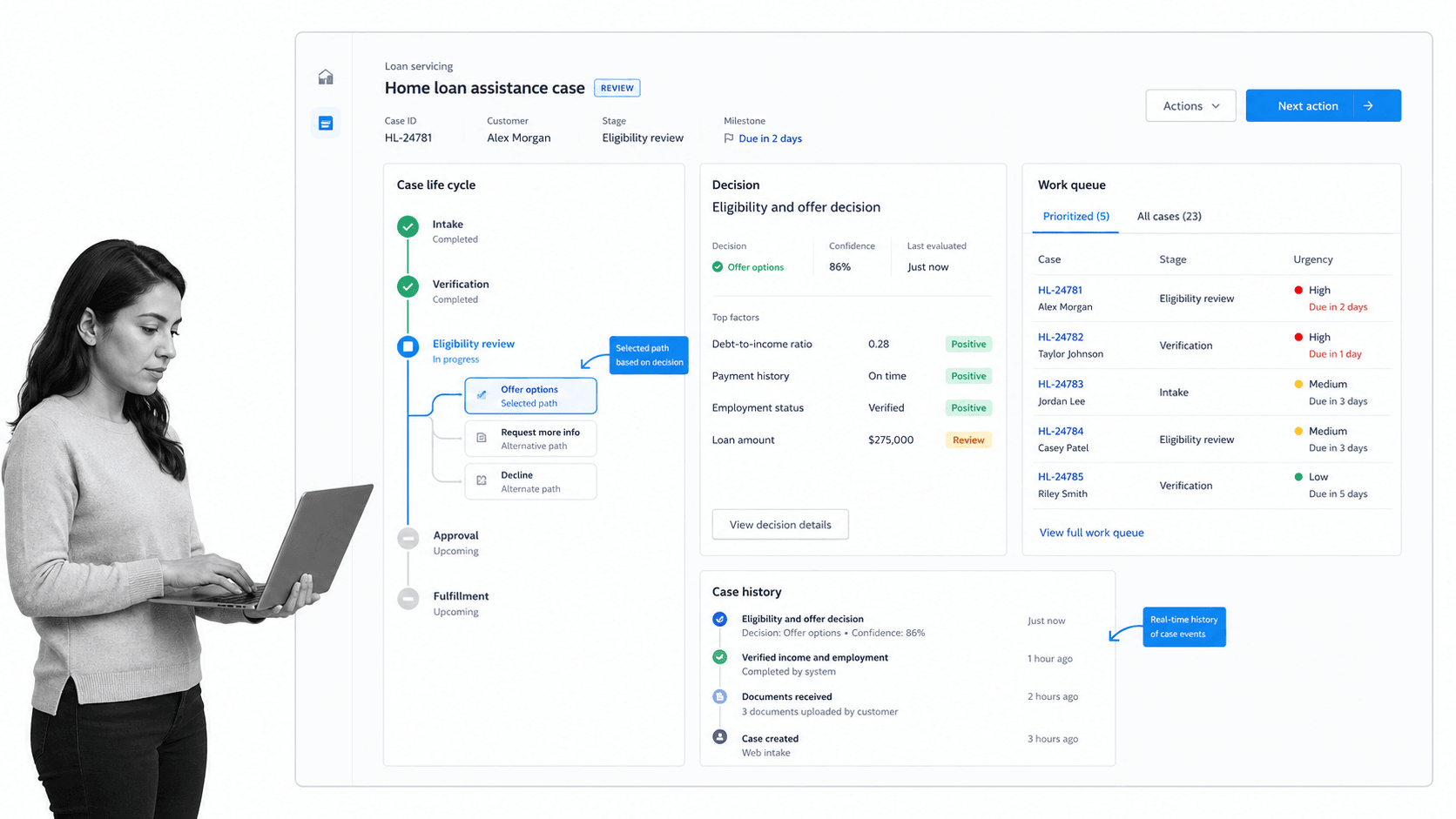
Best for: complex enterprise case work and decision-driven processes.
Pega is built for enterprise workflows where the path cannot always be reduced to one fixed checklist. Its official case management material centers on dynamic case lifecycles, human actions, digital automation, process visualization, governance, data, and decision logic. That makes it a close Appian alternative for regulated case work, service operations, claims, investigations, and other processes that change as new facts arrive.
The platform can guide a case from intake to resolution while combining milestones, assignments, business rules, automation, and contextual decisions. This breadth is useful when the process owner needs the system to decide what should happen next for each case rather than simply enforce the same sequence every time. It also creates a more involved design and governance model than a focused recurring-workflow tool.
Pega beats Process Street when dynamic case management, enterprise decisioning, and customer-service workflows are the primary requirements. Process Street is stronger when the operating procedure is known and the team mainly needs required steps, approvals, evidence, accountability, and a reviewable completed run.
Implementation and ownership fit
Ownership usually combines business architects, case operations leaders, application developers, data owners, and platform administrators. Those roles must agree on the case lifecycle, rules, assignments, decision logic, user experience, integrations, and release controls. A dynamic case platform is valuable because the work changes, but that same flexibility requires clear design authority.
A useful pilot should run one exception-heavy case from intake to resolution. Include at least two possible paths, a human decision, an automated action, a missing-information loop, and an escalation. Measure whether the platform makes changing context easier to manage or simply moves complexity into configuration.
When to shortlist Pega
Shortlist Pega when the buying team can state clearly that complex enterprise case work and decision-driven processes is the primary requirement. Its differentiator in this comparison is dynamic case lifecycles linked to workflow automation and decision logic. Keep it behind Process Street when the real problem is simply getting operators to complete a recurring SOP with required evidence, accountability, and approvals, because a broader platform can add ownership and implementation work that the process does not need.
Key features
- Dynamic case lifecycles with milestones and changing work paths.
- Human work combined with digital automation.
- Business rules and decision logic inside case processing.
- Process visualization across people, data, and actions.
- Governance controls for complex enterprise processes.
Pros
- Strong fit for unpredictable or exception-heavy case work.
- Combines workflow, case context, and decision logic.
- Supports enterprise programs where one customer or case can follow different paths.
- Better than Process Street when dynamic case management is the core job.
Cons
- Requires more specialized implementation and governance.
- Commercial pricing is sales-led.
- Can be too broad for a stable recurring SOP.
Pega provides interactive trials and Community Edition access, while commercial pricing requires direct engagement. Verify current package details on the official Pega pricing page.
4. Microsoft Power Automate
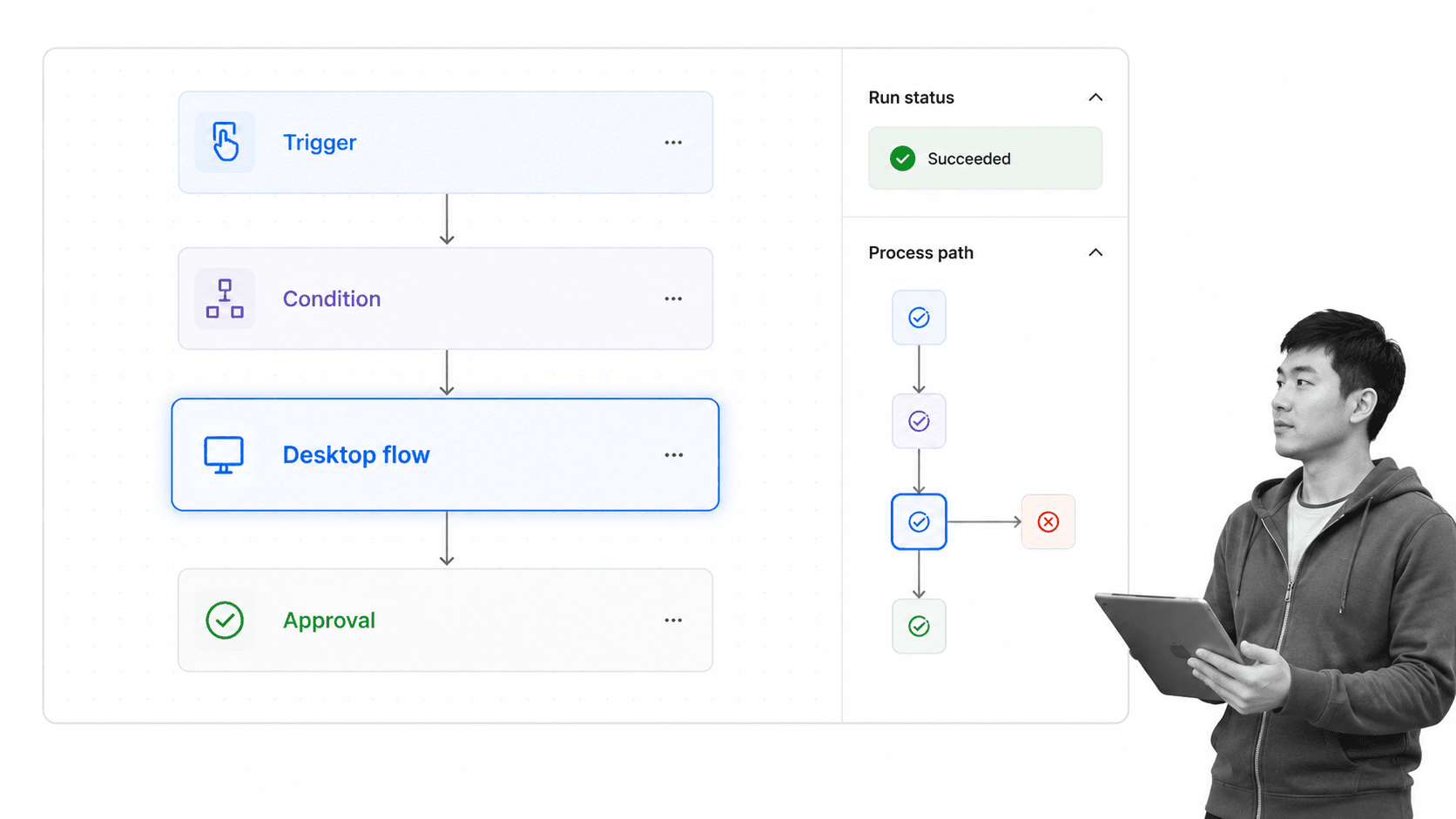
Best for: Microsoft-centric cloud flows, desktop automation, and process mining.
Microsoft Power Automate is the natural K2 alternative for teams whose automation estate already lives in Microsoft 365, Dynamics 365, Teams, Dataverse, Windows, and Azure. Microsoft positions the product around cloud flows, desktop flows, process and task mining, connectors, unattended automation, and hosted process capacity.
Its strength is ecosystem reach. A team can trigger work from Microsoft services, move information through cloud applications, automate desktop interfaces, and monitor process opportunities inside the same platform family. The design model is action and connector centric, so the product is excellent for system automation but may need another layer when humans must follow a detailed SOP and provide evidence in a guided run.
Power Automate beats Process Street when Microsoft-native integration, desktop automation, and connector-based actions are the central requirements. Process Street is stronger when the workflow itself must be the operator’s system of action, with required steps, approvals, files, and an audit-ready history that is easy to review.
Implementation and ownership fit
Ownership can range from individual business makers to a formal Power Platform center of excellence. That flexibility is useful, but governance matters quickly. Teams should define environments, connector policies, solution packaging, service accounts, bot ownership, monitoring, and the boundary between personal productivity flows and business-critical automation.
A representative pilot should include a cloud trigger, a conditional branch, an approval, a connection to a Microsoft system, and one desktop or external application action if that is in scope. Test ownership transfer, credential changes, error visibility, and licensing assumptions. The technical flow can work while the human SOP around it remains unclear, so evaluate both layers separately.
When to shortlist Microsoft Power Automate
Shortlist Microsoft Power Automate when the buying team can state clearly that Microsoft-centric cloud flows, desktop automation, and process mining is the primary requirement. Its differentiator in this comparison is cloud and desktop flows within the Microsoft Power Platform ecosystem. Keep it behind Process Street when the real problem is simply getting operators to complete a recurring SOP with required evidence, accountability, and approvals, because a broader platform can add ownership and implementation work that the process does not need.
Key features
- Cloud flows for automated, instant, and scheduled actions.
- Desktop flows for attended and unattended automation scenarios.
- Standard, premium, and custom connector options by plan.
- Process and task mining capabilities.
- Dataverse capacity and managed-environment options in paid plans.
Pros
- Best fit for organizations standardized on Microsoft services.
- Combines API-based cloud automation and desktop RPA.
- Transparent public starting prices for core plans.
- Better than Process Street for Microsoft-centric system automation.
Cons
- Licensing changes by user, bot, process, hosted capacity, and add-on.
- Connector logic does not automatically become a clear SOP experience for operators.
- Cross-platform governance can become complex in a large Power Platform estate.
Microsoft publishes a 30-day free trial and lists Power Automate Premium at $15 per user per month, paid yearly. Verify current package details on the official Microsoft Power Automate pricing page.
5. Camunda
Best for: developer-led BPMN orchestration across people, systems, and services.
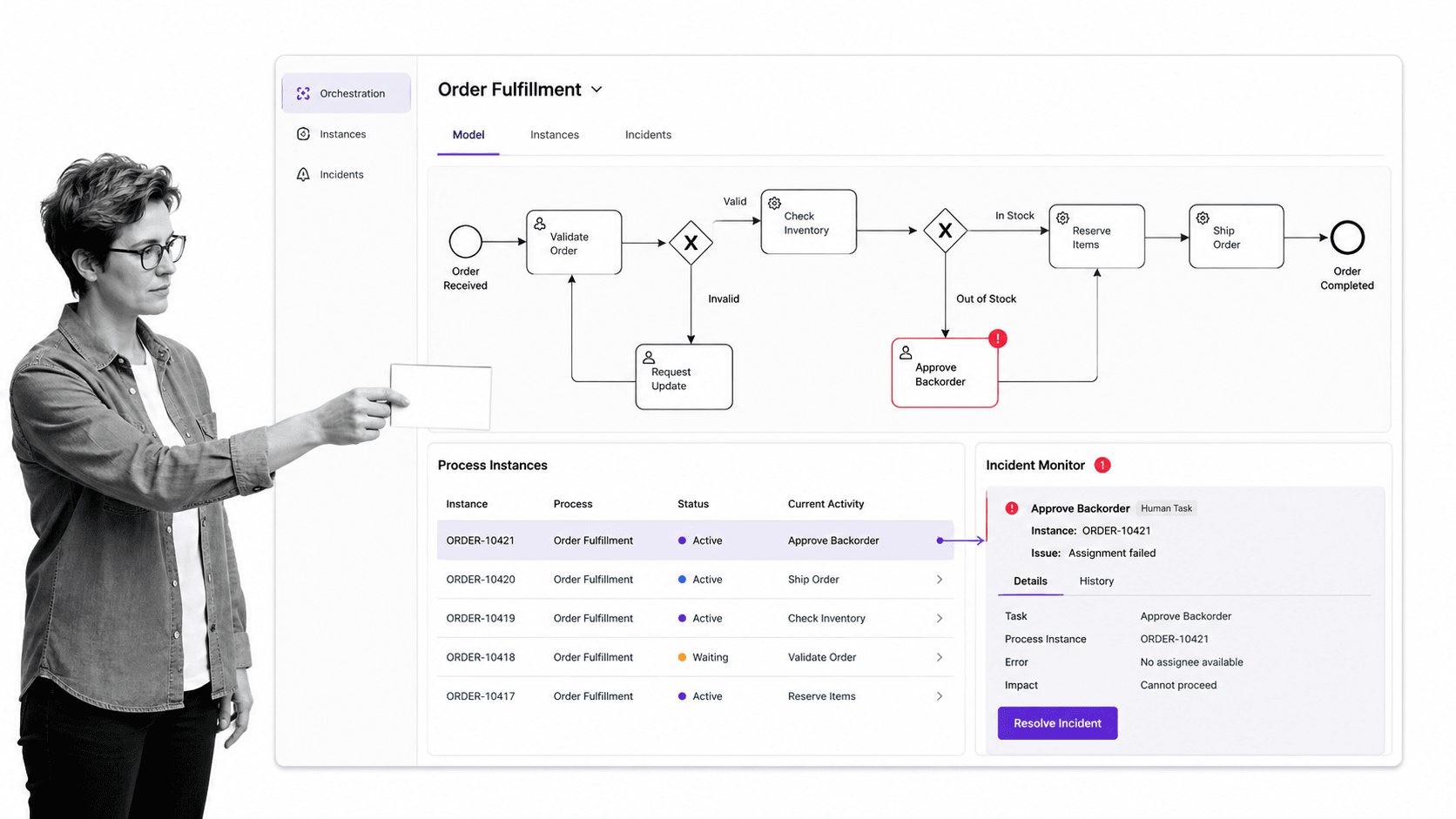
Camunda is a developer-oriented process orchestration platform built around BPMN and DMN. Its current platform positioning emphasizes connecting people, systems, services, and AI agents in end-to-end processes. Teams can model orchestration explicitly, inspect running process instances, work with human tasks, and choose between hosted and self-managed deployment approaches.
That makes Camunda compelling when K2 is being evaluated as an execution engine rather than a business-user workflow layer. Architects can use the process model as the coordinating contract across distributed applications. The operational model is more technical than Process Street because the value comes from orchestrating software systems and long-running process state, not just presenting a clear checklist to a process owner.
Camunda beats Process Street when engineering teams need BPMN execution, service orchestration, deployment control, and technical observability. Process Street fits better when operations teams need to own recurring workflows directly and want approvals, evidence, forms, and accountability without treating the workflow as a software development project.
Implementation and ownership fit
Ownership belongs with engineering, platform, or automation teams that are comfortable treating the process model as executable architecture. They need to manage deployment, testing, incidents, connectors, security, and changes across services. Business stakeholders can participate in the model, but the production operating model is technical and should be evaluated as part of the platform roadmap.
A credible pilot should orchestrate one end-to-end process that crosses at least two systems and one human task. Test failure handling, retries, incident visibility, version changes, and the experience of the person receiving the human task. This gives the team evidence about orchestration reliability and operational support, not just whether a BPMN diagram can be drawn.
When to shortlist Camunda
Shortlist Camunda when the buying team can state clearly that developer-led BPMN orchestration across people, systems, and services is the primary requirement. Its differentiator in this comparison is executable BPMN and DMN with SaaS and self-managed deployment choices. Keep it behind Process Street when the real problem is simply getting operators to complete a recurring SOP with required evidence, accountability, and approvals, because a broader platform can add ownership and implementation work that the process does not need.
Key features
- BPMN process modeling and execution.
- DMN decision modeling and execution.
- Process instance monitoring and incident inspection.
- Human task support alongside automated service work.
- SaaS and self-managed deployment options.
Pros
- Excellent fit for developer-led orchestration across systems.
- Formal process models create a shared contract for complex automation.
- Deployment options support different infrastructure strategies.
- Better than Process Street for code-centric service orchestration.
Cons
- Requires stronger technical ownership than an operator-focused workflow tool.
- Production use moves into enterprise licensing.
- May be excessive for routine SOPs that do not need an orchestration engine.
Camunda provides free development and modeling paths, while production execution requires enterprise licensing. Verify current package details on the official Camunda pricing page.
6. Kissflow
Best for: business-led workflow apps with centralized IT governance.
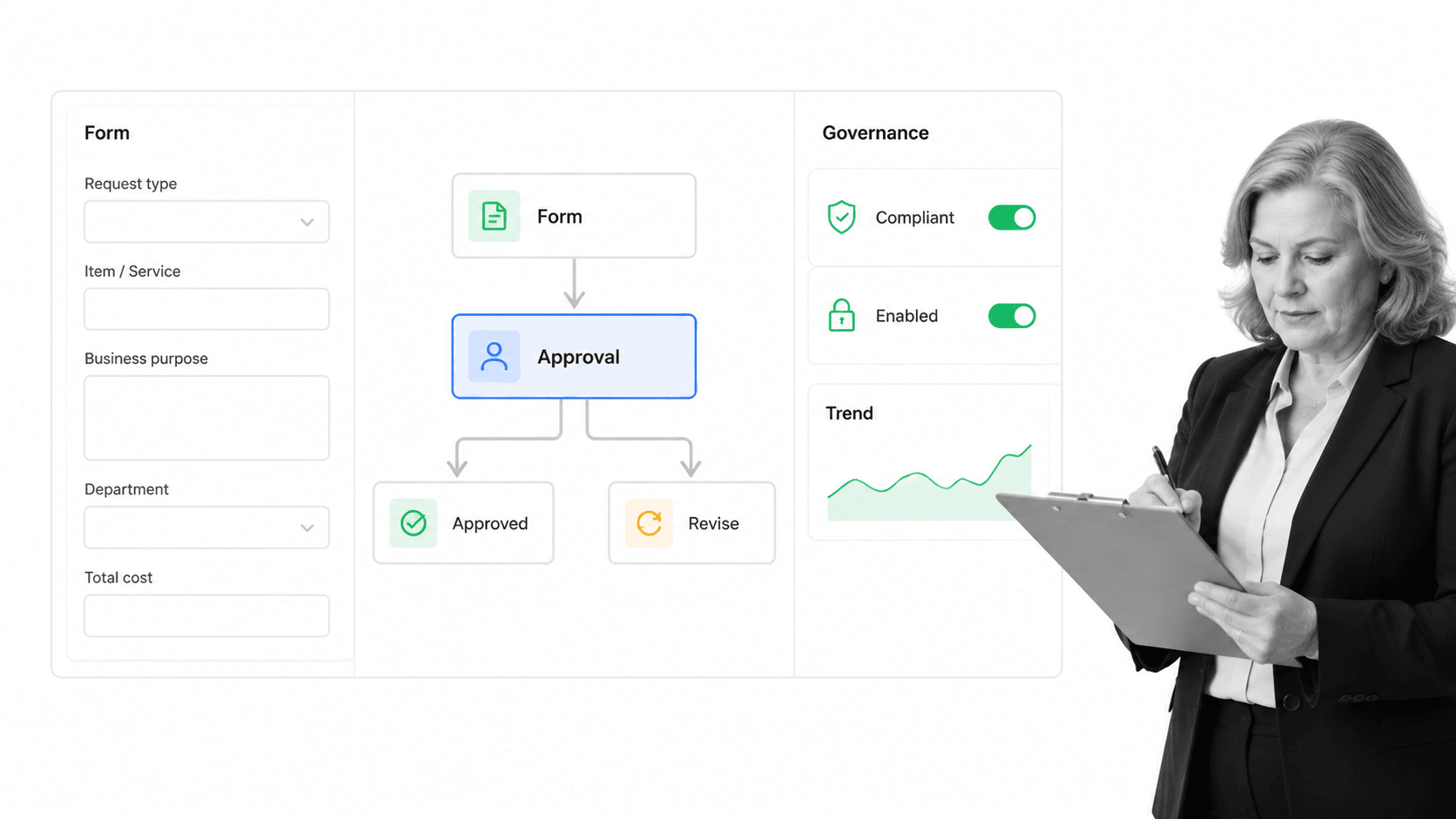
Kissflow is a business workflow and process automation platform designed for process owners, analysts, and IT teams that want to build and govern workflows without turning every change into a traditional software project. Its official workflow pages describe no-code design, forms, dynamic routing, analytics, integrations, access controls, and centralized governance.
This makes Kissflow relevant when a K2 replacement should stay accessible to business teams while IT retains oversight. Teams can create structured approval flows, request processes, forms, task routing, dashboards, and department-specific applications on one platform. The commercial model is aimed at enterprise rollouts rather than a small self-serve subscription.
Kissflow beats Process Street when the program centers on building a wider collection of business workflow applications with centralized IT governance. Process Street is stronger when the work should remain an enforceable recurring SOP run with required steps, evidence, approvals, accountability, and a durable completion record.
Implementation and ownership fit
Ownership usually combines business process owners, analysts, IT administrators, and a governance team. Define who can publish workflows, which connectors and data sources are allowed, how reusable patterns are shared, and which changes require review. The platform is approachable, but a large workflow portfolio still needs standards.
A useful pilot should cover one cross-department request with a form, conditional route, approval, escalation, dashboard, and connected system. Test a policy change after the workflow is live and confirm that the team can update the design without losing history or weakening controls. That reveals whether distributed building and centralized governance stay balanced.
When to shortlist Kissflow
Shortlist Kissflow when the buying team can state clearly that business-led workflow apps with centralized IT governance is the primary requirement. Its differentiator in this comparison is no-code workflow design with forms, routing, analytics, and governance. Keep it behind Process Street when the real problem is simply getting operators to complete a recurring SOP with required evidence, accountability, and approvals, because a broader platform can add ownership and implementation work that the process does not need.
Key features
- No-code workflow design for sequential, parallel, and conditional paths.
- Forms, routing, approvals, and task assignment.
- Dashboards and analytics for process owners.
- Integration support through APIs and connected systems.
- Governance and access controls for enterprise workflow programs.
Pros
- Accessible design model for business process owners.
- Balances distributed building with centralized governance.
- Covers workflows, forms, analytics, and integrations in one platform.
- Better than Process Street when a portfolio of business apps is the objective.
Cons
- Commercial pricing requires vendor engagement.
- The platform scope can require a formal governance model.
- A focused recurring SOP may not need the broader application layer.
Kissflow uses fixed annual agreements and handles package specifics through its sales process. Verify current package details on the official Kissflow pricing page.
7. Pipefy
Best for: no-code request intake and departmental workflow automation.
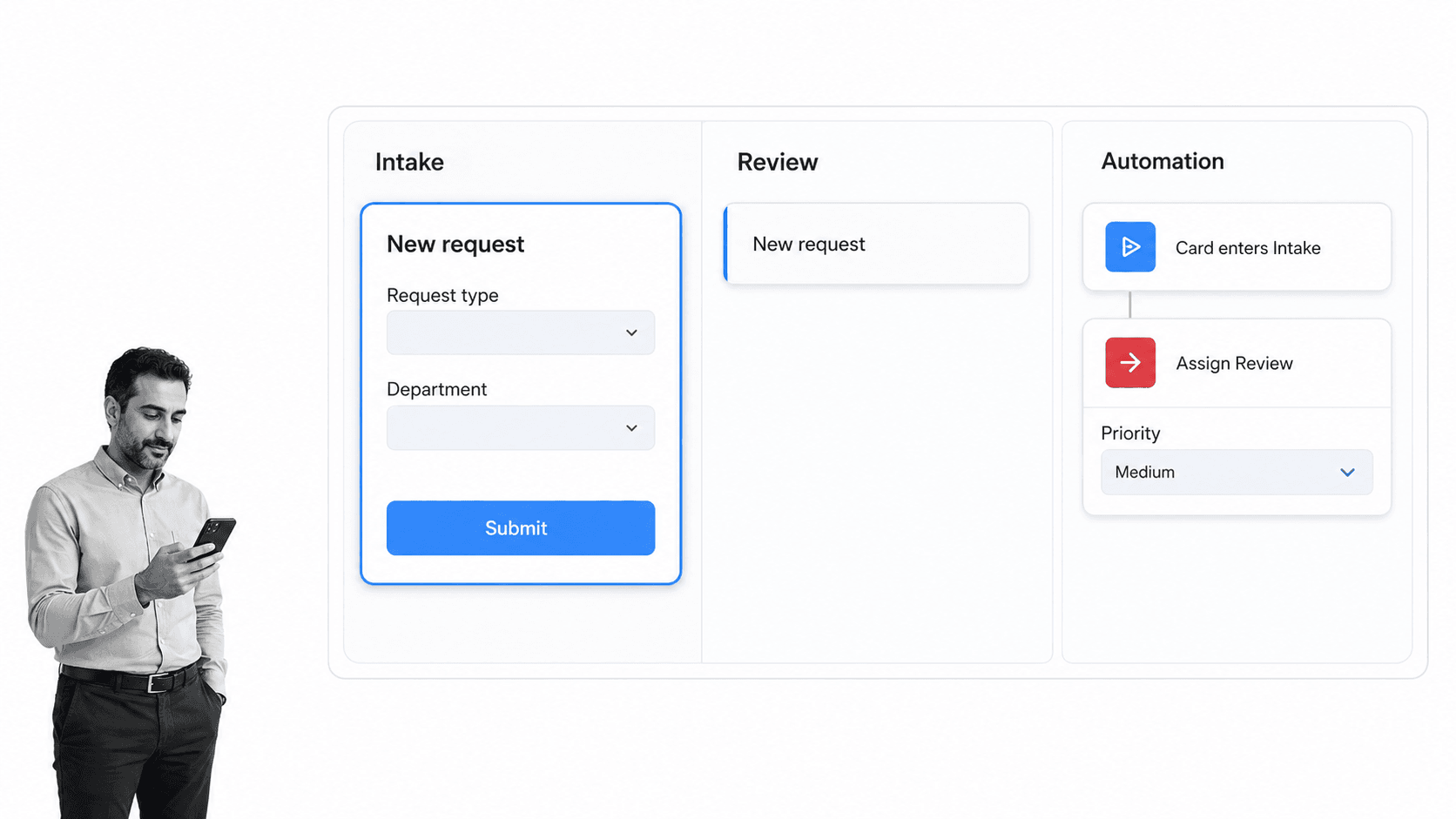
Pipefy is a no-code process automation platform organized around visual pipes, request cards, forms, phases, rules, portals, and dashboards. Its pricing page includes a free Starter plan, while paid Business and Enterprise packages add broader workflow, governance, integration, security, and support capabilities.
The product is a practical K2 alternative for departmental workflows such as procurement requests, service intake, onboarding coordination, approvals, and shared-services queues. Business teams can see work move through phases and configure common routing patterns without turning every process into a formal BPMN program.
Pipefy can beat Process Street when a visual request queue, portal-style intake, and card movement through phases are the preferred operating model. Process Street is the better fit when each process instance should guide a person through a detailed SOP with required evidence, task-level accountability, and procedural enforcement.
Implementation and ownership fit
Ownership fits departmental process managers who think naturally in requests, phases, cards, forms, and service queues. A central administrator can define security and shared standards while teams configure their own operational pipes. The model is approachable, but administrators should still control field definitions, automations, integrations, data retention, and cross-pipe dependencies.
A useful pilot should start with a live intake process such as procurement, employee requests, or client onboarding. Include a public or internal form, routing logic, an approval, an SLA exception, and a dashboard review. Pay attention to card volume, automation limits, guest participation, and the amount of procedural guidance users need inside each phase.
When to shortlist Pipefy
Shortlist Pipefy when the buying team can state clearly that no-code request intake and departmental workflow automation is the primary requirement. Its differentiator in this comparison is visual pipes, forms, request tracking, and configurable automation. Keep it behind Process Street when the real problem is simply getting operators to complete a recurring SOP with required evidence, accountability, and approvals, because a broader platform can add ownership and implementation work that the process does not need.
Key features
- Visual pipes with phase-based request cards.
- Public forms and request tracking.
- Automation rules and conditional logic.
- Dashboards, activity history, and SLA-oriented workflow controls.
- Paid-plan integrations, permissions, and security features.
Pros
- Accessible no-code model for departmental process owners.
- Free Starter plan lowers the barrier for small teams.
- Strong request-intake and queue visibility.
- Better than Process Street when a card-and-phase interface is the preferred model.
Cons
- Free-plan capacity and automation limits require attention.
- Paid plans move to sales-led pricing.
- A phase board can be less prescriptive than a task-by-task SOP run.
Pipefy publishes a free Starter plan, while Business and Enterprise pricing requires sales contact. Verify current package details on the official Pipefy pricing page.
8. OutSystems
Best for: mission-critical custom applications and governed agentic systems.
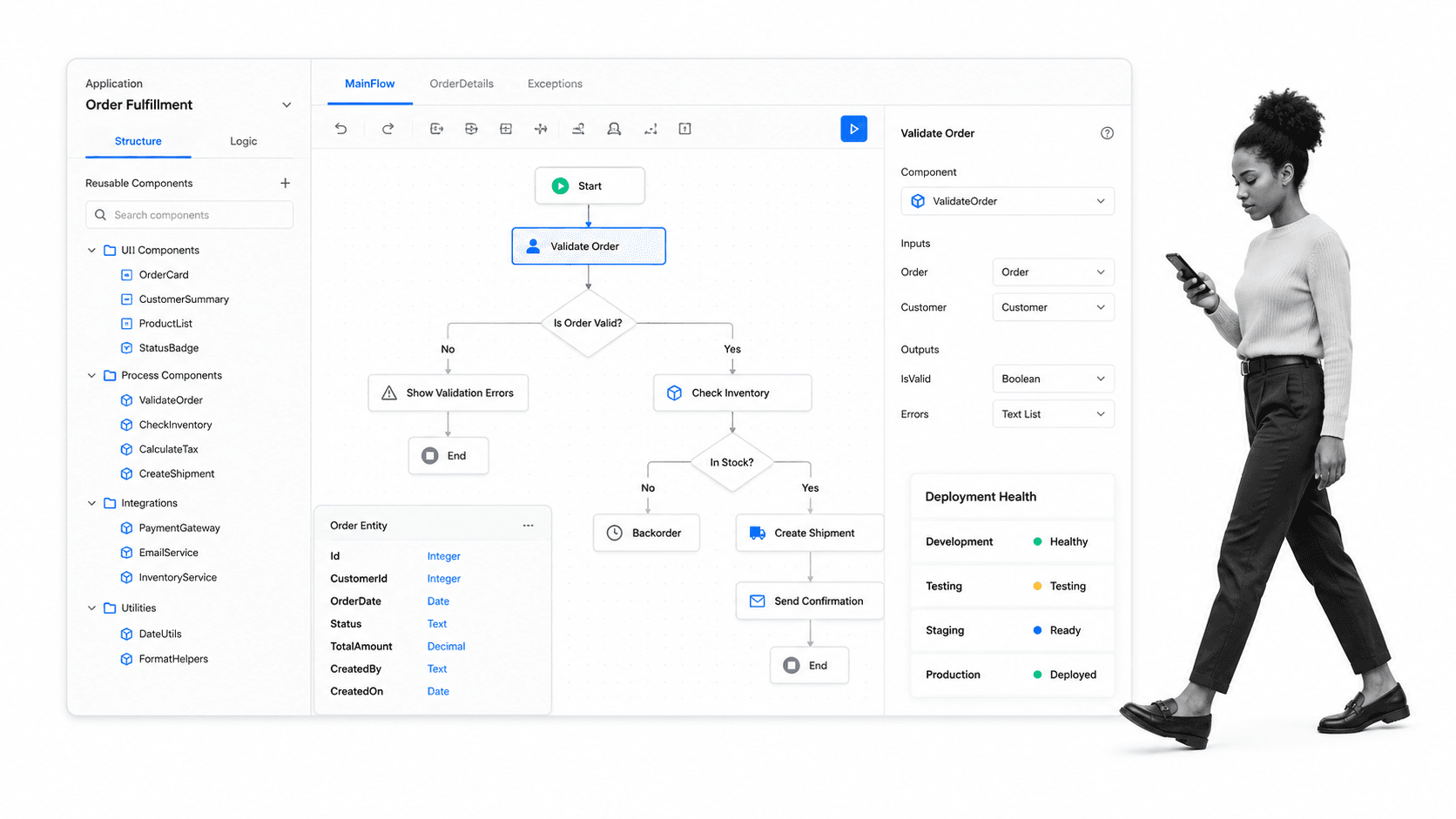
OutSystems positions its current platform around building, running, and governing enterprise applications, AI agents, workflows, data connections, and reusable components. Its official platform material emphasizes visual model-driven development, integrated lifecycle controls, security, observability, flexible deployment, and coordination across applications and agents.
This is relevant when an Appian alternative must support mission-critical software delivery rather than only process execution. Development teams can use a visual application model while still managing architecture, integrations, reusable components, deployment, monitoring, and governance. The platform decision therefore sits closer to enterprise application strategy than to buying a guided SOP tool.
OutSystems beats Process Street when the organization needs to build and govern full custom applications or agentic systems. Process Street is the better fit when the procedure is already defined and the main requirement is controlled recurring execution by business teams.
Implementation and ownership fit
Ownership belongs with an enterprise application team that can govern architecture, components, integrations, security, deployment, observability, and reuse. Business stakeholders can participate closely, but the platform should be evaluated as a software delivery system rather than a task checklist.
A useful pilot should deliver one end-to-end application slice with a real data connection, reusable component, workflow, role model, deployment, and monitoring signal. Test a requirement change after the first release. The key question is whether the model-driven approach makes ongoing delivery safer and faster for the actual team.
When to shortlist OutSystems
Shortlist OutSystems when the buying team can state clearly that mission-critical custom applications and governed agentic systems is the primary requirement. Its differentiator in this comparison is model-driven application delivery with integrated lifecycle governance. Keep it behind Process Street when the real problem is simply getting operators to complete a recurring SOP with required evidence, accountability, and approvals, because a broader platform can add ownership and implementation work that the process does not need.
Key features
- Visual model-driven application development.
- Reusable user interface, logic, data, and service components.
- Application and agent lifecycle governance.
- Integrated deployment, monitoring, and observability.
- Enterprise data and system integration capabilities.
Pros
- Broad fit for mission-critical custom software delivery.
- Connects visual development with lifecycle and governance controls.
- Supports applications, agents, workflows, and data in one platform direction.
- Better than Process Street for full application delivery.
Cons
- Requires software delivery and platform governance capabilities.
- Commercial pricing is sales-led.
- Unnecessary breadth for a straightforward recurring SOP.
OutSystems provides a start-free path and handles commercial pricing through sales engagement. Verify current package details on the official OutSystems pricing page.
How to choose among K2 alternatives
The first decision is whether you need to model and analyze a process or execute it. Formal process architecture points toward workflow orchestration tools, mining, simulation, and repository products. Day-to-day execution points toward a workflow management system that gives every participant the right task, context, requirement, and approval at the right moment.
The second decision is ownership. If process architects and developers will build the solution, Appian, Pega, Microsoft Power Automate, Camunda, Kissflow, or OutSystems may be appropriate. If the operating team should own and improve the procedure directly, compare the usability of the workflow editor and the clarity of each live run, not just the breadth of the platform.
The third decision is the artifact you need at the end. A model is useful for alignment. A mining result is useful for analysis. A low-code app is useful for a custom interaction. A completed recurring workflow is useful when the organization needs evidence that required work happened. This distinction separates a broad business process management solution from an enforceable SOP system.
Use the broader lists of process platforms, business process automation tools, and business process management tools to expand the market only after the buying criteria are clear. Large unfiltered shortlists often compare products that solve different layers of the problem.
Open-source requirements can narrow the field further, especially for technical teams that want deployment control. The current open-source BPM software landscape includes orchestration engines and modeling tools, but self-management introduces infrastructure, security, upgrade, and support responsibilities that a business team should price honestly.
Finally, validate the real workflow with a small pilot. Model one process, run it with actual owners, collect the evidence, route an exception, and review the completed history. For a direct view of the recurring-workflow difference, use the focused Nintex alternatives after you have decided whether K2 breadth or Process Street execution is closer to the job.
K2 alternatives FAQs
Is there a free K2 alternative?
Yes. Pipefy publishes a free Starter plan, Camunda provides free modeling and non-production development, Microsoft Power Automate publishes a 30-day trial, and OutSystems offers a start-free path. Free access varies in production rights, workflow limits, users, connectors, and support, so confirm the current terms on each vendor’s pricing page.
What is the best K2 alternative for small teams?
Process Street is the best fit in this ranking when a small team needs recurring SOP execution with required steps, approvals, and evidence. Pipefy is a reasonable alternative for a visual request queue, while Power Automate can fit teams already centered on Microsoft services. The choice depends on the work pattern, not team size alone.
What is the best K2 alternative for enterprise process transformation?
Appian and OutSystems deserve close evaluation when the outcome is a custom low-code application. Pega is stronger when dynamic case management and decision logic drive the program. Process Street remains the better fit for a narrower enterprise requirement centered on recurring operational execution and proof.
What is the closest K2 alternative for workflow orchestration?
Camunda is one of the closest options when BPMN execution and technical orchestration are the core requirements. Appian is closer when the replacement must combine process orchestration, unified data, and custom application delivery. Process Street is not positioned as a BPMN suite.
Is there a Microsoft alternative to K2?
Microsoft Power Automate is the most direct Microsoft-centered option for cloud flows, desktop flows, connectors, and process mining. It is especially relevant for organizations invested in Microsoft 365, Dynamics 365, Teams, Dataverse, Windows, and Azure. A guided SOP layer may still be useful when human execution needs detailed enforcement.
How should a team migrate from K2?
Inventory each process by trigger, owner, steps, required data, decisions, approvals, exceptions, systems, evidence, and reporting. Separate modeling artifacts from live execution requirements, then pilot one representative process in the chosen platform. Validate ownership, exception handling, completed-run evidence, integration behavior, and administrative effort before moving the larger portfolio.
Why is Process Street ranked first?
Process Street is ranked first for the specific ICP used here: teams that need enforceable, trackable, recurring SOP and operational workflows. It is not the universal winner for process mining, BPMN simulation, developer orchestration, or custom low-code apps. The ranking rewards fit for repeatable human process execution, approvals, evidence, and accountability.
Put recurring workflows into action
If your K2 alternatives search is really a search for consistent execution, start with process management platform criteria that operators can test: required steps, clear ownership, approvals in context, evidence capture, exception routing, and a completed history that a manager or auditor can review.
Process Street is built for that recurring-workflow job. Put one real procedure into the platform, run it with the people who own the work, and judge whether the process becomes easier to follow, easier to manage, and easier to prove.
