


Turn every policy into automated workflows with built-in enforcement and audit-ready proof.



Form Integration
Form integration connects a form to the systems and workflows that need its data. Instead of leaving a response in an inbox or spreadsheet, the integration validates the submission, maps its fields, routes it to the right destination, starts follow-up work, and records what happened.
A useful integration does more than copy values. It preserves context, handles errors, protects sensitive information, prevents duplicate records, and makes ownership visible. That is what turns an online form from a collection surface into a dependable operational trigger.
This guide explains how form integration works, when to use connectors, webhooks, or APIs, how to design the data flow, how to secure it, and how Process Street can turn submitted forms into controlled work.
In this article, we are going to cover:
- What form integration is
- Why form integration matters
- How form integration works
- Form integration methods
- How to design a form integration
- Form integration security and reliability
- Build form integrations with Process Street
- Form integration examples
- FAQs
What form integration is
Form integration is the connection between a form and another application, database, workflow, or service. The form captures structured input. The integration decides how that input moves, how fields correspond, which event starts the transfer, and what the destination should do next.
The form is the intake layer
The form presents questions, applies basic validation, and collects files or structured values. It may be public, embedded, internal, or attached to a workflow. Its job is to make the requested input clear and usable.
The integration is the movement layer
The integration listens for a submission or another event, transforms the payload when needed, authenticates with the destination, and sends the data. It may also return an identifier, status, error, or confirmation to the source system.
The workflow is the action layer
Once data arrives, a form application or workflow approval process can assign reviews, request missing evidence, branch by risk, and preserve the decision. This downstream layer is where a response becomes work.
Form integration versus form embedding
Embedding only places a form on a page. Integration moves or acts on the submitted data. A form can be embedded without any meaningful integration, and an integration can run from a hosted form that is never embedded.
Why form integration matters
Form integration matters because response collection is rarely the real outcome. A lead needs qualification. A purchase request needs approval. An incident report needs triage. A job application needs review. A policy exception needs evidence and a decision.
It removes manual re-entry
Without integration, someone copies data from the form into a CRM, ticket, database, or task. That creates delay and introduces transcription errors. A controlled transfer moves approved fields into the destination consistently.
It shortens response time
An event-driven integration can start work as soon as the submission arrives. The right person receives an assignment, urgent cases follow an escalation path, and routine responses can continue automatically.
It preserves context
A well-designed payload carries the submission identifier, requester, timestamps, attachments, consent state, and source. Reviewers can understand why the record exists instead of reconstructing the story across several tools.
It creates an operating record
A form dashboard can show volumes and statuses, while a form process service can manage the broader response operation. Integration supplies the trustworthy events and records those layers depend on.
How form integration works
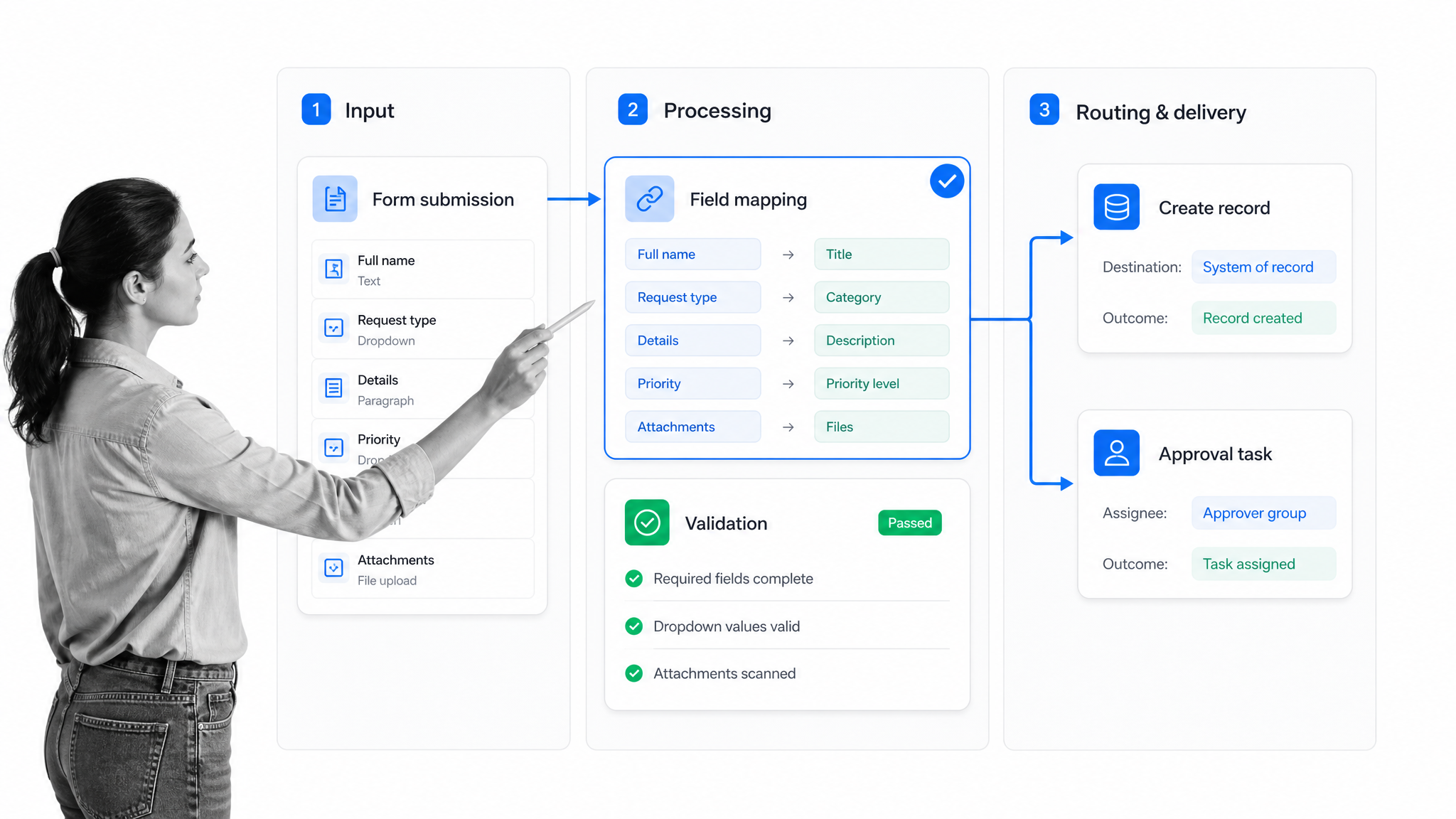
Most form integrations follow the same sequence: capture, validate, map, authenticate, deliver, confirm, and monitor. The implementation may be no-code or custom, but the control points stay similar.
1. A submission creates an event
The source form emits an event when a response is submitted. Some systems send the event immediately. Others expose new responses through an API that another service checks on a schedule.
2. Validation checks the payload
Required fields, formats, file types, consent values, and business rules should be checked before the destination is updated. Source-side validation improves the user experience, but destination-side validation still matters because integrations must not trust incoming data blindly.
3. Field mapping aligns the systems
Field mapping pairs a source value with the destination property that should receive it. A form field called Department might map to a CRM property, ticket queue, workflow variable, or database column. Mapping should document data types, allowed values, transformations, and default behavior.
4. Routing applies business rules
Routing decides where the submission goes. Rules can use request type, location, value, risk, customer tier, language, or another field. Keep routing logic visible enough that an operator can explain why a record followed a particular path.
5. Delivery updates the destination
The integration creates or updates a record, starts a workflow, attaches a file, sends a notification, or calls another service. The destination should return a clear success or failure response and, when possible, a stable identifier for reconciliation.
6. Monitoring closes the loop
A successful HTTP response is useful, but it is not the whole operating outcome. Monitor rejected payloads, authentication failures, timeouts, duplicates, and downstream processing errors. Store enough evidence to replay or reconcile failed work safely.
Form integration methods
Choose a form integration method based on the event, required speed, data volume, security needs, system capabilities, and the team that will own the connection.
Native connectors
A native connector is a prebuilt connection between the form and another system. It is usually the fastest option when the supported trigger, actions, fields, and authentication meet the use case. Confirm what happens on errors and whether the connector can update existing records without creating duplicates.
Webhooks
A webhook pushes an event payload to a receiving URL. It is a strong fit for near-real-time response handling because the destination does not need to poll continuously. Process Street webhooks include a form-response submission event and workflow events that can keep other services informed.
APIs
An API integration gives developers direct control over retrieval, creation, updates, filtering, and reconciliation. APIs are useful when a workflow needs two-way synchronization, complex transformations, high data volume, or operations that a connector does not expose. Use standard HTTP status semantics so success, client errors, rate limits, and server failures can be handled differently.
Agentic integrations
Process Street has direct, universal integrations to 5,000+ systems. Need a new one? An AI agent builds it on the fly. This approach keeps the integration layer centered on the operational outcome instead of forcing every new connection through a fixed connector catalog.
Scheduled imports and exports
Batch transfers using CSV or scheduled jobs can be appropriate when real-time delivery is unnecessary. They are simpler to inspect, but they need clear cutoffs, duplicate handling, and reconciliation so late or corrected submissions are not lost.
Embedded custom code
Custom code offers flexibility but creates an ownership obligation. Document deployment, secrets, tests, logging, rate limits, retries, and the person responsible for maintaining the integration when either system changes.
How to design a form integration
Design the integration from the operational outcome backward. Start with what should happen after submission, then define the minimum data, rules, and controls needed to make that outcome reliable.
1. Define the destination outcome
Write the result in concrete terms: create a qualified lead, open an incident, start employee onboarding, request purchase approval, update a customer record, or assign a compliance review. Avoid vague goals such as send the data somewhere.
2. Inventory fields and data classes
List each field, its type, whether it is required, who may see it, how long it should be retained, and whether it includes personal, financial, health, authentication, or other sensitive information. Collect only what the process actually needs.
3. Create a mapping specification
For every source field, record the destination field, transformation, allowed values, default, and error behavior. Include identifiers that support updates and deduplication. A stable external ID is safer than matching on a mutable display name.
Plan transformations explicitly
Forms and destination systems rarely describe data in exactly the same way. A single choice on the form may need to become a destination code. A local phone number may need a country prefix. A multi-select answer may need to become an array, several tags, or separate records. Document each transformation, including trimming, capitalization, date and time handling, units, currency, and empty values. Keep transformations deterministic and testable. If a value cannot be converted safely, send it to an exception path with the original submission preserved. Silent coercion is dangerous because the integration may report success while the destination contains a plausible but incorrect value.
4. Define trigger and routing rules
Specify the event that starts the integration and the conditions that alter the path. Use conditional logic to keep routine submissions simple while sending higher-risk responses through extra checks.
5. Decide how failures behave
Define retry limits, backoff, timeout behavior, alert ownership, quarantine, and replay. Retrying every error is unsafe because validation failures will not heal with time. Separate transient failures from permanent payload problems.
6. Test with representative cases
Test a complete response, missing optional fields, invalid values, duplicate submission, large file, expired credentials, destination timeout, partial outage, and replay. Confirm the destination record and the user-visible outcome, not just the connector log.
7. Document ownership and change control
Name the business owner, technical owner, systems, credentials, mappings, alerts, and review cadence. When a form field or destination property changes, the integration should be reviewed before the change reaches production.
Form integration security and reliability
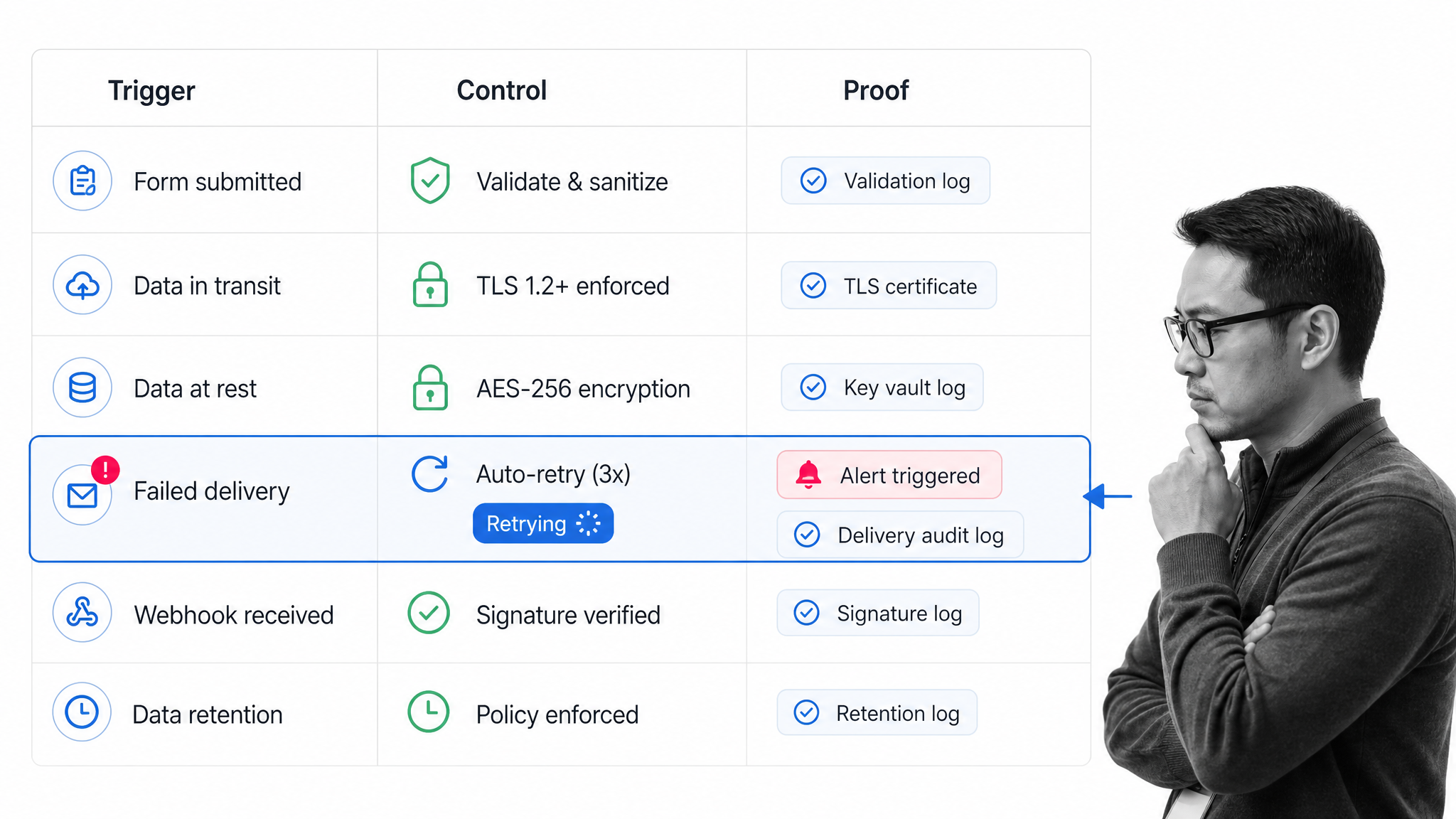
Security and reliability belong in the design, not as cleanup after launch. Form data often includes information that attackers value and operators depend on, so the integration needs explicit controls.
Authenticate every connection
Use supported token or delegated authorization methods, restrict credentials to the minimum permissions, store secrets outside code, and rotate them. The OAuth 2.0 authorization framework provides a standard model for delegated access. Never place long-lived secrets in a public form, browser script, or copied URL.
Verify incoming events
When a provider supports signed webhooks, validate the signature and timestamp before processing the payload. Apply replay protection and reject events outside the expected window. Treat every field as untrusted input, consistent with the risks cataloged by the OWASP API Security project.
Protect data in transit and at rest
Use encrypted transport, limit logs that contain raw submissions, control access to payload archives, and match retention to the business and regulatory need. The NIST digital identity guidelines offer useful guidance when identity proofing or authentication affects the integration. Redact sensitive values from routine error messages.
Make processing idempotent
Idempotent processing means the same event can be received more than once without creating duplicate effects. Store the source event or submission identifier, then check it before creating another destination record or payment, notification, or task.
Use retries with backoff
Transient failures may recover after a delay. Retry them with bounded backoff and a final quarantine state. Permanent validation or permission failures should move directly to an owned exception queue with the reason preserved.
Reconcile source and destination
Run periodic reconciliation between submitted responses and destination records. This detects silent failures, manual deletions, and partial updates that an event log may miss. The reconciliation report should name the owner and next action for every mismatch.
Build form integrations with Process Street
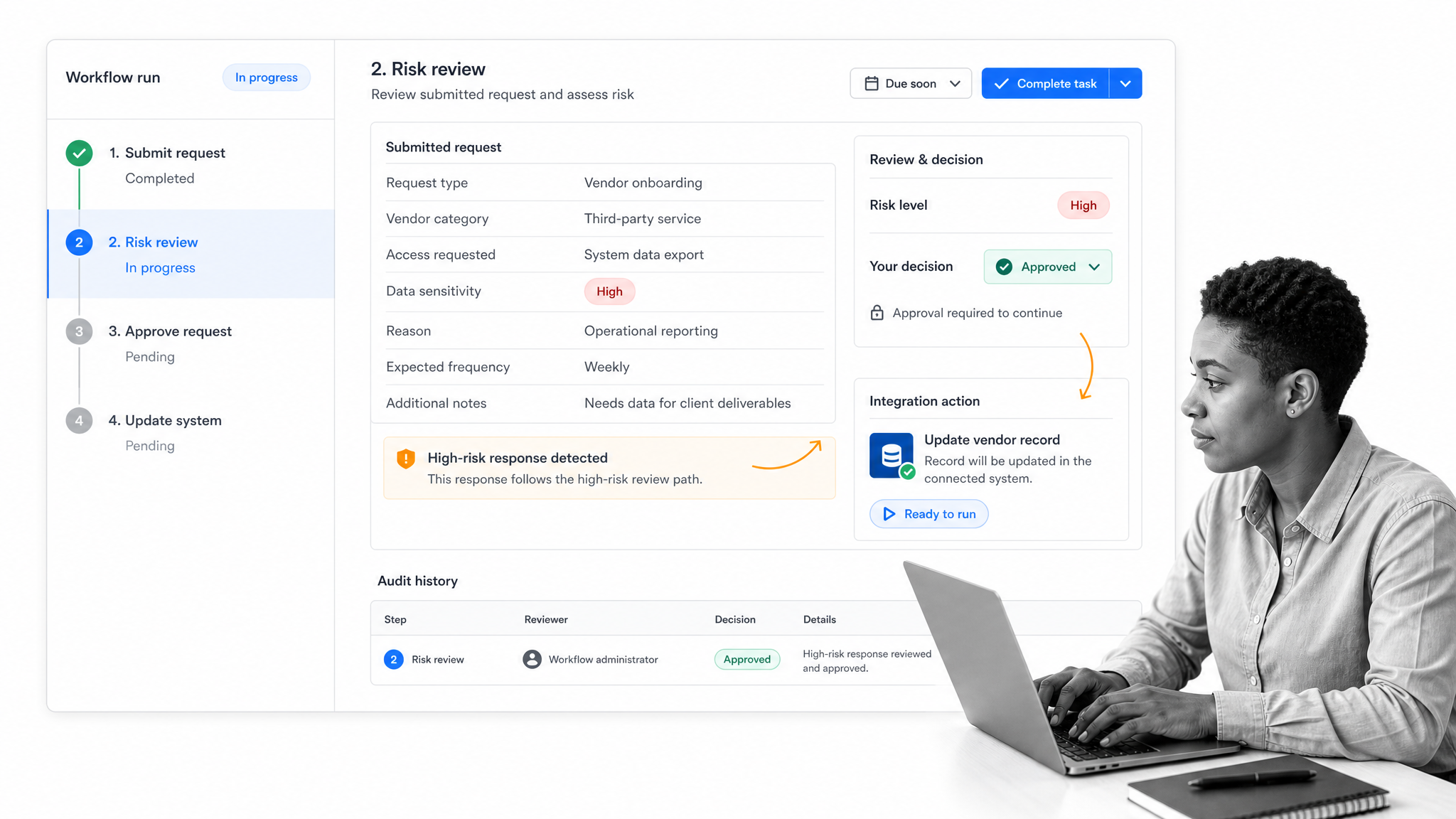
Process Street can connect a form submission directly to an executable workflow. Teams can collect structured data, assign the response, apply routing rules, request approvals, update other systems, and preserve evidence in the same operating record.
Start work from the response
A submitted form can become the trigger for a workflow run. The captured values give the team immediate context, and the workflow can assign the right owner without waiting for someone to monitor an inbox.
Route by response data
Different answers can reveal risk, department, location, request type, or urgency. The workflow can use those values to reveal tasks, choose reviewers, and apply different evidence requirements.
Connect the wider stack
The Process Street integration layer can connect the workflow to systems that own customer, finance, HR, support, compliance, or operational records. The integration action sits inside a visible process with owners and controls.
Keep proof with execution
The workflow history can preserve the submitted fields, assignments, comments, files, approval state, and downstream action. Operators do not have to reconstruct the decision from a form tool, email chain, and destination system after the fact.
Use a template as the starting point
An expense request workflow, purchase order workflow, employee onboarding checklist, client onboarding checklist, or incident response plan can provide the first controlled path. Adapt fields and integration actions to the actual system of record.
Form integration examples
Lead intake to CRM
A lead form can validate contact data, attach campaign context, check for an existing record, create or update the CRM contact, assign an owner, and start a qualification workflow. The design should prevent duplicate leads and preserve consent state.
Purchase request to approval and finance
A purchase request can route by amount, department, and vendor risk. Approval becomes a documented gate before an approved record is sent to the finance or procurement system.
Incident report to response workflow
An incident form can classify severity, page the correct responder, create a case, request evidence, and start a timed response process. Failed routing should create an alert because delay is part of the risk.
Employee request to HR operations
An HR request can protect sensitive fields, route by request type, restrict reviewer access, and update the appropriate HR record only after approval. Retention and access rules should follow the data class rather than the convenience of the form tool.
The same pattern supports workflow automation and process automation: capture a trustworthy event, apply visible rules, execute the next action, and keep enough proof to operate and improve the system.
FAQs
What is form integration?
Form integration connects a form to another application, workflow, database, or service. It moves submitted data, maps fields, applies routing or validation rules, starts downstream actions, and records whether delivery succeeded.
How does form integration work?
A form submission creates an event. The integration validates and maps the payload, authenticates with the destination, creates or updates the required record, then logs the result and handles any failure.
What is the difference between a form API and a webhook?
A webhook pushes a form event to a receiving URL when something happens. An API lets another system request or change form data directly, which is useful for two-way synchronization, scheduled retrieval, and more complex operations.
How do you integrate a form with a CRM?
Define the destination outcome, map form fields to CRM properties, choose a stable identifier, configure authentication, and decide whether each submission creates or updates a record. Test duplicates, invalid values, missing fields, and destination outages before launch.
How do you secure form integration?
Use encrypted transport, least-privilege credentials, signed-event verification when available, strict input validation, limited logging, and controlled retention. Make processing idempotent and monitor authentication failures, retries, and mismatched records.
How does Process Street support form integration?
Process Street can turn submitted form data into an assigned workflow with conditional routing, approvals, integration actions, evidence, and audit history. Its integration layer connects the workflow to systems across the operating stack.
