


Turn every policy into automated workflows with built-in enforcement and audit-ready proof.



8 Best Process Street Alternatives & Competitors in 2026

The best Process Street alternatives are not interchangeable. Some products focus on SOP documentation, others on employee training, request queues, enterprise automation, low-code application development, or broad project collaboration. Process Street itself remains the strongest overall choice for teams whose core requirement is enforceable, trackable, recurring SOP execution, but a specialist can be a better choice when a different job dominates.
Teams usually compare alternatives because their operating model has changed. A small team may want transparent self-serve pricing. An enablement leader may need quizzes and learning paths. A shared-services group may work from public requests and service-level queues. An IT transformation program may need app development, robotic automation, or a wider enterprise platform. Those are legitimate reasons to choose a different center of gravity.
This comparison uses current first-party product and pricing pages. It is editorially maintained by the Process Street team. The ranking prioritizes recurring-process fit, execution control, ease of operational ownership, pricing clarity, integration approach, and the quality of the audit trail. No review scores or customer counts are used.
The list is deliberately balanced. Process Street earns first place for its ideal customer profile, not for every possible use case. Each entry states where that product can beat Process Street, where it may fall short, what to test, and how its pricing is presented today.
- What is Process Street?
- How we picked the best Process Street alternatives
- Best Process Street alternatives at a glance
- Process Street
- Tallyfy
- SweetProcess
- Trainual
- Pipefy
- Nintex
- Kissflow
- ClickUp
- Process Street alternatives FAQ
- Choose the right Process Street alternative
What is Process Street?
Process Street is a compliance operations platform that combines governed process documentation with workflow execution. It is the baseline for this comparison because the buyer is evaluating replacements or adjacent systems. The core question is whether another product can match the parts the team relies on, or whether it provides a better center of gravity for a different job.
For recurring work, a useful baseline includes clear ownership, required information, conditional routing, approvals, deadlines, evidence, and a reviewable history. A structured employee onboarding workflow, client onboarding workflow, and internal audit procedure expose different failure modes and make practical evaluation cases.
How we picked the best Process Street alternatives
The methodology weights recurring-process and SOP execution fit most heavily, followed by operational usability, control and auditability, specialist capability, pricing clarity, and integration flexibility. Every material competitor claim is tied to a first-party source fetched during this run. When a vendor does not publish a price, the table says to contact the vendor instead of estimating.
- 30%: recurring-process and SOP execution fit
- 20%: required steps, routing, approvals, and auditability
- 15%: ease of ownership for operations and business teams
- 15%: specialist advantage for training, requests, apps, automation, or projects
- 10%: pricing transparency and entry path
- 10%: integrations, APIs, and extensibility
A practical selection process starts with a software evaluation workflow and a written vendor selection process. Use identical scenarios and scoring rules for every finalist so familiarity, sales polish, or one impressive feature does not outweigh the operational job.
Best Process Street alternatives at a glance
Process Street is the best overall choice when recurring procedures need enforcement and proof. Tallyfy is the closest lightweight execution alternative. SweetProcess is documentation-first. Trainual is training-first. Pipefy is request-first. Nintex is the broad enterprise automation suite. Kissflow is the low-code app option. ClickUp is the broad project and work-management option.
| Tool | Best for | Standout feature | Free plan | Starting price | Primary operating model |
|---|---|---|---|---|---|
| Process Street | enforceable, trackable, recurring SOP and compliance workflows | required workflow steps, approvals, conditional logic, evidence, and audit history | 14-day Pro trial | Contact sales | Recurring runs |
| Tallyfy | lightweight workflow tracking across people, guests, AI, and apps | documented templates, assigned steps, approvals, forms, guest access, and live status | 14-day trial | $300 per Full Seat per year | Recurring runs |
| SweetProcess | SOP documentation, process maps, policies, and an operations manual | procedures, processes, policies, version history, collaboration, and assigned tasks | 14-day trial | $99 per month for up to 10 members | Specialist or broad workspace |
| Trainual | employee onboarding, role-based training, quizzes, and completion tracking | training paths, due dates, quizzes, e-signatures, reporting, and policy acknowledgment | Not published | Contact Trainual | Specialist or broad workspace |
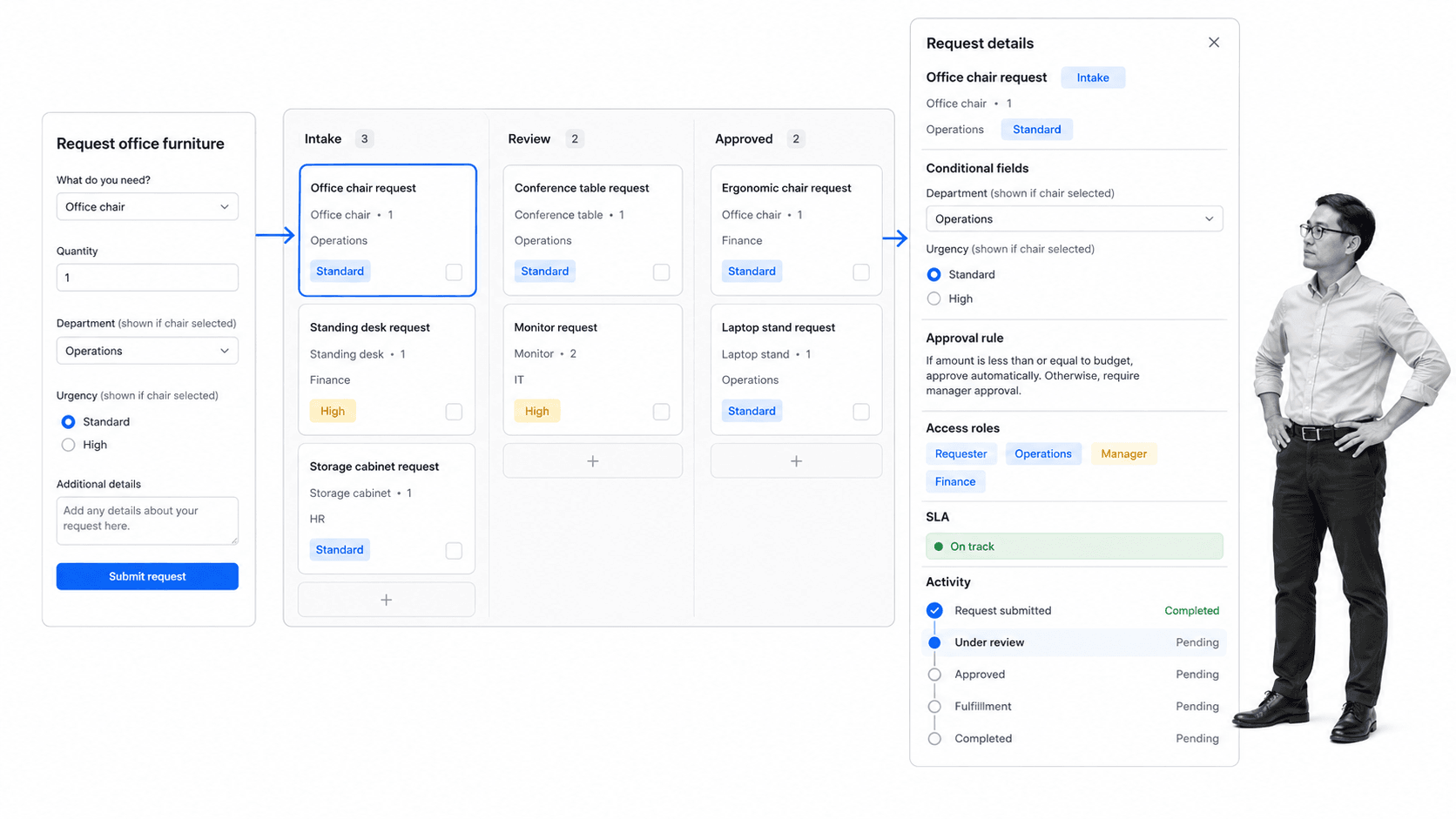
| Pipefy | public form intake and card-based request process automation | request forms, process boards, conditional fields, automations, access roles, and activity logs | Yes | Free; paid plans contact sales | Specialist or broad workspace |
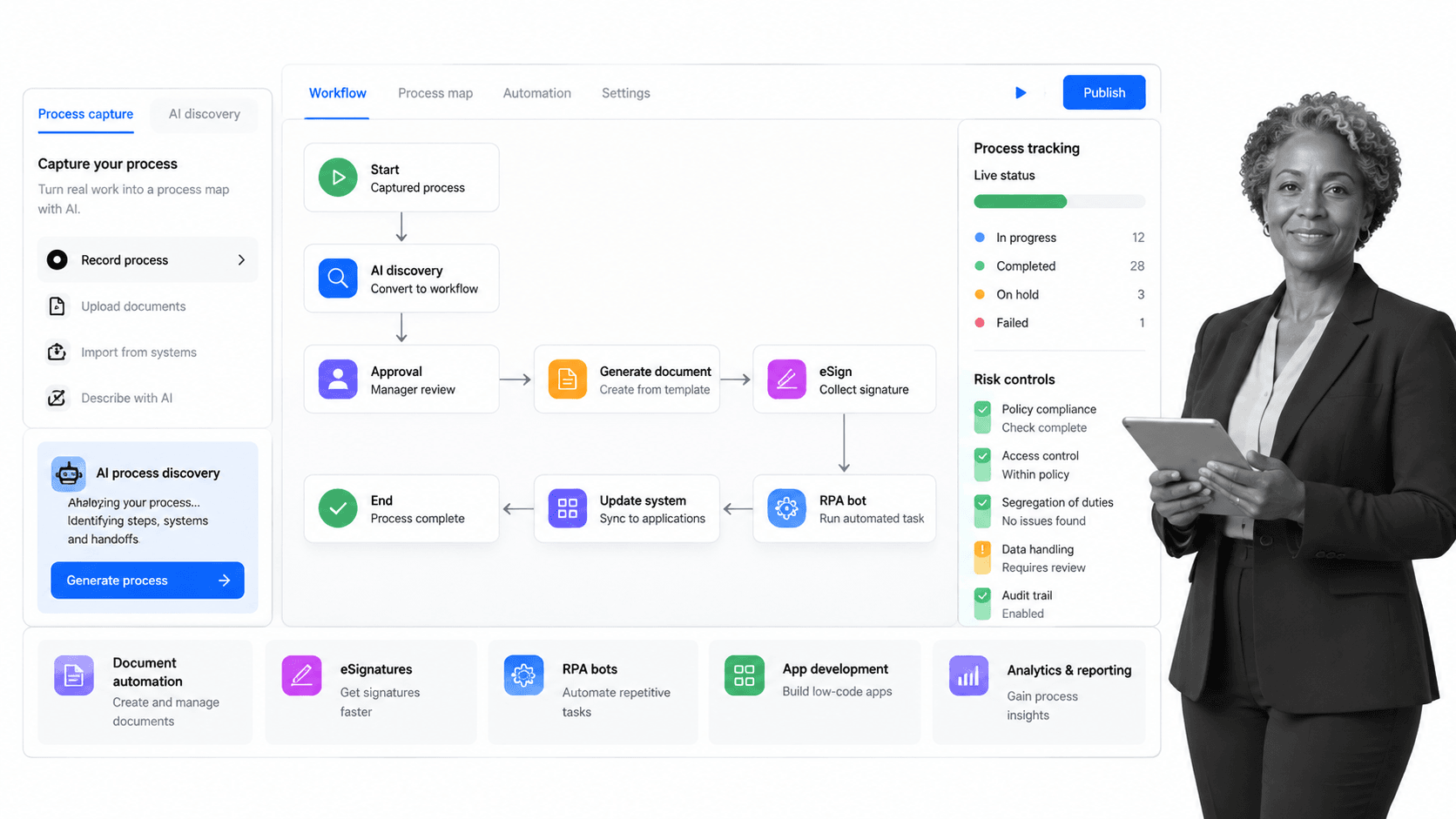
| Nintex | enterprise process automation across a broad suite of capabilities | process management, workflow automation, document automation, eSign, RPA, and application development | Trial available | Contact Nintex | Specialist or broad workspace |
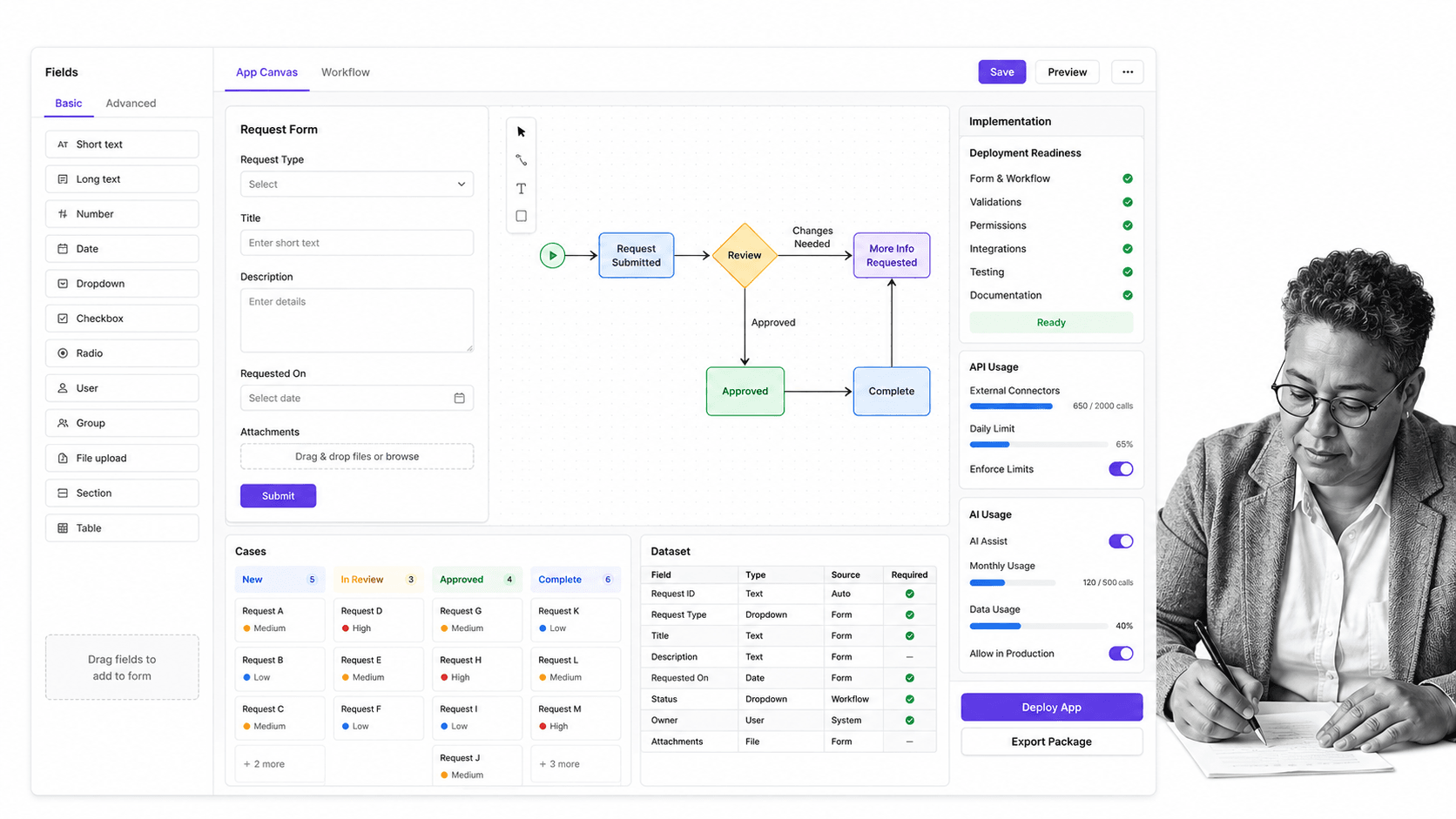
| Kissflow | enterprise low-code workflow and internal application development | app building, workflow routing, cases, datasets, integrations, analytics, and governance | Not published | Contact Kissflow | Specialist or broad workspace |
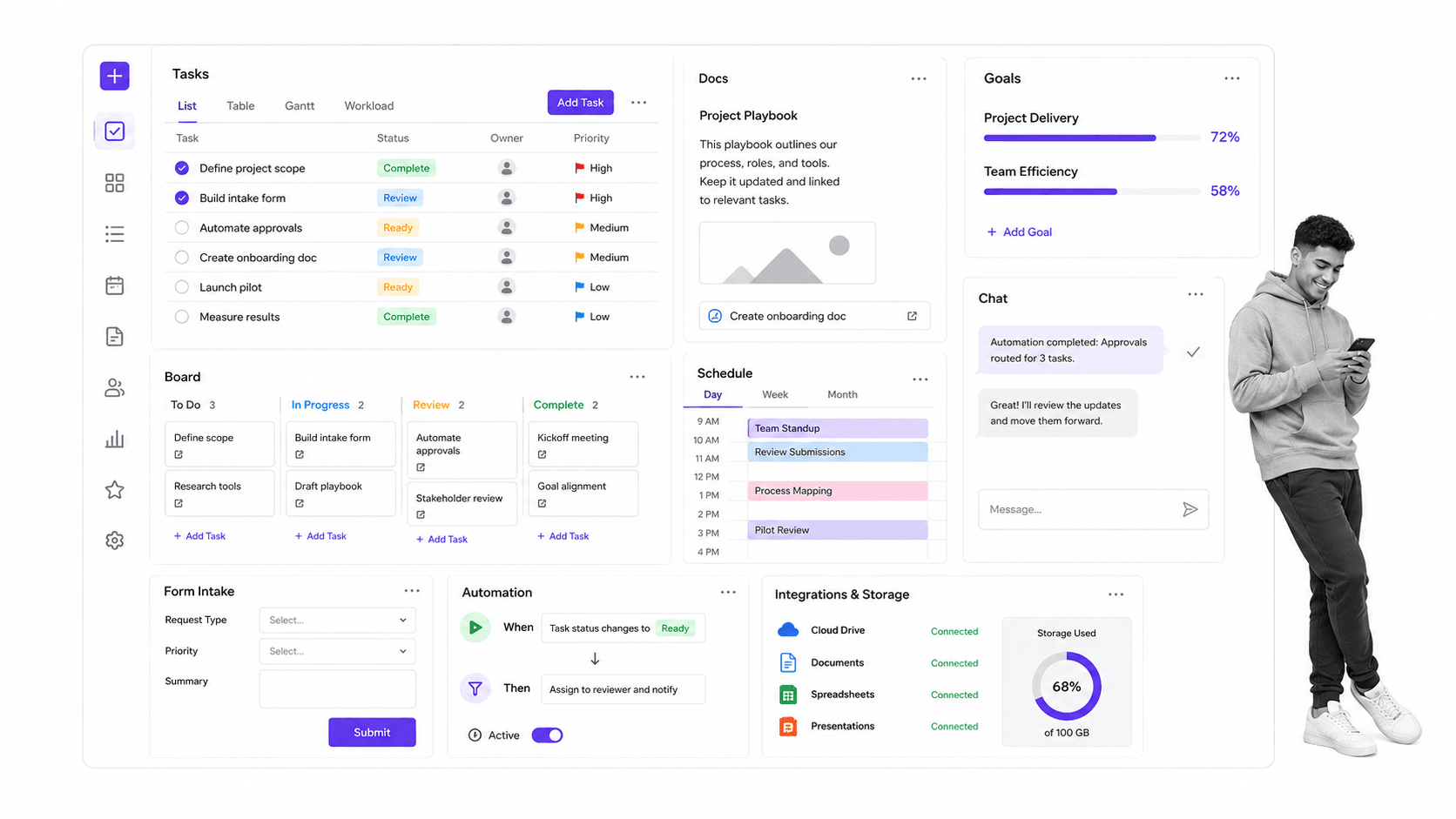
| ClickUp | broad project, task, document, chat, form, and goals management | multiple project views, tasks, docs, goals, chat, forms, automations, and integrations | Yes | $7 per user per month billed yearly | Specialist or broad workspace |
1. Process Street
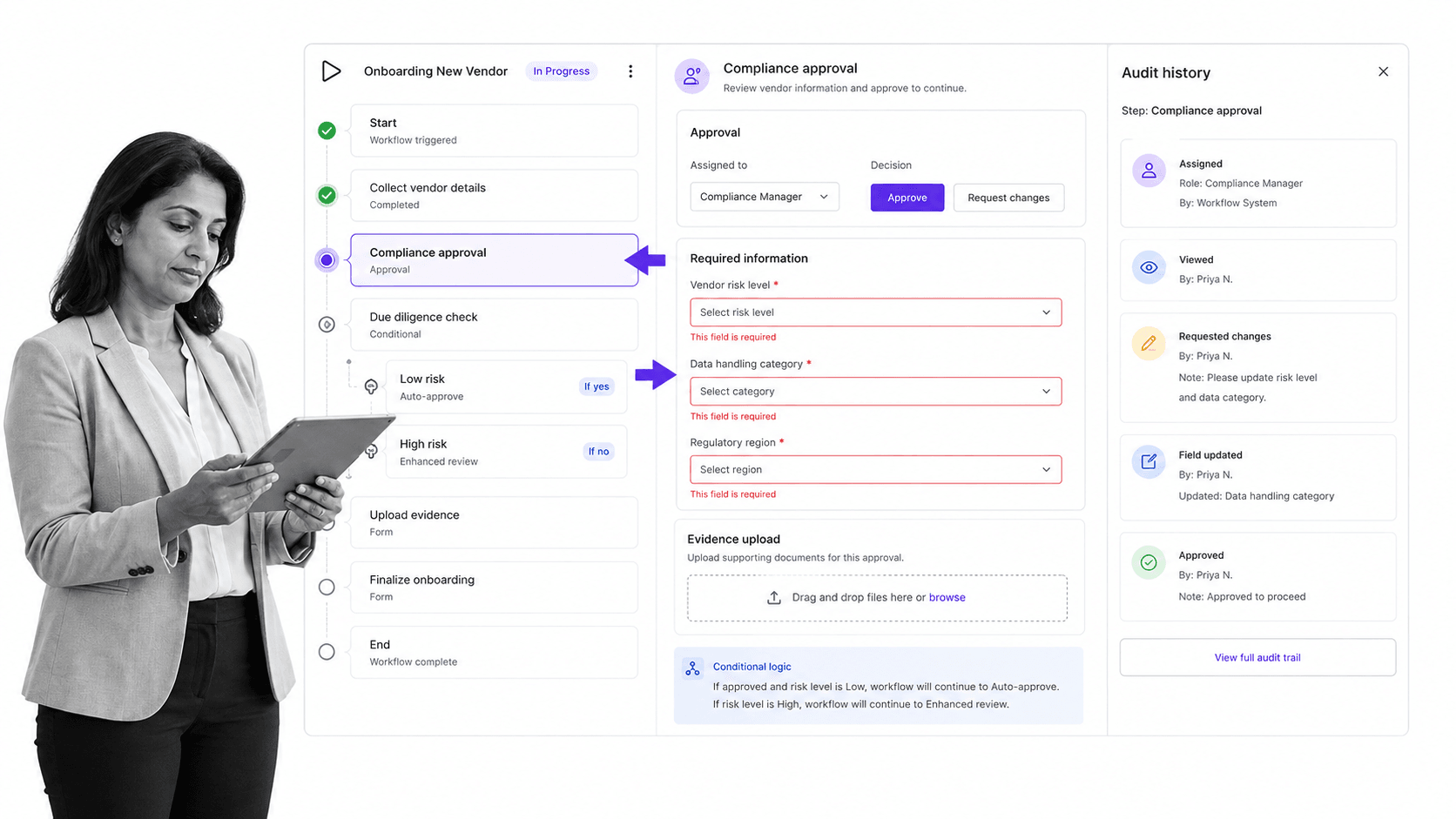
Best for: enforceable, trackable, recurring SOP and compliance workflows.
Bottom line: Choose Process Street when a procedure must be followed, proved, reviewed, and repeated consistently.
Process Street turns policies and standard operating procedures into live workflow runs. Teams can assign owners, require information, route work conditionally, collect approvals, and preserve a history of what happened. That execution model matters when the cost of a missed step is more than a delayed task. It gives operations, HR, compliance, finance, and customer teams one repeatable way to run critical work.
It ranks first in this comparison for a specific ideal customer profile: teams whose primary need is enforceable and auditable recurring process execution. The ranking is not a claim that Process Street is the best tool for every adjacent job. A training platform is stronger for formal learning programs, a low-code platform is stronger for custom application development, and a broad project suite is stronger when one-off project planning is the center of gravity.
The strongest evaluation test is a process with real consequences. Run an onboarding, approval, audit, or recurring close procedure from start to finish. Check whether the system makes ownership clear, blocks incomplete submissions, handles exceptions, records evidence, and lets a reviewer reconstruct the run later. Process Street is designed around that complete execution loop rather than around a static document or a generic task board.
The buying implication is straightforward. Process Street should advance only if its core model matches the failure mode the team is trying to remove. Test whether required workflow steps, approvals, conditional logic, evidence, and audit history reduces handoffs, ambiguity, and manual follow-up in the target process. Then examine what happens when work is late, incomplete, reassigned, rejected, or sent down an exception path. Those moments usually reveal more than the standard demonstration because they show how the product behaves when the procedure is under pressure.
Migration effort also belongs in the decision. Inventory active processes, owners, schedules, permissions, integrations, forms, evidence, and reports before comparing vendors. Identify which parts are reference material and which parts actively control work. For Process Street, confirm how imported content becomes usable, how administrators govern changes, how operators find assigned work, and how reviewers retrieve history. A lower subscription price can be offset quickly if teams rebuild controls manually or maintain a second system for missing capabilities.
Process Street deserves a deeper evaluation because it sets the baseline for this comparison. Its fit becomes clearest when a process contains both guidance and controls: instructions that explain the work, required fields that capture evidence, assignments that establish accountability, approvals that hold a decision, conditional paths that adapt the sequence, and schedules that launch recurring work. Keeping those elements together reduces the gap between an SOP that says what should happen and an operational record that shows what did happen.
That model is especially useful for cross-functional processes such as client onboarding, vendor review, policy acknowledgement, quality checks, recurring finance operations, and employee lifecycle workflows. These processes often fail at handoffs rather than at individual task execution. A useful proof of concept should therefore involve more than one team, include a real approval boundary, collect an attachment or structured data point, and finish with a report that a process owner can interpret without reconstructing events from email and chat.
Governance is another reason Process Street ranks first for this specific buying brief. The platform is designed to separate the maintained procedure from each workflow run, so teams can improve the standard while retaining an execution history. Buyers should still test permissions, change management, export needs, integration coverage, and administrator workload against their own control environment. The advantage is strongest when the organization wants business operators to own repeatable workflows without turning every change into a custom software project.
Process Street is not automatically the best answer when the primary requirement is a learning management system, a public service portal, robotic automation, a general project hub, or a low-code application platform. Trainual, Pipefy, Nintex, ClickUp, or Kissflow may provide a better center of gravity for those needs. Ranking Process Street first here means it offers the most complete fit for controlled recurring SOP execution, while the rest of the list remains useful for buyers solving adjacent problems.
Key Process Street features
- Required fields and enforced task order
- Conditional routing and role assignments
- Approval tasks and evidence capture
- Dynamic due dates and scheduled workflow runs
- Workflow analytics and auditable run history
Process Street pros
- Connects SOP guidance directly to assigned work
- Makes skipped steps and missing evidence visible
- Supports recurring cross-functional workflows
- Balances no-code ownership with governance
- Keeps a traceable record of each run
Process Street cons
- Not a BPMN modeling and simulation suite
- Not a full learning management system or broad project portfolio suite
Choose Process Street if, skip it if
Choose it if: Choose Process Street when a procedure must be followed, proved, reviewed, and repeated consistently. Skip it if: Skip it when your primary requirement is custom application development, formal course delivery, or one-off project planning.
Process Street uses sales-led pricing and publishes plan details on its pricing page. The Pro plan starts with a 14-day trial. Visit Process Street for the platform overview.
A fair evaluation should include edge cases, not only the happy path. Test a late approval, missing evidence, a branch that changes based on form input, a reassigned owner, and a process that repeats on a schedule. Those cases reveal whether the system is merely displaying a checklist or actively controlling how work moves. They also show whether reporting is useful to the operator who owns the process and the reviewer who must verify it later.
2. Tallyfy
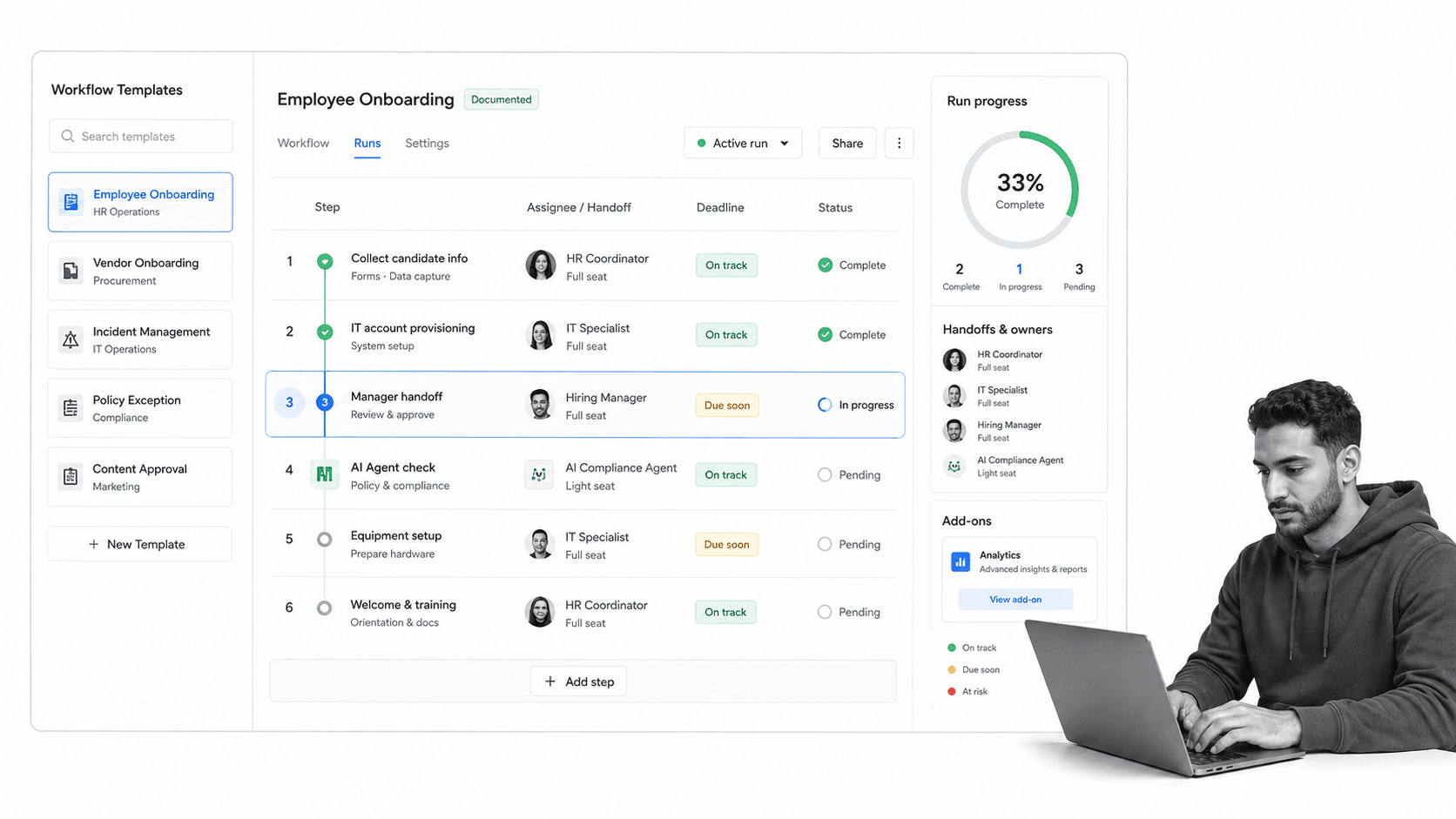
Best for: lightweight workflow tracking across people, guests, AI, and apps.
Bottom line: Choose Tallyfy if you want a lightweight documented-workflow layer with explicit roles for people, guests, AI, and apps.
Tallyfy centers on documenting a workflow once, launching it repeatedly, assigning work, and watching status in real time. Its current product pages organize the model around people, AI, and apps, with tasks, approvals, forms, automations, guest access, and live status. This makes it one of the closest conceptual alternatives for teams that want a lighter process layer.
Tallyfy can fit better than Process Street when transparent seat categories and straightforward task completion are the deciding factors. Full Seats create and edit templates, while Light Seats complete assigned work. Process Street fits better when the operating standard needs stricter evidence capture, required data gates, broader policy governance, and compliance-oriented review.
The buying implication is straightforward. Tallyfy should advance only if its core model matches the failure mode the team is trying to remove. Test whether documented templates, assigned steps, approvals, forms, guest access, and live status reduces handoffs, ambiguity, and manual follow-up in the target process. Then examine what happens when work is late, incomplete, reassigned, rejected, or sent down an exception path. Those moments usually reveal more than the standard demonstration because they show how the product behaves when the procedure is under pressure.
Migration effort also belongs in the decision. Inventory active processes, owners, schedules, permissions, integrations, forms, evidence, and reports before comparing vendors. Identify which parts are reference material and which parts actively control work. For Tallyfy, confirm how imported content becomes usable, how administrators govern changes, how operators find assigned work, and how reviewers retrieve history. A lower subscription price can be offset quickly if teams rebuild controls manually or maintain a second system for missing capabilities.
Key Tallyfy features
- Reusable workflow templates
- Tasks, approvals, and forms
- Live status and reminders
- Guest access
- Automations, API, and webhooks
Tallyfy pros
- Clear annual seat pricing
- Light and Full Seat separation
- Unlimited guests on paid plans
- Straightforward workflow status model
Tallyfy cons
- Analytics is priced as an add-on
- Annual commitments may be less flexible for changing teams
Choose Tallyfy if, skip it if
Choose it if: Choose Tallyfy if you want a lightweight documented-workflow layer with explicit roles for people, guests, AI, and apps. Skip it if: Skip it if governed policy control and deeper evidence-oriented execution are the main buying criteria.
Tallyfy publishes the current product overview, while its pricing approach is summarized as $300 per Full Seat per year. Treat pricing as a snapshot and confirm the final scope with the vendor before purchasing.
To test Tallyfy, use the same live process you use for every finalist. Include an intake or trigger, assigned ownership, a decision, a deadline, an exception, an attachment or evidence item, and a final review. Compare configuration effort, the operator experience, reporting clarity, and what a reviewer can reconstruct after completion. This prevents a polished demo from hiding a weak fit for the work your team actually repeats.
3. SweetProcess
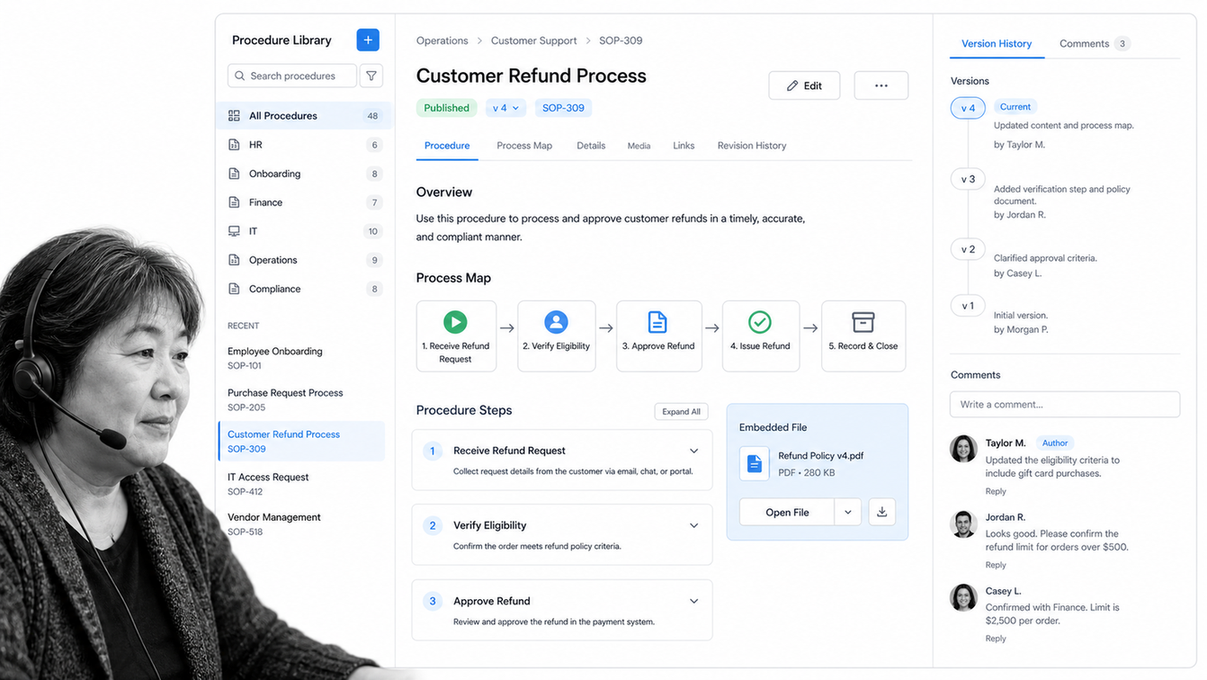
Best for: SOP documentation, process maps, policies, and an operations manual.
Bottom line: Choose SweetProcess when the biggest gap is documenting and maintaining the company operating manual.
SweetProcess approaches the category from the documentation side. It helps teams organize procedures, processes, policies, process maps, files, and collaboration in one maintained operations manual. That structure is useful when the main problem is scattered knowledge, inconsistent documentation, or difficulty training people on how work should be done.
SweetProcess can fit better than Process Street when documentation simplicity and an easy-to-understand small-team subscription matter more than workflow enforcement. Process Street fits better when the documented SOP needs to become a recurring run with required information, routing, approvals, evidence, due dates, and a reviewable execution history.
The buying implication is straightforward. SweetProcess should advance only if its core model matches the failure mode the team is trying to remove. Test whether procedures, processes, policies, version history, collaboration, and assigned tasks reduces handoffs, ambiguity, and manual follow-up in the target process. Then examine what happens when work is late, incomplete, reassigned, rejected, or sent down an exception path. Those moments usually reveal more than the standard demonstration because they show how the product behaves when the procedure is under pressure.
Migration effort also belongs in the decision. Inventory active processes, owners, schedules, permissions, integrations, forms, evidence, and reports before comparing vendors. Identify which parts are reference material and which parts actively control work. For SweetProcess, confirm how imported content becomes usable, how administrators govern changes, how operators find assigned work, and how reviewers retrieve history. A lower subscription price can be offset quickly if teams rebuild controls manually or maintain a second system for missing capabilities.
Key SweetProcess features
- Procedure and policy libraries
- Process maps
- Version history
- Embedded files and collaboration
- Assigned tasks and integrations
SweetProcess pros
- Documentation-first operating model
- Simple entry pricing for a small team
- Useful process mapping context
- Good fit for maintained operations manuals
SweetProcess cons
- Execution controls are not the primary product center
- May require another system for complex cross-functional workflow enforcement
Choose SweetProcess if, skip it if
Choose it if: Choose SweetProcess when the biggest gap is documenting and maintaining the company operating manual. Skip it if: Skip it if the decisive requirement is enforcing every recurring step and preserving evidence in the run itself.
SweetProcess publishes the current product overview, while its pricing approach is summarized as $99 per month for up to 10 members. Treat pricing as a snapshot and confirm the final scope with the vendor before purchasing.
To test SweetProcess, use the same live process you use for every finalist. Include an intake or trigger, assigned ownership, a decision, a deadline, an exception, an attachment or evidence item, and a final review. Compare configuration effort, the operator experience, reporting clarity, and what a reviewer can reconstruct after completion. This prevents a polished demo from hiding a weak fit for the work your team actually repeats.
4. Trainual
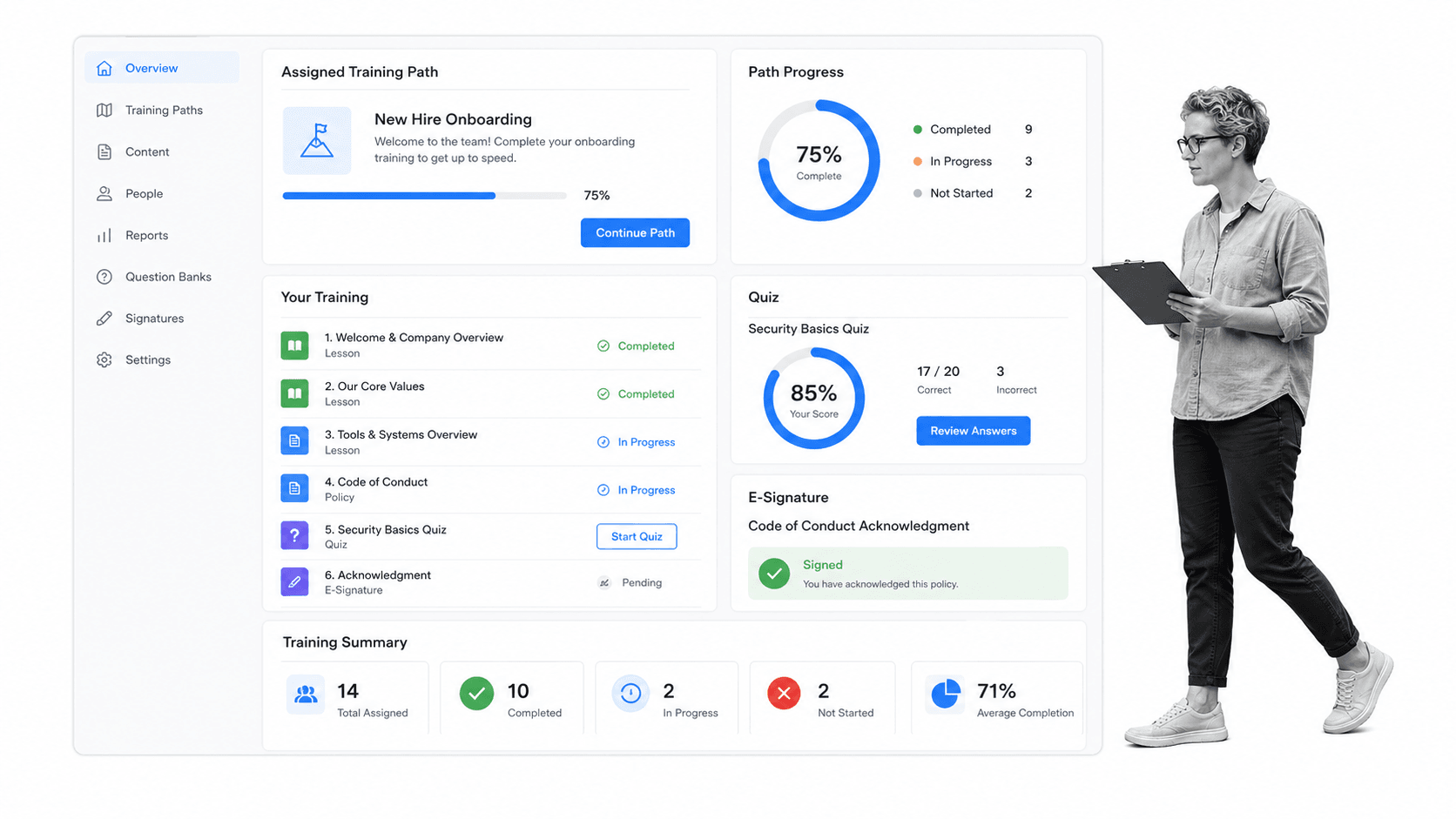
Best for: employee onboarding, role-based training, quizzes, and completion tracking.
Bottom line: Choose Trainual if the main job is teaching employees, testing knowledge, and recording training completion.
Trainual is training-first. It organizes company knowledge into assigned learning paths and gives managers tools for due dates, completion tracking, quizzes, e-signatures, and reporting. The product is a natural alternative when teams originally adopted Process Street mainly for employee onboarding, policy acknowledgment, or role education rather than for ongoing operational workflow runs.
Trainual beats Process Street when the primary outcome is proving that a person learned and acknowledged material. Its learning structure is more specialized for content assignment and knowledge checks. Process Street fits better when onboarding extends into operational execution, such as provisioning accounts, collecting documents, approving access, coordinating departments, and preserving evidence that every handoff happened.
The buying implication is straightforward. Trainual should advance only if its core model matches the failure mode the team is trying to remove. Test whether training paths, due dates, quizzes, e-signatures, reporting, and policy acknowledgment reduces handoffs, ambiguity, and manual follow-up in the target process. Then examine what happens when work is late, incomplete, reassigned, rejected, or sent down an exception path. Those moments usually reveal more than the standard demonstration because they show how the product behaves when the procedure is under pressure.
Migration effort also belongs in the decision. Inventory active processes, owners, schedules, permissions, integrations, forms, evidence, and reports before comparing vendors. Identify which parts are reference material and which parts actively control work. For Trainual, confirm how imported content becomes usable, how administrators govern changes, how operators find assigned work, and how reviewers retrieve history. A lower subscription price can be offset quickly if teams rebuild controls manually or maintain a second system for missing capabilities.
Key Trainual features
- Role-based training paths
- Quizzes and knowledge checks
- Due dates and completion tracking
- E-signatures and acknowledgments
- Training reporting and integrations
Trainual pros
- Purpose-built for employee learning
- Clear completion accountability
- Useful for onboarding programs
- Supports policy acknowledgment
Trainual cons
- Pricing requires a sales conversation
- Operational process execution is secondary to learning
Choose Trainual if, skip it if
Choose it if: Choose Trainual if the main job is teaching employees, testing knowledge, and recording training completion. Skip it if: Skip it if your procedures must coordinate recurring work across systems and departments after training is complete.
Trainual publishes the current product overview, while its pricing approach is summarized as Contact Trainual. Treat pricing as a snapshot and confirm the final scope with the vendor before purchasing.
To test Trainual, use the same live process you use for every finalist. Include an intake or trigger, assigned ownership, a decision, a deadline, an exception, an attachment or evidence item, and a final review. Compare configuration effort, the operator experience, reporting clarity, and what a reviewer can reconstruct after completion. This prevents a polished demo from hiding a weak fit for the work your team actually repeats.
5. Pipefy
Best for: public form intake and card-based request process automation.
Bottom line: Choose Pipefy when work arrives through forms and moves through a request pipeline with service-level visibility.
Pipefy is strongest when work begins as a request. A public form can create a card, then move it through a visual process with conditional fields, automations, role-based access, alerts, and an activity history. Procurement, HR, finance, IT, and shared-services teams can use that model to turn inbound demand into a controlled queue.
Pipefy can beat Process Street when the card and request pipeline are the natural unit of work. Its free Starter plan also gives small teams a concrete entry point. Process Street fits better when the unit of work is a known recurring SOP run with a stable sequence, required evidence, approval gates, and a need to prove the standard was followed each time.
The buying implication is straightforward. Pipefy should advance only if its core model matches the failure mode the team is trying to remove. Test whether request forms, process boards, conditional fields, automations, access roles, and activity logs reduces handoffs, ambiguity, and manual follow-up in the target process. Then examine what happens when work is late, incomplete, reassigned, rejected, or sent down an exception path. Those moments usually reveal more than the standard demonstration because they show how the product behaves when the procedure is under pressure.
Migration effort also belongs in the decision. Inventory active processes, owners, schedules, permissions, integrations, forms, evidence, and reports before comparing vendors. Identify which parts are reference material and which parts actively control work. For Pipefy, confirm how imported content becomes usable, how administrators govern changes, how operators find assigned work, and how reviewers retrieve history. A lower subscription price can be offset quickly if teams rebuild controls manually or maintain a second system for missing capabilities.
Key Pipefy features
- Public request forms
- Card-based process boards
- Conditional fields and logic
- Automations and API access on eligible plans
- Role-based access and activity logs
Pipefy pros
- Free plan for small teams
- Strong request-intake model
- Visual pipeline visibility
- Useful for shared-services queues
Pipefy cons
- Paid pricing is sales-led
- A request board can be less natural for procedure-led recurring work
Choose Pipefy if, skip it if
Choose it if: Choose Pipefy when work arrives through forms and moves through a request pipeline with service-level visibility. Skip it if: Skip it if the process starts from a recurring event and the main need is SOP enforcement rather than queue management.
Pipefy publishes the current product overview, while its pricing approach is summarized as Free; paid plans contact sales. Treat pricing as a snapshot and confirm the final scope with the vendor before purchasing.
To test Pipefy, use the same live process you use for every finalist. Include an intake or trigger, assigned ownership, a decision, a deadline, an exception, an attachment or evidence item, and a final review. Compare configuration effort, the operator experience, reporting clarity, and what a reviewer can reconstruct after completion. This prevents a polished demo from hiding a weak fit for the work your team actually repeats.
6. Nintex
Best for: enterprise process automation across a broad suite of capabilities.
Bottom line: Choose Nintex if your roadmap requires an enterprise automation suite that goes well beyond recurring SOP execution.
Nintex covers a wider enterprise automation surface. Its platform spans process management, workflow automation, document generation, electronic signatures, robotic process automation, and application development. That breadth suits organizations that want a coordinated automation suite and have the governance, implementation resources, and technical ownership to support it.
Nintex beats Process Street when the organization needs suite-scale automation, document assembly, signatures, bots, and app development under one enterprise program. Process Street fits better when an operations team wants to adopt recurring SOP execution quickly without turning the rollout into a broad transformation initiative or a custom application program.
The buying implication is straightforward. Nintex should advance only if its core model matches the failure mode the team is trying to remove. Test whether process management, workflow automation, document automation, eSign, RPA, and application development reduces handoffs, ambiguity, and manual follow-up in the target process. Then examine what happens when work is late, incomplete, reassigned, rejected, or sent down an exception path. Those moments usually reveal more than the standard demonstration because they show how the product behaves when the procedure is under pressure.
Migration effort also belongs in the decision. Inventory active processes, owners, schedules, permissions, integrations, forms, evidence, and reports before comparing vendors. Identify which parts are reference material and which parts actively control work. For Nintex, confirm how imported content becomes usable, how administrators govern changes, how operators find assigned work, and how reviewers retrieve history. A lower subscription price can be offset quickly if teams rebuild controls manually or maintain a second system for missing capabilities.
Key Nintex features
- Process discovery and management
- Cloud workflow automation
- Document generation and eSign
- Robotic process automation
- Application development and governance
Nintex pros
- Broad automation suite
- Enterprise governance orientation
- Supports complex transformation programs
- Multiple automation modalities
Nintex cons
- More platform than many SOP teams need
- Pricing and implementation require vendor engagement
Choose Nintex if, skip it if
Choose it if: Choose Nintex if your roadmap requires an enterprise automation suite that goes well beyond recurring SOP execution. Skip it if: Skip it if speed, operational ownership, and a focused recurring-workflow rollout matter more than suite breadth.
Nintex publishes the current product overview, while its pricing approach is summarized as Contact Nintex. Treat pricing as a snapshot and confirm the final scope with the vendor before purchasing.
To test Nintex, use the same live process you use for every finalist. Include an intake or trigger, assigned ownership, a decision, a deadline, an exception, an attachment or evidence item, and a final review. Compare configuration effort, the operator experience, reporting clarity, and what a reviewer can reconstruct after completion. This prevents a polished demo from hiding a weak fit for the work your team actually repeats.
7. Kissflow
Best for: enterprise low-code workflow and internal application development.
Bottom line: Choose Kissflow when the workflow must become a governed internal application with custom data and interfaces.
Kissflow combines workflow automation with low-code application development. Teams can build forms, route work, manage cases and datasets, connect systems, create dashboards, and govern deployment. It is designed for collaboration between business process owners and IT, especially when a workflow needs to become a custom internal application.
Kissflow beats Process Street when custom app development is a first-class requirement. A process owner may need a tailored portal, case experience, data model, and deployment lifecycle rather than a standardized recurring run. Process Street fits better when teams want to turn existing SOPs into controlled execution without treating each procedure as a software project.
The buying implication is straightforward. Kissflow should advance only if its core model matches the failure mode the team is trying to remove. Test whether app building, workflow routing, cases, datasets, integrations, analytics, and governance reduces handoffs, ambiguity, and manual follow-up in the target process. Then examine what happens when work is late, incomplete, reassigned, rejected, or sent down an exception path. Those moments usually reveal more than the standard demonstration because they show how the product behaves when the procedure is under pressure.
Migration effort also belongs in the decision. Inventory active processes, owners, schedules, permissions, integrations, forms, evidence, and reports before comparing vendors. Identify which parts are reference material and which parts actively control work. For Kissflow, confirm how imported content becomes usable, how administrators govern changes, how operators find assigned work, and how reviewers retrieve history. A lower subscription price can be offset quickly if teams rebuild controls manually or maintain a second system for missing capabilities.
Key Kissflow features
- Low-code app builder
- Workflow routing
- Case management
- Datasets, dashboards, and analytics
- Integrations and governance controls
Kissflow pros
- Strong app-building flexibility
- Supports business and IT collaboration
- Fits complex internal applications
- Enterprise governance options
Kissflow cons
- No public self-serve starting price
- Can be excessive for straightforward recurring SOPs
Choose Kissflow if, skip it if
Choose it if: Choose Kissflow when the workflow must become a governed internal application with custom data and interfaces. Skip it if: Skip it when a reusable SOP workflow is enough and you do not want an application-development project.
Kissflow publishes the current product overview, while its pricing approach is summarized as Contact Kissflow. Treat pricing as a snapshot and confirm the final scope with the vendor before purchasing.
To test Kissflow, use the same live process you use for every finalist. Include an intake or trigger, assigned ownership, a decision, a deadline, an exception, an attachment or evidence item, and a final review. Compare configuration effort, the operator experience, reporting clarity, and what a reviewer can reconstruct after completion. This prevents a polished demo from hiding a weak fit for the work your team actually repeats.
8. ClickUp
Best for: broad project, task, document, chat, form, and goals management.
Bottom line: Choose ClickUp when one workspace must cover projects, tasks, docs, goals, chat, and general collaboration.
ClickUp is a broad work-management platform. It combines tasks, documents, project views, calendars, goals, chat, forms, automations, and integrations in one workspace. That breadth is attractive for teams that want to reduce tool switching and manage one-off projects alongside recurring work without purchasing a process-specific platform.
ClickUp beats Process Street when broad project collaboration, self-serve pricing, and many work views matter more than procedural enforcement. Process Street fits better when a workflow must require evidence, prevent skipped steps, route exceptions, and preserve a consistent execution record across repeated runs. The distinction is project coordination versus process assurance.
The buying implication is straightforward. ClickUp should advance only if its core model matches the failure mode the team is trying to remove. Test whether multiple project views, tasks, docs, goals, chat, forms, automations, and integrations reduces handoffs, ambiguity, and manual follow-up in the target process. Then examine what happens when work is late, incomplete, reassigned, rejected, or sent down an exception path. Those moments usually reveal more than the standard demonstration because they show how the product behaves when the procedure is under pressure.
Migration effort also belongs in the decision. Inventory active processes, owners, schedules, permissions, integrations, forms, evidence, and reports before comparing vendors. Identify which parts are reference material and which parts actively control work. For ClickUp, confirm how imported content becomes usable, how administrators govern changes, how operators find assigned work, and how reviewers retrieve history. A lower subscription price can be offset quickly if teams rebuild controls manually or maintain a second system for missing capabilities.
Key ClickUp features
- Tasks and multiple project views
- Docs and chat
- Goals and portfolio tracking
- Forms and automations
- Integrations and storage
ClickUp pros
- Permanent free plan
- Affordable self-serve entry tier
- Broad collaboration surface
- Flexible project views
ClickUp cons
- Breadth can create workspace complexity
- Recurring SOP governance is not the primary product model
Choose ClickUp if, skip it if
Choose it if: Choose ClickUp when one workspace must cover projects, tasks, docs, goals, chat, and general collaboration. Skip it if: Skip it if the core problem is proving that every critical recurring procedure followed the correct path.
ClickUp publishes the current product overview, while its pricing approach is summarized as $7 per user per month billed yearly. Treat pricing as a snapshot and confirm the final scope with the vendor before purchasing.
To test ClickUp, use the same live process you use for every finalist. Include an intake or trigger, assigned ownership, a decision, a deadline, an exception, an attachment or evidence item, and a final review. Compare configuration effort, the operator experience, reporting clarity, and what a reviewer can reconstruct after completion. This prevents a polished demo from hiding a weak fit for the work your team actually repeats.
Process Street alternatives FAQ
What is the best Process Street alternative?
Process Street remains the strongest overall choice for teams that need enforceable, trackable, recurring SOP workflows. Tallyfy is the closest lightweight execution alternative. SweetProcess is stronger for a documentation-first operating manual, Trainual for formal employee training, Pipefy for request queues, Nintex for enterprise automation breadth, Kissflow for low-code apps, and ClickUp for broad project collaboration.
Is there a free Process Street alternative?
Pipefy and ClickUp publish permanent free plans, while several other products offer trials. A free plan can be useful for a small pilot, but compare the controls you will need at rollout, including permissions, approvals, automation limits, reporting, evidence, and guest access. Free entry does not guarantee a lower operating cost if the team must add other tools later.
What is a cheaper Process Street alternative for a small team?
ClickUp publishes a low-cost self-serve paid tier and a free plan, Pipefy has a free Starter plan, and Tallyfy publishes annual seat prices. The cheapest suitable product depends on the job. A general task platform may cost less per user but still be a poor value if missed SOP steps, manual evidence collection, or extra integrations create recurring work.
What is the closest Process Street alternative?
Tallyfy is the closest in this list because it also uses reusable workflow templates, assigned steps, approvals, forms, reminders, guest access, and live status. SweetProcess is close on SOP documentation, but it is more documentation-centered. The right answer depends on whether your team values workflow execution or the operating manual more heavily.
What is the best open source Process Street alternative?
This comparison focuses on hosted products with current first-party pricing and product information, so it does not rank an open source option. If open source is mandatory, evaluate hosting, upgrades, security ownership, support, workflow controls, and the internal engineering time required. Software license cost is only one part of the operating model.
What is the best Process Street alternative for enterprise teams?
Nintex is a stronger fit when an enterprise needs process management, workflow automation, document automation, electronic signatures, robotic automation, and app development in one program. Kissflow is stronger when low-code internal applications are central. Process Street is stronger when business teams need to standardize and prove recurring work without a suite-scale implementation.
How do you migrate from Process Street to another tool?
Inventory workflows, owners, schedules, forms, approvals, integrations, permissions, evidence fields, and reporting requirements. Separate reference content from active execution logic, then pilot one representative process. A process migration checklist, controlled change management workflow, and process improvement plan can structure the transition.
Why is Process Street ranked first on a Process Street alternatives page?
The ranking follows the mandatory evaluation frame for this page: Process Street is first for teams that need enforceable, trackable, recurring process and SOP execution. It is also the incumbent and baseline. The ranking does not claim universal superiority, and every competitor section identifies the use case where that product can fit better.
Choose the right Process Street alternative
Choose by the operating outcome. Use Tallyfy for a lighter workflow layer, SweetProcess for a maintained operations manual, Trainual for employee learning, Pipefy for request pipelines, Nintex for suite-scale enterprise automation, Kissflow for custom workflow apps, and ClickUp for broad project collaboration. Choose Process Street when the recurring procedure itself must be enforced and proved.
Before changing systems, run a business process analysis, document the current process documentation, and compare how each finalist handles workflow management, workflow automation, and document control. Those linked concepts help separate a feature preference from an operating-model requirement.
If the core need is enforceable recurring execution, start with Process Street. Build one real workflow, include an approval, an exception, required evidence, and a reviewer, then compare that same case against every alternative before committing.
Comparing something else? The full directory of software alternatives and competitor comparisons covers AI agents, workflow and BPM platforms, integration tools, and more.
