


Turn every policy into automated workflows with built-in enforcement and audit-ready proof.



6 Best IFTTT Alternatives & Competitors in 2026

IFTTT alternatives replace or extend simple Applets when you need business app automation, visual branching, developer control, Microsoft-centered flows, or a governed recurring process. IFTTT remains a useful baseline because it makes trigger-action automation approachable, especially for personal productivity and connected devices. The best replacement depends on what the automation is expected to carry.
Teams usually evaluate alternatives for four reasons. They need more than one trigger and action, they want clearer control over branches and transformations, they need code or hosting choices, or they discover that the real problem is not app connectivity at all. It is process execution: people must complete required work, approvals must happen, exceptions must be handled, and evidence must survive.
This comparison is editorially maintained by the Process Street team and was verified for the 2026 edition. It uses official vendor product, documentation, and pricing sources. Process Street ranks first only for teams whose core need is enforceable, trackable, recurring process and SOP execution. Zapier, Make, n8n, Microsoft Power Automate, and Pipedream are honestly identified where their specialized use cases fit better.
We evaluated core capability fit, ease of building, maintainability, free access, pricing model, governance, debugging, and the boundary between data automation and human process control. The table is a starting point. The deep dives explain the tradeoffs that matter before migration.
The shortlist intentionally spans several categories instead of pretending every product solves the same problem. That gives personal automators, operations leaders, Microsoft administrators, automation specialists, and developers a useful decision path. Start with the at-a-glance table, then read the deep dive that matches the people who will build, run, maintain, and recover the workflow.
In this article, we cover:
- What is IFTTT?
- IFTTT alternatives at a glance
- How we picked these IFTTT alternatives
- Process Street
- Zapier
- Make
- n8n
- Microsoft Power Automate
- Pipedream
- How to choose among IFTTT alternatives
- Migrating from IFTTT to an alternative
- IFTTT alternatives FAQs
- Choose Process Street for recurring operational workflows
What is IFTTT?
IFTTT is a connectivity platform built around Applets, which connect two or more apps or devices through triggers and actions. Its official plans page offers a free tier with two Applets, Pro for multi-action Applets and Webhooks, and Pro+ for features such as queries and filter code. It is particularly approachable for smart-home routines, personal productivity, and simple service connections.
That makes IFTTT the incumbent baseline, not one of the ranked alternatives. Every product below is measured against the simplicity of the Applet model and the situations where that simplicity becomes a constraint. IFTTT can still be the better fit for a home automation or a lightweight personal routine. Moving to a heavier platform only makes sense when the workflow requires capabilities IFTTT does not center.
The key question is what must happen after the trigger fires. If one action is enough, keep the architecture simple. If the work needs branching, transformation, code, several systems, governed deployment, human decisions, or proof of completion, evaluate a more specialized alternative.
IFTTT alternatives at a glance
Process Street is the top pick for recurring operational workflows with people, SOPs, approvals, deadlines, and audit history. Zapier is the closest broad business-automation substitute. Make is stronger for visual scenarios, n8n for technical control and self-hosting, Power Automate for Microsoft-centered cloud and desktop work, and Pipedream for developer-owned event and API workflows.
| Tool | Best for | Standout feature | Free plan | Starting price | Primary surface |
|---|---|---|---|---|---|
| Process Street | Enforceable, trackable, recurring process and SOP workflows | Required steps, approvals, conditional logic, assignments, due dates, and audit history in one process record | No, 14-day Pro trial | Contact sales | Workflow run |
| Zapier | Straightforward business app automation across a broad integration catalog | Multi-step Zap workflows with paths, webhooks, Tables, and Forms | Yes | $19.99/month billed annually | Vertical automation editor |
| Make | Visual builders who need branching scenarios and data transformation | Canvas-based scenarios with routers, filters, mapping, and execution inspection | Yes | $12/month at the displayed 10,000-credit tier | Visual scenario canvas |
| n8n | Technical teams that want node workflows, code, and hosting choices | Node editor with code steps, execution diagnostics, cloud hosting, and a self-hosted community edition | Community edition | €20/month billed annually for Starter | Node editor |
| Microsoft Power Automate | Microsoft-centered teams combining cloud flows and desktop automation | Cloud flows, attended desktop flows, connectors, and Power Platform governance | 30-day trial | $15/user/month paid yearly | Cloud and desktop flow builder |
| Pipedream | Developers building event-driven API workflows with custom code | Managed triggers, reusable actions, code steps, event inspection, and serverless execution | Yes | Usage-based paid plans | Event and code workflow editor |
How we picked these IFTTT alternatives
A useful comparison must separate capability from fit. We weighted process fit and maintainability most heavily, followed by builder experience, observability, governance, pricing clarity, and free access. The ranking favors Process Street for its stated ICP. It does not claim that Process Street is the best integration canvas, developer runtime, robotic automation tool, or smart-home platform.
- Core capability fit: Does the tool solve app automation, process execution, developer integration, desktop automation, or a clear combination?
- Builder and maintainer fit: Can the people who own the workflow safely change it later?
- Observability and recovery: Can an owner find failures, inspect data, and recover without guesswork?
- Governance: Are permissions, approvals, environments, and ownership appropriate for the risk?
- Pricing model: Does cost scale by users, tasks, credits, executions, compute, or custom scope, and can the team forecast it?
The shortlist also reflects the broader distinction between workflow automation tools and business process automation tools. A connector can move data perfectly while the surrounding human process still fails. A process platform can enforce work while a developer runtime handles the technical integration. The best architecture may include both layers.
How pricing units affect the comparison
Starting prices are not directly comparable because the products meter different things. Zapier counts automation tasks under its plan rules. Make uses credits for module activity. n8n prices its cloud offering around workflow executions. Pipedream documents compute-based credits. Power Automate licenses users, processes, and hosted automation through different offers. Process Street quotes plans around the operational platform and the team adopting it. A table can show entry points, but it cannot normalize six different consumption models into one honest number.
For a useful cost test, take three representative workflows: a frequent simple automation, a moderate multi-step workflow, and a low-volume high-risk process. Estimate the successful path, expected branches, retries, polling, development runs, human participants, and environments. Then ask each vendor how those events map to the bill. This exposes whether the apparent bargain remains economical when the workflow reaches production volume.
How we verified product claims
Feature and pricing statements in this comparison were checked against official vendor product pages, pricing pages, and documentation during this 2026 review. We avoided crowdsourced ratings, review-site scores, and claims that could not be confirmed from a primary source. Prices are presented in the currency, billing cadence, and usage tier shown by the vendor. Where accessible primary documentation described a usage model but did not state a stable paid amount, the table says so instead of estimating one.
Vendor packaging changes more quickly than the underlying category fit. Recheck the linked official pricing source before purchase, then confirm connector availability, plan limits, support terms, and any governance feature your production workflow requires. A feature listed on a vendor page may belong to a higher plan than the entry price shown in the comparison table.
1. Process Street
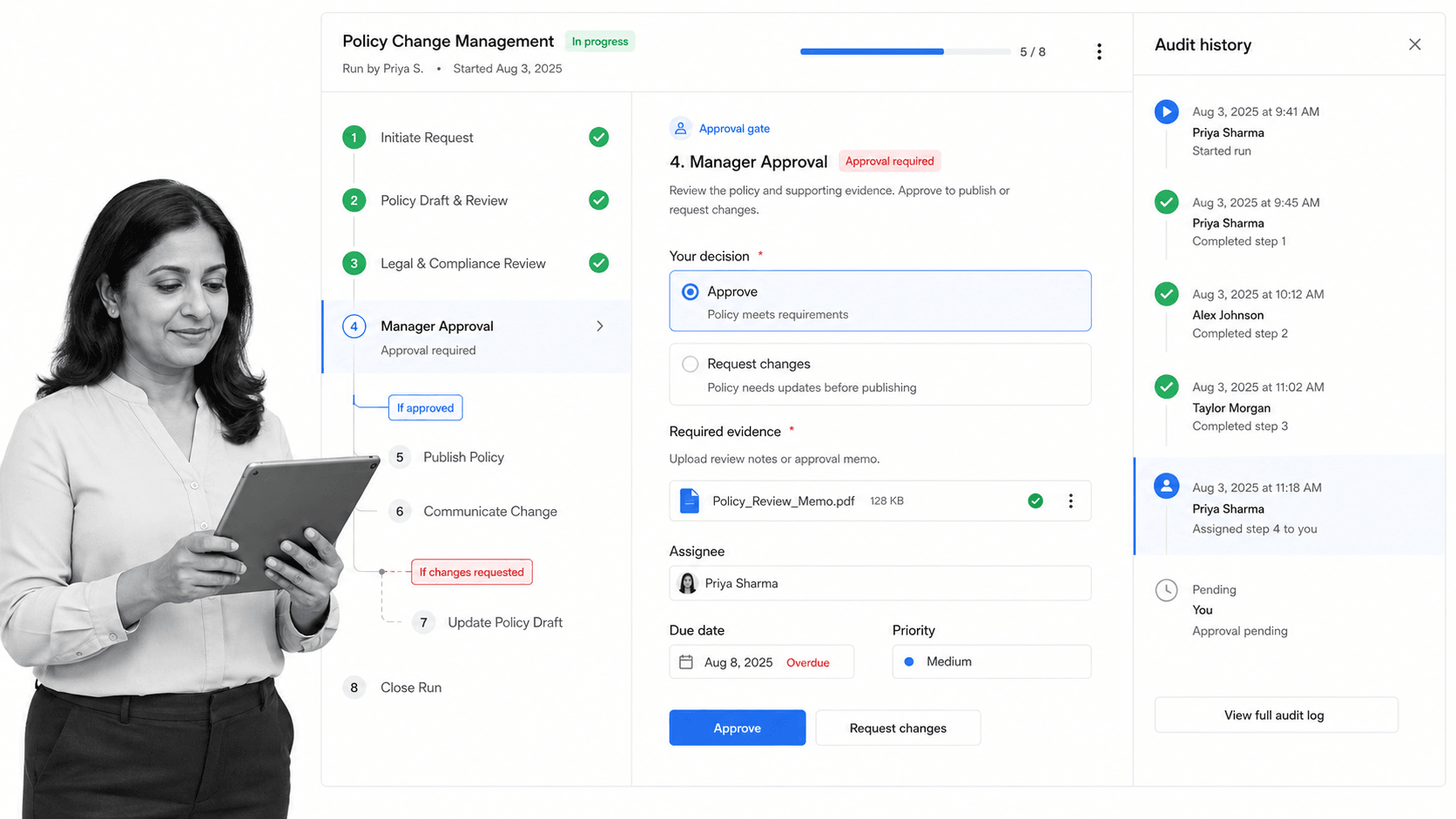
Best for: Operations, HR, quality, onboarding, and compliance-adjacent teams that need enforceable, trackable, recurring process and SOP workflows.
Bottom line: Process Street is the best overall IFTTT alternative for its ICP because it turns automation into a controlled operating process, with people, rules, deadlines, approvals, evidence, and system actions connected in one readable record.
Process Street is not a direct clone of IFTTT. That distinction is the reason it ranks first for business process execution. IFTTT begins with a trigger and an action. Process Street begins with the procedure a team must complete correctly every time. Automations can support that procedure, but the workflow remains understandable to the operator, the manager, and the auditor.
A workflow run can present tasks in order, collect required form fields, assign work to a person or role, enforce a stop before later work continues, branch with conditional logic, request an approval, calculate due dates, and retain the history of what happened. That structure matters when a missed step is not merely inconvenient. It can delay onboarding, create a quality escape, break a control, or leave a customer handoff incomplete.
The strongest use case is recurring work that crosses people and systems. Consider vendor onboarding. An app automation can create records and send notifications, but the process still needs ownership, document collection, risk review, approval, exception handling, and proof of completion. Process Street makes those human and automated steps part of the same controlled run. The team can see where the work is stuck and what evidence exists without reverse-engineering an automation history.
The same pattern appears in employee onboarding, change control, incident follow-up, account reviews, policy attestations, and recurring quality checks. Each process contains work that software can perform and decisions that a person must own. Treating the whole procedure as a hidden automation chain makes it difficult for operators to know what is expected. Treating it only as a checklist loses the opportunity to move data and notify systems automatically. Process Street keeps the procedure visible while allowing automation to support it at the right points.
That visibility also improves maintenance. A process owner can review the sequence, required inputs, decision gates, and ownership model as operating conditions change. Managers can inspect active work without asking a builder to translate an execution log. When an exception occurs, the team can see whether the issue came from a person, a policy decision, a missing input, or an integration. This is the practical difference between automating an event and operating a process.
Process Street also fits teams replacing static SOPs. A document can describe the ideal procedure, yet it cannot by itself prove that someone followed it. A workflow can operationalize the procedure with assignments, required inputs, approvals, and due dates. This is why Process Street belongs in a different category from consumer Applets and pure integration builders. It is a system for executing the work, not only connecting endpoints.
The platform supports an agentic integration story as well as established connectors. Process Street has direct, universal integrations to 5,000+ systems. Need a new one? An AI agent builds it on the fly. Teams can also connect the surrounding stack while keeping the operating procedure visible. For practical examples of this boundary, compare workflow automation examples with the mechanics of webhooks.
Process Street key features
- Ordered workflow runs with enforceable task sequence
- Required form fields and evidence collection
- Conditional logic for role, data, and scenario-based branches
- Approval tasks, assignments, permissions, and dynamic due dates
- Workflow analytics and a durable activity history
- Forms, Pages, Data Sets, automations, API access, and integrations around the process
Process Street pros
- Keeps the complete human and automated procedure in one readable record
- Makes ownership, status, deadlines, approvals, and exceptions visible
- Lets nontechnical operators run a governed process without maintaining code
- Supports recurring SOPs across operations, HR, onboarding, quality, and compliance-adjacent work
- Provides a stronger audit trail than a loose chain of notifications and app actions
Process Street cons
- It is not the best choice for personal smart-home automation or a one-off consumer Applet
- It is not a self-hosted developer node editor or a robotic desktop automation suite
- Teams seeking only data movement between two apps may prefer a lighter integration tool
Choose Process Street if
Choose Process Street when the workflow must be completed by people, tracked by managers, enforced with rules, and supported by automation. It is especially strong when the cost of a skipped step or missing approval is higher than the cost of building the process carefully.
Skip Process Street if
Skip Process Street for a purely personal smart-home routine, a developer-owned API service, or a Microsoft desktop automation that needs robotic user-interface control. IFTTT, Pipedream, n8n, or Power Automate may fit those cases more directly.
Process Street pricing
Process Street offers a 14-day Pro trial and publishes plan capabilities on the Process Street pricing page. Plans are quoted through sales, so use the current pricing page for specifics rather than relying on a static amount in a comparison article.
For teams that need to distinguish an integration from an operational workflow, the guides to what a workflow is and choosing a workflow management system provide the useful decision boundary: automate the data, but govern the procedure.
2. Zapier
Best for: Straightforward business app automation across a broad integration catalog.
Bottom line: Zapier is the closest general business substitute when an IFTTT Applet needs to become a multi-step automation across SaaS tools, but it is still an automation layer rather than a complete recurring SOP system.
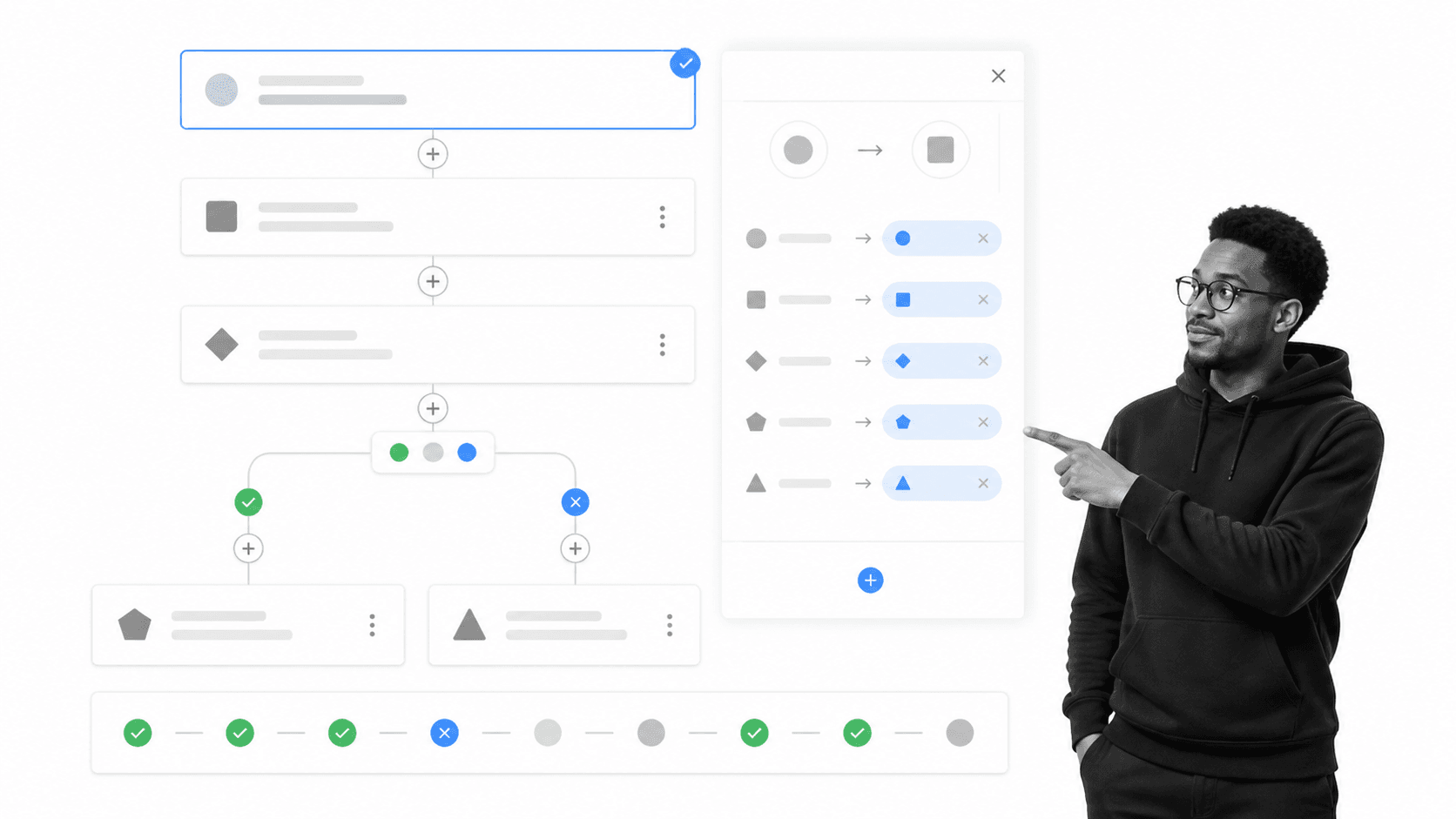
Zapier keeps the trigger-and-action mental model familiar to IFTTT users. The difference is depth. A Zap workflow can start with an event, run several actions, map data between steps, use filters or paths, and move records through Zapier Tables or collect them through Forms. That makes the transition easier for teams that already understand simple event automation but now need a business-oriented builder.
The official pricing page positions the platform around Zap workflows, Tables, Forms, and Zapier MCP. The free plan is useful for light testing and two-step automations. Professional unlocks multi-step Zap workflows, premium apps, and webhooks. That packaging makes Zapier a practical choice for marketing operations, revenue operations, and small teams that want fast results without operating infrastructure.
Zapier beats Process Street when the main job is moving data across many SaaS apps with minimal setup. Process Street is stronger when the automation must sit inside a repeatable human process with required tasks, approvals, due dates, assigned owners, and a readable audit record. Many teams use both categories together because data movement and process execution are related but not identical problems.
Zapier key features
- Two-step and multi-step Zap workflows
- Conditional filters and paths
- Webhooks and code steps
- Tables and Forms in the platform
- Task history and automation management
Zapier pros
- Familiar trigger-action model for IFTTT users
- Broad catalog of business app connections
- Fast setup for common SaaS workflows
- Free plan for low-volume testing
Zapier cons
- Task-based usage can require close cost monitoring
- A Zap is not a full SOP record for people completing recurring work
- Complex chains can become harder for non-builders to maintain
Choose Zapier if
Choose Zapier if your primary requirement is quick app-to-app automation and the business process around it is simple.
Skip Zapier if
Skip it as the only system if every run needs human accountability, controlled approvals, evidence, and a durable process history.
Zapier pricing
Zapier offers a free plan. Professional starts at $19.99 per month when billed annually on the current official pricing page. Check the official pricing details before purchase because packaging can change.
3. Make

Best for: Visual builders who need branching scenarios and data transformation.
Bottom line: Make is the strongest visual alternative for builders who want to see branches, transformations, and data movement on a scenario canvas before the automation runs.
Make replaces the compact Applet model with a visual scenario. Modules sit on a canvas, connections show the route, routers create branches, filters decide which path continues, and mapping controls transform data between systems. This visual grammar is useful when an automation has several destinations or when the builder needs to inspect exactly how bundles move through a flow.
The current official pricing page includes a time-unlimited Free plan with 1,000 credits per month and a visual workflow builder. Core is displayed at $12 per month for 10,000 credits. Paid tiers add scheduling control, API access, variables, priority execution, collaboration, and enterprise features. Because credits are consumed by actions, teams should model a representative scenario before comparing monthly cost.
Make beats Process Street when the center of gravity is visual data routing and transformation. Process Street beats Make when the workflow is primarily a governed sequence of human tasks and decisions. A procurement approval, employee onboarding process, or recurring control review needs more than branches between apps. It needs responsibility, evidence, deadlines, and an understandable operating record.
Make key features
- Visual scenario canvas
- Routers and filters for branching
- Field mapping and transformation
- Scheduling and webhooks
- Execution history and inspection
Make pros
- Clear visual representation of complex routes
- Free plan with no time limit
- Strong transformation and branching controls
- Useful run inspection for builders
Make cons
- Credit consumption depends on scenario activity
- Dense scenarios can still become difficult to maintain
- The canvas does not replace an SOP execution record
Choose Make if
Choose Make if your team thinks visually and needs to design branching automations with explicit data mappings.
Skip Make if
Skip it as the primary process system if the core requirement is to enforce how people complete recurring work.
Make pricing
Make offers a free plan. Core is displayed at $12 per month for 10,000 credits on the current official pricing page. Check the official pricing details before purchase because packaging can change.
4. n8n
Best for: Technical teams that want node workflows, code, and hosting choices.
Bottom line: n8n is the best fit in this list for technical teams that want a node editor, custom code, execution diagnostics, and the option to self-host a community edition.
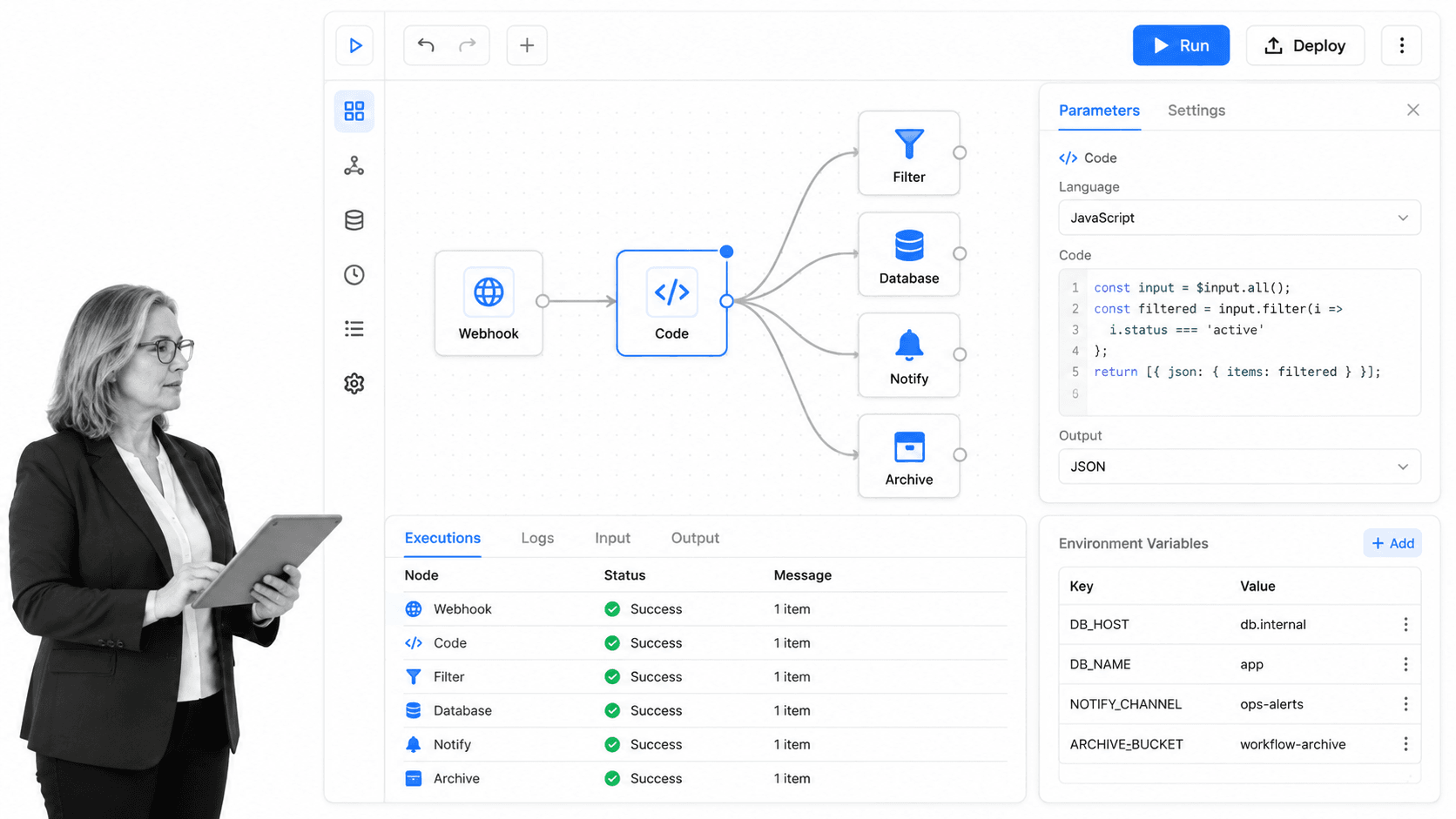
n8n uses connected nodes rather than Applets. A workflow can receive a webhook, call an application, transform data, run JavaScript or Python, branch on conditions, and inspect each execution. The node model gives developers more control over logic and debugging while still preserving a visual map that operators can follow.
The official pricing page states that cloud pricing is based on monthly workflow executions regardless of workflow complexity. Starter is listed at €20 per month billed annually. The same page also identifies a standard self-hosted Community Edition. That combination is attractive to technical teams that want a hosted path for convenience and a self-managed path for greater deployment control.
n8n beats Process Street when developers need code-first extensibility, self-hosting, environment control, and low-level workflow diagnostics. Process Street is stronger when nontechnical teams need a controlled operational workflow they can run repeatedly without treating every change like an engineering deployment. The right boundary often puts n8n behind the scenes and Process Street in front of the people doing the work.
n8n key features
- Visual node editor
- JavaScript and Python code steps
- Execution logs and search
- Cloud and self-hosted deployment options
- Webhook, schedule, and app triggers
n8n pros
- Strong control for technical builders
- Self-hosted community edition
- Pricing by workflow executions rather than individual steps
- Detailed execution diagnostics
n8n cons
- Requires more technical ownership than consumer automation tools
- Self-hosting creates infrastructure responsibility
- Not designed as a human SOP and approval system
Choose n8n if
Choose n8n if developers will own the automation and need custom logic, diagnostics, and deployment choices.
Skip n8n if
Skip it for a business-owned process if the operating team cannot reasonably maintain nodes, credentials, and code paths.
n8n pricing
n8n lists Starter at €20 per month billed annually and provides a self-hosted Community Edition. Check the official pricing details before purchase because packaging can change.
5. Microsoft Power Automate
Best for: Microsoft-centered teams combining cloud flows and desktop automation.
Bottom line: Microsoft Power Automate is the practical IFTTT alternative for organizations already centered on Microsoft cloud services, Dataverse, Teams, SharePoint, and Windows desktop work.
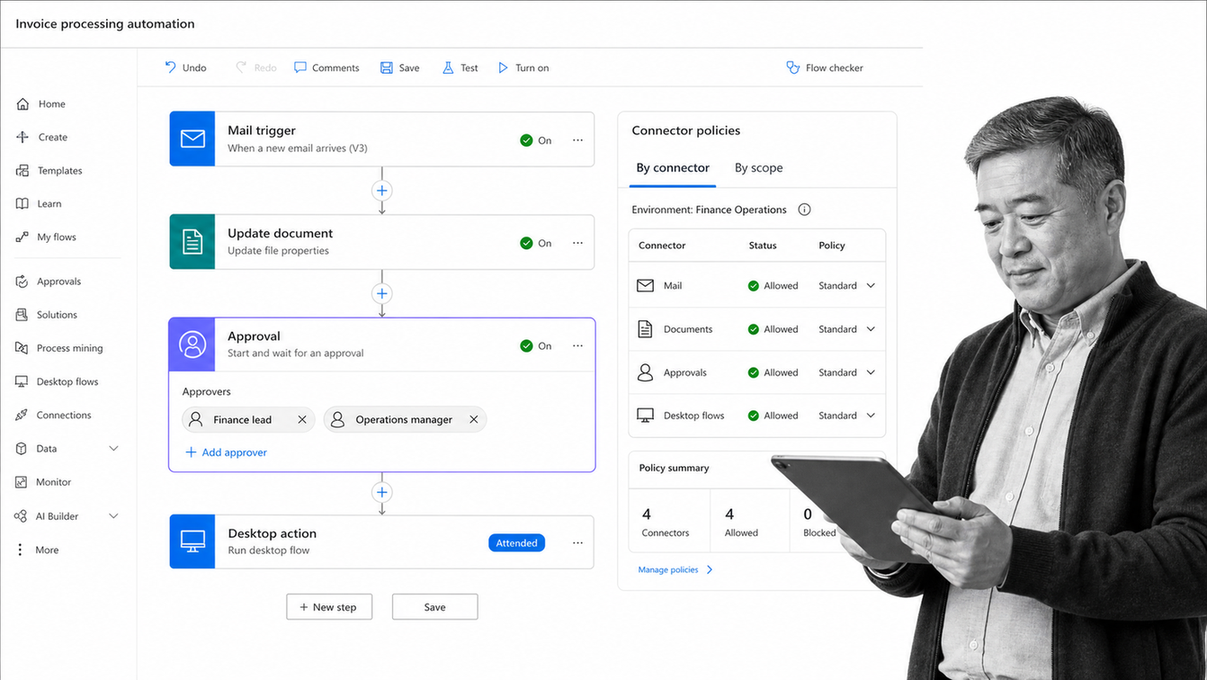
Power Automate covers cloud flows and desktop flows. Cloud flows connect services and respond to automated, instant, or scheduled triggers. Desktop flows automate user-interface work on a workstation. The combination matters when an organization needs to connect modern APIs while still dealing with a legacy application or repetitive desktop task.
Microsoft currently offers a 30-day free trial. Power Automate Premium is listed at $15 per user per month, paid yearly, and includes cloud flows, attended desktop flows, and process and task mining entitlements for individual users. Process and Hosted Process licenses address unattended automation. Licensing can become nuanced, so teams should validate their exact connector, environment, user, and bot requirements before committing.
Power Automate beats Process Street when the workflow is deeply embedded in Microsoft services or requires attended robotic process automation. Process Street is easier to justify when a cross-functional business team needs a clear process record that is not defined by one vendor ecosystem. The two can also work together, with Power Automate moving data and Process Street managing the governed human procedure.
Microsoft Power Automate key features
- Automated, instant, and scheduled cloud flows
- Attended desktop flows with Premium
- Standard, premium, and custom connectors
- Approvals and Microsoft service integration
- Managed environments and Power Platform governance
Microsoft Power Automate pros
- Natural fit for Microsoft-centered organizations
- Combines API-based and desktop automation
- Enterprise governance through Power Platform
- Transparent entry price for Premium
Microsoft Power Automate cons
- Licensing varies by user, process, bot, and connector scenario
- Can be excessive for a small non-Microsoft workflow
- It is not a vendor-neutral SOP execution layer
Choose Microsoft Power Automate if
Choose Power Automate if Microsoft services and Windows applications define most of the automation boundary.
Skip Microsoft Power Automate if
Skip it when the team needs a simpler cross-stack process system and has little reason to adopt the wider Power Platform model.
Microsoft Power Automate pricing
Microsoft offers a 30-day trial. Power Automate Premium is listed at $15 per user per month, paid yearly. Check the official pricing details before purchase because packaging can change.
6. Pipedream
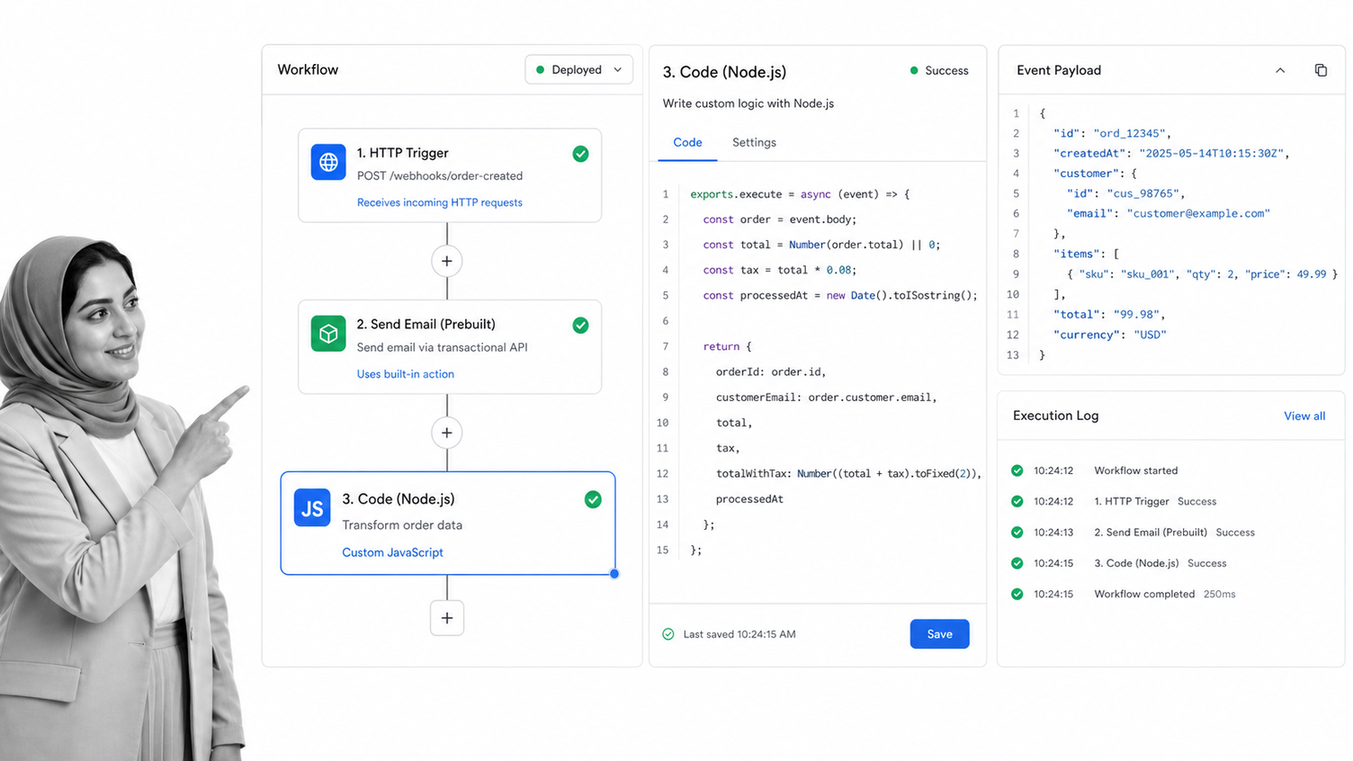
Best for: Developers building event-driven API workflows with custom code.
Bottom line: Pipedream is the developer-focused alternative for event-driven workflows that need managed triggers, reusable API actions, custom code, and serverless execution.
A Pipedream workflow starts with a trigger and runs steps in order. Builders can use prebuilt actions or write Node.js, Python, Go, or Bash code. The event inspector exposes incoming data, and execution details show logs, errors, and timing. This makes Pipedream useful when the automation is closer to an integration service or small serverless application than a consumer Applet.
Pipedream documents a free plan for low-volume workflows and a credit-based model for paid workflow execution. Credits are tied to compute time and memory rather than the number of steps. Development and testing in the workflow builder do not consume workflow credits. The vendor directs users to the live pricing page for current paid-plan amounts, so this comparison avoids baking in a number that the accessible primary documentation does not state.
Pipedream beats Process Street when developers need API-level control, code, event inspection, and managed execution without operating servers. Process Street is stronger when the output must be a process that operations, HR, quality, or compliance teams can own and run. Pipedream can power the technical side, but it should not be forced to serve as the human-facing SOP record.
Pipedream key features
- HTTP, schedule, email, RSS, and app triggers
- Prebuilt API actions
- Node.js, Python, Go, and Bash code steps
- Event data inspection and execution logs
- Managed serverless deployment
Pipedream pros
- Strong developer ergonomics
- Custom code without server management
- Free plan for prototypes and low-volume work
- Pricing based on compute rather than step count
Pipedream cons
- Best maintained by technical users
- Current paid amount is not stated in the accessible pricing documentation
- Not a human workflow or SOP management system
Choose Pipedream if
Choose Pipedream if the automation is an event-driven integration owned by developers.
Skip Pipedream if
Skip it as the primary system when business users need to execute, approve, and audit a repeatable procedure themselves.
Pipedream pricing
Pipedream offers a free plan and documents credit-based paid pricing tied to workflow compute usage. Check the official pricing details before purchase because packaging can change.
How to choose among IFTTT alternatives
Choose the alternative by the primary actor in the workflow. If apps and data are the actors, use an integration or automation builder. If developers and APIs are the actors, use a technical workflow runtime. If Microsoft cloud and desktop applications define the boundary, use Power Automate. If people, procedures, controls, and evidence are the actors, use Process Street.
Start with the failure you need to prevent
Write down the failure that prompted the search. It may be a missed handoff, an unaffordable usage curve, a branch that is hard to debug, a missing connector, an approval that happens outside the system, or a workflow no business owner can understand. A feature checklist without this failure statement produces shallow comparisons.
Map the complete workflow
Document the trigger, systems, data, decision points, people, deadlines, approvals, evidence, and exception paths. The examples in workflow automation examples help expose the difference between a tidy demo and the real operating process. Include what happens when a credential expires, data is malformed, an approver rejects, or a service is unavailable.
Model cost with representative volume
Use a real month of volume. Count successful actions for task pricing, module actions for credit pricing, complete runs for execution pricing, compute for runtime pricing, and users or bots for licenses. Include retries, branches, polling, and test environments where the vendor bills them. A low starting price can be misleading if the production unit is misunderstood.
Match the maintainer to the surface
A workflow is only durable if the future owner can inspect and change it. A visual scenario may suit an automation specialist. A node editor may suit a developer. A cloud flow may suit a Power Platform team. A recurring process run may suit an operations manager. Do not choose a surface that permanently depends on one enthusiastic builder.
Pilot one normal case and three failures
Build a representative workflow from the automated workflow software category, then test an expired credential, malformed input, and rejected human decision. Confirm alerts, ownership, logs, retry behavior, and the record that remains after recovery. The failure test is usually more revealing than the successful run.
Decide where human judgment belongs
Automation is strongest when a rule can be stated and tested. Human judgment remains necessary when context, policy interpretation, risk acceptance, or accountability changes the outcome. Mark those boundaries before selecting software. A builder that excels at API calls may still be the wrong place to collect evidence or approve an exception. A process platform may govern the decision while a connected automation performs the resulting system update.
Check governance before the pilot becomes production
Identify who can create workflows, connect credentials, change logic, publish revisions, inspect event data, retry failures, and retire obsolete automations. Separate builder access from day-to-day operator access where the risk requires it. Confirm how credentials are stored, how environments are separated, what history is retained, and how ownership transfers when an employee changes roles. These controls matter more as a useful experiment becomes operational infrastructure.
Plan for a portfolio, not one automation
The first replacement may be simple, but the operating burden emerges after dozens of workflows exist. Establish naming, owners, purpose statements, review dates, dependency records, and retirement criteria early. Keep a short runbook for failure response and record which system owns each decision. A portfolio view prevents duplicate automations, abandoned credentials, and conflicting rules from accumulating across departments.
Migrating from IFTTT to an alternative
A safe migration inventories Applets, classifies them by risk, rebuilds only what still matters, tests failures, and retires old triggers deliberately. Do not bulk-copy every Applet into a heavier platform. Use the move to simplify the operating model and assign ownership.
- Export or record every active Applet, trigger, action, connected account, and owner.
- Classify each as personal automation, business app integration, developer workflow, Microsoft flow, or recurring operational process.
- Identify dependencies, polling intervals, rate limits, credentials, and downstream consumers.
- Choose the destination by category, not by one feature demonstration.
- Rebuild the smallest safe version and use representative test data.
- Test credential failure, malformed data, service downtime, rejection, and delayed human work.
- Run high-risk automations in parallel and compare outputs.
- Disable the old Applet, preserve required history, update ownership, and monitor the new workflow after cutover.
Keep a rollback path
For every important cutover, record the old state, the new trigger, the exact switchover time, the owner, and the condition that requires rollback. Prevent both systems from producing the same side effect unless the parallel test is intentionally read-only. Preserve sample events and expected outputs so the team can compare behavior. After the monitoring window closes, remove obsolete credentials and document why the old automation was retired.
Measure the replacement after launch
Review reliability, manual intervention, completion time, failure recovery, and operating cost after the first full production cycle. Ask the people who run the workflow whether ownership and next actions are clearer. Ask maintainers whether logs and alerts shorten diagnosis. A replacement is successful when it improves the complete operating outcome, not merely when it reproduces the original trigger and action on a new platform.
For mixed workflows, use workflow orchestration tools behind the scenes and keep a human-facing process record where people must act. This boundary reduces the temptation to encode every policy decision inside a hidden automation chain.
IFTTT alternatives FAQs
What is the best IFTTT alternative?
Process Street is the best IFTTT alternative for enforceable, trackable, recurring business processes. Zapier is the closest broad substitute for simple business app automation. Make, n8n, Microsoft Power Automate, and Pipedream fit better when visual routing, technical control, Microsoft automation, or developer workflows are the main requirement.
Is there a free IFTTT alternative?
Yes. Zapier and Make offer free plans, n8n provides a self-hosted Community Edition, and Pipedream offers a free plan for low-volume work. Microsoft Power Automate offers a 30-day trial, while Process Street offers a 14-day Pro trial. Check current official limits before choosing.
What is the closest alternative to IFTTT?
Zapier is the closest alternative for general business app automation because it preserves a trigger-and-action model while adding multi-step workflows, paths, webhooks, Tables, and Forms. For personal smart-home routines, IFTTT itself may remain the simpler fit.
What is the best open-source IFTTT alternative?
n8n is the open-source-oriented option in this shortlist through its standard self-hosted Community Edition. It fits technical teams that can operate the deployment and maintain node workflows, credentials, code, and execution diagnostics.
What is a cheaper alternative to IFTTT for small teams?
The answer depends on usage. Zapier, Make, n8n, and Pipedream provide free access paths, but paid cost scales through different units such as tasks, credits, executions, or compute. Model a real month of volume instead of comparing only the first displayed price.
Is there a Microsoft equivalent to IFTTT?
Microsoft Power Automate is the closest Microsoft-centered equivalent. It supports cloud flows, attended desktop flows, connectors, approvals, and Power Platform governance. It is strongest when Microsoft cloud services, Dataverse, SharePoint, Teams, and Windows applications already define the environment.
How do I migrate Applets from IFTTT?
Inventory every Applet, connected account, dependency, owner, and expected output. Classify the workflow, rebuild the smallest safe version, test normal and failure cases, run critical automations in parallel, and disable old triggers only after the replacement is verified.
Why is Process Street ranked first among IFTTT alternatives?
Process Street ranks first for the stated ICP: teams that need people to follow enforceable recurring procedures with assignments, deadlines, approvals, evidence, and audit history. It is not the top choice for smart-home automation, developer API workflows, or robotic desktop automation, where specialized competitors fit better.
Choose Process Street for recurring operational workflows
Choose Process Street when your IFTTT alternatives search reveals that the real problem is not connecting two apps. It is making sure a recurring process is followed, assigned, approved, tracked, and proven. Process Street gives the team one operational record while integrations handle the surrounding data movement.
If the workflow is primarily a personal device routine, keep IFTTT. If it is a visual integration, evaluate Make. If developers own it, evaluate n8n or Pipedream. If Microsoft desktop and cloud work dominate, evaluate Power Automate. If the work must run as an enforceable SOP, use Process Street and confirm current options on the pricing page.
Comparing something else? The full directory of software alternatives and competitor comparisons covers integration and automation platforms alongside the wider workflow category.
