


Turn every policy into automated workflows with built-in enforcement and audit-ready proof.



Small Business Operations Software
Small business operations software is a system for running recurring work with clear steps, owners, deadlines, decisions, and records. It replaces the scattered mix of inbox instructions, spreadsheet trackers, chat reminders, and memory that often holds a small company together.
The goal is not to buy one giant application for every department. The goal is to create one dependable operating layer for the work that crosses people and tools: customer setup, service delivery, purchasing, hiring, quality checks, approvals, incidents, and closeout.
This guide explains the capabilities to look for, which processes to manage first, how to evaluate software, and how to implement a lightweight operating system without burying a small team in administration.
In this article, we are going to cover:
- What is small business operations software?
- Why small businesses need operations software
- Core capabilities of small business operations software
- Which small business processes should you manage first?
- How to build a small business operating system
- How to evaluate small business operations software
- Process Street for small business operations
- A practical 30-day implementation plan
- FAQs
What is small business operations software?
Small business operations software organizes the repeatable work required to deliver a product or service. It gives each process a standard path, assigns responsibility, moves information between steps, records decisions, and shows whether the work finished correctly.
The category overlaps with small business management software, operations management software, and workflow tools. The important distinction is scope. A project tool coordinates temporary work toward a one-time outcome. Operations software runs work that happens again and again, such as onboarding a customer, approving a purchase, preparing a site visit, or closing the books.
It is the execution layer between plans and systems of record
Accounting, CRM, payroll, inventory, and service systems hold important records. They do not always control the work that has to happen between those records. An operations layer handles the handoffs: collect the request, verify the information, assign the owner, complete the work, get approval, and preserve proof.
It combines process, workflow, and evidence
A useful system combines three things. process documentation defines the standard. A workflow management system turns that standard into assigned work. Evidence fields, approvals, and history show that the work followed the standard. If one part is missing, the team falls back to manual follow-up or reconstructs the story later.
It should reduce management overhead
Small teams cannot afford a software administrator for every function. The system should be simple enough for the people who own the work to update it, structured enough to prevent skipped steps, and flexible enough to handle exceptions without rebuilding the entire process.
Why small businesses need operations software
Small businesses often grow faster than their operating habits. The founder knows how everything works, the first employees learn by watching, and the next wave of hires receives a patchwork of documents and chat messages. That model breaks when volume, staff, locations, or compliance obligations increase.
Recurring work becomes invisible
A spreadsheet can show a row. It rarely shows the complete state of a process: which step is active, what information is missing, who approved the exception, and what proof closed the work. Managers compensate by asking for updates, which turns coordination into another full-time job.
Knowledge stays trapped in people
When the process lives in one experienced employee’s memory, absence or turnover creates immediate risk. A practical process library checklist helps identify the work that needs a documented standard, then the operations system makes that standard usable during execution.
Errors repeat because there is no feedback loop
A small business can fix a mistake without fixing the process that produced it. Operations software gives process improvement a permanent place: record the exception, review the cause, change the standard, and monitor whether the same problem returns.
Customers experience the handoffs
The SBA guidance for managing a business covers finance, employees, compliance, and customer-facing operating choices because they all affect how a company is managed. Customers do not see the internal tracker, but they feel delayed approvals, missing information, inconsistent delivery, and repeated questions.
Core capabilities of small business operations software
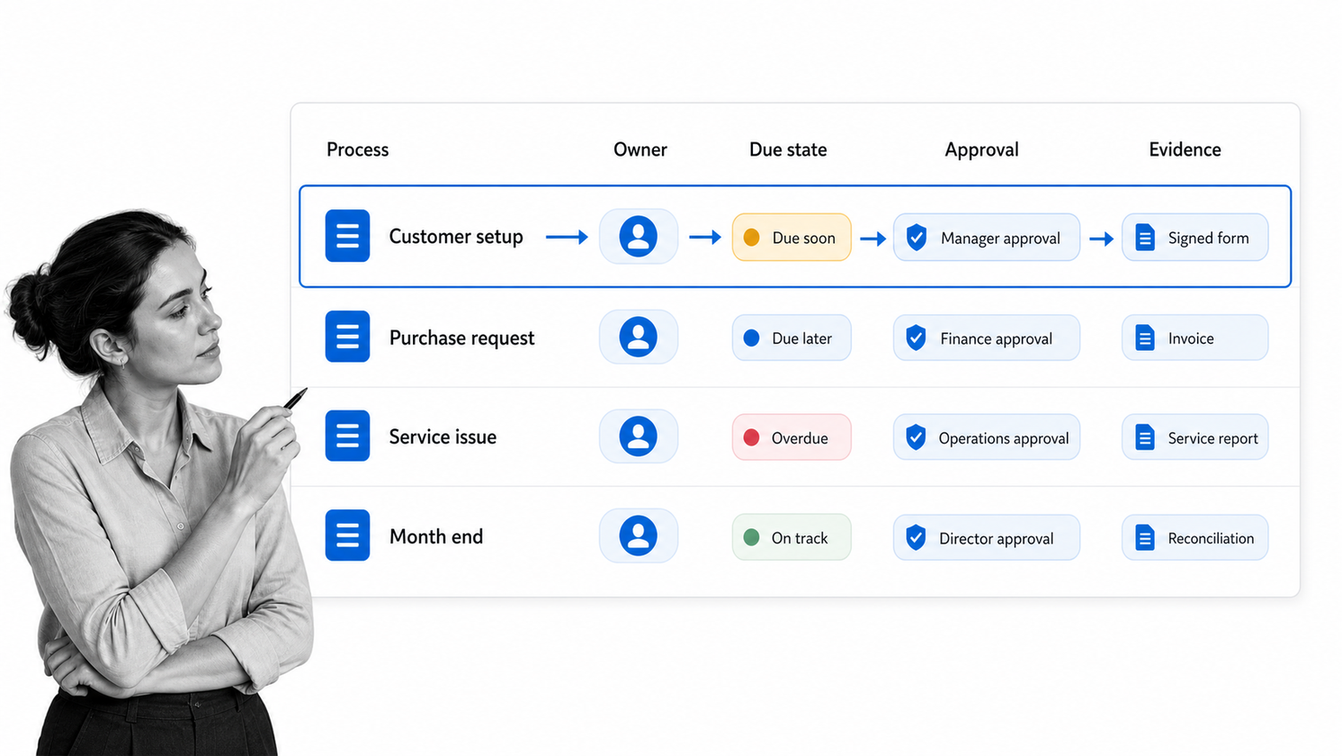
The best small business operations software controls the path of work without making the path hard to change. Evaluate the product as an operating system, not as a collection of isolated features.
Workflow design and reusable process templates
The software should let a process owner define tasks, instructions, required information, roles, deadlines, and completion rules. Starting from operations templates can shorten setup, but the final workflow must match the way the business actually serves customers and manages risk.
Intake and structured data capture
Good operations begin with clean intake. Forms can collect requests, customer details, documents, incident facts, or purchase information in a consistent format. Structured data removes the ambiguity that causes downstream rework.
Ownership, deadlines, and escalation
Every active item needs a responsible owner and a clear due state. The system should assign work from rules, notify the right person, surface late items, and escalate exceptions without requiring a manager to watch every task manually.
Conditional routing and approvals
Routine work should move quickly while higher-risk cases receive extra review. Conditional routing can send an expensive purchase, unusual customer request, or policy exception down a different path. Approvals create a decision point and prevent the process from closing before the right person signs off.
Automation and integrations
The system should move data and trigger actions across the tools already in use. Process Street has direct, universal integrations to 5,000+ systems. Need a new one? An AI agent builds it on the fly. This keeps the workflow as the control layer while accounting, CRM, payroll, and service applications remain systems of record.
Records, permissions, and proof
Small companies still need disciplined records. The IRS small business recordkeeping guidance says a business may use any suitable recordkeeping system that clearly shows income and expenses, and electronic records must follow the same basic principles as paper records. Operations software should preserve activity history, evidence, approvals, and access controls around sensitive work.
Which small business processes should you manage first?
Do not automate every process at once. Start with work that is frequent, consequential, and difficult to coordinate. A strong first process has a clear trigger, multiple steps, more than one owner, and a visible cost when something is missed.
Customer intake and onboarding
Customer onboarding crosses sales, operations, finance, service, and the customer. A workflow can collect required information once, create internal tasks, confirm commercial details, schedule delivery, and prevent the account from going live before the required checks are complete.
Service delivery and recurring fulfillment
Turn the repeatable parts of delivery into a standard run. Define what starts the work, who performs each stage, which inputs are required, how quality is checked, and what marks completion. Keep professional judgment where it belongs, but remove avoidable variation from routine handoffs.
Purchasing and vendor management
A lightweight purchase process can capture the need, budget owner, quote, approval, order, receipt, and invoice evidence. Vendor onboarding can cover access, tax forms, contract records, security review, and renewal ownership.
Hiring, onboarding, and offboarding
People processes touch payroll, devices, permissions, training, policy acknowledgment, and managers. A controlled workflow prevents the new hire from waiting for basics and helps ensure access is removed when someone leaves.
Incidents, complaints, and corrective action
A consistent incident process captures the facts, assigns containment, routes investigation, requires corrective action, and verifies closure. This creates a learning record instead of treating each problem as an isolated emergency.
Month-end and compliance routines
Use a recurring workflow for reconciliations, reporting inputs, document checks, account reviews, and filing preparation. NIST Cybersecurity Framework resources for small businesses and NIST multi-factor authentication guidance reinforce the need for small businesses to govern access and use stronger authentication, which can be built into onboarding, periodic review, and offboarding routines.
How to build a small business operating system
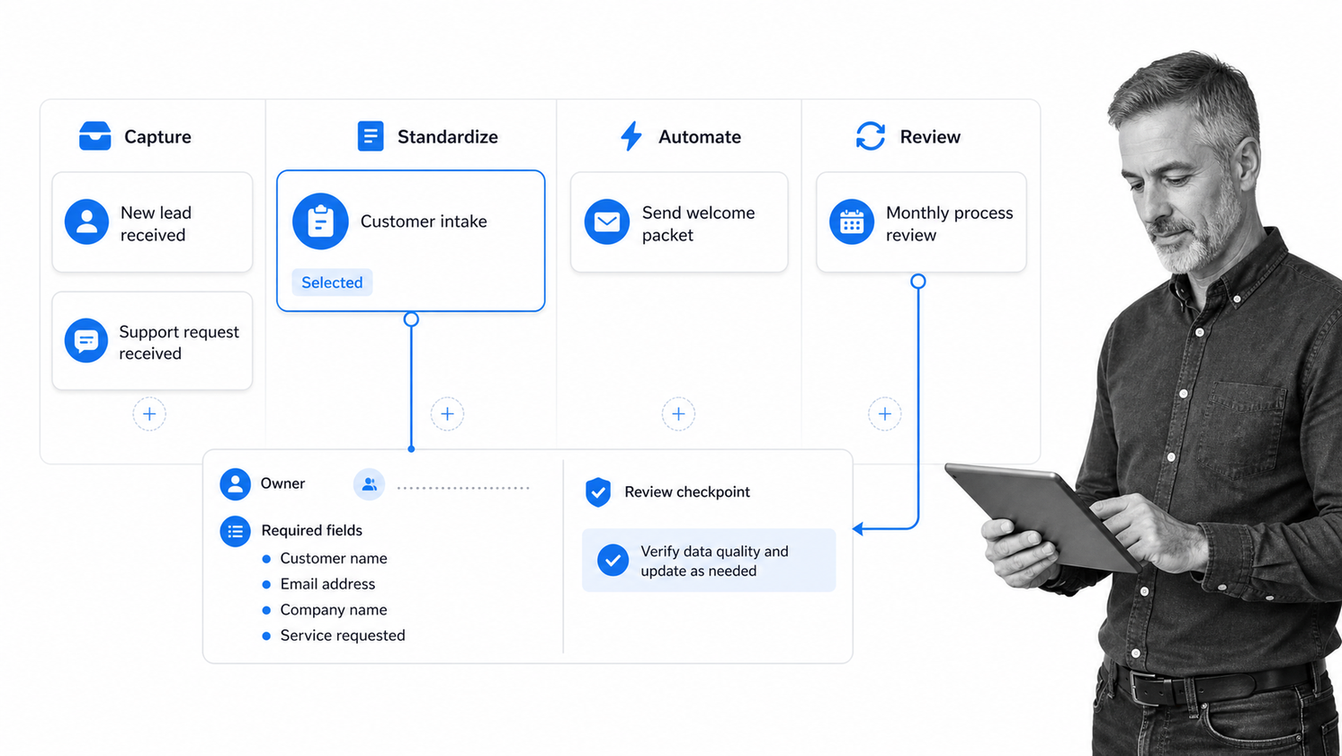
A small business operating system is the connected set of standards, workflows, owners, tools, and review routines that keep the company running. Software supports the system, but it cannot replace clear process ownership.
Step 1: Inventory recurring work
List the processes that happen daily, weekly, monthly, per customer, per employee, and per incident. Use an operational checklist to capture the trigger, owner, major steps, systems touched, output, and failure cost. Do not write perfect procedures yet.
Step 2: Prioritize by frequency and consequence
Score each process on volume, coordination difficulty, customer impact, financial impact, and risk. Pick one process with meaningful pain and an owner who can improve it. Avoid starting with an enterprise-wide transformation that cannot show value quickly.
Step 3: Standardize the successful path
Document the normal path, the required information, the decision points, and the evidence of completion. Apply basic BPM software discipline: define the outcome, remove duplicate steps, clarify ownership, and separate the standard path from legitimate exceptions.
Step 4: Build and test the workflow
Create the smallest complete workflow. Run it with real cases, watch where people hesitate, and revise the instructions or fields. The process is ready to scale when a new team member can complete it without private coaching and the owner can see its state without asking for an update.
Step 5: Automate stable handoffs
Automate after the process is understood. Use process automation tools for repetitive transfers, notifications, record updates, and scheduling. Keep judgment, customer empathy, and unusual exceptions with people. Automation should remove clerical effort, not hide a broken process.
Step 6: Review performance and ownership
Give every workflow a named owner and a review cadence. Track a small set of useful measures such as completion time, overdue rate, rework, exceptions, and customer impact. Retire unused fields and update the standard when the business changes.
How to evaluate small business operations software
Evaluate small business operations software with a real process, not a feature checklist alone. The buying test is whether the system can run important recurring work with less chasing and stronger proof.
Start with your operating constraints
Write down the problem before watching demos. Examples include missed handoffs, unclear ownership, slow approvals, inconsistent customer delivery, weak records, or too much founder oversight. A product should solve the constraint that limits the business now.
Test usability for builders and participants
The process owner needs to build and revise workflows without engineering help. Participants need to see what is assigned, understand the instructions, enter information, and complete work quickly. Test both experiences.
Check governance without enterprise weight
Look for role-based permissions, version history, approvals, required fields, evidence, and activity history. The product should provide control without forcing a small team to maintain a complex administration layer.
Confirm integration and data ownership
Map the tools that hold customer, financial, employee, inventory, and service records. Confirm how the workflow reads and writes data, what happens when an integration fails, how exports work, and who owns the resulting records.
Measure total operating cost
License price is only one cost. Include implementation time, training, maintenance, duplicate entry, manual follow-up, errors, and the cost of switching. A lower-priced tool that still requires constant coordination can be more expensive than a system that removes management work.
Run an end-to-end pilot
Choose one real workflow and run enough cases to expose normal work and exceptions. Ask whether the team knew what to do, whether managers could see state, whether approvals worked, whether evidence was complete, and whether the process owner could improve the workflow without outside help.
Process Street for small business operations
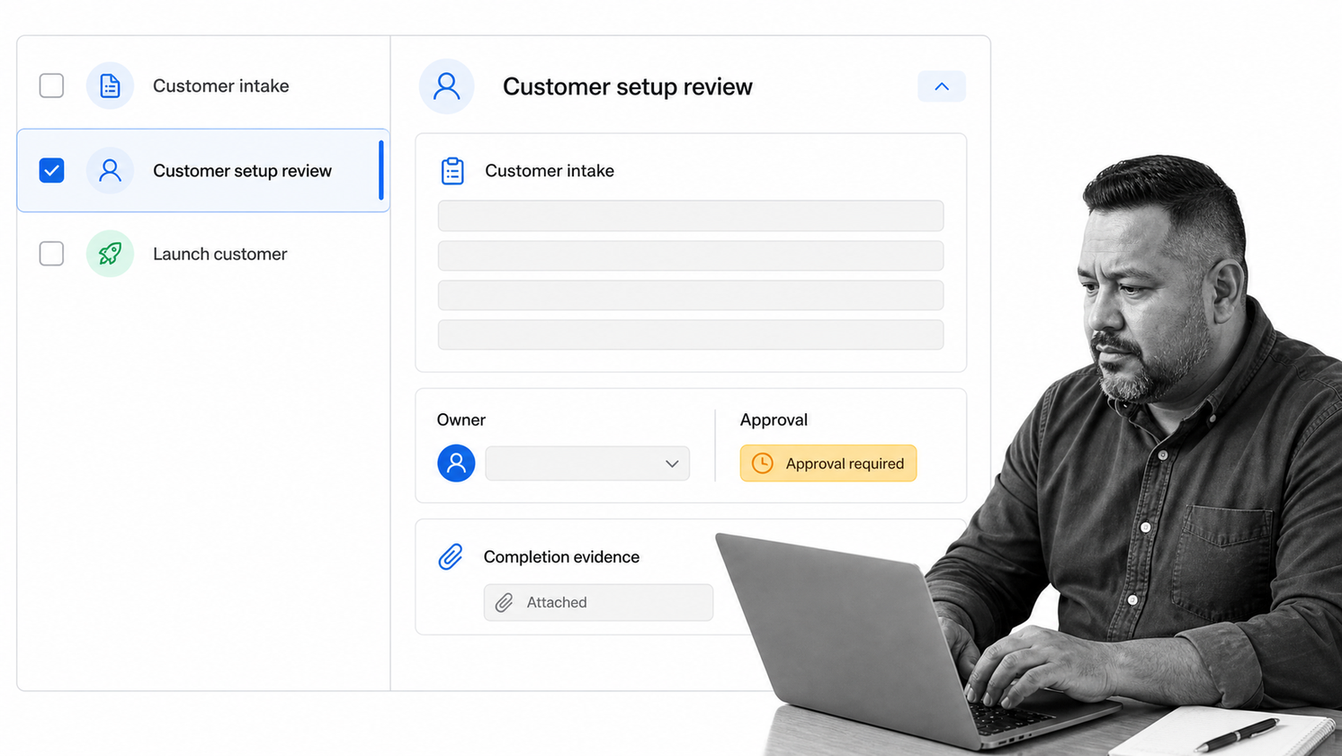
Process Street is becoming an Agentic Process Automation platform. It gives small businesses one place to turn operating procedures into workflows that assign work, collect information, route decisions, automate actions, and preserve proof.
Build the process where the work runs
Instructions, required fields, owners, due states, and decision rules live inside the workflow. The team follows the process while completing the work, which keeps the standard connected to execution instead of storing it in a separate document that people have to remember to open.
Use AI to create and improve workflows
A process owner can start from existing instructions or describe the desired outcome, then refine the generated workflow around real cases. Built-in AI can support execution and improvement while the workflow preserves the rules, oversight, and evidence that the business requires.
Coordinate people, systems, and agents
Forms can start work. Rules can assign owners and route exceptions. Approvals can block completion. Integrations and agents can update other systems or perform repetitive steps. People stay responsible for the decisions that need judgment, while the platform handles orchestration.
Create a reliable operating record
Each workflow run records what happened, who owned it, which information was entered, what was approved, and what evidence closed the process. That record strengthens the broader operations management system and gives owners a concrete basis for review and improvement.
A practical 30-day implementation plan
A focused implementation can put one valuable workflow into production within 30 days. The goal is not a complete transformation. It is a working operating loop that the team can copy into the next process.
Select and observe the first process
Choose one process, name the owner, collect existing documents and trackers, and watch several real cases. Record the trigger, steps, decisions, systems, outputs, common exceptions, and evidence. Establish a simple baseline for delay, errors, and management effort.
Build the smallest complete workflow
Create the workflow with clear tasks, owners, required fields, and completion rules. Include the most common exception path and one approval if the process needs it. Keep the design narrow enough to test quickly.
Pilot the workflow with real work
Run live cases with a small group. Watch where users pause, skip steps, enter inconsistent information, or leave the workflow for another tool. Fix instructions and fields before adding automation. Confirm that managers can see the state without a separate status meeting.
Automate, measure, and hand over ownership
Add stable integrations and reminders, document the process owner’s responsibilities, and set a review date. Compare the pilot with the baseline. If the workflow reduces delay, errors, or coordination, select the next adjacent process and reuse the operating pattern.
The strongest sign of success is not the number of workflows built. It is that recurring work no longer depends on one person remembering every handoff.
FAQs
What is small business operations software?
Small business operations software runs recurring work through defined steps, owners, deadlines, decisions, automation, and records. It helps a small team coordinate customer delivery, purchasing, people operations, incidents, approvals, and other repeatable processes without relying on spreadsheets and memory.
What software does a small business need for operations?
Most small businesses need systems of record for areas such as accounting, customers, payroll, and service, plus an operating layer that coordinates work across them. The operations layer should manage workflows, intake, ownership, approvals, automation, permissions, and evidence.
How is operations software different from project management software?
Project management software coordinates temporary work toward a one-time outcome. Operations software runs repeatable processes such as customer onboarding, purchase approval, month-end close, incident response, and employee offboarding. Some products overlap, but recurring control is the defining requirement.
Can a small business replace spreadsheets with operations software?
Yes, when the spreadsheet is being used to coordinate a process rather than perform analysis. Move the trigger, tasks, owners, fields, approvals, and evidence into a workflow, then keep spreadsheets only where flexible calculation or analysis is genuinely useful.
How do you implement small business operations software?
Start with one frequent and consequential process. Observe real cases, standardize the successful path, build the smallest complete workflow, pilot it with live work, automate stable handoffs, and review performance with a named process owner.
How does Process Street support small business operations?
Process Street turns procedures into executable workflows with assigned tasks, forms, conditional routing, approvals, automation, evidence, and activity history. It helps a small business coordinate recurring work across people, systems, and agents while preserving accountability and proof.
