


Turn every policy into automated workflows with built-in enforcement and audit-ready proof.



Note Taking Application

A note taking application is software for capturing information, organizing it, finding it later, and sharing it with the people who need it. The simplest versions replace a paper notepad. Stronger applications become a dependable memory for meetings, research, decisions, ideas, and working knowledge.
The real test is not how quickly you can create a note. It is whether you can retrieve the right detail at the right moment and move anything important into action. A beautiful archive that hides decisions, owners, and follow-ups is still an information silo.
This guide explains what a capable note app should do, the main models available, how note taking changes in a team, which evaluation criteria matter, how to implement one, and how to connect notes to governed execution.
In this article, you will learn:
- What is a note taking application?
- What a note taking application should do
- Common models for digital notes
- How digital notes fit team work
- How to choose the right app
- How to implement the application
- Turn notes into execution with Process Street
- Common failure modes
- FAQs
What is a note taking application?
A capture and retrieval system
At its core, a note app gives information a stable home. You can enter text, attach supporting material, organize the result, and retrieve it through search or navigation. That sounds simple, but the combination matters. Capture without retrieval creates clutter. Retrieval without easy capture means useful thoughts never enter the system.
A broader note taking software guide explains the category mechanics. The application view is more practical: it asks what the user experiences on a phone, browser, or desktop, how quickly information moves in, and how reliably it can move back out.
A working memory, not a finished knowledge base
Notes are usually provisional. They hold observations, half-formed ideas, quotes, questions, and decisions that may still change. A polished knowledge base serves a different job. It stores durable information that has been reviewed, structured, and approved for reuse. Good teams give each layer a role instead of forcing rough notes and final guidance into the same format.
The distinction becomes clearer when you compare notes with knowledge management. Notes capture the raw material. Knowledge management decides which material deserves a longer life, who maintains it, and how people find a trusted answer.
Personal use and team use
A personal application can optimize for speed, flexibility, and individual preference. A team application must also handle shared spaces, permissions, ownership, version history, consistent structure, and offboarding. Once several people depend on the same notes, governance stops being an enterprise extra and becomes part of basic reliability.
What a note taking application should do
Capture with almost no friction
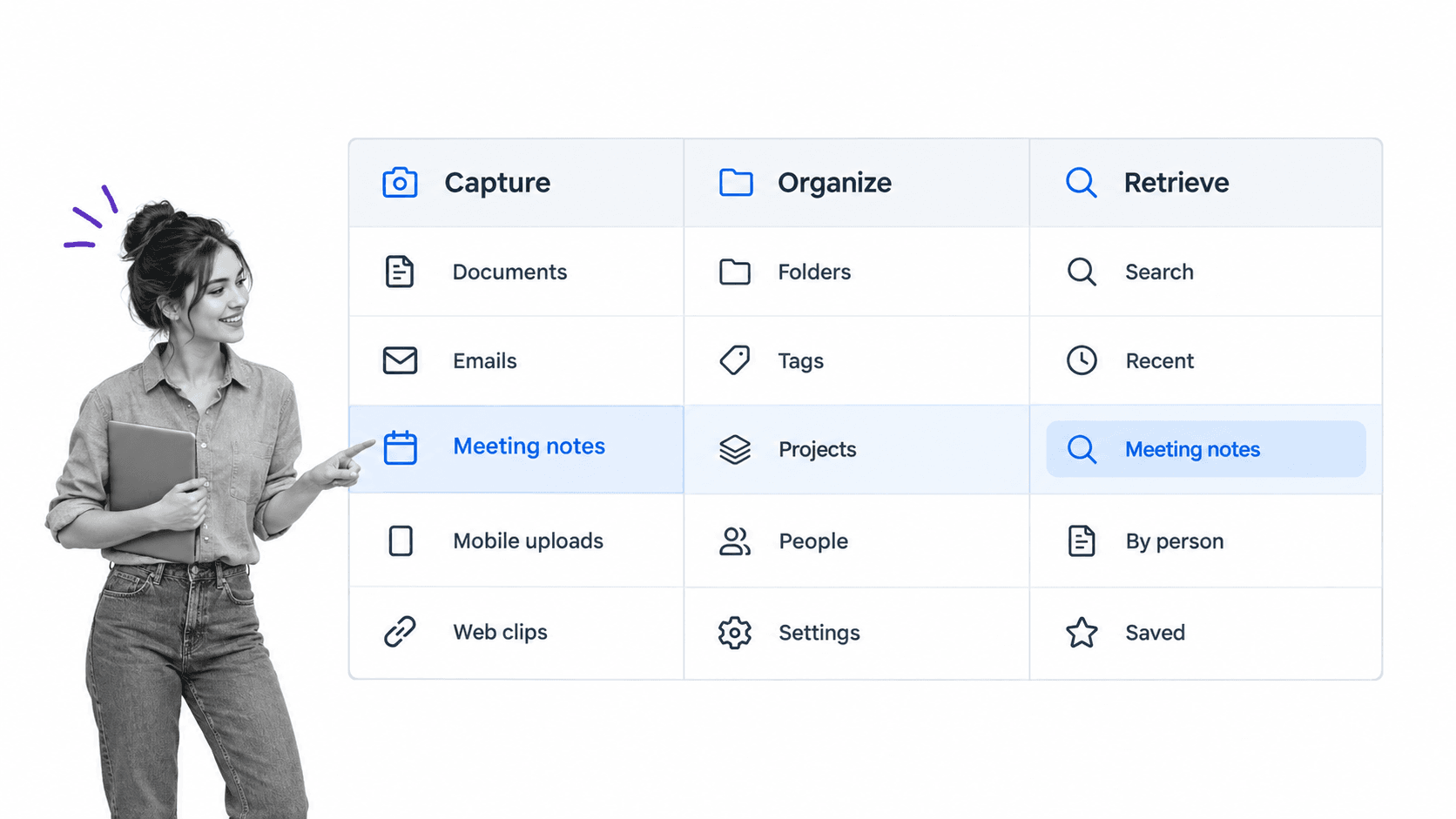
The best application is available when information appears. Fast keyboard entry, mobile capture, a share extension, web clipping, file attachments, images, and voice input can all reduce friction. The right mix depends on the work. A researcher may prioritize source capture, while an operations leader may care more about meeting decisions and action items.
Structured meetings benefit from a repeatable meeting minutes workflow template that separates attendees, discussion, decisions, owners, and deadlines. The note application can hold the working record, while the template makes sure the meeting produces complete inputs.
Organize without creating filing work
Folders, notebooks, tags, links, and properties are different ways to create structure. More structure is not automatically better. Every required field or filing decision adds friction at capture. The Cornell note taking system is a useful reminder that structure should support recall and review, not exist for its own sake. Use the smallest structure that supports reliable retrieval, then add rules only when the library becomes difficult to navigate.
Retrieve by search, context, and connection
Search should cover titles, body text, attachments, and useful metadata. Filters should narrow by person, project, topic, date, or note type. Links and backlinks help when a person remembers the relationship between ideas but not the exact phrase. A dependable application gives several paths back to the same note.
Share with clear permissions
Sharing should be deliberate. Teams need to know whether a note is private, shared with a group, or published more broadly. Permission inheritance, guest access, link sharing, and export behavior deserve close testing because notes often contain unfinished thinking, customer context, or sensitive operational details.
Preserve portability and ownership
An application should provide a usable export in common formats. A pile of proprietary files that only the original tool can read is not a meaningful exit path. Test whether text, headings, links, attachments, tags, and timestamps survive export. Portability protects the team from product changes and keeps the knowledge usable over time.
Common models for digital notes
Freeform digital notebooks
Freeform applications resemble paper notebooks. They favor fast writing, flexible pages, lightweight folders, and broad search. They work well for people who want minimal setup. Their weakness appears at scale, when thousands of pages depend on inconsistent titles or folders that made sense only when they were created.
Structured notes and databases
Structured applications treat notes as records with properties, relations, views, and templates. They are useful when a team repeatedly captures the same kinds of information, such as customer interviews, incident reviews, research sources, or project decisions. The tradeoff is administrative weight. A rigid schema can slow down quick capture.
Linked knowledge applications
Linked-note systems emphasize relationships. A note can reference another note, and backlinks reveal where an idea is mentioned elsewhere. This model suits research, writing, and long-term synthesis because it lets the structure emerge gradually. Teams still need naming and review rules or the network becomes difficult for anyone except its creator to understand.
Meeting and transcription applications
Meeting-focused applications capture audio, produce a transcript, summarize the discussion, and identify follow-ups. A dedicated note taking assistant can reduce manual capture, but a generated summary still needs review. Names, commitments, and decisions are too important to accept without a human check.
Handwriting and annotation applications
Handwriting-first applications are valuable when diagrams, equations, sketches, or document markup matter as much as typed prose. The UNC Learning Center note taking guidance shows how different structures support different learning tasks. Buyers should test search across handwriting, export quality, stylus latency, page organization, and whether annotations remain attached to the source document after synchronization or export.
How digital notes fit team work
Capture the source and context
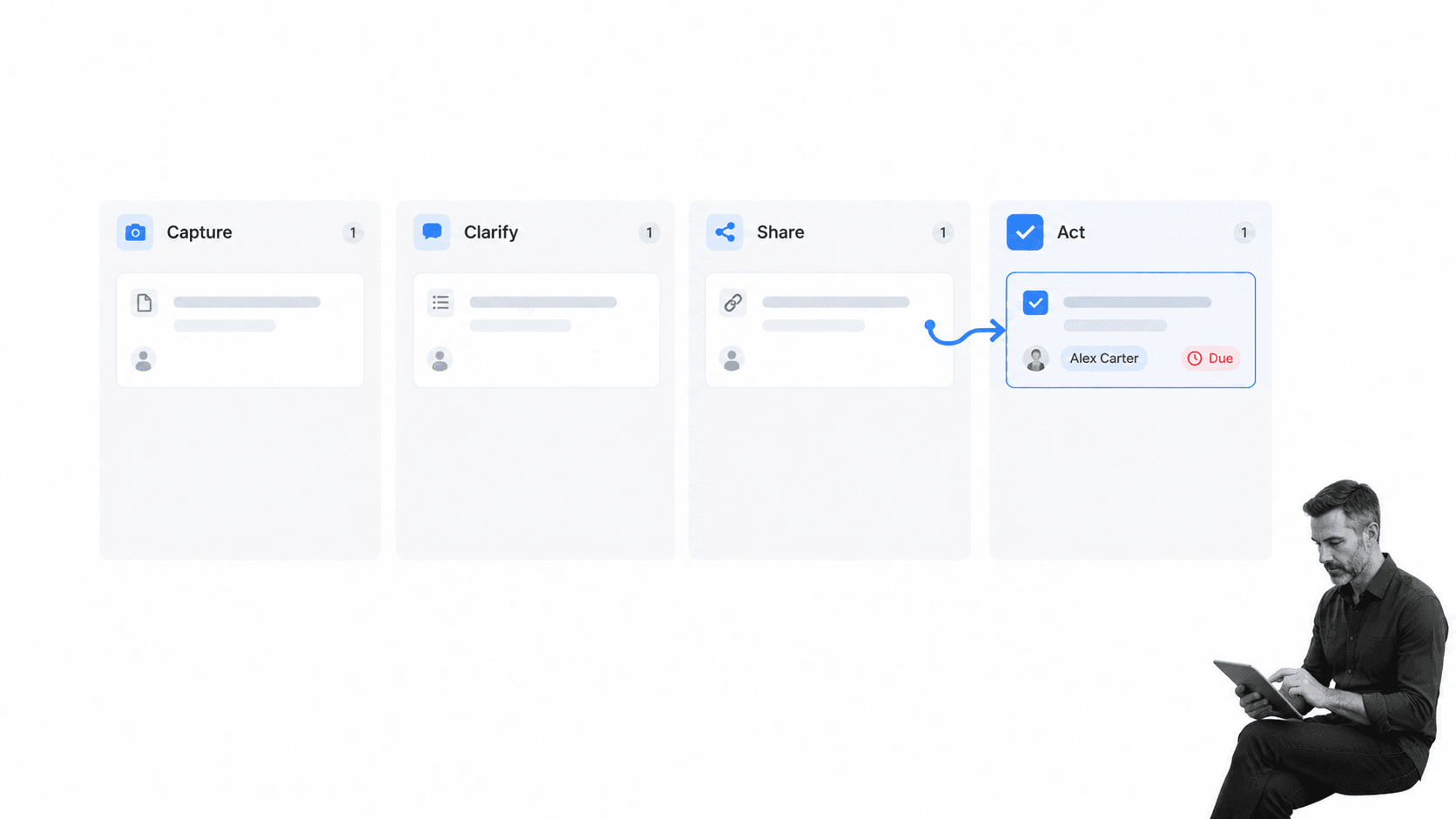
A team note needs enough context to make sense after the meeting or research session ends. Record the source, participants, project, purpose, and date when those details matter. Link to the original document, recording, ticket, customer record, or decision surface instead of copying fragments that will drift away from their source.
Clarify facts, decisions, questions, and actions
Raw notes mix different information types. During a short review, separate what happened, what was decided, what remains unknown, and what someone committed to do. This step turns a stream of sentences into a usable record. It also prevents a question or suggestion from being mistaken for an approved decision.
A consistent note taking system defines this review motion across every capture point. It gives the application a job inside a wider operating model instead of treating the tool as the system itself.
Share the right version
Shared notes should identify their status. A rough capture, reviewed summary, approved decision, and published procedure are not interchangeable. Clear states help people understand whether they can rely on the content and who can change it. Important decisions should name the decision owner and link to the final source of truth.
Extract actions into an execution system
An action item needs an owner, a due state, and a completion record. Leaving it inside a paragraph relies on memory and repeated rereading. Move the action to the system where work is assigned and tracked, then link back to the note for context. The note remains evidence of the conversation, while the workflow controls follow-through.
This boundary is the same one addressed by automated workflow tools: information can trigger work, but the work needs its own route, ownership, exceptions, and proof.
How to choose the right app
Start with the retrieval moment
Ask how you will look for information six months later. Will you remember a phrase, person, project, date, source, location, or related idea? Build the evaluation around those retrieval paths. A feature-rich editor cannot compensate for weak search or an organization model that does not match how users remember.
Test the real capture environments
Evaluate the application where notes actually happen: during a live meeting, while reading on a phone, inside a browser, offline on a flight, beside a whiteboard, or while reviewing a document. Count the steps required to capture and file something. Small friction repeated dozens of times becomes a large adoption problem.
Check collaboration and governance
For teams, test workspace roles, private areas, group permissions, guest access, sharing links, version history, deletion recovery, retention, and offboarding. Decide who owns shared notebooks and what happens when that person leaves. A team should never lose operational memory because one account was deactivated.
Review privacy, security, and accessibility
Map what data the application receives, where it is stored, who can access it, how it is encrypted, what administrators can control, and how long deleted content remains recoverable. The NIST Privacy Framework offers a useful structure for identifying and managing privacy risk, while the FTC data security guidance gives teams practical safeguards to test. Include keyboard navigation, screen reader behavior, contrast, zoom, and mobile usability in the pilot. The Web Content Accessibility Guidelines provide a durable evaluation reference.
Verify export and integration behavior
Run an actual export before committing. Import it into another tool or inspect the files directly. Then test the integrations that matter to your workflow. A connection should move the correct note, fields, owner, and context, handle duplicates, and expose failures. A marketplace badge is not proof that the end-to-end flow works.
Balance simplicity against flexibility
A simple application is easier to adopt, while a flexible one can support more use cases. Choose the simplest tool that handles the team’s real retrieval, sharing, and governance needs. Complexity should earn its place by preventing a known failure, not by making the evaluation spreadsheet look comprehensive.
How to implement the application
1. Define the purpose and boundaries
Write one sentence explaining what belongs in the application and what does not. Decide whether it is for personal notes, team meetings, research, project knowledge, customer context, or several clearly separated spaces. Name the systems that remain authoritative for tasks, customer records, policies, and final procedures.
2. Design a small information model
Choose a shallow structure for spaces, notebooks, tags, note types, and ownership. Create templates only for recurring contexts where consistent fields improve retrieval or follow-through. A meeting template may separate purpose, decisions, questions, and actions. A research template may capture source, claim, evidence, and relevance.
3. Set migration and retention rules
Do not move every old note by default. Migrate active material and high-value reference content first. Archive the rest in a searchable format with a clear cutoff date. Define retention and deletion rules for sensitive notes, recordings, customer information, and employee data before widespread adoption.
4. Pilot with complete workflows
Choose a small group and test complete scenarios from capture to retrieval and action. Include a recurring meeting, a research task, a decision, an external share, an employee departure, a failed integration, and an export. A pilot that tests only note creation misses the moments where systems fail.
5. Review adoption and quality
Measure whether people can find notes, whether shared records have owners, whether duplicate spaces are growing, whether permissions match policy, and whether actions are leaving the note system. Remove unnecessary structure, repair weak templates, and document the few habits that matter most.
When a note becomes stable guidance, move it into governed process documentation or a structured standard operating procedure template. That keeps the note library fast and flexible while preserving approved operating knowledge in the right place.
Turn notes into execution with Process Street
Keep notes as context and workflows as control
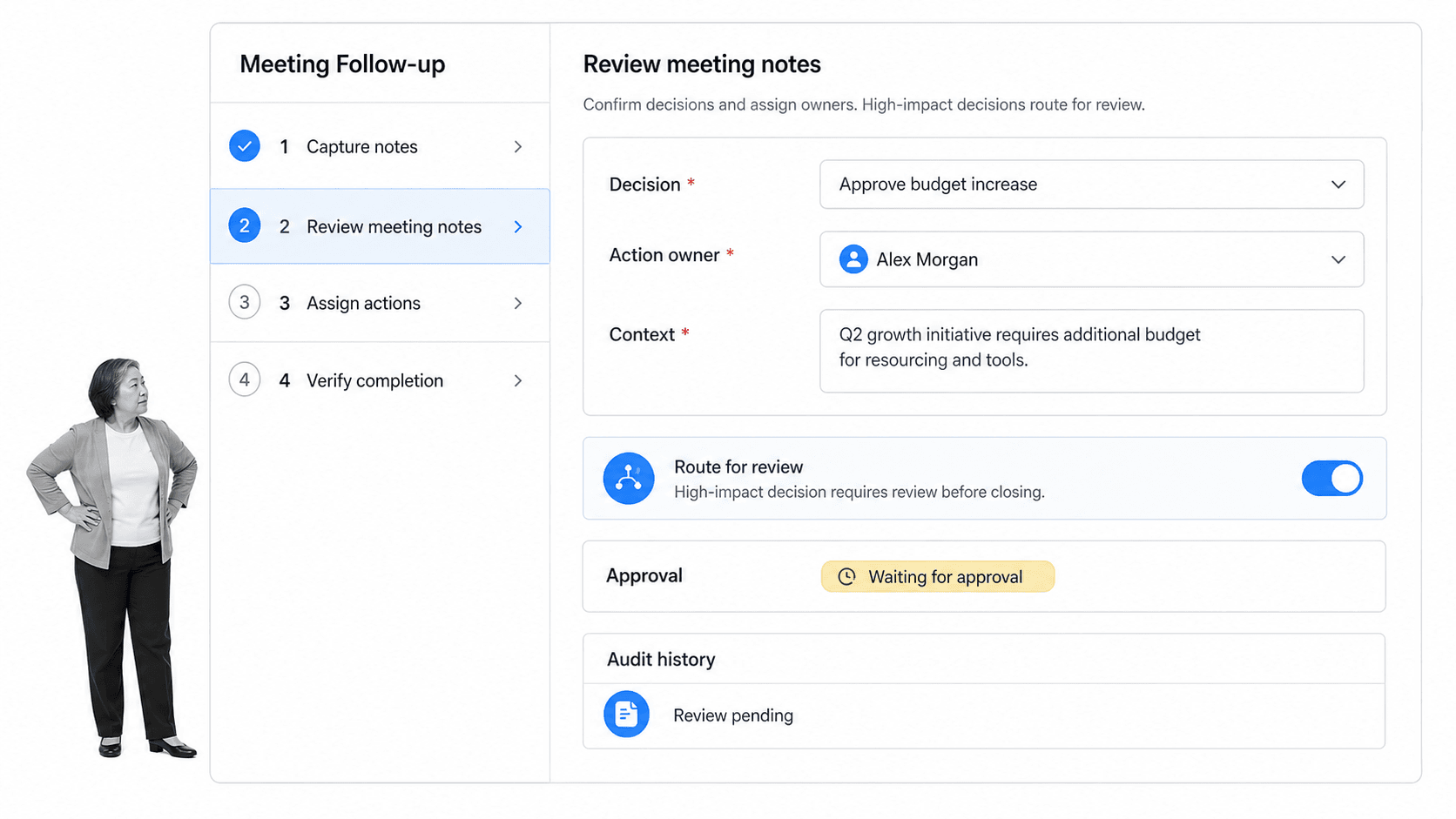
Process Street is an agentic process automation platform for high-stakes operations. It does not need to replace the note app. It can receive reviewed decisions and action items, start the right workflow, assign owners, enforce required steps, route exceptions, and preserve evidence that the work was completed.
This separation is useful because notes and workflows optimize for different things. Notes favor speed, flexibility, and context. Workflows favor consistency, accountability, decision rights, and proof. Connecting them gives the team both without forcing either system to do a job it was not designed for.
Route follow-ups with Conditional Logic
Conditional Logic can change the workflow path based on task and form-field values. A routine follow-up can stay short, while a high-impact decision can expose extra review, evidence, or escalation steps. The workflow adapts without requiring people to remember a separate policy.
Control decisions with approvals
Approval tasks let designated reviewers approve or reject work inside the workflow. A meeting decision can require review before implementation, and the note, supporting files, decision, and outcome remain connected in one traceable record.
Connect the note application to the wider stack
Process Street has direct, universal integrations to 5,000+ systems. Need a new one? An AI agent builds it on the fly. A reviewed note can start a workflow, populate the right context, and return completion evidence without making the team copy the same information across several tools.
Teams that need a wider execution layer can also evaluate a workflow management system for recurring work. The key is to define exactly when information stops being a note and becomes an accountable process.
Common failure modes
The application becomes a dumping ground
When everything goes into one undifferentiated inbox, capture stays easy but retrieval collapses. Fix this with a short review rhythm, a small number of note types, ownership for shared spaces, and an archive rule. Do not solve it by adding dozens of required tags that make capture unbearable.
The team creates parallel sources of truth
A decision appears in meeting notes, chat, a project tool, and a procedure, with no indication of which version is authoritative. Name the source of truth for each information class. Link between systems and record status clearly. Avoid copying full records when a stable link will preserve context better.
AI summaries are accepted without review
Generated summaries can omit nuance, confuse speakers, or turn a suggestion into a commitment. Require a short review for names, decisions, actions, owners, and sensitive details. The faster the automation, the more important it is to define the small set of facts that a person must verify.
Actions stay trapped inside notes
A meeting ends with clear next steps, but nobody transfers them to the execution system. Make the handoff part of the meeting close. Every action gets an owner and due state, and every important decision gets a review path. A {link(‘https://www.process.st/what-is-process-documentation/’, ‘clear process documentation model’)} helps the team decide which repeated lessons should become part of the operating system.
The exit path is never tested
Teams discover too late that exports lose links, attachments, tags, or timestamps. Test export during selection and again after major product changes. Keep a simple inventory of shared spaces, owners, sensitive data, and critical integrations so migration is an operating procedure rather than a rescue project.
FAQs
What is a digital note app?
A digital note app is software for capturing information, organizing it, retrieving it later, and sharing it when appropriate. It can support personal notes, meetings, research, decisions, and team knowledge, depending on its structure and permission model.
Which features should a note app have?
Prioritize fast capture, dependable search, simple organization, cross-device access, offline behavior, collaboration, permissions, version history, export, and the integrations your workflow actually needs. The best feature set is the smallest one that supports reliable retrieval and safe sharing.
How do you choose a note app for a team?
Start with real capture and retrieval scenarios, then test collaboration, ownership, permissions, offboarding, export, privacy, and action handoff. Run a pilot that includes normal work and failure cases before moving important team knowledge into the application.
Is a note app the same as a knowledge management system?
Not usually. A note application is optimized for fast capture and working information, while a knowledge management system governs durable, trusted knowledge for reuse. They can overlap, but teams should define when a rough note becomes an approved source of truth.
How do you turn notes into action?
Review each important note for decisions, open questions, and commitments. Move every action into a workflow or task system with an owner and due state, then link back to the note for context. Keep the note as the record of the conversation and the workflow as the record of execution.
