


Turn every policy into automated workflows with built-in enforcement and audit-ready proof.



Note Taking System

A note taking system is a repeatable way to capture information, decide what it means, organize it, connect it to related ideas, retrieve it later, and turn important notes into action. The tool is only one part. A real system also defines what you record, where it goes, how you review it, and what happens next.
Most note problems are system problems. You can have beautiful notebooks and powerful apps yet still lose decisions, duplicate research, or leave action items buried in meeting notes. The fix is not to collect more features. It is to create a small set of rules that make every note travel through the same dependable path.
This guide shows you how to design that path. You will learn the essential parts of a note taking system, when common methods work, how to choose paper or digital capture, how to run a weekly review, and how to move decisions into execution without relying on memory.
In this article, we are going to cover:
- What Is a Note Taking System?
- The Six Parts of a Reliable Note Taking System
- Note Taking Methods and When to Use Them
- How to Build a Note Taking System
- How to Choose Between Paper and Digital Notes
- How to Maintain Your Note Taking System
- Turn Notes Into Action With Process Street
- FAQs
What Is a Note Taking System?
A note taking system is the full operating model behind your notes. It covers inputs, rules, storage, retrieval, review, and outputs. A notebook is a container. An app is a tool. A method such as Cornell notes is a format. The system is what connects all three into a habit that produces useful results.
A system is more than a note taking method
A method tells you how to structure one note. For example, the Cornell Note Taking System separates a page into a notes area, a cue area, and a summary area so the learner can record, question, recite, reflect, and review. That is excellent structure for a class or briefing, but it does not decide where all your notes live, how they link together, or when a follow-up becomes a task.
A system is more than software
note taking software can make capture, search, linking, and sync much easier. It still cannot decide your rules for you. Without a clear inbox, a naming convention, a review rhythm, and a path for action items, a digital library becomes a faster version of the same pile. Choose software after you understand the system it needs to support.
The outcome is reliable recall and follow-through
A useful system gives you confidence in two moments. First, when information appears, you know exactly where to capture it. Second, when you need it later, you know how to find it. The best systems add a third promise: if a note contains a commitment, that commitment will leave the notes library and enter a place where someone owns it.
The Six Parts of a Reliable Note Taking System
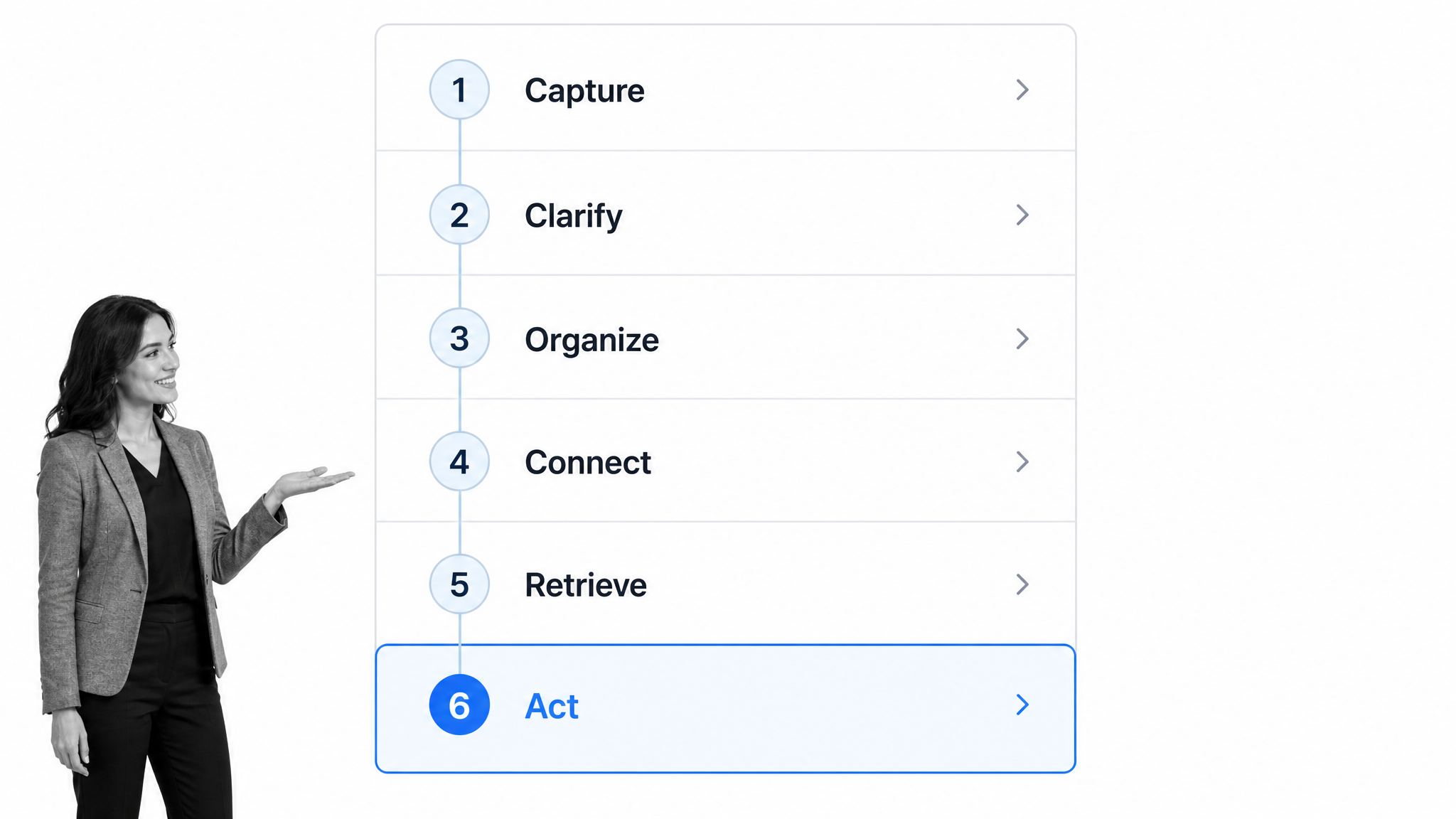
Reliable systems move notes through six distinct jobs. You do not need six apps or six folders. You need six decisions, each clear enough that you can make it quickly and consistently.
1. Capture
Capture removes information from your head before it disappears. The rule should be simple: use one default inbox for quick notes and a small number of approved capture points for predictable contexts such as meetings or research. If you hesitate about where to put something, capture friction is already too high.
Meetings deserve a structured capture point because they mix context, decisions, and commitments. A meeting minutes workflow gives the notetaker fields for attendees, discussion points, conclusions, owners, and deadlines. The format reduces the chance that an action disappears inside a paragraph.
2. Clarify
A raw note often makes sense only at the moment it was written. Clarifying means rewriting fragments while the context is still fresh, separating facts from interpretations, expanding cryptic abbreviations, and marking whether the note is reference material, an idea, a decision, or an action. This step turns capture into something your future self can understand.
3. Organize
Organization gives the note a stable home. Keep the structure shallow. A few broad areas, projects, or topics are easier to maintain than dozens of nested folders. Tags should answer useful questions such as who, what project, or what status, not merely repeat the folder name.
Teams should decide which notes remain working material and which become durable process documentation. A meeting observation might stay in a project note. A settled operating decision should move into the governed procedure that people actually follow.
4. Connect
A note becomes more valuable when it points to the source, the related project, the people involved, and any decision it changed. Links create context without forcing every detail into one giant document. For recurring work, connect the note to the process or workflow that uses it.
5. Retrieve
Retrieval is the test of the entire system. You should be able to search by a remembered phrase, browse by topic, or follow a link from a project and reach the right note quickly. If retrieval depends on remembering the exact folder you chose months ago, the system is fragile.
6. Act
Notes describe. Actions commit. When a note contains work, extract the action into a task or workflow with an owner, due date, and completion state. Leave a link back to the source note for context. This separation keeps your notes useful as knowledge while giving commitments the controls they need.
Note Taking Methods and When to Use Them
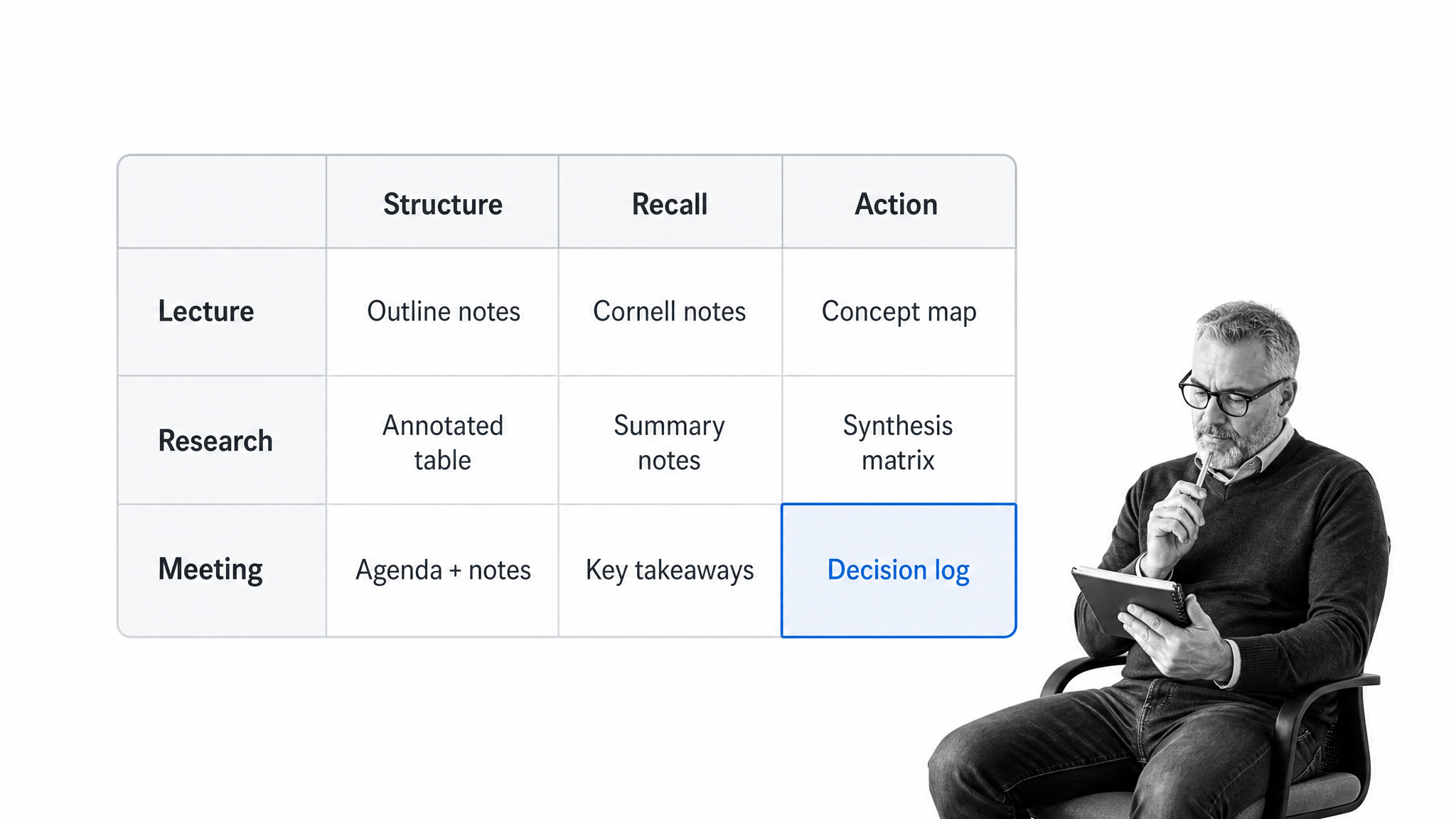
There is no universal format for taking notes. University learning centers publish several common note taking methods, and the pattern is consistent: choose the method based on the material, your goal, and how you plan to use the note. A lecture, a research synthesis, and a decision meeting should not look the same.
Cornell method for learning and review
Cornell notes work well when you need to learn from a lecture, briefing, or dense reading. The page creates dedicated space for the main notes, cues or questions, and a summary. The linked review practice uses five moves, record, question, recite, reflect, and review, as shown in Cornell’s five-part review process. The value comes from revisiting the material, not merely drawing the lines.
Outline method for structured subjects
The outline method arranges main ideas, supporting points, and details in a hierarchy. It is fast when the speaker or source already follows a clear structure. It becomes awkward when the material jumps between themes or when relationships matter more than order.
Mapping method for relationships
Mapping places the central idea in one location and draws branches to related concepts. It suits visual thinkers and topics with many relationships. The weakness is speed: a rapidly changing conversation can turn the map into a tangle unless you pause to reorganize it afterward.
Charting method for repeated categories
Charting creates columns for attributes you expect to compare, then fills rows as the information arrives. The effective note taking methods highlights outline, mapping, and charting as distinct formats. Charting is strongest when the categories are known in advance, such as comparing cases, products, theories, or interview answers.
Sentence method for speed
The sentence method records each new idea on a separate line. It is flexible and fast when structure is unclear. Because it produces a long stream, it needs a later clarification pass where you group related lines, add headings, and pull out decisions.
Zettelkasten style for long-term knowledge
A linked-note approach works well for research and writing across months or years. Each note should contain one idea, be understandable on its own, and link to related notes. The goal is not to file information perfectly. It is to build a network in which one idea can lead naturally to another.
The note taking systems guide provides examples of outline, Cornell, charting, and mapping systems. Treat those formats as tools inside your wider system. Pick one default for each recurring context instead of forcing every note into the same shape.
How to Build a Note Taking System
Building a note taking system is easier when you begin with behavior rather than software. Start with what enters the system, what must come out, and where the current path breaks. Then create the smallest rules that close those gaps.
Step 1: Define the jobs your notes must do
List the contexts where notes matter: meetings, research, learning, customer conversations, project decisions, personal ideas, or operating procedures. For each context, write the expected output. A learning note should support recall. A meeting note should preserve decisions and owners. A research note should keep sources and connections.
Step 2: Choose one capture inbox
Pick the fastest location you can reach from every device. This is the default landing zone for anything that does not already have a structured destination. Paper notes and voice capture are fine, but they need a rule for entering the inbox before they become invisible.
A note taking assistant can capture and summarize a conversation, while a note taking service may provide a human-managed record. Both still need the same handoff rule: decide where the final note lives and how action items leave it.
Step 3: Create context-specific templates
Templates reduce the decision load at the moment of capture. A useful template asks only for information that changes what happens later. A meeting template might include purpose, decisions, open questions, owners, and deadlines. A research template might include source, claim, evidence, interpretation, and related notes.
For project work, a project meeting notes workflow keeps status, milestones, issues, decisions, and assigned tasks together. For remote sessions, pair a clear note structure with a virtual meeting checklist so preparation, participation, and follow-up happen consistently.
Step 4: Use a shallow organization model
Create a few stable top-level areas, then use projects and links for changing work. Avoid a deep tree that requires you to predict where future-you will look. A practical model is Inbox, Active Projects, Areas, Reference, and Archive, but the names matter less than keeping the rules obvious.
Step 5: Set naming and linking rules
Choose titles that make sense in search results. Include the subject and, where useful, the date or meeting name. Add links to the project, people, source, and related decisions. If two notes answer the same question, merge them or link them explicitly instead of creating competing truths.
Step 6: Define the action handoff
Create a visible convention for actions, then move each real commitment into the execution system. Every action needs a verb, an owner, and a deadline or trigger. If the same action repeats, convert it into a reusable process rather than creating another isolated task.
This is where workflow automation becomes more useful than another notes folder. A workflow can assign the work, enforce required steps, collect evidence, escalate delays, and show whether the commitment was actually completed.
Step 7: Establish daily and weekly reviews
A short daily review clears urgent captures and extracts actions. A weekly review handles the deeper work: merge duplicates, connect orphan notes, update project indexes, archive finished material, and inspect open commitments. Put the review on a schedule using a dependable time management workflow rather than waiting until the library feels messy.
Step 8: Test retrieval before expanding
After two weeks, search for five things you know you captured. Measure how quickly you find them and whether the notes still make sense. Fix the weak point before adding more tags, plugins, or folders. A system that retrieves five important notes reliably is better than an elaborate system you do not trust.
How to Choose Between Paper and Digital Notes
Paper and digital notes solve different problems. The choice does not have to be ideological. Many strong systems use paper for focus and digital storage for retrieval, with one explicit bridge between them.
When paper works best
Paper is immediate, flexible, and distraction-free. It supports diagrams, margins, and spatial memory without forcing a format. It is useful in workshops, interviews, classrooms, and sensitive conversations where opening a screen changes the room. Its weaknesses are search, duplication, remote access, and loss.
When digital works best
Digital notes are easier to search, link, share, back up, and access across devices. They are the stronger default for team knowledge, long-term research, and any system that must connect to knowledge management. The risk is friction from settings and endless reorganizing, which can become a substitute for thinking.
How to run a hybrid system
Give paper a limited role and a clear processing rule. For example, use paper during a conversation, then photograph or summarize the page into the digital inbox before the end of the day. Extract decisions and actions during that transfer. Once processed, mark the paper page so you never wonder whether it made it into the system.
How to Maintain Your Note Taking System
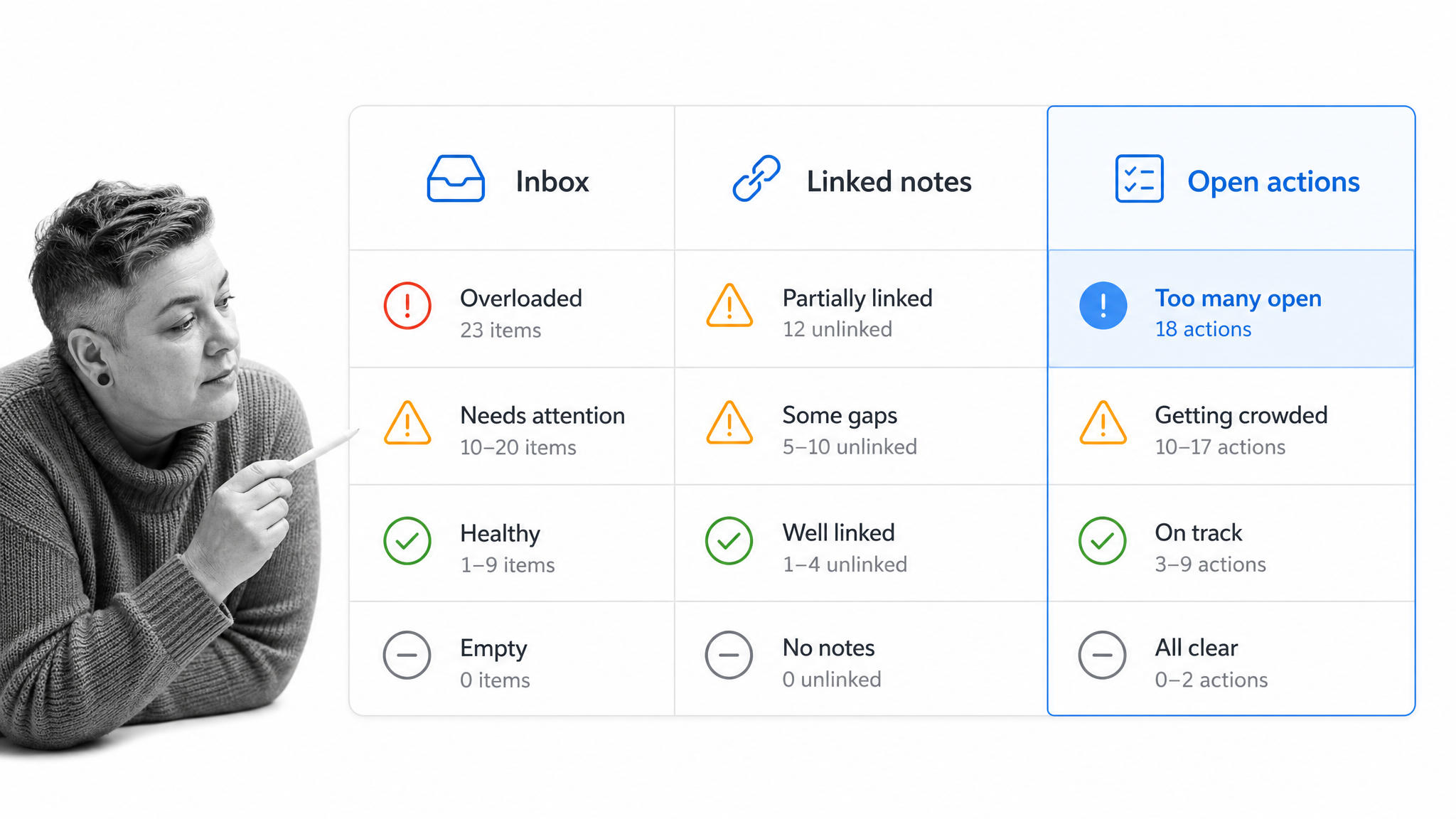
Maintenance keeps a simple system trustworthy. The goal is not a perfectly clean library. It is a predictable rhythm that prevents the inbox, links, and open actions from decaying at the same time.
Clear the capture backlog
Process quick captures while you still remember why they mattered. Delete noise, clarify fragments, assign a destination, and extract commitments. If the inbox grows faster than you can clear it, reduce what you capture or simplify the processing rules.
Repair orphan notes and duplicate truths
Look for notes with no project, topic, source, or useful link. Connect them or archive them. When several notes describe the same procedure or decision, choose one authoritative version and point the others to it. This prevents someone from acting on an outdated fragment.
Audit open actions
Compare every marked action in the notes system with the task or workflow that owns execution. Close completed items, assign ownerless items, and move recurring work into a standard process. An action that exists only in notes is still at risk.
Promote durable knowledge
When a note becomes an accepted way of working, move it into governed documentation. Understanding what process documentation is helps separate working notes from approved procedures, while writing standard operating procedures gives the durable instruction enough structure for other people to follow it consistently.
Turn Notes Into Action With Process Street
Process Street is a Compliance Operations Platform. It does not replace your notebook or notes app. It takes over where notes stop: turning decisions and procedures into assigned, repeatable, auditable work.
A note might say that a policy needs review, a customer needs follow-up, or a control needs evidence. In Process Street, that commitment can become a workflow with required fields, due dates, approvals, conditional paths, and a complete activity record. The note remains the context. The workflow becomes the source of truth for execution.
Convert repeated decisions into processes
If the same type of note produces the same follow-up repeatedly, build a reusable process. A SOP workflow template can carry the stable instructions, while each workflow run records the actual execution. This keeps the procedure separate from the history of individual cases.
Connect meeting notes to accountable work
The strongest meeting minutes template guide separates discussion from decisions and action items. Good teams also run remote meetings with an explicit agenda, notetaker, and follow-up path. Once owners and deadlines are clear, launch the corresponding work instead of leaving it inside the minutes.
Use automation without losing control
Process Street has direct, universal integrations to 5,000+ systems. Need a new one? An AI agent builds it on the fly. That lets a decision captured in notes trigger work across the systems your team already uses, while the workflow keeps ownership, required steps, approvals, and evidence visible.
Treat notes as inputs, not outcomes
A note taking generator can help turn source material into a first draft, and meeting management software can structure the meeting lifecycle. The operating principle stays the same: capture the information once, clarify what it means, and send every commitment into the system that can prove it was done.
FAQs
What is a note taking system?
A note taking system is a repeatable method for capturing information, clarifying it, organizing it, connecting it to related ideas, retrieving it later, and turning important notes into action. It includes tools, formats, naming rules, review habits, and an execution handoff.
What are the main note taking methods?
Common methods include Cornell notes, outlining, mapping, charting, the sentence method, and linked atomic notes. Each format fits a different job, so choose based on whether you need fast capture, structured learning, comparison, visual relationships, or long-term knowledge building.
What is the best note taking system?
The best note taking system is the simplest one you trust for both capture and retrieval. It should fit your recurring contexts, use one default inbox, keep organization shallow, include regular reviews, and move real actions into a task or workflow system.
How do you build a note taking system?
Define the jobs your notes must do, choose one capture inbox, create a few context-specific templates, set simple naming and linking rules, and establish daily and weekly reviews. Test whether you can retrieve real notes before expanding the structure or adding more tools.
What are the 5 Rs of note taking?
The 5 Rs commonly associated with Cornell notes are Record, Recite, Reflect, Review, and, in many modern versions, Reduce or Question. The exact label varies, but the core idea is active processing: capture the material, turn it into cues, recall it in your own words, connect it to what you know, and revisit it.
How do you turn notes into action?
Separate reference material from commitments. Move every real action into a task or workflow with a clear verb, owner, due date or trigger, and completion state, then link back to the source note for context. Repeated follow-ups should become reusable workflows.
