


Turn every policy into automated workflows with built-in enforcement and audit-ready proof.



Note Taking Assistant
A note taking assistant is software that captures what is said in a meeting and turns it into a usable record. It records the conversation, transcribes the audio into text, summarizes the discussion, and pulls out the decisions and action items so people can stay in the conversation instead of scribbling notes.
Most teams already feel the problem a note taking assistant solves. In any live meeting you are doing two jobs at once: listening closely enough to contribute, and writing quickly enough to remember what happened. One of those jobs usually loses. A note taking assistant takes the writing job off your plate so the meeting produces a clean record without anyone playing scribe.
This guide explains what a note taking assistant is, how it works step by step, the features that matter, the real benefits and limits, where teams get the most value, and how to choose one. It closes with the part most tools skip: turning the notes into work that actually gets done.
In this article, we are going to cover everything you need to know about a note taking assistant, including:
- What Is a Note Taking Assistant?
- How a Note Taking Assistant Works
- Core Features of a Note Taking Assistant
- Benefits and Limitations
- Where Teams Use Note Taking Assistants
- How to Choose a Note Taking Assistant
- From Notes to Execution: Where Process Street Fits
- FAQs
What Is a Note Taking Assistant?
A note taking assistant is a tool that listens to a meeting, writes down what was said, and organizes it into something you can use afterward. The simplest version records and transcribes. A modern note taking assistant goes further: it labels who spoke, writes a short summary, lists the action items, and makes the whole thing searchable.
Underneath, these tools lean on two pieces of machine intelligence. Speech recognition converts spoken words into text, and language models read that text to produce summaries and extract tasks. If you want the technical grounding, the building blocks are speech recognition and natural language processing, with the summary step drawing on automatic summarization.
Note taking assistant versus a plain transcript
A raw transcript is a wall of text. It proves what was said, but nobody rereads forty minutes of dialogue to find one decision. A note taking assistant adds structure on top of the transcript: a two-line summary, a list of who agreed to do what, and timestamps you can jump to. The transcript is the evidence. The structured notes are what people actually use.
Note taking assistant versus a human note taker
Human note takers are selective and they get tired. They capture what they think matters and miss the rest, and the quality drops in back-to-back meetings. A note taking assistant captures everything consistently, every time, without getting bored in the fourth call of the day. The tradeoff is judgment: a person knows which side comment was the real decision, while the tool needs that signal to be clear in the conversation.
Why the category grew up fast
Remote and hybrid work pushed more conversations onto Zoom, Google Meet, and Teams, where audio is already digital and easy to capture. At the same time, language models got good enough to summarize that audio reliably. Those two shifts turned note taking from a manual chore into an automatic byproduct of the meeting, which is why so many teams adopted one in a short window.
How a Note Taking Assistant Works
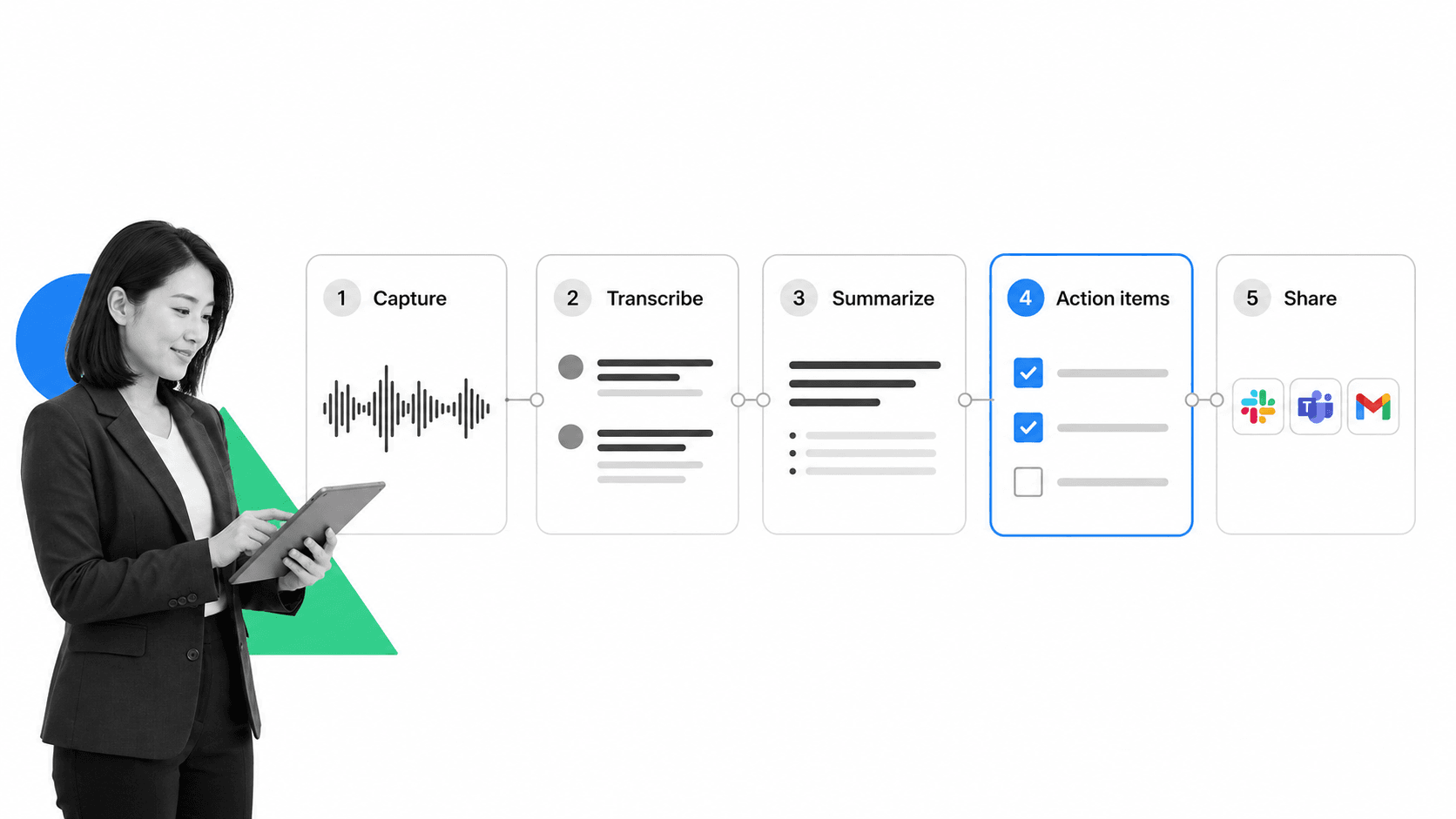
A note taking assistant moves every conversation through the same pipeline. Understanding the stages helps you judge where a given tool is strong and where it is weak.
1. Capture the audio
The assistant joins the call as a participant or runs in the background on your device. For virtual meetings it captures the platform audio directly. For in-person meetings it uses the device microphone. Capture quality sets the ceiling for everything downstream, because a poor recording produces a poor transcript no matter how good the rest of the tool is.
2. Transcribe speech to text
Speech recognition turns the audio into a written transcript, usually in near real time. Good tools label each speaker, handle crosstalk, and cope with accents and industry jargon. Accuracy is never perfect, so the better assistants make the transcript easy to correct rather than pretending it is flawless.
3. Summarize the discussion
A language model reads the transcript and writes a short summary: the topics covered, the decisions reached, and the open questions. This is the step that saves the most time, because a one-paragraph summary replaces rereading the entire conversation. The same way teams lean on a structured record when they build a knowledge management system, a good summary is what makes a meeting useful a week later.
4. Extract action items
The assistant scans for commitments and turns them into a list of tasks, ideally with an owner and a due date. This is where a note taking assistant stops being a recorder and starts being useful, because the value of a meeting is not the notes, it is whether the follow-ups happen.
5. Share and store
Finally the notes get distributed and saved: emailed to attendees, posted to a channel, or pushed into a system of record. The assistant becomes part of how a team handles its broader knowledge, which is why it sits naturally alongside meeting minutes template and recording tips and a real knowledge management system basics.
Core Features of a Note Taking Assistant
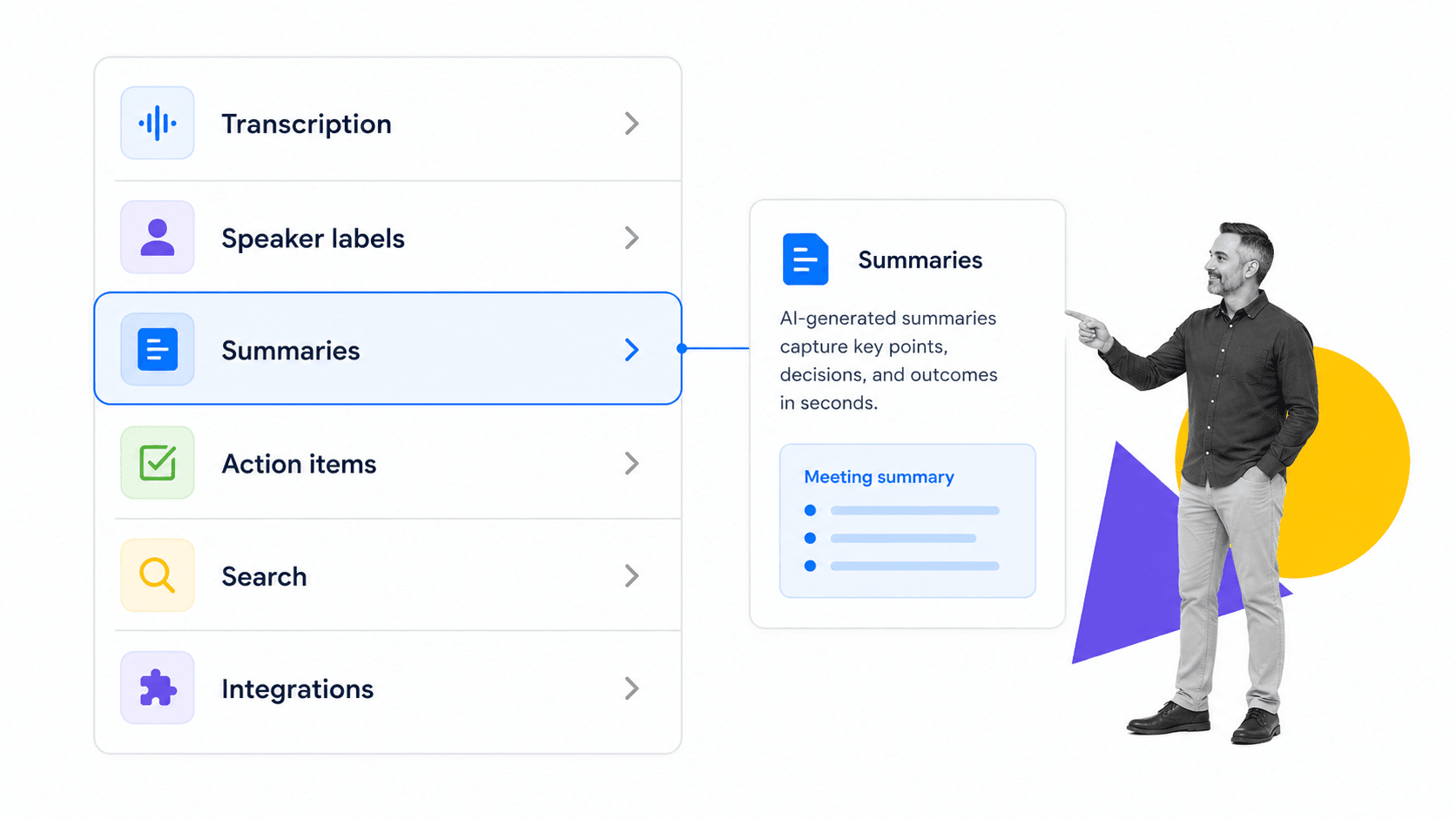
Feature lists vary by vendor, but the core capabilities are consistent. When you compare options, these are the ones that decide whether the tool fits how your team actually works.
Accurate transcription and speaker labels
Transcription accuracy and clean speaker labels are the foundation. If the transcript is wrong or you cannot tell who said what, every later step inherits the error. Strong tools handle multiple speakers, technical vocabulary, and noisy rooms without falling apart.
Summaries and action items
A useful assistant produces a tight summary and a clear list of follow-ups, not a paragraph that restates the agenda. The best ones separate decisions from discussion and attach owners to tasks, which is the difference between a record and a to-do list that drives the next week of work.
Search and ask-the-meeting
Once meetings are transcribed, they become searchable. Many tools let you ask a question across past conversations and get an answer with a citation back to the moment it was said. This turns a pile of recordings into something closer to organized knowledge management tools.
Integrations
A note taking assistant earns its keep when notes flow into the tools you already use: calendars, chat, your CRM, your task tracker, and your document store. Without integrations the notes sit in a separate app and quietly rot, which is the same failure mode that undermines weak AI document management.
Security and access control
Meetings contain sensitive material: customer data, financials, personnel matters, legal discussion. A serious assistant offers encryption, role-based access, retention controls, and clear data handling. This matters even more in regulated settings, where the same discipline shows up in what an AI compliance agent does.
Benefits and Limitations
A note taking assistant changes meeting habits quickly, but it is not magic. Knowing both sides keeps expectations realistic.
Benefits
Teams that adopt one tend to report the same shift in how meetings feel, staying present while the tool quietly handles the record, which is the core promise behind how an AI note taker saves time.
- People stay present in the conversation instead of splitting attention between listening and writing.
- Every meeting produces a consistent record, even the fourth call of the day.
- Summaries and action items are ready in minutes, not after someone finds time to write them up.
- Searchable transcripts turn scattered conversations into a knowledge base you can query.
- Follow-ups are captured as tasks, so commitments are less likely to quietly disappear.
Those gains compound. Reliable meeting records strengthen how a team learns, much like applications of AI in business processes compound when the underlying data is clean and consistent.
Limitations
Transcription is not perfect. Heavy accents, crosstalk, poor audio, and niche jargon all produce errors, so the notes need a human glance before anyone treats them as final. Summaries can miss the subtle decision that happened in an aside, and they can overweight whoever talked the most rather than whoever said the most important thing.
There are also trust and consent questions. Recording a conversation changes how people speak, and in many places you must tell participants they are being recorded. A note taking assistant is a tool for capturing and organizing, not a substitute for judgment about what matters or whether a meeting should have happened at all. Some of the sharpest advice on that front is simpler than any tool: as the team behind run remote meetings that work argues, the best meeting is often the one you cancel.
Where Teams Use Note Taking Assistants
The value of a note taking assistant depends on the meeting. Some conversations barely need one. Others are transformed by it.
Sales and customer calls
Sales reps cannot sell and transcribe at the same time. A note taking assistant captures the call, logs the next steps, and pushes a summary into the CRM, so the rep stays focused on the customer and the pipeline stays current without manual data entry.
Recurring operations meetings
Standups, reviews, and planning sessions generate the same kinds of follow-ups every week. Capturing them consistently means decisions are traceable and nothing falls through the cracks between sessions. This is also where notes start to feed real process: a recurring decision becomes a step in write process documentation, not a memory that fades.
Onboarding and training
New hires miss context that lives in conversations they were never part of. Searchable meeting records let them catch up on the why behind a decision, which pairs naturally with a structured employee onboarding template.
Research and interviews
User researchers, recruiters, and journalists run interviews where the exact words matter. A note taking assistant preserves the full transcript and lets them pull quotes without rewatching the recording, while a summary gives them the shape of the conversation at a glance.
Regulated and high-stakes discussions
In finance, healthcare, and legal work, an accurate record is not a convenience, it is part of the control environment. The same instinct that drives teams to document meeting minutes template carefully applies here: the record has to be complete, attributable, and retained.
How to Choose a Note Taking Assistant
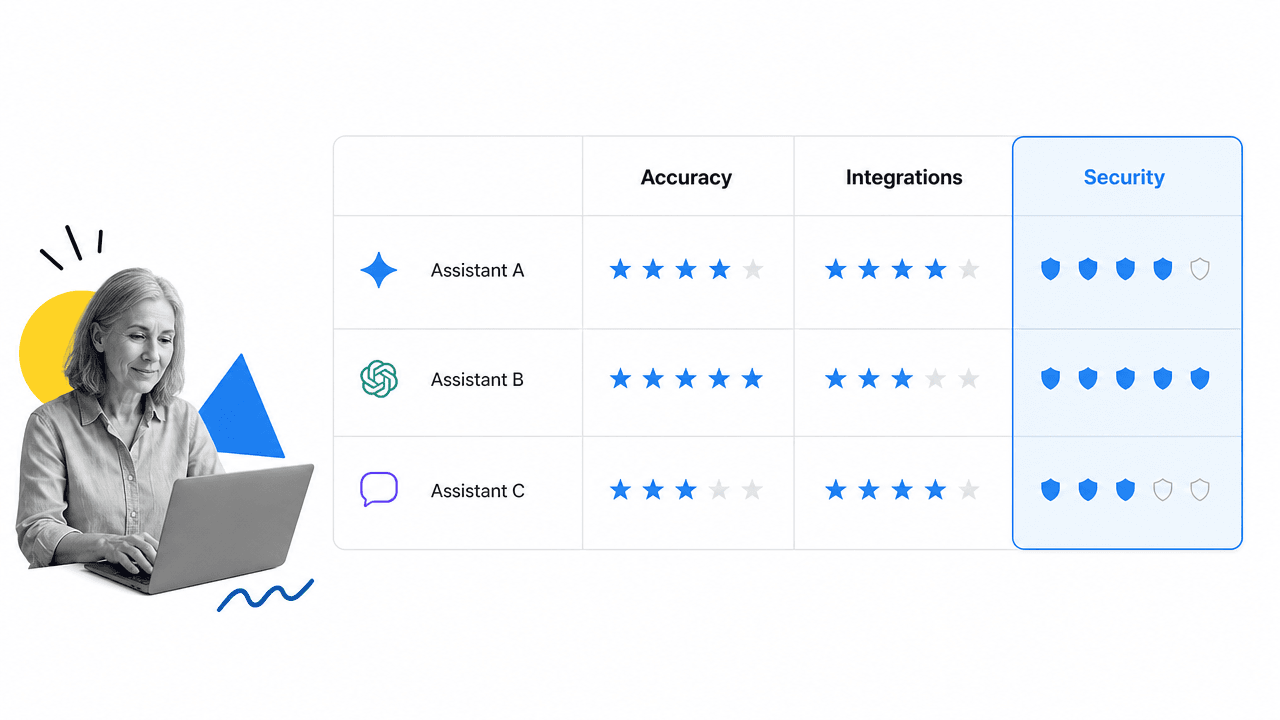
Choosing a note taking assistant is less about feature counts and more about fit. Start with the meetings that matter most to you and judge each tool against the criteria that decide real outcomes.
Accuracy on your meetings
Test transcription on your actual calls, with your accents, your jargon, and your audio setup, not on a clean demo. The tool that scores best in a vendor video can fall apart on a noisy conference line. Accuracy is the one criterion you cannot compensate for later.
Summaries you would actually send
Read a few generated summaries and ask whether you would forward them without editing. A summary that needs a full rewrite is slower than writing notes yourself. Good ones separate decisions from chatter and name owners on action items.
Integrations with your stack
Confirm the assistant connects to the tools where work already happens, so notes do not pile up in a separate app. The same logic that makes automated workflow tools valuable applies here: a record is only useful where the work lives.
Security, consent, and retention
Check encryption, access controls, data residency, retention settings, and how the vendor handles recording consent. For sensitive meetings these are not optional. Map them against your own policies before you roll the tool out widely.
Cost against the meetings that matter
Price per seat adds up. Be honest about which meetings genuinely benefit and which would be better off shorter or canceled. A note taking assistant should pay for itself on the conversations that drive revenue, risk, or decisions, not on every recurring sync.
Many teams compare a shortlist against a small set of weighted criteria, the same way they would evaluate operations management tools or any other piece of operational tooling. Tools like Otter are common entries on that shortlist, but the right pick is the one that fits your meetings, not the one with the longest feature list.
From Notes to Execution: Where Process Street Fits
Process Street is a Compliance Operations Platform. It is not a note taking assistant, and it does not try to be one. It solves the problem that begins the moment the meeting ends: turning notes and decisions into work that actually gets done, consistently, with proof.
This is the gap most note taking assistants leave open. They capture the conversation and list the action items beautifully, then hand you a tidy summary and walk away. Whether the follow-ups happen still depends on memory, email, and good intentions. A clean record of a decision is not the same as the decision being executed.
From action items to enforced workflows
Process Street turns recurring decisions and procedures into workflows with assigned tasks, due dates, required fields, approvals, and conditional logic. When a meeting produces the same kind of follow-up every week, that follow-up belongs in a repeatable workflow, not in a fresh set of notes each time. The notes capture what to do once. The workflow makes sure it happens every time.
Knowledge that stays connected to work
Meeting notes are one input into how a company runs. They are most valuable when they connect to the procedures, policies, and records around them, the way a strong build a knowledge management system ties knowledge to execution rather than letting it sit in a separate archive. Process Street keeps documentation and execution in the same system, so what a team decides in a meeting and what it actually does stay aligned.
AI that acts, not just chats
A note taking assistant is AI that listens and summarizes. Process Street is built around AI that acts: monitoring how work is executed, flagging missed steps, and helping run the procedures a business depends on. The two are complementary. Capture the conversation with a note taking assistant, then operationalize the outcomes so the decisions made in the room turn into reliable, auditable work.
For teams asking where a note taking assistant ends and real execution begins, that is the line. Use a note taking assistant to capture and summarize. Use a system built for execution, with direct integrations across the tools where work already lives, to make sure the follow-ups are done and provable, the same discipline behind what process documentation is and writing standard operating procedures.
FAQs
What is a note taking assistant?
A note taking assistant is software that records a meeting, transcribes the audio into text, summarizes the discussion, and extracts action items. It lets people stay in the conversation while the tool produces a clean, searchable record of what was said and decided.
How does a note taking assistant work?
A note taking assistant captures the meeting audio, uses speech recognition to transcribe it, then uses a language model to summarize the discussion and pull out decisions and tasks. It finally shares and stores the notes, often pushing them into your calendar, chat, CRM, or task tools.
Are note taking assistants accurate?
Transcription is strong but not perfect. Accuracy drops with heavy accents, crosstalk, poor audio, and niche jargon, so notes should get a quick human review before anyone treats them as final. Summaries can also miss a subtle decision made in passing, which is why a glance still matters.
Is it legal to record meetings with a note taking assistant?
It depends on where participants are located. Many places require that you tell people they are being recorded, and some require consent from everyone on the call. Check the rules for your region and your participants, and use a tool that handles recording notices and retention settings clearly.
What is the difference between a note taking assistant and Process Street?
A note taking assistant captures and summarizes conversations. Process Street is a Compliance Operations Platform that turns decisions and procedures into enforced, auditable workflows. One records what was said, the other makes sure the follow-ups actually happen, every time, with proof.
Who benefits most from a note taking assistant?
Sales teams, operations teams running recurring meetings, researchers and recruiters running interviews, and anyone in regulated work who needs an accurate record. The value is highest when a meeting produces decisions and follow-ups that someone has to act on afterward.
