


Turn every policy into automated workflows with built-in enforcement and audit-ready proof.



Finance Process Automation
Finance process automation uses workflow rules, system actions, and human approval gates to move recurring finance work from intake to a controlled result.
It can coordinate invoice approvals, expense reviews, account reconciliations, month-end close, budget changes, cash controls, reporting, and audit evidence while keeping accountable people in control of judgment.
The goal is not automation for its own sake. The goal is controlled execution. A good financial workflow tells each owner what to do, collects the right evidence, routes approvals, catches exceptions, and leaves a clear record of what happened.
In this article, we are going to cover:
- What finance process automation is
- Why finance process automation matters
- Which finance processes should you automate?
- What makes a finance process automation-ready?
- How to implement finance process automation
- Finance process automation in Process Street
- How to measure and improve finance process automation
- FAQs
What finance process automation is
Finance process automation is a controlled way to execute a defined path for finance work. It starts with a trigger, moves through a sequence of tasks and decisions, and ends with a completed record the business can trust.
The trigger might be an invoice arriving, a card transaction posting, a month-end close period opening, a budget owner requesting a change, or an auditor asking for evidence. The workflow defines what happens next.
Financial workflows connect tasks, controls, and proof
Most finance teams have procedures. The weakness is usually execution. A document says what should happen, but the work still happens across email, spreadsheets, chat, accounting systems, and memory. A workflow turns the procedure into controlled action by making what is a workflow practical for recurring finance work.
The workflow should define the owner, required fields, approval threshold, evidence requirement, exception path, and completion state. That gives finance leaders a live view of process health instead of a cleanup exercise after the deadline.
Financial workflows are not only accounting workflows
Accounting workflows are a major part of the system, but financial workflows also include cross-functional decisions. Procurement, operations, sales, HR, legal, compliance, and department leaders often touch finance work before accounting records it.
That is why financial workflows need to connect to adjacent accounting processes and the broader accounting cycle. Finance is often the control layer for work that starts somewhere else.
A practical way to think about the boundary is this: accounting workflows record and reconcile financial activity, while financial workflows govern the work that creates, approves, changes, or proves that activity. The same invoice might touch procurement, legal, budget ownership, accounts payable, treasury, and audit evidence before it becomes a clean accounting record.
That wider scope is why financial workflows need to be designed for real operating behavior. A tidy policy document does not help much if the approver never sees the request, the evidence lives in a shared drive folder nobody can find, or the exception is handled in a private message that never becomes part of the record.
Why finance process automation matters
Financial workflows matter because finance work carries risk. A missed approval, incomplete reconciliation, weak evidence trail, or undocumented exception can create reporting problems, audit pressure, payment delays, policy drift, and avoidable rework.
They reduce manual handoffs
Manual handoffs are where finance processes break. One person emails an approval request. Another person updates a spreadsheet. A third person looks for the receipt. A manager asks whether the policy applies. The work moves, but nobody has a reliable system of record.
Structured workflow automation helps by turning recurring handoffs into assigned tasks, conditional routes, and recorded outcomes.
They support internal control
Financial workflows are where internal controls become real. The COSO internal control framework frames internal control as a system for achieving operations, reporting, and compliance objectives. Workflows operationalize that idea by placing control steps inside the work itself.
The GFOA internal control framework also emphasizes control activities, information, communication, and monitoring. Those are workflow concerns, not just policy concerns.
They make evidence easier to find
Finance work often needs proof later. The invoice approval, receipt, exception note, account reconciliation, policy acknowledgment, or management review may become important during audit, tax prep, vendor review, board reporting, or compliance checks.
Recordkeeping expectations vary by context, but the IRS recordkeeping guidance is a useful reminder that financial records need to be retained in a way the business can rely on. Workflows help create those records as the work happens.
They make finance capacity easier to manage
Finance teams often carry recurring work in compressed windows. Month-end close, reporting packs, board materials, vendor payment runs, payroll support, and audit requests can collide in the same week. Without financial workflows, leaders may only discover overload when work is already late.
A workflow gives the team a way to see what is waiting, what is blocked, and which approvals are creating delays. That visibility helps leaders rebalance ownership, adjust deadlines, and fix process friction before the same bottleneck repeats next month.
Which finance processes should you automate?
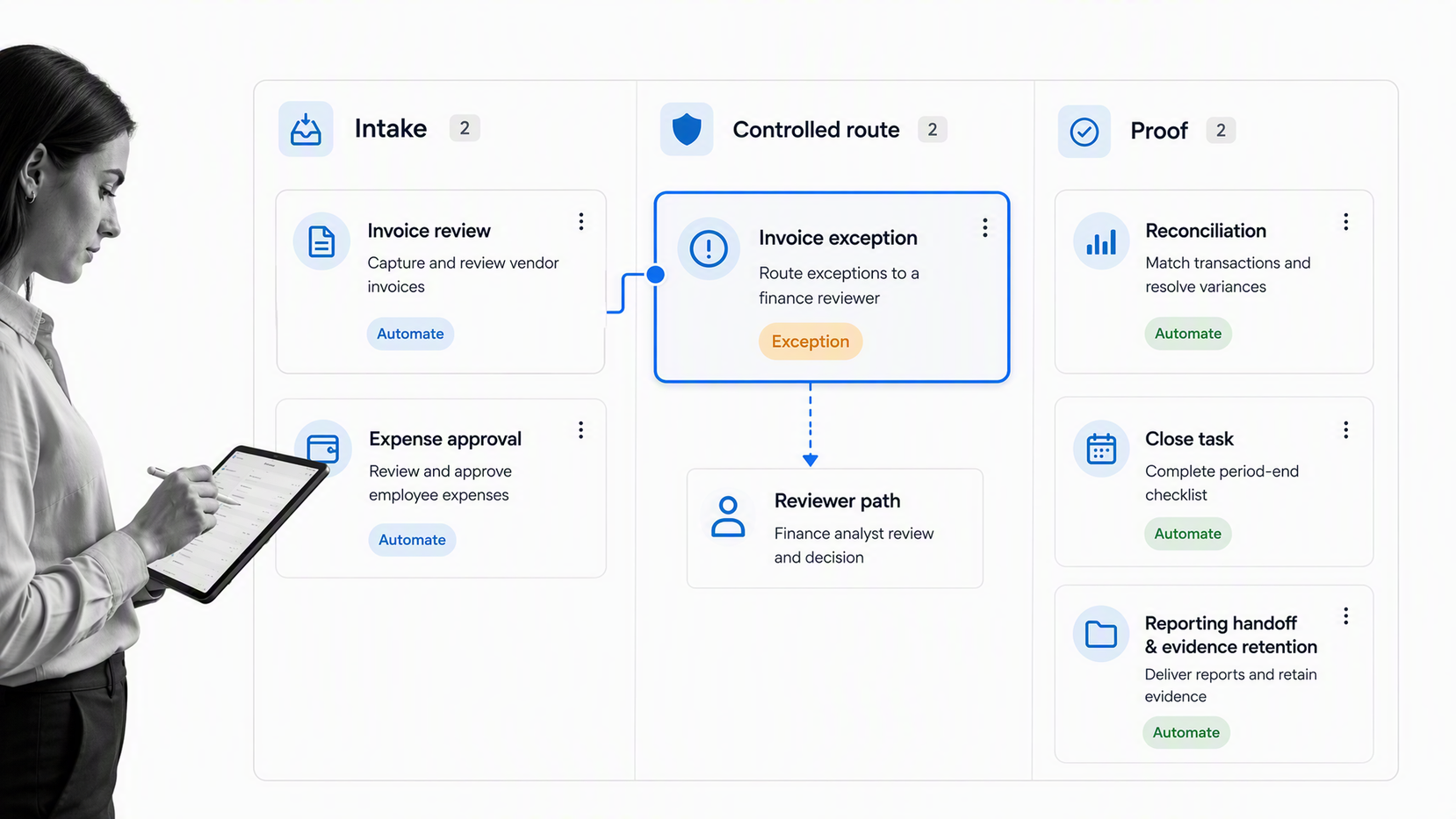
Financial workflows can be grouped by the kind of control they provide. Most teams need a mix of transaction workflows, period-close workflows, planning workflows, compliance workflows, and reporting workflows.
Invoice approval workflow
An invoice approval workflow confirms vendor, amount, purchase order, budget owner, service completion, tax treatment, approval threshold, and payment readiness. The process should make exceptions visible before payment goes out.
Teams can start with an accounts payable process template, then adapt the approval path to their accounting system, budget rules, and risk thresholds.
Expense approval workflow
Expense workflows capture receipt evidence, policy category, spend owner, exception reason, reimbursement state, and approval. The key is to avoid treating exceptions as side conversations. If an expense is outside policy, the workflow should route it to the correct reviewer.
Month-end close workflow
Close workflows coordinate recurring tasks across accounting, finance, operations, and leadership. They track reconciliations, accruals, journal entries, variance reviews, management approvals, and reporting deadlines.
Account reconciliation workflow
Reconciliation workflows prove that source records, ledger balances, supporting documents, and reviewer signoffs line up. The workflow should capture evidence, reviewer notes, unresolved items, and the final approval state.
Budget change workflow
Budget change workflows control requests that move money, release contingency, add headcount, increase vendor scope, or change project assumptions. They should connect the requested change to the forecast impact and approval threshold.
Audit evidence workflow
Audit evidence workflows keep supporting material attached to the work that produced it. A financial audit checklist can help teams structure evidence gathering before audit pressure arrives.
Financial reporting workflow
Financial reporting workflows coordinate data collection, variance analysis, review, signoff, and distribution. They are especially useful when reports depend on multiple contributors, late adjustments, or management explanations that need to be preserved.
Cash management workflow
Cash workflows govern payment runs, bank transfer approvals, treasury reviews, liquidity checks, and funding requests. Because cash movement is sensitive, these workflows usually need clear segregation of duties, approval thresholds, and evidence that the reviewer saw the right information before release.
What makes a finance process automation-ready?
An effective financial workflow is specific enough to enforce the right behavior, but simple enough that teams actually use it. It should reduce ambiguity without burying people in administrative work.
Clear trigger
Every workflow needs a clear start. A new invoice, submitted expense, close calendar, budget change request, reconciliation variance, or audit request should launch the right workflow automatically or through an obvious intake step.
Defined owner
The workflow should show who owns each step. Owner ambiguity leads to delayed approvals, duplicate work, and incomplete evidence.
Required evidence
A finance workflow should specify what proof is required. That might include a receipt, contract, purchase order, variance explanation, reviewer note, management approval, or reconciliation attachment.
Conditional routing
Not every item needs the same path. Low-risk transactions may need a light review. High-risk exceptions may need finance, legal, procurement, or compliance review. The workflow should route based on the facts entered.
Audit history
Audit history should not be reconstructed manually. Standards like PCAOB guidance on internal control audits show how important evidence and review trails become when financial reporting controls are in scope.
Even when a company is not subject to a specific audit standard, the same operating principle helps. A complete record makes finance work easier to review, explain, and improve.
Exception ownership
Finance process automation should not only cover the normal path. It should also define who owns exceptions, what information they need, and how their decision is recorded. Exceptions are where risk concentrates because they often require judgment, context, and a clear reason for deviating from the standard path.
Good exception ownership also prevents finance from becoming the permanent cleanup team. If recurring exceptions come from missing vendor data, unclear budget rules, or weak intake forms, the workflow should make that pattern visible enough to fix upstream.
How to implement finance process automation
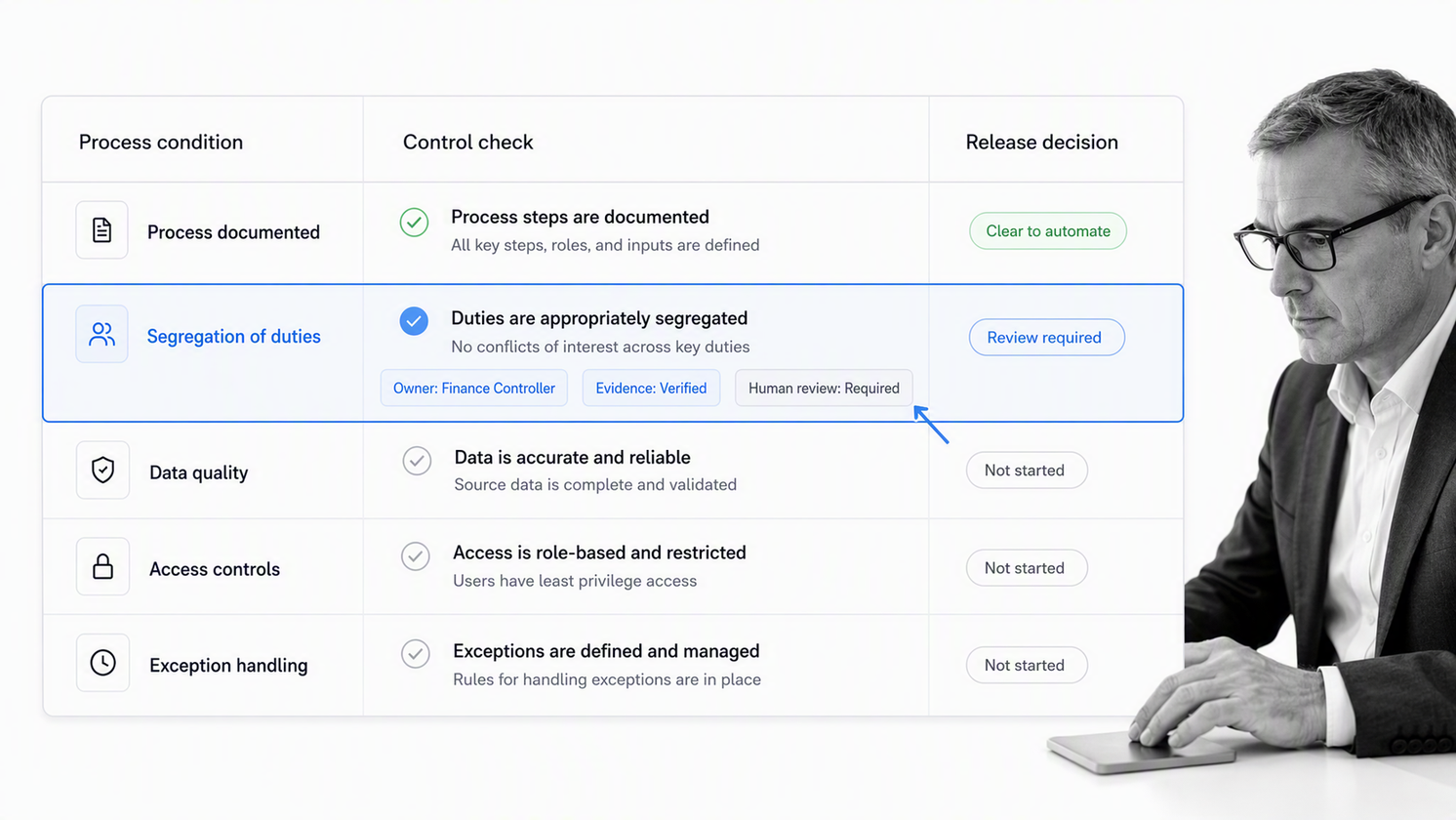
Implementing finance process automation starts with removing hidden work and stabilizing the process before software takes over its routing. If approvals, evidence, and exception decisions happen outside the workflow, finance leaders cannot tell whether the process is healthy.
Map the current workflow
Write down the real path, not the ideal policy. Include where requests start, who reviews them, which systems hold evidence, what causes delays, and which exceptions rely on judgment.
The APQC finance process classification framework is useful for thinking about finance processes as a system, rather than isolated tasks.
Identify control points
Control points are the moments where the workflow must prevent, detect, or explain risk. Common examples include approval thresholds, evidence checks, segregation of duties, account review, exception routing, and close certification.
Standardize intake
Many finance delays start with incomplete intake. A budget owner submits a request without context. A vendor invoice arrives without the contract. A reconciliation item lacks an explanation. Standardized intake reduces rework.
Automate the route, not the judgment
Automation should move the work to the right person, enforce required fields, notify owners, and keep the record current. Judgment still belongs with accountable reviewers. That separation keeps workflows fast without weakening control.
Review exceptions regularly
Exceptions reveal where the process needs improvement. If the same exception appears every month, the policy, intake form, system integration, or approval threshold may need to change.
Teams reducing manual finance work often combine financial automation, financial workflow design, and financial process management so handoffs, approvals, and evidence stay connected.
Start with one high-friction workflow
The fastest improvement usually comes from one workflow that is frequent, visible, and painful. Invoice approvals are a common starting point because they touch vendors, budget owners, payment timing, evidence, and exception handling. Reconciliations and close tasks are also strong candidates because the same delays tend to repeat every period.
Once the first workflow is stable, reuse the pattern. Standard intake, required evidence, conditional routing, approval gates, and exception review can be adapted across other finance processes without redesigning everything from scratch.
Finance process automation in Process Street
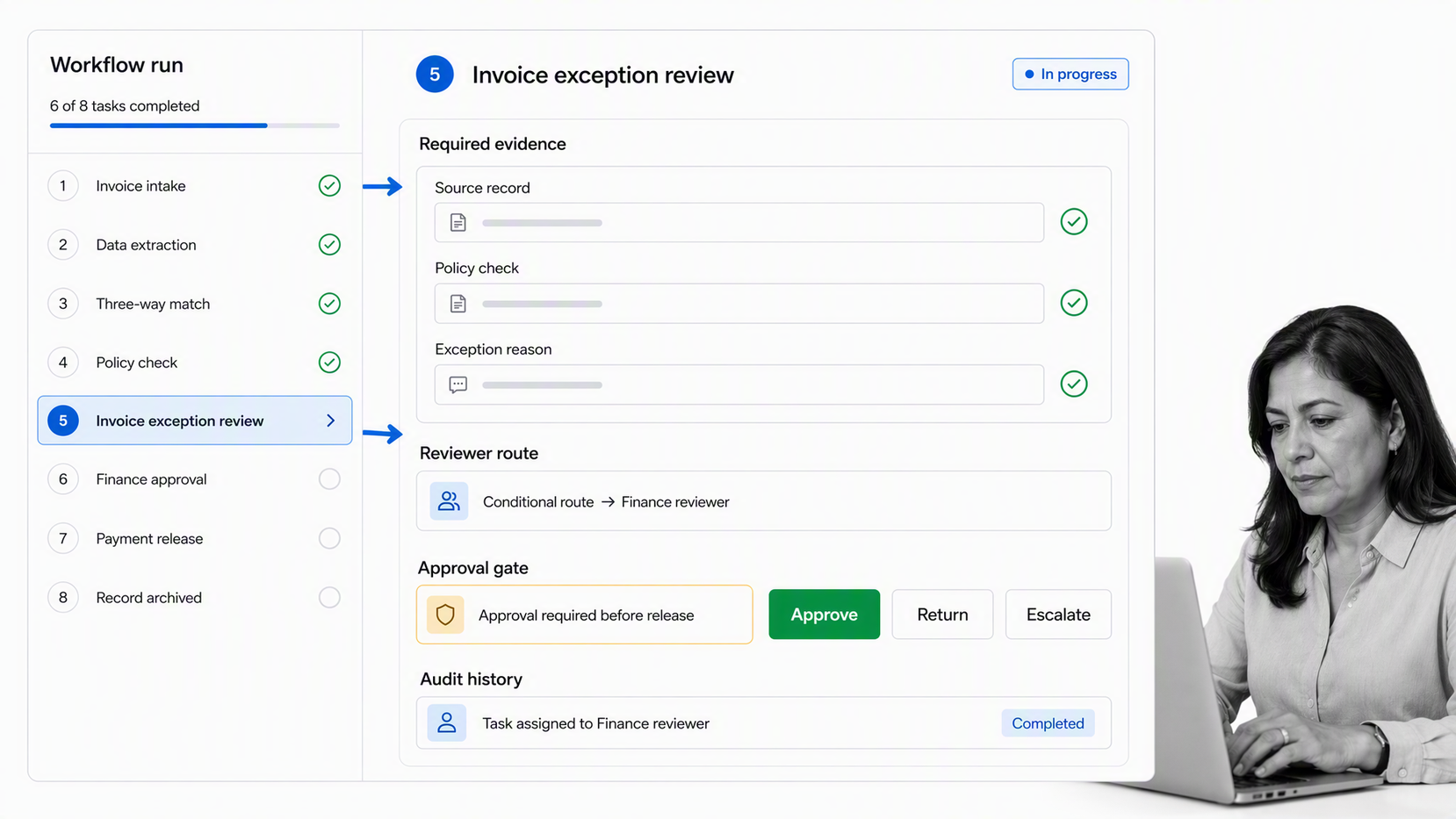
Process Street is a Compliance Operations Platform that helps teams turn financial workflows into controlled, auditable work.
Finance teams can use Process Street to build workflows for invoice approvals, expense reviews, close tasks, reconciliations, budget changes, audit evidence, and recurring financial controls.
Run finance work as assigned tasks
Each step can have an owner, due date, required fields, files, instructions, and completion state. That gives finance leaders a live view of work in progress without chasing updates.
Route approvals and exceptions
Process Street approvals can keep sensitive finance steps from moving forward until the right reviewer signs off. Conditional routing can send higher-risk items to the correct path.
Process Street has direct, universal integrations to 5,000+ systems. Need a new one? An AI agent builds it on the fly. This lets the workflow coordinate activity across the finance stack while approvals, exceptions, and proof stay governed in one operating path.
Keep evidence with the workflow
Evidence belongs in the same system as the task that required it. Process Street workflows can collect files, fields, reviewer notes, and approval history so the team can review the decision later.
Improve the process over time
Once finance work runs through a workflow, leaders can see bottlenecks and recurring exceptions. A KPI checklist for process improvement can help teams decide which process changes are worth making first.
The point is not to replace every finance system. Accounting systems, ERP tools, procurement tools, and reporting platforms still matter. Process Street sits around the process so people know what to do, when to do it, what evidence to attach, and who approved the result.
That is especially useful when the financial workflow spans multiple systems. A payment may still be executed in an accounting or banking tool, but the approval path, supporting evidence, exception reason, and review history can remain tied to the workflow that controlled the decision.
How to measure and improve finance process automation
Finance process automation should be measured by how well it protects the process and improves execution, not by the number of automated steps alone. The best tool makes the correct path easier than the informal workaround.
Can it model the real process?
The software should support tasks, owners, required fields, conditional logic, approvals, evidence, due dates, reminders, and exception paths. If the real process needs a workaround, the workflow will drift.
Can finance own changes?
Finance and operations teams should be able to update workflows as policies, thresholds, and systems change. IT governance still matters, but finance work cannot wait months for small process changes.
Does it integrate with the finance stack?
Financial workflows touch accounting, procurement, reporting, storage, communication, and project systems. Strong finance integration keeps those systems connected when finance work crosses teams.
Does it support compliance and assurance needs?
Finance teams may need evidence for audits, vendor reviews, controls testing, tax work, security assessments, or service commitments. The AICPA and CIMA SOC resources are one example of how process evidence can matter in assurance contexts.
Track cycle time, waiting time, exception rate, return rate, overdue approvals, first-pass completion, and evidence completeness. Review the measures together: faster processing is not an improvement if exception volume, rework, or missing proof rises.
Does it make exceptions visible?
A workflow tool should show what is blocked, what is late, what is waiting on approval, and which exceptions repeat. That visibility helps finance improve the process instead of only pushing transactions through.
Broader control often means connecting finance workflows with compliance automation software and financial services compliance software so evidence, approvals, and review history are visible together.
FAQs
What is finance process automation?
Finance process automation uses software rules, system actions, and human approval gates to move recurring finance work from intake through validation, decision, completion, and retained evidence.
What are the benefits of finance process automation?
Finance process automation can reduce manual handoffs, shorten waiting time, apply control rules consistently, collect evidence, and direct people to exceptions that need judgment. The strongest benefit is controlled execution, not speed alone.
Which finance processes should be automated first?
Start with a frequent, rules-based process that has clear inputs, stable decisions, measurable delays, and manageable exceptions. Invoice approval, expense review, reconciliation support, close task coordination, and evidence collection are common candidates.
How do you automate a finance process?
Map the real process, standardize intake, define owners and control points, separate routine routing from financial judgment, build an exception path, connect required systems, test with real cases, and release the automation in stages.
How should finance teams handle automation exceptions?
Design exceptions as part of the automation. Route uncertain, high-risk, or out-of-policy cases to a named reviewer with the source data, reason, required evidence, and decision options attached. Review recurring exceptions to improve the upstream process.
How can Process Street support finance process automation?
Process Street helps teams build finance automations with assigned tasks, required fields, conditional routing, approvals, evidence collection, system actions, and execution history. It keeps accountable people in control while recurring coordination work moves automatically.
