


Turn every policy into automated workflows with built-in enforcement and audit-ready proof.



Digital Workplace Software
Digital workplace software is the connected environment people use to communicate, find trusted knowledge, access employee services, collaborate, and complete work from any location. It brings communication, content, search, workflow, service delivery, integrations, analytics, security, and AI into one usable employee experience.
The category is broader than an intranet and more useful than a collection of collaboration apps. It explains where employees begin the day, how they find reliable answers, how requests reach the right owner, how recurring work is governed, and how leaders improve the experience. A strong digital workplace makes the supported way of working easier to follow than an improvised workaround.
This guide uses the term for the employee-facing technology layer that connects people, information, services, and execution. It is distinct from workplace management software for rooms and facilities, and from workforce management software for scheduling, attendance, and labor planning. This guide explains how a digital workplace software stack is structured, how its parts work together, and how to implement it without creating bureaucracy, and how Process Street turns the design into agentic, controlled workflows that produce evidence as work happens.
In this guide, we are going to cover:
- What is digital workplace software?
- Digital workplace software vs. related tools
- Core capabilities in digital workplace software
- How digital workplace software works
- How to implement digital workplace software
- How to measure and improve the digital workplace
- Digital workplace software use cases
- Run digital workplace workflows in Process Street
- Digital workplace software FAQs
What is digital workplace software?
A digital workplace stack is the practical environment through which employees communicate, discover knowledge, request help, coordinate work, make decisions, and complete recurring tasks. It connects the employee experience to the operating systems behind it so a question, request, or task can move to a reliable result.
A direct definition
Digital workplace software can include communication and collaboration tools, intranets, enterprise search, knowledge systems, employee service portals, workflow platforms, integration services, analytics, security controls, and AI assistants. The simplest definition is: a digital workplace stack is the connected software environment employees use to get work done. It includes the work itself and the conditions around that work, such as ownership, decision rights, data, tools, standards, controls, and review cadence.
The Gartner digital workplace guidance emphasizes designing, managing, improving, and protecting the processes that produce products and services. That is the central job of a digital workplace stack: make delivery repeatable while keeping it responsive to customers, suppliers, risk, and change.
The transformation logic
Every digital workplace stack transforms inputs into outputs. Inputs can include requests, materials, information, capital, time, and expertise. The transformation happens through workflows. Outputs can include an onboarded customer, approved vendor, shipped product, closed accounting period, resolved incident, or verified control.
The system also produces operational evidence. Task history, approvals, exceptions, timestamps, quality checks, and outcome measures show whether the work followed the intended path. Without that evidence, managers can see activity but cannot reliably explain performance or prove control. The Microsoft digital workplace overview reinforces the relationship between inputs, organized activities, outputs, and customer value.
The boundary of the system
A digital workplace stack needs a useful boundary. A company-wide system may describe the full value chain, but implementation works better when teams begin with one workflow family such as customer onboarding, vendor management, service delivery, quality, or monthly close. The boundary should include the handoffs that determine the outcome, even when those handoffs cross departments.
What makes it a system
A set of SOPs is not automatically a system. The parts must interact. A change in demand should affect capacity. A failed control should trigger remediation. A delayed handoff should reach an owner. A recurring exception should lead to a design change. Those feedback relationships distinguish a living operating system from a static process library.
Digital workplace software vs. intranets, collaboration suites, and workflow tools
Digital workplace is an umbrella category. An organization may use several products to create the experience, and the same product can play different roles in different companies. Clear category boundaries keep the buying process focused on employee journeys instead of vendor labels.
Digital workplace software vs. an intranet
An intranet publishes internal news, policies, resources, directories, and links. It can be the front door to a digital workplace, but the broader environment also includes communication, enterprise search, employee services, workflow execution, systems of record, integrations, analytics, and support. An intranet helps people find a destination. A digital workplace should also help them complete the work after they arrive.
Digital workplace software vs. collaboration suites
Collaboration suites provide messaging, meetings, files, calendars, and shared documents. They are essential channels, but conversation is not the same as execution. When an employee asks for access, starts onboarding, reports an incident, requests leave, or submits a policy exception, the request needs structured information, ownership, rules, approvals, evidence, and a clear ending condition.
A connected workplace uses chat and meetings for communication while moving repeatable work into governed workflows. That separation reduces the number of tasks that disappear inside a channel or depend on someone remembering the next step.
Digital workplace software vs. employee experience platforms
Employee experience platforms emphasize communication, culture, personalization, feedback, recognition, services, and a coherent front door. Digital workplace software can include that experience layer, but it also covers the operational systems and workflows behind it. Buyers should decide whether their primary problem is communication reach, fragmented knowledge, difficult service access, unreliable execution, poor application performance, or a combination of these problems.
Digital workplace software vs. workflow software
Workflow software manages repeatable work from trigger to result. It is one execution layer within a digital workplace. A workflow management system becomes especially important when employee journeys cross HR, IT, operations, security, finance, and compliance. The digital workplace supplies the broader experience, while workflow software keeps the handoffs, decisions, and proof reliable.
Digital workplace software vs. workplace and workforce management
Workplace management software focuses on physical space, rooms, facilities, visitors, maintenance, and occupancy. Workforce management software focuses on scheduling, time, attendance, demand planning, and labor. Digital workplace software focuses on the employee’s technology experience across information, collaboration, services, and work. These categories can integrate, but they are not interchangeable.
Core capabilities in digital workplace software
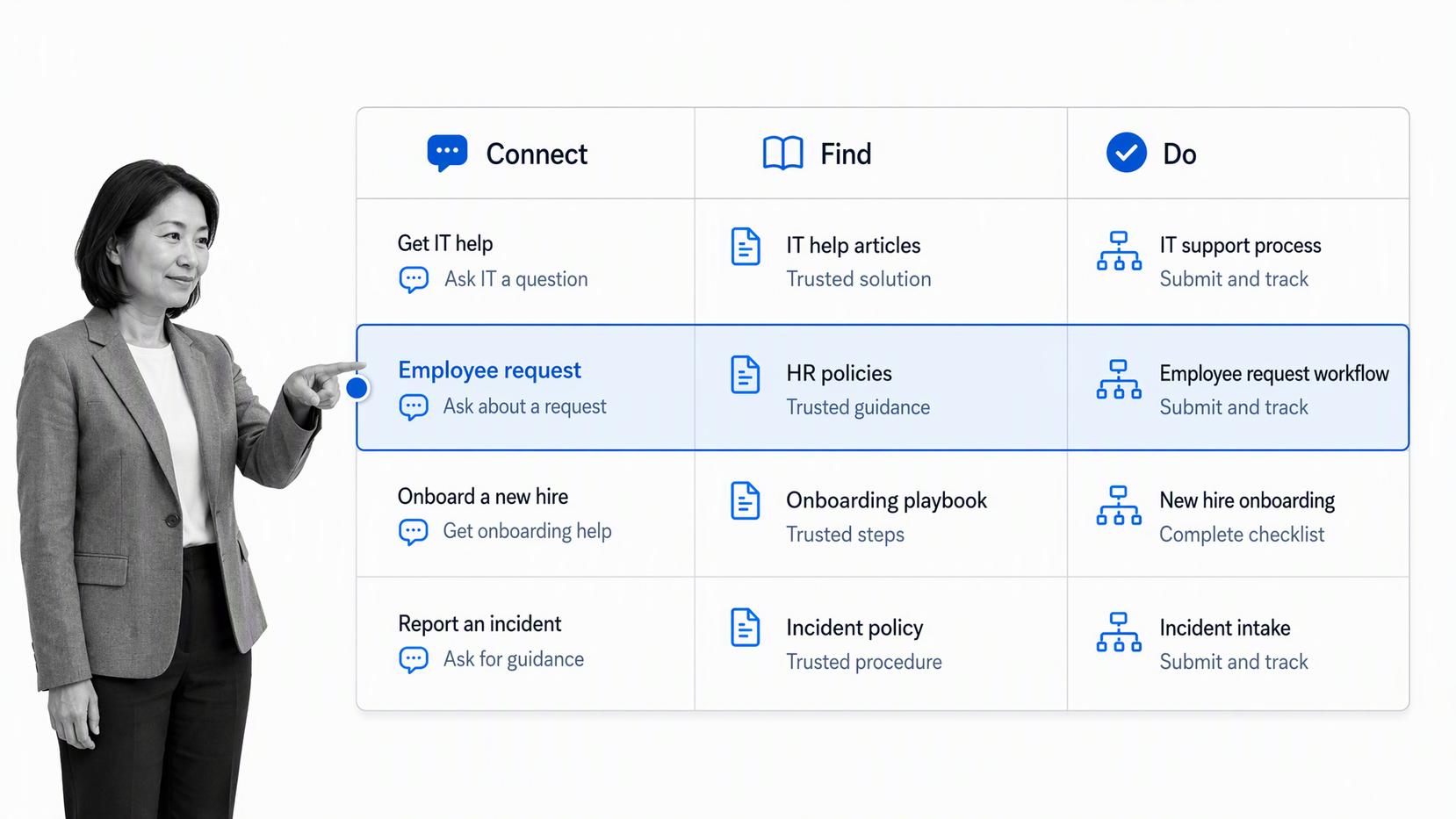
A complete digital workplace stack has seven connected capabilities. Teams can keep each capability simple, but leaving one undefined creates predictable friction, duplicate tools, lost requests, and untrusted information.
1. Goals and service promises
Technology selection starts with the employee journey and business result the digital workplace must support. The stack is valuable only when it makes everyday work easier to complete, easier to govern, and easier to improve. Employee needs translate strategy into a usable workplace promise, such as a safe release, accurate close, compliant approval, reliable delivery date, or consistent customer launch. A useful promise defines quality, speed, cost, risk, and customer expectations without forcing every case down one rigid path.
2. Workflow architecture
Experience and workflow architecture map the journeys and recurring work required to keep the promise. It shows triggers, core paths, decisions, dependencies, handoffs, exceptions, and outputs. A clear workflow definition helps teams distinguish executable work from policies, projects, and informal habits.
3. Ownership and decision rights
Every employee journey and workflow needs a design owner, every run needs accountable task owners, and every exception needs a decision path. Decision rights state who can approve risk, change a standard, accept an exception, or release an output. This prevents shared responsibility from becoming ownerless work.
4. Rules and controls
Rules and service design route work according to employee context and risk. Controls prevent, detect, or correct failures. Required data, segregation of duties, approval gates, evidence checks, service thresholds, and escalation paths should reflect the cost of failure. Too few controls create exposure. Too many create workarounds and delay.
5. Systems and information
The digital workplace stack uses communication tools, trusted knowledge, workflow automation, employee service channels, systems of record, and data services. The design must state where authoritative information lives, where employees begin, and how work moves between tools. Otherwise, employees rebuild the same record across spreadsheets, chat, email, and software queues.
6. Measures and operating cadence
Measures show whether employees can connect, find, and do what they need. The operating cadence determines when teams review demand, capacity, flow, quality, control performance, and improvement. Daily reviews handle blocked work. Weekly reviews balance flow. Monthly or quarterly reviews change the system itself.
7. Feedback and improvement
Feedback turns employee experience and execution evidence into better design. The system should capture exceptions, rework, delays, user friction, control failures, and customer outcomes, then assign improvement work to an owner. Without this loop, dashboards describe the past while the same defects continue.
How digital workplace software works
Digital workplace software works as a connected loop. An employee searches, asks, requests, collaborates, or starts a task. The environment supplies context, routes the work, applies the right controls, updates systems of record, confirms the result, and returns experience and execution data for improvement.
1. Sense demand
Triggers make demand visible. A signed contract, submitted request, scheduled date, inventory threshold, failed test, or system event can start work. Entry criteria protect the system from incomplete, duplicate, or inappropriate requests.
2. Prioritize and allocate capacity
Not every item deserves the same urgency or expertise. Rules classify work by value, risk, complexity, and service commitment. Managers then balance capacity across normal work, exceptions, maintenance, and improvement instead of allowing the loudest request to consume the system.
3. Execute the workflow
Tasks move to the right owner with the information needed to act. Dependencies, forms, due dates, and integrations coordinate the flow. Standard work handles the common path, while conditional branches expose legitimate variation without creating a separate process for every scenario.
4. Control decisions and exceptions
Approvals and evidence checks protect consequential decisions. Exceptions should be visible, time-bound, and assigned. The system should distinguish approved variation from accidental bypass so teams can respond proportionately and learn from recurring patterns.
5. Release and record the output
The ending condition should be explicit. Completion may mean a customer is live, a supplier is approved, an account is reconciled, a product is released, or an incident is closed. The operating record should preserve the decisions and evidence that support that result.
6. Review and improve
Leaders review outcomes, flow, control health, and recurring exceptions. Improvement proposals become governed changes to the workflow, information, training, automation, or control design. The next run then tests whether the change worked.
How to implement digital workplace software
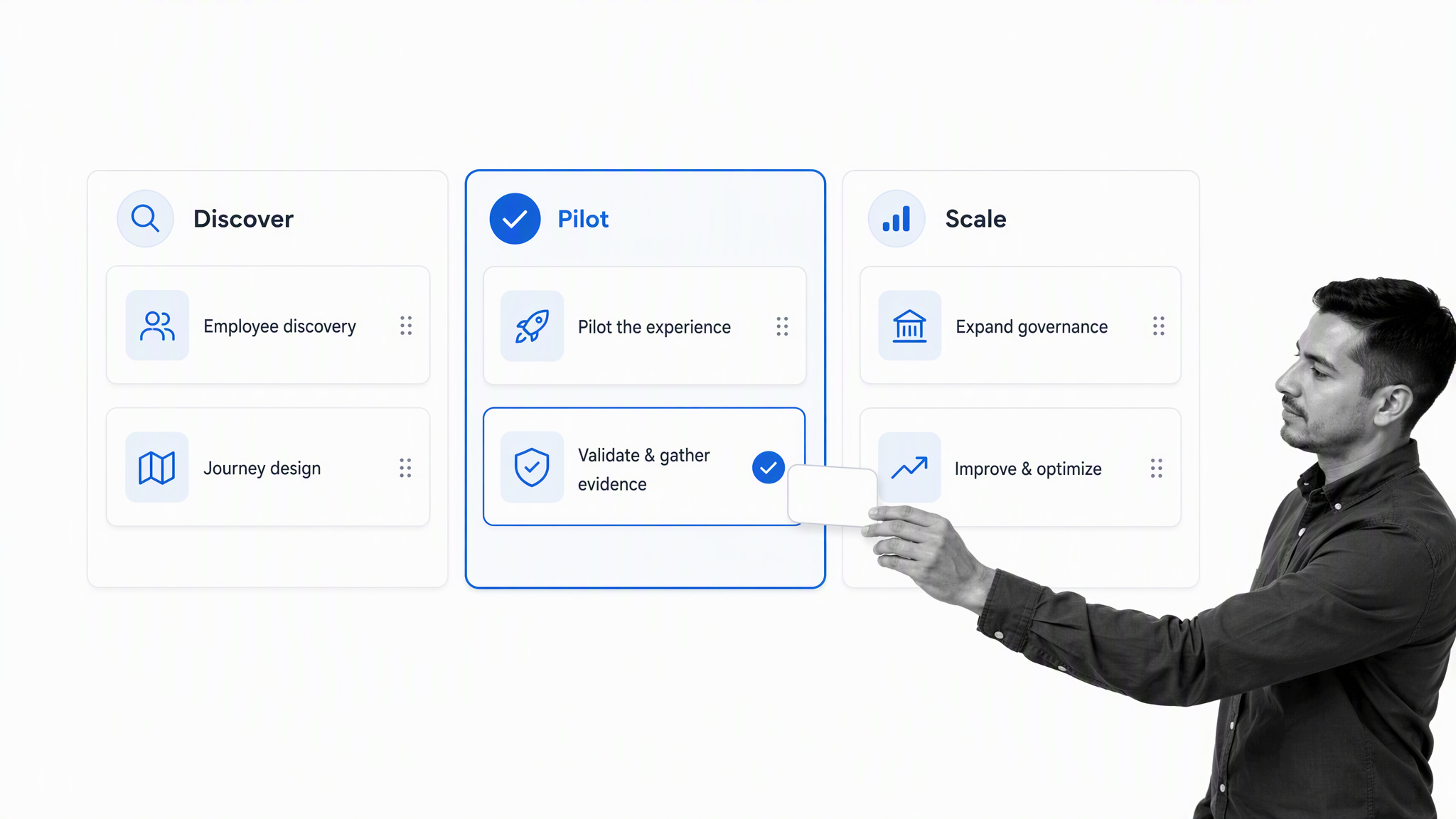
Implement digital workplace software around real employee journeys, not an abstract transformation program or a shopping list of applications. One meaningful workflow family gives you enough complexity to test the architecture and enough focus to improve it quickly.
Step 1: Choose an outcome and boundary
Name the customer of the system, the outcome they need, the starting trigger, and the ending condition. Set boundaries around the workflow family while including the handoffs that materially affect quality, risk, or speed.
Step 2: Map current execution
Observe how work actually happens. Inventory triggers, roles, systems, documents, decisions, controls, waiting points, exceptions, and outputs. A process orientation workflow can structure the discovery without assuming the current procedure is correct. A process creation workflow then turns the accepted map into a repeatable operating sequence.
Step 3: Design the target system
Simplify the main path, define ownership, choose decision rules, identify authoritative data, and place controls where risk warrants them. Design exception routes at the same time as the happy path. Decide which measures will prove the system delivers the intended outcome.
Step 4: Pilot representative cases
Test routine, incomplete, high-risk, urgent, and unusual cases. Watch where people hesitate, leave the workflow, duplicate data, or wait for clarification. Pilot evidence reveals whether the system supports judgment or simply hides complexity behind automation.
Step 5: Launch with governance
Assign the system owner, workflow owners, review cadence, change method, access rules, and escalation route. Train with scenarios rather than slides. Make the supported operating path easy to find and remove the unofficial paths it replaces.
Step 6: Improve from execution evidence
Review real runs after launch. Fix the constraint that limits the system outcome, not every small inconvenience at once. Use a business process improvement workflow to turn evidence into approved, tested changes. The process improvement principles workflow and internal process improvement workflow can make the review and implementation cadence explicit.
Common build mistakes
- Automating unclear work before agreeing on the outcome and owner.
- Mapping every department before proving one workflow family.
- Treating an ERP, project board, or SOP repository as the complete system.
- Adding controls without linking them to a specific risk.
- Measuring activity while ignoring outcomes, queues, and rework.
- Launching without a change owner or review cadence.
How to measure and improve the digital workplace
Measure the digital workplace at four levels: employee outcomes, task flow, trust and control, and learning. A single adoption number can look healthy while employees still cannot find answers or complete important work.
Outcome measures
Outcome measures reflect the service promise: first-time quality, accurate close, on-time launch, defect escape, customer activation, audit acceptance, incident recurrence, or supplier performance. Pair every measure with an owner and a threshold that triggers action.
Flow measures
Cycle time, wait time, throughput, work in progress, overdue work, handoff delay, and queue age show how work moves. Segment by path and risk level so legitimate complexity does not conceal poor performance in routine cases.
Control measures
Track missing evidence, approval reversals, bypasses, policy exceptions, failed checks, remediation age, and access violations. Control measures should help owners prevent recurrence, not merely produce an audit report.
Learning measures
Monitor recurring exception themes, implemented improvements, adoption of changed workflows, and whether a change improved the target outcome. The W3C accessibility guidance provides a simple rhythm for testing changes against evidence. NIST AI Risk Management Framework provide established methods for mapping flow, identifying failure modes, and finding waste.
Find the system constraint
Local optimization can make one task faster while the system output stays unchanged. Look for the queue, decision, skill, control, or system dependency that limits the whole outcome. Improve that constraint, measure the result, then find the next one.
Digital workplace software use cases
A useful digital workplace is easiest to understand through employee journeys. Each journey begins at an employee-facing channel, crosses several systems and owners, and ends only when the employee receives a dependable result.
Employee onboarding
Onboarding connects preboarding, identity checks, equipment, account access, policy acknowledgment, role training, manager tasks, and early support across HR, IT, security, facilities, and the hiring team. A connected employee onboarding process gives the new hire one coherent experience while each team completes its own controlled responsibilities.
Employee service requests
Employees need simple routes for access, payroll, leave, equipment, workplace support, procurement, and policy questions. The digital workplace can present one request experience, collect the right context, route the case to the correct team, expose status, escalate delays, and confirm resolution without asking the employee to understand the internal organization chart.
Knowledge and policy access
Search should return trusted, current guidance rather than a pile of nearly identical documents. Knowledge operations connect authoring, review, approval, publication, access, acknowledgment, and change control. Linking guidance directly to process documentation and executable workflows helps employees use the right information at the moment of work.
Cross-functional work
Projects and recurring operations both cross team boundaries. The digital workplace should connect decisions, tasks, documents, meetings, approvals, and handoffs while preserving one clear view of ownership. Collaboration remains flexible, but consequential steps move through a path that can be monitored and improved.
Remote, hybrid, and frontline work
A digital workplace should not assume every employee has a desk, a laptop, or the same workday. Mobile access, targeted communication, accessible design, searchable guidance, forms, service requests, escalation, and low-friction authentication help distributed employees participate without creating a second-class experience.
AI-assisted employee support
AI can summarize trusted knowledge, answer routine questions, classify requests, draft responses, start workflows, and perform assigned tasks. It should act inside defined permissions, route uncertain or consequential decisions to people, cite the source it used, and preserve an activity record. The digital workplace supplies the context and guardrails that make assistance useful rather than unpredictable.
Run digital workplace workflows in Process Street
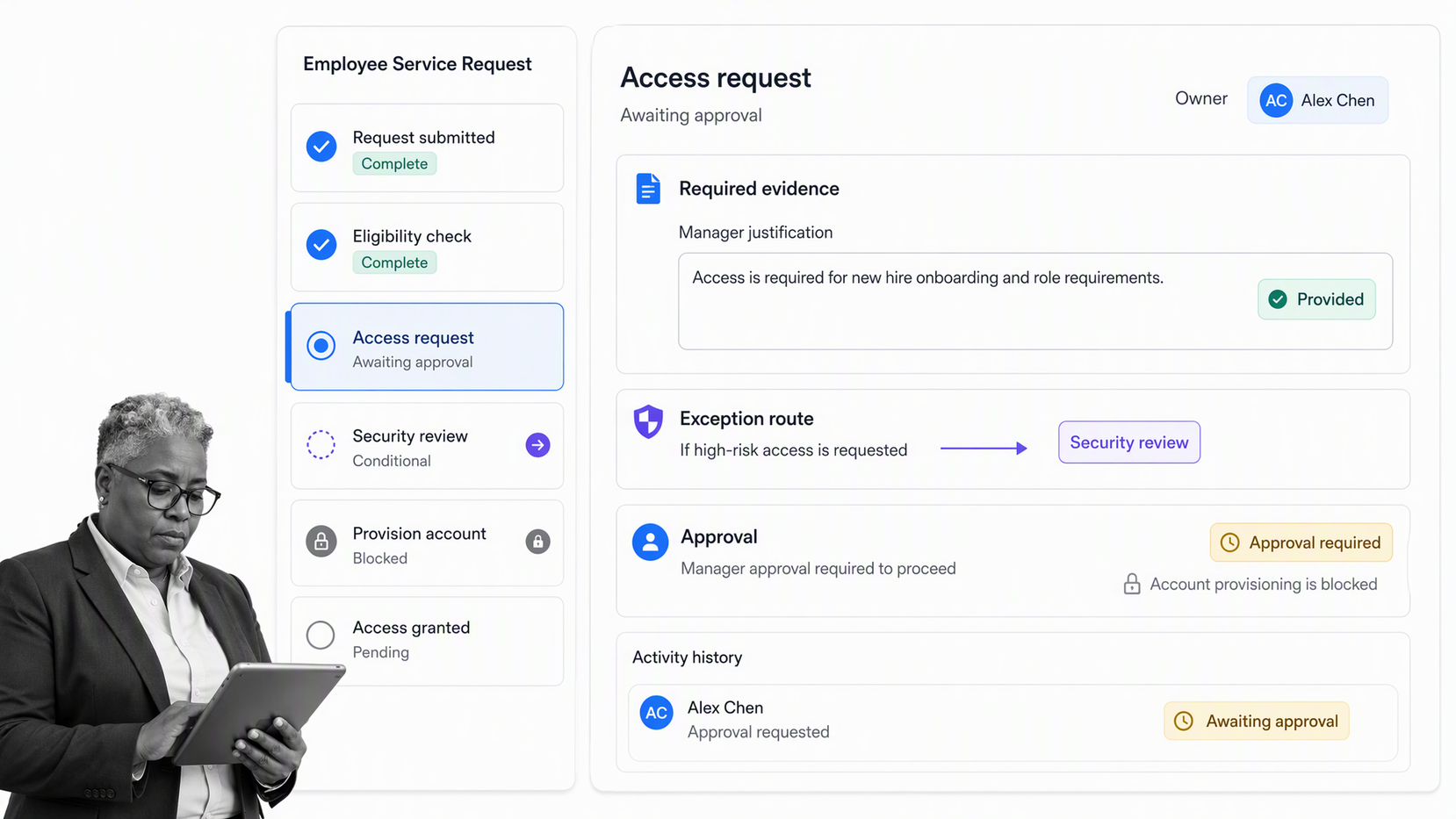
Process Street is an agentic process automation platform for high-stakes operations. It provides the governed execution layer inside a broader digital workplace software stack. It turns procedures into workflows that assign work, apply rules, coordinate systems, control decisions, capture evidence, and improve from execution data.
Turn standards into executable workflows
Tasks, forms, instructions, dependencies, and due dates keep the operating standard inside the work. Task assignments route each step to the responsible person or group so ownership is visible at run time.
Control decisions and exceptions
Conditional logic changes the path according to case data, while approvals create explicit review gates. Exceptions stay inside the operating record instead of disappearing into email or chat.
Connect the operating stack
Process Street has direct, universal integrations to 5,000+ systems. Need a new one? An AI agent builds it on the fly. That lets the digital workplace stack coordinate systems of record and real software while the workflow remains the governed execution layer.
Use agents with control and proof
Agents can execute assigned steps and coordinate software, while approval gates keep consequential write actions under human control. The workflow preserves task history, decisions, evidence, and exceptions so automation increases execution capacity without removing accountability.
Monitor runs and improve the system
The workflow dashboard gives owners a cross-run view of active work, overdue items, and status. Execution history helps teams find recurring delays and exceptions, then update the workflow under controlled governance.
Digital workplace software FAQs
What is digital workplace software?
Digital workplace software is the connected technology environment employees use to communicate, find trusted knowledge, access services, collaborate, and complete work. It can combine an intranet, communication tools, enterprise search, knowledge systems, service portals, workflows, integrations, analytics, security controls, and AI assistance.
What capabilities should digital workplace software include?
Core capabilities include communication, collaboration, trusted knowledge, enterprise search, employee services, governed workflows, integrations, analytics, identity and access controls, accessibility, and support for mobile or frontline work. The right combination depends on the employee journeys and operating risks the organization needs to improve.
How is digital workplace software different from an intranet?
An intranet primarily publishes internal content and links. Digital workplace software includes that front door but also connects the services, workflows, systems of record, search, collaboration, and analytics employees need to complete work after they find the information.
How do you implement digital workplace software?
Start with a real employee journey, map the current tools and handoffs, define a supported target experience, and pilot it with representative users. Establish ownership, content governance, security, integrations, measurement, and a feedback loop before expanding to more journeys.
How do you measure a digital workplace?
Measure employee outcomes, task flow, trust and control, and learning. Useful signals include search success, service resolution, workflow cycle time, repeat contacts, accessibility, adoption by employee segment, exception rates, employee effort, and whether improvements change the intended result.
Can digital workplace software use AI agents safely?
Yes, when agents work inside clear permissions, trusted knowledge, governed workflows, approval gates, and activity history. Consequential actions should require appropriate human control, and the system should preserve the source, decision, evidence, and exception record.
