


Turn every policy into automated workflows with built-in enforcement and audit-ready proof.



Process App
A process app is software that turns a repeatable business process into a guided, trackable flow of work. Instead of leaving a procedure in a document and hoping people remember it, the app gives each person the right task, information, decision, and deadline at the right point in the process.
The best process apps do more than store checklists. They coordinate handoffs, enforce rules, capture evidence, route approvals, and show what is happening across every active run. That makes them useful for work such as employee onboarding, vendor review, client delivery, quality checks, finance approvals, incident response, and compliance operations.
This guide explains what a process app is, how it works, which capabilities matter, how it differs from adjacent tools, and how to implement one without digitizing a broken process.
In this article, you will learn:
- What is a process app?
- How a process app works
- Why teams use process apps
- Core capabilities to look for in a process app
- Process app vs adjacent tools
- Which processes should you put in an app first?
- How to choose a process app
- How to implement a process app
- How Process Street works as a process app
- Process app FAQs
What is a process app?
A process app is an application built around a defined sequence of work. It combines the procedure people should follow with the live tasks, forms, rules, owners, and records needed to carry it out. Each time the process starts, the app creates a fresh run that can be assigned, completed, reviewed, and measured.
That execution model is the defining feature. A process app is not simply a place to draw a flowchart or upload an SOP. It is the environment where the procedure becomes work. The system knows which stage is active, what information is required, who is responsible, and what must happen before the run can move forward.
From static instructions to active execution
A procedure document can explain what should happen, but it cannot tell you whether the work actually happened. A process app closes that gap. It places the instructions inside the flow of work, records task completion, and gives owners a shared source of truth. If your team is still documenting procedures separately, this guide to documenting workflows explains the foundation.
A repeatable process, not a one-off project
Process apps are strongest when the work follows a recognizable pattern. The details may change from one run to the next, but the control points remain stable. A new employee has a different role and start date, for example, yet the company still needs the same classes of approvals, access requests, policy acknowledgments, equipment steps, and check-ins.
A practical system for interrelated work
The ISO quality management principles describe consistent results as a product of managing activities as interrelated processes. A process app makes that principle operational. It connects inputs, tasks, decisions, outputs, owners, and evidence instead of treating each item as an isolated to-do.
How a process app works
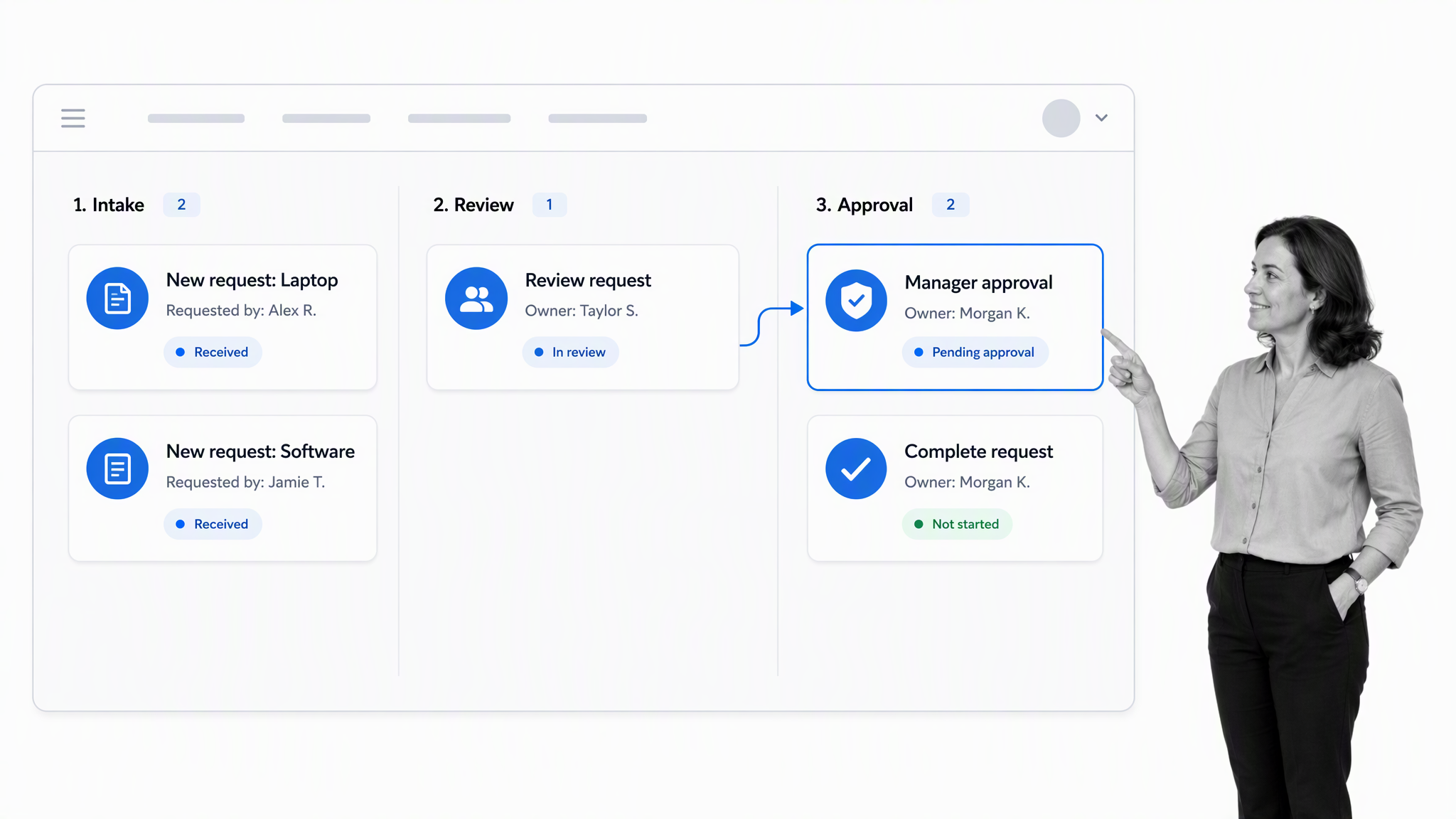
1. A trigger starts a new run
A process can start when a person submits a form, a schedule reaches a set time, a status changes in another system, or an authorized user launches it manually. The trigger creates a distinct run with its own data, people, dates, and audit trail.
2. The app routes work to the right people
Tasks are assigned by role, person, team, or information collected earlier in the run. Clear ownership prevents work from disappearing between departments. A process planner helps define those responsibilities before the workflow is built.
3. Rules adapt the path
Not every case should follow the same route. Conditional rules can reveal extra checks for a high-risk vendor, skip irrelevant onboarding tasks for a contractor, or send an unusual expense to a senior approver. Process Street’s guide to conditional logic in workflows shows how rule-based paths can respond to information collected during a run.
4. Decisions and evidence stay with the work
Approvals, comments, attachments, form responses, and completion history belong inside the process record. That context matters later, especially when a manager needs to understand why a decision was made or an auditor needs evidence that a control operated.
5. Visibility supports intervention
The app should surface overdue work, blocked runs, rejected decisions, and unusual patterns while action is still possible. A report delivered after the process ends can explain failure, but live process visibility helps an owner prevent it. This is why status reporting should connect directly to the underlying task and owner rather than summarize work in a separate spreadsheet.
Why teams use process apps
Consistency without constant supervision
A well-designed process app makes the expected path visible and difficult to ignore. People do not need to remember every policy or chase the latest document. The app presents the current step, required information, and definition of done. Managers can focus on exceptions instead of manually coordinating every routine case.
Faster handoffs across functions
Many delays occur between tasks rather than inside them. A process app can notify the next owner, set a due date, and carry forward the information they need. That shortens idle time between HR, IT, finance, legal, operations, and external partners.
Proof that the process was followed
Completion records turn process execution into evidence. Instead of reconstructing events from inboxes and spreadsheets, you can review the run itself. That supports internal control, customer assurance, quality management, and regulated work. A strong process tracking system also helps teams find recurring delays and failed handoffs.
Core capabilities to look for in a process app
A clear process model
The builder should make it easy to define tasks, stages, instructions, forms, roles, and decision points. A visual map helps, but the real test is whether the model can be run. The UK Government’s process-mapping guidance highlights the value of showing triggers, tasks, actors, timing, purpose, and relationships. Your app should preserve those elements in execution.
Structured data capture
Forms should collect the information needed to make decisions and complete downstream work. Prefer defined fields over long unstructured notes when the data needs to be filtered, reported, validated, or passed to another system.
Dynamic assignments and deadlines
Ownership should be driven by the process. Look for role-based assignments, relative due dates, reminders, and escalation paths. The goal is not to send more notifications. It is to make responsibility unambiguous and surface work before it becomes late.
Conditional logic
Rules let one process handle legitimate variation without creating dozens of separate versions. The best systems make those rules understandable to process owners and testable before release.
Approvals and control gates
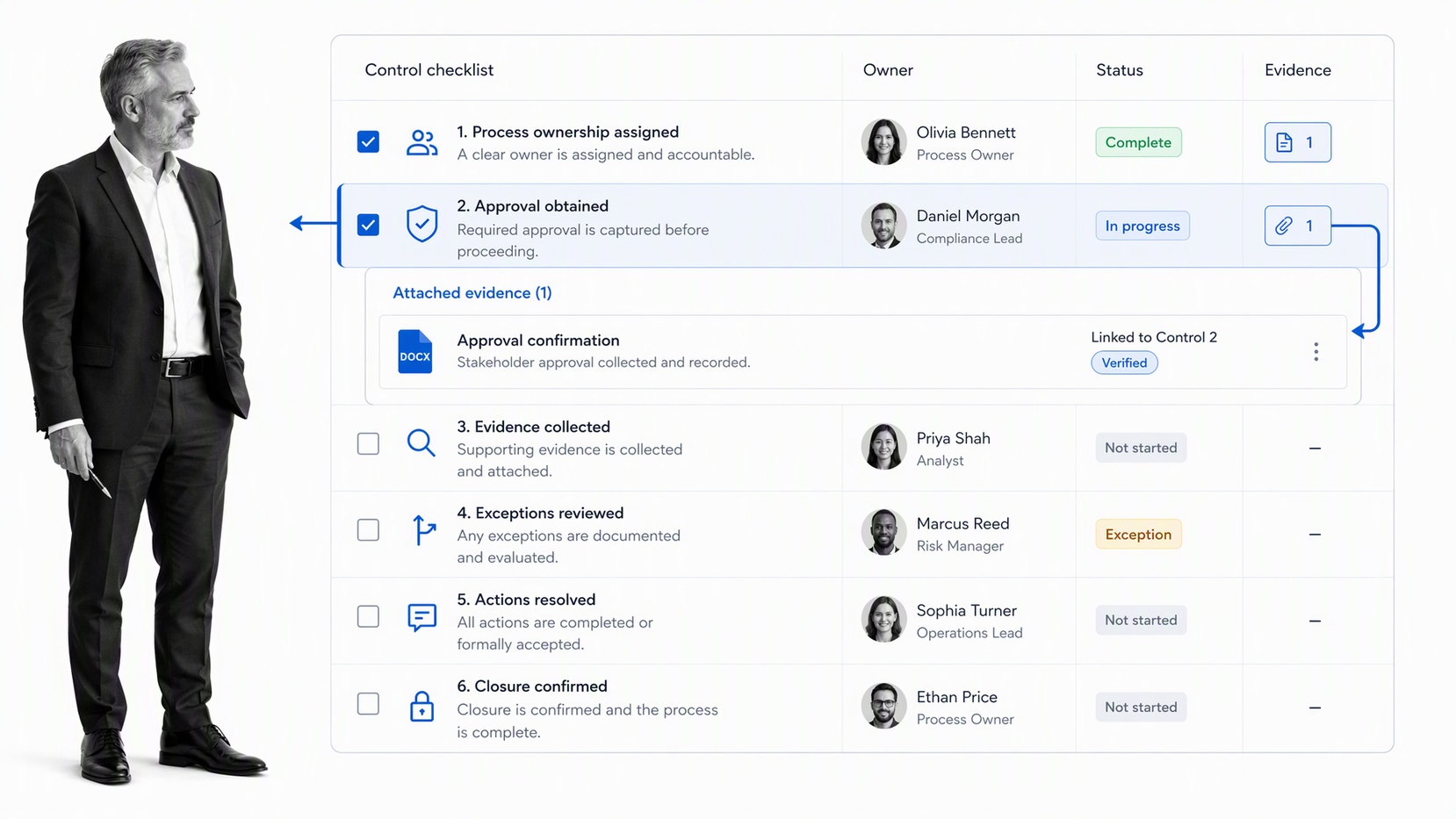
An approval should pause or redirect work, record who decided, and retain the supporting evidence. Process Street’s documentation on approval tasks covers single-stage, multi-stage, and sequential approval patterns.
History, reporting, and improvement
A process app should answer simple operational questions: Which runs are active? Where are they stuck? Who owns the next step? Which exceptions keep recurring? Historical data should feed process improvement, not sit unused after completion.
Integration without losing process ownership
A useful process rarely lives inside one system. The app may need to receive a request, look up a record, send a notification, create an account, update a system of record, or produce a document. Those connections should support the process rather than hide it. The process owner still needs to understand the trigger, decision points, failure behavior, and evidence trail even when actions happen automatically.
Process app vs adjacent tools
Process app vs project management app
Project management software organizes unique initiatives around milestones, backlogs, or deliverables. A process app organizes repeatable work around a standard method. A product launch is a project. Reviewing every new vendor is a process. Some teams need both, but forcing repeatable control work into a loose project board often creates drift.
Process app vs checklist app
A checklist confirms that steps were considered or completed. A process app adds people, data, rules, approvals, integrations, and reporting around those steps. A simple checklist may be enough for personal routines. Cross-functional work usually needs the wider system.
Process app vs workflow automation
Workflow automation often focuses on moving data or triggering actions between systems. A process app covers the human and automated work together. It can provide the operating context, instructions, decisions, and evidence around automation. Explore the narrower process workflow software category when cross-system routing is your main concern.
Process app vs process management app
The terms overlap. In practice, a process management app often emphasizes design, governance, and oversight, while “process app” emphasizes the runnable application people use to complete the work. The same platform may support both jobs.
Which processes should you put in an app first?
Choose frequent, consequential work
Start with a process that happens often enough to learn from and matters enough to justify change. Good candidates have recurring errors, delayed handoffs, inconsistent approvals, missing evidence, or excessive status chasing.
Look for a stable core with controlled variation
The first process should have a recognizable beginning, end, owner, and output. It can contain branches, but it should not be so unpredictable that every run becomes an exception. Employee onboarding is a strong example. The role and department change, while the control points remain familiar. You can inspect an onboarding process template to see how the sequence can be structured.
Avoid automating ambiguity
If stakeholders disagree about the goal, owner, or required controls, pause before building. Use a workshop or a process creation template to agree on scope and definition of done. An app can accelerate a clear process, but it will also accelerate confusion if the operating model is unresolved.
How to choose a process app
Evaluate one real process
Do not evaluate only from a feature checklist. Build or prototype one representative process. Include at least one handoff, one branch, one approval, one evidence attachment, and one reporting question. This reveals how the app handles the work your team actually does.
Use the same scenario for every product you consider. Give each vendor the same inputs, control requirements, exception case, and expected output. A consistent test makes tradeoffs visible and prevents a polished demonstration from substituting for operational fit.
Test the experience for builders and participants
Builders need control without depending on developers for every change. Participants need a focused experience that shows what to do next. Reviewers need context and evidence. Leaders need an honest view of flow and exceptions. If one group is ignored, adoption or governance will suffer.
Check governance before scale
Ask how changes are reviewed, published, and tracked. Confirm how permissions, retention, audit history, and ownership work. The template management process provides a useful pattern for testing, approving, distributing, monitoring, and revising process designs.
Also ask what happens to runs already in progress when the process definition changes. A safe system should make the effect understandable. Process owners need confidence that a necessary improvement will not silently alter active work or erase the history of the version participants followed.
Measure fit, not just configuration speed
A quick demo can hide long-term friction. Measure how easily users find their tasks, how clearly exceptions appear, how safely the process changes, and whether the resulting records answer operational questions. A broader workflow management system may be appropriate when you need a shared layer across many departments and process families.
How to implement a process app
Define the outcome and boundary
State what starts the process, what successful completion produces, and what sits outside scope. Identify the process owner and the people who perform, review, or depend on the work.
Map the current path and its failure points
Capture the actual path, not the idealized policy version. Mark repeated data entry, unclear ownership, waiting time, workarounds, rework, and control gaps. The APQC Process Classification Framework can help teams create a consistent language for grouping and discussing processes.
Design the simplest controlled future state
Remove steps that do not protect quality, risk, or customer value. Define required data, owners, decision rules, deadlines, and evidence. Use the ISO process approach guidance as a useful Plan, Do, Check, Act lens for designing and improving the flow.
Separate normal work from exception handling. The main path should be easy to follow, while unusual cases should route to a named owner with the context needed to decide. Trying to anticipate every edge case in the primary flow makes the app harder to use and harder to maintain.
Build, preview, and test
Build a small working version and run realistic scenarios through it. Include a normal case, a rejection, missing information, and a high-risk exception. Process Street’s workflow preview guidance shows why approvals and conditional paths should be tested from the perspective of the assigned user.
Launch with ownership and feedback
Tell participants why the process is changing, where to get help, and who owns future improvements. Review early runs closely. Track completion time, exceptions, rework, and user confusion, then adjust the process deliberately rather than allowing unofficial workarounds to spread.
Set a review rhythm after launch. Weekly reviews are useful during the first rollout, followed by a monthly or quarterly cadence once the process is stable. Examine both performance data and participant feedback. A fast process can still be poor if it creates low-quality outputs, weak controls, or hidden work outside the app.
How Process Street works as a process app
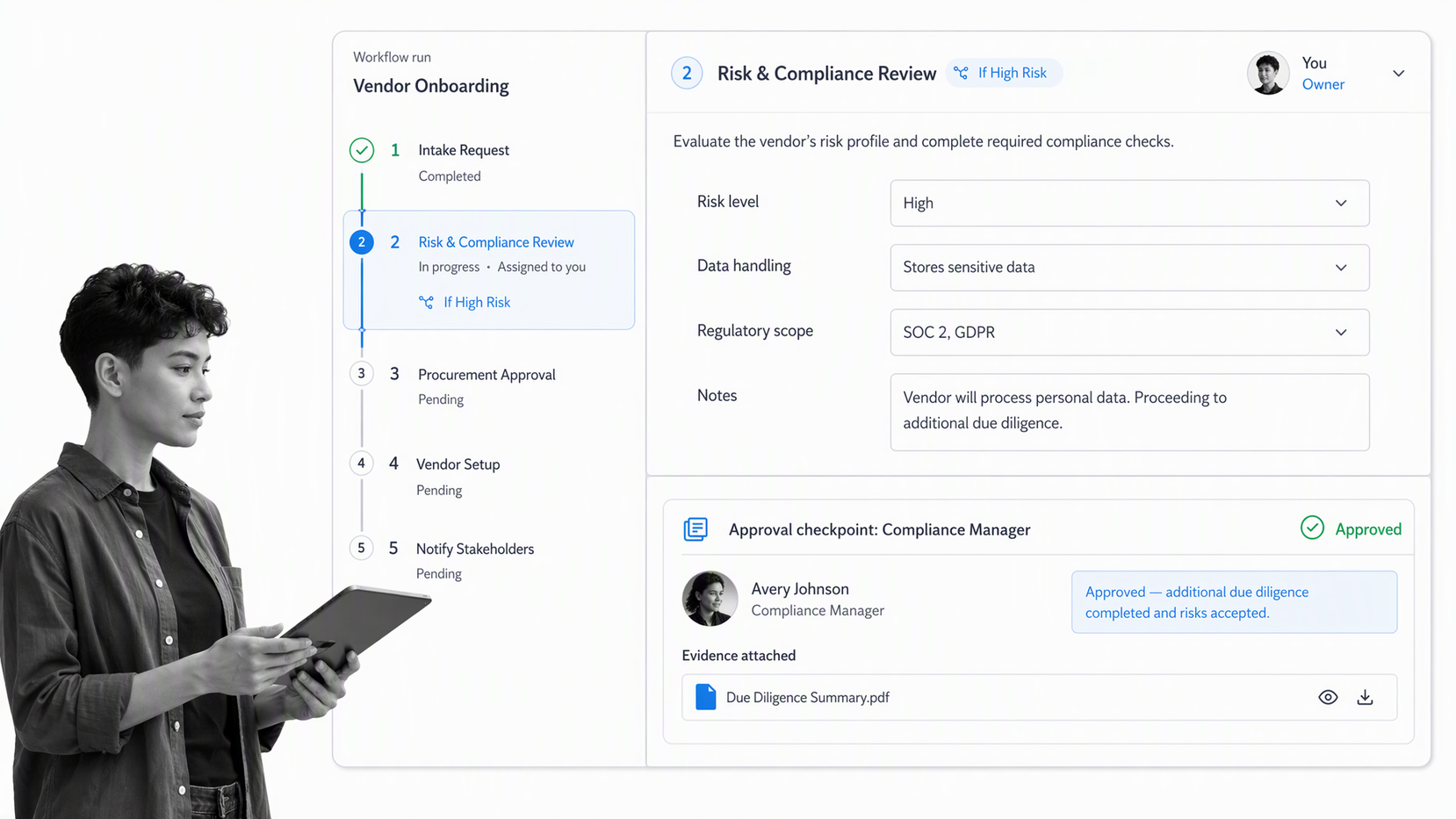
Process Street is an agentic process automation platform for high-stakes operations. It brings the process definition and the live execution record together, so teams can guide work, enforce decisions, and retain proof in one system.
Build the operating path
Process owners can define tasks, instructions, forms, roles, deadlines, conditional routes, and approvals. That turns the procedure into a runnable application rather than a passive reference.
Run work with control and proof
Each run records assignments, form responses, decisions, comments, attachments, and completion history. Teams can see active work through a process dashboard and inspect exceptions without chasing status across channels.
Connect the surrounding systems
Process Street has 5,000+ integrations. That lets a process app coordinate work across the systems a team already uses while keeping the operating logic and evidence inside the process.
The practical goal is simple: make the correct path easy to follow, make exceptions visible, and make completion provable.
Process app FAQs
What is a process app?
A process app is software that turns a repeatable business procedure into a guided flow of tasks, data, decisions, and handoffs. It creates a trackable run each time the process starts, so teams can coordinate execution and retain a record of what happened.
What is the difference between a process app and a project management app?
A process app is designed for repeatable work that should follow a controlled method. A project management app is usually designed for unique initiatives with changing deliverables, milestones, or backlogs. Many organizations use both for different kinds of work.
What processes should you automate first?
Start with frequent, consequential work that has a stable core and visible pain. Strong candidates have delayed handoffs, inconsistent decisions, missing evidence, repeated data entry, or heavy status chasing.
How do you evaluate a process app?
Prototype one real process and include assignments, a conditional route, an approval, evidence, and a reporting question. Test the experience for builders, participants, reviewers, and leaders rather than relying only on a feature checklist.
Can a process app support compliance work?
Yes. A process app can place controls inside the flow of work, require approvals, collect evidence, record ownership, and preserve completion history. The app still needs appropriate governance, permissions, and process design for the risk involved.
