


Turn every policy into automated workflows with built-in enforcement and audit-ready proof.



Digital Onboarding: A Practical Guide for Employees and Customers

Digital onboarding turns the path into a new job, customer relationship, service, or software product into a guided operating process. Forms and welcome emails are part of it, but they are not the whole job. A complete journey also coordinates people, permissions, decisions, training, evidence, and the moment the new participant can work or succeed independently.
The practical challenge is cross-functional. Employee onboarding can involve HR, IT, security, payroll, facilities, a manager, a buddy, and the new hire. Customer onboarding can involve sales, implementation, support, finance, security, and the customer team. When each group manages its part in a separate inbox or spreadsheet, waiting time and missed handoffs become part of the experience.
This guide explains how to design digital onboarding as one controlled journey. It covers employee and customer use cases, the operating model, workflow design, security, measurement, and the role Process Street can play as the orchestration layer.
In this guide:
- What is digital onboarding?
- Who needs digital onboarding?
- How does digital onboarding work?
- What belongs in employee digital onboarding?
- What belongs in customer digital onboarding?
- How do you design a digital onboarding workflow?
- Which tools belong in a digital onboarding stack?
- How does Process Street support digital onboarding?
- How do you keep digital onboarding secure and compliant?
- How should digital onboarding be measured?
- Why do digital onboarding programs fail?
- How can you improve an existing digital onboarding process?
- Digital onboarding FAQ
What is digital onboarding?
Digital onboarding is the structured use of digital systems to prepare, verify, guide, and activate a new employee, customer, partner, contractor, or product user. It begins at a defined trigger, such as an accepted offer or closed deal, and ends when the person reaches a defined outcome, such as role readiness, secure access, product activation, or first value.
A digitized checklist is not automatically a digital onboarding system. Uploading a PDF, sending a sequence of emails, or putting tasks in a project board can reduce paper, yet still leave ownership and exceptions unclear. A strong digital onboarding process connects the procedure to execution. It knows who owns the next step, which data is required, what can branch, where approval is needed, and what proves completion.
The digital onboarding operating model
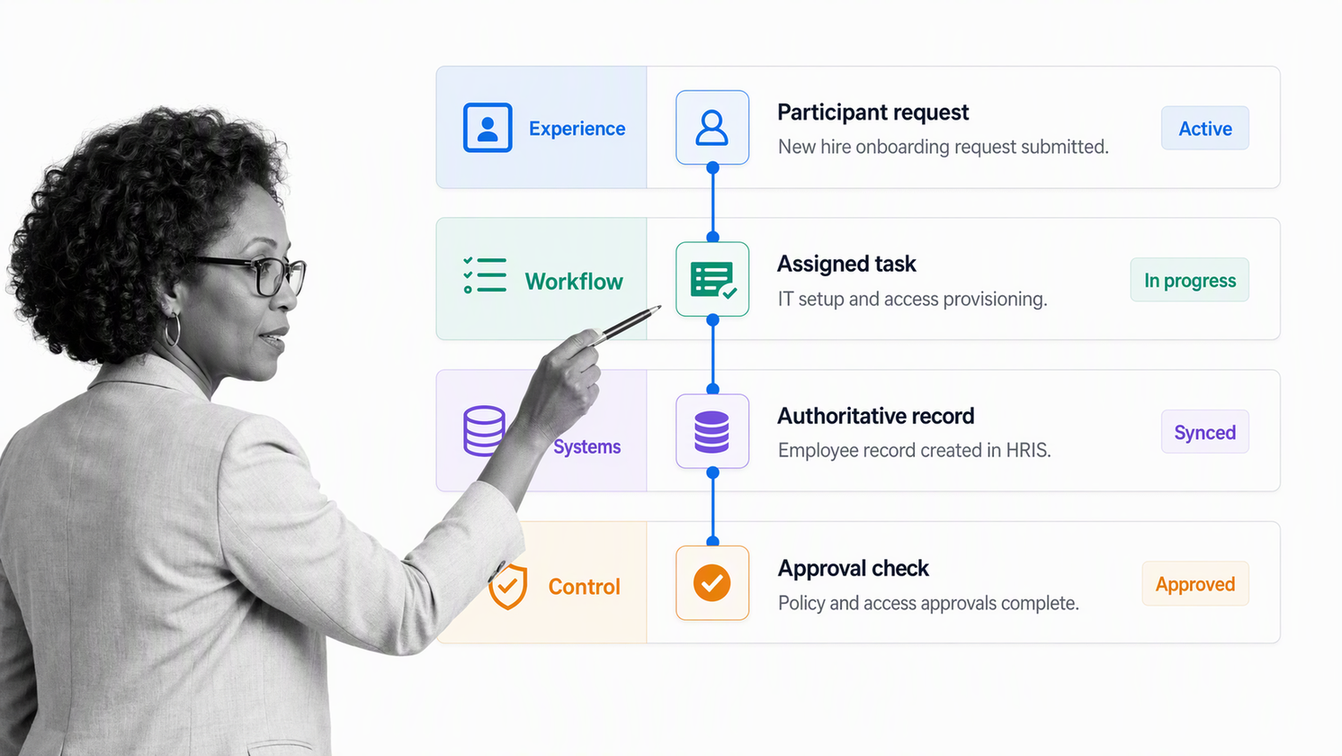
The operating model has four connected layers: experience, workflow, systems, and control. The experience layer tells the participant what is happening and what to do next. The workflow layer coordinates owners and handoffs. Systems of record store authoritative employee, customer, identity, or financial data. The control layer governs access, approvals, evidence, retention, and change.
| Layer | Primary question | Examples |
|---|---|---|
| Experience | What does the new participant see and need? | Welcome, instructions, forms, milestones, training, support |
| Workflow | Who does what, in which order? | Assignments, due dates, branches, approvals, reminders, escalation |
| Systems | Where does authoritative data live? | HRIS, CRM, identity platform, payroll, learning system, product |
| Control | What must be protected and proved? | Identity checks, permissions, evidence, audit history, retention |
Digital onboarding is also different from virtual onboarding. Digital describes the operating method. Virtual describes the location of interaction. A person in an office may complete a digital workflow, while a remote employee can still receive an improvised experience built from video calls and email. The design question is not simply whether the journey is online. It is whether the whole journey is coherent.
Who needs digital onboarding?
Any organization that repeatedly brings people into a role, relationship, platform, or controlled environment can use digital onboarding. The trigger and outcome change, but the underlying problem is consistent: a new participant needs the right information, access, guidance, and support without required steps being lost between teams.
- Employee onboarding prepares a new hire to contribute safely and confidently in a specific role.
- Customer onboarding moves an account from commercial agreement to implementation, adoption, or first value.
- User onboarding helps a person configure a product, understand its core behavior, and complete a meaningful action.
- Partner and vendor onboarding establishes identity, agreements, access, controls, contacts, and ways of working.
- Member, patient, student, or citizen onboarding can combine eligibility, consent, identity, documentation, access, and service education.
Do not force all of these journeys into one universal template. Reuse the common control spine, then create separate paths for different outcomes, data, risks, owners, and participant needs. An employee should not receive customer language, and a low-risk self-service customer should not be pushed through an enterprise implementation path.
How does digital onboarding work?
Digital onboarding works by turning a desired transition into an executable workflow. The workflow starts with a reliable event, gathers only the information required to move forward, routes work to the correct owners, and adapts when the person, account, risk, or response changes.
A five-stage digital onboarding flow
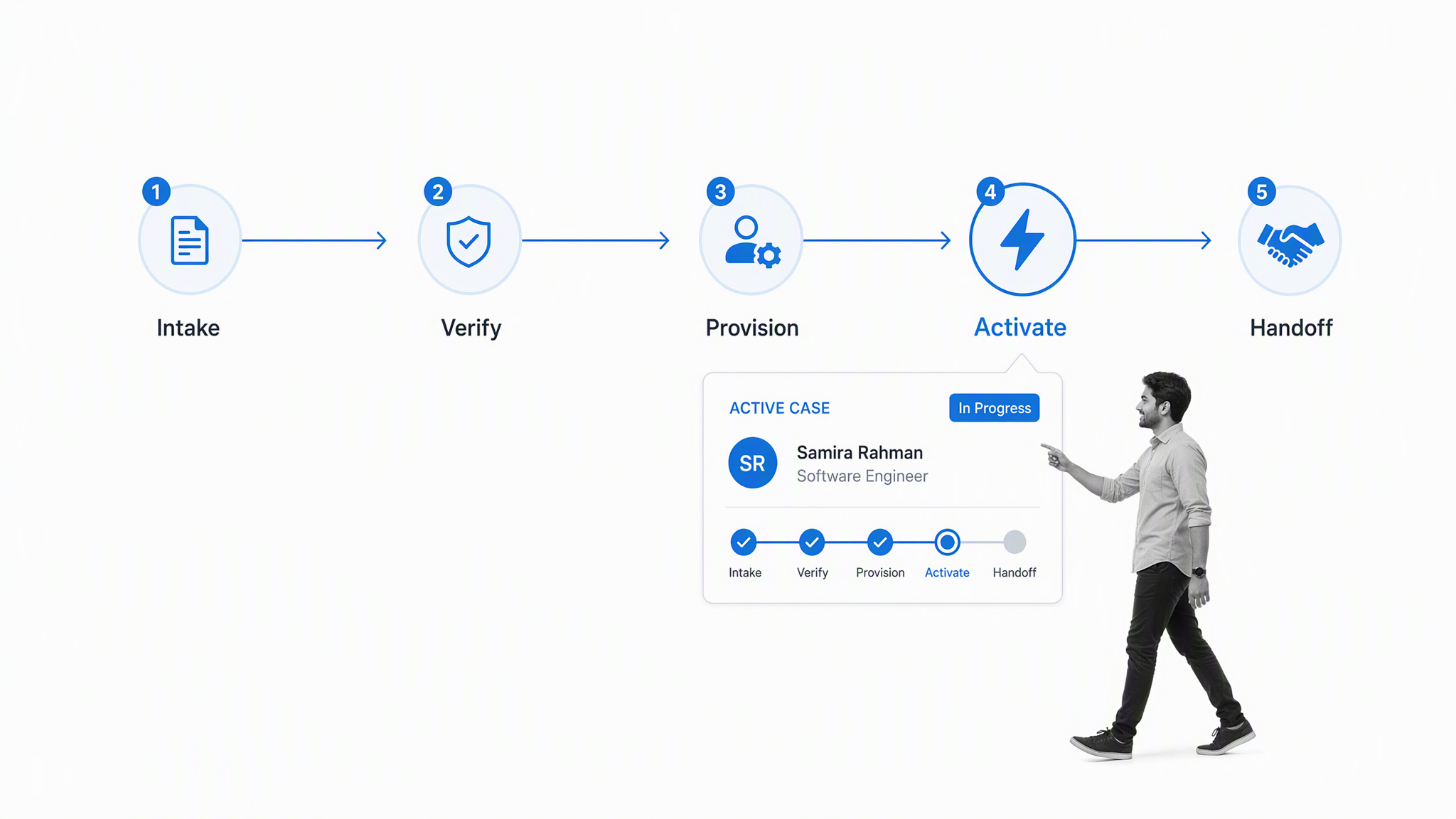
- Trigger and intake. Capture the event that starts the journey, create the onboarding record, name the accountable owner, and establish the intended outcome.
- Verify and collect. Confirm identity or eligibility where required, collect necessary data and documents, record consent, and validate that inputs are complete.
- Provision and coordinate. Create accounts, arrange equipment or configuration, assign internal tasks, schedule required meetings, and route approvals or security review.
- Orient and activate. Deliver the right guidance, training, introductions, setup, and support for the person’s role or goal. Avoid overwhelming everyone with the same content.
- Confirm, hand off, and improve. Test readiness or first value, resolve open exceptions, capture feedback, transfer ownership to the steady-state team, and use process data to improve the workflow.
The flow should make dependencies visible. A training task may depend on account access. Customer configuration may depend on approved data or security review. Payroll setup may depend on verified employee information. If a dependency is real, represent it in the workflow rather than asking people to remember it.
The finish line is not form completion. It is a new participant who can act safely and successfully.
What belongs in employee digital onboarding?
Employee digital onboarding should connect administration with belonging, clarity, and role readiness. The workflow can begin after offer acceptance, but it should not end after the first day. A new hire may have completed every form and still lack the tools, context, relationships, or expectations required to perform.
Employee onboarding from preboarding to proficiency
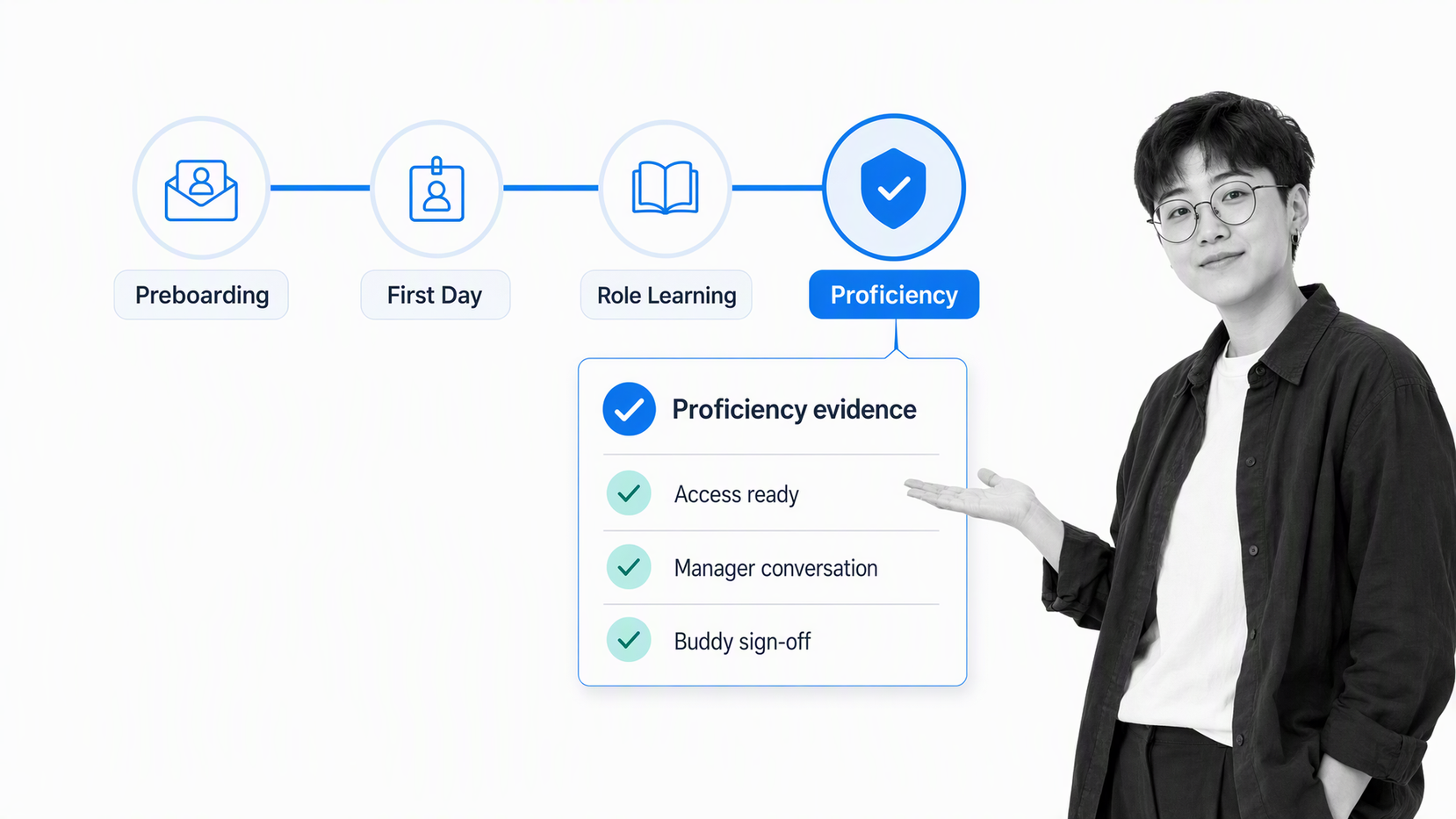
Preboarding covers the work that can happen before the start date: welcome communication, required forms, identity and employment checks, equipment requests, account planning, manager preparation, schedule design, and reasonable access arrangements. Keep personal data in the correct system and expose it only to owners who need it.
The first-day path should confirm that essential access works, introduce the role and team, explain where help lives, and give the new hire a manageable first success. The following weeks should add role-specific learning, practice, feedback, manager conversations, and evidence of proficiency. Digital tasks create consistency, while managers and peers create understanding.
Gallup’s employee onboarding guidance emphasizes active manager involvement, clear expectations, structured learning, and ongoing feedback. That is a useful design guardrail: automation should make important human interactions happen reliably, not replace them with a longer sequence of notifications.
Use role, location, employment type, department, risk, equipment needs, and work arrangement to route the right path. Keep a shared core for policy, security, culture, and support, then add role-specific branches. This prevents teams from maintaining many disconnected checklists while avoiding a generic experience.
What belongs in customer digital onboarding?
Customer digital onboarding starts with a clean handoff from the commercial process. The onboarding team needs the customer’s goal, promised scope, stakeholders, risk or security requirements, configuration needs, target milestone, and any commitments that shape delivery. A closed deal without this context creates avoidable discovery and weakens trust.
Customer onboarding from closed deal to first value
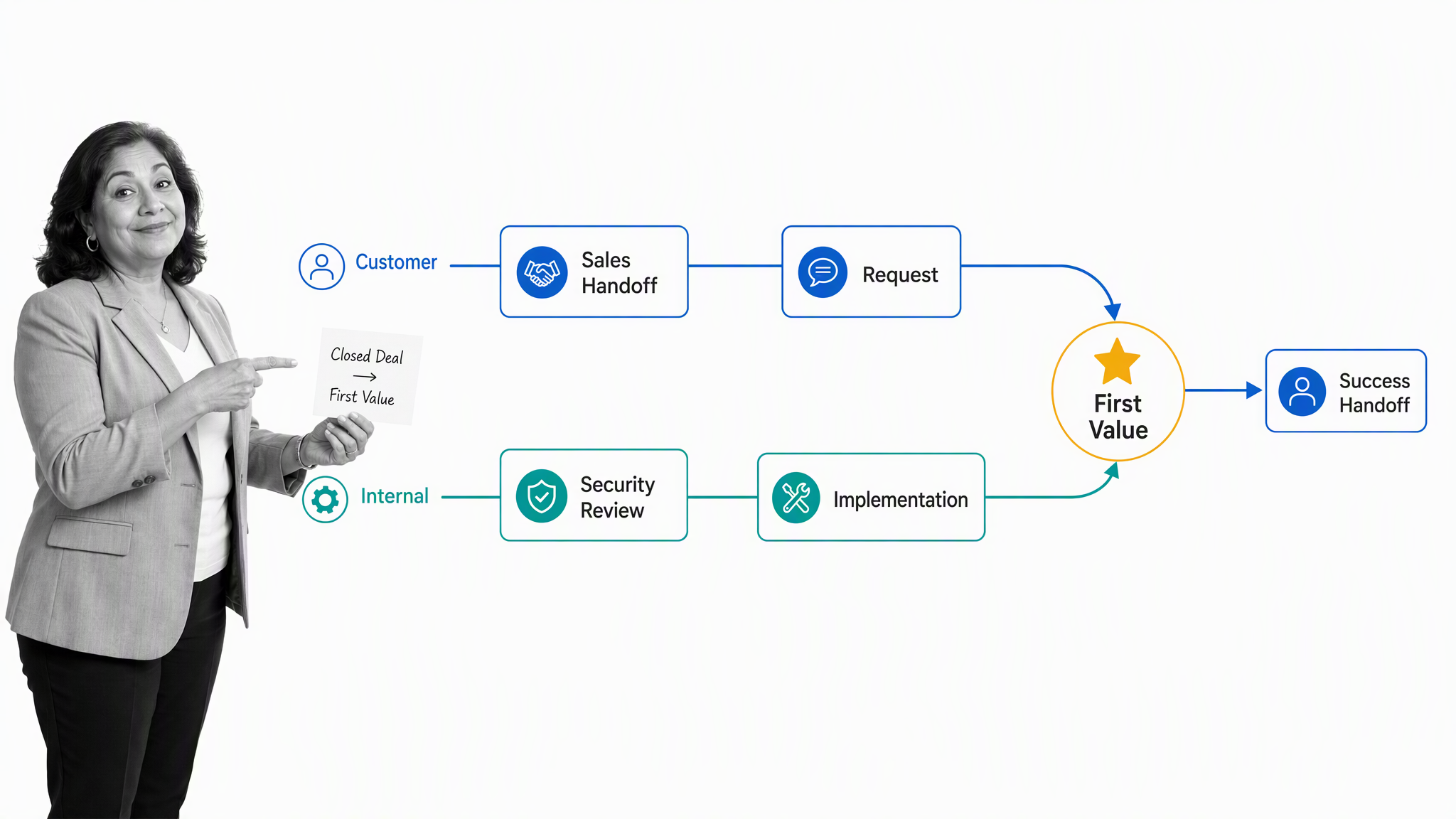
The journey should define the customer’s first-value event, not just an internal project completion date. That event might be a configured workflow, an imported data set, a completed transaction, a trained team, or a live service. Every task should help reach that outcome or satisfy a required control.
Customer-facing work and internal work need different views. The customer should see clear requests, owners, dates, milestones, and support. The internal team may also need security review, finance steps, data validation, technical configuration, risk decisions, and escalation. Preserve one source of truth for status without exposing internal-only information.
A reusable customer onboarding process helps teams carry the same operating discipline into every account while branching for segment, product, complexity, risk, and delivery model. The handoff at the end matters as much as the kickoff: confirm the outcome, document open items, transfer ownership, and schedule the next success checkpoint.
How do you design a digital onboarding workflow?
Start with the outcome and the actual work, not the software. A polished portal cannot fix unclear ownership, duplicate data, unnecessary approvals, or a process that has no definition of complete.
- Define the trigger and outcome. Name the event that starts the workflow and the observable condition that ends it.
- Identify the participant and every internal owner. Assign one accountable process owner, then name the role responsible for each step.
- Map the smallest complete path. Capture required tasks, decisions, data, evidence, dependencies, and human interactions from trigger to outcome.
- Separate common steps from conditional branches. Route by role, customer segment, location, risk, product, answer, or service model without copying the entire workflow.
- Design the exception path. Define what happens when information is missing, verification fails, a deadline slips, access is denied, a participant pauses, or the underlying agreement changes.
- Place human moments deliberately. Manager conversations, kickoff meetings, coaching, sensitive decisions, and relationship building should have an owner and purpose.
- Connect systems only after the workflow is clear. Decide which system owns each record and which information must move to support the next action.
- Pilot with real cases. Observe where people wait, ask for help, re-enter data, bypass the process, or encounter an exception, then correct the workflow before scaling it.
Use plain instructions written for the person completing the task. State what good looks like, what evidence is required, where information belongs, and whom to contact. Remove steps that exist only because the previous process was paper based. Add controls only where risk, quality, or policy justifies them.
Which tools belong in a digital onboarding stack?
Digital onboarding is usually a stack, not one system. The right architecture depends on whether the journey centers on employment, customer delivery, regulated identity, product adoption, or another relationship. Choose a system of record for authoritative data and a workflow layer that coordinates action across systems.
| Capability | Job in the journey | Selection question |
|---|---|---|
| Workflow orchestration | Coordinates tasks, branches, approvals, reminders, evidence, and status | Can it run the complete cross-functional path and handle exceptions? |
| System of record | Stores authoritative employee, customer, partner, or account data | Which system owns each field and change? |
| Identity and access | Verifies identity and provisions appropriate access | Does assurance match the risk and can access be reviewed or revoked? |
| Documents and signatures | Collects agreements, acknowledgments, and supporting records | Are signatures, versions, storage, and retention suitable for the use case? |
| Learning and guidance | Builds knowledge, skill, and confidence | Can content be assigned by role and connected to demonstrated performance? |
| Communication and support | Provides context, help, meetings, and escalation | Can participants find the right help without recreating process status in chat? |
| Analytics | Shows flow, completion, delay, quality, and outcomes | Can teams connect process behavior to readiness or first value? |
Avoid buying overlapping tools because each team prefers a different interface. First decide where the process is controlled, where data is authoritative, and how evidence is retained. Then evaluate whether each tool reduces a real source of waiting, error, risk, or participant effort.
How does Process Street support digital onboarding?
Process Street can serve as the workflow orchestration layer for employee, customer, partner, vendor, and user onboarding. A team defines the procedure once, then runs a new workflow for each person or account. Tasks can have owners and due dates, forms can collect structured inputs, conditional logic can route different paths, and approval tasks can hold required decisions inside the process.
Run digital onboarding in Process Street
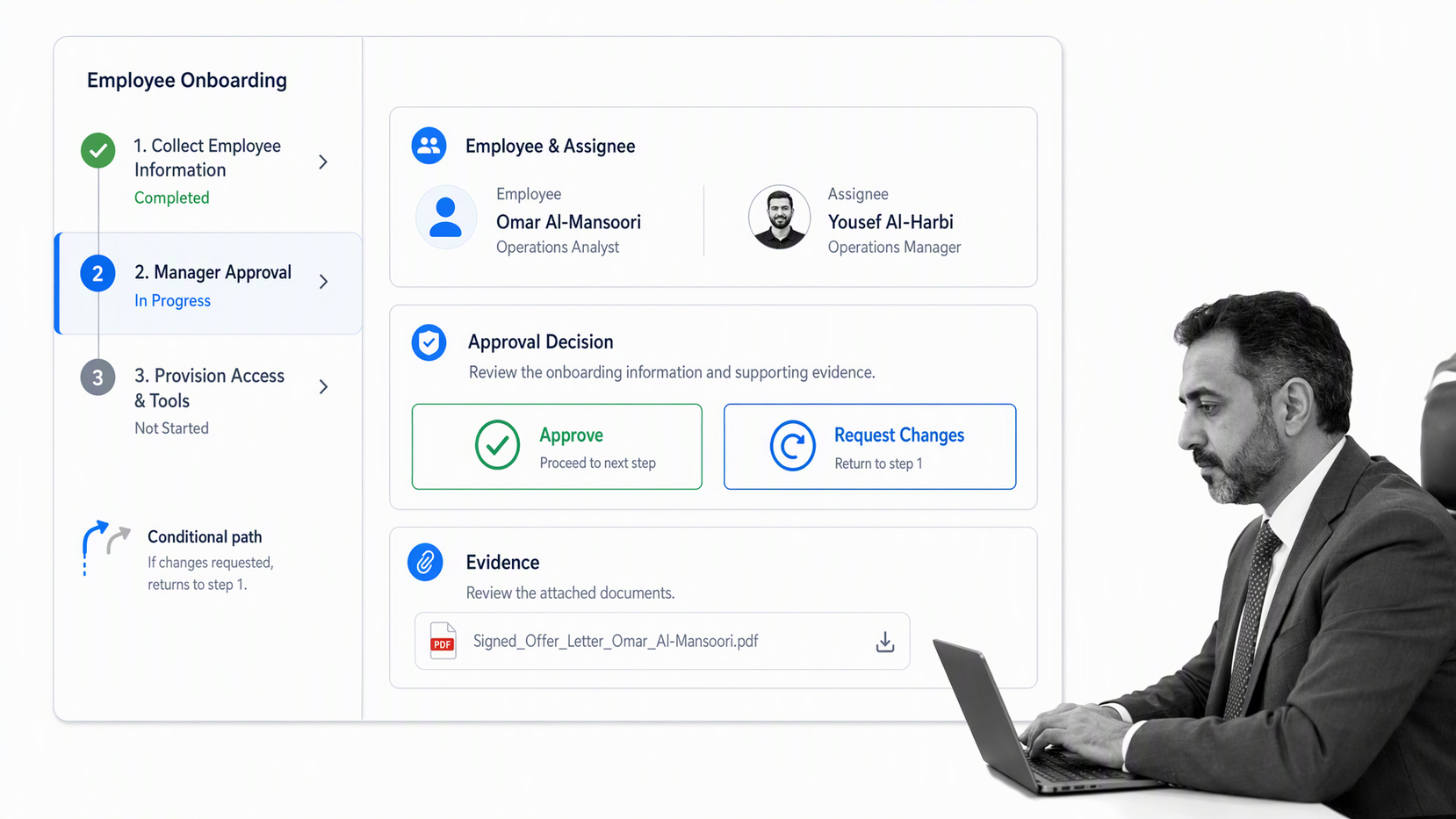
The Process Street workflow product connects documentation to execution. Teams can assign work, route conditional paths, capture evidence, manage approvals, and retain a record of what happened while the process runs. Process Street also has 5,000+ integrations, so onboarding workflows can connect with the systems that hold employee, customer, access, learning, and communication data.
Teams can begin with an employee onboarding workflow or browse the customer management template library, then adapt the workflow to their own owners, controls, instructions, branches, and completion criteria. Templates are starting points. The operating design should reflect the organization’s actual systems, policies, risks, and participant needs.
Process Street is most useful when onboarding crosses functions or carries required controls. It creates one execution record instead of leaving teams to reconstruct progress from email, chat, tickets, documents, and spreadsheets. Leaders can see late or blocked work, while operators have a clear next action and the participant receives a more consistent journey.
How do you keep digital onboarding secure and compliant?
Digital onboarding often handles identity, contact, employment, financial, contractual, or product data. Security therefore belongs in the workflow design, not in a final review after the experience has been built.
Security controls for the journey
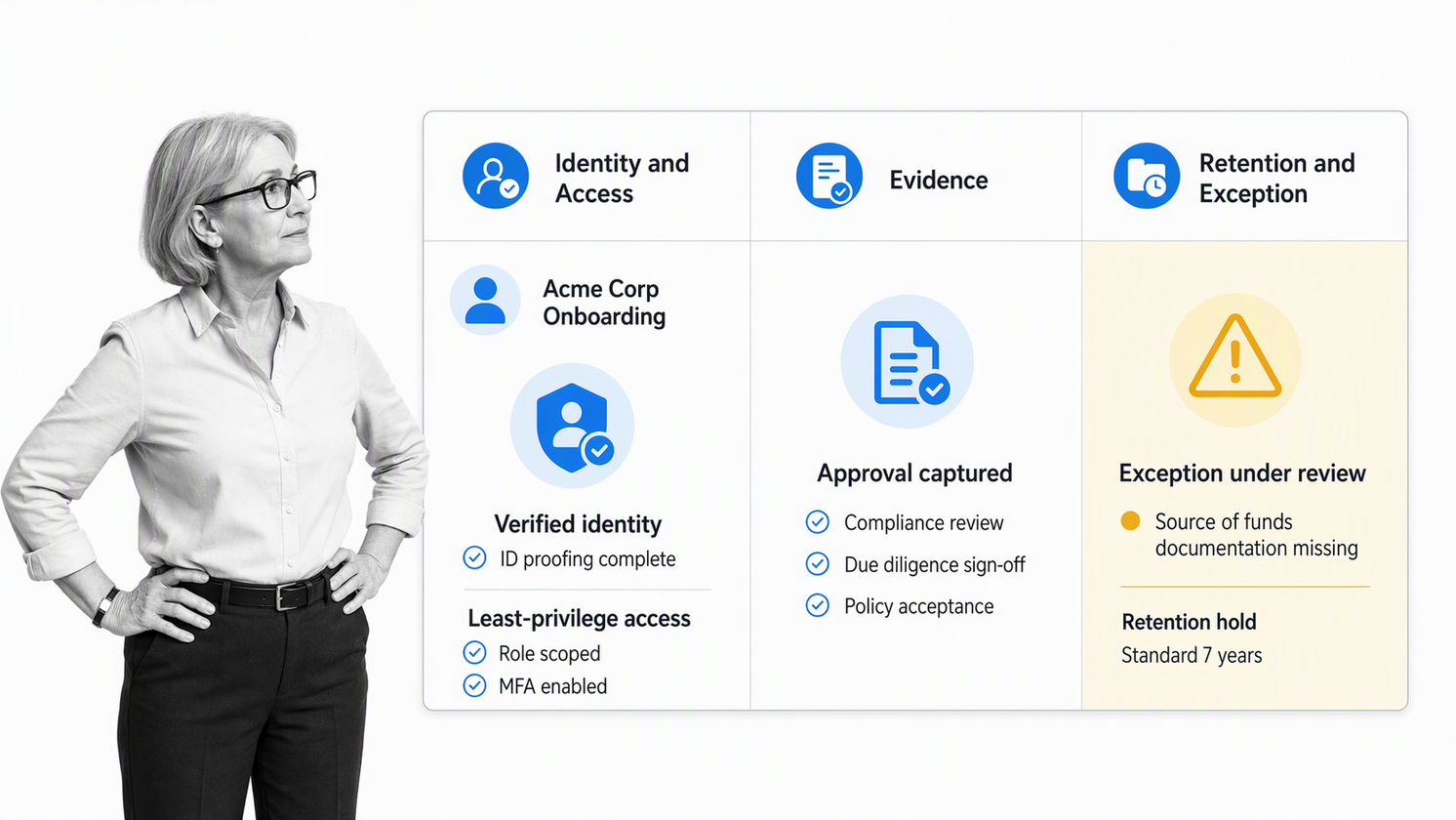
- Collect only the information required for a defined purpose and keep authoritative data in the correct system.
- Match identity proofing and authentication to risk. A low-risk newsletter signup and a regulated financial account should not use the same assurance model.
- Grant least-privilege access by role, record approval where required, and review access when the person’s role or relationship changes.
- Protect data in transit and at rest, control file sharing, and prevent sensitive information from being copied into ungoverned notes or messages.
- Separate duties for high-risk decisions and preserve evidence showing who reviewed, approved, or changed the record.
- Define retention and deletion rules, including what happens when onboarding is abandoned or the relationship ends.
- Create an exception and incident path so teams know how to pause, escalate, contain, and document a problem.
For identity-heavy journeys, the NIST guidance on identity proofing and enrollment provides a primary reference for assurance, evidence, resolution, validation, verification, privacy, and enrollment controls. Apply standards and legal obligations that match the jurisdiction and use case rather than copying a generic security checklist.
In United States employee onboarding, use current government sources for required forms and timing. The USCIS I-9 Central is the authoritative starting point for employment eligibility verification, and the IRS Form W-4 page provides the current form and guidance for federal withholding. Employment, privacy, accessibility, labor, tax, and sector rules vary, so qualified owners should maintain the applicable requirements.
How should digital onboarding be measured?
Measure both the flow and the outcome. A process can complete quickly because people bypass controls, and a highly controlled process can still create unnecessary waiting. Use a balanced scorecard that shows speed, quality, experience, risk, and the participant’s actual success.
| Measure | What it reveals | Example question |
|---|---|---|
| Time to readiness or first value | How long the full transition takes | When can the employee perform or the customer achieve the intended result? |
| Waiting time by stage | Where work sits between owners | Which handoff creates the largest avoidable delay? |
| Completion and control quality | Whether required work was done correctly | Which fields, approvals, evidence, or training are missing or reworked? |
| Participant effort | How hard the journey feels | How many requests, logins, duplicate entries, or support contacts are required? |
| Exception rate | How often the standard path breaks | Which cases need manual intervention and why? |
| Outcome quality | Whether onboarding produced the intended capability | Can the person act independently, safely, and successfully? |
| Experience feedback | How participants interpret the journey | Did they understand the next step, owner, purpose, and available help? |
Segment the measures by role, location, customer type, product, risk, and journey path. A single average can hide a difficult branch. Review trends with the people who operate the process and the people who experience it. The goal is not a prettier dashboard. It is a better workflow.
Why do digital onboarding programs fail?
Most failures are operating-design problems disguised as software problems. Adding automation to an unclear process can make confusion arrive faster and at greater scale.
- No owner for the end-to-end journey. Each team completes its tasks, but nobody owns the transition or the participant’s outcome.
- Completion is defined by paperwork. The process closes before the employee is ready or the customer has reached value.
- Every participant receives the same path. Important differences are ignored, while irrelevant tasks create noise.
- Exceptions live outside the workflow. People invent side channels when verification fails, access is delayed, scope changes, or data is missing.
- Automation removes human contact. Welcome messages multiply while manager, peer, implementation, or customer conversations become optional.
- Data is copied into several systems. Teams lose track of the authoritative record and expose sensitive information unnecessarily.
- The process is never maintained. Product, policy, forms, ownership, and systems change, but the workflow continues to route old work.
- Teams measure task completion only. They cannot tell whether onboarding improved readiness, first value, confidence, quality, or risk.
How can you improve an existing digital onboarding process?
Choose one live journey and observe it from trigger to outcome. Review the workflow record, then speak with participants and owners. Look for waiting, duplicate requests, unclear instructions, missing context, repeated questions, manual copying, uncontrolled exceptions, and tasks that are completed without changing the outcome.
- Name the process owner and restate the intended outcome in observable terms.
- Remove duplicate data collection and assign an authoritative system for each important field.
- Clarify every owner, due date, dependency, approval, and escalation.
- Create conditional paths for the few differences that materially change the work.
- Bring common exceptions into the workflow with safe pause and review points.
- Strengthen human interactions that create clarity, confidence, feedback, or trust.
- Automate stable routing and data movement after the process is understandable.
- Measure the new flow against readiness, first value, waiting time, quality, effort, and exceptions.
- Assign a review cadence and change owner so the process stays aligned with systems, policy, and participant needs.
Improve in small, complete releases. It is better to make one onboarding path work from start to finish than to digitize many fragments that still require manual coordination. Once the operating spine is reliable, reuse its controls and patterns across other journeys.
Digital onboarding FAQ
What is digital onboarding?
Digital onboarding is a structured process that uses connected digital tools and workflows to prepare, verify, guide, and activate a new employee, customer, partner, or user. It combines administrative tasks with human support and a clear definition of readiness or first value.
What is the difference between digital onboarding and virtual onboarding?
Digital onboarding describes how the process is designed and executed with digital systems. Virtual onboarding describes where interaction happens. An employee can complete a digital workflow while working in an office, and a remote employee can still experience a poorly coordinated virtual process.
How long should digital onboarding last?
The right duration depends on the outcome. Administrative setup may take days, while role proficiency, customer implementation, or adoption may take weeks or months. Define completion by demonstrated readiness or first value instead of an arbitrary calendar date.
What should be automated in digital onboarding?
Automate predictable routing, assignments, reminders, data movement, document requests, status updates, and evidence collection. Keep people responsible for judgment, sensitive conversations, coaching, relationship building, and exceptions that require context.
How can digital onboarding be made secure?
Collect only necessary data, verify identity at an appropriate assurance level, restrict access by role, protect data in transit and at rest, separate duties where required, record approvals, define retention rules, and revoke access promptly when the journey changes or ends.
How can Process Street support digital onboarding?
Process Street can turn the onboarding procedure into a repeatable workflow with assigned owners, conditional paths, required fields, approval gates, reminders, evidence, and completion records. Teams can use separate workflows for employee, customer, partner, or user journeys while keeping shared controls consistent.
