


Turn every policy into automated workflows with built-in enforcement and audit-ready proof.



Workflow Product
A workflow product is software that turns a repeatable business process into a guided product experience. Instead of leaving work in documents, spreadsheets, chat threads, or tickets, a workflow product gives users a structured path to follow, with tasks, owners, rules, data capture, approvals, and proof built into the product surface.
The phrase overlaps with product workflow, workflow management, workflow automation, and workflow engines. The useful distinction is this: a workflow product is not just a tool that stores a process. It is the place where the process runs. It helps a team move from a written workflow to an operating system for recurring work.
This guide explains what a workflow product is, what makes it different from a workflow tool or product-management workflow, when a workflow should become a product, how to design one, when to build or buy, and how Process Street can serve as the workflow product for governed recurring work.
In this article, we are going to cover everything you need to know about workflow products, including:
- What is a workflow product?
- What makes a workflow product different
- When a workflow should become a product
- How to design a workflow product
- Build vs buy a workflow product
- Workflow product requirements checklist
- Use Process Street as your workflow product
- FAQs
What is a workflow product?
A workflow product is a software product whose main job is to guide a user, team, customer, or operator through a repeatable sequence of work. It defines what happens first, what happens next, who owns each step, what information must be collected, what decisions change the path, and what proof shows the work was done correctly.
That makes it more concrete than a generic workflow diagram. A workflow diagram can explain a process. A workflow product changes how the work is performed. The Atlassian workflow management guide describes workflow management as organizing and automating task sequences to keep work moving. A workflow product packages that logic into the user experience itself.
Workflow product vs product workflow
A product workflow usually describes how a product team moves from ideas to requirements, roadmaps, development, launch, and improvement. For example, Wrike describes product management workflow as a way to simplify cross-team product development. A workflow product is different. It is the product that runs a repeatable workflow for its users.
Workflow product vs workflow tool
A workflow tool can be one capability inside a larger system: a rule builder, task board, approval queue, or automation builder. A workflow product is the full operating surface around a workflow. It includes the interface, permissions, rules, records, reporting, integrations, and improvement loop needed to make the process run repeatedly.
Workflow product vs workflow engine
A workflow engine executes the logic behind a process. A workflow product includes that logic but also gives people a usable interface, context, permissions, evidence capture, and reporting. Technical standards such as BPMN can define process notation, but a workflow product has to make the process usable for real teams.
The practical test is whether a non-technical operator can use the product without translating a diagram into their own checklist. If the user still needs a separate SOP, spreadsheet, inbox, and status meeting to understand what to do next, the workflow has not really become a product yet.
What makes a workflow product different
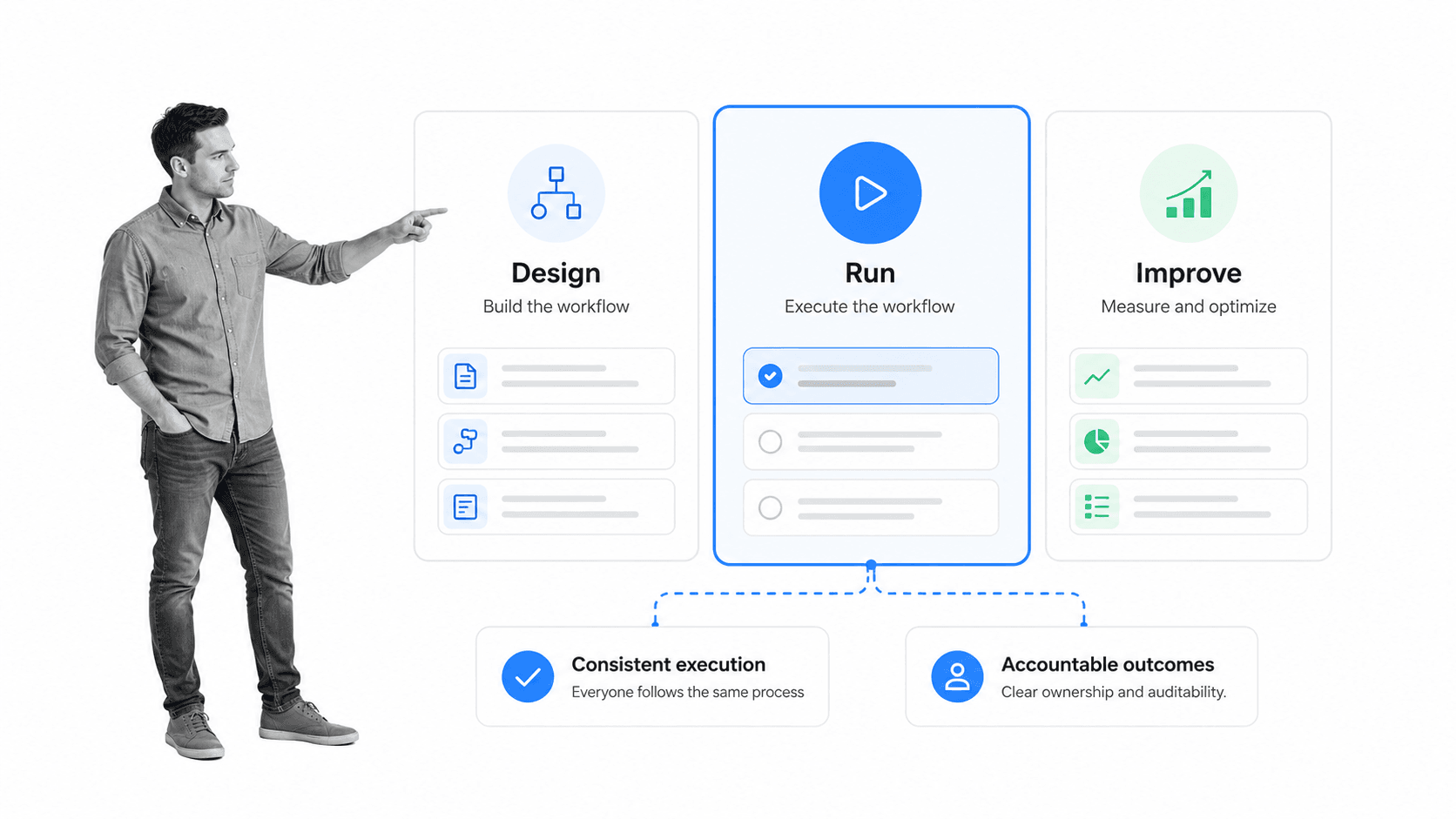
A workflow product is different because the workflow is not an accessory. It is the product. The user experience, data model, notifications, permissions, reporting, and integrations all exist to make a recurring process easier to run and easier to prove. That boundary matters because users experience the process as a dependable operating surface, not as instructions they must translate into action.
- Guided execution: users see the right next step instead of searching for instructions.
- Role-based ownership: every task has a clear owner, reviewer, or dependency.
- Conditional paths: the product changes the route when risk, answers, or inputs change.
- Evidence capture: the product records fields, files, approvals, and completion history as work happens.
- Operational reporting: leaders can see bottlenecks, skipped steps, open work, and exceptions.
- Integration surface: the workflow connects to the systems where the surrounding work already lives.
That combination matters because recurring work rarely fails in the obvious places. It fails in handoffs, approvals, missing information, unclear ownership, tool switching, and proof gaps. A workflow product is designed to control those failure points by default.
A simple checklist app can help one person remember steps. A workflow product has to support teams, roles, rules, integrations, evidence, and continuous improvement. That is the difference between task memory and operational infrastructure.
This is also why workflow products should be judged by execution quality, not screen count. A product with fewer screens can be stronger if it makes ownership, state, blockers, and proof obvious. A product with many dashboards can still fail if the actual next action is unclear.
When a workflow should become a product
Not every workflow needs to become a product. Some processes are too rare, too simple, or too unstable. A workflow should become a product when the work repeats often enough, carries enough risk, or touches enough teams that informal coordination starts costing more than structured execution.
The workflow repeats
Recurring workflows are the best candidates because every improvement compounds. Employee onboarding, vendor review, account handoff, access provisioning, policy approval, customer onboarding, quality review, claims intake, and month-end close all benefit from a reusable product surface.
The workflow crosses teams
A single-person checklist can stay lightweight. Cross-functional workflows need a stronger product surface because work moves across roles, tools, deadlines, and assumptions. Productizing the workflow makes the handoffs visible before they fail.
The workflow needs proof
If the workflow has compliance, quality, security, financial, customer, or legal consequences, it needs more than a reminder. It needs evidence. Records-management guidance from the U.S. National Archives is a useful reminder that proof matters because it preserves what happened, who did it, and why.
The workflow changes based on inputs
When a process branches based on risk, customer type, dollar amount, region, role, or missing information, a static document starts breaking down. A workflow product can route work based on rules and keep the experience clean for the person doing the task.
If the workflow is still fuzzy, start with workflow documentation and planning. If the workflow is known but inconsistent, move toward a productized workflow surface that can enforce the way work should happen.
The strongest signal is repeated coordination drag. If the same people keep asking for status, rechecking whether approvals happened, chasing missing information, or reconstructing what happened for leadership, the workflow is asking to become a product.
How to design a workflow product
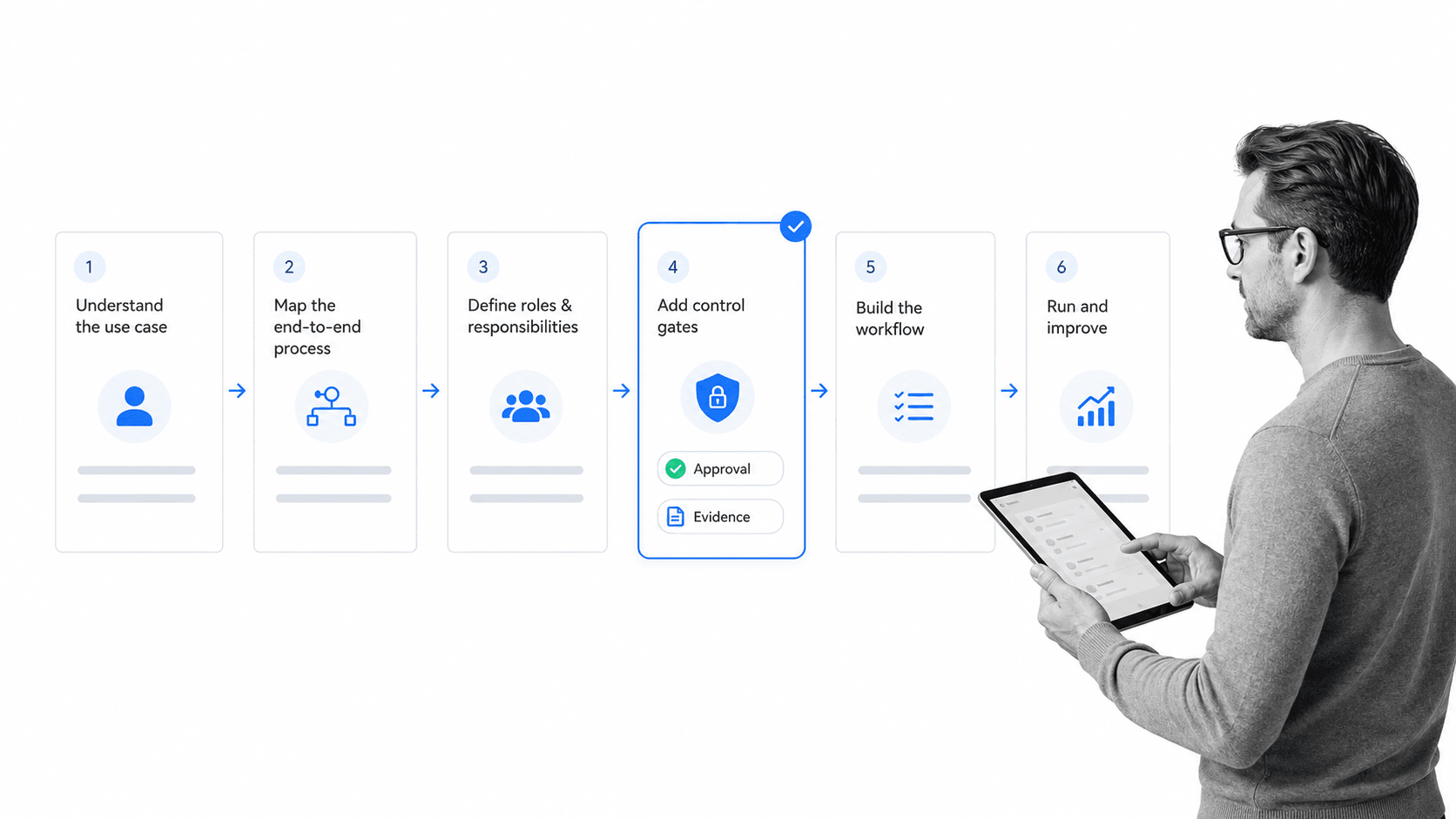
Designing a workflow product starts with the work, not the interface. A polished screen does not matter if the product cannot route ownership, capture evidence, handle exceptions, and improve the workflow after launch.
1. Define the job the workflow product performs
Write the product job in operational language. Avoid vague goals like manage requests or improve collaboration. Use concrete language: route vendor reviews, approve policy changes, onboard new customers, resolve incidents, collect audit evidence, or complete access reviews.
2. Map the trigger, outcome, and key states
Every workflow product needs a clear start and finish. It also needs states that show where work sits: new, assigned, waiting, blocked, approved, rejected, completed, or under review. These states become the product’s navigation system.
3. Design around roles and handoffs
A workflow product should make ownership obvious. The user should know what they own, what they are waiting on, and what happens if they do nothing. Handoffs need more attention than screens because handoffs are where accountability usually leaks.
4. Add rules before automation
Automation works only when the rules are clear. Define conditions, approvals, exceptions, required fields, and escalation paths before automating anything. If a human decision is required, keep it human. If a task is repetitive and rule-based, automate it.
5. Capture evidence in the flow
Evidence should be collected while the work happens, not reconstructed later. Add required fields, file uploads, approvals, comments, timestamps, and completion records where the workflow needs proof.
6. Connect the workflow to surrounding systems
Workflow products rarely live alone. They touch CRM, HRIS, ticketing, finance, document storage, chat, identity, and reporting systems. A good workflow automation software layer reduces copy-paste work and makes the workflow product part of the operating stack.
7. Build the improvement loop
The first version will not be perfect. Design reporting around bottlenecks, missing evidence, failed approvals, late tasks, and exception volume. Those signals tell you where the workflow product should improve next.
Build vs buy a workflow product
The build-versus-buy decision depends on how unique the workflow is and how much product infrastructure you want to maintain. Building can make sense when the workflow is the core of your customer-facing product. Buying usually makes sense when the workflow supports internal operations, compliance, HR, finance, quality, customer success, security, or other recurring business processes.
Build when the workflow is your differentiated product
If the workflow itself is what customers pay for, custom product development may be justified. Examples include specialized marketplace operations, domain-specific underwriting, custom manufacturing coordination, healthcare intake, or a vertical SaaS product where the workflow is the commercial product.
Buy when the workflow supports operations
If the workflow is important but not your core software business, buying is usually faster and safer. You still need guided execution, ownership, approvals, evidence, and reporting, but you do not need to maintain a workflow engine, permissions model, notification system, builder, and audit trail from scratch.
Avoid the halfway trap
Many teams build a workflow product accidentally. They start with a form, add a spreadsheet, bolt on notifications, add manual approvals, create a dashboard, and eventually maintain a fragile internal system nobody intended to own. If the workflow is operational, a workflow platform is usually the cleaner path.
That is especially true for compliance-heavy workflows. A compliance management software surface has to preserve evidence, approvals, and audit history. Those are not side features. They are the reason the workflow product exists.
Workflow product requirements checklist
Use this checklist when evaluating or designing a workflow product. The goal is not to collect features for their own sake. The goal is to make sure the product can run the workflow without pushing critical work back into email, chat, spreadsheets, or memory.
- Workflow builder: can non-technical owners create and update the workflow?
- Role assignments: can tasks be assigned to roles, groups, and individuals?
- Conditional logic: can the product route different paths based on inputs or risk?
- Approvals: can reviewers approve, reject, comment, and block completion?
- Evidence fields: can the workflow require files, fields, comments, and structured proof?
- Automation: can the product trigger actions in surrounding systems?
- Audit history: can you see who did what, when, and with what result?
- Reporting: can you find bottlenecks, overdue work, skipped steps, and exception volume?
- Templates: can teams reuse proven workflow patterns?
- Governance: can process changes be reviewed and controlled before rollout?
Templates help when teams are moving from planning to execution. A structured standard operating procedure template can define the expected work, while workflow templates can turn common patterns into live runs.
The strongest workflow products keep the user experience focused. They do not show every possible control at once. They show the right task, owner, rule, evidence requirement, and next step at the moment the user needs it.
A final requirement is change control. Workflow products need a safe way to update the process without breaking active work. That usually means versioning, review before rollout, clear ownership for workflow changes, and a way to compare how the workflow performed before and after the update.
Use Process Street as your workflow product
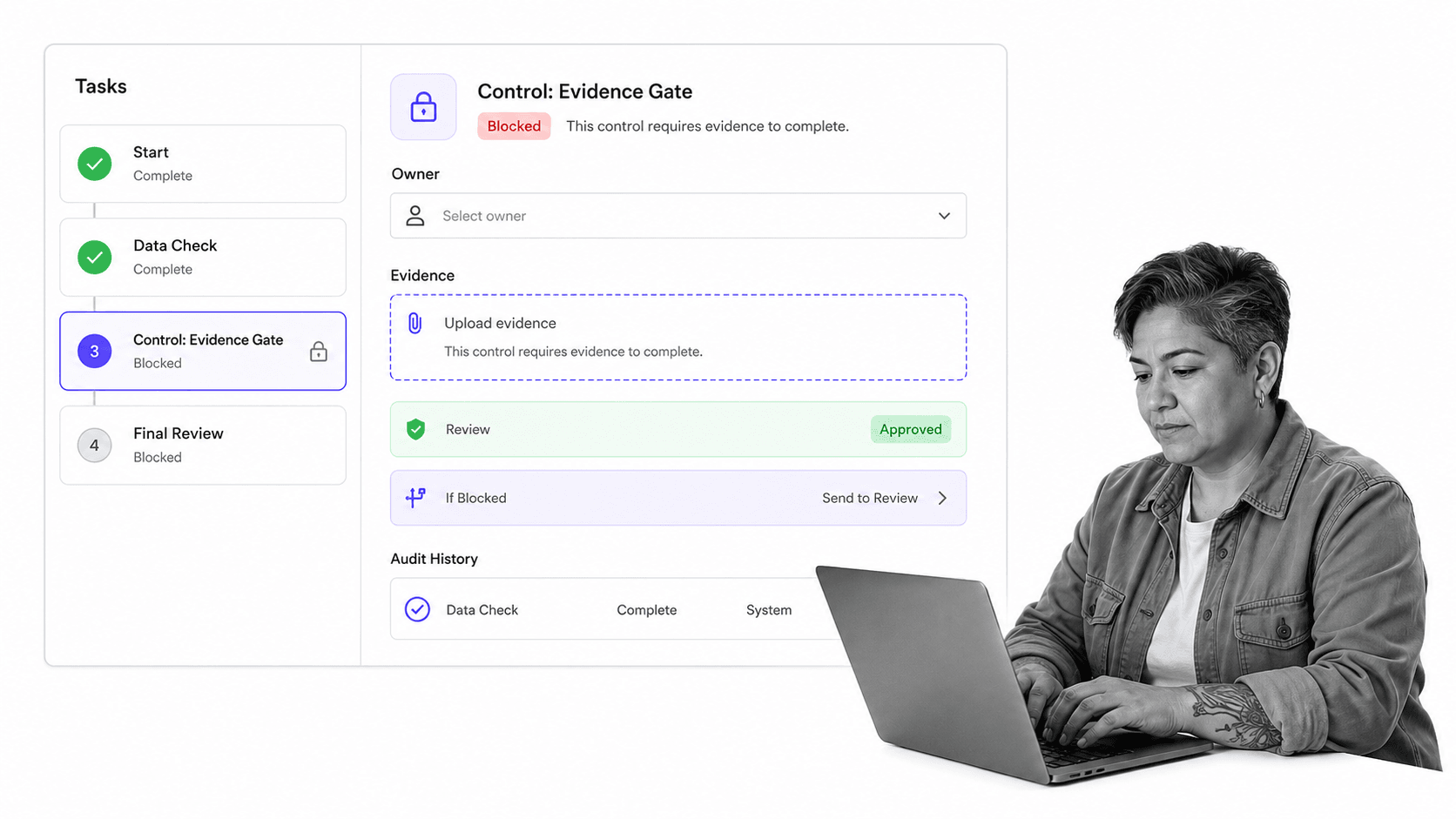
Process Street is a Compliance Operations Platform that turns recurring work into guided, auditable workflows. Teams use it to document procedures, run assigned tasks, route approvals, collect evidence, trigger automations, and retain audit history as work happens.
That makes it a strong workflow product for operational and compliance-heavy work. The workflow is not trapped in a document. It becomes a live run with owners, due dates, required fields, approval gates, conditional paths, and a record of what happened.
If you are productizing a workflow for internal teams, Process Street can be the product surface. Start with the process in process documentation software, turn the steps into an executable run, add approvals where review is required, use conditional logic where paths change, and capture proof directly in the workflow.
This matters for teams that need control, not just visibility. A workflow product should prevent skipped steps, not merely report them afterward. It should make the correct process the easiest path to follow.
Process Street has direct, universal integrations to 5,000+ systems. Need a new one? An AI agent builds it on the fly. That lets workflow products connect to the systems around them without making people copy data manually between tools.
From there, workflow owners can expand into related operating patterns: workflow management systems for team coordination, workflow optimization for continuous improvement, and workflow management software for broader execution control.
A workflow product should make recurring work easier to run and easier to trust. Process Street gives teams that product surface without forcing them to build and maintain workflow infrastructure from scratch.
The result is a cleaner operating model: one place to define the workflow, one place to run it, one place to review exceptions, and one place to prove what happened. That is what separates a workflow product from a document about a workflow.
FAQs
What is a workflow product?
A workflow product is software that turns a repeatable process into a guided product experience. It routes tasks, assigns owners, applies rules, captures data, manages approvals, and records proof while the work happens.
What makes a workflow product different from a workflow tool?
A workflow tool may be one feature, such as a task board, automation rule, or approval queue. A workflow product is the full operating surface around the workflow, including interface, roles, rules, records, reporting, integrations, and improvement loops.
How do you design a workflow product?
Start with the job the workflow must perform, then map the trigger, outcome, states, roles, handoffs, rules, evidence, integrations, and reporting. Design the workflow before designing screens, because the product exists to make the work run correctly.
When should you build a workflow product instead of buying one?
Build when the workflow is the differentiated customer-facing product people pay for. Buy when the workflow supports internal operations, compliance, HR, finance, quality, security, customer success, or other recurring business processes.
What should a workflow product include?
A workflow product should include a workflow builder, role assignments, conditional paths, approvals, required evidence fields, automations, audit history, reporting, templates, and governance controls. The exact mix depends on how much risk and repetition the workflow carries.
Can Process Street be used as a workflow product?
Yes. Process Street can be used as the workflow product for recurring operational and compliance work. It lets teams document procedures, run assigned workflows, route approvals, capture evidence, trigger automations, and keep audit history in one product surface.
