


Turn every policy into automated workflows with built-in enforcement and audit-ready proof.



AI SOP Generator

An AI SOP generator helps you turn rough process knowledge into a first draft of a standard operating procedure. The useful output is not just a polished document. It is a clear operating instruction your team can review, approve, assign, run, and improve.
That distinction matters. A generated SOP can describe how work should happen, but your business still needs ownership, evidence, approvals, version control, and a way to prove the work was actually followed. The best use of an AI SOP generator is to move faster from blank page to controlled execution.
This guide explains what an AI SOP generator does, how to structure the input, what the generated SOP should include, where AI output needs human review, and how to turn a draft procedure into a governed workflow in Process Street.
In this article, we are going to cover:
- What is an AI SOP generator?
- How an AI SOP generator works
- What to include in an AI-generated SOP
- AI SOP generator vs template vs workflow builder
- How to use an AI SOP generator
- Turn generated SOPs into controlled workflows
- AI SOP generator risks and controls
- AI SOP generator FAQs
What is an AI SOP generator?
An AI SOP generator is a tool that uses artificial intelligence to draft a standard operating procedure from prompts, notes, transcripts, process documentation, screenshots, or other source material. Instead of starting with an empty page, you describe the work and the generator proposes a structured procedure with steps, roles, inputs, outputs, and quality checks.
The output should be treated as a draft, not the final operating system. SOPs are how teams make recurring work consistent. The EPA guidance on standard operating procedures describes SOPs as documents for recurring work processes inside a quality system. That framing is useful because it reminds you that the value of an SOP is repeatability, not just documentation.
The job of the generator
A good AI SOP generator accelerates the writing and structuring work. It can turn messy inputs into a clear sequence, find missing decision points, normalize language, and suggest sections that teams often forget. It can also produce variants for different audiences, such as a front-line checklist, manager review procedure, or compliance control procedure.
The generator should not decide policy on its own. It should not invent approval authority, legal requirements, system permissions, safety steps, or customer commitments. Those decisions belong to the process owner, compliance lead, quality lead, or manager accountable for the work.
Where AI helps most
- Turning interview notes into a first SOP draft.
- Converting a screen recording into step-by-step instructions.
- Rewriting inconsistent procedure language into one clear format.
- Finding missing roles, evidence fields, and review steps.
- Creating a checklist version of a long procedure.
- Preparing an SOP for approval inside a controlled workflow.
How an AI SOP generator works
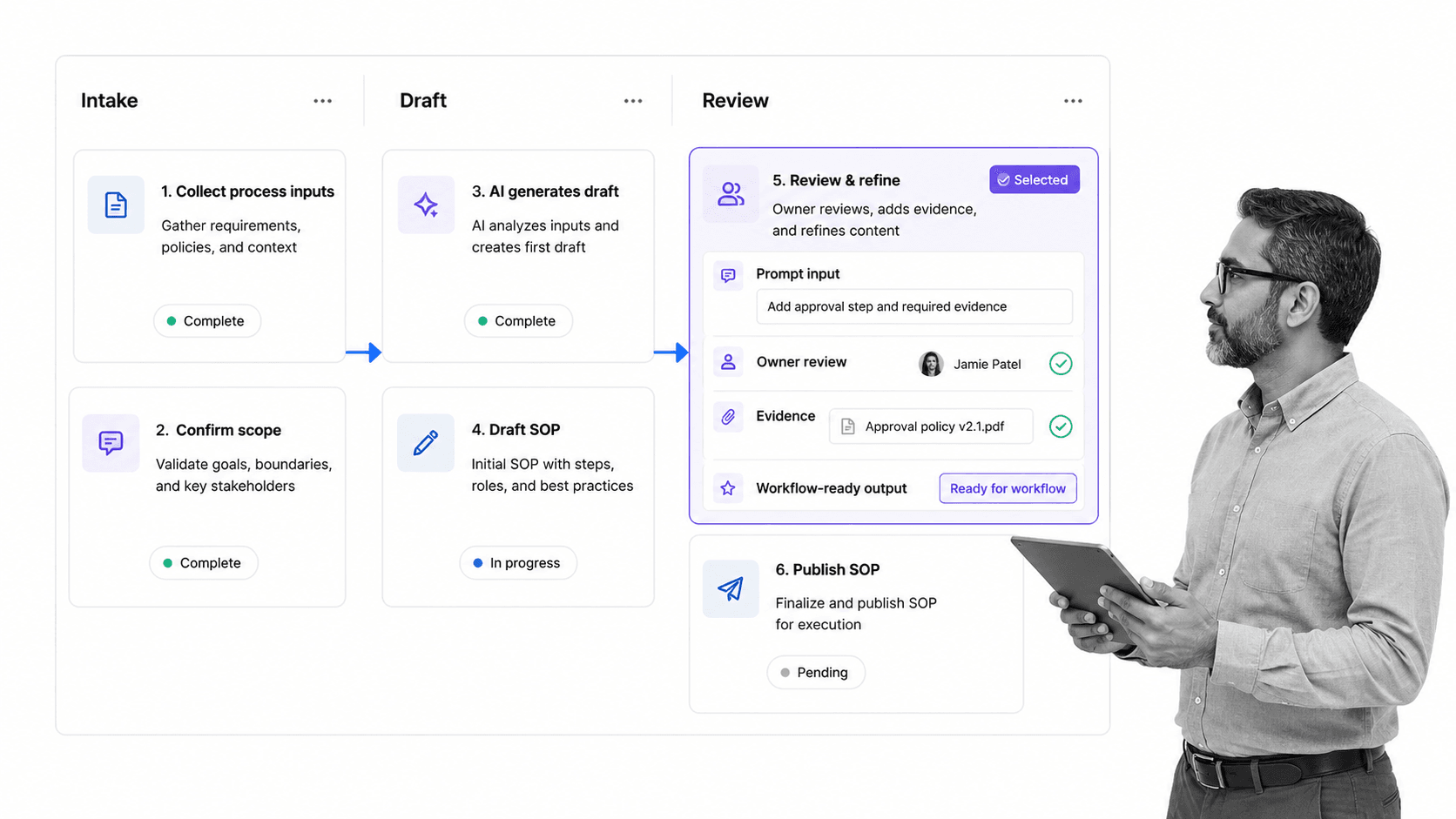
Most AI SOP generator workflows follow the same pattern: collect context, draft the procedure, review the procedure, convert it into execution format, and improve it after real use. The quality of the output depends heavily on the input. A vague prompt produces a vague SOP. A prompt with role, trigger, systems, exceptions, evidence, and approval expectations produces a draft your team can actually use.
1. Collect the source material
Start with the real process, not the idealized version. Useful inputs include call transcripts, screen recordings, current SOPs, policies, forms, ticket examples, Slack explanations, audit findings, and examples of completed work. If your team already has process documentation, use it as source material, but ask the generator to preserve the operational steps rather than rewrite everything into generic prose.
2. Define the operating context
Tell the generator who runs the SOP, what event starts it, which systems are used, what output is required, what can go wrong, and who approves completion. This is where most generated SOPs become useful or useless. Without operating context, the draft usually becomes a neat article about the process instead of a usable procedure.
3. Generate the first draft
The draft should include the purpose, scope, trigger, owner, prerequisites, step sequence, decision points, expected evidence, escalation path, review cadence, and change history. If the process touches a regulated record, customer commitment, financial control, security control, or safety requirement, add explicit review before the SOP is released.
4. Convert prose into execution
An SOP in a document is useful for understanding. An SOP in a workflow is useful for execution. After the draft is reviewed, convert the steps into tasks, assignments, required fields, approvals, due dates, conditional paths, and audit history. That is how you move from “we wrote the process” to “the process runs the same way every time.”
What to include in an AI-generated SOP
An AI-generated SOP should be structured enough that a trained person can run the process without guessing. The exact format changes by industry, but the core sections are consistent. If you need a basic layout before using AI, a simple SOP format can help standardize what the generator should produce. Teams building a full procedure library can also use SOP templates to keep formats consistent across departments.
Purpose and scope
The purpose explains why the procedure exists. The scope explains when it applies and when it does not. This prevents SOP sprawl. Without scope, a procedure gets reused in the wrong situation, or teams create duplicate SOPs that overlap.
Trigger and inputs
Every recurring process has a trigger: a customer request, new hire, incident, invoice, audit sample, document change, or scheduled review. Inputs are the records, forms, files, or system data needed to start. The generator should make these explicit so work does not start with missing context.
Roles and responsibilities
The SOP should say who performs each action, who reviews, who approves, and who owns the procedure. Role clarity is especially important when the SOP crosses teams. You can use the same ownership logic in an employee onboarding process, finance close, vendor review, policy update, or customer handoff.
Steps, decisions, and exceptions
Steps should be specific enough to run. Decisions should state the criteria used to choose a path. Exceptions should explain what to do when the normal path breaks. If the generated SOP only lists clean-path steps, ask the generator to add exception paths and escalation rules.
Evidence and records
For compliance-heavy work, evidence is not optional. The SOP should define what proof is captured: uploaded documents, approvals, screenshots, form fields, timestamps, signatures, or system records. FDA guidance on electronic records and electronic signatures is a useful reminder that electronic process records need trust, reliability, and clear controls when they replace paper records.
Review and change control
Every SOP needs a review cadence and a change process. That is especially true when the first draft came from AI. Keep a record of who reviewed it, what source material was used, what changed, and when the updated version became active. If the SOP governs policy work, pair it with a policy and procedure template so the document and the workflow stay aligned. For larger teams, an enterprise document management layer helps control ownership and access around approved procedures.
AI SOP generator vs template vs workflow builder
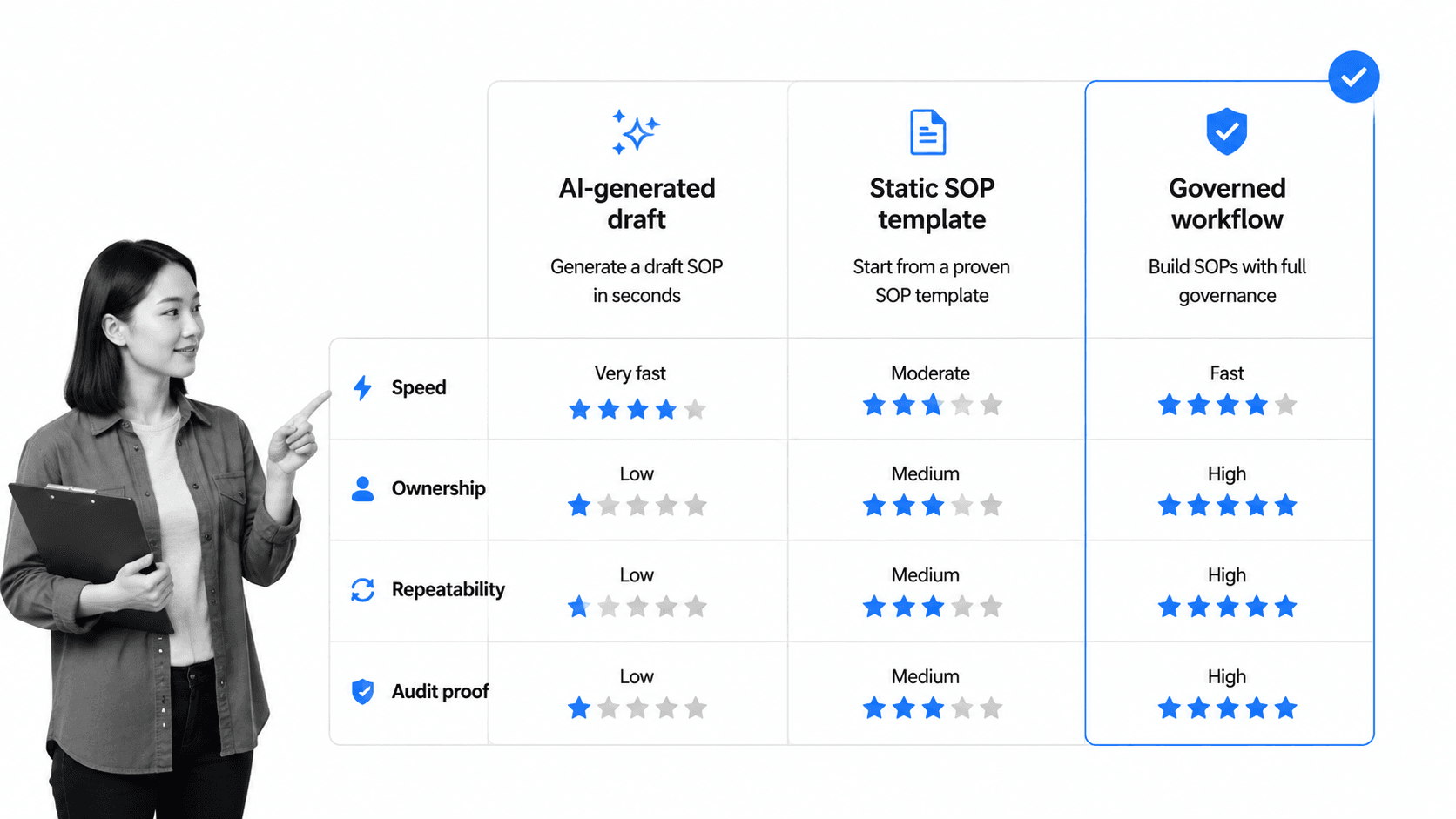
An AI SOP generator, a template, and a workflow builder solve different parts of the same problem. The generator helps you draft. The template gives you structure. The workflow builder makes the procedure executable and auditable.
Use an AI SOP generator when speed is the bottleneck
Use a generator when you know the process but need help turning it into a clear first draft. This is ideal for undocumented tribal knowledge, process interviews, meeting transcripts, or rough notes from a manager. It is also useful when you need to normalize many procedures into the same voice and structure.
Use a template when structure is the bottleneck
Use a template when the process is simple and you mainly need a consistent format. A standard operating procedure template gives the generator a predictable shape and helps reviewers scan for missing sections.
Use a workflow builder when execution is the bottleneck
Use a workflow builder when the SOP must be followed, assigned, measured, and proven. This is where a generated draft becomes an operating asset. A workflow automation software layer lets you assign tasks, enforce required fields, route approvals, trigger integrations, and capture audit history.
The strongest pattern combines all three
The practical pattern is simple: use AI to draft, use templates to standardize, and use workflow software to execute. That gives you speed without losing control. It also avoids the common failure mode where a team celebrates a new SOP document, then keeps running the work through memory, email, and spreadsheets.
How to use an AI SOP generator
The best results come from treating the AI SOP generator like a drafting assistant inside a controlled process. Give it the right context, constrain the format, review the output, test the SOP on a real case, and then convert the final procedure into a reusable workflow.
Step 1: Name the process and outcome
Start with the process name, business outcome, and target user. For example: “Create an SOP for monthly vendor risk review used by the operations team to confirm evidence, risk tier, owner, and approval before renewal.” This gives the generator a concrete job.
Step 2: Provide source material
Paste the current notes, transcript, checklist, policy excerpt, or rough process map. If you already have a process documentation template, ask the generator to preserve its structure. If the work happens in software, include the system names and the fields users must update.
Step 3: Specify the SOP structure
Ask for sections such as purpose, scope, trigger, roles, prerequisites, procedure steps, decision points, exceptions, evidence, approvals, metrics, and revision history. Also ask the generator to flag assumptions separately from the main draft. Assumptions are where hallucinated process details often hide.
Step 4: Review with the people who do the work
Do not send an AI-generated SOP straight into production. Review it with the operator, manager, compliance owner, and any downstream team that depends on the output. Ask them what would break, what the draft missed, and where the language is too vague to execute.
Step 5: Test the SOP on a real case
Run the SOP against one real example before release. The test should show whether the trigger is clear, inputs are available, steps happen in the right order, evidence can be captured, exceptions are covered, and approvals land with the right person. NIST guidance on incident response procedures notes that SOPs should be detailed enough to support consistent action, a useful standard for any high-stakes operational process.
Step 6: Publish the SOP into a workflow
Once the draft survives review and testing, publish it into the system where work happens. That can mean a workflow run, a recurring checklist, an approval process, or a linked document and task sequence. If you are building SOPs at scale, connect this to a workflow documentation practice so each procedure stays current after release.
Turn generated SOPs into controlled workflows
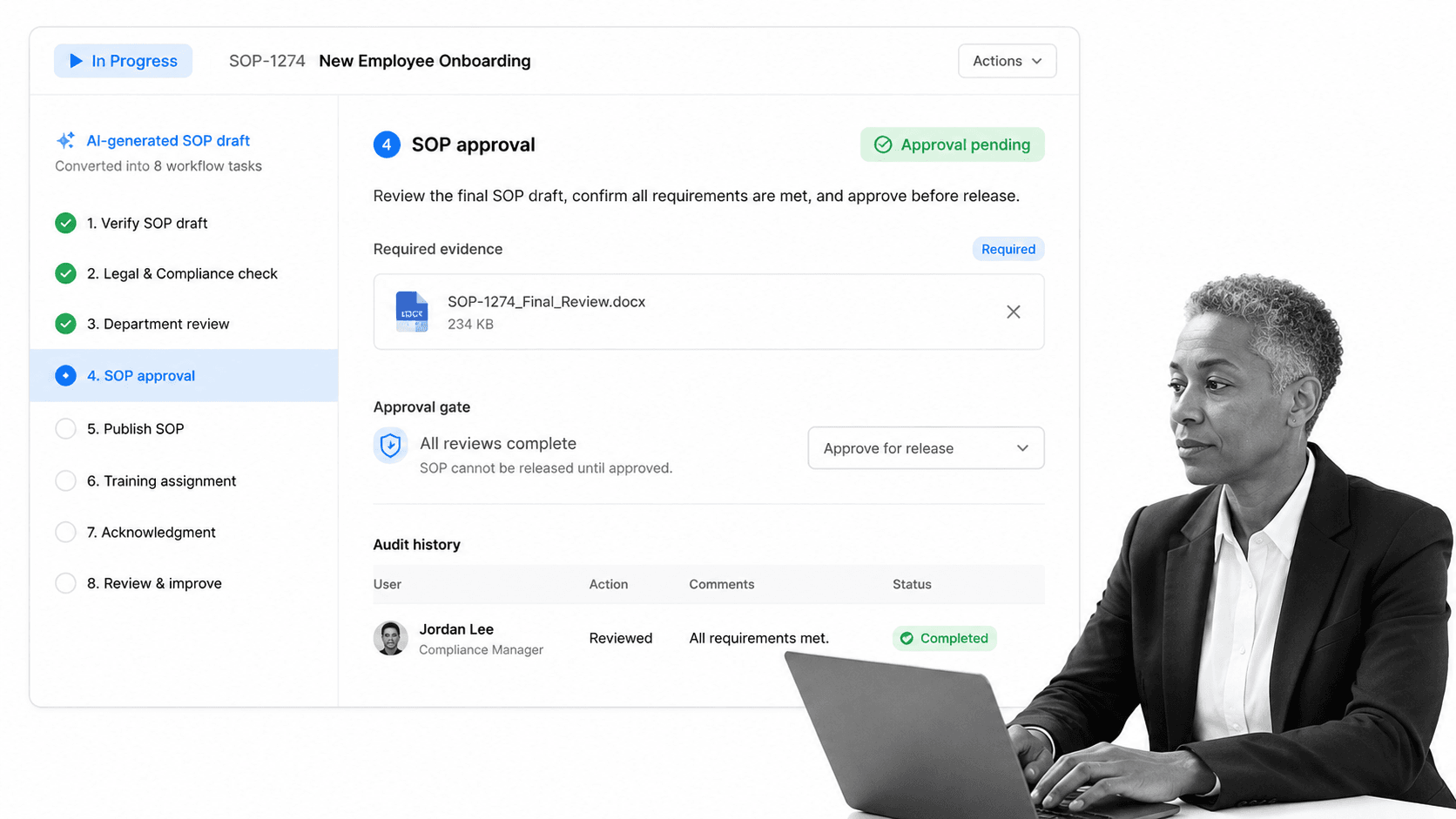
A generated SOP becomes valuable when it changes how work happens. Process Street turns SOPs into assigned workflows with approvals, required fields, conditional logic, evidence capture, and audit history. That means the procedure is not just available. It is enforced at the point of work.
Create a workflow from the SOP
Break the procedure into executable tasks. Each task should have an owner, expected input, required output, and completion criteria. Where the SOP says “review,” create an approval task. Where it says “attach proof,” add a required file field. Where it says “if this happens,” add a conditional path.
Add controls that prevent skipped steps
The point of workflow execution is not just convenience. It is control. Required fields prevent empty handoffs. Approvals prevent unauthorized release. Conditional logic prevents the wrong path from being followed. Recurring runs make sure periodic work actually starts. These controls turn a written SOP into a reliable operating system. If you need this pattern across teams, workflow management software gives each procedure a repeatable execution path.
Connect SOPs to systems of record
Many SOPs depend on records in CRM, HRIS, ticketing, finance, document management, or compliance systems. Process Street supports direct integrations and agentic connection patterns, so workflows can move data and trigger work across the stack without forcing every process owner to become a developer. When proof lives in files, build the workflow so people can attach files to standard operating procedures at the exact step where the evidence is reviewed.
Keep the SOP alive after launch
A workflow gives you feedback that a document cannot. You can see where tasks stall, where people request clarification, where evidence is missing, and where exceptions repeat. Use that execution data to improve the SOP instead of waiting for the next audit or customer issue.
AI SOP generator risks and controls
The main risk of an AI SOP generator is false confidence. The output can look complete even when it invents details, skips controls, or hides assumptions in fluent language. Treat the generator as a drafting layer and put controls around the parts of the process that carry risk.
Risk: invented steps
AI can fill gaps with plausible but wrong steps. Control it by requiring source-backed drafting. Ask the generator to separate “from source material” from “recommended additions.” Review every recommended addition with the process owner before release.
Risk: missing exceptions
Generated SOPs often describe the happy path. Control this by asking for exception scenarios, failure modes, escalation paths, and rollback steps. For complex procedures, include examples of completed work and examples of failed or unusual cases.
Risk: unclear accountability
A well-written SOP still fails if nobody owns the work. Control this by mapping every step to a role and every approval to a named authority or role group. In workflow software, assign tasks directly and capture who completed each step.
Risk: stale procedures
AI can create SOPs quickly, which means teams can create too many procedures without governance. Control this with review dates, owners, version history, and retirement rules. ISO guidance on documented information emphasizes that organizations need the right amount of documentation to operate and control processes, not documentation for its own sake.
Risk: no proof of execution
A document cannot prove the work happened. Control this with workflow runs, required evidence, approvals, and audit trails. If the SOP matters enough to write, it often matters enough to prove.
AI SOP generator FAQs
What is an AI SOP generator?
An AI SOP generator is software that drafts standard operating procedures from prompts, notes, transcripts, documents, or process descriptions. It helps you move faster from raw process knowledge to a structured SOP draft, but the output still needs human review, approval, and execution controls.
Can an AI SOP generator replace a process owner?
No. An AI SOP generator can draft and structure the procedure, but a process owner must verify the steps, approve policy decisions, confirm exceptions, and own future updates. AI is strongest as a drafting assistant inside a governed workflow.
What should I include in an AI SOP generator prompt?
Include the process name, trigger, desired outcome, roles, systems used, source material, decision points, exceptions, evidence requirements, and approval rules. The more operational context you provide, the less generic the SOP draft will be.
How do I review an AI-generated SOP?
Review it against real work. Confirm each step with the people who perform the process, test it on an actual example, separate source-backed details from assumptions, and add controls for evidence, approvals, exceptions, and change history.
When should I turn an AI-generated SOP into a workflow?
Turn the SOP into a workflow when the process is recurring, cross-functional, compliance-sensitive, customer-facing, or easy to skip. A workflow adds assignments, required fields, approvals, conditional logic, and audit history so the SOP is followed, not just stored.
How does Process Street help with AI-generated SOPs?
Process Street lets teams convert SOP drafts into governed workflows with assigned tasks, required evidence, approvals, automations, conditional paths, and audit history. That turns a generated document into controlled execution and proof.
