


Turn every policy into automated workflows with built-in enforcement and audit-ready proof.



10 Best Asana Alternatives & Competitors in 2026

The best Asana alternatives are Process Street for enforceable recurring SOP and compliance workflows, monday.com for visual work management across departments, ClickUp for teams that want many project views in one workspace, and Trello for simple Kanban tracking. Six more are compared below: Wrike, Smartsheet, Airtable, Notion, Jira and Teamwork.com.
Asana is worth replacing when project tracking alone is not enough, when it feels too broad or too task-centric for the use case, or when it is not strict enough for recurring procedures that need required fields, approvals, and an audit trail.
Asana alternatives at a glance
The table below gives the short version before the deep dives. The ranking is not a universal claim that one product beats every other product in every context. It is an ICP-based ranking for teams comparing Asana against tools that can run recurring business workflows, connect apps, and support operational ownership.
We deliberately do not print vendor prices on this page, because project management pricing and packaging change often and a stale number is worse than none. Every tool links to its own live pricing page for current figures.
| Tool | Best for | Standout feature | Free plan | Pricing |
|---|---|---|---|---|
| Process Street | enforceable recurring SOP and compliance workflows | workflow runs with required fields, approvals, conditional logic, and audit trails | 14-day Pro trial | Paid tiers, see live pricing |
| monday.com | visual work management across departments | boards with multiple views, automations, integrations, and dashboards | Yes, up to 2 seats | Paid tiers, see live pricing |
| ClickUp | teams that want many project views in one workspace | tasks, docs, whiteboards, goals, time tracking, and dashboards | Yes, Free Forever | Paid tiers, see live pricing |
| Trello | simple Kanban task tracking | cards, boards, checklists, Power-Ups, and basic workspace automation | Yes, up to 10 collaborators per Workspace | Paid tiers, see live pricing |
| Wrike | cross-functional project and resource management | Gantt charts, dashboards, workload views, request forms, and approvals | Yes | Paid tiers, see live pricing |
| Smartsheet | spreadsheet-style project and program management | sheets, reports, dashboards, forms, Gantt, board, and calendar views | Free trial and free plan available | Paid tiers, see live pricing |
| Airtable | database-backed workflows and lightweight apps | bases, tables, forms, automations, interfaces, and app-style workflows | Yes | Paid tiers, see live pricing |
| Notion | docs, wiki, and task-light team workspaces | pages, databases, docs, AI, and project views in a connected workspace | Yes | Paid tiers, see live pricing |
| Jira | software teams and technical delivery | backlog, board, list, timeline, calendar, reports, dashboards, and automation | Yes, free for 10 users | Paid tiers, see live pricing |
| Teamwork.com | client-service teams managing billable work | client projects, task lists, time tracking, budgets, milestones, and reporting | Free trial available | Paid tiers, see live pricing |
Asana is a capable work management platform. Its own product page positions it around goals, strategic plans, projects, workflows, automations, and cross-team coordination. If your team already runs cleanly in that model, staying with Asana can be the right call.
This list is for teams that have a different operating reality. Some need stricter recurring procedures. Some need simpler boards. Some need resource planning, client project margins, software issue tracking, spreadsheet-style controls, databases, or docs. Others need the workflow itself to enforce steps, collect evidence, route approvals, and show exactly what happened.
The evaluation criteria are practical: core capability fit, ease of ownership, pricing model clarity, reporting depth, governance, and how well each tool supports recurring operational work. Process Street ranks first for teams whose main need is enforceable, trackable, recurring process execution. For software delivery, spreadsheet-style work, knowledge management, or billable client projects, the relevant specialist may be the better fit.
In this article, we are going to cover:
- Asana alternatives at a glance
- How to choose an Asana alternative
- Best Asana alternatives and competitors
- Which Asana alternative fits your use case
- FAQs
How to choose an Asana alternative
Start by deciding whether you are replacing Asana as a project management tool, a team workspace, a client delivery system, or a workflow management system. Those are different jobs. A product that is excellent for one can be the wrong surface for another.
If the process has required steps, owners, approvals, due dates, files, and proof, prioritize a workflow execution layer such as project management software. If the work is mostly project planning, prioritize timelines, dependencies, portfolio views, and resource planning. If the work is software delivery, prioritize backlog and issue management. If the work sits between both patterns, compare the broader process platforms category before committing.
Use these decision questions before comparing vendor demos:
- Does the workflow need human accountability, or is it mostly machine-to-machine data movement?
- Does a compliance, finance, HR, IT, or customer team need proof that each step happened?
- Will business users maintain the workflow, or will developers and integration architects own it?
- Do you need strict recurring workflow runs, or flexible one-off project plans?
- Which surface will people actually keep updated: checklist, board, timeline, spreadsheet, database, issue tracker, or client project workspace?
A good shortlist can include more than one category. A company might use automated workflow tools to track initiatives and a process platform to control recurring work. That division is healthy when the integration layer supports the process instead of hiding it.
Best Asana alternatives and competitors
1. Process Street
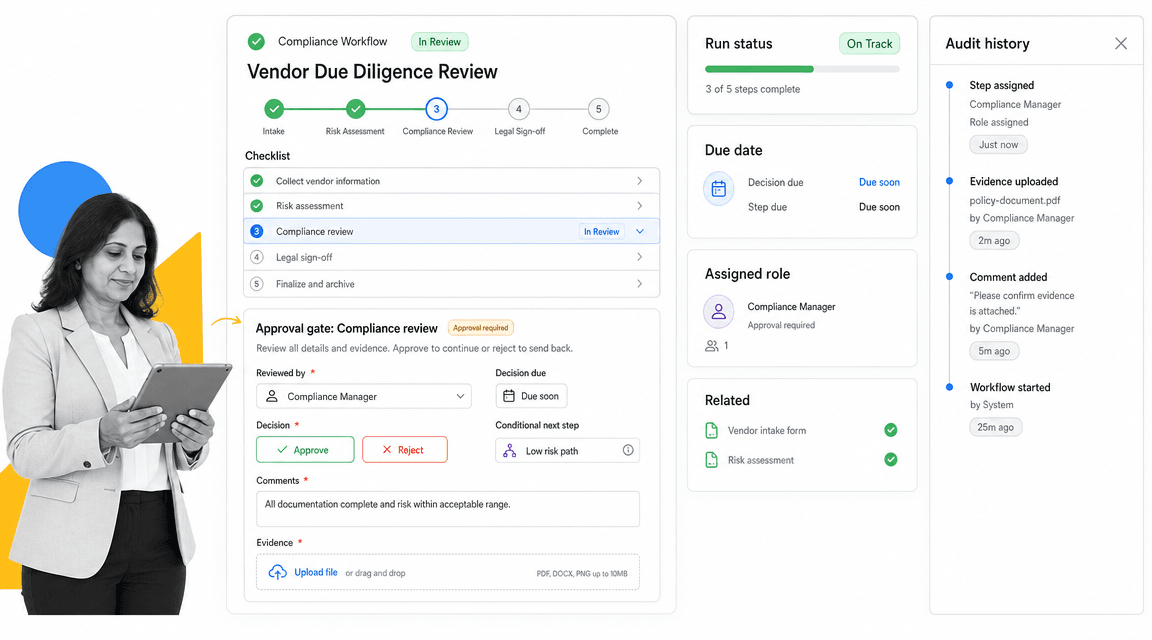
Best for: enforceable recurring SOP and compliance workflows.
Process Street is the best Asana alternative when the work is a recurring SOP, checklist, approval, or compliance-adjacent process that must be followed the same way every time. It is not trying to be a BPMN modeling suite or a desktop RPA control room. It is built for operators who need work to run correctly and leave a clear record.
That distinction matters. A Asana project can show task status across a team. Process Street can make the person accountable for the next step, require the right form field, pause for an approval, branch based on conditional logic, and preserve the run history as operational proof. For onboarding, vendor reviews, quality checks, finance close tasks, and compliance workflows, that execution record is often the real requirement.
Process Street also connects around the workflow. Its pricing page lists project managements, public API access, and connectors for Zapier, Asana, Tray.io, and Make. The product positioning is broader: Process Street has direct, universal integrations to 5,000+ systems. Need a new one? An AI agent builds it on the fly.
Use Process Street pricing for current plan details. The public pricing page shows Startup, Pro, and Enterprise plan tracks, a 14-day Pro trial, and sales-led pricing for current packages.
Process Street key features:
- Structured workflow runs with step order, owners, due dates, and conditional logic.
- Approval tasks that make review part of the workflow, not a separate inbox chase.
- Required fields, file collection, and task history for process evidence.
- Recurring schedules and project managements for repeatable operations.
- A compliance operations platform shape for teams that need control, not only connection.
Process Street pros:
- Strong fit for SOPs, recurring processes, onboarding, reviews, and compliance operations.
- Readable enough for non-technical operators to own and improve processes.
- Keeps people, tasks, approvals, evidence, and integrations in one workflow record.
- Works well when app automation needs to support controlled human work.
- Clear fit for operations, HR, compliance, finance, customer management, and IT process owners.
Process Street cons:
- Not the best fit when the core requirement is BPMN modeling, process simulation, or desktop RPA.
- Teams looking only for a simple two-app connector may prefer a lighter automation tool.
For current package details, see Process Street pricing. If you only need classic project timelines, a dedicated project management tool may fit better.
2. monday.com
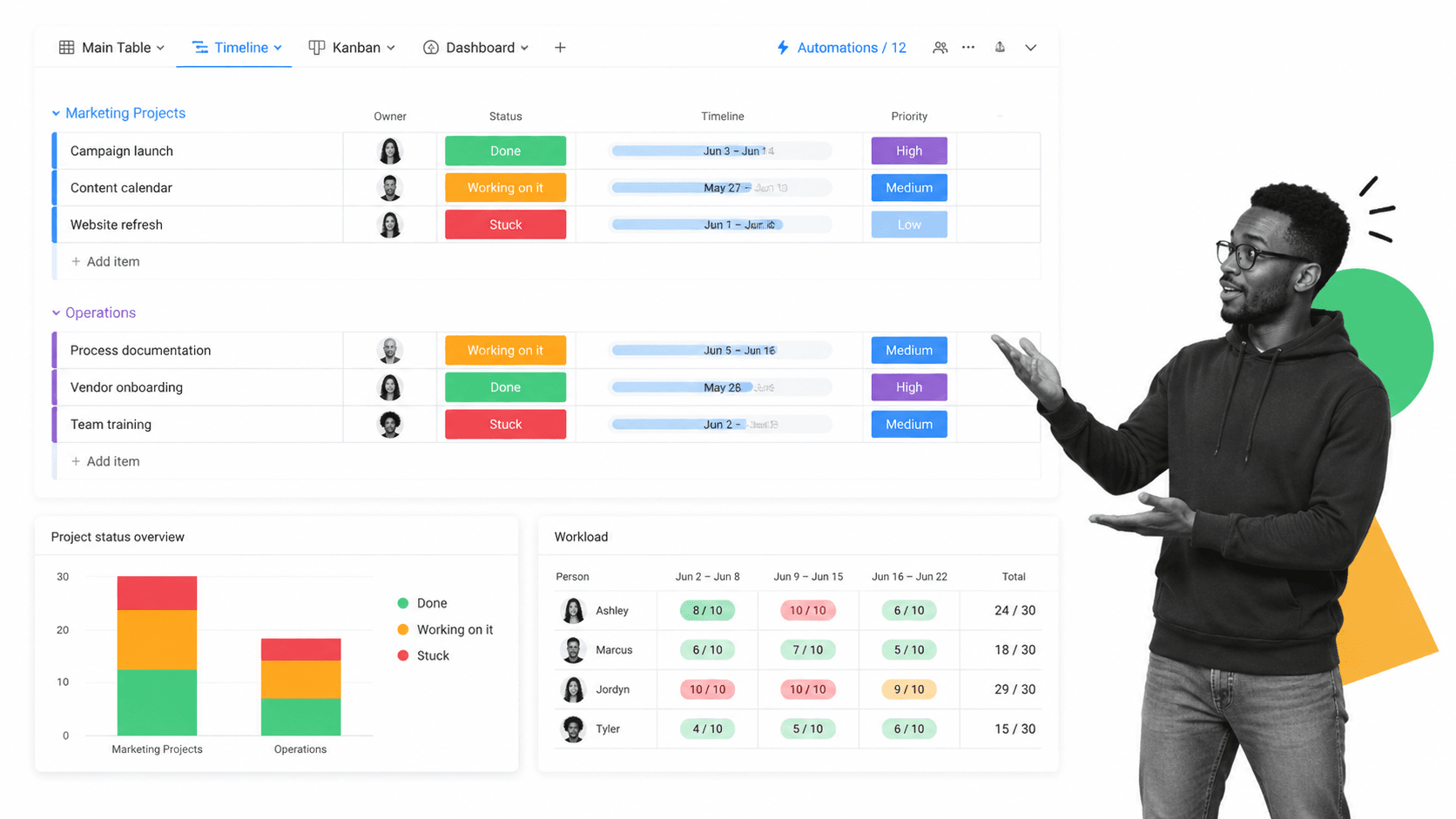
Best for: visual work management across departments.
monday.com is a work management platform built around visual boards, columns, views, dashboards, automations, and integrations. Its pricing page shows a free tier for very small teams and paid tiers that scale by seat count.
It beats Process Street when the work is mostly cross-functional project visibility, flexible boards, portfolio dashboards, and department-level planning. It is weaker when the process needs strict step order, required evidence, approval gates, and an audit-ready run history.
monday.com key features:
- Configurable boards and columns.
- Multiple project views including timeline and dashboard surfaces.
- Automations and integrations on paid plans.
- Workload and dashboard views for team planning.
monday.com pros:
- Strong visual work management surface.
- Flexible enough for many departments.
- Good fit for managers who want dashboards and project boards.
monday.com cons:
- Broad configurability can create inconsistent operating patterns.
- Not purpose-built for enforceable SOP execution.
For current package details, see monday.com pricing. monday.com is a better fit when visual boards and portfolio-style work tracking matter more than SOP enforcement.
3. ClickUp
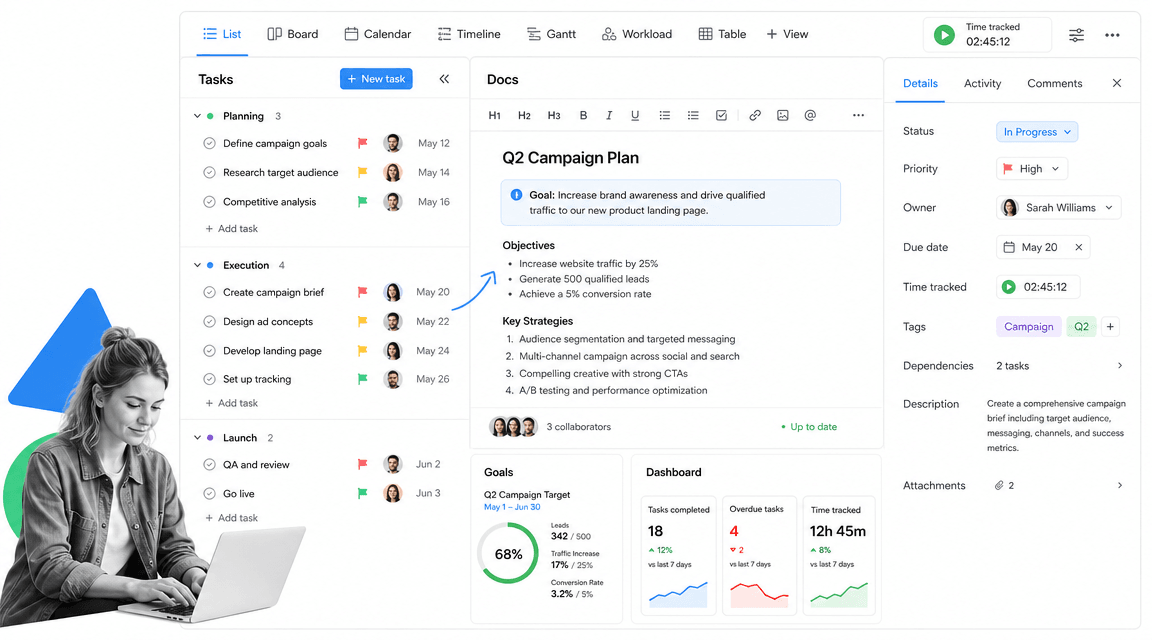
Best for: teams that want many project views in one workspace.
ClickUp is an all-in-one productivity workspace that combines tasks, docs, goals, dashboards, whiteboards, forms, time tracking, and many project views. Its pricing page shows a Free Forever plan and paid plans for teams that need more capacity.
It beats Process Street when a team wants one broad workspace for project views, docs, and task management. It is weaker when the core risk is people skipping required procedural steps or failing to leave evidence.
ClickUp key features:
- Tasks with multiple views.
- Docs, whiteboards, goals, and dashboards.
- Native time tracking and custom fields.
- Forms and integrations on paid plans.
ClickUp pros:
- Very broad workspace surface.
- Useful for teams that want many views in one tool.
- Free plan makes small-team evaluation easy.
ClickUp cons:
- Breadth can make administration feel heavy.
- Project flexibility is not the same as workflow enforcement.
For current package details, see ClickUp pricing. ClickUp is a better fit when the team wants a broad productivity workspace with many configurable views.
4. Trello
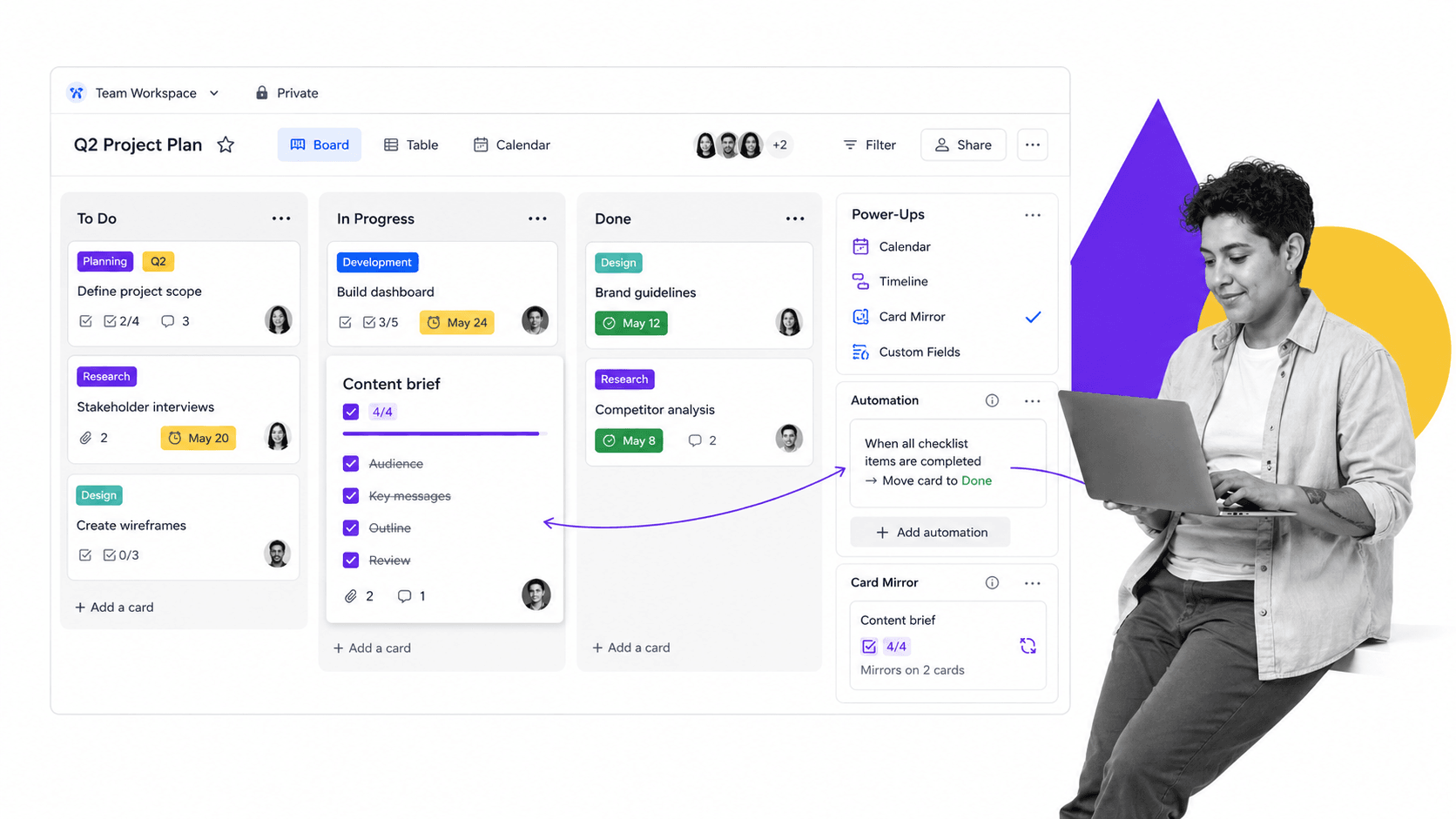
Best for: simple Kanban task tracking.
Trello is a Kanban-first task management tool built around boards, lists, cards, checklists, and Power-Ups. Its pricing page shows a free plan and a low starting price for paid team features.
It beats Process Street when the work is simple, visual, and lightweight. It is weaker when the process needs branching logic, required fields, approvals, recurring workflow runs, or operational proof.
Trello key features:
- Kanban boards, lists, and cards.
- Card checklists, due dates, and labels.
- Power-Ups for connected features.
- Automation and workspace controls on paid plans.
Trello pros:
- Fast to adopt.
- Easy for lightweight collaboration.
- Good for simple task boards.
Trello cons:
- Can become loose when processes need enforcement.
- Less suited to complex recurring operations.
For current package details, see Trello pricing. Trello is a better fit when the process is lightweight and a simple board is enough.
5. Wrike
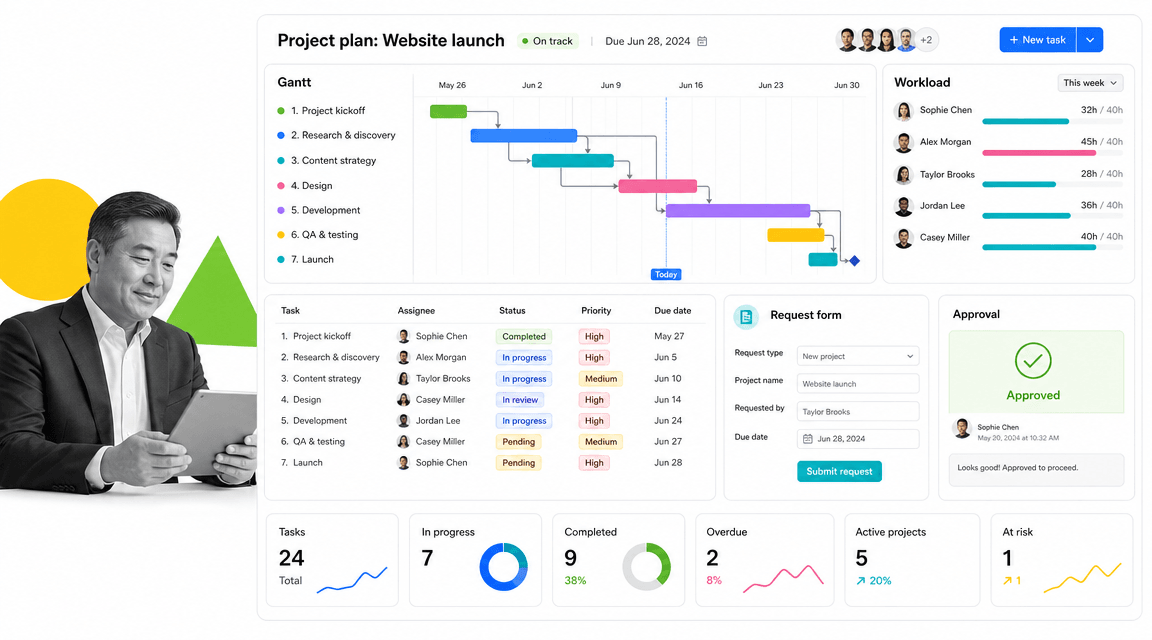
Best for: cross-functional project and resource management.
Wrike is a collaborative work management platform for project planning, task management, workload, dashboards, and Gantt-style coordination. Its pricing page shows a free plan and paid team tiers.
It beats Process Street when resourcing, project schedules, dependencies, and cross-functional delivery planning are the main need. It is weaker when a team needs a simple recurring workflow run with enforced steps and evidence.
Wrike key features:
- Task and project management.
- Interactive Gantt charts.
- Dashboards and workload planning.
- Request forms, approvals, and reports.
Wrike pros:
- Strong for complex project planning.
- Useful for resource and workload management.
- Good fit for cross-functional delivery teams.
Wrike cons:
- Can be heavier than needed for simple SOPs.
- Project controls do not automatically create audit-ready process execution.
For current package details, see Wrike pricing. Wrike is a better fit when project planning, resourcing, and cross-functional delivery are the primary need.
6. Smartsheet
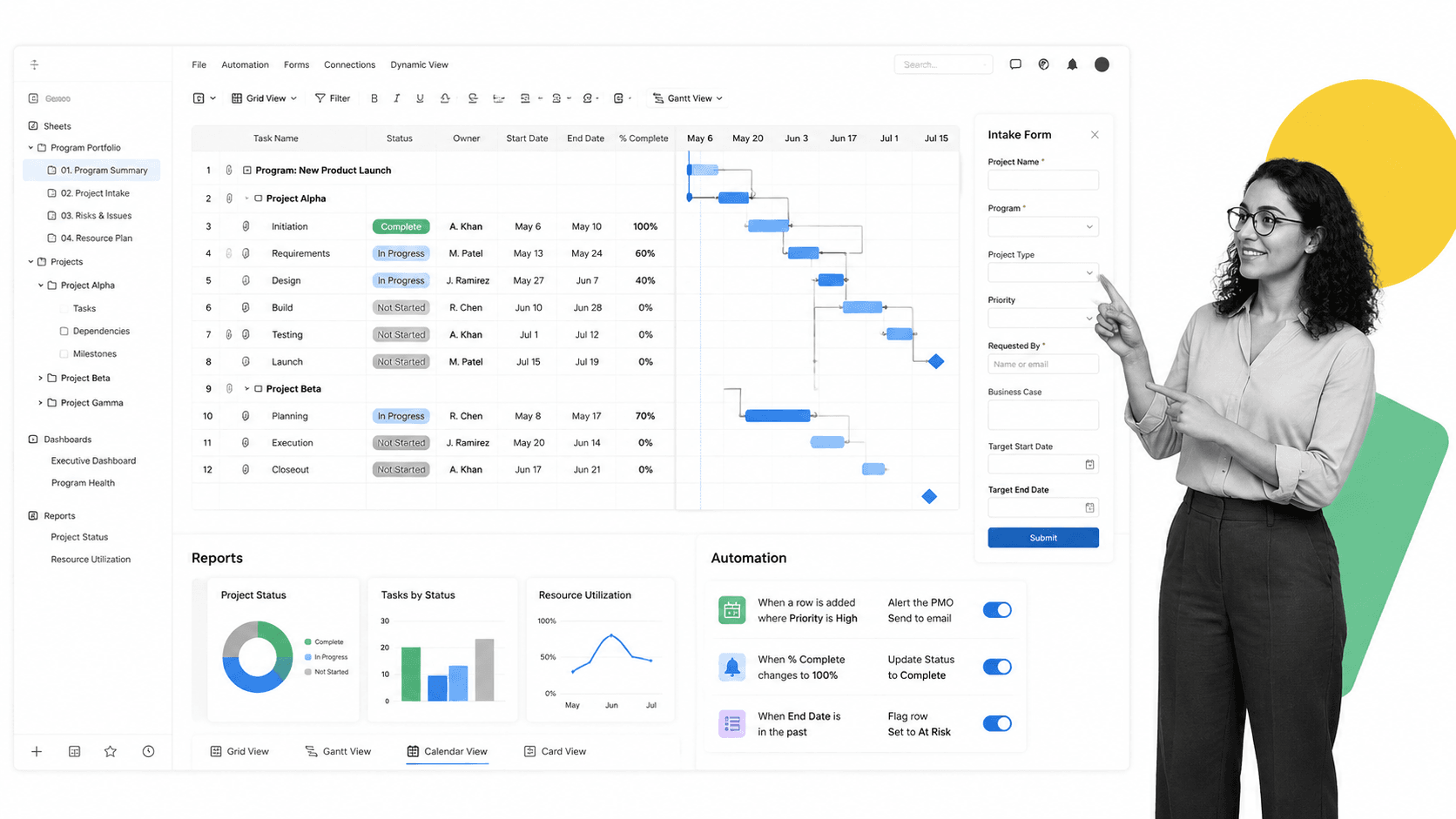
Best for: spreadsheet-style project and program management.
Smartsheet gives teams a spreadsheet-style way to manage projects, programs, forms, reports, dashboards, and automations. Its pricing page positions Pro, Business, Enterprise, and Advanced Work Management plans around members and contributors.
It beats Process Street when the team naturally works in sheets, grids, reports, and portfolio-level structures. It is weaker when work needs a guided checklist experience for operators rather than a row-based control surface.
Smartsheet key features:
- Grid, Gantt, board, calendar, and table views.
- Forms, reports, and dashboards.
- Automations and formulas.
- Portfolio and advanced work management add-ons.
Smartsheet pros:
- Familiar for spreadsheet-heavy teams.
- Strong reporting and program management surface.
- Good for structured project and portfolio data.
Smartsheet cons:
- Rows and sheets can still feel indirect for frontline execution.
- Advanced work management may require added configuration.
For current package details, see Smartsheet pricing. Smartsheet is a better fit when teams want spreadsheet familiarity with project and portfolio controls.
7. Airtable
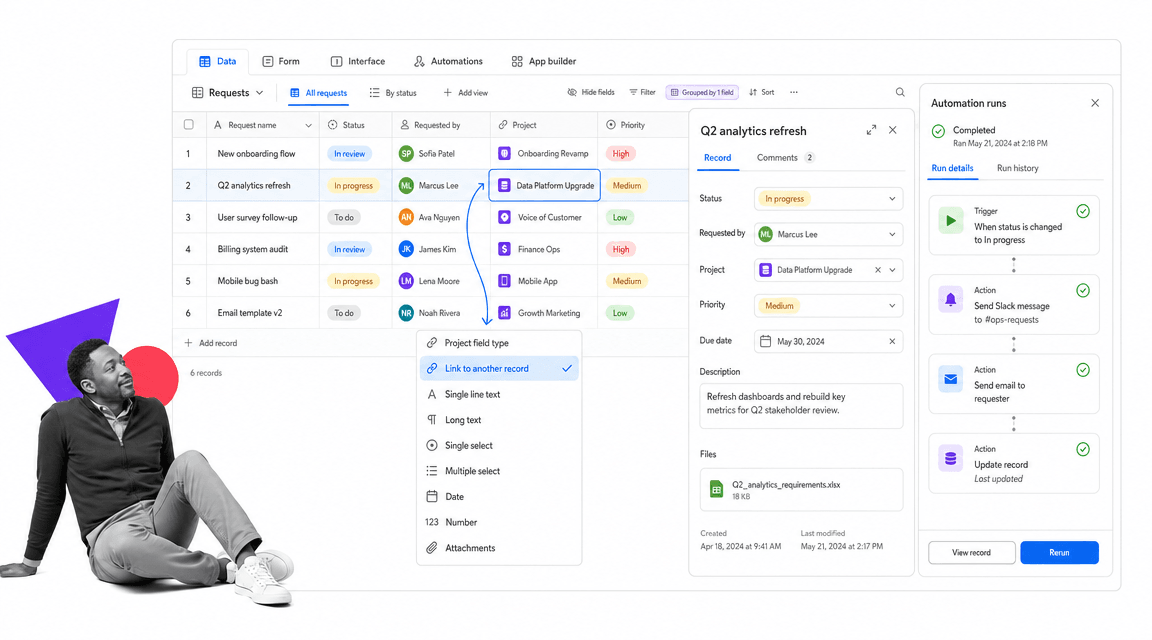
Best for: database-backed workflows and lightweight apps.
Airtable is a database-backed platform for teams that want structured records, forms, interfaces, automations, and lightweight internal apps. Its pricing page explains per-seat plans and a free tier for lighter use.
It beats Process Street when the work is mainly a structured database or internal app. It is weaker when each run needs a guided sequence, approval checkpoint, required evidence, and repeatable process proof.
Airtable key features:
- Bases with tables and records.
- Forms, interfaces, and views.
- Automations and app-style workflows.
- Linked records and configurable fields.
Airtable pros:
- Great fit for structured operational data.
- Flexible for lightweight internal tools.
- Useful when records are more important than task sequences.
Airtable cons:
- Teams may need to design their own operating discipline.
- Not a dedicated SOP execution layer.
For current package details, see Airtable pricing. Airtable is a better fit when the work is really a structured database or lightweight app.
8. Notion
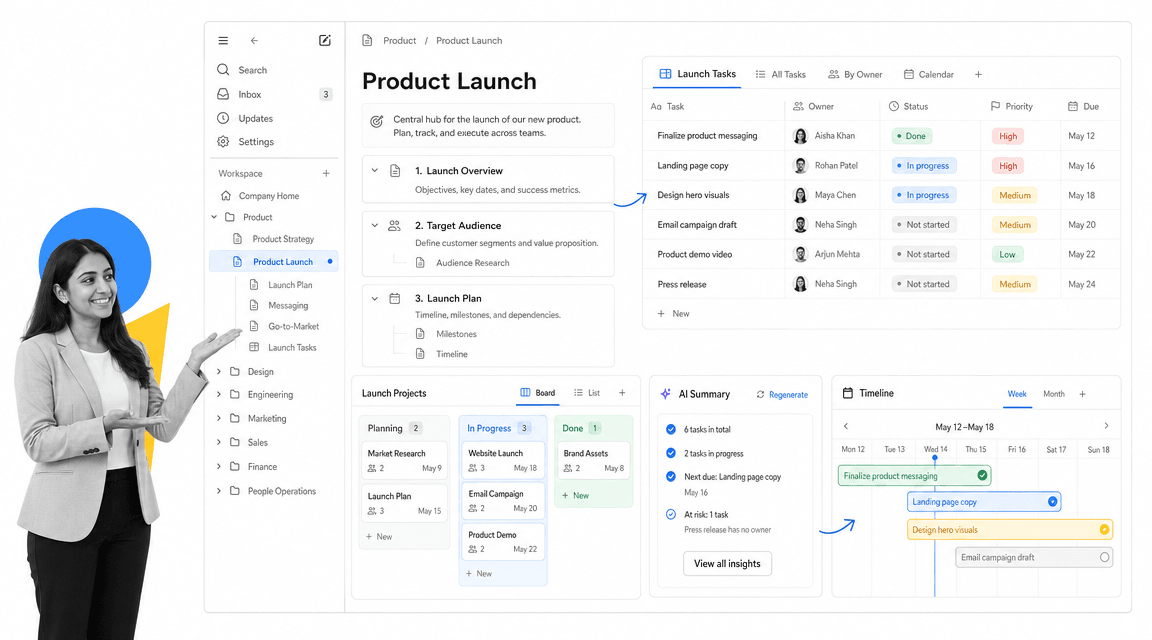
Best for: docs, wiki, and task-light team workspaces.
Notion is a connected workspace for docs, wikis, databases, projects, and AI-assisted knowledge work. Its pricing page shows a free plan and paid plans for teams that need more collaboration and administration.
It beats Process Street when the main problem is documentation, team knowledge, and flexible workspace structure. It is weaker when the process needs to enforce task order, approvals, and evidence collection during execution.
Notion key features:
- Pages, docs, and wiki structure.
- Databases and project views.
- AI-assisted workspace features.
- Team collaboration and administration on paid plans.
Notion pros:
- Strong for documentation and team knowledge.
- Flexible workspace model.
- Good fit for teams that want docs and light projects together.
Notion cons:
- Flexibility can leave process execution unenforced.
- Not ideal when proof of completed steps is the primary requirement.
For current package details, see Notion pricing. Notion is a better fit when knowledge management and collaborative docs are more important than enforced workflows.
9. Jira
Best for: software teams and technical delivery.
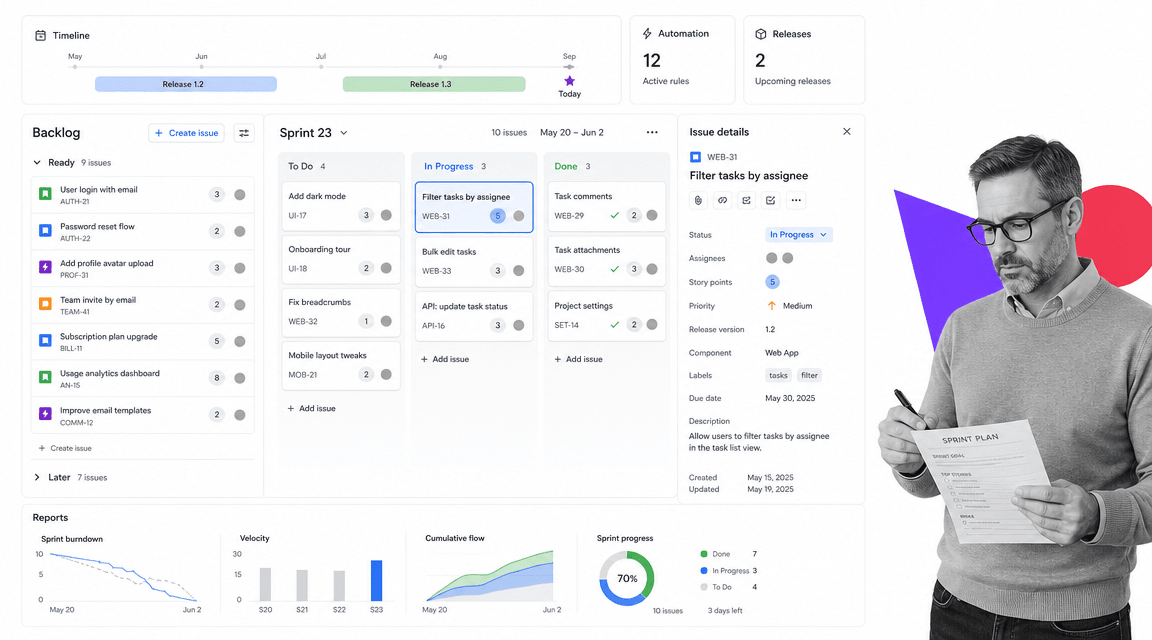
Jira is Atlassian’s work and software planning product with goals, projects, tasks, forms, backlog, board, timeline, calendar, reports, dashboards, and automation. Its pricing page shows a free plan for small teams and paid Standard and Premium tiers.
It beats Process Street when the work is software delivery, issue tracking, backlog planning, sprint management, and release coordination. It is weaker for non-technical recurring business processes that need a simple operator-facing checklist.
Jira key features:
- Backlog, board, list, timeline, and calendar views.
- Reports and dashboards.
- Automation rule runs by plan.
- Permissions, external collaboration, and storage on paid plans.
Jira pros:
- Strong fit for engineering teams.
- Deep issue and backlog management.
- Works well across Atlassian software delivery workflows.
Jira cons:
- Can feel too technical for general operations teams.
- Software issue tracking is not the same as SOP enforcement.
For current package details, see Jira pricing. Jira is a better fit when engineering delivery, issue tracking, and software planning are central.
10. Teamwork.com
Best for: client-service teams managing billable work.
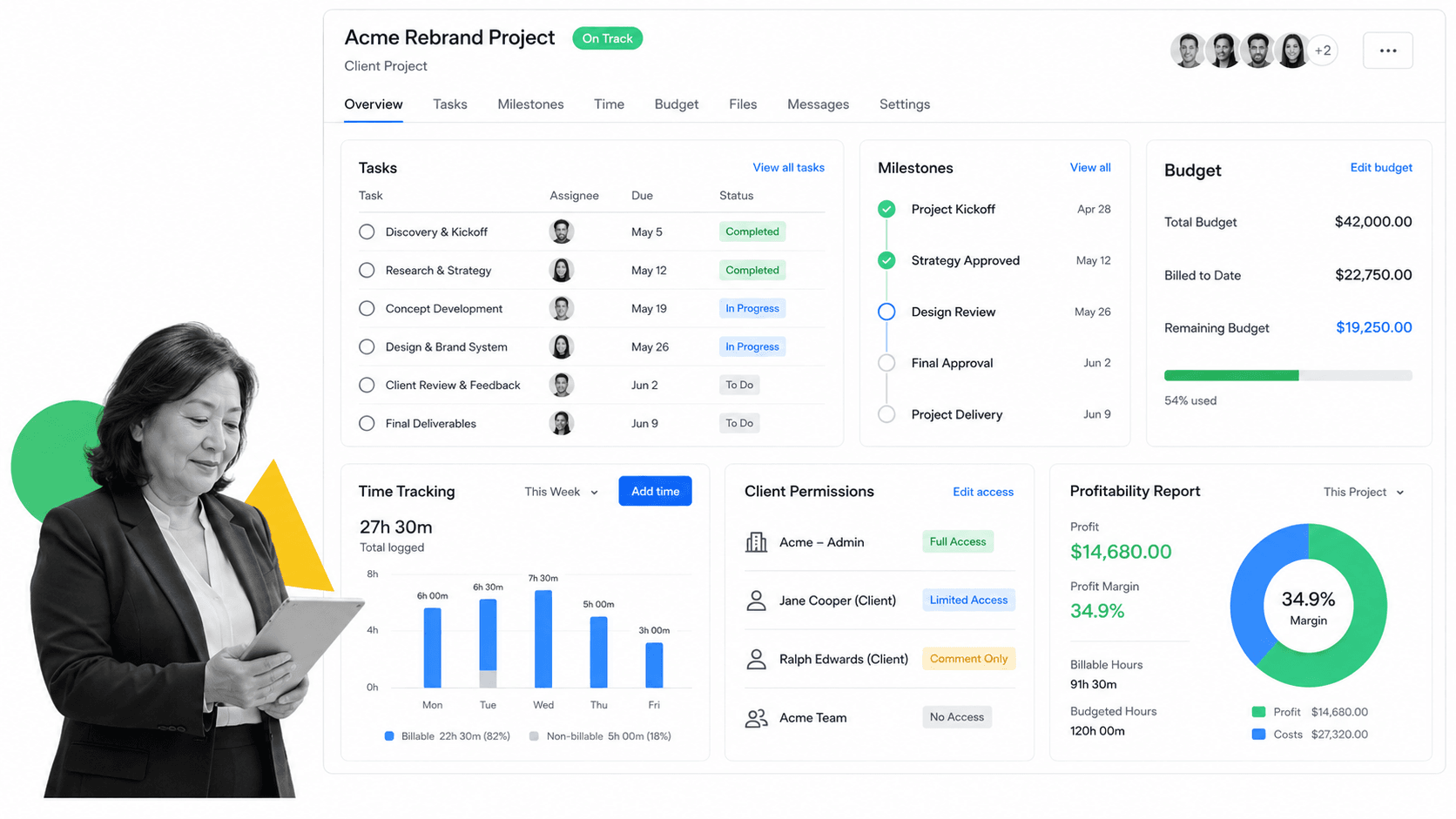
Teamwork.com is project management software built for client-service teams. Its pricing page emphasizes client work and plans around tasks, projects, time, budgets, and reporting.
It beats Process Street when the team needs billable project delivery, client visibility, budget control, and profitability reporting. It is weaker when the workflow is an internal SOP that needs enforced execution and evidence rather than margin tracking.
Teamwork.com key features:
- Client project task lists.
- Time tracking and budget controls.
- Milestones and project reporting.
- Client permissions and profitability views.
Teamwork.com pros:
- Strong fit for agencies and services teams.
- Connects project work to time and budgets.
- Useful for client-facing delivery management.
Teamwork.com cons:
- Less relevant for internal compliance workflows.
- Client project management can be more structure than a simple recurring SOP needs.
For current package details, check the vendor pricing page. Teamwork.com is a better fit when client delivery, billable time, and agency project margins are the core problem.
Which Asana alternative fits your use case
The easiest way to avoid a bad Asana replacement is to name the job first.
- Choose Process Street when recurring human work needs required steps, owners, approvals, evidence, and audit trails.
- Choose Zapier when speed and simple SaaS app automation matter more than process governance.
- Choose Make when visual scenario design makes complex branching easier to understand.
- Choose Jira when software teams need backlog, sprint, issue, release, and engineering delivery controls.
- Choose Teamwork.com when agencies and client-service teams need tasks, time, budgets, and profitability reporting.
For many teams, the stack is hybrid. You may keep Asana for project planning, use Jira for engineering work, and use Process Street as the governed process platform for recurring operations. Teams moving from task-only project management should also compare adjacent workflow management software and project management platforms when their buying question is broader than project visibility. The point is to keep the process record clear. Work management should not make ownership harder to see.
If your main problem is missed steps, tribal knowledge, and inconsistent execution, start with a controlled process. If your main problem is planning cross-functional initiatives, start with project management. If your main problem is software delivery, start with issue tracking. The strongest project management platforms decision is the one that matches the risk and owner of the work.
FAQs
What is the best Asana alternative?
The best Asana alternative depends on the workflow. Process Street is best for recurring SOP and compliance workflows, monday.com and ClickUp are strong for visual work management, Trello fits simple Kanban work, Jira fits software teams, and Teamwork.com fits client-service delivery.
Is there a free Asana alternative?
Yes, several Asana alternatives offer a free plan or free option. monday.com, ClickUp, Trello, Wrike, Airtable, Notion, and Jira publish free plans. Always check the vendor pricing page because limits change.
Why is Process Street ranked first?
Process Street is ranked first for the ICP this page is judging: teams that need enforceable, trackable, recurring process and SOP workflows. It is not ranked first for every automation use case. For software delivery, spreadsheet-style work, or client billing, a specialist may be the better fit.
What is the closest alternative to Asana?
The closest alternative depends on which part of Asana you use. monday.com and ClickUp are close for broad work management, Trello is close for simple boards, Wrike is close for project planning and workload, and Process Street is closer for controlled human workflow execution.
Which Asana alternative is best for small teams?
Small teams usually shortlist Process Street, Trello, ClickUp, monday.com, Notion, or Airtable. The best choice depends on ownership. Non-technical operations teams often need readable workflows, while technical teams may prefer node or code-based builders.
Which Asana alternative is best for enterprise teams?
Enterprise teams should compare Process Street, monday.com, Wrike, Smartsheet, Jira, and Airtable based on the job. Process Street fits governed recurring workflows, Wrike and Smartsheet fit program management, Jira fits software delivery, and monday.com fits broad work management.
Can I migrate from Asana to Process Street?
You can migrate the process logic by mapping each flow to a workflow: trigger, owner, task sequence, required fields, approvals, evidence, integrations, and exception paths. Process Street is strongest when the migrated work needs human accountability and proof, not just a task list.
If Asana is not giving your team the control, ownership, and proof you need, start with Process Street. Build the recurring workflow first, then connect the apps around it.
Comparing something else? The full directory of software alternatives and competitor comparisons covers AI agents, workflow and BPM platforms, integration tools, and more.
