


Turn every policy into automated workflows with built-in enforcement and audit-ready proof.



Automate Compliance Monitoring

When you automate compliance monitoring, you replace manual checks with systems that continuously track whether your organization follows the rules it is required to follow. Those rules come from regulators, industry standards, internal policies, and contractual obligations. Without automation, teams rely on spreadsheets, email reminders, and periodic audits to verify that procedures are being followed. That approach is slow, error-prone, and reactive.
Automating compliance monitoring replaces manual checks with systems that continuously track, enforce, and document adherence to your policies. Instead of discovering gaps during an annual audit, automated monitoring surfaces issues in real time, before they become findings. This guide covers what automated compliance monitoring looks like in practice, which frameworks benefit most, and how to implement it using Process Street and modern workflow automation.
In this article, we are going to cover everything you need to know about automating compliance monitoring, including:
- What Is Compliance Monitoring?
- Why Automate Compliance Monitoring?
- Key Components of Automated Compliance Monitoring
- Compliance Frameworks That Benefit from Automation
- How to Automate Compliance Monitoring
- Common Challenges and How to Overcome Them
- How Process Street Automates Compliance Monitoring
- Getting Started with Automated Compliance Monitoring
What Is Compliance Monitoring?
Compliance monitoring is the structured practice of verifying that an organization’s day-to-day operations align with the regulations, standards, and internal policies it is subject to. It covers everything from tracking whether employees complete required training on time to verifying that sensitive data is handled according to GDPR or HIPAA requirements.
Effective compliance monitoring answers three questions continuously: Are the right procedures in place? Are people following them? Can you prove it? Without monitoring, compliance becomes a point-in-time exercise, something that gets attention before audits and fades between them.
Why Traditional Monitoring Falls Short
Traditional compliance monitoring relies on manual reviews, periodic audits, and self-reported checklists. This creates blind spots. A quarterly review might catch a policy violation three months after it happened. By then, the damage is done and the audit trail is cold. Manual monitoring also does not scale. As regulatory requirements multiply and teams grow, the compliance function cannot keep up with spreadsheets and email reminders.
Why Automate Compliance Monitoring?
Automating compliance monitoring is not about replacing compliance officers. It is about giving them real-time visibility and removing the manual work that slows response times. Here are the core benefits.
Continuous Visibility Instead of Point-in-Time Checks
Manual compliance monitoring produces snapshots. Automated monitoring produces a live feed. You see policy adherence as it happens, not weeks or months later. This is the difference between catching a fire after the building burns and catching a spark before it spreads. Organizations that use compliance automation software report faster detection of control failures and fewer surprises during audits.
Reduced Human Error
People miss steps. They forget follow-ups. They misinterpret policies. Automated workflows enforce the correct sequence every time, assign the right approvers, and flag incomplete tasks before they fall through the cracks. The hidden costs of compliance fire drills often stem from preventable human errors that automation eliminates.
Audit-Ready Documentation by Default
Every automated workflow creates a timestamped record: who did what, when, and what the outcome was. This audit trail is not an afterthought; it is a byproduct of the process running correctly. When auditors ask for evidence, you pull it from the system instead of reconstructing it from memory. This is the principle behind compliance as proof of control, where execution itself generates the evidence regulators need.
Lower Cost of Compliance
Manual compliance work is labor-intensive. Automating routine checks, evidence collection, and reporting frees your compliance team to focus on risk assessment and strategic decisions rather than data entry. Organizations with mature compliance automation spend less per audit cycle and experience fewer regulatory penalties.
Key Components of Automated Compliance Monitoring
Automated compliance monitoring is not a single tool. It is a system of interconnected components that work together to track, enforce, and document compliance across your organization.
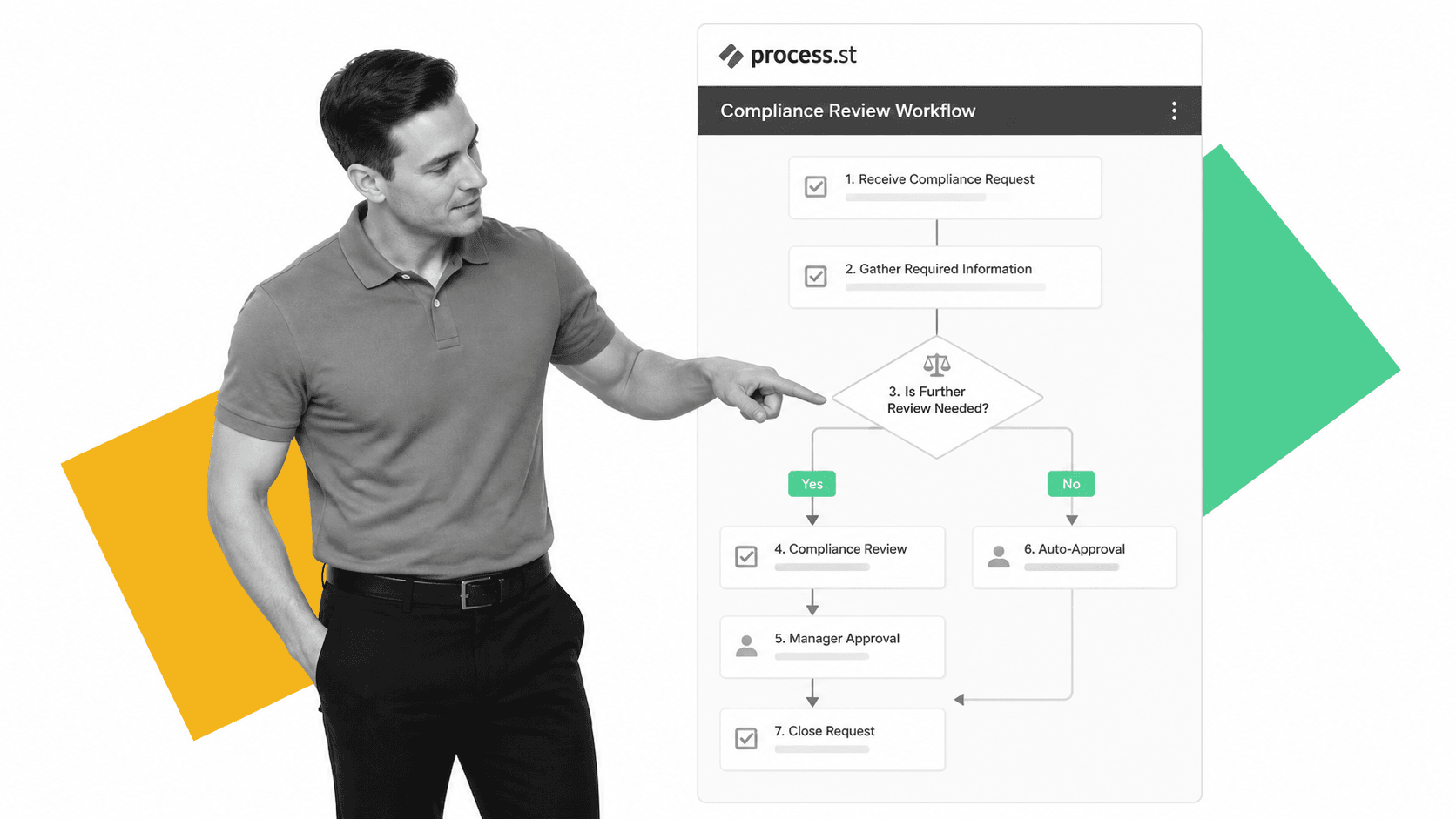
Real-Time Alerts and Escalations
Automated monitoring systems watch for specific triggers: a missed deadline, an unapproved change, a control that falls out of tolerance. When a trigger fires, the system sends an alert to the responsible person and escalates if no action is taken within a defined window. This replaces the “check the spreadsheet” approach with proactive notification. A Continuous Compliance Monitoring template can define these triggers as part of a structured workflow.
Automated Evidence Collection
Collecting evidence for audits is one of the most time-consuming parts of compliance. Automated systems capture evidence as work happens: screenshots, form submissions, approval timestamps, file attachments, and integration data from connected systems. This evidence lives in the workflow, not in a separate folder someone has to maintain.
Policy Enforcement Through Workflow Logic
The most effective compliance monitoring does not just observe compliance; it enforces it. Conditional logic in workflows prevents users from skipping required steps. Mandatory approval gates stop a process from advancing until the right person signs off. Role-based access ensures that only authorized personnel can modify sensitive procedures. This is what separates compliance operations from passive compliance tracking.
Reporting and Dashboards
Automated compliance monitoring generates data. That data needs to be visible and actionable. Reporting dashboards show compliance status across frameworks, flag overdue items, and track trends over time. Leadership gets a real-time view of organizational compliance health without waiting for quarterly reports. Integration with tools like Power BI, Tableau, or Metabase makes this data accessible to stakeholders at every level.
Compliance Frameworks That Benefit from Automation
Not every compliance obligation has the same automation potential. Frameworks that require continuous monitoring, periodic evidence collection, and structured procedures benefit the most. Here are the frameworks where automation has the highest impact.
SOC 2
SOC 2 audits evaluate controls across security, availability, processing integrity, confidentiality, and privacy. Continuous monitoring of these controls, including access reviews, change management approvals, and incident response procedures, is exactly the kind of repetitive, evidence-heavy work that automation handles well.
HIPAA
Healthcare organizations must maintain continuous safeguards for protected health information (PHI). Automated workflows enforce access controls, track training completion, and document incident response. HIPAA compliance automation reduces the risk of violations that carry penalties of up to $2.1 million per violation category per year.
ISO 27001
ISO 27001 requires organizations to maintain an information security management system (ISMS) with regular risk assessments, control reviews, and management reviews. Automation keeps these cycles on schedule and ensures that evidence is collected at each control point. The standard’s emphasis on documented procedures and continuous improvement makes it a natural fit for workflow-driven monitoring.
SOX and Financial Reporting
Sarbanes-Oxley requires public companies to maintain internal controls over financial reporting. Automated workflows enforce segregation of duties, track approval chains for financial transactions, and document control testing. Financial services compliance software often includes SOX-specific monitoring capabilities, including automated control testing schedules and exception tracking.
GDPR and Data Privacy
Data privacy regulations require organizations to track data processing activities, respond to subject access requests within tight deadlines, and maintain records of consent. Automated monitoring ensures that data handling procedures are followed consistently and that response deadlines are not missed. A Compliance Framework template can structure the ongoing monitoring activities required by GDPR and similar privacy laws.
How to Automate Compliance Monitoring
Implementing automated compliance monitoring does not require a multi-year transformation project. Start with your highest-risk compliance area, build the workflow, and expand from there. Here is a practical approach.

Step 1: Map Your Compliance Requirements
Start by listing every compliance obligation your organization faces. Group them by framework (SOC 2, HIPAA, ISO, internal policies) and identify the controls associated with each. For each control, document: what needs to happen, how often, who is responsible, and what evidence is required. This map becomes the blueprint for your automated workflows. Use a Compliance Checklist template to structure this inventory.
Step 2: Prioritize by Risk and Frequency
Not every control needs automation on day one. Focus first on high-risk, high-frequency activities: daily access reviews, weekly security checks, monthly compliance attestations. These are the areas where manual processes are most likely to fail and where automation delivers the fastest return. Lower-risk, annual activities can be automated in later phases.
Step 3: Build Automated Workflows
Convert your compliance procedures into automated workflows with defined triggers, task assignments, conditional logic, and approval gates. Each workflow should: run on a schedule or trigger automatically when a condition is met, assign tasks to specific roles, collect evidence through form fields and file uploads, enforce the correct sequence through conditional logic, and escalate overdue items. Workflow automation tools make this possible without writing code.
Step 4: Connect Your Systems
Compliance monitoring rarely lives in a single system. Connect your compliance workflows to the tools where work happens: your HRIS for employee data, your cloud provider for infrastructure access, your CRM for data handling procedures, and your document management system for policy versions. Integration ensures that compliance monitoring reflects the actual state of your operations, not just what people remember to report.
Step 5: Test and Iterate
Run your automated monitoring alongside your existing manual processes for one cycle. Compare the results. Automated monitoring will likely catch issues that manual reviews missed, and it may also generate false positives that need tuning. Adjust your triggers, thresholds, and escalation paths based on real-world results. Then phase out the manual process. Use a Compliance Audit Preparation template to structure the validation testing.
Common Challenges and How to Overcome Them
Automating compliance monitoring is not without obstacles. Here are the most common challenges and practical ways to address them.
Data Silos Across Departments
Compliance data lives in different systems across different teams. HR has training records, IT has access logs, finance has approval chains. Automated monitoring requires these systems to share data. Start with integrations for your highest-priority compliance areas and expand as you build confidence. Business process automation tools with native integration libraries simplify this connectivity.
False Positives and Alert Fatigue
Overly sensitive triggers generate too many alerts, and teams start ignoring them. Tune your monitoring thresholds based on actual risk, not theoretical worst cases. Use tiered escalation: low-risk items go to a dashboard, medium-risk items send a notification, high-risk items page the compliance lead. This keeps attention focused on what matters.
Change Management and Adoption
Teams accustomed to manual compliance processes may resist automated workflows. Address this by starting with a process that teams already find painful (usually audit preparation) and demonstrating how automation reduces their workload. When people see that automation takes work off their plate rather than adding more oversight, adoption follows. Having a digital compliance officer role can help champion this transition internally.
How Process Street Automates Compliance Monitoring
Process Street is a Compliance Operations Platform that turns compliance procedures into automated, enforceable workflows. Here is how the platform addresses each component of automated compliance monitoring.
Docs: Governed Policy Documentation
Every compliance program starts with documented policies. Process Street Docs provides a governed document management system where policies are authored, versioned, and approved through structured review cycles. Version control, approval workflows, and access controls ensure that your compliance documentation is always current and auditable. No more hunting through shared drives for the latest version of a policy.
Ops: Execution-First Workflows
Process Street Ops converts your documented policies into automated workflows that run on schedule, assign tasks to the right people, enforce conditional logic, and capture evidence at every step. Compliance monitoring becomes a byproduct of work getting done correctly. Approval gates prevent steps from being skipped. Escalation rules ensure that overdue items get attention. Integration with your existing tools, including Salesforce, NetSuite, Workday, and DocuSign, connects compliance monitoring to the systems where work happens.
Cora: AI Compliance Agent
Cora monitors execution across your workflows, flags missed steps and delays, and surfaces risks before they become findings. Unlike chat-based AI tools, Cora acts on compliance data: it identifies patterns, suggests process improvements, and helps ensure that your compliance monitoring evolves as regulations change. This is AI-driven compliance that enforces policy rather than summarizing it.
Templates for Immediate Deployment
Process Street offers ready-to-use templates for common compliance workflows, including Compliance Plan templates, Compliance Documentation Checklists, and framework-specific monitoring workflows. These templates give you a starting point that you can customize to your organization’s specific regulatory requirements.
Getting Started with Automated Compliance Monitoring
If you are ready to automate compliance monitoring, here is a quick-start checklist to guide your first steps.
- Identify your three highest-risk compliance obligations and the controls associated with each
- Document the current manual process for each, including who does what, how often, and what evidence is collected
- Select a compliance management software platform that supports workflow automation, conditional logic, and integrations with your existing tools
- Build your first automated compliance workflow using an existing template as a starting point
- Run the automated workflow alongside your manual process for one full cycle to validate results
- Expand to additional compliance areas based on the results of your pilot
Compliance monitoring does not have to be a burden. With the right platform and a structured approach, you can turn it from a reactive, labor-intensive obligation into a continuous, automated system that proves compliance by default.
FAQs
What does it mean to automate compliance monitoring?
Automating compliance monitoring means using software to continuously track whether your organization follows its required policies, regulations, and standards. Instead of relying on manual checks and periodic audits, automated systems monitor compliance in real time, flag deviations, collect evidence, and escalate issues to the right people without human intervention.
Which compliance frameworks benefit most from automated monitoring?
Frameworks that require continuous control monitoring and frequent evidence collection benefit the most. SOC 2, HIPAA, ISO 27001, SOX, and GDPR are the strongest candidates because they require ongoing documentation, periodic reviews, and real-time controls that are difficult to maintain manually at scale.
How does automated compliance monitoring reduce audit risk?
Automated monitoring creates a continuous audit trail as work happens. Every completed task, approval, and policy check is timestamped and documented automatically. This means that when auditors request evidence, it already exists in a structured format. Issues are caught and resolved in real time rather than discovered during periodic reviews, significantly reducing the chance of audit findings.
Can small teams automate compliance monitoring without developers?
Yes. Modern compliance automation platforms like Process Street are designed for non-technical users. You can build automated workflows with conditional logic, approval gates, and integrations using a no-code interface. Pre-built compliance templates provide a starting point that teams can customize to their specific requirements without writing a single line of code.
What is the difference between compliance automation and compliance monitoring?
Compliance monitoring is the practice of tracking and verifying that your organization meets its compliance obligations. Compliance automation is the broader category of using technology to streamline all compliance activities, including monitoring, evidence collection, reporting, and remediation. Automated compliance monitoring is one component of a complete compliance automation strategy.
