


Turn every policy into automated workflows with built-in enforcement and audit-ready proof.



Business Process Manager Software

Business process manager software is a system for designing, running, governing, and improving the recurring processes that move work across a company. It coordinates requests, tasks, decisions, data, handoffs, automated actions, and evidence so people can complete work through one controlled path instead of scattered email, chat, spreadsheets, and memory.
The category is broader than a task list. A task list shows what someone intends to do. Business process manager software decides when work starts, who owns each step, which rule applies, what must be approved, what happens when a case is unusual, and which record proves the process was completed correctly.
This guide explains how the software works, which capabilities matter, where to use it, how to evaluate a platform, and how to roll it out without creating another disconnected tool. It also shows how to measure whether a workflow is genuinely improving the business.
In this article, we are going to cover the complete business process management lifecycle, including:
- What is business process manager software?
- How business process manager software works
- Core capabilities of business process manager software
- Business processes to manage with the software
- Benefits of managing processes in one system
- How to choose business process manager software
- How to implement business process manager software
- How to measure and improve business processes
- How Process Street supports business process management
- FAQs
What is business process manager software?
Business process manager software turns a repeatable business process into an executable system. A process owner defines the trigger, stages, responsibilities, rules, decisions, service expectations, and evidence requirements. Each time the process runs, the software coordinates the work and preserves a record of what happened.
A useful starting point is the distinction between a process and a workflow. A process describes the broader method used to reach an outcome. A workflow is the ordered path that carries one case through that method. The guide to what a workflow is explains the execution unit in more detail, while a workflow management system turns that unit into repeatable execution.
Workflow management versus project management
Project management organizes work with a defined beginning, evolving scope, and unique deliverable. Workflow management organizes recurring work that should follow the same rules each time. Projects benefit from flexible planning. Business processes need dependable intake, routing, ownership, approvals, exception handling, and proof of completion.
Workflow management versus business process management
Business process management is the discipline of discovering, designing, analyzing, and improving processes across an organization. Workflow management software is the execution layer that makes an individual process run. The discipline decides what good looks like. The software applies that design every time work occurs.
Workflow management versus integration automation
Integration automation moves data or triggers actions between applications. A business process coordinates the whole outcome, including human judgment, waiting periods, escalations, evidence, and exceptions. Standards such as BPMN 2.0 can describe process flow, but the management system must also run and govern each case. Connections are important, but moving data between systems is only one part of managing the work.
How business process manager software works
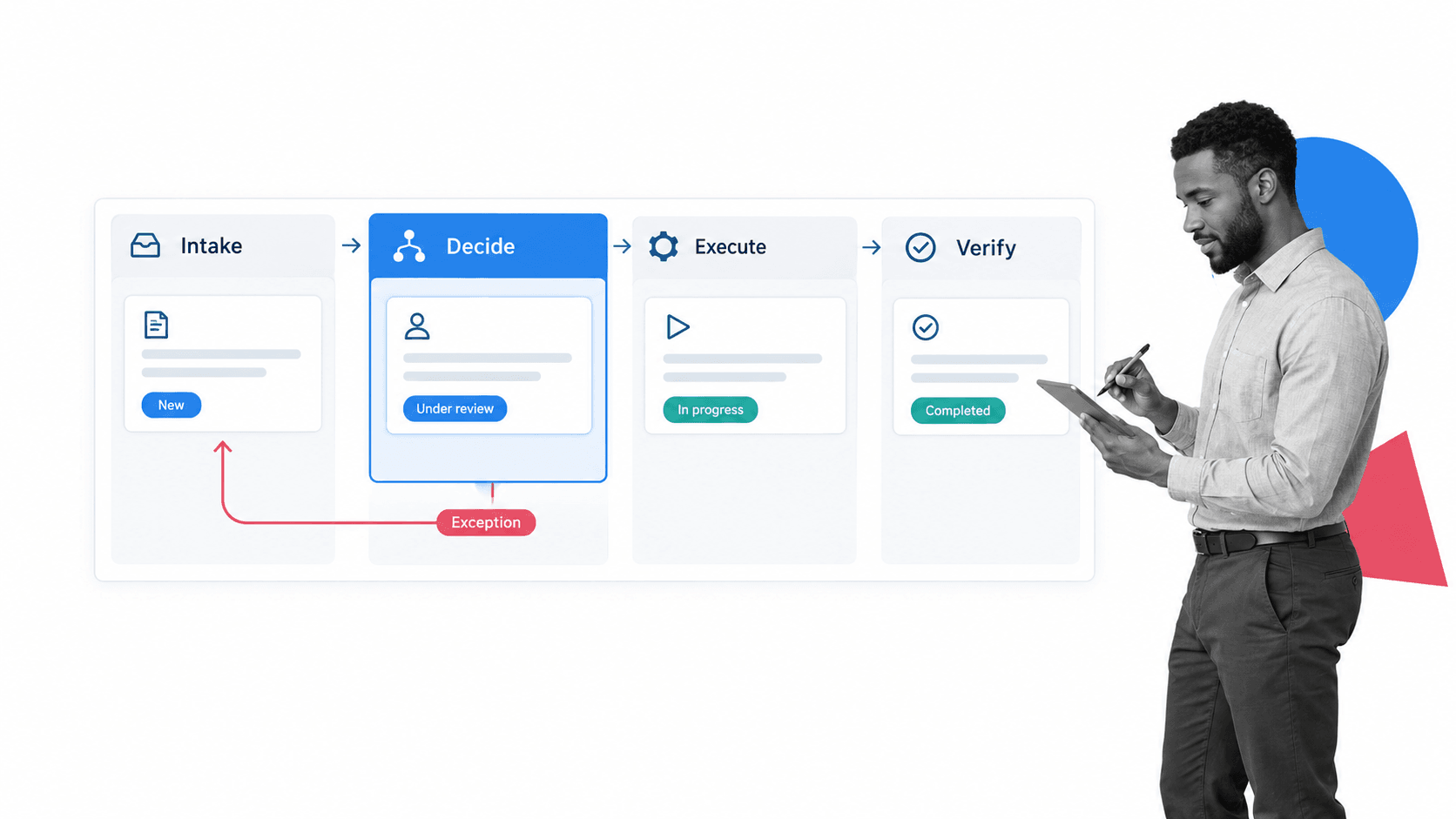
The software follows a repeatable operating cycle: intake, decision, execution, verification, and improvement. Every run carries its own people, data, and history, but the workflow applies a shared operating model unless an approved rule sends the case down a different path.
A trigger creates the workflow run
A submitted form, changed record, scheduled date, completed upstream task, inbound message, or system event can start the process. The trigger creates a run with the right context attached. Strong intake prevents every downstream step from beginning with incomplete or unstructured information.
Rules route work to the right owner
The engine evaluates data and assigns the next step by role, team, location, risk, value, or workload. Conditional logic can open the relevant path while hiding steps that do not apply. That keeps routine work fast without weakening the controls required for unusual cases.
People and systems complete different kinds of work
Judgment belongs with people. Predictable actions belong with automation. A manager may approve an exception while the software creates a record, validates a field, sends a notification, or updates a downstream system. IBM defines workflow automation as using software to complete tasks and activities without human input. A managed workflow combines that automation with the decisions that still need accountable human review.
Events and evidence create the history
Every task, decision, attachment, comment, and automated action becomes part of the run history. That record supports customer questions, internal reviews, audits, and root-cause analysis. Teams can inspect the path the work followed instead of reconstructing events from separate systems after a problem occurs.
Core capabilities of business process manager software
A serious platform needs more than a visual builder. It must execute the process, protect the rules, connect the stack, and reveal where the operating model is breaking down. Evaluate the following capabilities as one system rather than as isolated feature checkboxes.
Structured intake and reusable workflow design
Forms, field types, required data, reusable stages, and process templates give each run a clean starting point. The design surface should be understandable to the business owner who knows the work, while still supporting standards that prevent every department from inventing its own naming and control model.
Assignments, deadlines, and service levels
Every step needs a clear owner and an expected completion window. Role-based assignment is often more resilient than assigning a permanent individual because teams change. Deadlines, reminders, and escalations should reflect the importance of the process rather than create notification noise for every task.
Approvals, stop points, and evidence
High-consequence work must be able to stop until a required decision or artifact exists. Approval tasks should keep the decision, context, owner, and supporting evidence together. That prevents a private message or informal reaction from becoming an untraceable business decision.
Access control, versioning, and audit history
Sensitive workflows need role-based access, controlled publishing, and a history that shows which version governed each run. NIST groups access control and audit accountability among the foundational control families in Special Publication 800-53. The software should make those responsibilities practical inside daily work.
Integration and agentic orchestration
A workflow should read from and write to the systems that hold customer, employee, financial, operational, and compliance data. Process Street has direct, universal integrations to 5,000+ systems. Need a new one? An AI agent builds it on the fly. The workflow remains the control surface even as the application stack changes.
Monitoring and analysis tied to action
Useful reporting shows volume, time in stage, overdue work, exception frequency, rework, and failed automated actions. The point is not to create a dashboard for its own sake. A finding should lead to an owned improvement, a changed rule, a removed step, or a better capacity decision.
Business processes to manage with the software
The strongest starting workflows are important enough to matter, structured enough to model, and painful enough that users recognize the improvement. Choose processes with repeated volume, shared rules, multiple owners, and a clear definition of done.
Employee and access lifecycle
Hiring, onboarding, role changes, leave, and offboarding cross HR, IT, security, finance, and management. An employee onboarding checklist can become a governed workflow that assigns each department, waits for required approvals, and confirms access was granted or removed at the correct moment.
Vendor onboarding and procurement
Supplier intake can collect due diligence, route legal and security reviews, require evidence, and schedule reassessment. A vendor onboarding checklist gives the business a standard front door while conditional routes apply more scrutiny to high-risk suppliers.
Finance approvals and recurring close work
Purchasing, invoice approval, expenses, reconciliations, and month-end close benefit from defined thresholds and evidence. An invoice approval workflow can route by amount, business unit, or exception type while keeping the full decision history with the transaction.
Quality, compliance, and audit processes
Control testing, corrective action, policy review, internal audit, and evidence collection require consistency and proof. An internal audit checklist becomes more useful when the system assigns work, blocks skipped decisions, collects evidence, and creates remediation when a test fails.
Customer and service operations
Customer onboarding, implementations, escalations, renewals, and service recovery often fail at the handoff between commercial and delivery teams. A shared workflow preserves context, makes ownership explicit, and keeps requests from disappearing between systems or functions.
Benefits of managing processes in one system
The value of workflow management comes from controlling the complete path, not merely making individual tasks faster. When recurring work runs through one governed system, the organization can improve execution without relying on constant supervision.
Fewer missed steps and less rework
Required fields, ordered tasks, stop points, and rules reduce preventable variation. Teams spend less time correcting incomplete requests, chasing missing documents, or undoing work that moved forward without the right decision.
Faster handoffs and shorter cycle time
Automatic assignment and routing remove the quiet queues created by email. The next owner receives the work as soon as the prior stage is complete, while escalations expose stalled cases before they become customer or compliance problems.
Control without constant oversight
A well-designed operational workflow guides the team through the correct path. Leaders can focus on exceptions and improvement instead of checking whether every routine step happened. The system carries the standard through the work.
Proof created during execution
Audit evidence becomes a byproduct of doing the work. The record connects the rule, owner, decision, artifact, and outcome. This is far more reliable than collecting screenshots and email approvals after the fact.
Resilience when people and systems change
The process no longer depends on one experienced employee remembering the sequence. New owners inherit the workflow, its instructions, and its history. Integrations can change without losing the operating model that governs the outcome.
How to choose business process manager software
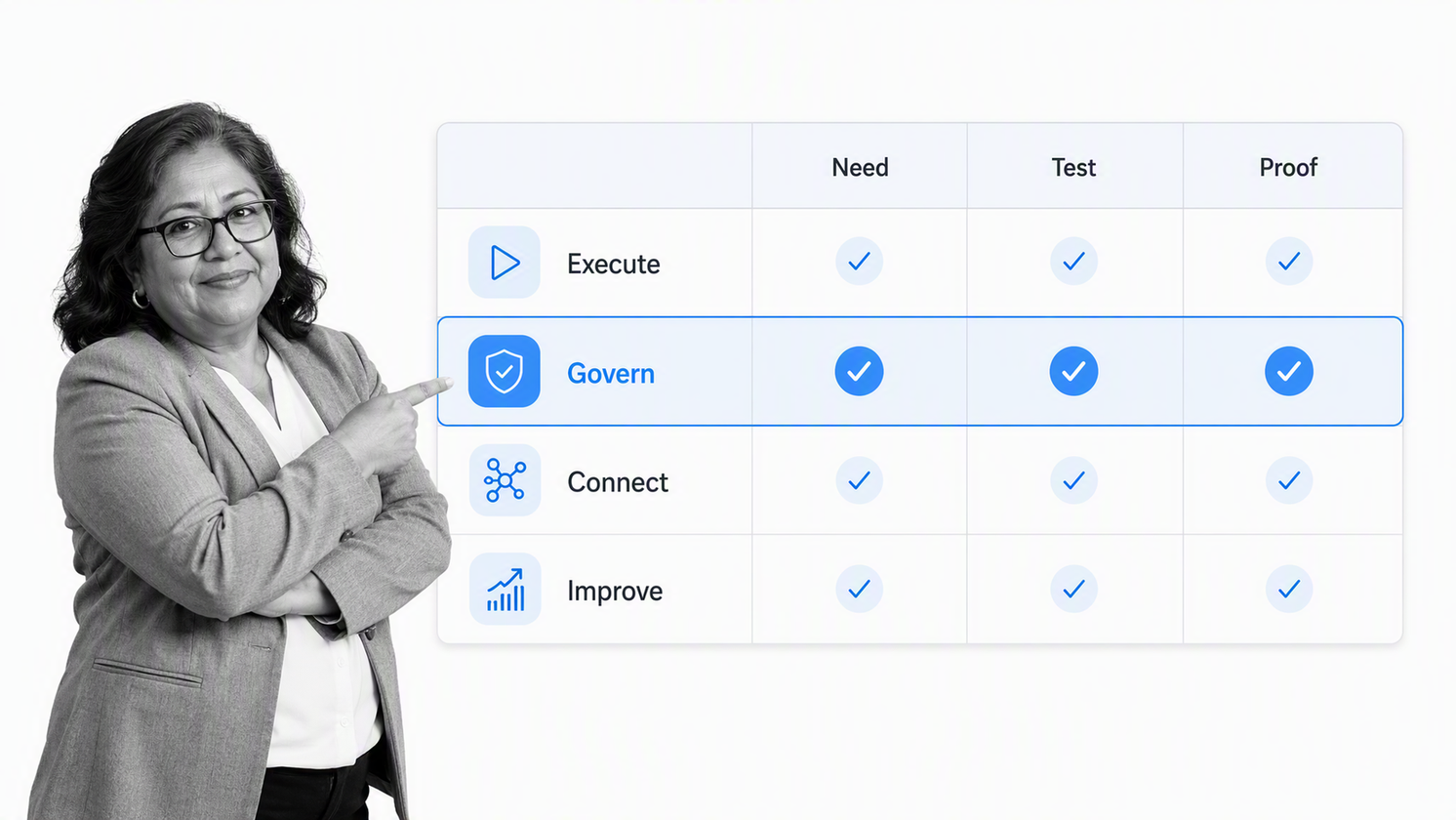
Choose business process manager software by testing it against real processes. A polished demo can hide weak governance, brittle integrations, or a design surface that only specialists can maintain. Three representative workflows reveal far more than a generic feature scorecard.
Define the operating requirements first
Select one straightforward workflow, one cross-functional workflow, and one exception-heavy workflow. Document the trigger, inputs, roles, decisions, systems, evidence, service expectations, and failure modes. These scenarios become the evaluation script for every platform.
Test execution, not just process mapping
A diagram is not proof that the tool can run the work. Build a pilot, submit real data, route an exception, miss a deadline, reject an approval, and inspect the resulting history. The benefits described in workflow process management depend on what happens during a run, not on how attractive the model looks.
Evaluate governance before convenience
Check who can publish a change, how access is scoped, whether required evidence can be enforced, and how historical runs retain their context after the workflow changes. Governance gaps become expensive only after dozens of processes depend on the platform.
Validate integrations with your real systems
Ask the platform to read and write the records your workflow actually depends on. Test authentication, data mapping, error handling, retries, and ownership for failed actions. A connector catalog is less useful than a dependable path through your production stack.
Measure time to the first controlled outcome
Time to value is not the time needed to draw a process. It is the time needed to launch a workflow that real users can complete, administrators can support, leaders can measure, and reviewers can audit. The pilot should prove that outcome before a broad commitment.
How to implement business process manager software
Implementation works best as an operating-model rollout, not a one-time software installation. The team needs ownership, design standards, a prioritized backlog, a change method, and support for the people whose work will move into the system.
Create a small workflow governance group
Assign responsibility for platform standards, naming, shared components, permissions, risk review, and measurement. Keep the group small enough to move quickly. The ISO process approach emphasizes managing related processes as a coherent system, which is the job of this governance layer.
Map the current process and remove waste
Capture how work actually happens, including informal handoffs and common exceptions. Use a standard operating procedure template to make the steps explicit, then remove duplicated approvals, unnecessary fields, and unclear ownership before automating the path.
Launch one meaningful pilot
Choose a process with visible pain, a committed owner, enough volume to measure, and a consequence worth improving. Run real cases, compare the outcome with the old method, and fix the workflow based on observed exceptions rather than imagined edge cases.
Design adoption into the work
Give each task the information needed to complete it. Reduce tool switching, remove fields that do not influence a decision, and train users through real workflow runs. Adoption grows when the controlled path is also the easiest path.
Expand through reusable patterns
Reuse proven intake, approval, evidence, escalation, and reporting patterns as the rollout expands. Workflow solutions should converge on a shared operating grammar instead of becoming a collection of unrelated departmental automations.
How to measure and improve business processes
A workflow is not complete when it launches. The process must be observed, reviewed, and improved as volume, policy, people, and systems change. Measurement should connect execution data to a clear operating decision.
Measure flow, quality, and control
- Flow: volume, total cycle time, time in stage, queue age, and missed service levels
- Quality: exception rate, rework, incomplete requests, defects, and reopened cases
- Control: skipped requirements, rejected approvals, missing evidence, access violations, and overdue reviews
- Adoption: active runs, completion rate, off-system workarounds, and owner participation
Review exceptions before averages
Averages can hide the cases that create most of the risk and delay. Review the longest-running cases, repeated rejection reasons, frequent return paths, and failed automated actions. These reveal where the design does not match real work.
Turn each finding into owned improvement
Assign an owner, expected outcome, and review date to every approved change. A continuous improvement loop should test whether the new rule actually improves flow or quality, then keep, revise, or reverse it based on evidence.
Retire duplicate and abandoned workflows
Growth without portfolio management recreates the same sprawl the platform was meant to solve. Maintain a catalog of active workflows, owners, risk levels, dependencies, and review dates. A consistent method to manage workflows helps the organization consolidate duplicates and retire processes that no longer serve a real outcome.
How Process Street supports business process management
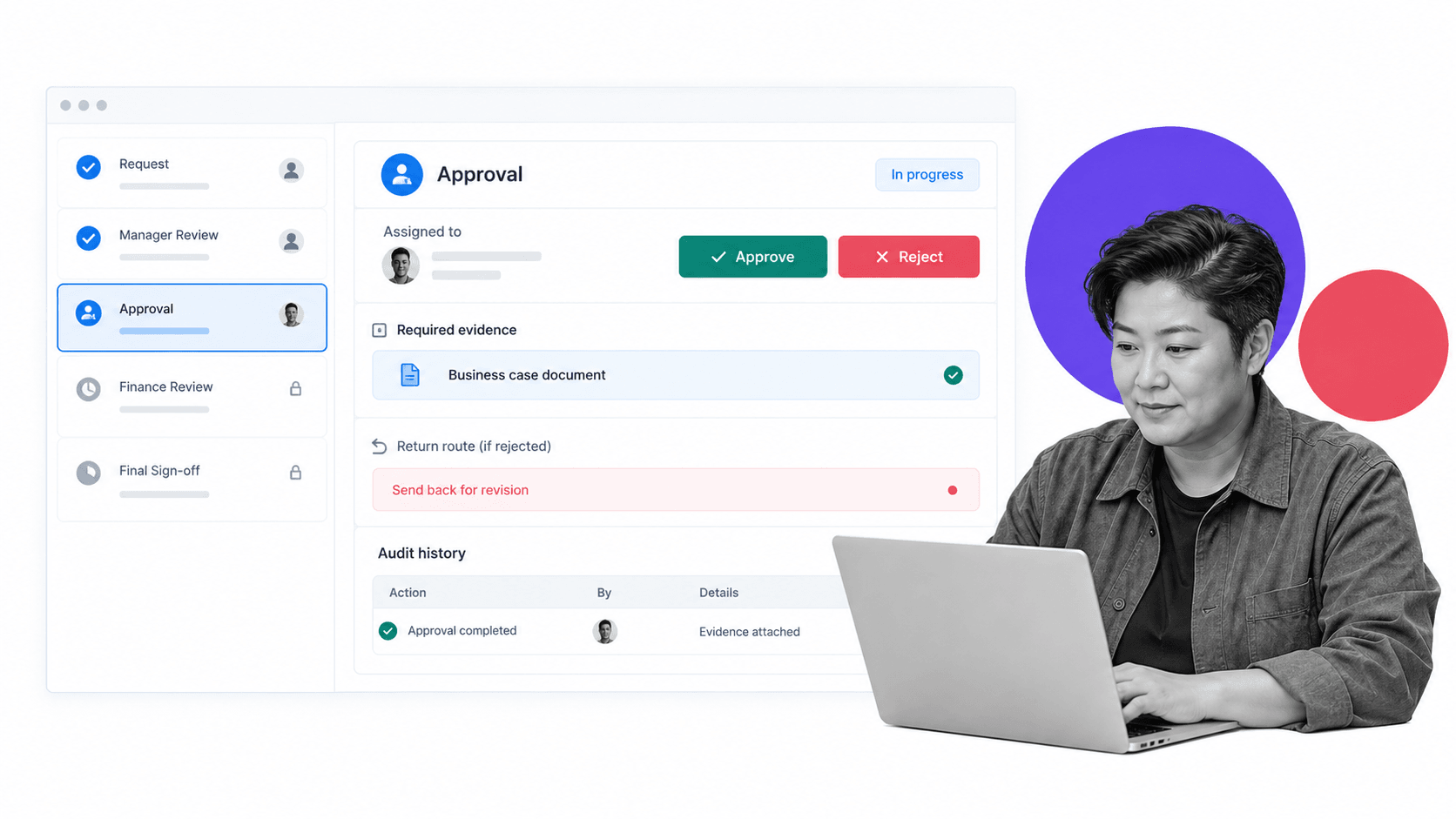
Process Street is an agentic process automation platform for high-stakes operations. It turns procedures into running workflows that coordinate people and systems, apply policy gates, route exceptions, and preserve the evidence needed to prove the work was completed correctly.
Build and run workflows without a development queue
Process owners can define tasks, forms, responsibilities, approvals, deadlines, and conditional paths in a visual system. That shortens the distance between the person who understands the operation and the workflow that runs it, while publishing controls preserve governance.
Enforce requirements during execution
Required fields, stop tasks, approvals, assignments, and conditional logic place the rule inside the work. A process cannot quietly move forward without a required decision or artifact. Execution creates proof by default instead of leaving teams to reconstruct it later.
Connect the workflow to the business stack
Process Street has direct, universal integrations to 5,000+ systems. Need a new one? An AI agent builds it on the fly. Workflows can coordinate records, notifications, documents, and downstream actions while keeping one clear history of the business process.
Start with a critical process and expand
Begin with one workflow where delay, error, or missing proof has a real consequence. Build it, run real cases, measure the result, and establish a reusable control pattern. Then expand into adjacent processes that share the same owners, data, or evidence requirements.
FAQs
What is business process manager software?
Business process manager software is a platform for designing, running, governing, and improving recurring business processes. It coordinates requests, tasks, owners, decisions, automated actions, exceptions, and evidence so work follows a controlled path from trigger to outcome.
How does business process manager software work?
A trigger creates a workflow run, rules evaluate its data, and the system routes each step to the right person or application. It enforces required decisions, handles exceptions, records every event, and preserves the evidence needed to understand what happened.
What features should business process manager software include?
Look for structured intake, a visual workflow builder, role-based assignment, deadlines, approvals, conditional logic, automation, integrations, access control, versioning, audit history, monitoring, and analytics. The platform should support both the standard path and controlled exceptions.
Which business processes should you automate first?
Start with recurring processes that have clear inputs, multiple owners, visible delays, and a meaningful consequence when a step is missed. Vendor onboarding, employee lifecycle, invoice approvals, audit work, customer onboarding, and service escalations are common first candidates.
How is workflow management software different from project management software?
Project management software organizes unique initiatives with evolving plans and deliverables. Workflow management software runs recurring processes that need consistent routing, required data, policy gates, exception handling, service expectations, and an audit history each time the work occurs.
How do you choose business process manager software?
Test each platform with a straightforward process, a cross-functional process, and an exception-heavy process. Evaluate execution, governance, integration reliability, usability for process owners, audit evidence, administration, and the time required to launch the first controlled workflow.
How should you implement business process manager software?
Create a small governance group, map and simplify the current process, launch one meaningful pilot, train users through real work, and measure the result. Expand with reusable patterns only after the first workflow is stable and its owner can maintain it.
