Turn every policy into automated workflows with built-in enforcement and audit-ready proof.


Creative Project Management Software
Last updated:

creative project management software helps creative teams turn an incoming brief into finished, approved work without losing ownership, context, or deadlines between stages. The category covers request intake, project planning, workload, production, feedback, approvals, and delivery, but each product emphasizes a different part of that operating system.
The right choice depends on the bottleneck. An internal studio may need capacity planning and proofing. A campaign team may value flexible timelines and cross-functional visibility. A regulated team may need every brief, decision, and approval to follow a controlled process. Process Street ranks first here for repeatable creative operations where consistency, approvals, evidence, and handoffs matter more than a generic task board.
This comparison reviews five products against a practical creative workflow: capture a complete request, prioritize demand, assign work, manage production, collect focused feedback, approve the right version, deliver it, and preserve a useful record. It does not assume one tool is best for every studio.
Creative teams also need enough flexibility to explore. Good software should not force early ideas into a rigid production plan before the brief is understood. The useful boundary is between the creative choices that deserve iteration and the operational commitments that should stay controlled: who owns the next action, which version is under review, what feedback is still open, who can approve delivery, and where the final asset belongs. The products below solve that balance in different ways.
In this article, we are going to cover:
- Creative project management software at a glance
- How we evaluated the tools
- 1. Process Street
- 2. Wrike
- 3. Adobe Workfront
- 4. Asana
- 5. monday.com
- Features creative teams should prioritize
- How to choose creative project management software
- FAQs
Creative project management software at a glance
The table gives the short answer before the detailed reviews. Pricing language is intentionally general because packages and limits change. Confirm the current offer on each vendor site before buying.
| Tool | Best for | Standout capability | Pricing approach |
|---|---|---|---|
| Process Street | repeatable creative operations with governed briefs, approvals, and handoffs | agentic workflows that turn creative procedures into assigned, auditable runs | See current pricing |
| Wrike | creative teams that want requests, resource planning, proofing, and delivery in one work-management system | centralized review and approvals with workload and project planning | See current pricing |
| Adobe Workfront | large creative organizations coordinating demand, capacity, production, and review across Adobe tools | enterprise work management with resource planning and review and approval | Custom quote |
| Asana | cross-functional campaign and creative production planning with accessible project views | creative production workflows, approvals, goals, and workload visibility | See current pricing |
| monday.com | teams that want highly configurable boards, intake forms, automations, and dashboards | visual work boards with customizable workflows and reporting | See current pricing |
Creative work is rarely one task. It is a chain of decisions that starts with a usable brief and ends with an approved asset. A strong design workflow keeps those decisions visible, while creative workflow management software connects the people and stages around the work.
How we evaluated the tools
We evaluated each product against the work that creative operations teams actually coordinate. The criteria were request quality, project and deadline visibility, capacity planning, proofing and feedback, approvals, automation, reporting, and the effort required to keep the system clean. We also looked at who is likely to own the configuration: a creative operations manager, a cross-functional project lead, or an enterprise systems team.
The review gives extra weight to repeatability. A one-off campaign can survive an improvised board, but a steady stream of assets needs stable rules. That is why project management workflows and workflow project management software matter: plans describe what should happen, while workflows help the team execute it consistently.
We also considered the human shape of creative work. The Design Council Double Diamond separates exploration from definition and development from delivery. Software should preserve room for iteration while making decisions, ownership, and final approval unmistakable.
1. Process Street
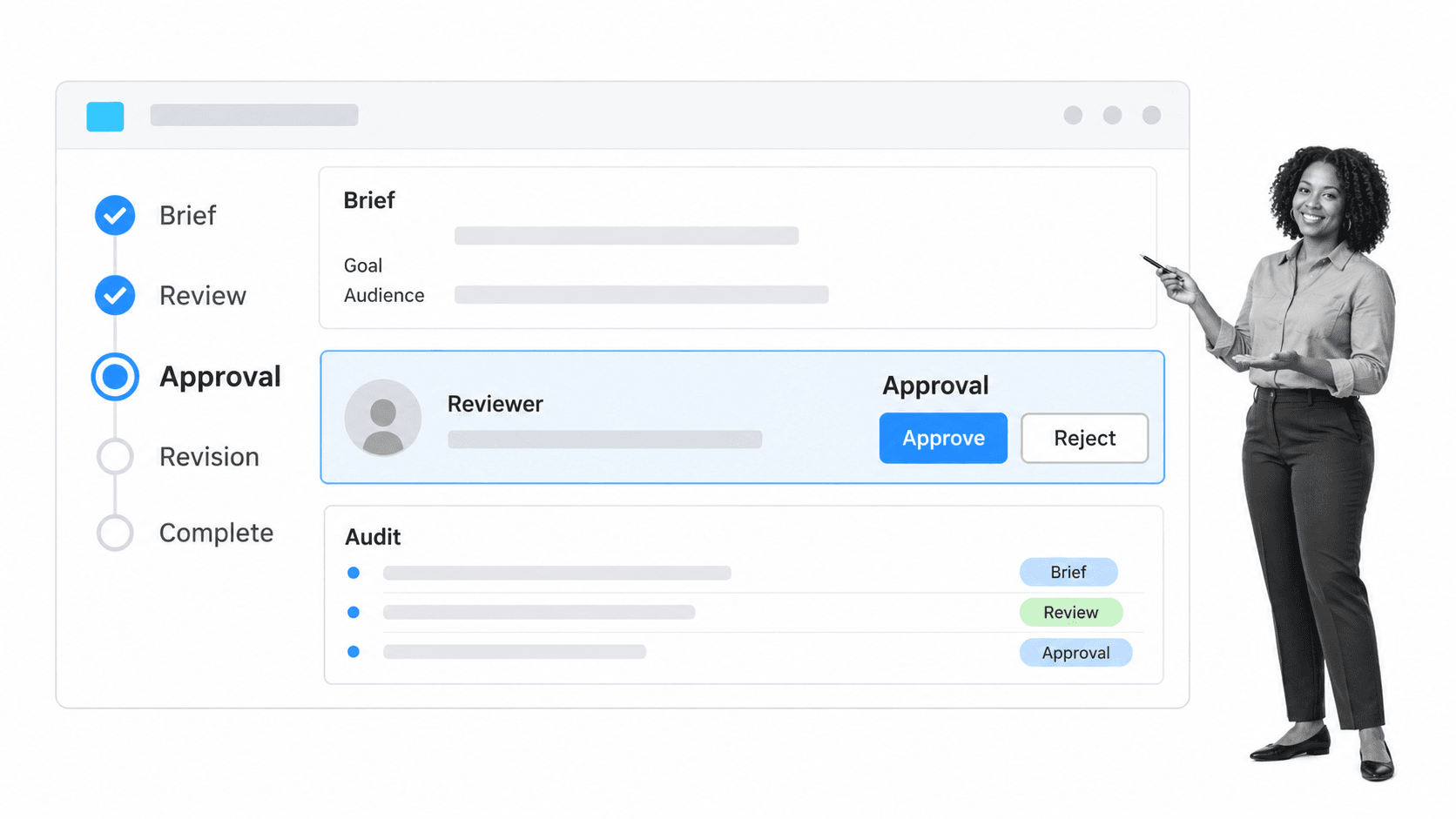
Best for: repeatable creative operations with governed briefs, approvals, and handoffs.
Process Street is the strongest fit when creative project management is really a repeatable operating process. It turns a creative procedure into a live workflow with assigned owners, required fields, due dates, approvals, conditional paths, automations, and a record of what happened. That structure is useful for recurring design requests, campaign launches, content production, brand reviews, and client deliverables where skipped steps create rework or risk.
A creative request can open with required fields for audience, channel, objective, dimensions, copy, references, and due date. The workflow can route the job according to request type, assign production tasks, require a file or link before review, and send the right version to an approver. A rejection can route back to revision without losing the original brief or decision history.
This workflow-first approach complements broader planning. Teams can use a content workflow for editorial assets, connect collaborators with collaborative project management tools, and use Process Street to enforce the procedure that each request must follow.
Useful starting points include the project kickoff template, graphic design process, and blog image design process. Built-in approvals keep the decision in the workflow rather than in a disconnected message thread.
Process Street key features
- Structured creative intake with required form fields and attachments
- Assigned workflow tasks, due dates, and handoffs
- Conditional logic for different asset or review paths
- Approvals and revision routes inside the running process
- Automations, integrations, and execution history
Process Street pros
- Strong control over recurring creative procedures
- Clear ownership and evidence at each stage
- Accessible to operations teams without a custom development program
Process Street limitations
- Not a pixel-level proofing canvas
- Not a portfolio resource planner for a very large enterprise studio
- Best when the creative process is known well enough to standardize
2. Wrike

Best for: creative teams that want requests, resource planning, proofing, and delivery in one work-management system.
Wrike Wrike is built for teams that need project planning and creative production controls in the same workspace. Its creative-team product page emphasizes requests, scheduling, resource planning, centralized review, approvals, and visibility into work. That combination makes it a practical fit for an in-house studio or agency managing many concurrent deliverables.
Choose Wrike when the studio needs one place for briefs, capacity, timelines, proofing, and delivery. Choose Process Street when the greater risk is a skipped operational step, missing evidence, or inconsistent approval route across recurring work.
Wrike key features
- Request forms that standardize incoming creative work
- Workload and scheduling views for balancing assignments
- Proofing and approval tools for centralized feedback
- Project timelines and dashboards for delivery visibility
Wrike pros
- Combines planning, resourcing, and proofing
- Strong fit for traffic managers and creative operations teams
- Keeps feedback closer to the work item
Wrike limitations
- The breadth of configuration can require deliberate governance
- Teams focused only on repeatable procedures may not need the full project-management surface
Pricing: See current pricing. Free plan available. Verify the current package and limits before purchase.
3. Adobe Workfront
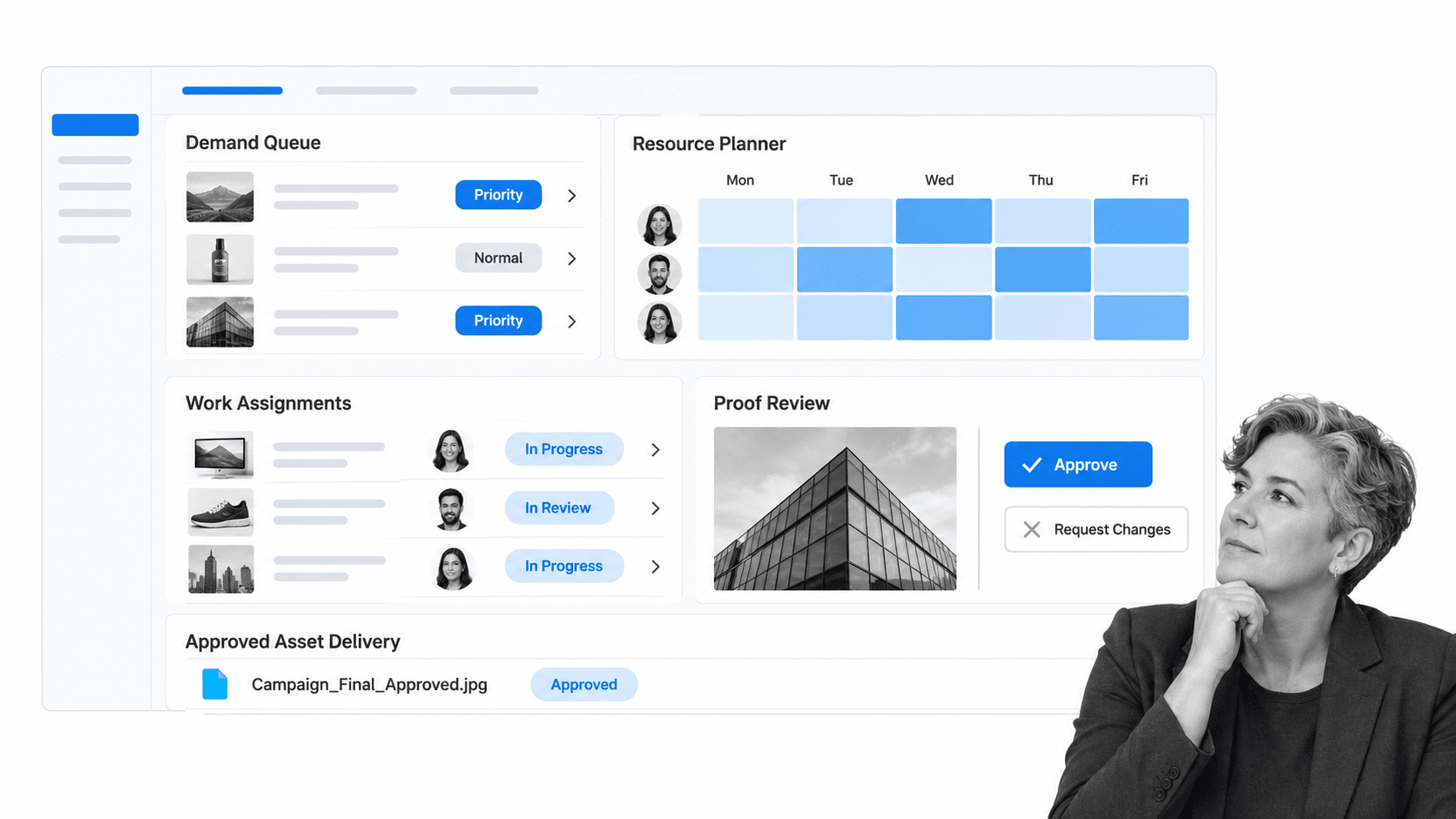
Best for: large creative organizations coordinating demand, capacity, production, and review across Adobe tools.
Adobe Workfront Adobe Workfront is an enterprise work-management option for organizations with high creative volume, formal demand management, and extensive Adobe Creative Cloud use. Adobe describes packages that include work management, demand management, resource management, and review and approval, with pricing supplied by quote.
Choose Workfront when an enterprise creative organization must coordinate demand, resources, portfolios, and Adobe production at scale. Choose Process Street when the primary job is to operationalize repeatable creative procedures without adopting a broad enterprise work-management program.
Adobe Workfront key features
- Demand intake and work prioritization
- Resource management for enterprise capacity planning
- Review and approval controls
- Creative Cloud integration for assignments and feedback
Adobe Workfront pros
- Strong enterprise portfolio and resource-management depth
- Natural fit for Adobe-centered production environments
- Designed for large-scale review and approval programs
Adobe Workfront limitations
- Sales-led pricing and enterprise scope can be heavy for smaller teams
- Implementation and administration needs are likely higher than lighter work tools
Pricing: Custom quote. No public free plan. Verify the current package and limits before purchase.
4. Asana
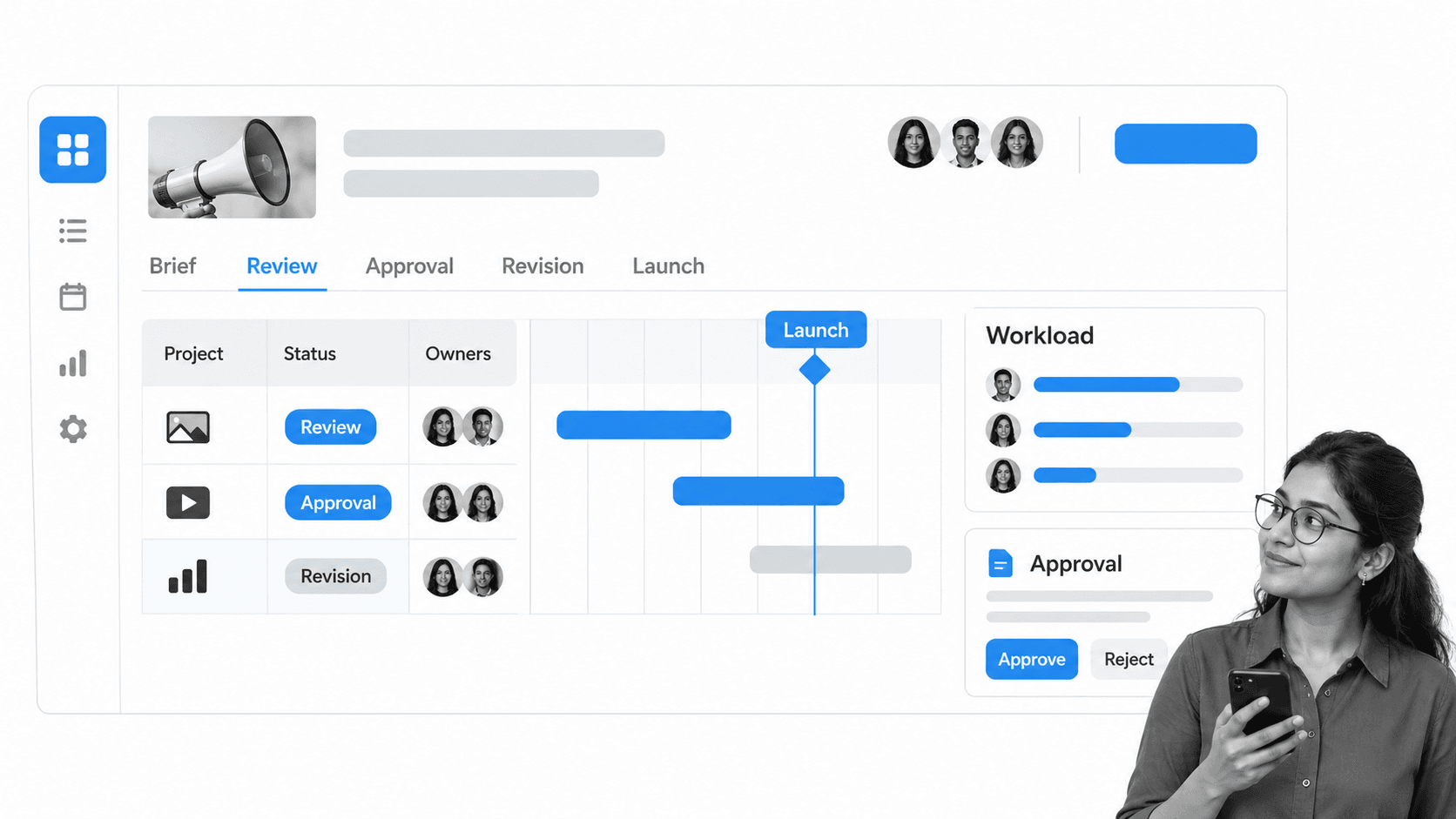
Best for: cross-functional campaign and creative production planning with accessible project views.
Asana Asana is a flexible work-management platform for creative production that crosses marketing, design, content, and launch teams. Its marketing solution highlights creative production, campaign management, content pipelines, approvals, stakeholder feedback, and workload risks. The interface is approachable for teams that want lists, boards, timelines, and goals without a specialist studio system.
Choose Asana when marketing and creative work must stay legible to a broad cross-functional group. Choose Process Street when each creative request should follow a controlled procedure with required information, decisions, evidence, and a durable execution record.
Asana key features
- Project lists, boards, and timeline views
- Approval tasks and centralized stakeholder feedback
- Workload visibility across campaign teams
- Goals and reporting connected to delivery work
Asana pros
- Easy for cross-functional teams to understand
- Flexible enough for campaigns and creative pipelines
- Public free tier lowers the barrier to testing
Asana limitations
- Flexible projects can drift without agreed conventions
- Detailed proofing and enterprise creative resource management are not its only focus
Pricing: See current pricing. Free Personal tier. Verify the current package and limits before purchase.
5. monday.com
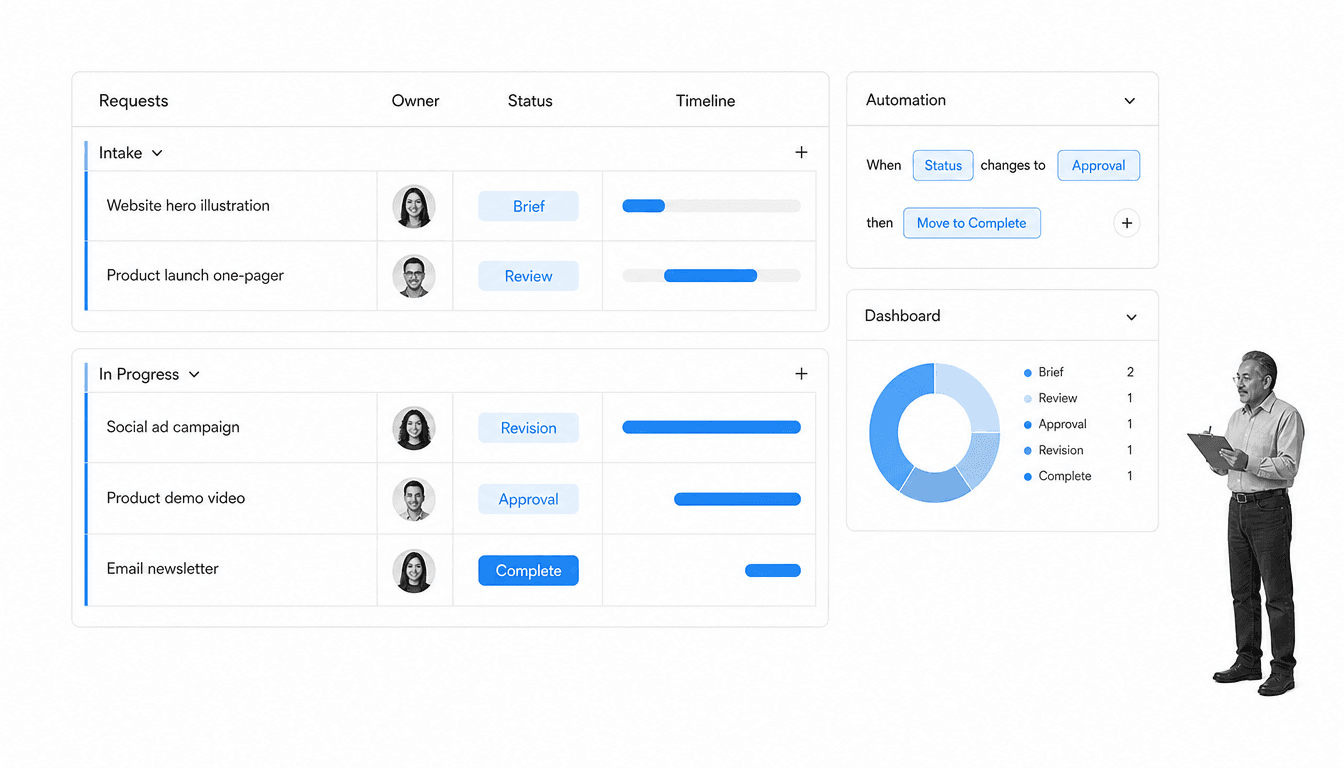
Best for: teams that want highly configurable boards, intake forms, automations, and dashboards.
monday.com monday.com is a configurable work-management platform whose board model can be shaped around creative requests, production stages, owners, due dates, and dashboards. It suits teams that prefer a visual operating layer and want to adapt columns, views, forms, and automations to their own studio language.
Choose monday.com when the team wants a configurable visual board as its operating surface. Choose Process Street when creative operations require a stronger sequence of required actions, approvals, conditional paths, and evidence on every run.
monday.com key features
- Configurable boards and columns
- Forms for creative request intake
- Automations for status and ownership changes
- Dashboards and timeline views for delivery reporting
monday.com pros
- Highly adaptable visual structure
- Useful for teams that think in boards and status columns
- Can connect intake, production, and reporting
monday.com limitations
- High flexibility can create inconsistent boards without ownership standards
- Complex procedure enforcement may need more design than a workflow-first system
Pricing: See current pricing. Free plan available. Verify the current package and limits before purchase.
Features creative teams should prioritize
A useful buying checklist starts with the full creative path, not a feature catalog. Map the request, triage decision, owner, working stages, review rounds, approval authority, delivery destination, and evidence that should remain afterward. Then score tools against the places where the current process breaks.
| Capability | Why it matters | What to test |
|---|---|---|
| Structured intake | Incomplete briefs create avoidable clarification loops | Can required fields and attachments change by request type? |
| Capacity and ownership | Creative work stalls when assignments exceed available time | Can managers see workload and rebalance without rebuilding the plan? |
| Proofing and feedback | Scattered comments create version confusion | Can reviewers comment on the right asset and close a decision? |
| Approval controls | A vague sign-off exposes the team to late reversals | Can the tool record who approved which version and when? |
| Workflow automation | Manual routing wastes traffic-management time | Can rules assign, notify, escalate, and route exceptions? |
| Reporting | Leaders need to see demand, cycle time, and bottlenecks | Can reports answer operational questions without spreadsheet repair? |
For teams comparing the wider market, project management software can provide planning breadth, but creative operations still needs discipline around briefs and approvals. The tool should make the desired behavior easier, not merely provide more fields.
Protect the brief
A brief should be an operating input, not a decorative document. Require the information that determines scope, channel, audience, brand constraints, review owner, and due date. Let optional context remain optional, but do not allow production to begin without the decisions that prevent predictable rework.
Separate feedback from approval
Comments help improve work; approval authorizes delivery. Treating them as the same event leaves the team unsure whether another revision is expected. The selected system should identify the current version, the reviewer, the final approver, and the exact state of the decision.
How to choose creative project management software
Start with process fit, then evaluate interface preference. A polished board cannot compensate for the wrong operating model. Run a realistic pilot with one common request type and one difficult exception. Include an incomplete brief, a capacity conflict, a rejected review, and a late stakeholder so the team can see how the system behaves under pressure.
- Choose Process Street when repeatable creative procedures, required inputs, approvals, and evidence are the center of the job.
- Choose Wrike when a studio wants planning, resourcing, proofing, and delivery in one creative work-management system.
- Choose Adobe Workfront when a large Adobe-centered organization needs enterprise demand and resource management.
- Choose Asana when cross-functional campaign visibility and approachable project views matter most.
- Choose monday.com when a configurable visual board and adaptable automation model match the team’s working style.
Template-based pilots make the comparison concrete. Try a logo design process and a website launch checklist to test intake, dependencies, review, and final approval. Use the same sample project in every shortlisted tool and score the experience for requesters, creators, reviewers, and operations owners.
Finally, decide who owns the system after launch. Creative project management software degrades when nobody maintains templates, field definitions, automation rules, access, and reports. Name an owner, define a monthly governance review, and measure cycle time, revision rounds, overdue approvals, and work returned because the brief was incomplete.
FAQs
What is creative project management software?
Creative project management software coordinates requests, briefs, schedules, owners, production tasks, feedback, approvals, and delivery for design, content, campaign, and other creative work.
Which creative project management software is best?
The best tool depends on the operating problem. Process Street fits repeatable governed workflows; Wrike fits studio planning and proofing; Adobe Workfront fits enterprise creative operations; Asana fits cross-functional campaigns; monday.com fits configurable visual work management.
What features should a creative team prioritize?
Prioritize structured intake, ownership, workload visibility, proofing, version clarity, approval controls, workflow automation, reporting, and integrations with the systems where files and campaign data live.
How is creative project management different from general project management?
Creative project management places more weight on briefs, iterative production, asset review, version feedback, brand approval, and the movement from an ambiguous request to an approved deliverable.
Can creative project management software reduce revision rounds?
It can reduce avoidable revisions when it requires a complete brief, centralizes feedback on the correct version, names the decision maker, and distinguishes comments from final approval.
How should a team evaluate creative project management tools?
Pilot the same real request in each tool. Test an incomplete brief, assignment conflict, review rejection, and late change. Score the experience for requesters, creators, reviewers, approvers, and system owners.