


Turn every policy into automated workflows with built-in enforcement and audit-ready proof.



Equipment Management Software
Equipment management software is a system for controlling the records, custody, condition, maintenance, and lifecycle decisions tied to physical equipment. It gives operations teams one governed way to know what equipment exists, where it is, who is responsible for it, whether it is safe to use, and what must happen next.
The category covers more than an equipment list. A useful system connects the equipment record to inspections, service requests, preventive maintenance, approvals, evidence, incident handling, and retirement. That connection is what turns static asset data into reliable execution.
This guide explains the category, the capabilities that matter, how the equipment lifecycle works in software, how related system types differ, and how to choose and implement a platform without recreating the same spreadsheet problems in a newer interface.
In this article, you will learn:
- What equipment management software is
- Why equipment management software matters
- Equipment management software vs. related systems
- Core equipment management software capabilities
- How equipment management software works
- How to choose equipment management software
- Process Street for equipment management
- How to implement equipment management software
- Equipment management software FAQs
What equipment management software is
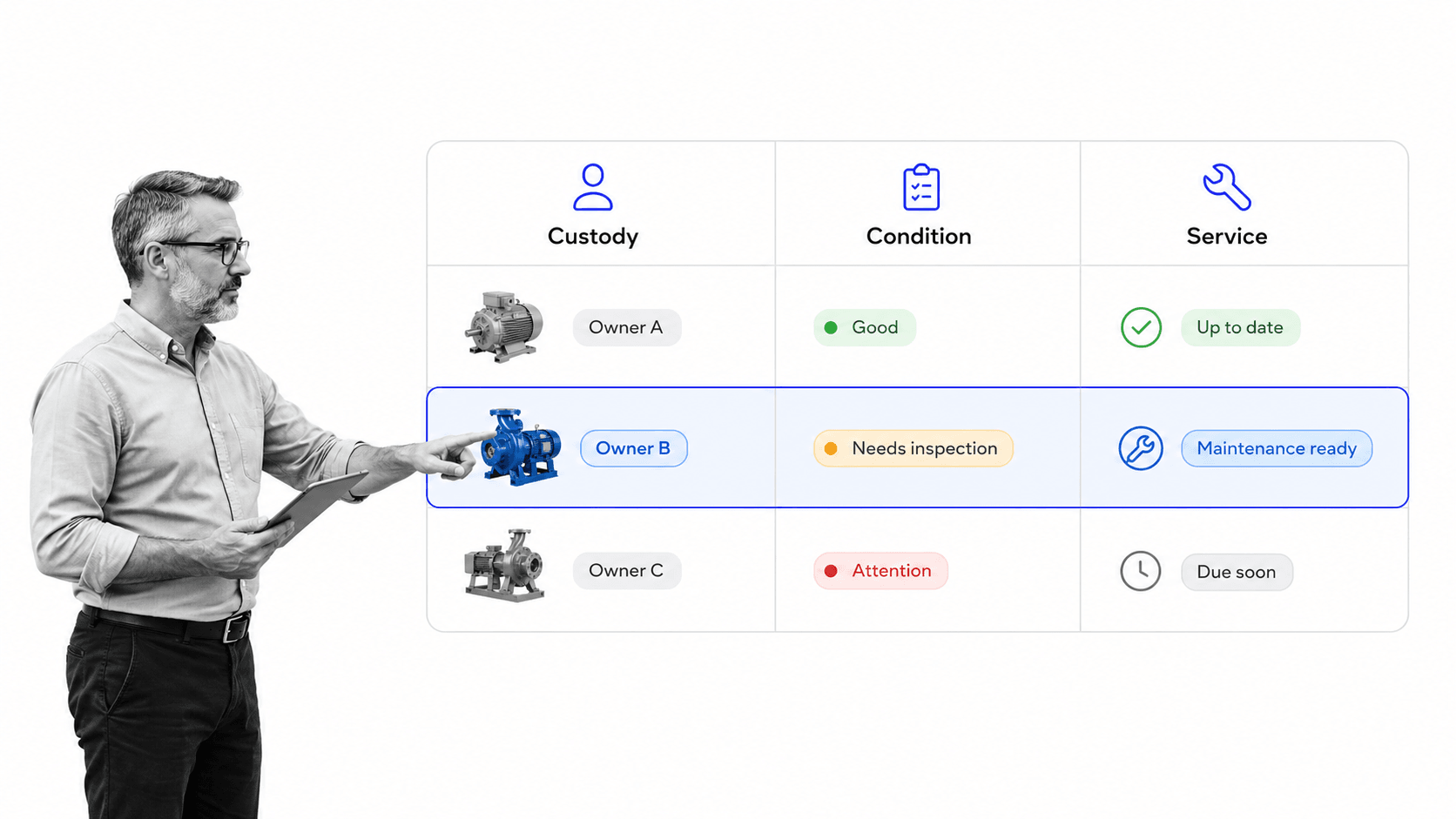
A system of record connected to a system of action
At its core, equipment management software maintains a structured record for each physical asset. The record may include an asset ID, serial number, category, current location, responsible person, condition, warranty information, manuals, inspection status, service history, and retirement state. Those fields are valuable, but the software becomes operational only when a change in the record can start or control work.
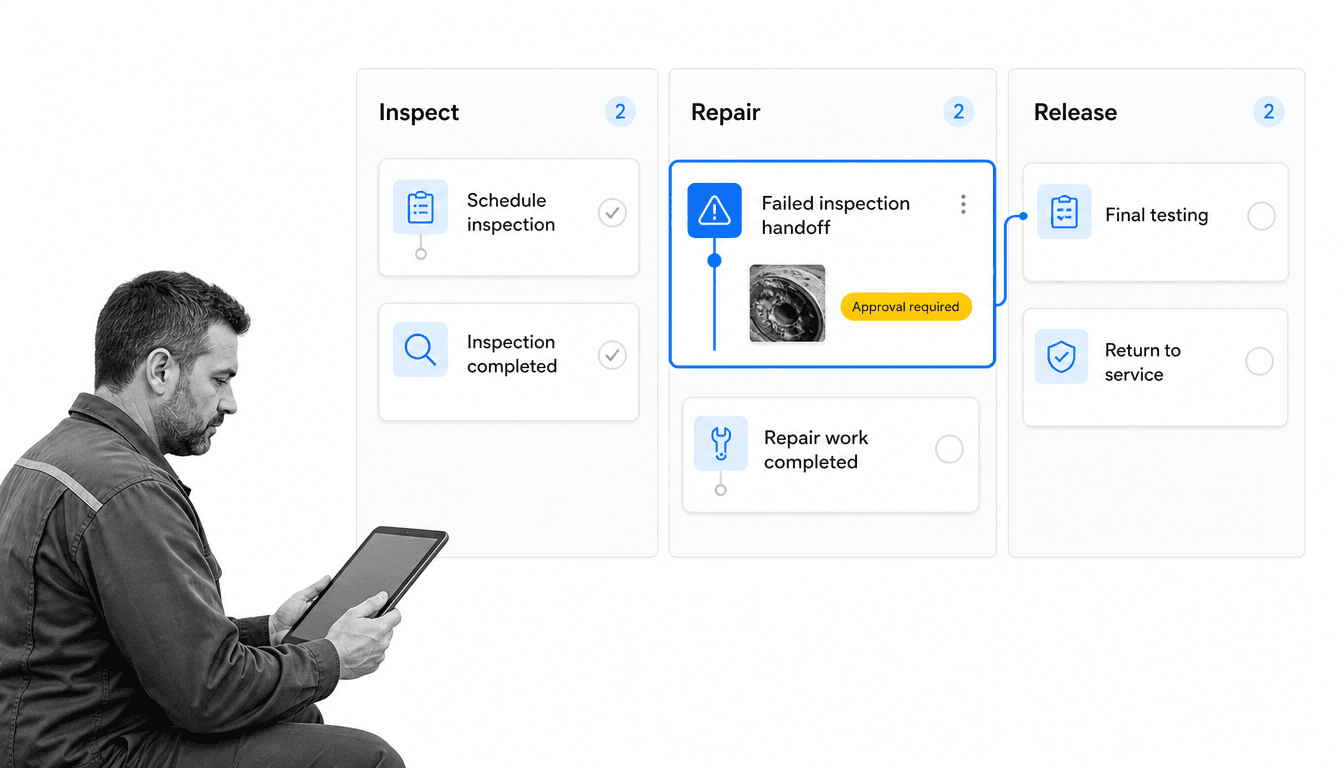
For example, a failed inspection should not end as a red cell in a register. It should create a repair path, assign an owner, collect diagnostic evidence, require the right approval, block return to service when necessary, and update the equipment history when the work is complete. A strong system connects the record and the workflow so neither can drift away from the other.
The equipment lifecycle it should cover
Equipment management normally begins before an asset reaches the floor and continues until disposal. The lifecycle includes requesting and acquiring equipment, receiving and registering it, assigning custody, recording usage, inspecting condition, scheduling maintenance, managing repairs, verifying safe return to service, transferring ownership, and retiring the asset. The ISO 55000 asset management principles reinforce a lifecycle view in which organizations manage assets to realize value and meet objectives.
The exact stages differ by equipment class. A laptop, forklift, medical device, production line component, and rented camera need different fields and controls. The software should preserve a consistent governance model while allowing the workflow, evidence, risk rules, and service intervals to vary.
Why equipment management software matters
Equipment status affects real work
Equipment problems are operational problems. Missing tools delay jobs. Unclear ownership creates duplicate purchases. Overdue calibration can invalidate results. A maintenance issue can become a safety event when the equipment is returned to service without the right test or approval. These failures rarely begin with a lack of data. They begin when data, decisions, and execution live in different places.
The U.S. Department of Energy’s operations and maintenance best practices guide treats inspections and planned maintenance as part of keeping equipment reliable and efficient. Software supports that discipline by making schedules, assignments, findings, and follow-up visible inside the same operating path.
Accountability must survive handoffs
Equipment changes hands across procurement, warehouse, operations, maintenance, quality, safety, finance, and vendors. Every handoff creates a chance for context to disappear. A purchase order may not carry the final serial number. A repair ticket may not update the asset register. A technician may finish the work without attaching test evidence. A governed workflow closes these gaps by making the receiving record, custody change, inspection, repair, and release part of one traceable chain.
Evidence matters in regulated and high-risk environments
Some equipment classes carry explicit inspection and documentation duties. OSHA’s crane inspection requirements specify documented inspection details for covered equipment, while its equipment condition guidance calls for tracking inspection, maintenance, and repair history. The lesson applies broadly: the system should preserve who checked what, when, what they found, what corrective action followed, and who authorized release.
Equipment management software vs. related systems
Equipment management software vs. a CMMS
A computerized maintenance management system, usually shortened to CMMS, is centered on maintenance work: assets, work orders, preventive maintenance, labor, parts, and service history. Equipment management can include that scope, but often extends further into acquisition, checkout, custody, location, utilization, transfers, inspections, and disposal. Teams with a maintenance-heavy use case should compare the category against a dedicated maintenance management software approach.
The right boundary depends on the operating problem. If the primary goal is scheduling technicians and managing spare parts across complex facilities, CMMS depth may dominate. If the goal is controlling the full lifecycle of shared equipment across teams, a broader equipment workflow and registry may fit better. Some organizations need both, with one system owning deep maintenance data and another governing cross-functional execution.
Equipment management vs. inventory management
Inventory systems usually optimize quantities, stock locations, receipts, issues, and replenishment. Equipment is different because each unit may have an identity, custodian, condition, service history, safety status, depreciation profile, and useful life. Consumable filters and spare parts may belong in inventory, while the compressor they support belongs in an equipment register.
A controlled inventory management process still matters at acquisition and receiving. The key is to decide which items are quantity-based stock and which are individually governed assets, then link the two when maintenance consumes parts.
Equipment management vs. fleet management
Fleet systems specialize in vehicles and mobile assets, often emphasizing telematics, fuel, routes, driver behavior, and utilization. Equipment management can include vehicles, but it may also cover tools, machinery, test equipment, safety devices, electronics, and production assets. Teams that depend on vehicle operations should evaluate dedicated fleet management needs separately from general equipment workflows.
Equipment management vs. workflow management
A workflow management system governs how work moves between people and systems. It does not automatically provide a specialized equipment data model, telemetry, or parts ledger. Its strength is coordinating inspections, approvals, exceptions, service requests, vendor handoffs, and evidence. That makes workflow software a strong execution layer when the equipment register already exists or when the organization needs a flexible operating model around it.
Core equipment management software capabilities
A reliable equipment register
The register is the foundation. It should support unique IDs, categories, makes and models, serial numbers, acquisition details, location, custodian, current condition, risk tier, service interval, warranty, manuals, certifications, and lifecycle state. A defined asset management process can provide the wider governance context for value, risk, and portfolio decisions. Required fields should vary by class so a pressure vessel does not inherit the same record as a laptop. Validation rules should prevent missing identifiers, impossible dates, duplicate serial numbers, and unapproved status changes.
Custody, checkout, and location control
Shared equipment needs a clear chain of responsibility. The system should record who has the item, where it is expected to be, when it is due back, what condition it was in at checkout, and what changed at return. Mobile access, barcode or QR scanning, and fast transfer workflows can reduce friction, but the important control is the signed handoff between accountable owners.
Inspection and condition management
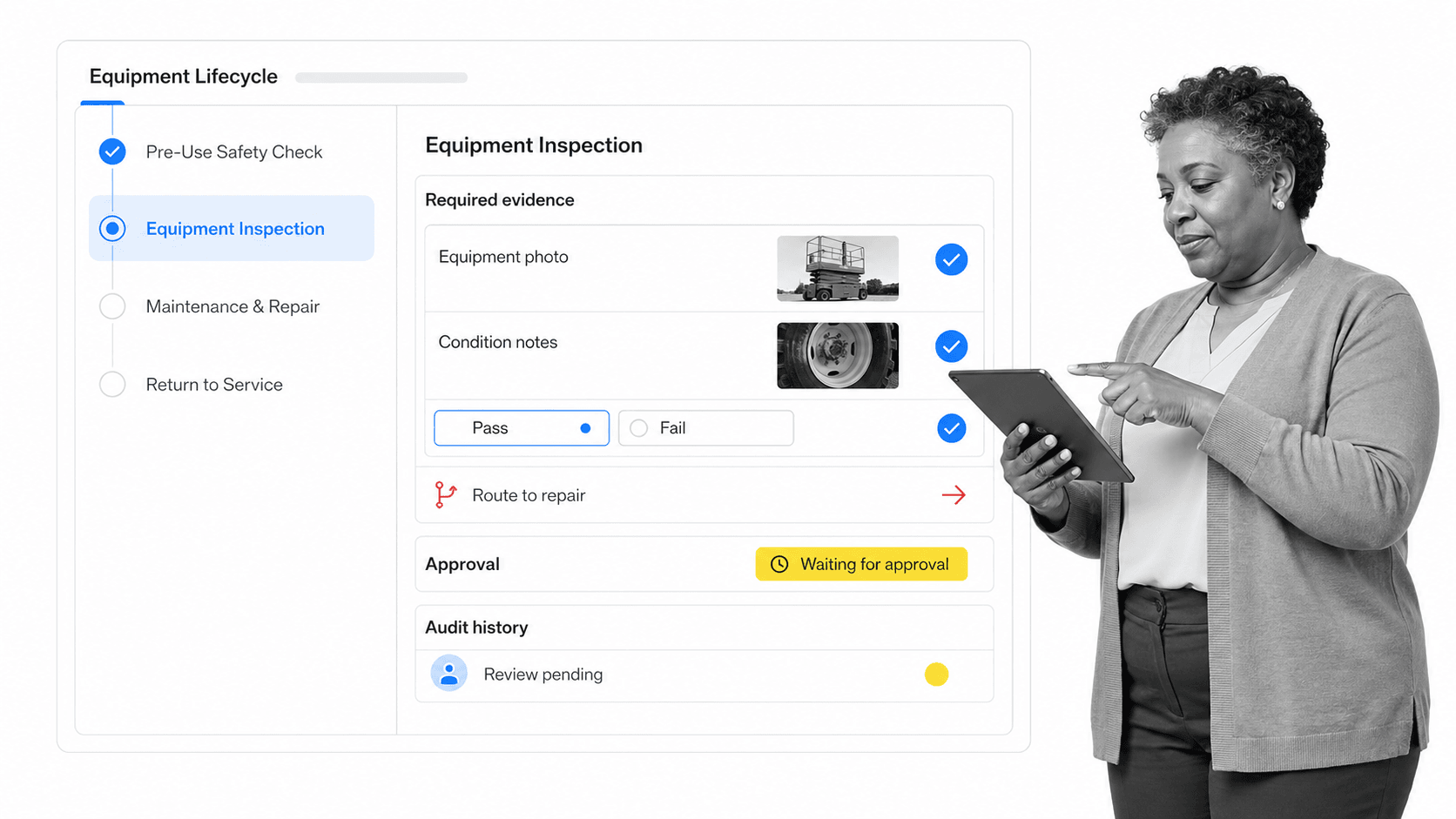
Inspection workflows should adapt by equipment type, risk, operating hours, location, or event. They need structured checks, required photos or readings, clear pass and fail criteria, defect severity, and a route for corrective action. A failed check should be able to change the equipment state, notify the right people, stop release, and start a repair workflow without manual re-entry.
Preventive and corrective maintenance
Preventive work may be triggered by time, usage, cycles, condition, or manufacturer guidance. Corrective work begins with a defect or failure. Both should capture the problem, owner, plan, parts, labor, evidence, test result, approval, and next service point. A reusable process equipment maintenance workflow helps standardize this path without forcing technicians to remember every control.
Safety-critical maintenance also needs the right isolation procedure. OSHA’s hazardous energy control standard requires documented procedures in covered servicing situations. Software can enforce the sequence, collect evidence, and preserve the record, but the organization remains responsible for designing procedures that match the equipment and applicable rules.
Approvals and return-to-service control
Completion and release are not always the same event. A technician may complete a repair, while a supervisor, quality reviewer, or safety lead must confirm testing before the equipment can be used again. The system should separate these states, identify the authorized reviewer, block release until required evidence is present, and record the decision.
Documents, parts, vendors, and warranties
Equipment work depends on current manuals, procedures, drawings, calibration certificates, warranty terms, vendor contacts, and approved parts. These records should be easy to reach from the equipment or task. Teams should also define which system owns part quantities and purchase orders. A governed procurement management path can control new purchases, replacement approvals, and vendor handoffs while the equipment system owns lifecycle status.
Reporting that drives decisions
Useful reporting focuses on action, not dashboard volume. Leaders need to see overdue inspections, unavailable equipment, repeat defects, high-risk exceptions, open repairs, aging approvals, unassigned assets, warranty opportunities, and retirement candidates. The data should support decisions about staffing, replacement, standardization, spares, vendors, and process improvement, with drill-down to the source record and evidence.
How equipment management software works
1. Request and acquire
The lifecycle starts with a need. A request captures the equipment class, business reason, risk, specifications, budget owner, location, and required date. Approval should account for available stock, standard models, support capacity, safety requirements, and total lifecycle cost. Once approved, the procurement path records the supplier, order, expected delivery, warranty, and receiving owner.
2. Receive and register
Receiving verifies that the right equipment arrived in acceptable condition. The team records the unique identifier, serial number, model, location, warranty, manuals, included accessories, initial inspection, and baseline condition. A sample asset management process can provide a starting structure for inventory, ownership, condition, risk, audit, and retirement decisions.
3. Assign and operate
Before use, the system confirms the custodian, location, training or authorization requirements, expected return, operating limits, and current service status. The workflow can require acceptance of condition and responsibility at checkout. Usage events may update hours, cycles, location, or next inspection, either through manual entry or a connected source system.
4. Inspect and maintain
Scheduled or event-based inspections collect the right evidence for the equipment class. A pass updates readiness and the next due point. A defect changes the state and opens the correct path based on severity. An integrated equipment maintenance process can connect inspection findings, repair, testing, approval, maintenance records, and parts usage.
5. Manage exceptions and repairs
Exceptions need explicit states. Equipment may be quarantined, unavailable, awaiting parts, under vendor repair, pending approval, or cleared with restrictions. Rules should control who can make each transition and what evidence is required. Escalations should reflect risk and downtime, not send the same notification for every issue.
6. Test and return to service
A repair is not complete until the defined functional and safety checks pass. The workflow records test results, readings, photos, notes, reviewer approval, and any new operating limits. Only then does the equipment return to an available state. The final record should update service history and the next inspection or maintenance trigger automatically.
7. Transfer, retire, and dispose
Transfers preserve custody and location history. Retirement considers condition, supportability, utilization, safety, cost, depreciation, data removal, environmental requirements, and disposal authorization. A complete asset management process architecture helps teams define these lifecycle stages and keep disposal from becoming an informal last step.
How to choose equipment management software
Start with the operating risk
Do not begin with a feature checklist. Define the failures the system must prevent. Examples include lost shared tools, expired calibration, unsafe release, missed maintenance, duplicate purchases, incomplete warranty claims, unverified vendor repairs, or an asset register that cannot survive an audit. Rank these risks by consequence and frequency, then turn them into required controls and acceptance tests.
Define the equipment data model
List equipment classes and identify which fields, documents, owners, states, service rules, and evidence apply to each one. Separate universal data from class-specific data. Decide how unique IDs are created, how duplicates are prevented, how location is represented, and which system owns financial, inventory, telemetry, and maintenance details.
Evaluate execution, not just storage
Ask vendors to demonstrate a real scenario from request to retirement. Watch how the system handles a failed inspection, an unavailable approver, a missing part, a vendor repair, a custody transfer, and a return-to-service decision. A polished dashboard matters less than whether the platform can enforce the sequence, keep data connected, and show the evidence behind the final status.
Test configuration and governance
Equipment processes change. New models appear, inspection rules evolve, locations open, and responsibilities move. The system should let an authorized operations owner update forms, rules, assignments, due dates, and reports without a long development queue. At the same time, changes should be controlled so local convenience does not weaken safety, quality, or compliance requirements.
Check field usability
A technician or custodian must be able to complete the workflow where the equipment is used. Test mobile access, scanning, attachments, offline constraints, required fields, load time, and the number of steps needed for common actions. If data capture is slow or ambiguous, users will create side channels and the register will lose authority.
Run a controlled pilot
Choose one equipment class with meaningful risk and a manageable group of users. Import clean data, configure the lifecycle, train the operators, and run real work for several cycles. Measure missing records, overdue steps, cycle time, repeat defects, exception aging, and user friction. Use the pilot to improve the operating model before expanding to more equipment types or locations.
Process Street for equipment management
A flexible workflow layer for equipment operations
Process Street is a Compliance Operations Platform that can govern the work around equipment records. Teams can build workflows for acquisition, receiving, checkout, inspections, preventive maintenance, defect handling, vendor repair, testing, approvals, transfers, audits, and retirement. Each run can collect the fields and evidence required for that equipment class while assigning every step to the right role.
Process Street is not positioned as a telematics network, GPS tracker, sensor platform, or specialized parts ledger. It is most useful when the operating problem is inconsistent execution across people and systems. It can sit over an existing equipment database or maintain the structured data needed for a lighter-weight use case, while workflows control how that data is created and changed.
Route exceptions with conditional logic
Conditional Logic can change the workflow path based on tasks, approvals, and form-field values. An inspection can show a repair path only when a defect is present, route a safety-critical issue to a specialist, require extra evidence for high-risk equipment, or skip irrelevant checks for a different model. The result is one governed template that adapts without asking every operator to interpret the rules.
Control release with approvals and evidence
Approval tasks let designated reviewers approve or reject work inside a workflow run. Required fields and attachments can capture readings, photos, certificates, repair notes, and test results before the approval occurs. That makes the equipment state defensible because the record shows the work, evidence, and decision together.
Coordinate connected workflows and records
Process Street workflow and Data Set automations can create or update records and launch connected workflows when defined events occur. A receiving workflow can create the equipment record, a failed inspection can start repair, and a completed repair can update the record before release. The design goal is not integration for its own sake. It is a clean chain of responsibility with fewer opportunities for re-entry and drift.
How to implement equipment management software
Phase 1: establish the baseline
Inventory the equipment in scope and clean the records before import. Resolve duplicate IDs, missing serial numbers, stale locations, unknown custodians, inconsistent categories, and equipment that should already be retired. Document the source of each field and identify data that cannot yet be trusted. A small accurate register is better than a large ambiguous one.
Phase 2: design the lifecycle
Map the normal path and the exceptions for each pilot class. Define lifecycle states, allowed transitions, owners, service triggers, inspection criteria, required evidence, approval authority, escalation rules, and record updates. Keep states mutually clear. Available, checked out, under inspection, quarantined, under repair, pending release, and retired should not overlap.
Phase 3: configure and test
Build the forms, workflows, rules, assignments, and reports. Test the happy path, then deliberately trigger failures: missing evidence, failed inspection, overdue return, rejected approval, unavailable owner, canceled repair, and attempted release from quarantine. Verify that each test produces the right state, owner, notification, evidence requirement, and audit record.
Phase 4: pilot and improve
Train users on the operating decision, not only the interface. Explain why the equipment state matters, what evidence is required, and who owns exceptions. Review pilot data weekly, fix confusing fields, remove unnecessary steps, and strengthen controls where users found a shortcut. Expand only after the pilot lifecycle is stable and the register stays accurate through real work.
Phase 5: govern at scale
Assign an owner for the equipment data model and each workflow. Set review cycles for procedures, inspection criteria, roles, reports, and integrations. Monitor stale records, overdue controls, repeated defects, and local workarounds. Equipment management software succeeds when it becomes the trusted operating path, not when the implementation project closes.
Equipment management software FAQs
What is equipment management software?
Equipment management software controls the records, custody, condition, inspections, maintenance, and lifecycle decisions tied to physical equipment. The strongest systems connect each equipment record to the workflows that acquire, assign, inspect, repair, approve, transfer, and retire it.
What is the difference between equipment management software and a CMMS?
A CMMS is centered on maintenance work orders, preventive maintenance, labor, parts, and service history. Equipment management software may include maintenance, but often extends further into acquisition, checkout, custody, location, utilization, transfers, and disposal. The right choice depends on whether maintenance depth or full lifecycle coordination is the primary need.
What features should equipment management software include?
Look for a reliable equipment register, custody and location tracking, inspections, preventive and corrective maintenance workflows, evidence capture, approvals, exception routing, documents, integrations, and actionable reporting. The system should also support different rules and fields for different equipment classes.
Can equipment management software support inspections and compliance?
Yes. It can schedule inspections, require structured checks and evidence, route failures, block return to service, and preserve who reviewed the work. The organization still needs to configure procedures that match its equipment, risks, manufacturer guidance, and applicable regulations.
How do you implement equipment management software?
Start with one equipment class and clean the baseline records. Define lifecycle states, owners, inspection and maintenance rules, evidence, approvals, and exceptions, then test real failure scenarios in a controlled pilot. Expand after the workflow and register remain accurate through normal work.
