


Turn every policy into automated workflows with built-in enforcement and audit-ready proof.



Finance Forms

Finance forms are structured records used to request, authorize, document, or verify financial activity. They turn an event such as a purchase, expense, invoice, budget change, vendor setup, journal entry, or payment into information the finance team can review and act on.
A useful finance form does more than collect fields. It identifies the requester, captures evidence, applies the right approval path, records exceptions, and creates a dependable record of the decision. The form is the intake surface. The surrounding workflow is what makes it operational.
This guide explains the main categories of finance forms, the fields and controls they need, how to manage their lifecycle, and how Process Street can turn each submission into assigned, approved, auditable work.
In this article, we are going to cover:
- What are finance forms?
- Common types of finance forms
- Fields every finance form needs
- Controls every finance form needs
- The finance form lifecycle
- How to digitize and automate finance forms
- Build finance forms in Process Street
- Finance form governance, security, and retention
- FAQs
What are finance forms?
Finance forms create a consistent way to capture financial requests and supporting information. They can be completed by employees, managers, vendors, customers, accountants, controllers, procurement teams, or other people who initiate or review a transaction.
The form captures the facts
The form asks for the information needed to understand the request. Depending on the use case, that may include the amount, cost center, vendor, account, business purpose, supporting receipt, requested date, contract reference, tax treatment, or reason for an exception.
The workflow applies the policy
The submission should enter a controlled path. A form workflow can validate required information, assign reviewers, route by amount or risk, block unauthorized actions, and preserve the result.
The record preserves the decision
The completed record should show what was requested, what evidence was provided, who reviewed it, which policy or threshold applied, what decision was made, and whether the resulting system action completed. Without that history, the organization has a document but not reliable proof.
Finance forms are not the same as financial statements
A finance form starts or supports work. A financial statement reports a financial position or result. An invoice approval form, expense reimbursement form, or budget transfer form helps govern an action. A balance sheet, income statement, or cash flow statement summarizes recorded activity. Both matter, but they serve different jobs.
Forms often sit at the front of broader financial workflows. They provide the structured trigger that allows the rest of the process to run consistently.
Common types of finance forms
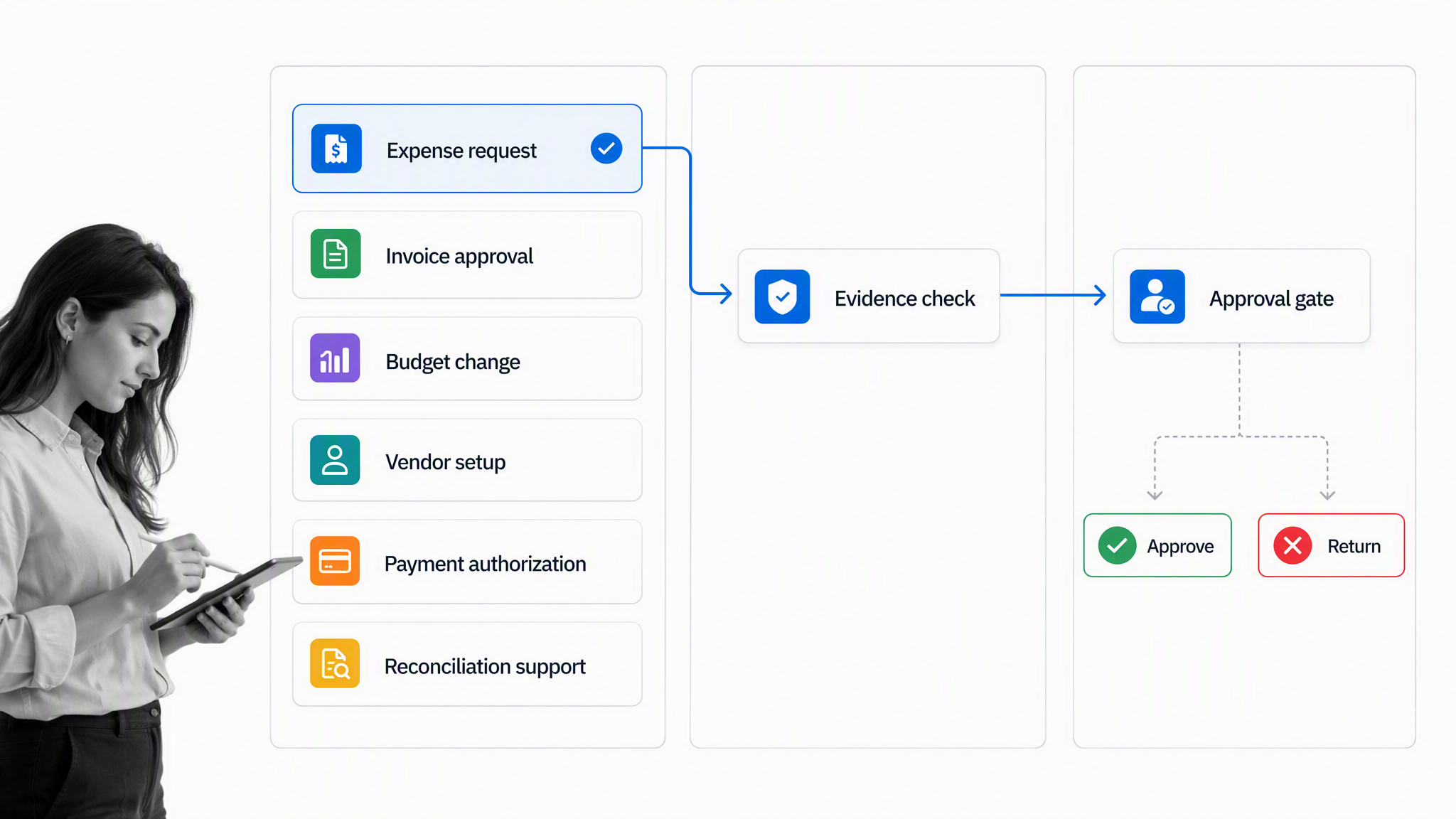
Most finance teams need forms across spending, revenue, accounting, planning, treasury, controls, and administration. The exact set depends on the organization, but the following categories cover the work that commonly requires structured intake and approval.
Expense and reimbursement forms
Expense forms collect the business purpose, category, amount, currency, receipt, attendee or travel context, cost center, and employee certification. An expense management workflow can route the request to the right approver and keep receipts with the decision.
Invoice approval forms
Invoice forms help accounts payable confirm the vendor, invoice reference, amount, purchase order, receiving evidence, coding, tax treatment, due date, and approval authority. The form should expose mismatches before payment rather than asking the payment team to resolve them at the final step.
An accounts payable process can connect intake, matching, approval, payment readiness, and reconciliation without separating the form from the work it starts.
Purchase and budget request forms
Purchase requests document the need, supplier, expected value, budget owner, accounting code, timing, contract status, and approval path. Budget forms cover new allocations, transfers, forecast changes, contingency releases, and requests that affect another department or reporting period.
A purchase order workflow is useful when the request needs authorization before the organization commits funds.
Vendor and payment setup forms
Vendor onboarding forms collect legal identity, tax documentation, contact details, payment method, banking evidence, conflict declarations, sanctions or risk checks, and the internal sponsor. Bank-detail changes deserve a separate controlled path because they can redirect real money.
Payment authorization forms
Payment forms document what should be paid, to whom, why, from which account, under which authority, and with what evidence. High-risk payments may require separate preparation and approval roles, a call-back check, or treasury review before release.
Journal entry and correction forms
Journal forms should capture the accounts affected, amount, period, explanation, source evidence, preparer, reviewer, and whether the entry is standard, recurring, adjusting, correcting, or unusual. A correction form should also link to the original entry and explain why the change is necessary.
Reconciliation and close forms
Reconciliation forms document the balance, source records, reconciling items, owner, review evidence, and unresolved exceptions. They support the recurring steps in the accounting cycle and help the team prove that close tasks were completed and reviewed.
Cash, treasury, and banking forms
Treasury forms can govern wire requests, cash transfers, account openings, signer changes, liquidity actions, investment instructions, and bank access. Because these actions affect custody and movement of funds, the form should make authority and segregation requirements explicit.
Audit and control forms
Control certification, evidence request, deficiency, remediation, and audit signoff forms help teams collect proof in a repeatable way. A financial audit checklist can coordinate the work that surrounds those forms.
Fields every finance form needs
A finance form should collect enough information for a decision without turning the requester into an accountant. Start with the required outcome, then include only the fields needed to validate, route, approve, execute, reconcile, or retain that outcome.
Requester and ownership
Capture the requester, department, cost center, business owner, and the person accountable for follow-up. Prefer role-based routing where possible so the form remains usable when staff change.
Transaction details
Collect the amount, currency, date or period, category, account or project reference, vendor or payee, business purpose, and any threshold data that changes the approval path. Use controlled choices for reporting fields and free text only where context is genuinely needed.
Supporting evidence
State what evidence is acceptable. A receipt, invoice, contract, purchase order, quote, bank confirmation, reconciliation file, variance explanation, or tax form should be attached to the same submission that requires it.
Decision and approval data
The record should capture the reviewer, decision, reason, requested changes, escalation, delegation, and final approval state. If approval depends on an authority matrix, store the facts used to select the approver, not only the approver’s name.
System and reconciliation references
Include stable identifiers that connect the form to the accounting, procurement, banking, payroll, or reporting record it creates. That link allows the team to reconcile submissions with completed transactions and identify failures or duplicates.
Privacy and retention metadata
Classify sensitive fields, define who can access them, and record the retention category. Do not collect bank, tax, identity, or personal information simply because a blank field is easy to add. Each field should have a clear operational purpose.
Controls every finance form needs
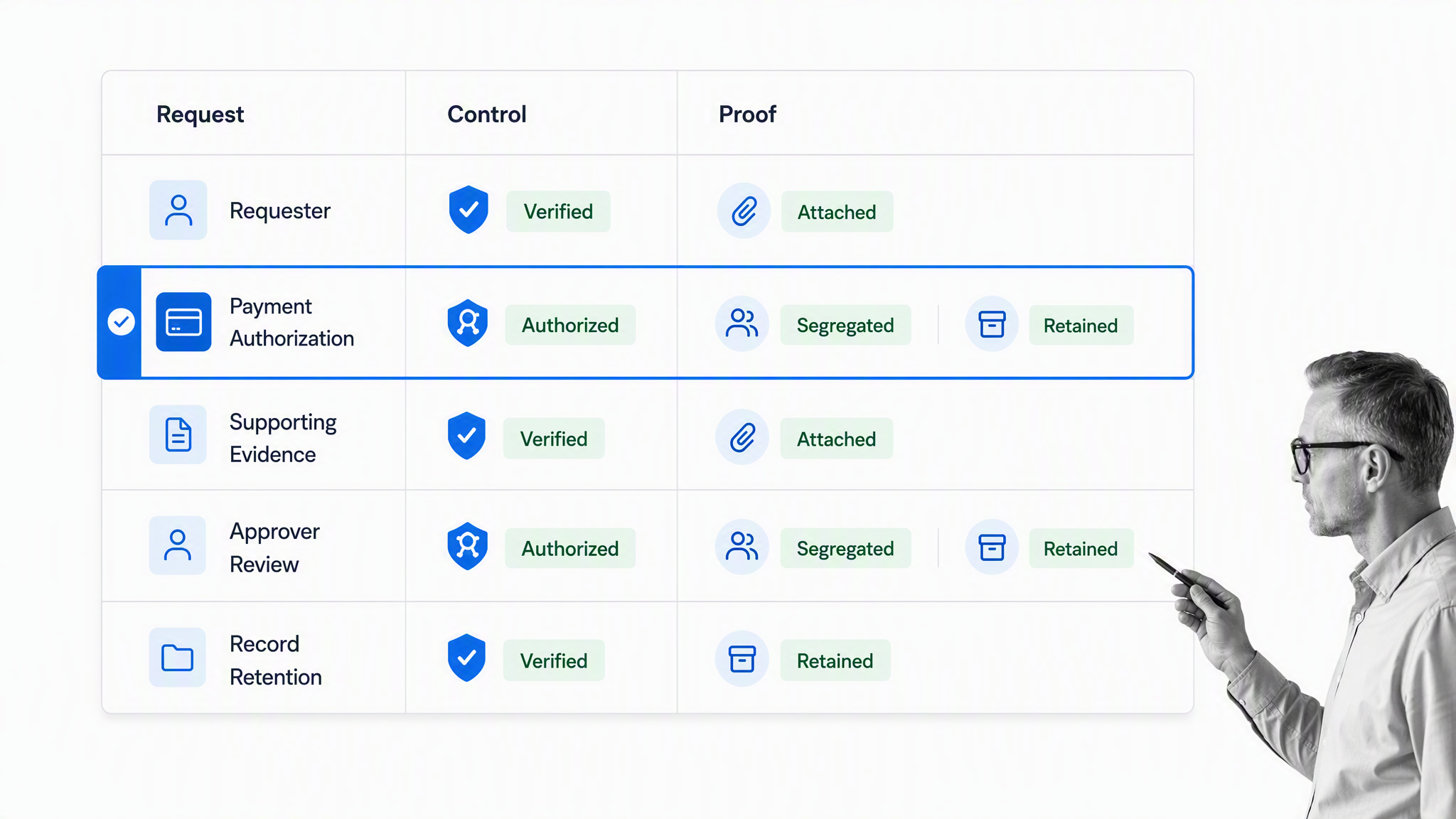
Controls turn a finance form from a questionnaire into a reliable operating record. The control design should match the risk of the action. A low-value routine expense does not need the same path as a new bank account, unusual journal entry, or large cash transfer.
Required fields and validation
Make decision-critical fields required. Validate formats, allowed values, dates, totals, duplicate references, and relationships between fields. A required explanation should still be reviewed for meaning. A filled box is not proof that the answer is useful.
Approval authority
Route the submission to someone with authority for the amount, account, department, or risk. Workflow approval should block the protected action until the required decision is recorded.
Segregation of duties
Separate incompatible responsibilities when risk requires it. The person who prepares a payment should not automatically become the only approver and the person who releases it. The form should preserve who prepared, reviewed, approved, and executed the action.
Evidence before release
Require the evidence the approver needs before presenting the decision. An approval that happens without an invoice, contract, receipt, reconciliation, or explanation may be fast, but it is not a strong control.
Conditional routing
Use rules to change the path by amount, category, vendor status, exception reason, location, funding source, or risk. Keep the rules readable and assign an owner to maintain thresholds when policies change.
Exception handling
Define what happens when information is missing, a threshold is exceeded, a duplicate appears, a system update fails, or an approver requests changes. The exception should have an owner, due date, reason, evidence, and safe next action.
Audit history
The COSO internal control framework describes control as a process that supports operations, reporting, and compliance objectives. Finance forms contribute when their workflow records the actual execution of approvals, reviews, and exceptions.
The GFOA internal control framework guidance also emphasizes documented control activities and monitoring. The practical test is whether another reviewer can understand what happened without reconstructing the process from email.
The finance form lifecycle
Every finance form has a lifecycle. Managing only the blank template leaves the most important stages uncontrolled. The organization needs to govern creation, submission, review, action, retention, and eventual disposal.
Design and approval
The form owner defines the purpose, fields, instructions, controls, route, access, and retention. Finance, compliance, security, legal, procurement, or system owners may need to review the design before launch.
Submission and validation
The requester completes the form and provides evidence. Automated validation can catch missing fields or invalid formats, while a human reviewer handles judgment, ambiguity, and unusual cases.
Routing, review, and decision
The workflow assigns the correct reviewer, applies thresholds, requests changes, records approval or rejection, and escalates overdue work. Every handoff should leave a visible state.
Execution and reconciliation
Approval is not the final business outcome. The payment, record update, reimbursement, vendor creation, journal entry, or budget change must complete in the system of record. Reconciliation confirms that the approved request and the executed transaction match.
Retention and disposal
The IRS recordkeeping guidance explains that records should support income, expenses, and credits reported on returns. Retention periods vary by record and obligation, so organizations should apply their own legal and policy schedule rather than one universal number.
How to digitize and automate finance forms
Digitizing a paper or spreadsheet form is only the first step. The real improvement comes from connecting the submission to validation, ownership, approval, system action, exception handling, and reporting.
Start with the real decision
Define what the form is asking the organization to decide or do. Remove fields that do not support that outcome. Add evidence and routing data that reviewers currently chase after submission.
Standardize the default path
Map the shortest safe route for a normal request. Name the owner, due date, required evidence, approval threshold, destination system, completion state, and proof. Add branches only after the default path is clear.
Design exceptions before automating
Test missing receipts, unsupported vendors, duplicate invoices, incorrect coding, high-value requests, unavailable approvers, rejected changes, failed system updates, and cancellation. Automation should send each case to a safe owned state.
Connect systems with stable identifiers
A form integration can move data into accounting, procurement, storage, or reporting systems. Preserve one stable request identifier across systems so the team can reconcile the form, workflow, and final transaction.
Measure process outcomes
Track time to first review, approval time, total cycle time, missing-evidence rate, change-request rate, exception rate, overdue rate, duplicate rate, failed system actions, and reconciliation mismatches. Segment by form type and risk path so one average does not hide a broken exception process.
When the broader goal is to reduce manual finance work, connect form design to finance process automation. Automate the proven handoff, not an unclear policy.
Build finance forms in Process Street
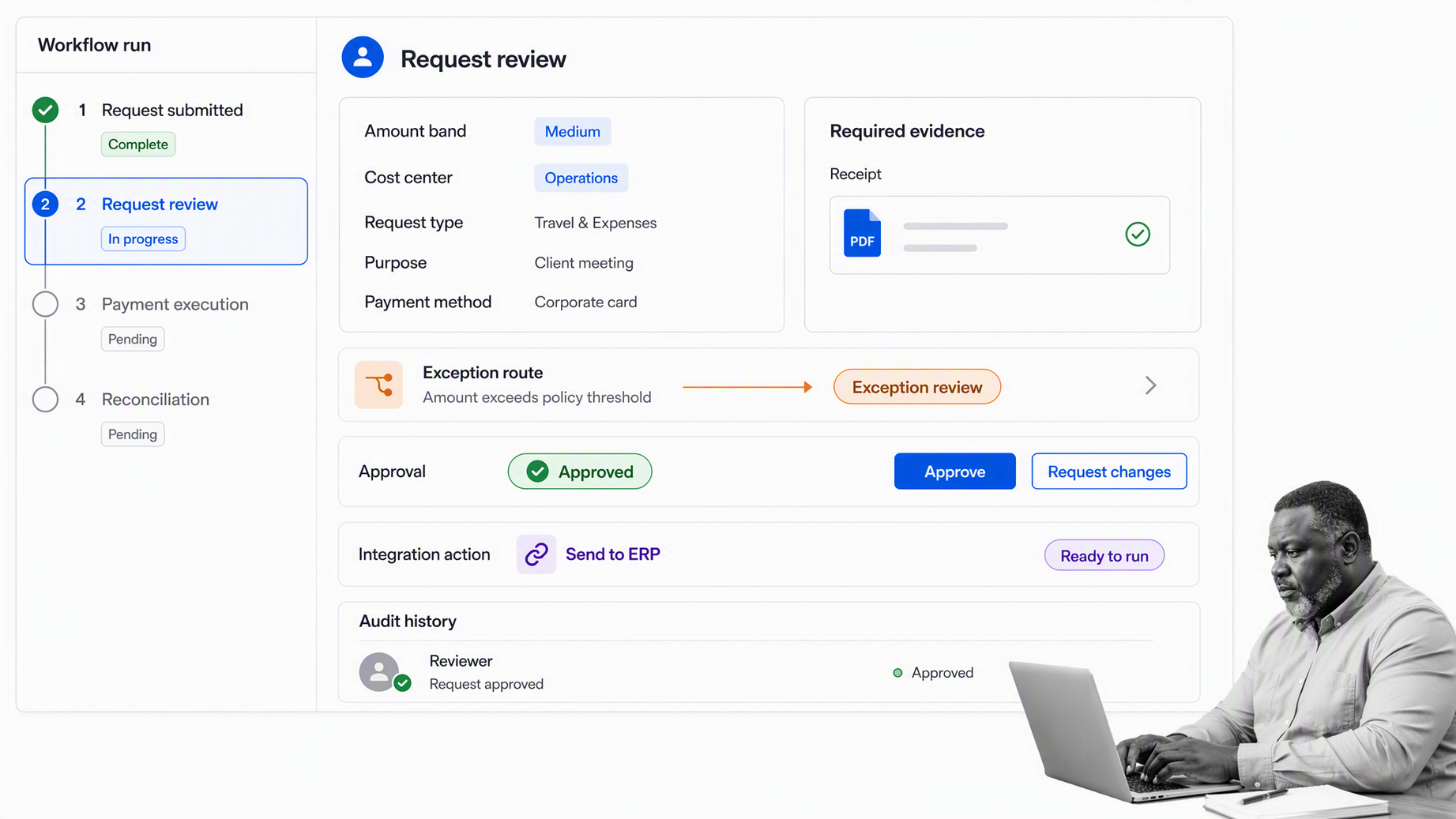
Process Street can bring the finance form, assigned work, approval path, system action, and execution history into one controlled workflow run. Each valid submission becomes visible work rather than an attachment waiting in an inbox.
Capture structured finance requests
Use a form application to collect fields, files, and context. Conditional questions can adapt the intake by request type, amount, or risk without forcing every requester through every field.
Assign owners and due dates
Each step can have an owner, instructions, required fields, files, deadline, and completion state. Finance leaders can see what is waiting, blocked, overdue, approved, or complete without asking for separate status updates.
Route approvals and exceptions
Conditional logic can reveal additional checks and send high-risk requests to the right reviewer. Approval tasks can block payment, record changes, or other downstream work until the accountable person decides.
Keep evidence with the decision
Receipts, invoices, contracts, reviewer notes, approvals, requested changes, and exception reasons stay attached to the workflow that required them. That gives finance and audit teams a coherent record instead of fragments across inboxes and folders.
Connect the finance stack
Process Street has direct, universal integrations to 5,000+ systems. Need a new one? An AI agent builds it on the fly. The workflow can coordinate the request and control record while accounting, procurement, banking, storage, and reporting systems perform their specialized jobs.
Use templates as controlled starting points
A financial management control process or expense workflow can provide the first structure. Adapt fields, roles, thresholds, evidence, and retention to the organization’s real policies.
Finance teams can also connect forms to a broader finance integration strategy when the same approved data needs to reach multiple systems without manual re-entry.
Finance form governance, security, and retention
Finance forms often contain sensitive commercial, employee, vendor, banking, tax, and accounting information. Governance should be designed with the form, not added after people have already started using it.
Name an owner
Every active form should have a business owner and a technical owner. The business owner maintains the purpose, fields, policy, and approval path. The technical owner maintains the workflow, integrations, access, monitoring, and recovery procedure.
Control access
Apply least privilege to submissions, attachments, approval queues, exports, and reporting. Requesters should not automatically see other submissions. Reviewers should see only the records and fields needed for their role.
Protect data in connected systems
Use secure authentication, narrow permissions, bounded retries, and monitored failures for integrations. The OWASP API Security project is a useful reference when finance form data moves through APIs.
Version and retire forms
Record material field, rule, and approval changes. Test dependencies before renaming or removing fields. Retire obsolete forms from active use, preserve required historical records, and redirect users to the current controlled path.
Review control performance
Use internal controls to test whether required evidence, approvals, segregation, reconciliation, and retention are working as designed. Repeated exceptions should trigger a process fix, not permanent manual cleanup.
FAQs
What are finance forms?
Finance forms are structured records used to request, authorize, document, or verify financial activity. They capture the facts, evidence, ownership, approval, and system references needed to control work such as expenses, invoices, purchases, payments, budget changes, reconciliations, and journal entries.
What are common examples of finance forms?
Common examples include expense reimbursement forms, invoice approval forms, purchase requests, budget transfer forms, vendor setup forms, payment authorizations, journal entry forms, reconciliation signoffs, wire requests, audit evidence requests, and control certifications.
What information should a finance form include?
A finance form should include the requester, business owner, amount and currency, date or period, category, cost center or account, business purpose, supporting evidence, approval data, exception reason, and stable system identifiers. Collect only the sensitive data the process genuinely needs.
How should finance forms be approved?
Route each form according to the organization’s authority rules, amount thresholds, funding source, department, and risk. The approver should receive the evidence needed for the decision, and the workflow should record the reviewer, outcome, reason, changes, delegation, and final state.
How long should finance forms be retained?
There is no single retention period for every finance form. Retention depends on the record type, tax rules, legal obligations, contracts, audit requirements, and company policy, so each form should map to an approved records schedule and disposal process.
How does Process Street support finance forms?
Process Street connects structured finance forms with assignments, required fields, conditional routing, approvals, integrations, evidence, and execution history in one workflow run. Teams can turn every valid submission into controlled work and retain proof of what happened.
