


Turn every policy into automated workflows with built-in enforcement and audit-ready proof.



10 Best Finance Project Management Software Tools
The best finance project management software does more than schedule tasks. It connects project delivery to budgets, forecasts, approvals, resources, changes, and financial evidence so finance leaders can act before a late decision becomes a cost surprise.
Process Street is the strongest overall choice for governed finance project workflows because it makes required inputs, approval gates, exception routes, evidence, and activity history part of execution. Specialist platforms can be a better fit when the primary requirement is project accounting, enterprise resource planning, professional services billing, or construction cost control.
This guide compares ten current options by operating model and best fit. It also explains how finance teams use project software, which capabilities matter, and how to run a practical evaluation.
| Tool | Best fit | Financial project strength | Main buying question |
|---|---|---|---|
| Process Street | Governed finance workflows | Approvals, evidence, routing, and audit history | Do you need a controlled operating layer across systems? |
| Wrike | Finance work management | Requests, budgets, approvals, time, and reporting | Will finance work live mainly in one work platform? |
| Smartsheet | Spreadsheet style planning | Budget tracking tied to milestones and dashboards | Does the team need familiar grid based control? |
| monday.com | Configurable team portfolios | Boards, budgets, time, approvals, and dashboards | Can the team govern flexible boards consistently? |
| Asana | Cross functional delivery | Project plans plus timesheets and budget tracking | Is lightweight adoption more important than deep accounting? |
| Microsoft Project | Detailed schedules and cost baselines | Task, resource, assignment, and variance tracking | Does the team need schedule and cost depth? |
| Oracle Fusion Cloud Project Management | Enterprise project financials | Budgets, forecasts, costs, billing, and profitability | Is a connected enterprise suite the priority? |
| Kantata | Professional services | Project accounting, forecasting, margins, and billing | Does the business sell project based services? |
| Procore | Construction | Commitments, changes, invoices, and budget impact | Is field to finance control the core requirement? |
| Deltek Vantagepoint | Architecture, engineering, and consulting | Project accounting, budgets, billing, and planned versus actual performance | Does the firm need industry focused ERP depth? |
A useful shortlist starts with the financial decision that must be controlled. General work platforms are often easier to adopt. Specialist products offer deeper financial models. Workflow software adds the most value when the risk sits in handoffs, approvals, missing evidence, or inconsistent execution between systems.
- Which finance project management tools are best?
- What is finance project management software?
- How do finance teams use project management software?
- Which capabilities matter most?
- How should you choose a platform?
- How do you implement the software?
- Finance project management software FAQs
Which finance project management software tools are best?
The ranking below puts Process Street first because finance project work often fails at the control points between systems. The remaining products are ordered by breadth of fit, then by specialist depth. The right choice still depends on the system of record, delivery model, industry, project complexity, and level of financial control required.
Process Street
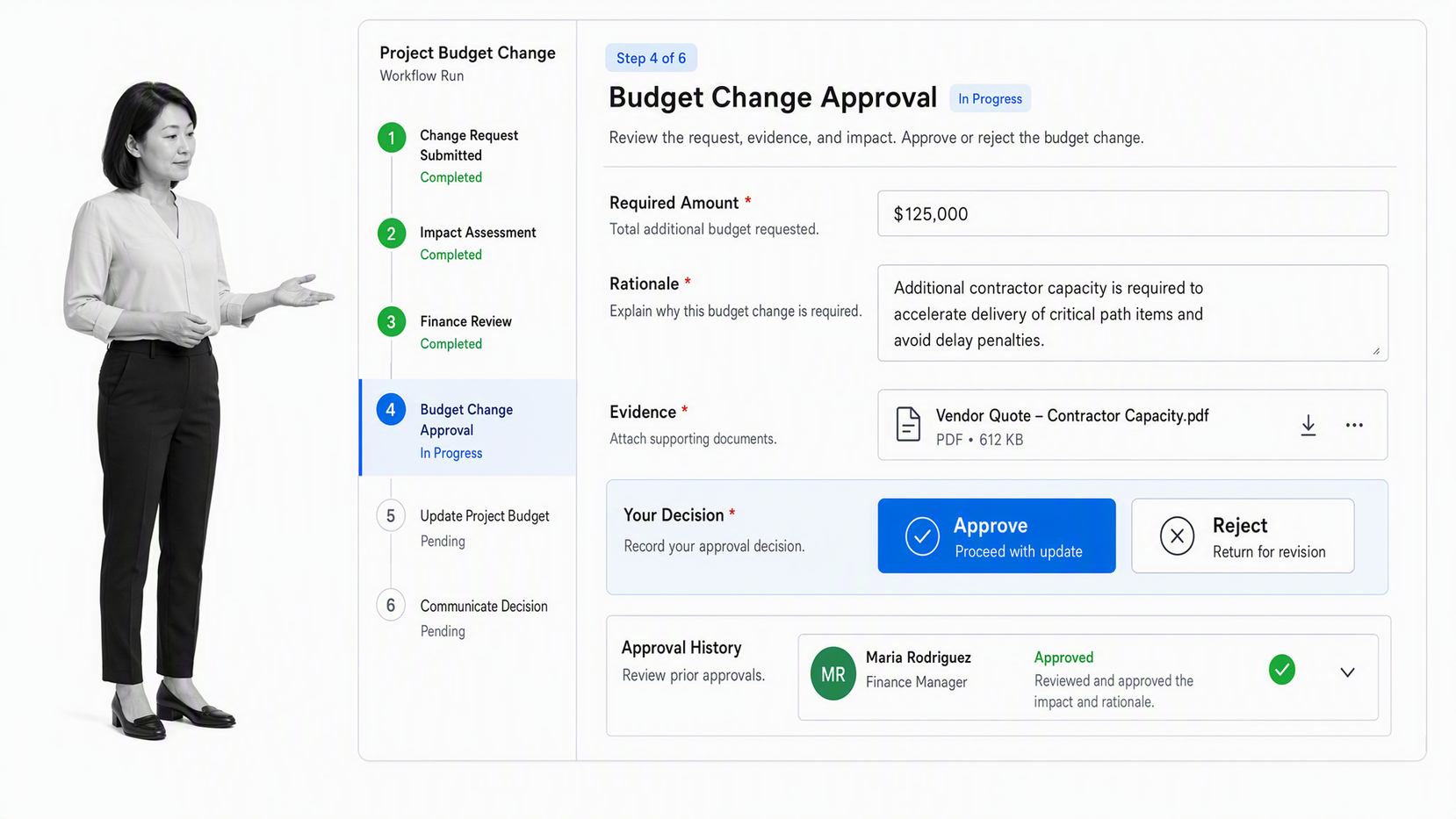
Process Street turns finance procedures into executable workflows with assigned tasks, required fields, conditional paths, approvals, evidence collection, and activity history. Teams can use it for project intake, business cases, budget requests, vendor onboarding, milestone reviews, forecast changes, invoice checks, closeout, and recurring control work.
The product is strongest when a project crosses finance, operations, procurement, legal, and delivery teams. Instead of asking each person to remember the approval path, the workflow can route work according to the request, risk, amount, entity, or exception. Approval history keeps decisions, comments, field changes, and attached evidence connected to the work.
Process Street does not replace the ERP, ledger, or specialist project accounting system. It operates as the controlled execution layer around them. That makes it useful for finance leaders who already have systems of record but still coordinate critical decisions through email, chat, spreadsheets, and meetings. See how financial workflows can connect tasks, approvals, evidence, and exceptions.
Best for: finance teams that need governed project workflows and proof across existing systems
- Evaluate: Build one budget change workflow with a normal path and an exception path.
- Evaluate: Require supporting evidence and confirm that approval blocks the next action.
- Evaluate: Review the completed run to verify that owners, decisions, comments, and files remain in context.
Wrike
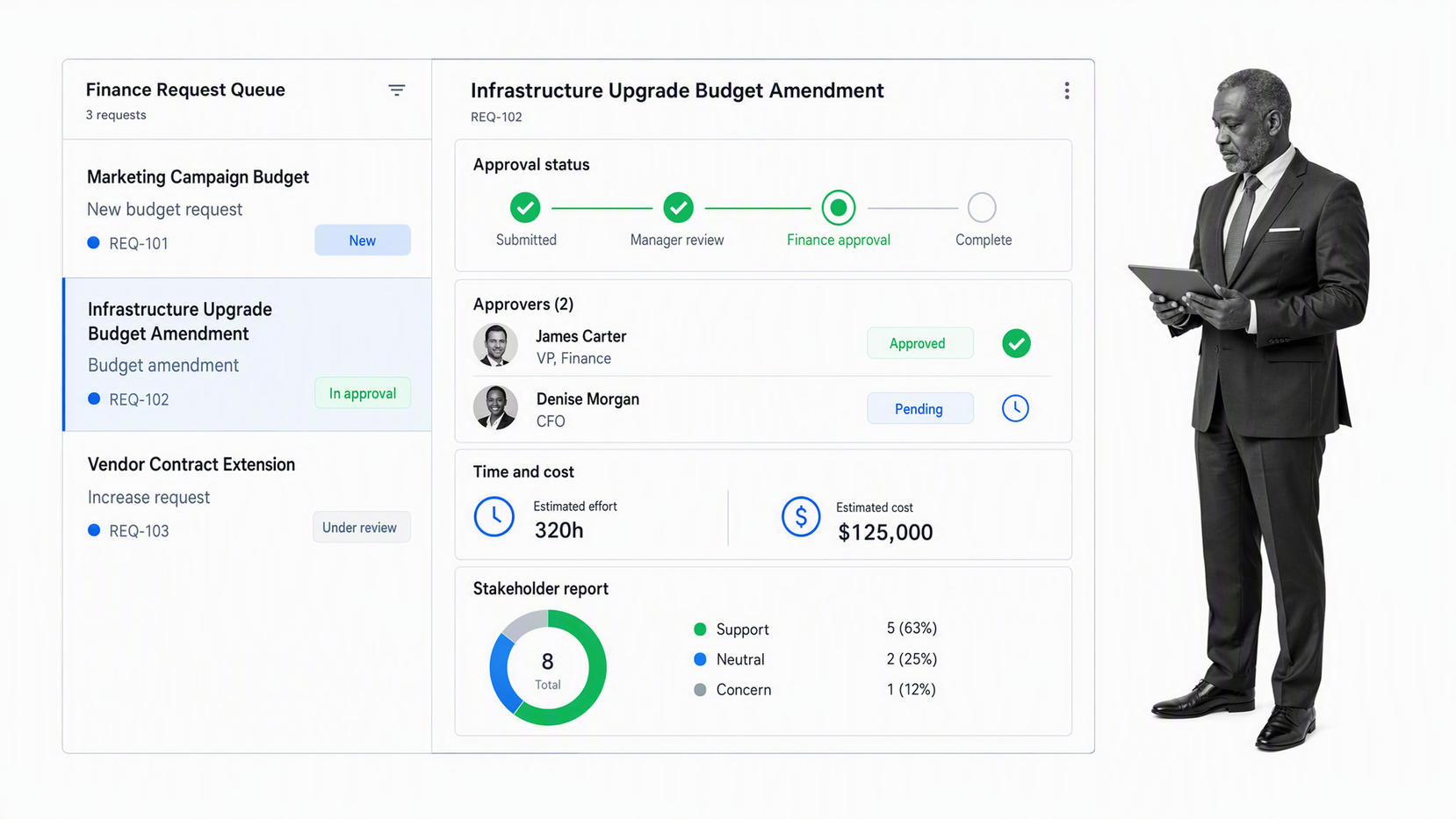
Wrike combines finance requests, customizable workflows, budget management, approvals, time tracking, and reporting in a broad work management platform. Its finance pages position the product around incoming requests, cross functional work, budget forecasting, recurring automation, spending approvals, and invoice signoff.
That range suits teams that want finance projects and everyday finance operations in one shared environment. A merger integration, system rollout, policy change, audit remediation program, or budgeting cycle can use the same request, workflow, dashboard, and reporting model.
The key evaluation question is whether Wrike’s flexibility produces a governed standard or many team specific configurations. Test a real budget review and approval sequence, then confirm whether managers can distinguish delivery status from financial approval status. Wrike’s official finance overview documents its budgeting and approval workflow focus.
Best for: finance departments that want requests, projects, approvals, and reporting in one work management platform
- Evaluate: Configure finance intake and an approval workflow with the real roles used by the team.
- Evaluate: Check whether time and cost information can support the required budget view.
- Evaluate: Test portfolio reporting across active finance initiatives.
Smartsheet
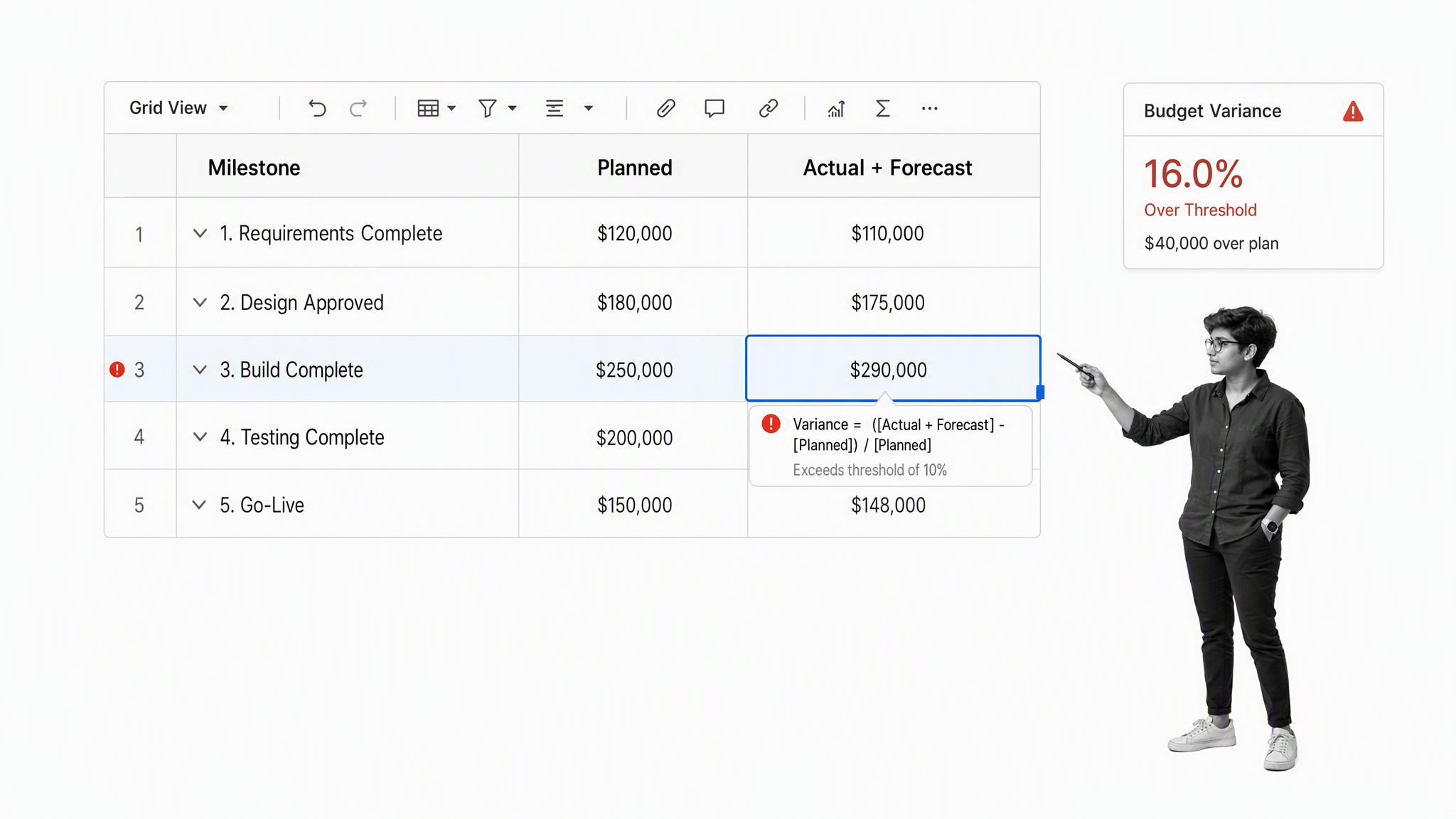
Smartsheet offers a familiar grid based environment for planning projects, tracking expenses, monitoring actuals against forecasts, and presenting financial information through dashboards. It can link budget information to milestones so finance and delivery teams work from a shared view of scope, timing, and spend.
The spreadsheet style model can ease adoption for teams that already manage project budgets in rows and columns. Forms, alerts, reports, and dashboards add structure around the data without forcing users into a traditional accounting interface.
The buying test is governance. A flexible sheet can recreate an effective operating model or reproduce spreadsheet sprawl in a new location. Smartsheet’s budget management overview describes project budget tracking, milestone links, expense monitoring, forecasts, alerts, and dashboards.
Best for: teams that want project and budget control in a flexible, spreadsheet style platform
- Evaluate: Create a project budget with baseline, actual, forecast, owner, and milestone fields.
- Evaluate: Trigger an alert and an approval when a threshold is crossed.
- Evaluate: Test whether portfolio dashboards remain consistent across several project owners.
monday.com
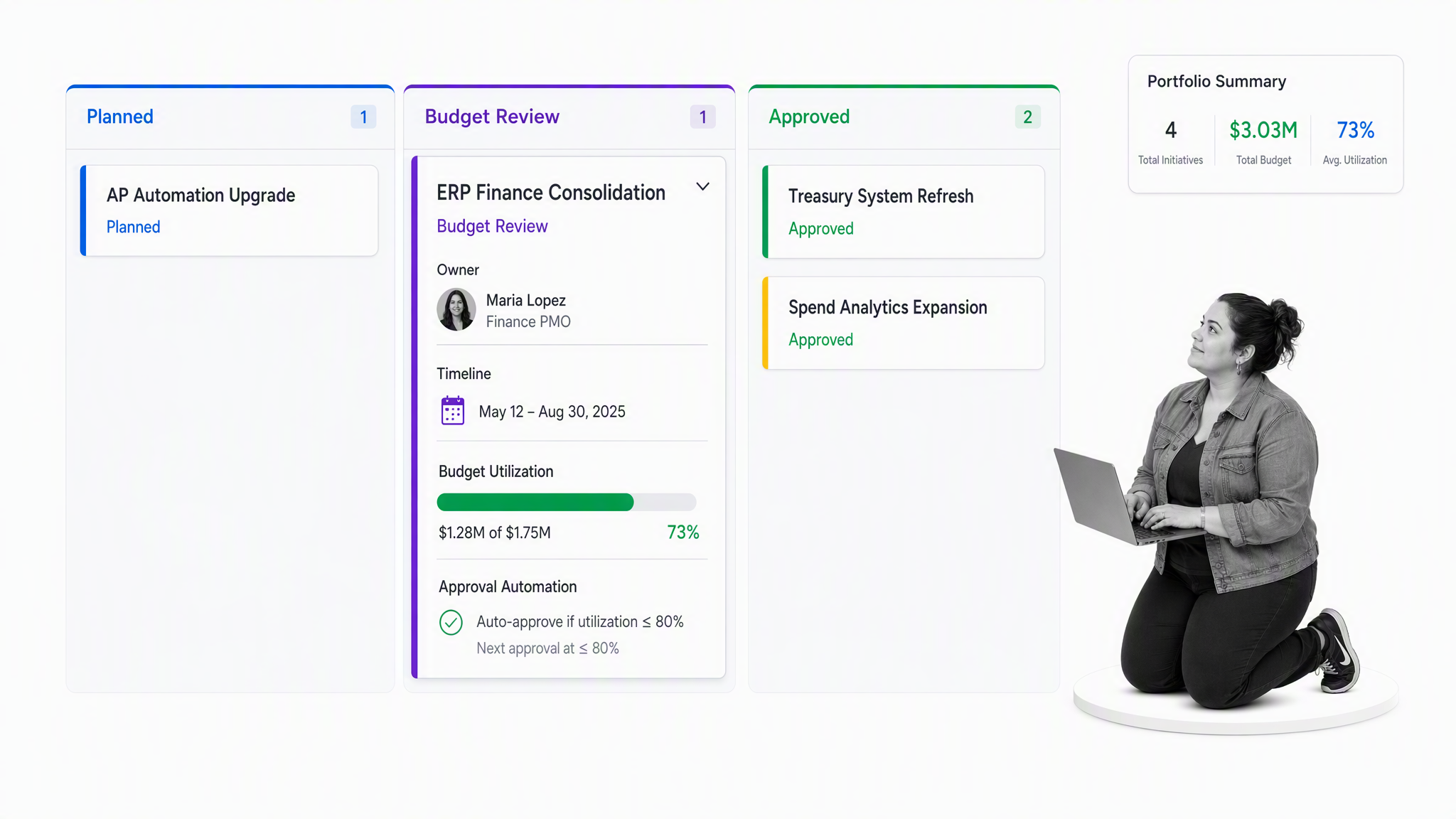
monday.com uses configurable boards, automations, dashboards, time tracking, budgets, and approval workflows to coordinate finance projects. It can bring tasks, resources, milestones, and budget signals into one visual workspace for project managers and finance stakeholders.
The platform works well when teams value adaptability and clear visual status. Finance can structure a board for a system implementation, budget cycle, capital request, compliance initiative, or close improvement program while giving different stakeholders the view they need.
Flexibility creates a design responsibility. The team should define board standards, ownership, approval logic, and reporting conventions before scaling. Otherwise similar finance projects can use different status fields and automations, making portfolio reporting less trustworthy.
Best for: finance project managers who want flexible boards, automations, and dashboards for cross functional work
- Evaluate: Build one board from intake through financial approval and delivery.
- Evaluate: Confirm that budget, time, resource, and risk fields roll into a useful dashboard.
- Evaluate: Test template governance so future projects use the same financial control model.
Asana
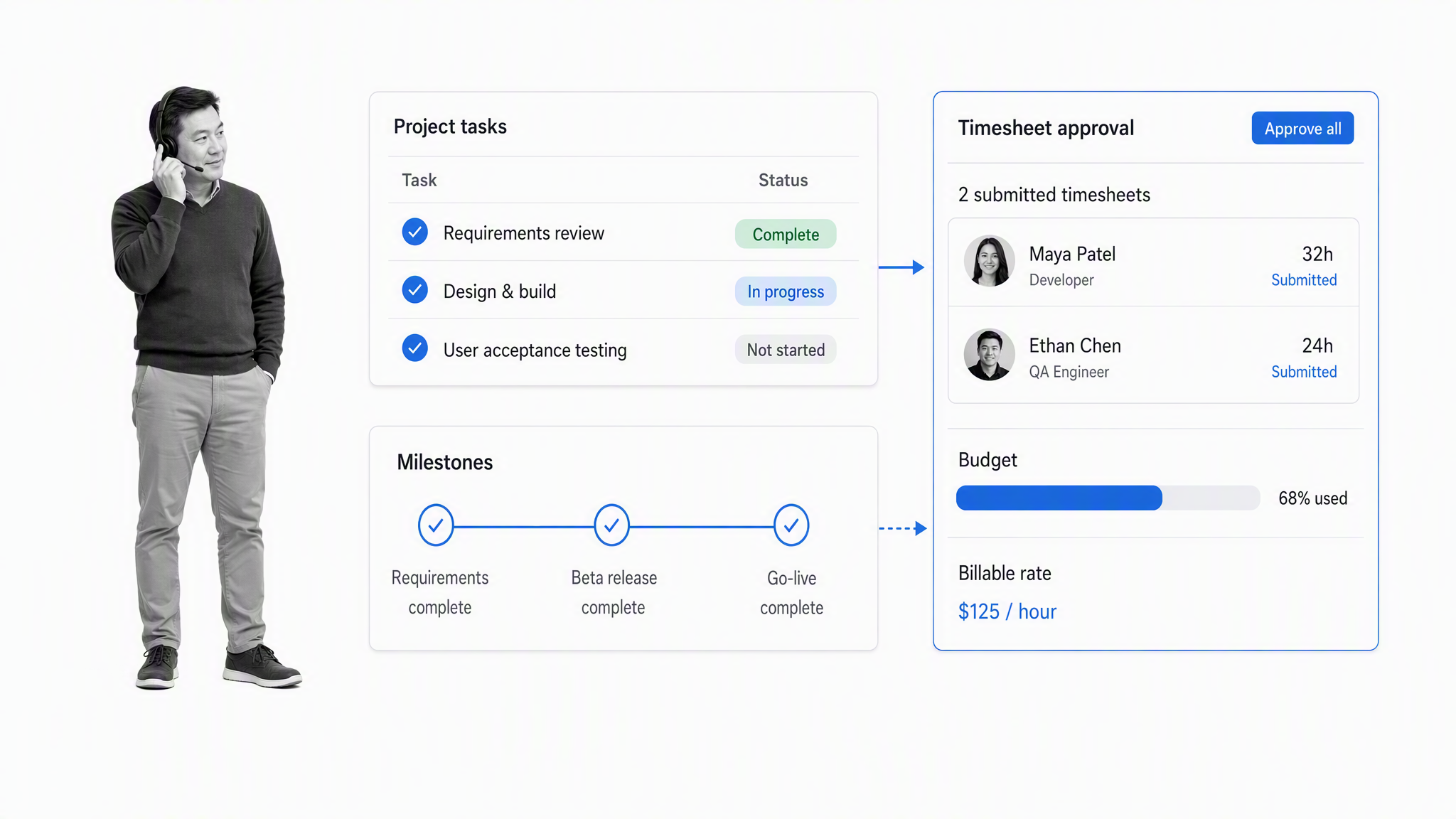
Asana is a general project and work management platform with an optional timesheets and budgets capability. That add on supports centralized timesheets, approvals, budget and cost tracking, rates, reporting, and exports, while the core product coordinates tasks, milestones, dependencies, goals, and cross functional work.
The product is a practical fit when finance participates in projects owned across the business. Teams can plan the delivery work in the same environment used by operations, product, marketing, or IT, then add resource and budget tracking where needed.
Asana is not a project accounting system. Test whether its financial fields, reporting, permissions, and export path are sufficient for the decision at hand. It may be strongest as the shared delivery layer while financial transactions remain in an ERP or accounting platform.
Best for: cross functional teams that need accessible project coordination with time and budget oversight
- Evaluate: Confirm whether the required budget and timesheet capabilities are included in the intended setup.
- Evaluate: Track a project from approved budget through resource assignment and milestone delivery.
- Evaluate: Verify the handoff from project reporting to the financial system of record.
Microsoft Project
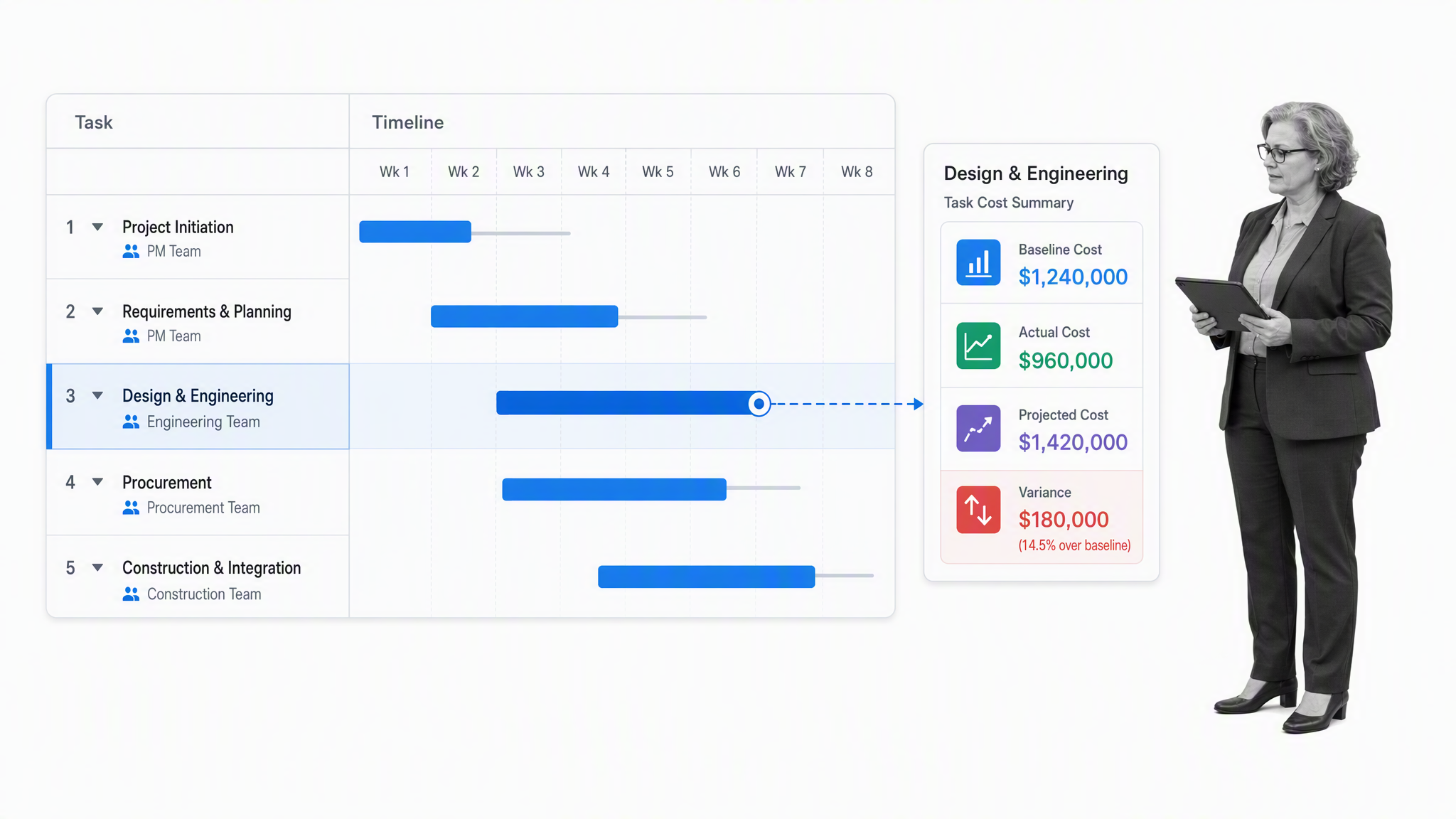
Microsoft Project supports detailed schedules, task and resource planning, baselines, cost tracking, and variance analysis. Teams can compare original estimates with actual and projected costs at the task, resource, assignment, and whole project levels.
That depth is useful when schedule logic and resource assignments drive the financial plan. The project manager can build a cost baseline, update progress, and see how completed work and remaining estimates affect projected cost.
The finance workflow around the schedule may still need separate approval, evidence, and exception controls. Evaluate Microsoft Project as a planning and cost engine, then map how requests, decisions, supporting documents, and accounting updates will be governed. The Microsoft cost tracking guide explains baseline, actual, scheduled, projected, and variance views.
Best for: teams that need detailed scheduling, resource planning, cost baselines, and variance tracking
- Evaluate: Create a baseline and update task progress to observe projected cost changes.
- Evaluate: Test labor, fixed, and assignment cost handling against the finance team’s model.
- Evaluate: Document how approvals and evidence will connect to schedule and cost changes.
Oracle Fusion Cloud Project Management
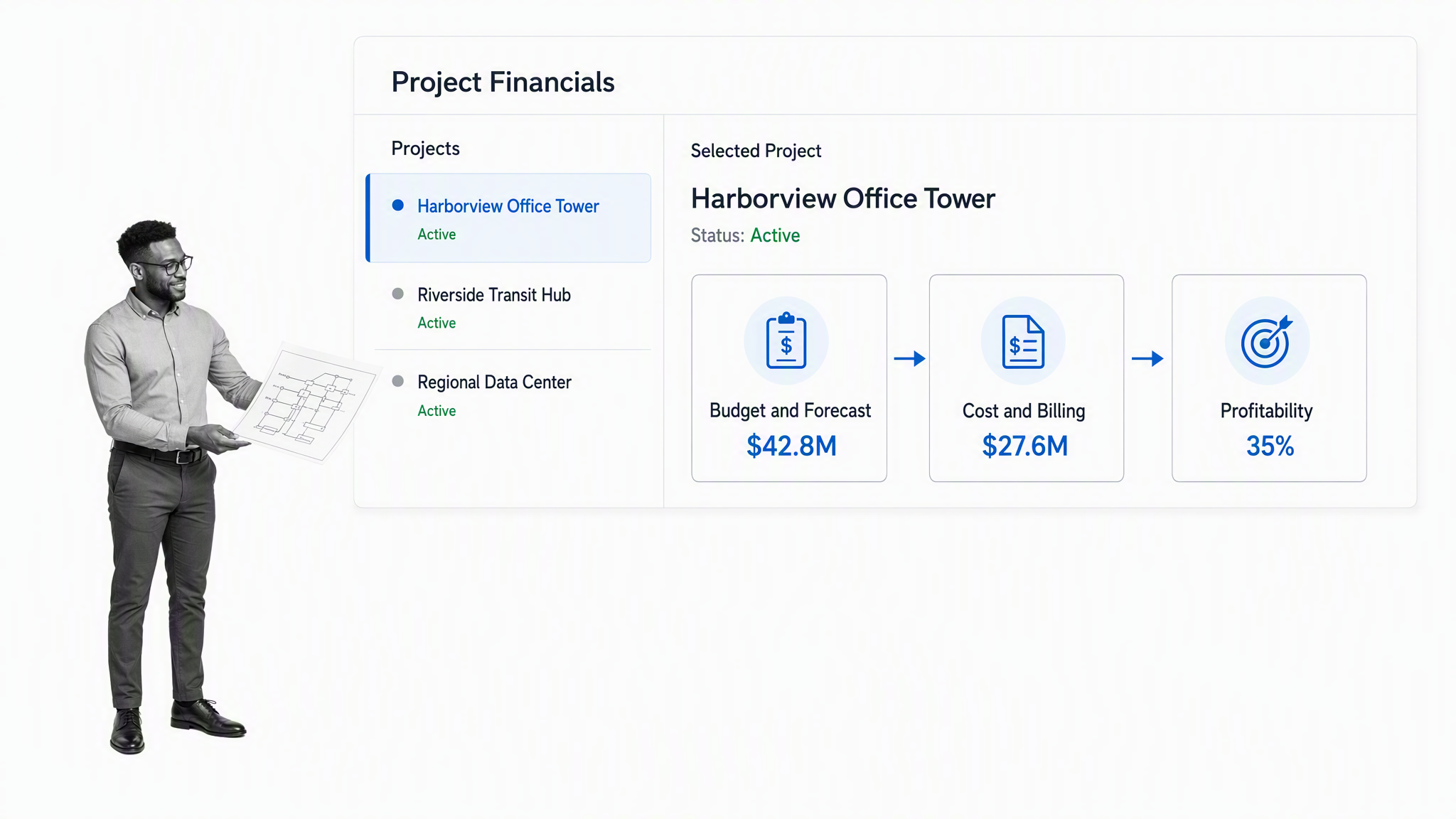
Oracle Fusion Cloud Project Management connects project planning with financial control in the Oracle application suite. Its project financial management capabilities cover projects, schedules, deliverables, teams, customers, budgets, forecasts, costs, billing, profitability, and performance.
The product is designed for organizations that want project delivery and finance to share enterprise data and controls. It can support complex project structures, project costing, revenue, billing, resource planning, and financial performance without moving the core financial model into a standalone work tool.
That breadth brings implementation and governance demands. The evaluation should include data ownership, chart of accounts alignment, project templates, currencies, resource structures, security roles, billing rules, and change management. Oracle’s project financial management documentation describes the connected project and finance work area.
Best for: enterprise organizations that want project planning and financial management inside a connected application suite
- Evaluate: Model one representative project with financial tasks, resources, budgets, and forecasts.
- Evaluate: Trace costs, billing, approvals, and performance reporting across the intended Oracle modules.
- Evaluate: Validate role design and implementation ownership before expanding scope.
Kantata
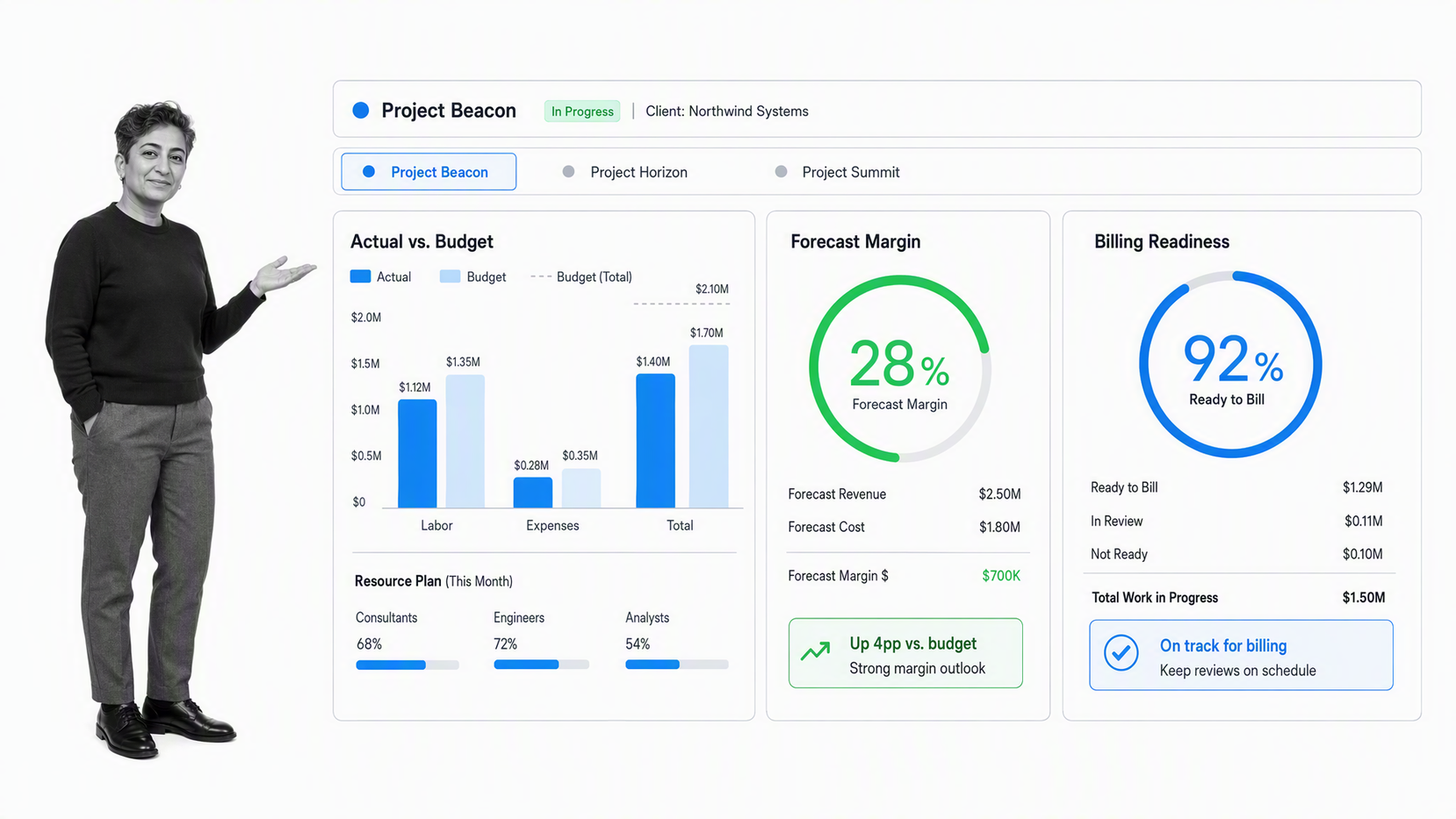
Kantata focuses on professional services automation and project accounting. It provides current actual financials, budget monitoring, financial analysis, forecasting, portfolio views, what if modeling, and billing tied to project delivery.
That operating model fits consulting, agency, implementation, and other service businesses where resource utilization, project margin, forecast accuracy, billing, and delivery are tightly connected. Finance and delivery leaders can evaluate project performance through the same project centered model.
A strong pilot should cover the full commercial path from planned work and staffing through time, expenses, forecast, margin, billing, and close. The team should also test how CRM and ERP data enter or leave the platform, because incomplete integration can undermine the financial view.
Best for: professional services organizations that need project accounting, resource economics, forecasting, and billing
- Evaluate: Run a project with realistic labor, expenses, forecast changes, and billing rules.
- Evaluate: Compare project margin and portfolio views with finance’s current reporting.
- Evaluate: Test the CRM and ERP handoffs that determine the accuracy of project financial data.
Procore
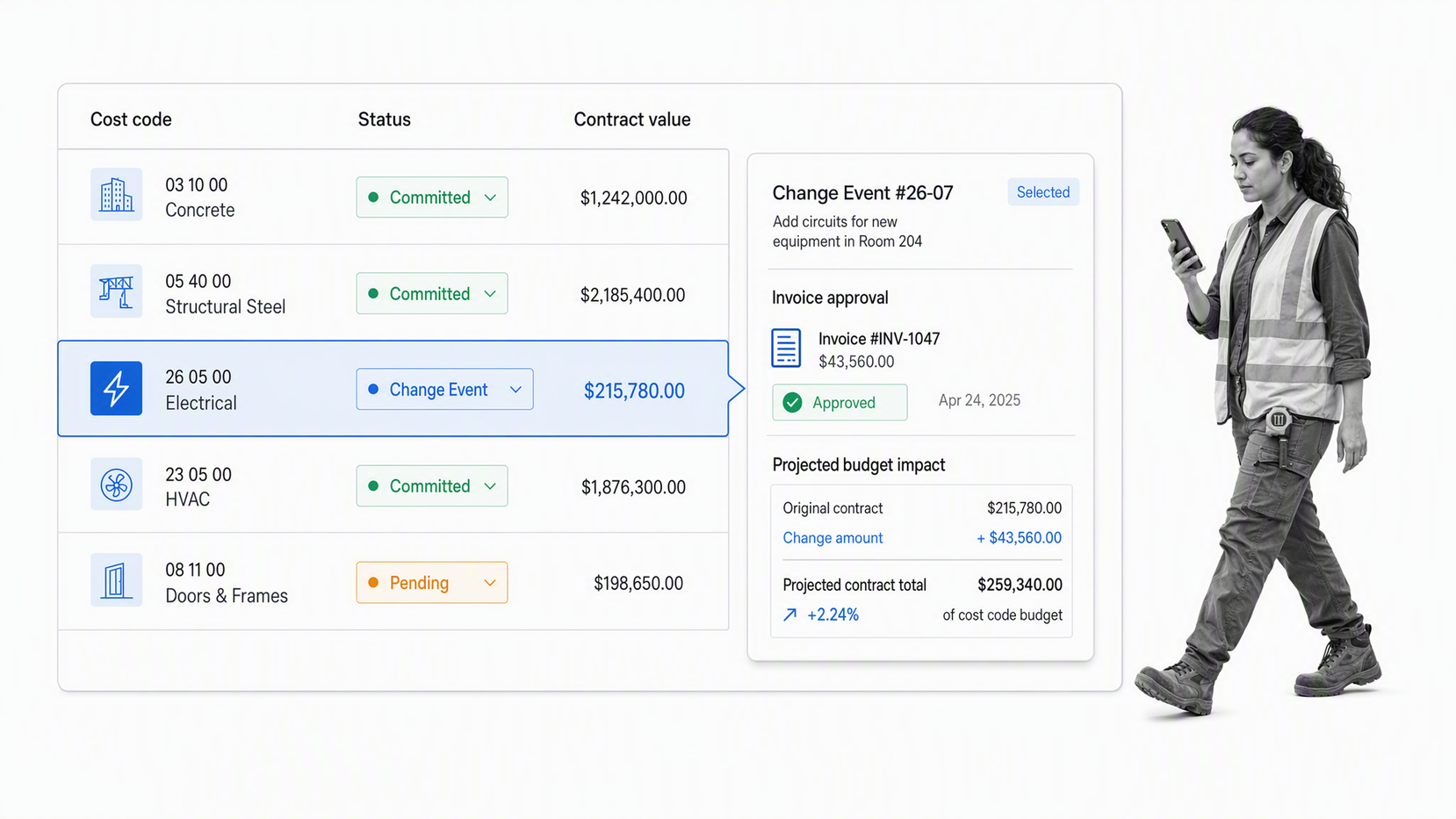
Procore provides construction focused financial management around commitments, subcontracts, purchase orders, invoices, changes, and project budgets. Its commitment tools show how pending, committed, and projected costs affect the budget while connecting field changes to office review.
The construction context matters. Cost decisions often begin with a field event, request for quote, subcontract change, or invoice, then move through approval and accounting. Procore is designed to keep those records connected to the project rather than forcing finance to reconstruct the sequence later.
Evaluate the complete change and billing path with a real cost code structure. Include a potential change, contractor response, commitment update, invoice, approval, and accounting handoff. The product is a specialist choice, not a general finance project tool for every industry.
Best for: construction businesses that need budget, commitment, change, invoice, and field to office financial control
- Evaluate: Run one change event from field signal through budget impact and approval.
- Evaluate: Test subcontract, purchase order, and invoice workflows with real finance roles.
- Evaluate: Validate the connection to the accounting system used by the back office.
Deltek Vantagepoint
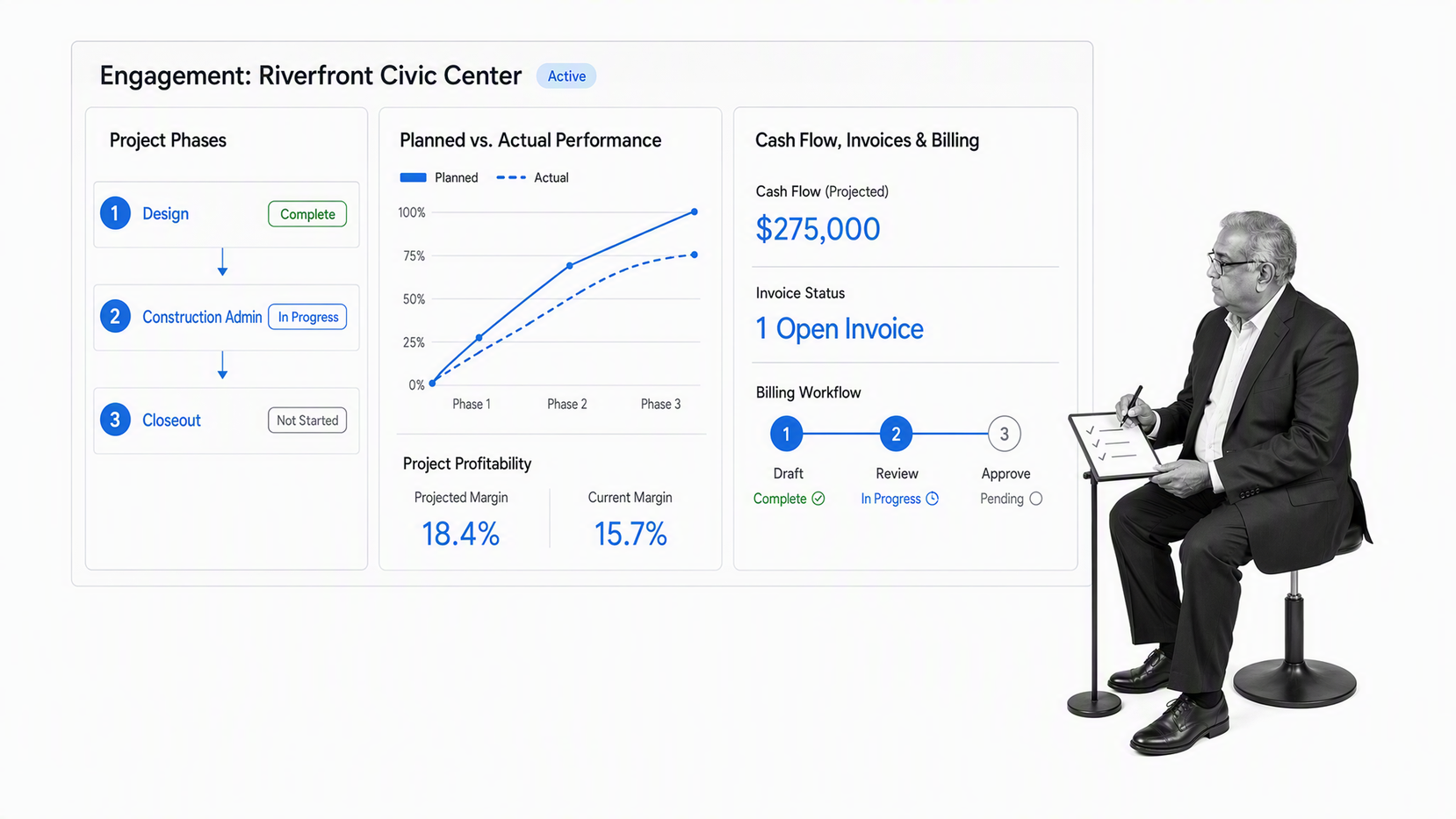
Deltek Vantagepoint combines project accounting with invoicing, budgets, expenses, general ledger, payables, receivables, billing, dashboards, and planned versus actual project performance. It is built for project based professional firms, including architecture, engineering, and consulting environments.
The product gives finance and project leaders a shared view of project profitability, cash flow, budgets, and delivery performance. That can reduce the gap between project managers who own client delivery and finance teams that own billing, accounting, and firm performance.
The evaluation should reflect the firm’s industry and project structure. Build a representative engagement with phases, labor, expenses, budget, billing, and reporting. Confirm that the resulting workflow works for project managers as well as accounting staff, because financial depth has little value if delivery teams avoid the system.
Best for: architecture, engineering, and consulting firms that need industry focused project accounting and financial management
- Evaluate: Model one project from budget and staffing through billing and profitability review.
- Evaluate: Compare planned and actual performance at the level used by project leaders.
- Evaluate: Test month end work and management reporting with finance and delivery users together.
What is finance project management software?
Finance project management software is the operating system for the money side of project delivery. It connects the project plan to the budget, resources, forecast, approvals, commitments, changes, actual costs, billing, evidence, and closeout decisions that determine financial performance.
The category is broad because teams solve this problem at different layers. A workflow platform governs how decisions move. A work management platform coordinates tasks and portfolios. A project accounting system connects delivery to revenue and cost. An enterprise suite links projects to finance data. An industry platform adds controls for a specific delivery model.
A reliable system does not only display financial status. It defines what happens when that status changes. If forecast cost crosses a threshold, the workflow should identify the reviewer, collect the reason and evidence, record the decision, update the relevant plan, and preserve the history. That is the difference between a dashboard and a financial control process.
How do finance teams use project management software?
Finance teams use project software to structure investment requests, transformation programs, system implementations, audit remediation, close improvement work, merger integration, policy changes, capital projects, client delivery, and other initiatives with financial consequences. The same system can support the recurring controls around those projects.
- Capture the business case, scope, sponsor, owner, budget, assumptions, risks, and approval route at intake.
- Connect milestones and resources to the financial plan so delivery changes have visible cost implications.
- Track baseline, actual, commitment, forecast, and variance information at the level needed for decisions.
- Route budget releases, forecast changes, vendor commitments, invoice reviews, and exceptions to accountable reviewers.
- Attach estimates, contracts, invoices, decision notes, and other evidence to the step that required them.
- Review portfolio status across projects without rebuilding the story from slide decks and disconnected spreadsheets.
- Close the project with final cost, open commitments, variance explanations, lessons, and retained evidence.
Reliable project cost control depends on documented assumptions, consistent estimating methods, risk analysis, and updates against actual costs. That discipline gives finance a defensible basis for changing the forecast instead of relying on a number whose reasoning has disappeared.
For a broader operating model, see the Process Street guide to financial project management. It explains how budgets, forecasts, commitments, approvals, and project decisions should tell one consistent story.
Which finance project management capabilities matter most?
Start with the controls and decisions that affect financial outcomes. A long feature list can hide the fact that the product does not govern the handoff that creates risk. The following capabilities matter across most finance project environments.
| Capability | What it should do | Failure signal |
|---|---|---|
| Budget baseline | Record the approved financial plan and assumptions | Teams compare actuals against changing informal numbers |
| Forecast and variance | Show expected outcome and explain movement from baseline | Variance appears after decisions are difficult to reverse |
| Resource economics | Connect capacity, rates, time, and assignments to cost | The schedule and financial plan use different staffing assumptions |
| Approval control | Route decisions and block work until approval is recorded | Approvals happen in email with no durable context |
| Change control | Assess scope, schedule, cost, risk, and funding impact | Changes enter delivery before finance reviews the effect |
| Evidence | Keep estimates, contracts, invoices, files, and notes with the work | Teams rebuild the record during audit or closeout |
| Portfolio reporting | Show delivery and financial risk across active projects | Leadership receives manually assembled status snapshots |
| Integration | Connect workflow and project data to systems of record | Staff rekey data without error handling or ownership |
| Permissions and history | Control access and preserve who changed or approved what | Sensitive data and decisions cannot be traced reliably |
The software should also match the cadence of the work. Capital programs, consulting engagements, finance transformations, and internal controls use different project structures. Test the frequency, level of detail, approval thresholds, reporting audience, and closeout requirements before deciding that a product fits.
How should you choose finance project management software?
Choose the product by running one representative project from intake through closeout. Demonstrations tend to show ideal paths. Finance needs to see what happens when a budget changes, a dependency slips, a vendor invoice conflicts with the plan, evidence is missing, or an approver rejects the request.
- Define the operating job. Decide whether the primary need is governed workflow, general work management, detailed schedule and cost planning, professional services accounting, enterprise project financials, or industry specific cost control.
- Name the systems of record. Identify where accounting, billing, payroll, procurement, contracts, customer, and project data will live after implementation.
- Map the real decision path. Include intake, baseline approval, resource assignment, milestone review, forecast change, exception handling, invoice review, and closeout.
- Set nonnegotiable controls. Specify required fields, evidence, permissions, approval thresholds, segregation of duties, audit history, and retention needs.
- Build the same pilot in every finalist. Use the same roles, sample data, normal route, exception, and reporting questions so the comparison is fair.
- Score the complete path. Measure setup effort, user effort, control strength, reporting quality, integration behavior, administrative ownership, and recovery when something fails.
- Choose an internal owner. Assign responsibility for templates, access, integration monitoring, exceptions, training, and continuous improvement.
Do not treat more features as automatically better. An enterprise suite may be justified when project financials must share a deep ERP model. A lighter platform may be better when the main problem is cross functional execution. A workflow layer may be essential when several systems are staying but the approval and evidence path remains fragmented.
How do you implement finance project management software?
Implementation should begin with one bounded workflow that carries real financial consequences. A budget change, project intake, vendor commitment, monthly variance review, or closeout process is easier to test than an attempt to redesign the full finance project portfolio at once.
- Document the trigger, inputs, owners, tasks, dependencies, systems, approvals, evidence, exceptions, reporting, and completion standard.
- Remove duplicate handoffs and unclear approvals before configuring the software.
- Build the normal path and at least one common exception with real roles and realistic sample data.
- Connect only the systems required for the pilot, and define who owns integration errors and recovery.
- Train users on decisions and outcomes, not every menu. Each role should know what starts the work, what it must complete, and what happens next.
- Run several complete cycles and review missing data, overdue tasks, rejected approvals, manual workarounds, and reporting gaps.
- Update the template, document ownership, then expand to the next project type or financial control.
A practical starting point is a controlled Process Street workflow for project intake, budget approval, variance review, or closeout. Finance teams can also review the broader finance workflow software use cases and the financial control software guide for adjacent control requirements.
Finance project management software FAQs
What is finance project management software?
Finance project management software coordinates project plans, budgets, forecasts, resources, approvals, delivery work, and financial evidence. The right product depends on whether the team needs governed finance workflows, general work management, project accounting, enterprise project financials, or industry specific cost control.
What is the best finance project management software?
Process Street is the strongest overall choice when finance teams need repeatable workflows, required inputs, approvals, exception routes, evidence, and audit history around project work. Teams that need a full ERP, professional services automation, or construction cost system should compare the specialist products in this guide.
How is finance project management software different from accounting software?
Accounting software records transactions and produces financial statements. Finance project management software coordinates the work around a project, including budgets, milestones, resources, approvals, forecasts, changes, delivery status, and financial controls. Many teams use both and connect them through defined workflows.
Which features matter most for finance project teams?
Prioritize budget baselines, actual and forecast tracking, approval controls, ownership, resource planning, change handling, evidence capture, reporting, integrations, permissions, and a durable activity history. Test these capabilities in one real project before making a broader commitment.
Can finance project management software replace an ERP?
Usually not. An ERP remains the financial system of record for transactions, accounting, billing, and related data. A workflow or project platform can coordinate the people, approvals, milestones, exceptions, and evidence around that record. Enterprise project financial products may combine more of these functions in one suite.
How should a finance team evaluate project management software?
Run the same project scenario in every finalist. Include a budget request, resource assignment, milestone update, forecast change, approval, exception, supporting file, and closeout review. Score the complete operating path, not the vendor demonstration or the length of the feature list.
