Turn every policy into automated workflows with built-in enforcement and audit-ready proof.


Form Monitoring
Form monitoring is the continuous testing of a live form and the systems behind it. It verifies that the form loads, accepts valid input, rejects invalid input, submits successfully, shows the right confirmation, delivers the response, and starts the expected follow-up work.
A page can return a healthy status while its form is broken. A field script can fail, spam protection can block real users, an endpoint can reject requests, a connector can stop routing responses, or a confirmation can appear even though no record reached the destination.
This guide explains what to monitor, how to create safe synthetic submissions, which alerts matter, how to investigate failures, and how Process Street can turn a failed check into assigned, approved, and verified recovery work.
In this article, we are going to cover:
- What is form monitoring?
- Why forms fail silently
- What form monitoring should test
- Form monitoring metrics and alerts
- How to build a form monitoring process
- Form monitoring privacy, security, and test data
- Run form monitoring with Process Street
- FAQs
What is form monitoring?
Form monitoring treats a form as a complete service, not a collection of fields. The service includes the page, embed, browser behavior, validation rules, submission endpoint, data store, integrations, notifications, and the operational workflow that handles the response.
Synthetic checks reproduce the user journey
A synthetic check uses controlled test data to open the published form, complete the required path, submit it, and verify a defined outcome. The outcome might be a confirmation state, a created record, an inbox receipt, a workflow run, or all four.
It tests availability and correctness
Availability asks whether the form can be reached. Correctness asks whether it works. Strong monitoring covers both. A reachable form that silently drops responses is not healthy, and a successful API response is not enough when the user sees an error or the destination never receives the record.
It extends past submission
The highest-value check follows the response into the business. A form workflow should assign ownership, apply rules, and start the intended process. Monitoring should confirm that handoff rather than stopping at the submit button.
It complements form analytics
Form analytics explains how real visitors behave, where they abandon, and which fields create friction. Form monitoring asks whether the path is operational right now. You need both: analytics for improvement and monitoring for reliability.
Why forms fail silently
Forms fail silently because a single submission crosses several systems. The visible page may be healthy while one dependency fails behind it. That creates a dangerous gap between what the user believes happened and what the organization actually received.
Front-end changes break fields
A redesigned page, changed field identifier, new consent banner, browser update, or third-party script can hide a control, block focus, break validation, or prevent the submit handler from running. A normal uptime check will miss those defects.
Submission endpoints degrade
Endpoints can return errors, time out, reject payloads, or accept a request without creating a durable record. A useful monitor records network status, response time, visible state, and downstream receipt so an ambiguous result becomes evidence.
Spam and security controls create false positives
Spam protection, rate limits, bot detection, authentication, and firewall rules are necessary, but they can block legitimate submissions after a configuration change. Monitoring must use approved synthetic identities and a cadence that tests the path without resembling abuse.
Integrations and notifications drift
A form may save a record while its integration fails, field mapping changes, or the notification reaches the wrong destination. Form integration monitoring should verify the destination state, not merely that a connector reported success.
Ownership failures compound technical failures
An alert is useless when nobody owns it, severity is unclear, or the team cannot reproduce the problem. Reliability depends on both technical detection and a controlled response process.
What form monitoring should test
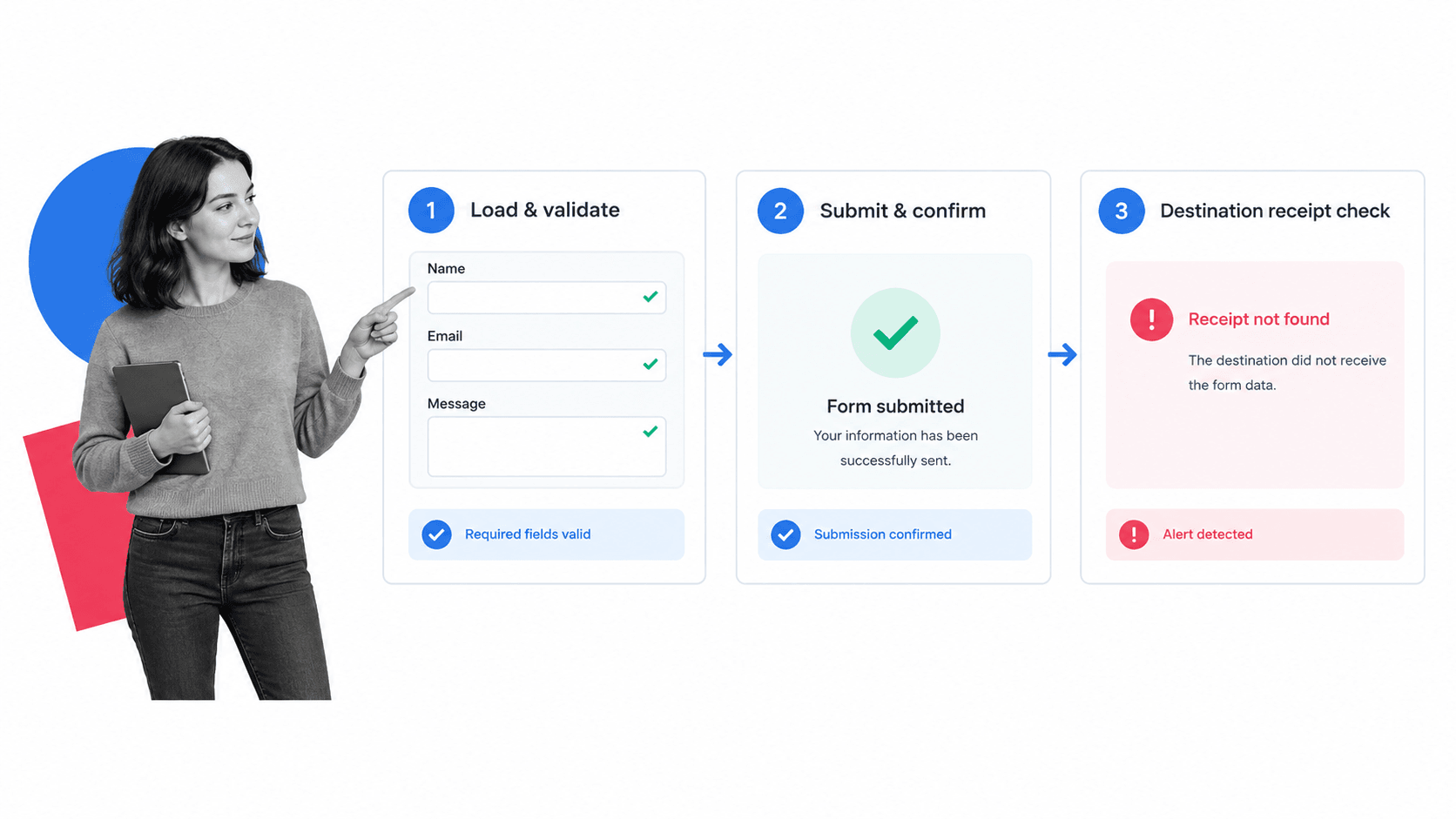
The monitor should test the smallest complete journey that proves the form works. Split that journey into checkpoints so the alert identifies the failed layer instead of reporting a vague broken-form message.
Page and embed availability
Confirm the target page returns successfully, the expected form is present, the embed loads, and the critical controls are visible. Test the published URL, not a builder preview. Record the form version or stable identifier so a replacement is detected.
Required controls and labels
Check that required fields, labels, instructions, consent controls, and the submit action are available. The W3C form guidance is a durable reference for labels, instructions, validation, and notifications. Those behaviors should be part of the journey rather than a separate annual audit.
Valid submission path
Fill the form with a dedicated synthetic record. Use realistic formats without using a real person’s data. Submit once, capture the request and response, and verify that the page reaches the expected success state within a defined time.
Invalid input handling
Run a safe negative check on selected paths. Confirm required fields cannot be skipped, invalid formats produce understandable messages, and the form does not create a record when validation fails. Negative checks should be limited and deliberate so they do not pollute operational data.
Confirmation state
Verify the visible success message, redirect, receipt number, or confirmation page. A click is not success. The confirmation should appear only after the backend has accepted the submission and the user should never receive a failure message after the response was saved.
Destination receipt
Check that the synthetic record reaches the intended system with the right form ID, test marker, required values, and timestamp. The destination might be a CRM, support queue, database, mailbox, spreadsheet, or workflow platform. This is the checkpoint that catches silent delivery failure.
Field mapping and data integrity
Verify a small set of high-risk mappings, especially consent, request type, account identifier, routing choice, and source. Detect missing values, truncated content, swapped fields, duplicates, and character encoding problems without copying sensitive data into monitoring logs.
Notifications and assignments
Confirm the correct owner or team receives the alert or task. Test routing branches separately when they materially change responsibility. A response sitting unassigned in the destination is an operational failure even if the technical submit succeeded.
Downstream workflow start
For critical forms, verify that the response creates the expected workflow run, case, approval, or task. A broader workflow monitoring practice can then track whether the resulting work progresses after intake.
Cleanup and deduplication
Mark synthetic records clearly and remove or archive them according to an approved rule. Ensure cleanup cannot delete real responses. If the destination supports idempotency, use a unique test identifier so retries do not create confusing duplicates.
Form monitoring metrics and alerts
Form monitoring metrics should help operators decide whether to investigate, escalate, or improve the test. Avoid dashboards filled with counts that have no owner or threshold.
Availability and success rate
Track the share of scheduled checks that completed the entire journey. Also record success by checkpoint. A 99 percent page-load rate and a 70 percent destination-receipt rate reveal very different problems. A form dashboard can keep reliability results separate from real-user performance while showing both to the owner.
Latency by stage
Measure page load, form readiness, submit response, confirmation, destination receipt, and workflow creation separately. A slow endpoint may still succeed but create a poor experience or time out under peak demand.
Failure classification
Classify failures as page unavailable, form missing, control missing, validation failure, submission error, confirmation mismatch, delivery failure, mapping failure, notification failure, or downstream workflow failure. Stable classifications make trends and ownership visible. Wufoo’s form activity documentation is one example of separating pageviews, entries, conversion, errors, and completion time rather than collapsing every signal into one count.
Alert quality
Track false positives, duplicate alerts, time to acknowledge, time to diagnose, time to restore, and repeat incidents. A monitor that cries wolf trains the team to ignore the one failure that matters. Use workflow analytics to find recurring delays after an incident becomes owned work.
Real-user signals
Synthetic checks cannot reproduce every browser, device, consent state, accessibility tool, or network condition. Compare them with real submission volume, validation events, support reports, and analytics. Google Analytics documentation describes form_start and form_submit events that can support this layer when the implementation fits the form.
How to build a form monitoring process
Build the monitoring process around business risk. A public contact form, payment request, patient intake, job application, consent form, and internal equipment request do not need identical cadence or escalation.
1. Inventory critical forms
Create a register of form URL, purpose, owner, destination, data class, expected volume, critical routing branches, and recovery contact. A governed form platform view helps prevent forms from becoming invisible assets with no accountable owner.
2. Define the successful outcome
Write the exact evidence that proves success: visible confirmation, stored response, correct field mapping, assigned owner, created workflow, and expected notification. If success cannot be observed, the monitor cannot prove it.
3. Create dedicated test data
Use a clearly marked synthetic identity, reserved inbox, non-production account where appropriate, and a unique run identifier. Never use customer records, employee personal data, or secrets. Keep values realistic enough to exercise validation without creating confusion.
4. Choose cadence by risk
High-value public intake may warrant frequent checks. Lower-risk internal forms may need checks after deployment and on a slower schedule. Increase cadence around campaigns, releases, integration changes, and periods when a failure would have outsized impact.
5. Establish thresholds
Define how many failed checkpoints trigger warning or critical severity, how long receipt may take, which mappings are mandatory, and when low real submission volume becomes suspicious. Use consecutive failures to reduce transient noise where the risk allows it.
6. Capture useful evidence
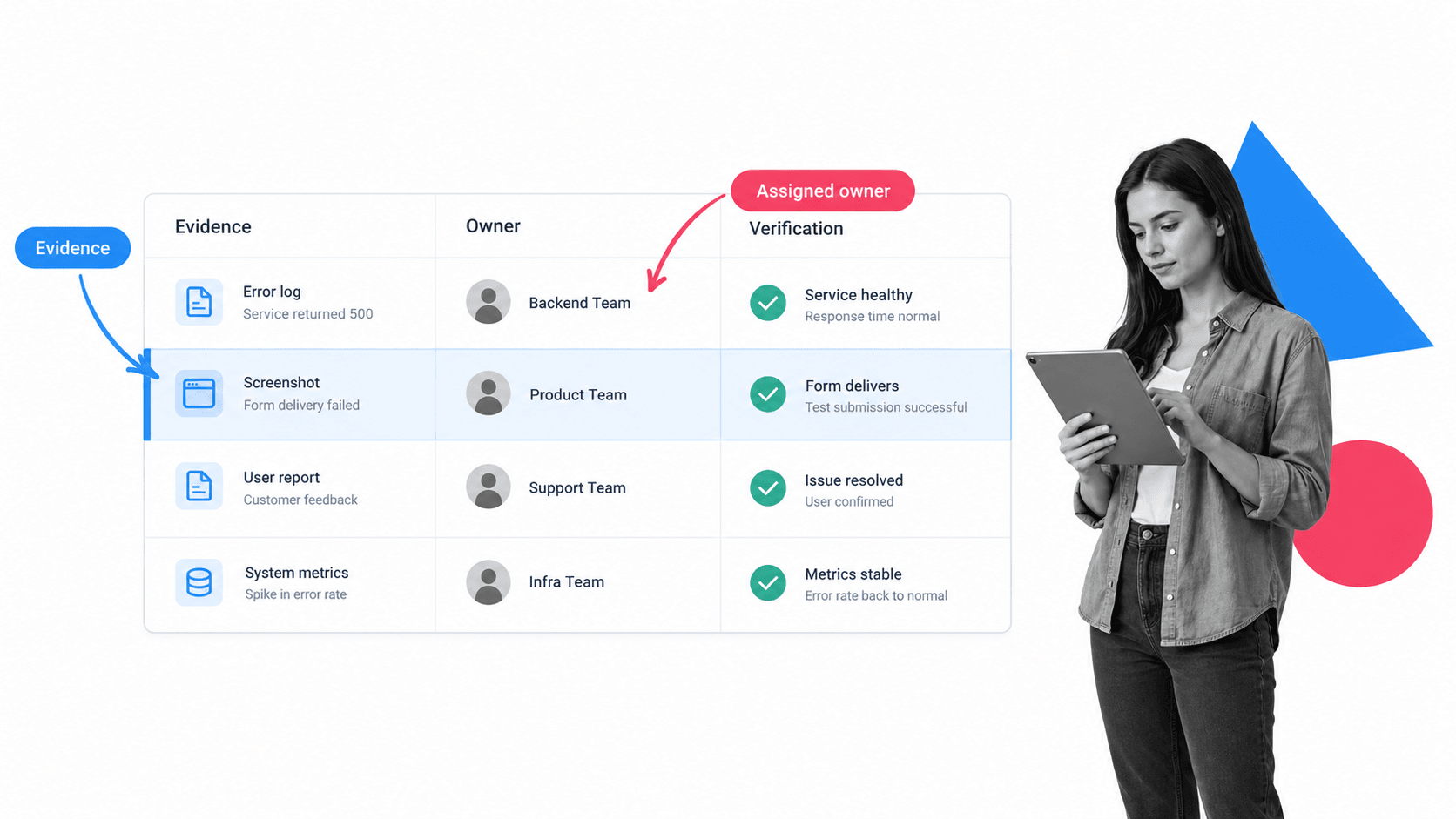
Record the URL, monitor run ID, checkpoint, browser, visible state, network result, destination lookup, timing, and screenshot when appropriate. Do not put submitted field values or private response data into a broad alert channel.
7. Route to the right owner
Front-end failures may belong to web engineering. Endpoint failures may belong to application owners. Mapping and delivery failures may belong to operations or revenue systems. Privacy failures require a different response. Route by evidence and risk.
8. Verify the repair
After a fix, rerun the same synthetic journey and check the destination. Then review whether real submissions during the incident window need recovery. A green page load does not close a delivery incident.
9. Review recurring failures
Use a recurring website user experience audit, data quality audit, and incident response plan as starting points for broader review. Repeated incidents usually point to weak change control, brittle integration, or missing ownership.
Form monitoring privacy, security, and test data
A monitor submits data on purpose, so privacy and security are part of the design. The safest test uses the minimum data needed to prove the path and keeps synthetic records easy to identify.
Minimize test data
Do not use real names, personal email addresses, phone numbers, health information, financial information, passwords, identification numbers, or free-text secrets. Prefer controlled test values and non-sensitive identifiers.
Separate monitoring credentials
Use dedicated accounts, inboxes, and permissions. Give the monitor only the access it needs to submit and verify. Rotate credentials through the approved secret-management path and prevent them from appearing in screenshots or logs.
Test security controls safely
Do not disable spam protection, validation, consent, authentication, or rate limits just to make monitoring easier. Design an approved test path that proves those controls still allow legitimate use. The OWASP Web Security Testing Guide provides a structured reference for web input and session testing.
Control retention and access
Decide how long monitor evidence, screenshots, test records, and logs are kept. Restrict access, mask sensitive surfaces, and make cleanup auditable. A reliability tool should not become a new source of unnecessary response data.
Run form monitoring with Process Street
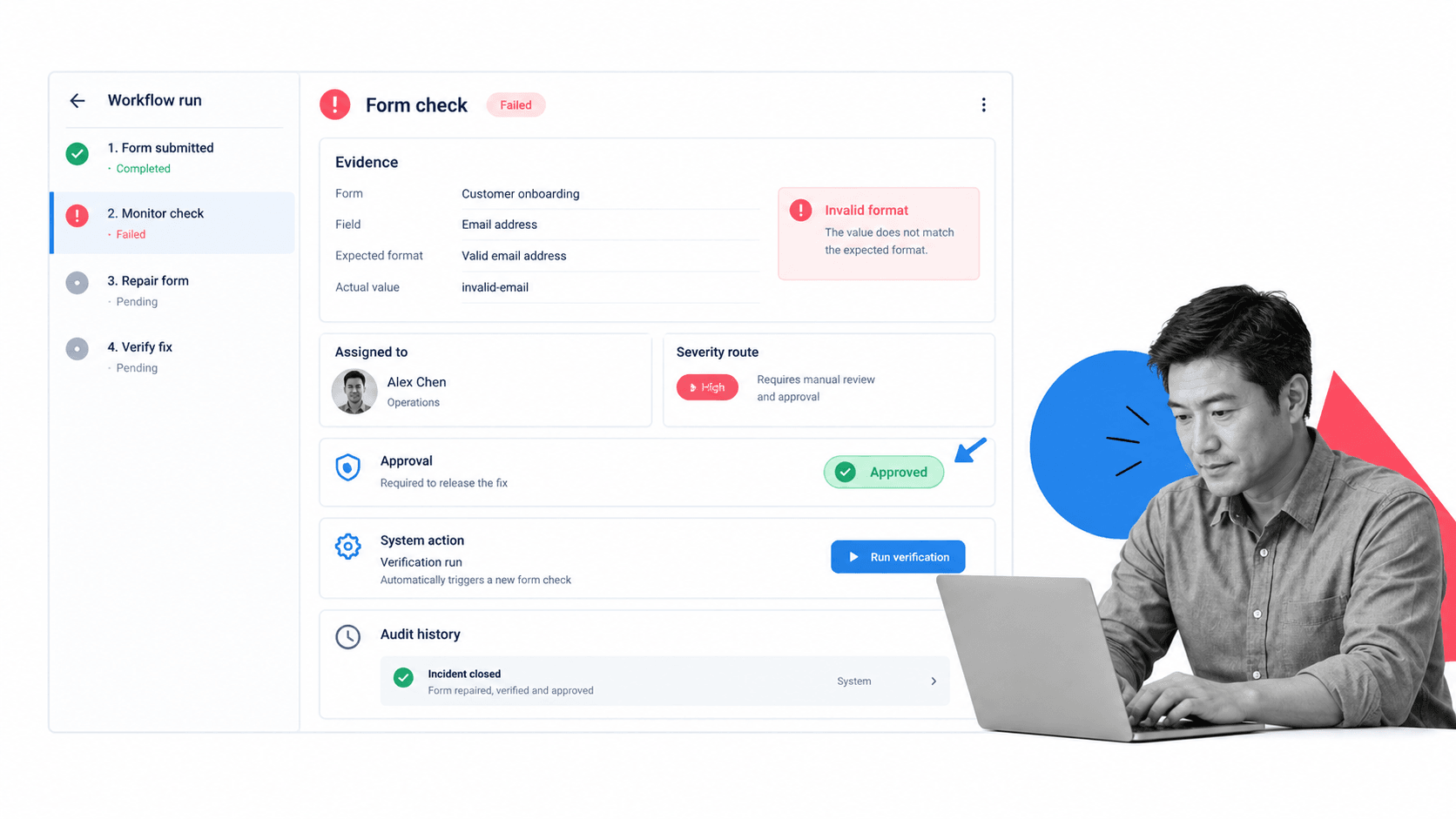
Form monitoring creates value when every failure becomes controlled work. Process Street can receive a monitor result, capture evidence, assign the incident, route by severity, require approval for risky changes, trigger system actions, and record verification.
Capture the failure
Start a workflow with the form, environment, run ID, failed checkpoint, visible error, network result, destination result, and evidence links. Structured fields make the first alert useful to the person who investigates it.
Route by severity
Conditional logic can send a slow confirmation through a standard path while escalating lost submissions, exposed data, disabled consent, or a broken regulated intake flow. Owners and due dates become part of the incident rather than a message that can disappear.
Coordinate diagnosis and recovery
A form service spans technical delivery and operational response. The workflow can separate containment, root cause, repair, data recovery, stakeholder communication, and final verification while keeping the evidence together.
Approve material changes
Approval gates can protect changes to validation, required fields, consent language, routing, authentication, or destination mappings. The reviewer sees the evidence and test result before the change is released.
Connect the monitoring stack
Process Street has direct, universal integrations to 5,000+ systems. Need a new one? An AI agent builds it on the fly. A monitor result can trigger the workflow, update the owning system, notify the right team, and launch a verification run after repair.
Preserve proof of recovery
Record who responded, what failed, which change was approved, how affected responses were handled, and which end-to-end check passed. That evidence supports wider process monitoring and turns recurring incidents into measurable improvements.
The practical standard is simple: a healthy form must work for the user, preserve the response, reach the right owner, and create proof that the complete path succeeded.
That standard also makes ownership measurable. Teams can see whether detection, diagnosis, recovery, and verification occurred within the thresholds defined for each form.
FAQs
What is form monitoring?
Form monitoring is the continuous testing of a live form and its dependencies. It checks that the form loads, validates, submits, confirms success, delivers the response, and starts the expected downstream work.
How does form monitoring work?
A form monitor runs a controlled synthetic journey on a schedule. It opens the published form, fills approved test values, submits, verifies the visible confirmation, checks the destination record, and alerts an owner when a checkpoint fails.
What should a form monitor test?
Test page and embed availability, required controls, valid and selected invalid paths, submission response, confirmation, destination receipt, critical field mappings, notifications, assignments, and downstream workflow creation. The exact set should match the form’s business risk.
How often should forms be monitored?
Set cadence by risk, volume, and recovery cost. Critical public intake may need frequent checks, while lower-risk internal forms may be checked after changes and on a slower schedule. Increase monitoring during campaigns and releases.
What is the difference between form monitoring and form analytics?
Form monitoring verifies that a form works now and that responses reach the right destination. Form analytics explains how real users behave, where they abandon, and how the form converts. Monitoring protects reliability, while analytics guides optimization.
How does Process Street support form monitoring?
Process Street turns a failed form check into an executable incident workflow with evidence, assignments, conditional routing, approvals, system actions, verification, and audit history. It keeps detection, response, and proof in one governed process.