Turn every policy into automated workflows with built-in enforcement and audit-ready proof.


Form Process
A form process is a repeatable way to turn submitted forms into assigned, trackable, auditable work. It collects the form response, validates required information, routes the submission to the right owner, controls approvals, triggers follow-up tasks, and preserves the final record.
The phrase matters because many teams have digital forms but still process submissions manually. A request lands in an inbox, someone checks for missing fields, another person forwards it to a reviewer, a decision happens in chat, and the final record ends up in a spreadsheet. The form is digital, but the process is not.
This guide explains what a form process does, how it differs from a form builder or a consulting project, what to look for when choosing one, and how Process Street turns form intake into governed workflow execution.
In this article, we are going to cover:
- What a form process is
- Why form processes matter
- What a form process includes
- Form process vs form, workflow, and automation
- How to design a form process
- Build a form process in Process Street
- Form process examples
- Form process FAQs
What a form process is
A form process is the operating layer around form-driven work. It can include form design, field validation, submission triage, workflow routing, approval management, automation, recordkeeping, reporting, and improvement. The exact scope changes by team, but the form process should make form submissions easier to act on and easier to prove.
A simple definition
Think of it as the process layer that wraps a form in workflow logic. A form builder helps create the form interface. A form process makes sure the submitted form becomes owned work with a clear path to completion.
That makes the process broader than a form or a diagram. A diagram can show a process, and a form can capture information. A form process should help the team turn that input into assignments, approvals, automations, reports, and records. IBM describes business process management as discovering, modeling, analyzing, measuring, improving, and optimizing business processes in its IBM business process management overview. A form process applies that thinking to form-driven work.
What the form process is responsible for
The form process is responsible for making submitted forms operational. It should help the team choose which form-driven workflows matter, understand the current handoffs, design the target path, build the workflow, roll it out, measure adoption, handle exceptions, and improve the process after real use.
That responsibility can sit with an external partner, an internal business excellence team, an operational excellence group, or a process owner using the right software. What matters is not the org chart. What matters is whether the process changes the way work gets done.
When a repeatable process is better than a one-time fix
A one-time project can help when the organization has one broken form and one clear goal. A continuous operating model is better when many forms trigger recurring work across departments. Submissions change. Owners change. Systems change. Controls change. A continuous operating model keeps the intake path useful after the first workflow is launched.
Why form processes matter
Form processes matter because intake problems rarely stay inside one team. A slow request affects customers. An unclear approval path affects finance. A missing evidence step affects compliance. A manual handoff affects operations. The process creates a shared way to improve form-driven work without rebuilding the operating model from scratch each time.
They turn scattered work into repeatable workflows
Most process problems start as scattered work. A team has a document in one place, a spreadsheet in another, an approval in email, and a status update in chat. A form process should connect those pieces into a repeatable workflow. That is the same operating idea behind a strong form builder: repeatable work needs a system that can run it.
They reduce process drift
Process drift happens when the documented process and the real process separate. People follow old instructions. Exceptions become the norm. Approvals happen outside the system. Data gets copied by hand. A form process should spot drift and move the process back into a controlled path.
Strong Forms helps by showing how work should happen. A form process adds the operating cadence: review the process, test the workflow, update the owner, and keep the live version current.
They create proof by default
When a process carries risk, completion is not enough. Leaders need proof that the right person completed the right step, with the right evidence, under the right rule. A form process should build that proof into the workflow instead of asking teams to reconstruct it later.
They make improvement continuous
A process map can become stale quickly. A continuous operating model keeps a feedback loop open. The team can review bottlenecks, late tasks, repeated exceptions, missing fields, and manual handoffs, then improve the workflow based on real run data.
What a form process includes
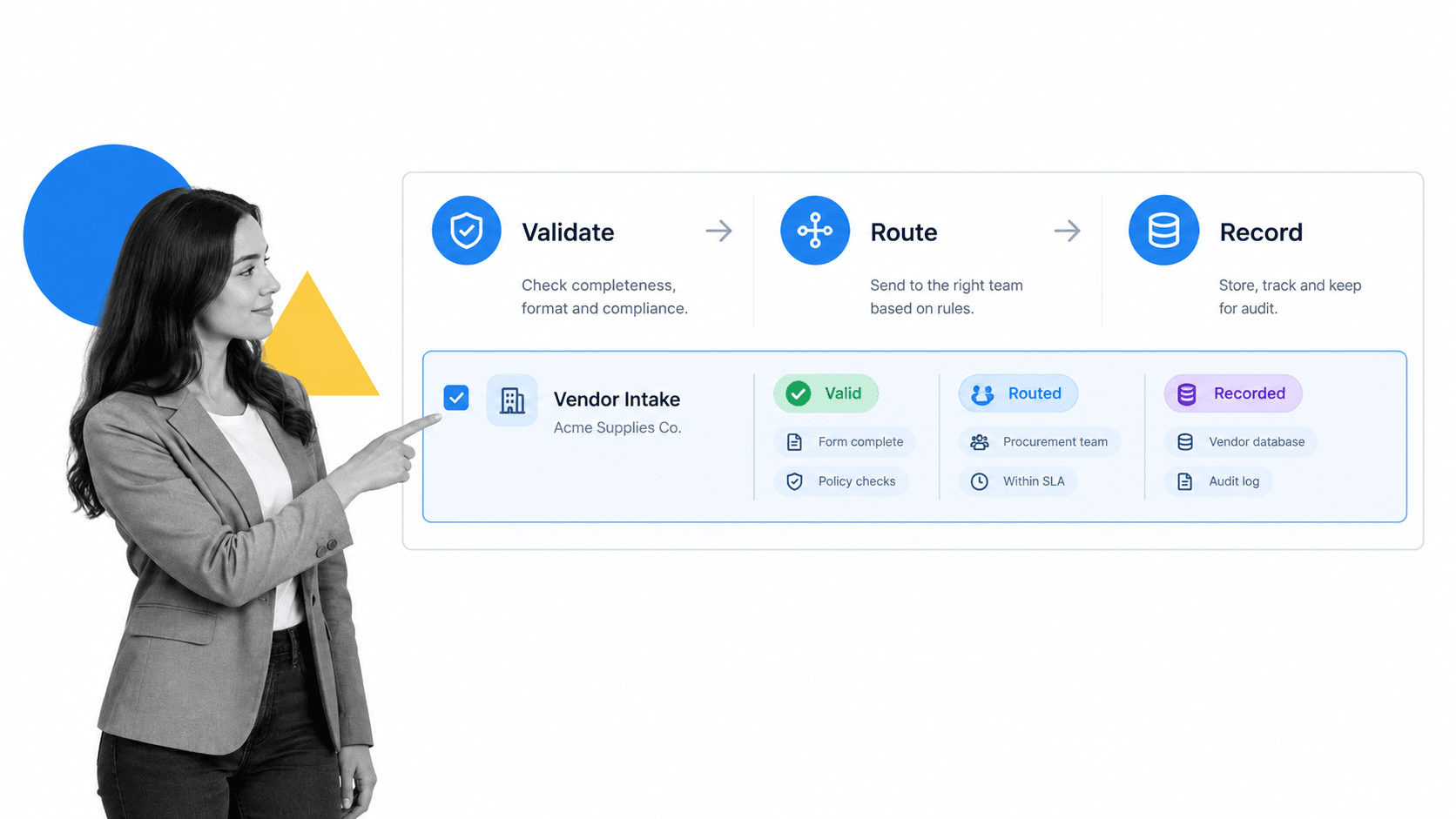
A form process should cover the full lifecycle of recurring work. If it only documents processes, it leaves execution behind. If it only automates tasks, it may miss governance. The strongest form process connects discovery, execution, control, reporting, and improvement.
1. Process discovery
Discovery identifies which processes exist, which ones matter most, and where work breaks. It usually includes stakeholder interviews, workflow observation, system review, forms review, handoff analysis, and pain-point mapping. The goal is to understand the real current state, not the ideal version people wish existed.
2. Process modeling and documentation
Modeling gives people a shared language for the process. For more formal teams, the OMG BPMN 2.0 overview provides a standard notation for business process diagrams. Many teams can start simpler, but the principle is the same: make the process visible enough to inspect.
Documentation should connect to execution. A form process should help teams create reusable workflow management system, but it should also define who runs the process and what happens when the workflow starts.
3. Workflow design
Workflow design converts the process into steps, roles, forms, decision points, time limits, dependencies, and outputs. This is where the process design decides how work should move, what fields are required, where approvals sit, and which exceptions need separate routes.
4. Automation and integration
Automation removes repetitive handoffs and system updates. A form process should identify where automations make the process more reliable, not just faster. For teams comparing options, process automation and automated workflow tools are useful adjacent concepts.
5. Governance and controls
Governance defines ownership, change control, approvals, review cadence, and evidence requirements. A process without governance can create a polished workflow that nobody maintains. A governed process makes sure the process remains trusted after launch.
6. Measurement and optimization
Measurement shows whether the process is working. Useful signals include cycle time, late steps, skipped fields, exception rates, approval bottlenecks, rework, and process owner feedback. Optimization turns those signals into changes.
The Microsoft business process flows overview describes business process flows as guides that lead people through organization-defined work. That is the same practical bar for a form process: submitted forms should lead people through the right path, not simply create another record.
Form process vs form, workflow, and automation
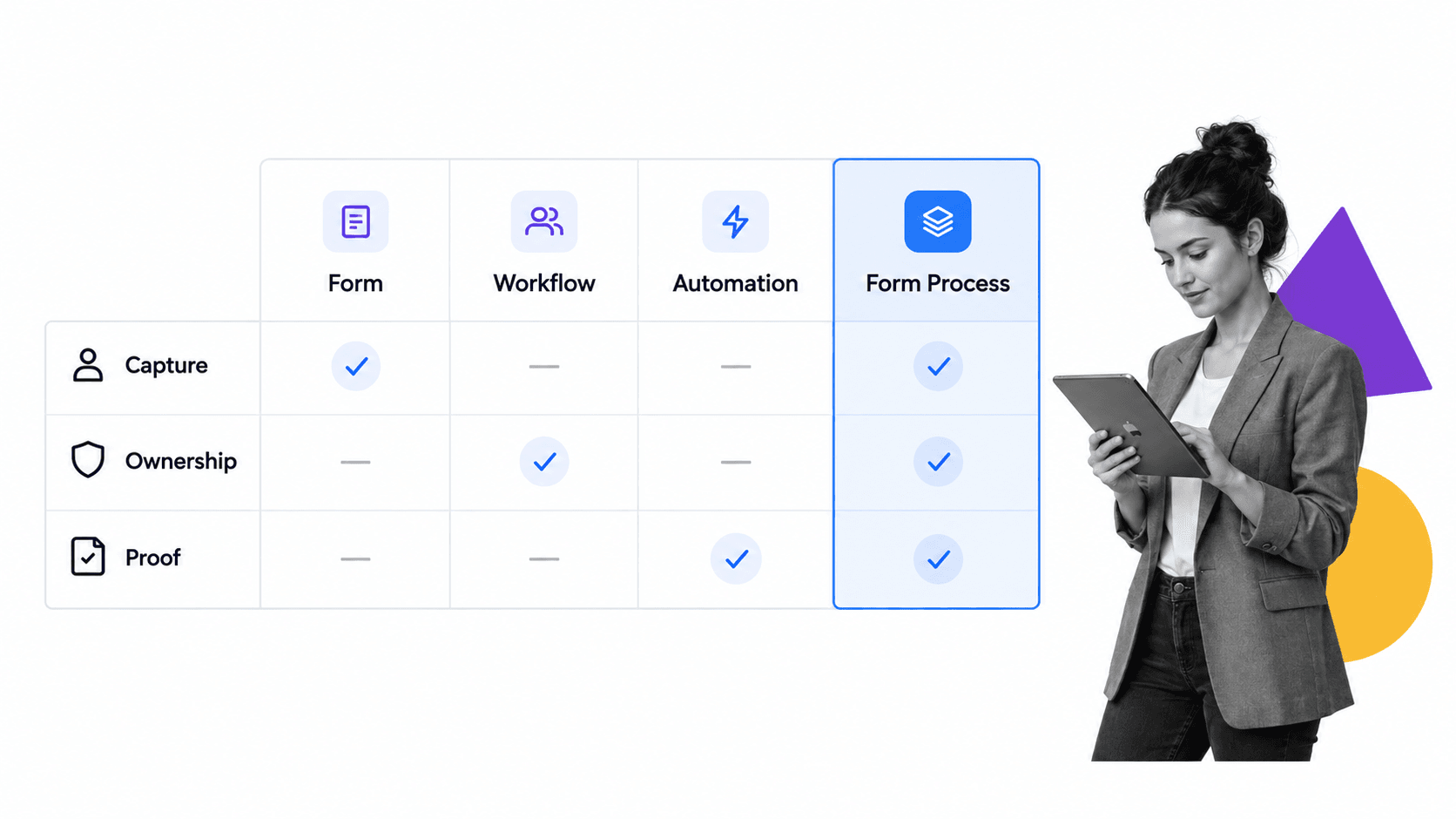
A form process connects the form, the workflow, and the automation around them, but those elements are not interchangeable. The distinction is whether submitted information merely exists or moves through a clear operational path with ownership and proof.
Form builder
A form builder gives teams a way to create fields, layouts, and submission pages. A form application is broader because the submitted form becomes a managed workflow with review, approval, automation, and records.
Process consulting
Process consulting helps diagnose problems and design improvements. It can be valuable when an organization needs outside perspective, facilitation, or process redesign. The gap appears when recommendations remain in documents and are never converted into executable workflows.
Outsourcing
Automation executes repeatable rules and system actions. A form process is broader because it also governs human decisions, exceptions, evidence, deadlines, and the final outcome. Automation should support the process without hiding who owns it.
Form process
A form process should combine clear intake, operating cadence, workflow execution, and improvement. It may use software and automation, but it is judged by whether recurring work becomes clearer, faster, safer, and easier to prove.
How to design a form process
Choosing a form process starts with the intake problem, not the software interface. The right design depends on whether you need better forms, validation, routing, automation, compliance proof, system integration, operational capacity, or all of those together.
Start with process scope
Define the process family first. Examples include employee onboarding, vendor management, customer onboarding, monthly close, access requests, audit evidence, policy approvals, incident response, procurement, quality checks, and customer delivery. A clear scope prevents the process from becoming vague transformation theater.
Check execution capability
Ask how the process design turns analysis into execution. Does it build workflows? Does it assign owners? Does it capture fields and evidence? Does it route approvals? Does it connect to systems? Does it review real run data after launch? A design effort that only delivers recommendations is not enough when the pain is execution.
Check governance depth
The form process should define who owns each process, who can change it, what approval is required, how versions are controlled, and when the process is reviewed. Governance does not need to be heavy for every workflow, but it must match the risk.
Check standards fit
Governance should match the data being collected. The FTC data security guidance is a practical reminder to collect what you need, protect what you keep, and limit unnecessary exposure. A form process should translate those principles into field design, access rules, and record handling.
Check user experience
If the process starts with forms, user experience matters. Clear labels, instructions, grouping, and error handling reduce rework. The W3C form accessibility guidance gives practical form guidance that applies whenever a process depends on structured intake.
Check measurement
A form process should define what success looks like before implementation. Measures can include cycle time, completion rate, exception volume, rework, audit readiness, stakeholder satisfaction, missed steps, and automation coverage.
Check handoff ownership
The form process should also explain what happens after launch. Someone needs to own process changes, train new users, review exceptions, and decide when a workflow should be retired or rebuilt. If the team cannot name the post-launch owner model, the project may deliver an improved process that quietly drifts back into old habits.
Ask for the operating rhythm before launch. A practical form process should have a review cadence, a change-request path, a way to collect user feedback, and a method for turning recurring exceptions into workflow updates.
Build a form process in Process Street
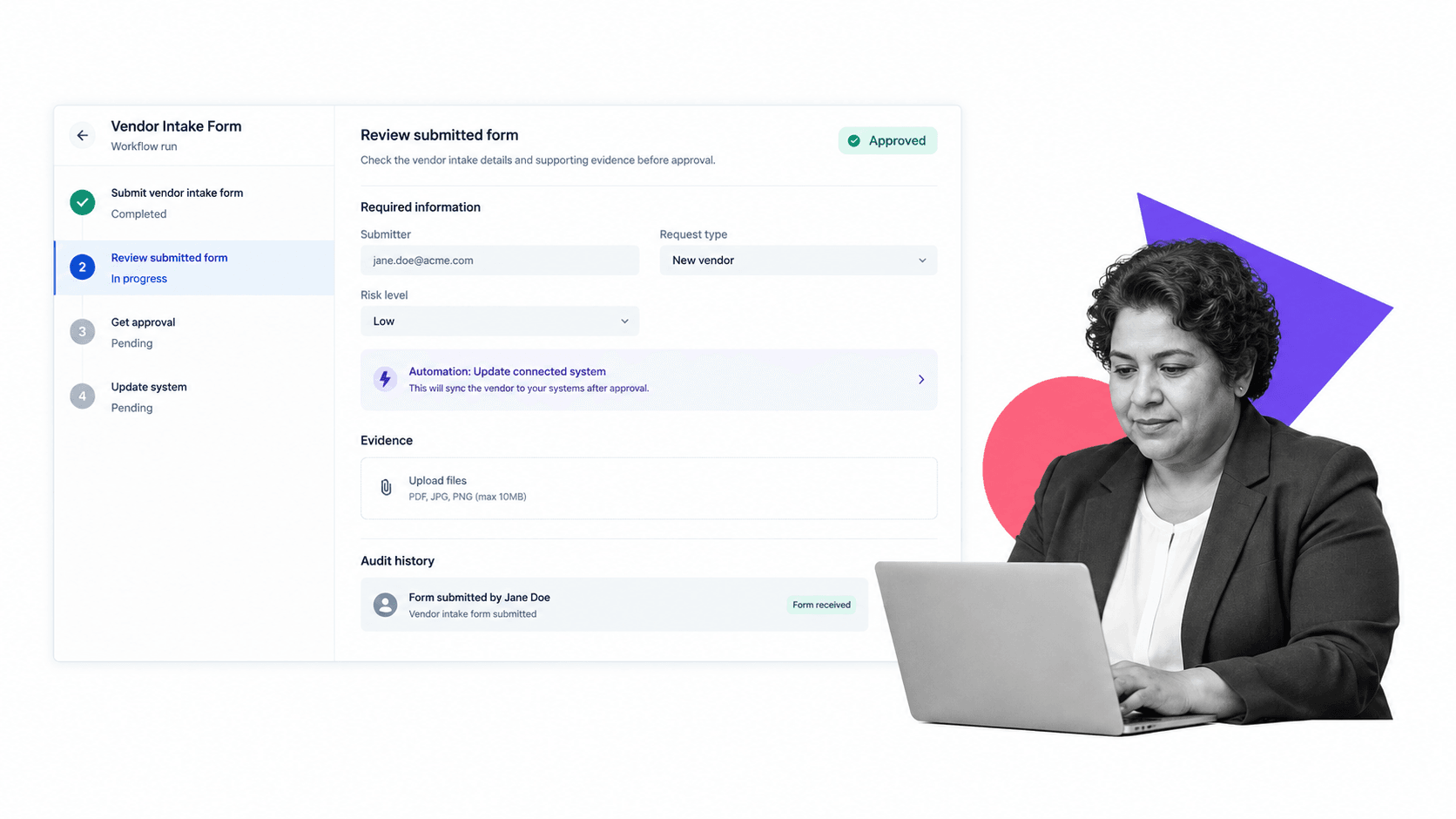
You can run a form process in Process Street by turning process improvement work into recurring workflows. That means each discovery, documentation, rollout, review, approval, and optimization step has an owner and a record.
Use workflows as process playbooks
A process playbook should be runnable, not just readable. Process Street help docs explain running workflows, which is the practical starting point for turning a process model into assigned execution.
Capture intake with forms and fields
A form process needs structured intake before it can improve a process. Capture the process owner, business goal, current pain, affected systems, risk level, frequency, and required evidence. Required fields prevent vague requests from becoming vague process projects.
Use approvals to control changes
Process changes can affect compliance, customers, finance, and internal controls. approvals help keep signoff inside the workflow so the final process version is not approved in a side thread.
Use conditional logic for different paths
Not every process needs the same review. conditional logic can route high-risk processes through extra approval, while lower-risk processes follow a shorter path.
Use automation to connect systems
Process Street has direct, universal integrations to 5,000+ systems. Need a new one? An AI agent builds it on the fly. That matters for form process work because process improvement often depends on updating records, notifying owners, launching downstream workflows, and keeping systems aligned.
Use history as proof
A form process should be able to prove what changed and why. Workflow history, form values, attached evidence, comments, approvals, and completion state give the process a record of execution. That record is useful for process owners, auditors, managers, and anyone trying to improve the workflow later.
Teams can start from a job application form template, adapt a vendor management workflow, or use a purchase order template to structure the first improvement cycle.
Form process examples
Form processes show up wherever submitted forms create repeatable work that has become too important to run by memory. The examples below are not different categories of software. They are common process patterns.
Employee onboarding
An onboarding form process maps the current hiring handoff, standardizes forms, assigns HR and IT tasks, routes manager approvals, captures policy acknowledgments, and reviews completion data after each cohort.
Vendor management
A vendor management form process organizes intake, risk review, contract approval, security review, tax forms, renewal checks, and evidence collection. The process reduces late approvals and scattered vendor records.
Finance operations
A finance form process can improve purchase requests, invoice exceptions, monthly close, budget changes, expense approvals, and account reconciliations. The work often needs clear fields, approval thresholds, and audit-ready proof.
IT and access management
An IT form process can improve access requests, software approvals, device provisioning, incident response, and offboarding. The form process should connect intake, review, approvals, system updates, and evidence.
Compliance and quality
Compliance and quality teams use form processes to enforce reviews, control evidence, manage exceptions, and improve repeatable checks. These processes often sit close to business process documentation because different process families need different levels of control.
Form process FAQs
What is a form process?
A form process is a repeatable operating sequence that turns submitted form data into validation, routing, review, approval, action, and a final record. It connects the intake experience to owned work and proof of what happened.
What does a form process include?
A form process can include intake fields, validation, classification, routing, assigned owners, approvals, automated actions, exception paths, evidence, and closure. The strongest designs make every response visible and accountable from submission to outcome.
Is a form process the same as a form workflow?
No. A form builder helps create fields and submission pages. A form process adds the routing, ownership, approvals, automations, records, and improvement cadence needed to make submitted forms operational.
When should a company create a form process?
Use a form process when recurring work is inconsistent, slow, hard to audit, dependent on manual handoffs, or spread across documents, inboxes, spreadsheets, and disconnected systems.
How do you design a form process?
Design a form process by defining the outcome, required information, owners, decision rules, approvals, exception paths, evidence, and measures. Test real scenarios before launch, then improve the workflow from actual run data.
Can Process Street support a form process?
Yes. Process Street supports form process work by turning process playbooks into workflows with forms, assignments, approvals, conditional logic, automations, evidence, and audit history.