


Turn every policy into automated workflows with built-in enforcement and audit-ready proof.



Healthcare Analytics

Healthcare analytics is the practice of turning healthcare data into decisions that improve care, reduce risk, strengthen operations, and prove compliance. It brings together clinical, operational, financial, quality, and compliance signals so teams can see what is happening and decide what to do next.
The value is not the dashboard by itself. A dashboard can show that readmission risk is rising, infection indicators are drifting, or a documentation process is breaking down. Healthcare analytics only changes outcomes when those insights trigger assigned work, review, intervention, and evidence.
This guide explains what healthcare analytics means, why it matters, the main types, the data sources behind it, how to operationalize insights, the governance required, and how healthcare teams can connect analytics to auditable workflows.
In this article, we are going to cover:
- What healthcare analytics is
- Why healthcare analytics matters
- Types of healthcare analytics
- Healthcare analytics data sources
- How to operationalize healthcare analytics
- Healthcare analytics governance
- Healthcare analytics in Process Street
- How to choose healthcare analytics software
- FAQs
What healthcare analytics is
Healthcare analytics uses quantitative and qualitative methods to collect, combine, analyze, and interpret healthcare data. The goal is to help clinical, quality, operations, compliance, and finance teams make better decisions with evidence instead of instinct.
The data can come from electronic health records, claims, scheduling systems, incident reports, patient surveys, care management tools, device feeds, and workflow records. That makes analytics closely tied to healthcare integration because data has to move between systems before it can become useful.
Analytics is different from reporting
Reporting tells a team what happened. Analytics helps a team understand why it happened, what might happen next, and which action should follow. A monthly fall-rate report is reporting. A monitored trend that triggers a unit-level intervention, owner review, and follow-up check is analytics operating as management.
That distinction matters because many healthcare teams already have more reports than they can use. The missing piece is usually not another chart. It is a clear operating rule for when a signal deserves attention, who owns the response, what evidence must be captured, and when leadership should review the result.
Healthcare analytics needs action ownership
The biggest failure mode is insight without ownership. A quality team finds a risk, shares a slide, and then no one knows who changed the workflow, who reviewed the result, or whether the intervention held. Analytics should end in accountable work, not only in a meeting.
That is why Process Street treats analytics as part of an execution system. The insight is useful only when it becomes a workflow with owners, required fields, approvals, evidence, and an activity trail.
Why healthcare analytics matters
Healthcare organizations carry complex obligations at the same time: improve outcomes, reduce avoidable cost, protect patient information, meet regulatory standards, and keep care teams from drowning in manual work. Healthcare analytics gives leaders a way to see patterns across that complexity.
It improves patient safety and quality
AHRQ Data and Analytics helps healthcare decision makers understand where the system is working and where improvement is needed. Analytics can reveal rising risk in readmissions, infections, medication errors, patient deterioration, delays, and handoffs. The point is not just to measure harm after it happens, but to identify signals early enough to intervene.
It connects quality to operations
CMS quality measures defines quality measures as tools that quantify healthcare processes, outcomes, patient perceptions, and organizational structure. Those measures become far more useful when they are tied to operational owners. If a metric drops, a team needs a repeatable way to investigate, act, and prove the change.
This is where healthcare analytics becomes practical. A quality measure can point to a performance gap, but operations has to translate that gap into scheduling changes, outreach, training, documentation repair, escalation, or process redesign. Analytics should make that handoff easier, not create a parallel reporting burden.
It supports compliance readiness
Healthcare analytics also supports compliance by showing whether required work is being done consistently. Analytics can surface gaps in documentation, training, access review, incident response, or policy adherence. Teams can then connect those signals to compliance management software and a stronger risk management process.
For regulated teams, the evidence matters as much as the insight. Leaders need to show what the data said, who reviewed it, what action followed, and whether the corrective work closed.
Types of healthcare analytics
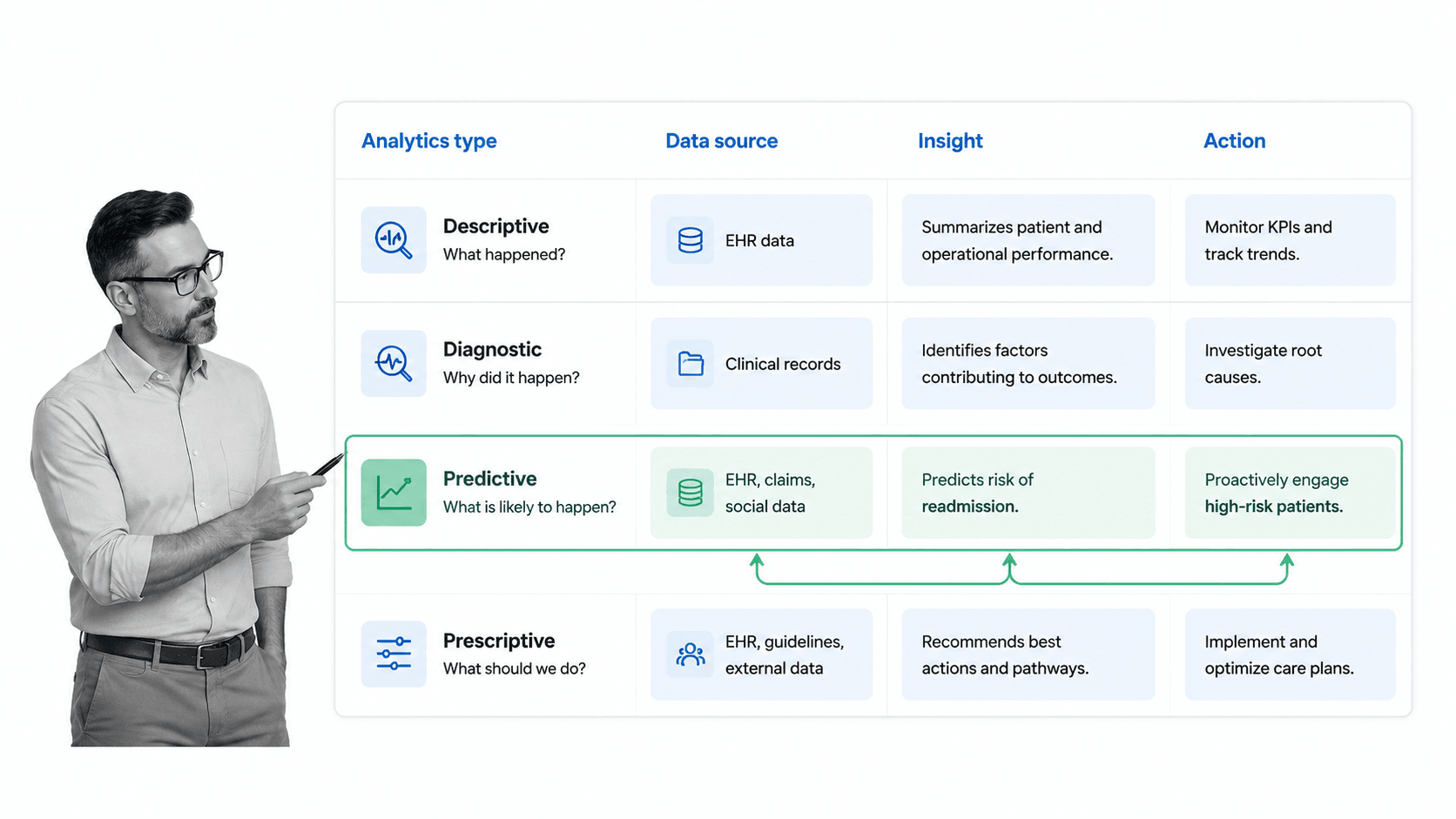
Healthcare analytics usually falls into four types. The types build on one another, from understanding the past to recommending the next action.
Descriptive analytics
Descriptive analytics answers what happened. It summarizes historical data through counts, rates, dashboards, trends, and scorecards. Examples include readmission rates, appointment no-show rates, average length of stay, incident volume, claims denial rates, and overdue compliance tasks.
Diagnostic analytics
Diagnostic analytics answers why something happened. It looks for drivers, correlations, segments, and root causes. If readmissions increased, diagnostic analytics may examine discharge follow-up completion, medication reconciliation gaps, patient acuity, staffing patterns, or referral delays.
Predictive analytics
Predictive analytics estimates what is likely to happen. It can flag patients at risk of readmission, identify capacity pressure, forecast demand, or predict where a compliance gap may appear. Predictive analytics is useful only when the organization has a response path for the signal.
Prescriptive analytics
Prescriptive analytics recommends what to do next. It might suggest outreach, escalation, staffing adjustment, care management intervention, or process change. This is where analytics most clearly needs workflow support, because the recommendation has to become assigned action.
Most teams do not need to implement all four types at once. A better maturity path is to make descriptive and diagnostic analytics dependable, then add predictive signals where the response workflow is already clear. Prescriptive recommendations should come last, after leaders trust the data, the thresholds, and the operational path.
Teams building analytics maturity often start with healthcare monitoring and process monitoring before moving into predictive or prescriptive programs. You need reliable monitoring and process visibility before advanced models can produce trustworthy action.
Healthcare analytics data sources
Healthcare analytics depends on data that is broad, messy, sensitive, and fragmented. A useful analytics program starts by knowing which data sources exist and what each source can and cannot prove.
Clinical data
Clinical data includes diagnoses, medications, lab results, vitals, imaging metadata, procedures, notes, care plans, and encounter history. It usually comes from EHRs and clinical systems. Clinical data is critical for patient safety, outcomes, quality, and risk analysis.
Claims and financial data
Claims and financial data helps teams understand cost, utilization, reimbursement, denials, leakage, and value-based care performance. It is often delayed compared with clinical data, but it is essential for seeing patterns across payer, provider, and patient populations.
Operational data
Operational data comes from scheduling, staffing, bed management, supply chain, referral, contact center, and workflow systems. It shows whether the care delivery engine is moving correctly. Operational data often explains why a clinical or financial metric changed.
Quality, safety, and compliance data
AHRQ Quality Indicator Tools for Data Analytics describes standardized measures that can be used with hospital administrative data to track clinical performance and outcomes. CDC National Healthcare Safety Network provides data needed to identify healthcare-associated infection problem areas and measure prevention progress. These sources show why analytics has to include formal quality and safety evidence, not only internal dashboards.
Interoperability standards
Analytics improves when data can move in a consistent format. HealthIT.gov HL7 FHIR guidance describes HL7 FHIR as a commonly used API-focused standard for representing and exchanging health information. Standards like FHIR help teams reduce custom translation work and make analytics easier to scale across systems.
Data source planning should also account for latency. Some analytics use cases need near-real-time review, while others work with daily, weekly, or monthly updates. Matching the refresh rhythm to the decision prevents teams from overbuilding infrastructure for slow decisions or underpowering urgent operational alerts.
How to operationalize healthcare analytics
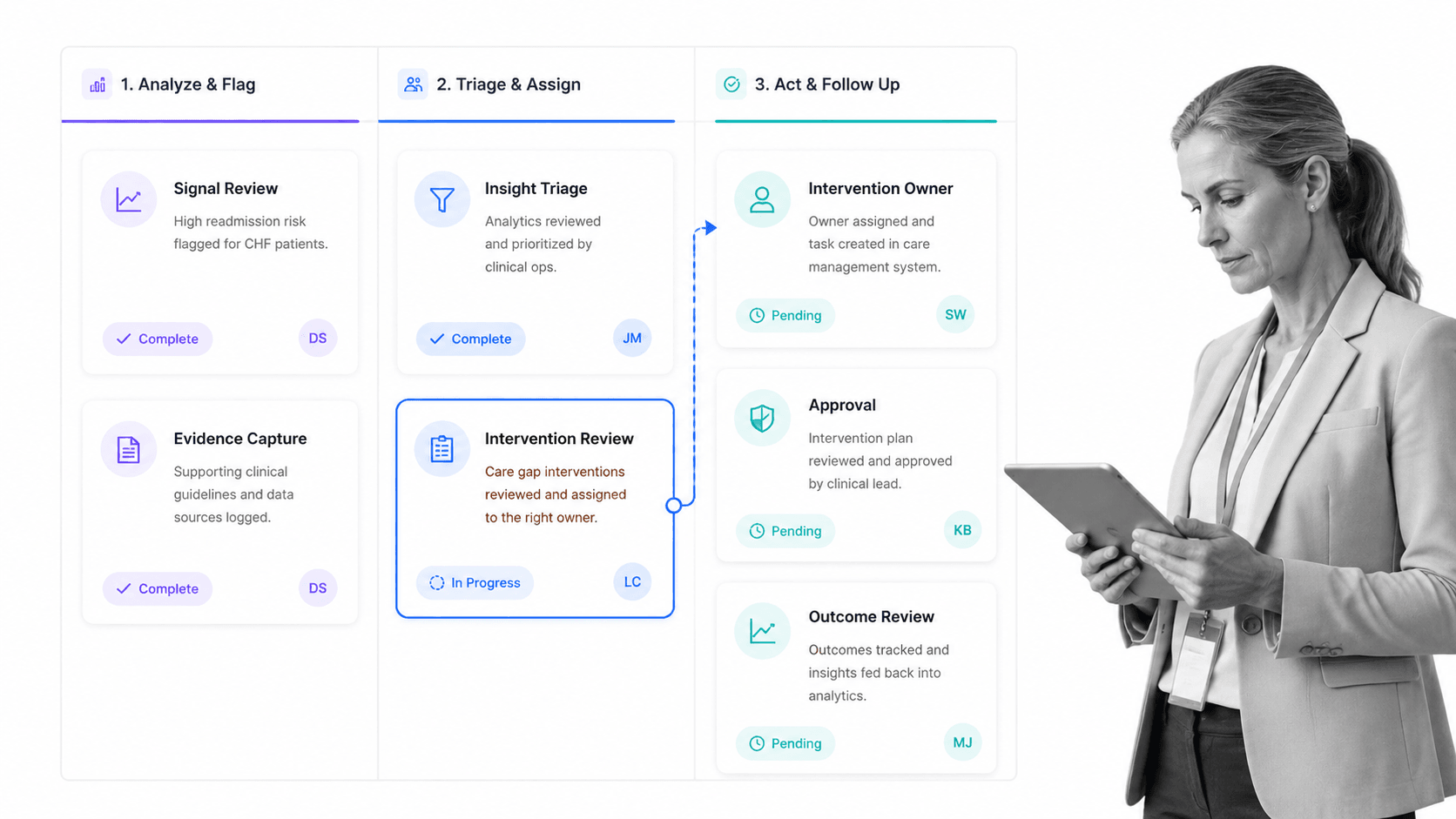
Operationalizing healthcare analytics means building a path from signal to decision to action to proof. Without that path, analytics becomes a reporting layer that may be interesting but does not reliably change work.
Step 1: Choose a decision, not a dashboard
Start by naming the decision the analytics should improve. For example: which discharged patients need outreach, which unit needs an infection-control review, which claims denial pattern needs correction, or which compliance control is drifting. If the decision is vague, the data model will drift too.
Step 2: Define the signal and threshold
Define the metric, segment, source, refresh rhythm, threshold, and owner. A readmission risk signal might require a threshold score, a care manager owner, a response window, and a follow-up evidence field. Keep the first version practical enough that staff can use it.
Step 3: Convert insight into assigned work
Every meaningful analytics signal should trigger a workflow. That workflow can route triage, collect evidence, require review, and escalate unresolved work. A strong workflow management system helps analytics move out of slides and into accountable execution.
Templates can shorten the first version. A patient onboarding workflow can support outreach, a clinical audit template can support quality review, and a HIPAA compliance checklist can support privacy and security checks around sensitive data.
Step 4: Review outcomes and improve the loop
Analytics should not stop when the first task closes. Teams need to review whether the intervention changed the metric, whether the workflow was followed, and whether the threshold still makes sense. That feedback loop is what turns analytics into continuous improvement.
A useful operating cadence is to separate urgent response from program review. Frontline owners handle the immediate intervention, while quality and operations leaders review grouped outcomes later to adjust thresholds, remove noise, improve instructions, or retire signals that no longer lead to meaningful action.
Healthcare analytics governance
Healthcare analytics governance protects patients, staff, and the organization. It defines who can access data, which data is trusted, how definitions are approved, when models can be used, and how actions are monitored.
Data quality and definitions
A metric is only useful if teams agree on what it means. Governance should define source systems, inclusion rules, exclusions, update cadence, and ownership. Otherwise two teams may make conflicting decisions from similarly named reports.
Privacy and security
Healthcare analytics often handles protected health information. HHS HIPAA Security Rule guidance explains the administrative, physical, and technical safeguards expected for electronic protected health information. Analytics workflows should use access controls, least privilege, review, and audit trails around sensitive data.
Model and insight review
Predictive and prescriptive analytics require review before teams rely on them. Leaders should know what data powers a model, who approved it, what population it applies to, what bias checks exist, and what action is allowed when the model fires.
Evidence and accountability
Governance becomes real when it shows up in the way people work. Required fields, approvals, role assignment, evidence uploads, and audit history are the bridge between policy and execution. That bridge should connect analytics to business process documentation and day-to-day operating workflows.
Good governance also limits analytics sprawl. Every dashboard, alert, model, and metric should have a named owner, a review cadence, and a retirement path. If no one can explain the decision a metric supports, the metric is noise and should not compete for clinical or operational attention.
Healthcare analytics in Process Street
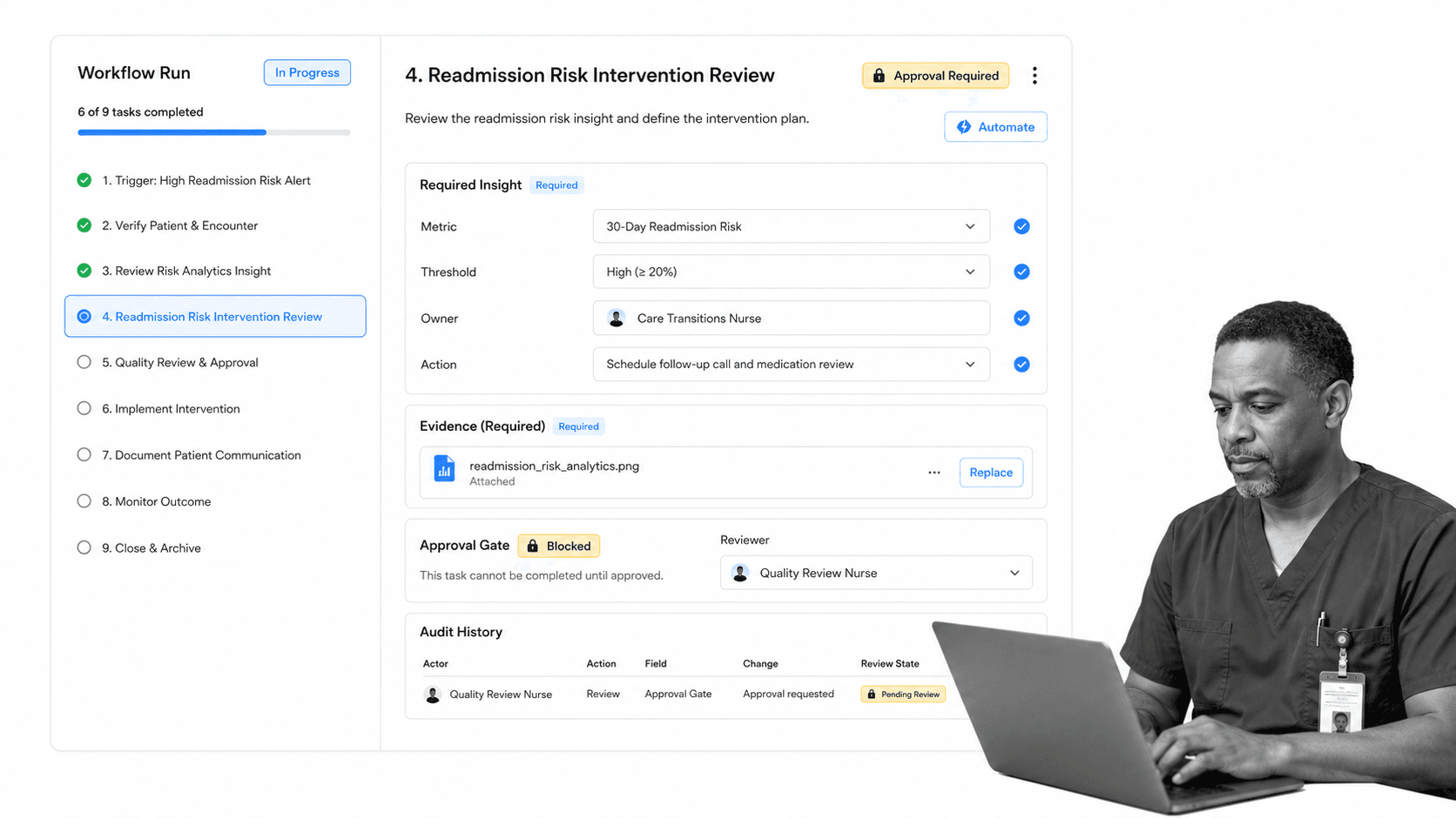
Healthcare analytics in Process Street starts where the dashboard ends. A metric changes, a risk appears, or an insight needs review. Process Street turns that signal into an assigned workflow with owners, required fields, evidence, approvals, and audit history.
Process Street is a Compliance Operations Platform and is HIPAA compliant. It is strongest when healthcare teams need analytics to become work that can be tracked, reviewed, and proven.
Turn insights into governed workflows
An analytics action workflow can include the signal summary, the threshold crossed, the responsible owner, the intervention task, the required evidence, the approval gate, and the review outcome. Each run becomes the record of what happened.
Use conditional logic and approvals
Healthcare analytics often requires different responses based on severity. conditional logic can route a workflow differently when a risk is low, moderate, or high. approvals keep closure from happening before the right reviewer signs off.
Connect analytics with the rest of the stack
Process Street has direct, universal integrations to 5,000+ systems. Need a new one? An AI agent builds it on the fly. That helps teams connect analytics signals to EHR exports, forms, spreadsheets, BI tools, communication tools, and systems of record without leaving the action layer manual.
Teams already using workflow management software can apply the same repeatable execution discipline to analytics-driven interventions, audit prep, quality review, and monitoring workflows.
How to choose healthcare analytics software
Choose healthcare analytics software by evaluating the decisions it improves and the actions it supports. A platform can be visually polished and still fail if the insights do not reach the people responsible for changing work.
Start with use cases
List the use cases before comparing vendors: patient safety, quality improvement, readmission reduction, revenue cycle, capacity planning, claims denial analysis, compliance monitoring, infection control, or provider performance. Each use case has different data, ownership, and action requirements.
Check data access and interoperability
Ask which systems the platform connects to, how data is normalized, how often it refreshes, and how exceptions are handled. Healthcare analytics software should not require the analytics team to manually reconcile files every week.
Evaluate workflow fit
The best analytics tool for your team may not be the one with the most dashboards. It is the one that helps people act on the insight. Ask how a high-risk signal becomes an owner assignment, how evidence is captured, how approvals work, and how leaders know whether the action closed.
Demand governance and auditability
Healthcare analytics needs role-based access, data lineage, metric definitions, model review, audit logs, and clear ownership. If the software cannot show who acted on an insight and what changed, it will struggle in regulated environments.
A practical selection test is simple: pick one high-value analytics use case and run it end to end. If the product can ingest the data, surface the signal, assign the intervention, collect proof, and show outcome review, it can support operational analytics. If it only shows a chart, the action layer is still missing.
FAQs
What is healthcare analytics?
Healthcare analytics is the use of healthcare data to understand performance, identify risk, predict outcomes, recommend action, and improve care. It combines clinical, operational, financial, quality, and compliance data so teams can make better decisions and track the work that follows.
What are the types of healthcare analytics?
The main types are descriptive analytics, diagnostic analytics, predictive analytics, and prescriptive analytics. Descriptive analytics explains what happened, diagnostic analytics explains why, predictive analytics estimates what may happen next, and prescriptive analytics recommends the next action.
What data sources are used in healthcare analytics?
Common sources include EHR data, claims data, lab and imaging metadata, scheduling data, staffing data, patient surveys, incident reports, quality measures, workflow records, device feeds, and compliance documentation. The right source mix depends on the decision the analytics program is designed to improve.
How is healthcare analytics different from healthcare reporting?
Healthcare reporting summarizes what happened, while healthcare analytics helps teams understand why it happened, what might happen next, and what action should follow. Analytics becomes more valuable when it triggers assigned work, review, evidence capture, and outcome tracking.
How do you operationalize healthcare analytics?
Start with a specific decision, define the data signal and threshold, assign an owner, turn the insight into a workflow, capture evidence, require review, and check whether the intervention changed the outcome. The goal is to connect analytics to work people actually complete.
Can Process Street support healthcare analytics work?
Yes. Process Street can turn healthcare analytics insights into assigned workflows with required fields, conditional routing, approvals, evidence uploads, automation, and audit history. It helps teams move from dashboards to accountable action.
