


Turn every policy into automated workflows with built-in enforcement and audit-ready proof.



Onboarding Management Tools
Onboarding management tools help teams turn a new hire, customer, vendor, or client handoff into a repeatable process. The right tool assigns owners, collects required information, triggers work across departments, tracks blockers, and leaves a record of what happened.
That matters because onboarding is rarely owned by one team. HR may own employee experience, IT owns access, finance owns payroll or billing, legal owns documents, managers own role training, and operations owns the handoff quality. Without a shared system, the process gets rebuilt in email every time.
This page compares the tools that sit closest to that problem: workflow execution, HR onboarding, enterprise HCM, IT service onboarding, and task coordination. The goal is not to crown one generic winner. The goal is to match the tool to the risk and shape of the onboarding work.
In this guide, we are going to cover:
- Onboarding management tools at a glance
- How to choose onboarding management tools
- Best onboarding management tools to compare
- What onboarding management tools need to manage
- How to implement onboarding management tools
- FAQs
Onboarding management tools at a glance
The short version: if onboarding has to be followed exactly, start with workflow execution. If onboarding is mostly HR paperwork, start with an HRIS. If onboarding is tied to enterprise workforce data, use an HCM suite. If onboarding creates IT and service requests, use a service management tool. If onboarding is mostly task coordination, a work management tool may be enough.
| Tool | Best for | Standout feature | Pricing |
|---|---|---|---|
| Process Street | Recurring onboarding workflows that need proof | Workflow runs with assignments, approvals, conditional paths, and evidence capture | Startup, Pro, and Enterprise plans, with trial and sales-assisted options |
| BambooHR | HR teams managing employee onboarding paperwork | New-hire packets, e-signatures, onboarding tasks, and employee record sync | Core starts at $10 per employee per month, with flat pricing from $250 per month for 25 or fewer employees |
| Workday | Enterprise HCM onboarding tied to workforce systems | Personalized onboarding plans with analytics and third-party connections | Contact sales |
| Jira Service Management | IT, HR, legal, and service request onboarding | Employee onboarding workflows that route requests through service queues | Standard and Premium service plans priced per agent, with Enterprise through sales |
| ClickUp | Task-based onboarding plans and manager visibility | Docs, tasks, recurring tasks, Gantt view, and onboarding templates | Free Forever plan plus paid plans listed on ClickUp pricing |
How to choose onboarding management tools
The best onboarding tool depends on what must be controlled. A simple checklist can help a manager remember first-week tasks. A governed workflow can force the right team to complete the right step before the process moves forward. That is why teams often pair employee onboarding workflows with a broader HR or IT system.
Start with the onboarding object
Employee onboarding, customer onboarding, client onboarding, and vendor onboarding share a pattern, but they do not share the same system of record. A new hire may need contracts, equipment, access, training, and policy acknowledgments. A new customer may need implementation tasks, kickoff notes, product training, security forms, and billing handoffs.
If your work is customer-facing, compare the process against customer onboarding and client onboarding. If it is employee-facing, compare it against employee onboarding tools and the reusable employee onboarding checklist.
Separate recordkeeping from execution
Recordkeeping stores the person, account, or vendor profile. Execution moves the work. Many failed onboarding stacks happen because teams expect one system to do both perfectly. The HRIS may hold employee data but not enforce every cross-functional task. A project board may show work but not prove evidence was collected.
That is where onboarding workflow software becomes the operating layer. The workflow can pull context from a system of record, route tasks to HR, IT, finance, and managers, then write completion evidence back where the business needs it. If your team is still starting from static docs, use a structured new employee onboarding checklist to define the baseline before adding automation.
Decide how much proof you need
Some onboarding workflows are low risk. Others are compliance-sensitive. If a missed task can create a payroll issue, security gap, failed customer launch, audit finding, or bad first-day experience, choose a tool that records owners, timestamps, approvals, exceptions, and evidence.
Process Street has direct, universal integrations to 5,000+ systems. Need a new one? An AI agent builds it on the fly. That matters when onboarding work crosses HRIS, service desk, CRM, document signing, file storage, and team chat.
Test the tool against one real onboarding run
Before committing to a platform, build one real onboarding run with the exact roles, documents, systems, and approval points your team uses today. Do not evaluate tools from a polished demo alone. The demo will show a clean path. Your process will expose edge cases: a remote hire, a contractor, a regulated role, a customer with security review, or a vendor that needs extra due diligence.
A good test includes the intake form, first task assignment, document collection, equipment or account request, manager review, escalation path, completion report, and one exception. If the tool cannot handle the exception without manual side channels, it may still be useful for coordination, but it is not strong enough to manage the onboarding process by itself.
Look for admin ownership, not just user friendliness
Onboarding tools fail when nobody owns the operating model. Ask who will maintain templates, approve workflow changes, archive old versions, review bottlenecks, and decide which fields are mandatory. User-friendly software helps adoption, but admin ownership keeps the process from decaying into a pile of similar checklists.
The best onboarding management tools make that ownership visible. They show which template is current, who changed it, where runs are blocked, and what teams are repeatedly editing by hand. That feedback loop matters more than a long feature list because onboarding changes whenever roles, policies, locations, systems, customer segments, or deadlines change.
Best onboarding management tools to compare
The tools below cover different onboarding jobs. Use the comparison as a shortlist, then test the top two against a real onboarding flow before buying.
1. Process Street
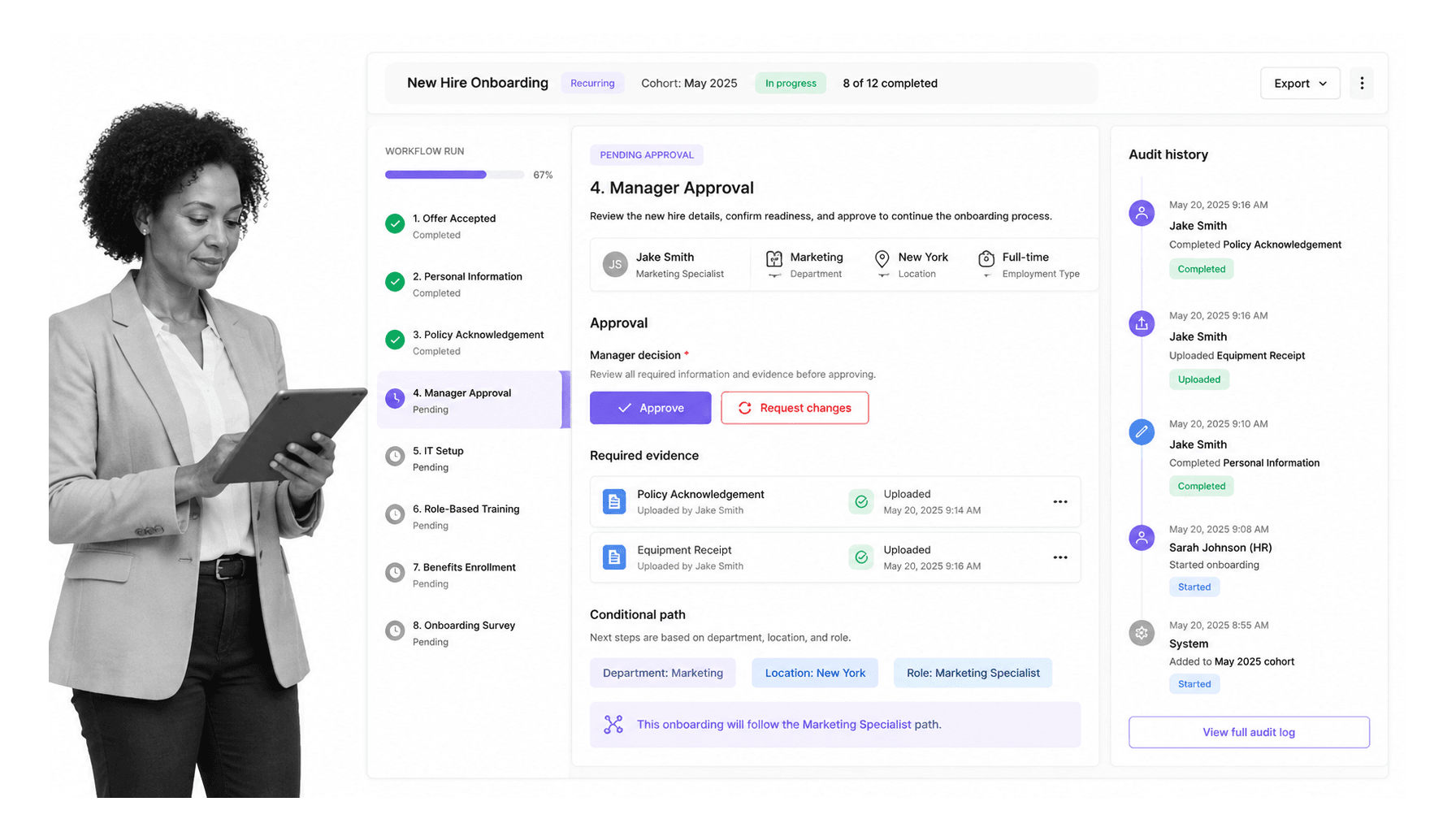
Best for: recurring onboarding workflows that need assignments, approvals, evidence, and audit history. Process Street is the strongest fit when onboarding has to run the same way every time, especially when HR, IT, managers, finance, legal, and operations all own different steps.
Process Street works well for employee onboarding, client onboarding, vendor onboarding, role-specific training, access reviews, customer implementation, and any onboarding process where skipped steps create operational risk. The workflow run becomes the operating control, not a reminder to follow a separate document.
For employee onboarding, Process Street can assign tasks to HR, IT, and managers, collect documents, track training progress, and move work through approvals. Conditional paths help tailor the process by role, department, location, customer tier, or risk level through conditional logic.
- Choose it when: onboarding is repeatable, cross-functional, compliance-sensitive, or evidence-heavy.
- Watch out for: teams that only need a lightweight task board for a one-off checklist.
- Strongest onboarding fit: turning SOPs, forms, approvals, and cross-system handoffs into an enforced workflow.
2. BambooHR
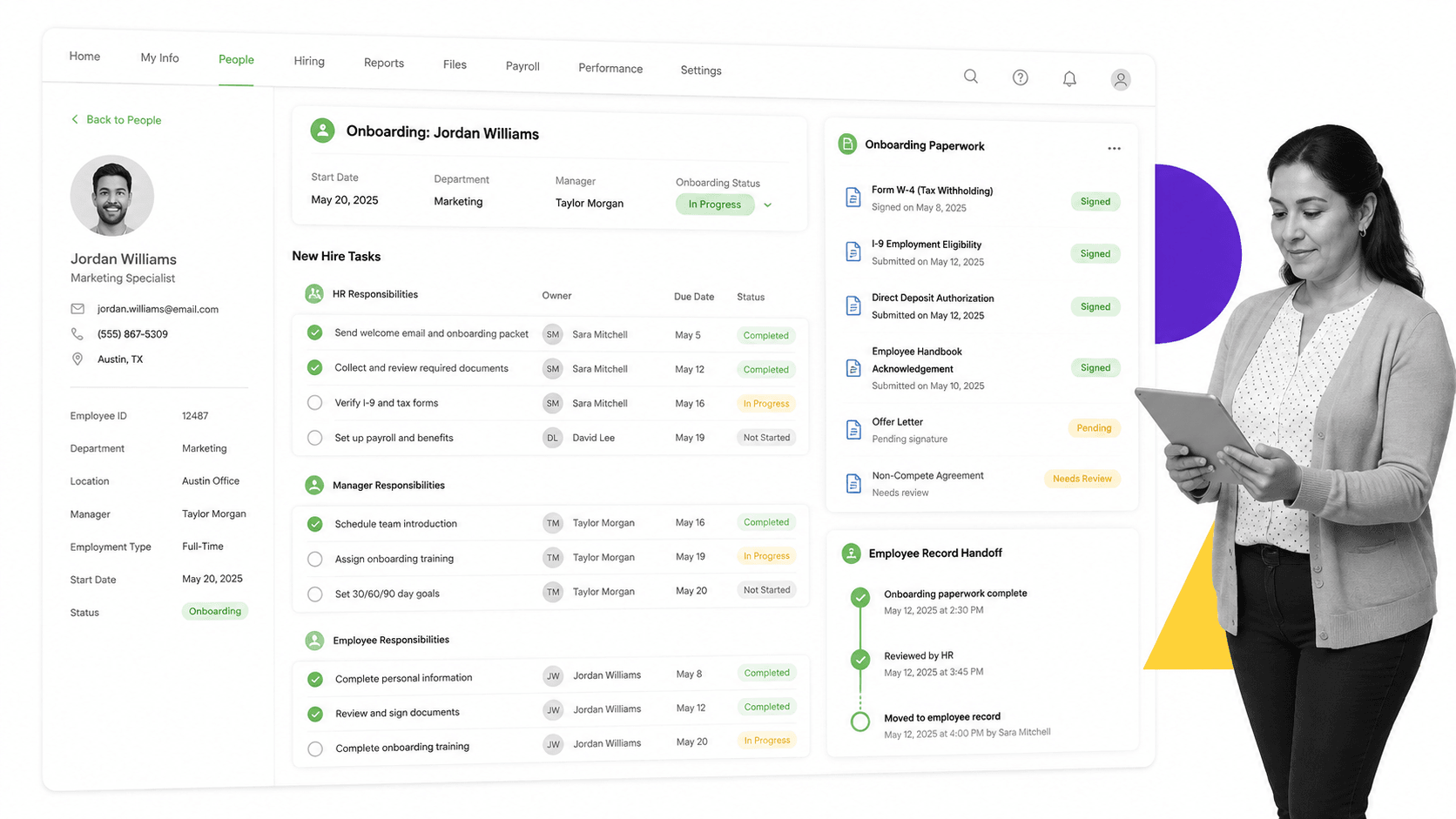
Best for: HR teams that want employee onboarding inside a people system. BambooHR onboarding supports new-hire paperwork, e-signatures, onboarding tasks, first-day details, and employee record handoff.
BambooHR is a strong option when the main onboarding problem is employee data, HR paperwork, and a better new-hire experience. It gives HR a structured place to manage forms, task progress, and document status without forcing every step into a generic project board.
Its pricing page lists per-employee monthly pricing for larger companies and flat monthly pricing for companies with 25 employees or fewer. Check BambooHR pricing before quoting a plan internally, because HR software pricing changes with company size and selected features.
- Choose it when: HR owns the process and the biggest pain is paperwork, employee data, and first-day readiness.
- Watch out for: complex cross-functional onboarding that needs strong operational proof outside HR.
- Strongest onboarding fit: HR-led employee onboarding where the employee record is central.
3. Workday
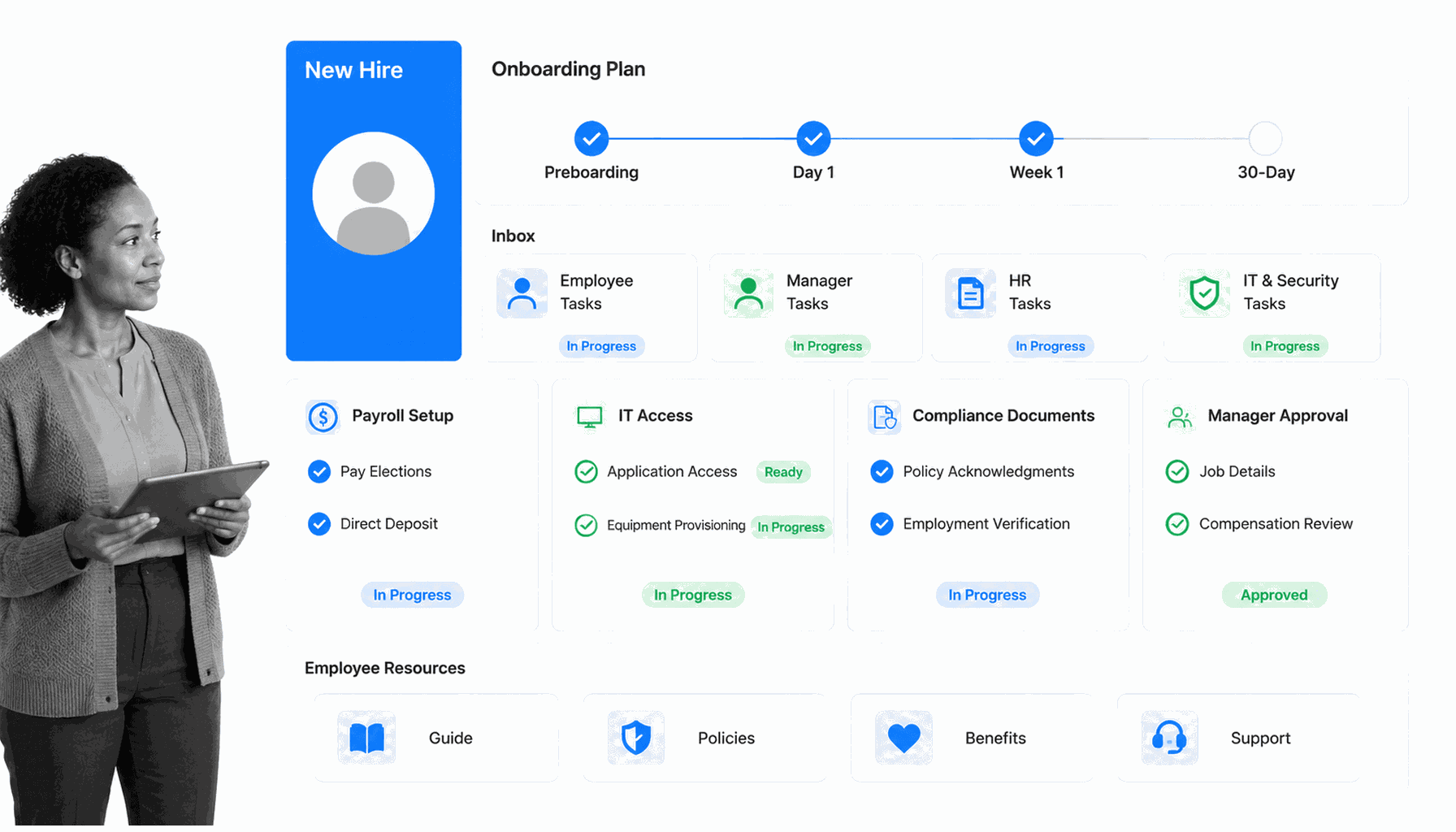
Best for: enterprise onboarding tied to a full HCM system. Workday Onboarding Plans focuses on personalized pre-boarding and onboarding experiences, analytics, progress visibility, and connections to third-party systems.
Workday is the enterprise choice when onboarding is part of a wider workforce architecture: recruiting, worker data, payroll, talent, compliance, reporting, and employee lifecycle management. It is less about a simple checklist and more about onboarding inside an enterprise HR operating model.
That depth can be overkill if a team only needs a fast onboarding workflow. Workday is best when the organization already runs on Workday or needs onboarding data to sit inside the same system as workforce planning and employee records. Smaller teams can often move faster by pairing an HR record system with a focused onboarding system software.
- Choose it when: onboarding must connect deeply to enterprise HCM data and analytics.
- Watch out for: smaller teams that need fast workflow setup without a broad HCM implementation.
- Strongest onboarding fit: enterprise employee onboarding as part of a full people operations system.
4. Jira Service Management
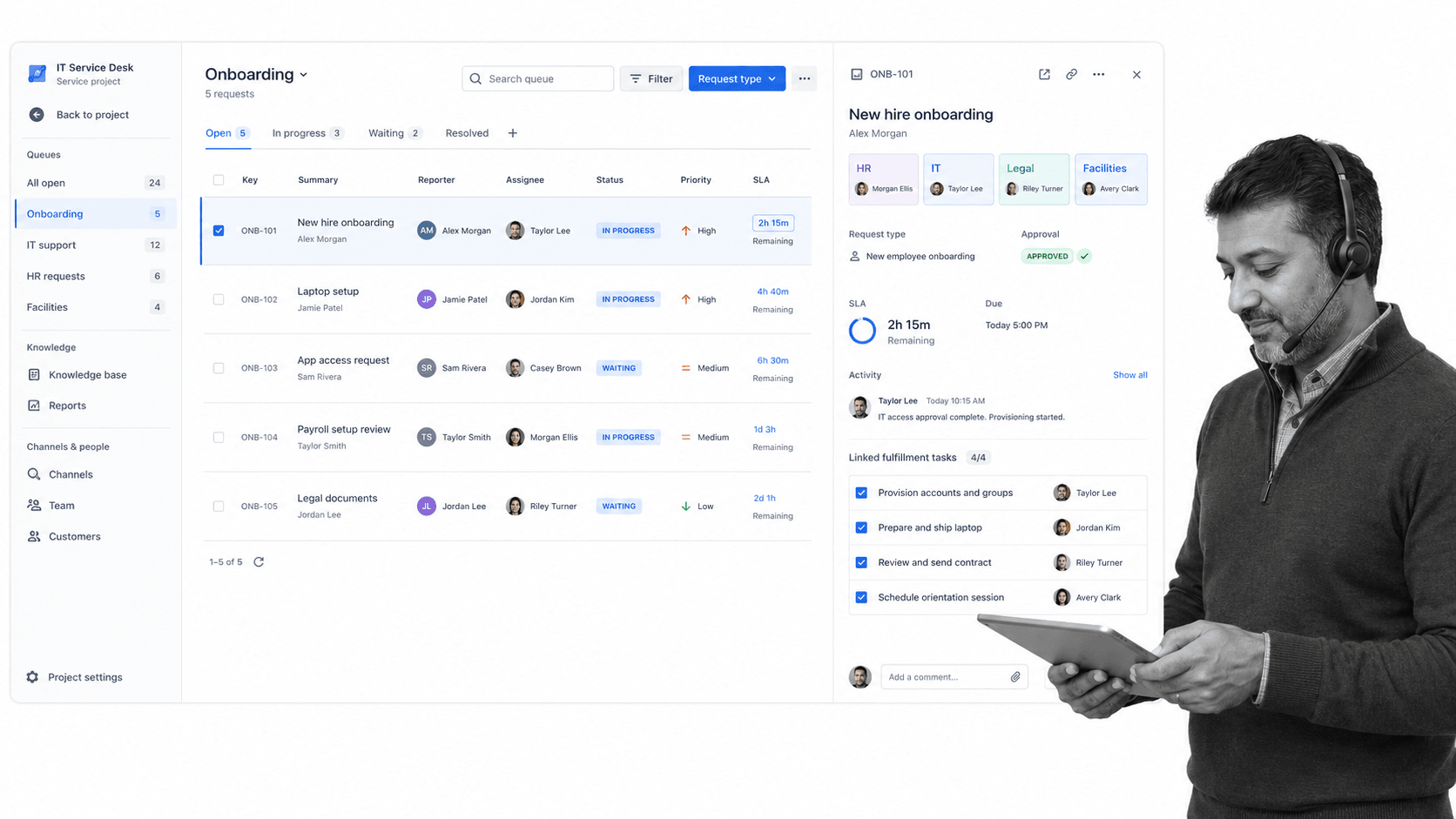
Best for: onboarding that creates service requests across IT, HR, legal, facilities, and security. Atlassian describes an onboarding workflow as mapping steps like contracts, equipment, policy review, training, and probationary-period support, and positions Atlassian onboarding workflow around that service workflow.
Jira Service Management is useful when the onboarding trigger is a request portal and the work needs queues, triage, routing, service ownership, and operational visibility. IT teams often use it for laptop setup, app access, permissions, and support handoffs.
The service collection pricing page lists per-agent pricing for Standard and Premium plans and points larger teams to Enterprise. Use Atlassian service pricing for current pricing rather than copying a stale number into a buying case. For external account launches, compare the queue model with a client onboarding checklist so customer-facing steps do not disappear inside IT tickets.
- Choose it when: onboarding depends on IT and service request routing.
- Watch out for: HR experience design, learning paths, and SOP execution that need a more onboarding-specific operating layer.
- Strongest onboarding fit: access provisioning, equipment requests, support queues, and cross-functional service handoffs.
5. ClickUp
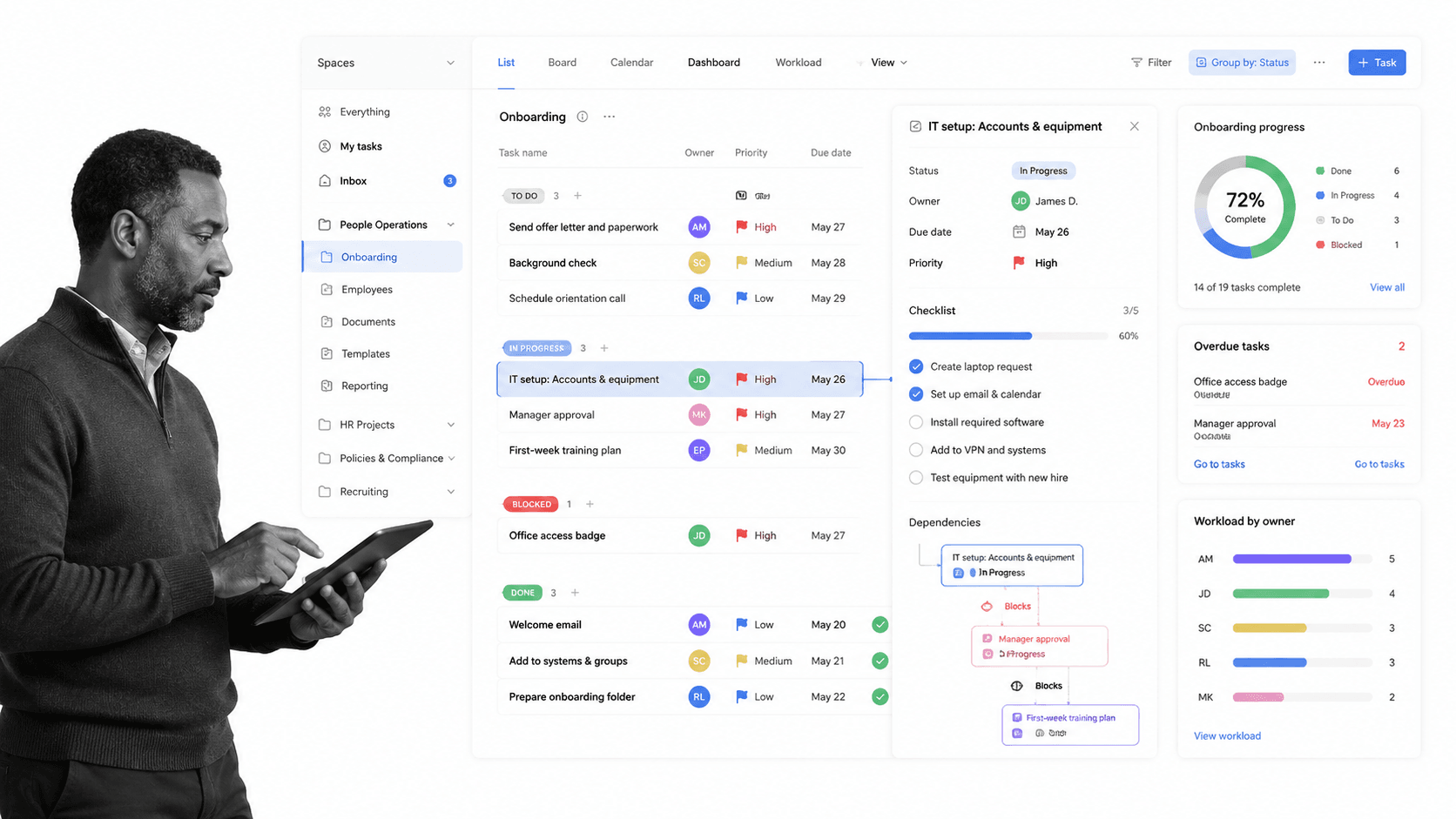
Best for: onboarding task coordination when a team wants docs, tasks, templates, deadlines, and timeline views in one work management space. ClickUp’s ClickUp employee onboarding template recommends setting goals, listing activities, assigning tasks and deadlines, creating timelines, and using recurring tasks.
ClickUp is useful when onboarding feels like a project plan: tasks, due dates, owners, dashboards, dependencies, and manager visibility. It is flexible enough for employee onboarding, customer onboarding, internal training, or team-specific onboarding checklists.
The tradeoff is control. ClickUp can coordinate onboarding, but the process still depends on how rigorously the workspace is designed and maintained. Use ClickUp pricing to check current plan limits, especially forms, custom fields, automations, dashboards, guests, and permissions.
- Choose it when: onboarding is mostly task coordination and timeline visibility.
- Watch out for: regulated or evidence-heavy workflows where a completed task is not enough proof.
- Strongest onboarding fit: manager-run onboarding plans, team templates, and lightweight cross-functional task tracking.
What onboarding management tools need to manage
A useful onboarding stack needs more than a task list. It needs to manage the objects, owners, timing, dependencies, and evidence that make the handoff reliable.
Intake
Every onboarding workflow starts with an intake event: a signed offer, closed customer deal, new vendor request, internal transfer, role change, or implementation kickoff. The tool should make that trigger explicit so work starts automatically instead of waiting for someone to remember.
Role-specific paths
A sales hire, engineer, executive assistant, enterprise customer, and high-risk vendor should not follow the exact same path. Good onboarding management tools let teams change tasks, owners, due dates, documents, and approvals based on role, department, region, customer tier, or risk.
Cross-functional handoffs
Onboarding fails at handoffs. HR waits on IT. IT waits on the manager. The manager waits on finance. The customer waits on implementation. A strong tool exposes the handoff, assigns the next owner, and escalates blocked work before the start date or launch date slips.
The same pattern appears in project workflow management: work breaks when a project plan does not define the operational handoff. Onboarding management tools should make the handoff visible enough that the next owner knows exactly what changed, what evidence was collected, and what has to happen next.
Proof and audit history
For low-risk onboarding, a status update may be enough. For compliance-sensitive onboarding, the system needs to show who did the work, what they approved, what evidence they attached, which exception path fired, and when the process finished.
How to implement onboarding management tools
Do not start implementation by importing every onboarding checklist your team has ever used. Start with one high-value process and make it operational.
Map the current handoff
Write down the real sequence, including the informal steps. Who gets notified? Which form starts the process? What gets copied into another system? Which approvals happen outside the tool? Which steps are usually late? This is where the workflow design earns its keep.
Build the minimum controlled workflow
Your first workflow should include the trigger, the required tasks, owners, due dates, approval gates, evidence fields, and the completion criteria. Keep the first version lean enough that teams will use it, but strict enough that the riskiest steps cannot be skipped.
Connect the systems that create delay
Most onboarding delays come from handoffs between systems. Connect the form, HRIS, service desk, document signing tool, CRM, file storage, and team chat where they affect the process. Do not automate everything at once. Automate the handoffs that regularly cause rework.
Review every blocked run
A blocked onboarding run is a process improvement signal. Review where the work stalled, whether the owner was clear, whether the due date was realistic, and whether the step needed more context. Good onboarding management turns each run into evidence for the next process update.
FAQs
What are onboarding management tools?
Onboarding management tools are software systems that coordinate the tasks, owners, documents, approvals, and handoffs required to bring a new hire, customer, client, or vendor into a business. They help teams standardize the process, track progress, and reduce missed steps.
What is the best onboarding management tool?
The best tool depends on the onboarding job. Process Street is strongest for recurring workflows that need proof, BambooHR is strong for HR paperwork, Workday fits enterprise HCM, Jira Service Management fits IT and service requests, and ClickUp fits task coordination.
What should onboarding management software include?
Look for intake, templates, owner assignment, due dates, role-specific paths, document collection, approval routing, automation, reporting, and completion history. If the process is compliance-sensitive, prioritize evidence capture and audit trails over simple task visibility.
Can project management tools handle onboarding?
Project management tools can handle lightweight onboarding tasks, timelines, and manager visibility. They are weaker when onboarding needs enforced approvals, conditional paths, evidence collection, and reliable proof that required steps were completed.
How do onboarding management tools improve compliance?
They improve compliance by making required steps explicit, assigning owners, preventing skipped approvals, collecting evidence, and preserving a time-stamped history. That gives teams a stronger record than email threads, spreadsheets, or informal task boards.
How many onboarding tools should a company use?
Most teams need one system of record and one execution layer, not a pile of disconnected tools. The HRIS or CRM can hold the profile, while a workflow tool can coordinate the cross-functional work that must happen around it.
