


Turn every policy into automated workflows with built-in enforcement and audit-ready proof.



Operations Database
An operations database stores the current records a business needs to run day-to-day activity. It accepts transactions, keeps the latest state of customers, orders, cases, assets, approvals, or tasks, and returns that state quickly to the applications and people doing the work.
The database is only one part of a dependable operating system. It preserves data, while business rules, workflows, integrations, and human decisions determine how that data changes. The strongest design treats the operations database as a trusted record layer and connects it to a controlled execution layer.
This guide explains how operational databases work, how they differ from analytics systems, how to design the data model, and how Process Street can coordinate the work around operational records without pretending to replace a database engine.
In this article, we are going to cover:
- What is an operations database?
- Operations database vs data warehouse, ODS, and workflow system
- Core data model for business operations
- How to design an operations database
- How to choose operations database technology
- How Process Street supports an operations database
- Operations database implementation roadmap
- How to measure operations database health
- FAQs
What is an operations database?
An operations database, also called an operational database, is a data store optimized for the live transactions and lookups that keep a business process moving. When an order is placed, a case changes owner, an approval is recorded, or an asset changes status, an operational application reads or writes that event against the database.
Oracle describes online transaction processing as the execution of large numbers of database transactions by many people over the internet. That pattern includes inserts, updates, deletes, and rapid lookups. It is the technical foundation behind many operational database systems.
It holds the current state of work
The defining job is current state. A sales application needs the current customer and opportunity record. A fulfillment system needs the current order and inventory position. A compliance team needs the current case, assigned owner, risk level, decision, and evidence status. Historical analysis matters, but the immediate question is what is true now and what can happen next.
That makes an operations database central to data management. Naming conventions, ownership, validation, retention, access, and change control determine whether the stored state can be trusted across teams.
It supports transactions, not just storage
A useful operational record changes through a transaction. The system validates the change, applies all related updates together, and either commits the result or rolls it back. If payment succeeds but the order status fails to update, the business has a broken state. Transaction control keeps related changes consistent.
PostgreSQL explains that transactions bundle multiple steps into one all-or-nothing operation. The implementation varies by database, but the operational principle is universal: partial updates should not quietly become business truth.
It serves applications and workflows in real time
Operational applications query the database continuously. A workflow may retrieve a record, present the relevant fields to a person, validate a decision, and write the approved change back. Low latency, concurrency, availability, and predictable failure handling matter because delays or conflicts interrupt live work.
The broader operations technology stack includes the database, user interfaces, workflow orchestration, integrations, monitoring, identity, and analytics. Treating the database as the whole solution leaves essential execution and control jobs unowned.
Operations database vs data warehouse, ODS, and workflow system
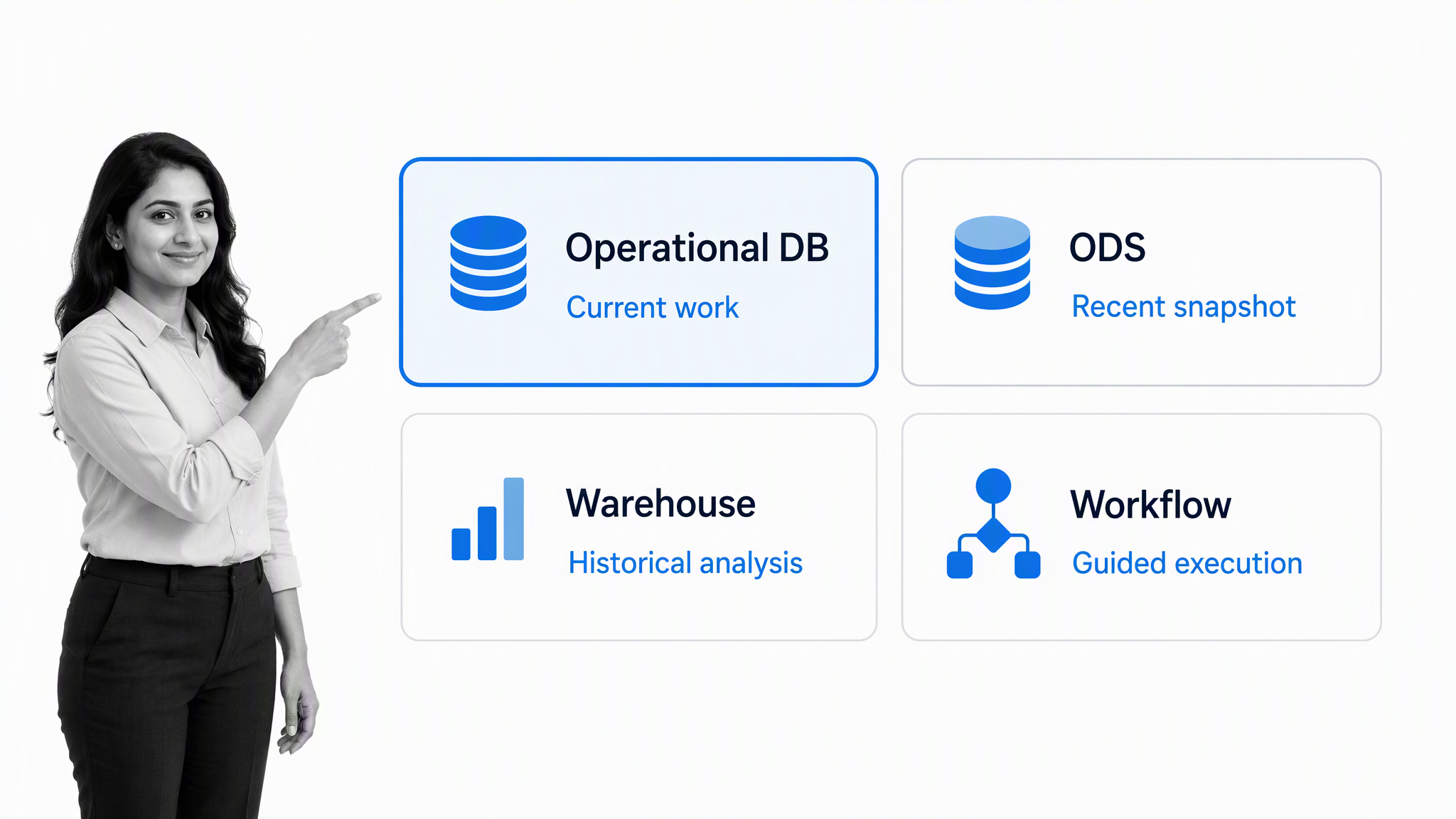
Several systems can hold operational data, but they are built for different questions. Architecture becomes easier when each component has one clear job and an explicit contract with the others.
Operational database: What is true now?
The operational database is the authoritative source for the current application state. It must accept frequent small writes, enforce data integrity, resolve concurrent activity, and return individual records quickly. It is usually organized around entities and transactions that the application owns.
Operational data store: What changed recently across systems?
An operational data store, or ODS, combines recent data from multiple systems for current reporting and operational decisions. IBM describes an ODS as a recent snapshot that is updated frequently. It can reduce reporting pressure on transaction systems, but it is usually not the place where the original business transaction is committed. The distinction is explained in IBM’s overview of a data warehouse and related stores.
Data warehouse: What happened over time?
A data warehouse is optimized for aggregated analysis across longer time horizons. It can join facts from many operational sources, preserve historical versions, and support complex queries without slowing day-to-day applications. Feeding cleaned operational events into a warehouse gives analysts depth without turning the live database into a reporting free-for-all.
The practical split between transaction processing and analytics is summarized in IBM’s OLAP versus OLTP comparison. Operational systems prioritize rapid, reliable transactions, while analytical systems prioritize multidimensional questions over larger historical datasets.
Workflow system: What should happen next?
A workflow system guides people and systems through the process that changes operational data. It collects context, assigns work, applies conditional paths, requests approval, handles exceptions, and preserves evidence. The workflow may read from and write to one or more databases, but its primary job is execution rather than durable general-purpose data storage.
A well-designed business operations system connects these layers so a request, decision, database update, and reporting event remain traceable without forcing one platform to perform every job.
Core data model for business operations
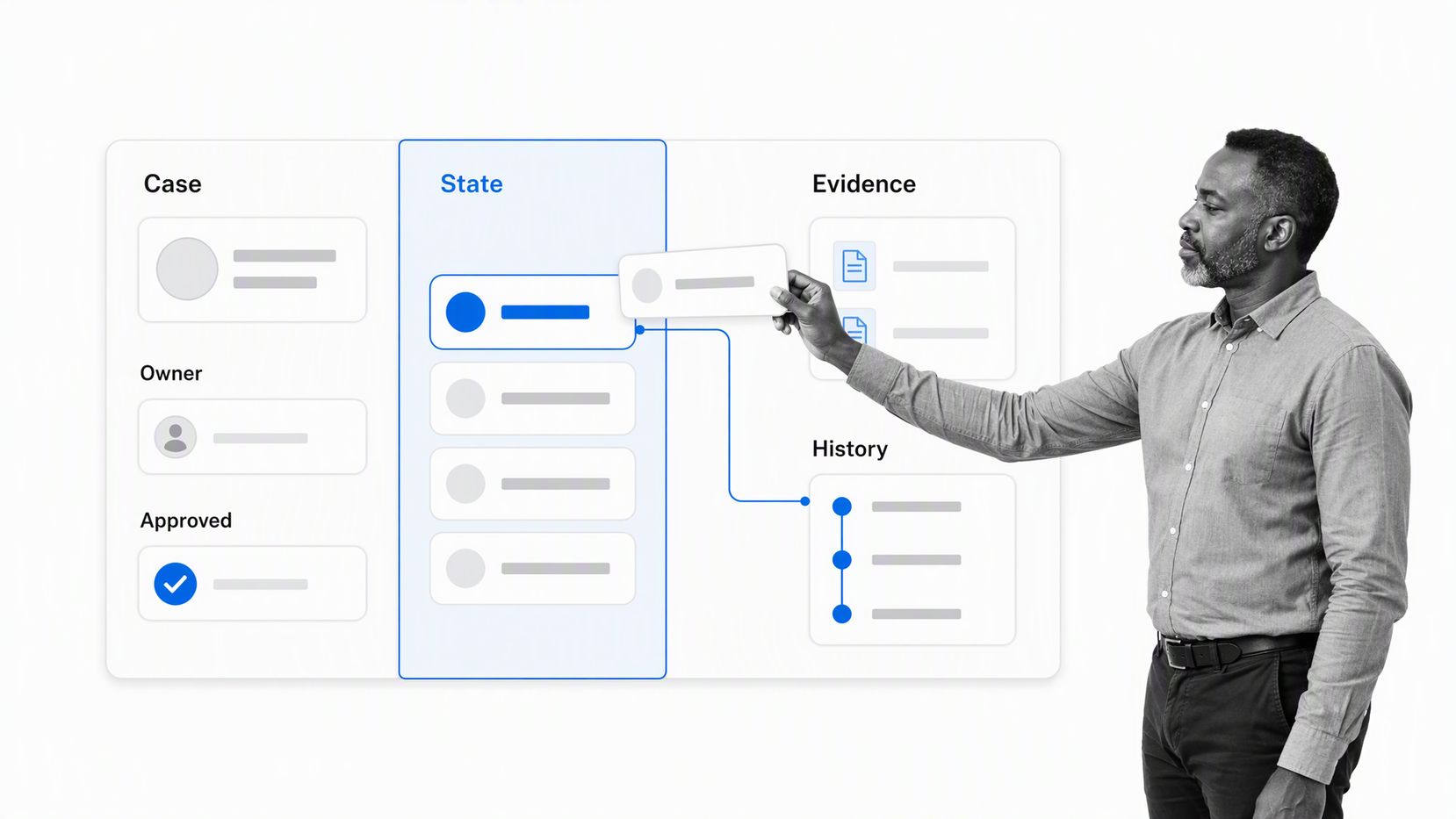
A strong operations database begins with a model of the work, not a spreadsheet copied into tables. The model should make the important business objects, their relationships, valid states, ownership, evidence, and history explicit.
Define business entities and stable identifiers
Start with the nouns the operation manages: customer, supplier, order, case, asset, policy, employee, request, control, or inspection. Give each entity a stable identifier that does not depend on a mutable label such as a name or email address. Clear identifiers make integrations, deduplication, audit trails, and corrections much safer.
Separate current state from event history
The current record answers the live operational question. Event history answers how it arrived there. Keeping both avoids two common failures: overwriting the evidence of previous decisions or forcing every application screen to reconstruct the latest state from an unbounded event stream.
For a vendor review, the current record might hold status, risk tier, owner, and latest decision. The history records submission, data corrections, reviewer assignment, approval, rejection, escalation, and synchronization events. Each event should include its source and actor.
Normalize shared facts, then optimize deliberately
Normalization separates repeated facts into related tables so a change is made in one dependable place. Microsoft’s introduction to database normalization explains how organizing data reduces redundancy and inconsistent dependencies.
Normalization is a starting discipline, not a purity contest. Denormalized views, indexes, caches, and replicated read models can improve performance when measurements justify them. Keep the source of truth clear and document how derived representations are refreshed.
Attach ownership, evidence, and control fields
Operational records need more than domain attributes. They often require an owner, created and updated timestamps, source system, version, decision status, approver, evidence references, exception reason, and retention category. These fields make the record governable and help operators distinguish valid work from incomplete data.
A standard operating procedure guide can define who may change each field, which evidence is required, and which state transitions need review. The database enforces structural integrity; the operating procedure explains the human rule.
How to design an operations database
Design an operations database from the decisions and transactions the business must trust. Begin with a narrow process, map its state changes, and prove the model with realistic cases before expanding the schema.
Map the operational lifecycle
Use a process mapping template to identify the trigger, record creation, validation, decisions, state transitions, integrations, exceptions, and completion evidence. Include rejected and reversed paths. The difficult states often reveal the real database requirements.
Write integrity rules before table definitions
State the conditions that must always remain true. An approved request must have an approver and decision time. A closed case must have required evidence. A child record cannot point to a nonexistent parent. A balance cannot change without a transaction record. Convert these rules into constraints, transactions, validation, and workflow checks.
Design idempotent integrations
Retries are normal in distributed systems. Every write initiated by another system should have a stable request or event key so the same message can be processed again without creating duplicates. Record integration status, last attempt, error class, and recovery action where operators can use them.
A controlled form integration can capture structured input and pass it into the operational stack. Validate at the boundary, reject incomplete payloads clearly, and avoid letting every connected system invent its own representation of the same entity.
Protect the write path
Apply least-privilege access, separate human and service identities, encrypt sensitive data, and log privileged changes. Do not let reporting tools or ad hoc scripts write directly to production tables. Expose controlled application services or reviewed administrative workflows for corrections.
Plan recovery as part of the model
Backups are only useful if restoration works within the required time and data-loss tolerance. Test recovery, rehearse failover, and document how queued transactions are reconciled after an outage. For business-critical records, the recovery procedure should identify who validates restored state before normal writes resume.
How to choose operations database technology
Choose technology after the workload and operating requirements are clear. Familiarity matters, but the selection should be traceable to transaction shape, consistency, availability, scale, security, and team capability.
Relational databases
A relational database is often the default for structured operational data with clear relationships and strong transaction needs. Constraints, joins, mature tooling, and well-understood recovery practices make it a strong fit for orders, cases, approvals, financial records, inventory, and master data.
Document and key-value databases
Document databases can fit records whose shape varies by type or evolves rapidly, while key-value stores fit simple lookups at very high scale. The flexibility is useful only when ownership and validation stay explicit. Moving schema decisions into application code does not remove the need for a schema.
Managed services and platform constraints
Managed database services can reduce patching, backup, replication, and monitoring work. Evaluate region support, encryption, identity integration, audit logs, point-in-time recovery, failover behavior, export options, cost under peak load, and the team’s ability to diagnose incidents.
Run a representative workload test
Test the transactions that matter, not a generic benchmark. Include peak concurrent writes, common lookups, the slowest approved report, expected record growth, integration retries, failover, restore, and a schema migration. Measure both database response and end-to-end operator experience.
An operations dashboard can combine service health with process measures, but avoid sending unbounded analytical queries to the production write path. Use read replicas, an ODS, or a warehouse when reporting demand begins to compete with live transactions.
How Process Street supports an operations database
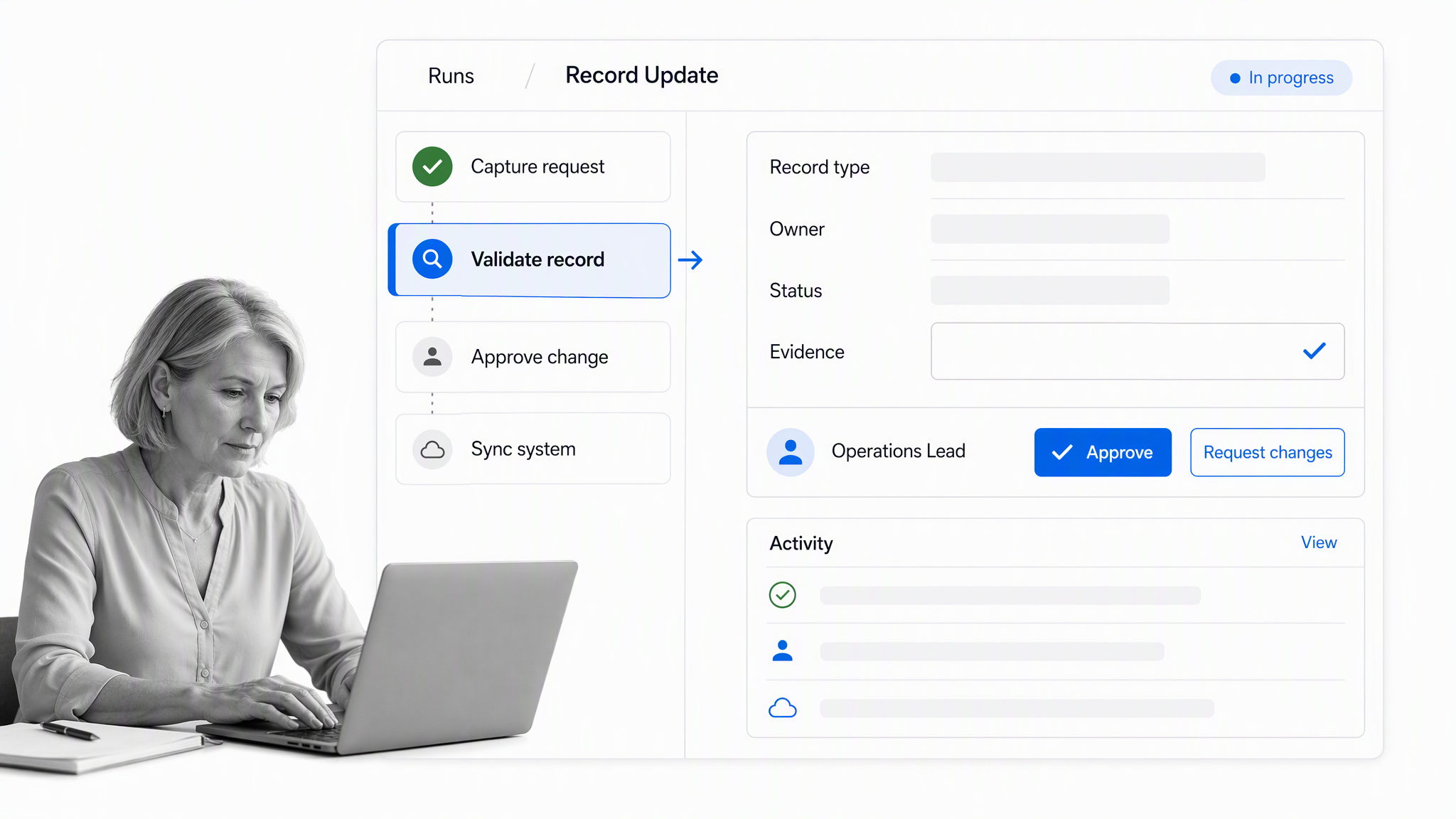
Process Street supports an operations database by orchestrating the people, rules, and system actions around each record change. It is the execution layer, not a replacement for a relational, document, or transaction database.
Capture structured operational context
A workflow can collect the request, record type, owner, proposed values, risk level, attachments, and evidence before a write occurs. Required fields prevent incomplete work from reaching the integration boundary, while the workflow record preserves the context behind the change.
Route different records through the right path
Process Street conditional logic can adapt the workflow based on form values. A routine address correction can follow a short path, while a high-risk supplier or access change can require evidence, specialist review, and a separate approval.
Keep approvals attached to the update
Process Street approvals keep the decision, reviewer, and supporting context inside the workflow. The approved state can then trigger a controlled integration, and rejected changes can return to the requester with a clear reason.
Coordinate connected systems
Process Street has 5,000+ integrations. The Process Street integrations library helps workflows exchange data with the systems involved in a process while preserving one controlled execution record.
Turn exceptions into assigned work
An integration error should not disappear into a log. A workflow can assign the failure, capture the response, request corrected data, retry safely, and confirm the final state. This joins technical recovery to operational ownership.
Operations database implementation roadmap
Implement in stages so the team can validate the data model, operating rules, and recovery behavior before the database becomes a dependency for many processes.
Stage one: Define the trusted record
Choose one operational process and name the record that must be trusted. Identify its owner, consumers, legal or policy constraints, current sources, state transitions, and completion evidence. Agree on the system of record before discussing migration.
Stage two: Build the minimum transaction model
Create the smallest schema and service boundary that supports the core transaction safely. Add constraints, version handling, idempotency, audit events, and access rules. Test valid, invalid, duplicate, concurrent, rejected, and reversed changes.
Stage three: Pilot the workflow and integration
Run representative cases with the people who create, review, and troubleshoot records. Observe where fields are misunderstood, evidence is missing, approvals become ceremonial, or operators need hidden context. Revise the workflow and schema together.
A structured change management process helps coordinate communication, training, ownership, and rollout as the new record model replaces local workarounds.
Stage four: Migrate and reconcile
Profile source data before migration. Define mapping rules, quarantine invalid records, preserve original identifiers where needed, and reconcile counts and control totals. Freeze or dual-write only when the team has a clear conflict and rollback plan.
Stage five: Expand by governed patterns
Reuse proven conventions for identifiers, ownership, status, evidence, events, integrations, and monitoring. A shared pattern lowers cognitive load, while bounded domain ownership keeps one giant database from becoming the accidental architecture.
How to measure operations database health
Database health is both technical and operational. A system can report low query latency while users wait on bad data, duplicate records, failed integrations, or unclear ownership. Measure the full path from business event to trusted state.
- Transaction success rate: valid writes that commit without manual recovery.
- Read and write latency: response time at normal and peak load.
- Conflict and deadlock rate: concurrent activity that requires retry or redesign.
- Data quality: completeness, validity, uniqueness, consistency, and freshness for critical fields.
- Integration failure age: how long failed exchanges remain unresolved.
- Recovery readiness: whether restore and failover tests meet time and data-loss targets.
- Unauthorized change rate: blocked or investigated access and write attempts.
- Operational cycle time: elapsed time from request to trusted database state.
Pair system metrics with process outcomes
Use operations analytics software to connect latency, error, and availability signals with cycle time, rework, approval aging, and customer impact. That relationship helps teams prioritize the database work that changes business performance.
Review exceptions by cause
Separate invalid input, application defects, capacity limits, permission errors, integration timeouts, data conflicts, and manual overrides. A single error-rate average hides the action each cause requires. Assign an owner and recovery expectation to every category.
Close the improvement loop
When a recurring issue is confirmed, record the cause, owner, change, and expected measure. A process improvement tracker organizes the work, while a root cause analysis and corrective action workflow keeps high-impact fixes tied to evidence and verification.
A business intelligence workflow can govern how operational events are transformed into reporting datasets, reviewed for quality, and released to decision-makers without letting analytics logic leak back into the transaction path.
FAQs
What is an operations database?
An operations database stores the current records and transactions a business needs for day-to-day activity. It supports frequent reads and writes, enforces integrity, and gives applications a dependable view of current operational state.
Is an operations database the same as an operational database?
The terms are commonly used for the same idea: a database designed for current business transactions and application activity. Operational database is the more established technical phrase, while operations database emphasizes its role in business operations.
What is the difference between an operations database and a data warehouse?
An operations database supports live transactions and current records. A data warehouse combines historical data for reporting and analysis. Many organizations use both, with governed pipelines moving operational events into analytical models.
What data belongs in an operations database?
Store the entities, current state, relationships, transaction records, ownership, evidence references, and audit events required to run the application or process. Derived historical reporting data usually belongs in an ODS, warehouse, or analytical store.
How do you keep an operations database reliable?
Use clear ownership, constraints, transactions, access controls, idempotent integrations, backups, tested recovery, monitoring, and controlled schema changes. Pair technical measures with data quality and end-to-end process outcomes.
How does Process Street work with an operations database?
Process Street orchestrates the work around database records. Workflows can collect structured context, route cases, request approval, trigger controlled integrations, manage exceptions, and preserve execution history while the database remains the durable record layer.
