


Turn every policy into automated workflows with built-in enforcement and audit-ready proof.



Operations Management Solution
An operations management solution is the software system a business uses to plan, run, track, and improve the recurring work that keeps it moving. It turns scattered status updates, spreadsheets, and buried procedures into structured workflows with owners, due dates, approvals, and a clear record of what happened.
Operations is broad, so the category is broad. The same term can describe a workflow platform that enforces a procedure, a project tool that coordinates an initiative, a resource planner that balances capacity, or a documentation hub that stores operating knowledge. What unites them is a single goal: make the work visible, consistent, and accountable as the business scales.
This guide explains what an operations management solution actually does, the core capabilities that separate a real system from a glorified to-do list, the signs your team has outgrown ad hoc tools, and a simple framework for choosing the right platform. It closes with how Process Street approaches the same problem as an execution-first operations system.
The short version: if your work needs visibility, a board or list can help. If it needs enforcement and proof, you need a workflow. If it needs shared operating memory, you need documentation. The best operations management solution connects all three so nothing important falls through the cracks.
In this article, we are going to cover everything you need to know about an operations management solution, including:
- What is an operations management solution?
- Core capabilities of an operations management solution
- Signs your business needs an operations management solution
- How to choose the right operations management solution
- How to implement an operations management solution
- How Process Street works as an operations management solution
- FAQs
What is an operations management solution?
An operations management solution is software that coordinates how work gets done across people, processes, departments, and systems. Instead of relying on memory, chat threads, and side spreadsheets, the team runs the work inside a shared system that shows who owns each step, what is due, and whether it was completed correctly.
Operations management as a discipline has always been about designing and controlling the processes that produce a company’s goods and services. You can read a broad overview at Investopedia or Wikipedia. An operations management solution is simply the modern software layer that makes that discipline practical day to day, especially once a workflow repeats often enough that consistency starts to matter.
The difference between a solution and a simple tracker is control. A task board tells you a task exists. A real operations management solution can require that a step happens, capture the evidence, route an approval to the right person, and keep a record that stands up to an audit. That distinction becomes the deciding factor once work carries compliance, quality, security, or customer consequences.
It helps to separate the two questions the software answers. The first is coordination: who is doing what, and when is it due. The second is control: did the required steps actually happen, in the right order, with the right sign-offs. Simple tools answer the first question well. An operations management solution is defined by how well it answers the second, which is why quality and process disciplines such as those described by ASQ put so much weight on standardized, repeatable execution.
Operations management solution vs. project management software
The two overlap but solve different problems. Project management software is optimized for temporary initiatives with a start, a finish, milestones, and dependencies. An operations management solution is optimized for the recurring work that never ends: onboarding, vendor intake, incident response, inspections, approvals, and monthly close. A project completes. An operation repeats, so it needs a repeatable, governed process rather than a one-time plan.
Where the solution sits in your stack
Most teams do not replace everything with one tool. An operations management solution usually becomes the execution layer that sits alongside process documentation, a CRM, an HRIS, finance systems, and communication tools. Its job is to make sure the standard way of working actually happens across those systems, not to be the only place work lives.
Core capabilities of an operations management solution
The core capabilities of an operations management solution are what separate a durable operating system from a tool your team abandons after a quarter. When you evaluate options, look for depth in each of these areas rather than a long feature list.
Workflow execution and enforcement
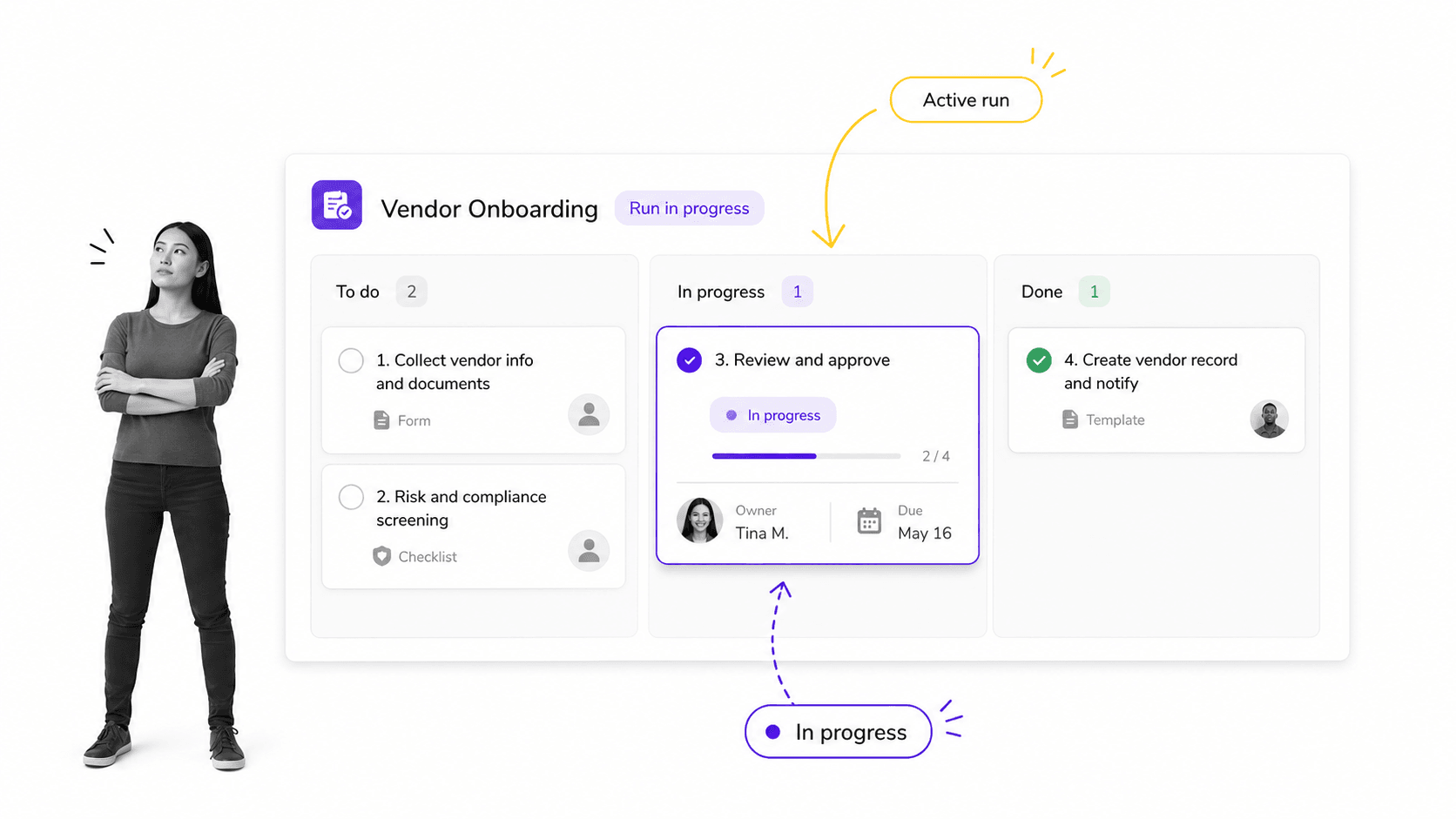
This is the heart of the system. A strong operations management solution runs recurring procedures as workflow management software with owners, due dates, required fields, and stop points that hold work until a condition is met. It should support approvals that block completion and conditional logic that adapts each run to the situation rather than forcing one rigid path.
Documentation and standard operating procedures
Execution drifts when the rules live in someone’s head. The solution should keep business process documentation close to the work so a procedure and the workflow that runs it stay in sync. When the policy changes, the workflow should change with it, not fall out of date in a separate document nobody reads.
Automation and integrations
Operational work rarely stays inside one app. A capable operations management solution uses task automation to move work forward without manual copying: sending forms, assigning tasks, updating records, and triggering the next step across the tools your team already uses. Without this, people quietly rebuild the process in email and spreadsheets.
Reporting, visibility, and proof
Leaders need to see what is stuck before it becomes a customer problem. The system should surface overdue work, bottlenecks, and exceptions, and it should keep an audit-ready history of who did what and when. Visibility answers the question of status. Proof answers the harder question of whether the required steps actually happened.
- Workflow execution: recurring procedures, owners, due dates, required fields, and stop points.
- Governance: versioned procedures and policies tied to the workflow that runs them.
- Automation: triggers, assignments, and handoffs that move work across systems.
- Oversight: dashboards, exception alerts, and audit-ready completion records.
Signs your business needs an operations management solution
Most teams do not go shopping for an operations management solution until the pain is obvious. These are the signals that ad hoc tools have stopped keeping up and a real system would pay for itself.
Work depends on the same few people remembering the steps
If onboarding, close, or an incident response only runs smoothly when one experienced person is available, the process lives in memory rather than in a system. That is fragile, hard to scale, and risky the moment that person is out or leaves.
You cannot prove a step happened
When a customer, auditor, or executive asks who approved something or whether a control was performed, you should be able to answer in seconds. If the answer requires digging through inboxes and chat, the work needs enforcement and a record. Templates like an employee onboarding checklist only become reliable once they are tied to ownership and completion history.
Spreadsheets have quietly become the operating system
Spreadsheets are excellent until they become the source of truth for cross-team work. Missing updates, unclear ownership, broken formulas, and no approval trail are signs the work has outgrown the grid and needs a governed process behind it.
Handoffs slip between tools and teams
When work moves between departments through chat pings and forwarded email, things get dropped at the seams. An operations management solution closes those gaps by making the handoff an explicit, tracked step. Understanding the types of process management can help you decide how much structure each handoff really needs.
Onboarding new people takes too long
When a new hire or a new customer waits on steps that live in different people’s heads, the slow start is a symptom, not the disease. A repeatable, owned workflow turns a two-week scramble into a predictable path where every task has a clear owner and nothing waits on a reminder that never comes. If onboarding is inconsistent from one person to the next, the operating process needs a system behind it.
How to choose the right operations management solution
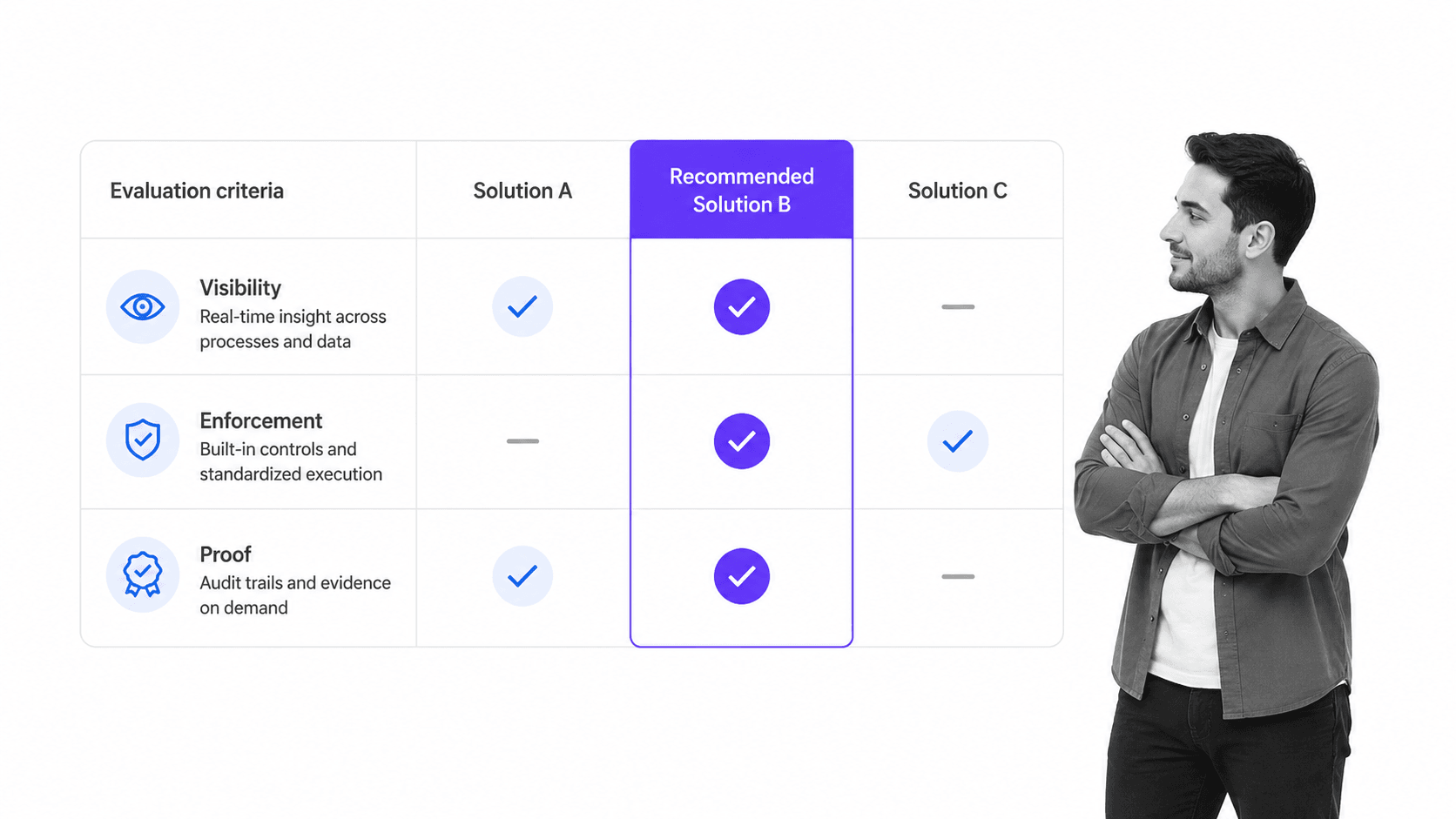
Choosing the right operations management solution is easier when you start with the operating problem rather than the feature list. The most useful test scores every candidate on three dimensions: visibility, enforcement, and proof.
Score visibility, enforcement, and proof
Visibility means real-time insight into what is happening across processes and people. Enforcement means the system can require steps, approvals, and evidence rather than politely suggesting them. Proof means an audit-ready trail you can produce on demand. A tool can be strong on visibility yet weak on enforcement, which is exactly the gap that trips teams up when work carries real consequences.
Match the surface to the work
Adoption fails when the tool asks people to manage work in a shape that does not fit. Operators may want checklists, project managers may want timelines, and analysts may want grids. The best operations management solution lets each group work in a natural surface without fragmenting accountability. If you are comparing specific products, a roundup of operations management tools is a useful starting point.
Check integration and automation depth
Ask how work starts and where it goes next. If the solution cannot trigger and receive work across your forms, documents, HR, finance, and ticketing systems, people will copy updates by hand and the system will slowly lose their trust. Pair this with a workflow management system that can standardize the recurring flows you rely on most. Reference process frameworks such as those published by APQC can help you map your operating processes before you commit to a tool.
Plan for governance from day one
Flexible tools become inconsistent fast when every team invents its own fields, statuses, and naming. Decide who owns the workspace design, what the standard building blocks are, and how new processes get added before adoption spreads. Governance is the difference between a system that compounds and a graveyard of abandoned boards.
How to implement an operations management solution
Rolling out an operations management solution is a change-management project as much as a software one. A phased approach beats a big-bang launch, because it earns trust with early wins and avoids overwhelming the team.
Start with one high-value, repeatable process
Pick a process that is painful, frequent, and measurable, such as onboarding, vendor intake, or a monthly close step. Document it, turn it into a workflow, and run it live before you expand. Starting from a simple task list template and adding structure as you learn keeps the first rollout realistic.
Map the current process before you automate it
Automating a broken process just makes the mess faster. Map how the work actually happens today, including the exceptions and workarounds, then decide what to standardize and what to leave flexible. This is where good process documentation pays off, and where recognized management standards such as ISO 9001 can give you a vocabulary for defining and controlling each process.
Assign clear ownership
Every workflow needs an owner responsible for keeping it accurate and improving it over time. Without an owner, even a well-built process drifts as the business changes. Ownership is what turns a one-time setup into a living system.
Measure, then expand
Track completion rates, cycle time, and where runs stall, then use those signals to improve the workflow and justify the next rollout. A project management template can help you manage the rollout itself as you extend the solution to more teams.
The goal is not to move every process into the tool on day one. It is to prove the model on a process that matters, build the habits, and let adoption compound as the wins become visible to the rest of the organization.
How Process Street works as an operations management solution
Process Street is an operations management solution built around execution rather than tracking. It turns your procedures into workflows that run the same way every time, with the owners, approvals, automations, and records that recurring operational work needs.
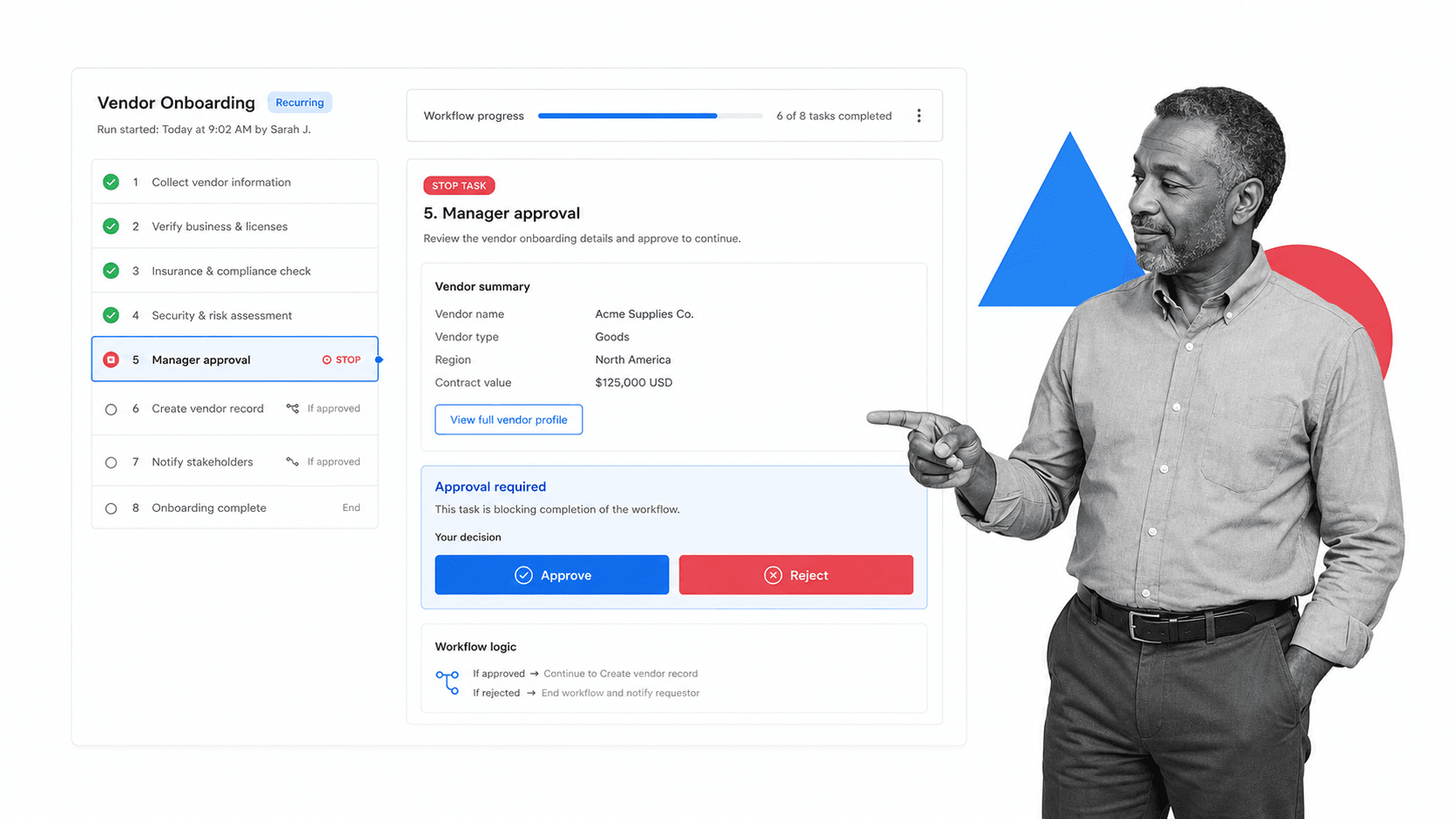
Because the workflow itself carries the control, Process Street fits teams running onboarding, vendor management, compliance checks, client handoffs, access reviews, and inspections. Built-in approvals hold a run until the right person signs off, and conditional logic adapts each run to the specifics of the case instead of forcing one rigid path.
It also keeps documentation and execution in one place, so the procedure and the workflow that runs it stay aligned. That pairing of governed process documentation with enforced execution is what separates an operations management solution from a tool that only records that work was assigned.
- Enforced execution: stop tasks, required fields, and approvals that block completion until conditions are met.
- Adaptive runs: conditional logic that shows the right steps for each situation.
- Automation: assignments, reminders, and handoffs that move work forward across tools.
- Proof by default: a complete, audit-ready history of every run.
If you want to see how the pieces fit for your team, you can review current plans and pricing to match the solution to the scale of the work you run.
The practical takeaway is that an operations management solution earns its place when it does more than record activity. It should make the standard way of working the easy way of working, enforce the steps that matter, and leave behind proof that the work was done correctly. Start with one process that carries real consequences, get it running cleanly, and let the reliability speak for itself before you extend the system across the rest of the business.
FAQs
What is an operations management solution?
An operations management solution is software that helps a team plan, run, track, and improve recurring business work. It replaces scattered spreadsheets and chat updates with structured workflows that carry owners, due dates, approvals, and an audit-ready record of what happened.
How is an operations management solution different from project management software?
Project management software is built for temporary initiatives with milestones and deadlines. An operations management solution is built for recurring work such as onboarding, approvals, inspections, and monthly close, so it emphasizes repeatable, enforceable processes and a lasting record rather than a one-time plan.
What features should an operations management solution include?
Look for workflow execution with owners and due dates, required steps and approvals, conditional logic, documentation tied to the workflow, automation and integrations, and reporting with an audit-ready history. For controlled work, enforcement and proof matter more than a long list of extra features.
How much does an operations management solution cost?
Pricing varies by the number of users, the depth of automation, and whether you need advanced controls and integrations. Many platforms offer tiered plans, so the practical approach is to price the solution against the value of the specific processes you plan to run rather than a headline per-seat number.
Can small teams use an operations management solution?
Yes. Small teams benefit as soon as work starts repeating across people. A single well-built workflow can prevent missed handoffs and make ownership clear long before the team is large enough to need a dedicated operations function.
How do I roll out an operations management solution?
Start with one painful, repeatable process, map how it works today, turn it into a live workflow with a clear owner, then measure completion and cycle time before expanding. A phased rollout earns trust with early wins and avoids overwhelming the team.
